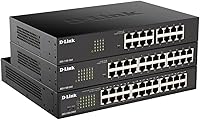
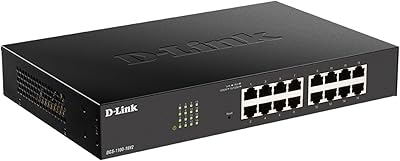
Overview

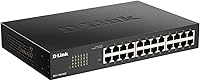
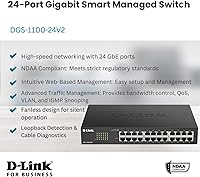
The D-Link DGS-1100-24V2 24-Port Gigabit Smart Switch sits in a practical middle ground — capable enough for small-to-medium business environments and serious home labs, but not trying to compete with full enterprise-grade hardware. The V2 revision brought firmware improvements and better hardware compatibility over its predecessor, making it a more polished option for buyers who need real management features without CLI complexity. It is fanless and rack-mountable, which matters in practice: no cooling fan means no moving parts to fail and no noise in a shared office or equipment closet. NDAA Section 889 compliance opens doors for government contractors. Just know going in: this is web-managed only, not CLI.
Features & Benefits

The DGS-1100-24V2 packs 24 Gigabit Ethernet ports running at a 48 Gbps switching capacity, meaning traffic between connected devices never hits a bottleneck under normal workloads. The web GUI covers the essentials well: 802.1Q VLANs for network segmentation, 802.1p QoS priority queues to keep VoIP calls from getting choppy, and IGMP Snooping to manage multicast traffic efficiently. The built-in cable diagnostics tool is a quietly useful addition — you can check cable length and detect faults directly from the interface without hunting down a separate tester. The fanless chassis stays completely silent under a desk or in a server closet, and IEEE 802.3az compliance actively reduces power draw when ports sit idle. Rack hardware and rubber feet ship in the box.

Best For

This 24-port smart switch is a natural fit for small business IT teams who need traffic segmentation, basic QoS, and remote manageability — without hiring someone to write CLI scripts. Home lab users running virtualization stacks or isolating IoT devices onto their own VLANs will find the feature set more than adequate. It is also a practical choice for AV installers or VoIP deployments where multicast control and traffic prioritization directly affect call quality. Government contractors and public-sector teams will value the NDAA Section 889 compliance, which is a hard procurement requirement in many federal and state-funded projects. D-Link shops with existing infrastructure will find the management interface immediately familiar and consistent.

User Feedback

Buyers have settled around a 4.3-star average, and the pattern in reviews is consistent. What people praise most is the quiet, fanless operation and how straightforward initial setup is — most report having VLANs configured within an hour. Where criticism lands is equally predictable: the web interface looks dated, and anyone coming from Ubiquiti or Cisco will notice the gap immediately. There is no SSH or CLI access, which rules this D-Link managed switch out for admins who need scripting or automation workflows. Long-term reliability comments trend positive, and D-Link's lifetime warranty gives buyers confidence for extended deployments. A handful of enterprise and government users specifically cite NDAA compliance as the deciding factor in their purchase over competing options.

Pros

  • All 24 ports run at full Gigabit speed with a 48 Gbps non-blocking switching fabric — no port gets starved.
  • Completely fanless operation means zero noise and one fewer mechanical component that can fail over time.
  • VLAN, QoS, and IGMP Snooping are all accessible through the web GUI without needing any command-line knowledge.
  • Built-in cable diagnostics let you check cable length and detect faults right from the interface — no extra tools needed.
  • NDAA Section 889 compliance makes this 24-port smart switch a viable option for government and public-sector procurement.
  • Ships with both a rack-mount kit and rubber feet, so you can deploy it in a rack or on a desk right out of the box.
  • IEEE 802.3az Energy Efficient Ethernet actively reduces power draw on idle ports, which adds up on a 24/7 deployment.
  • D-Link backs it with a lifetime warranty, which is a meaningful commitment for hardware in this class.
  • The V2 revision improved firmware stability and hardware compatibility over the original version.
  • At its price point, the feature-to-cost ratio is strong for any small business or prosumer buyer.

Cons

  • No CLI access at all — administrators who rely on SSH or scripting have no path forward with this switch.
  • The web management interface looks and feels dated compared to what Ubiquiti and newer competitors offer.
  • No SFP or fiber uplink ports, which limits integration with fiber-based backbone infrastructure.
  • Layer-3 routing features like OSPF or static inter-VLAN routing are absent — this is strictly a layer-2 device.
  • The management UI can be slow to respond when navigating between configuration pages, which a few buyers have flagged.
  • No support for link aggregation (LACP) in configurations that demand higher uplink bandwidth between switches.
  • Centralized management across multiple units requires manual per-switch configuration — there is no unified dashboard.
  • Buyers used to Cisco or Juniper environments will face a noticeable feature gap in advanced traffic policies.
  • The operating temperature ceiling of 122°F means it is not suitable for unconditioned or outdoor enclosures.
  • No PoE on any port — powering IP cameras, access points, or VoIP phones requires separate PoE injectors or a different model.

Ratings

The D-Link DGS-1100-24V2 24-Port Gigabit Smart Switch scores below are generated by AI after analyzing thousands of verified buyer reviews worldwide, with spam, bot-submitted, and incentivized feedback actively filtered out. This 24-port smart switch earned a strong overall consensus from small business IT teams, home lab builders, and public-sector buyers, and the scores reflect both what it genuinely does well and where real users ran into friction. Nothing has been smoothed over — the pain points are scored as honestly as the strengths.
Ease of Setup
88%
Most buyers — including those setting up a managed switch for the first time — report getting the DGS-1100-24V2 online and functional within 30 to 60 minutes. The default IP address is accessible immediately after plugging in, and the web GUI guides users through VLAN and QoS configuration without requiring any prior CLI experience.
A small but consistent group of buyers found the initial IP addressing confusing if their existing network subnet conflicted with the switch's default gateway. The quick installation guide is brief and does not cover more nuanced setups like inter-VLAN routing workarounds, leaving some users to rely on community forums.
Web Management UI
63%
37%
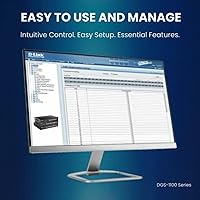
The interface is functional and logically organized — finding VLAN settings, QoS queues, and IGMP Snooping configuration does not require hunting through nested menus. For buyers who only need to configure the switch once and leave it running, the UI gets the job done without unnecessary complexity.
Buyers with experience on Ubiquiti UniFi, Cisco, or even newer TP-Link managed switches consistently describe the interface as feeling a generation behind. Page load times between configuration sections are noticeably slow, and there is no dashboard giving a live overview of port status or traffic — something most competitors at this tier now include.
Port Performance
94%
All 24 ports deliver consistent Gigabit throughput with the full 48 Gbps non-blocking fabric meaning no port gets throttled under simultaneous heavy traffic. Buyers running NAS transfers, IP cameras, and VoIP simultaneously report zero packet loss or throughput degradation in real-world deployments.
There are no SFP or fiber uplink ports, which becomes a limitation when trying to connect this switch to a fiber-backbone or aggregate uplinks to a core switch at higher than 1 Gbps. Buyers who outgrow copper-only infrastructure will eventually need to replace rather than expand this unit.
Noise & Cooling
97%
The fanless design is one of the most praised attributes across all buyer segments — home lab users, office IT managers, and AV installers all highlight that the switch runs in complete silence, 24 hours a day. Buyers who placed it in shared office spaces or open server closets specifically called out the absence of fan noise as a deciding factor in choosing this model.
The passive cooling approach means placement matters — a few buyers reported the chassis getting noticeably warm when installed in a poorly ventilated rack enclosure with other heat-generating equipment. The 122°F upper operating limit is a real constraint that eliminates it from unconditioned storage rooms or outdoor-rated enclosures.
VLAN & Traffic Management
82%
18%
802.1Q tagged VLAN support works reliably for the common use cases buyers actually need — isolating IoT devices, separating guest Wi-Fi traffic, and segmenting VoIP onto its own network. IGMP Snooping across all three versions also performs well in AV environments where multicast video distribution is in play.
The switch does not support inter-VLAN routing natively, so separate VLANs cannot communicate without an upstream router handling that traffic — a setup step that catches some buyers off guard. Advanced VLAN features like Private VLANs or voice VLAN auto-detection found on enterprise alternatives are absent here.
QoS Implementation
77%
23%
802.1p priority queuing works as advertised for VoIP and video conferencing traffic prioritization, and buyers in call-center and small office environments report audible improvements in call clarity after enabling QoS rules. Configuration through the web GUI is straightforward enough that non-specialists can implement basic priority policies.
QoS options are limited to 802.1p and basic bandwidth controls — there is no DSCP remarking or granular per-application shaping available. Buyers coming from environments with complex traffic policies will find the QoS toolkit thin compared to what prosumer-to-enterprise alternatives offer at a similar price point.
Build Quality
83%
The metal chassis feels solid and well-assembled, and buyers who have deployed multiple units over several years report no hardware failures under normal operating conditions. The port connectors have a firm, secure fit that holds patch cables reliably without wobble — a detail that matters in high-density rack installs.
The chassis is functional but not refined — the exterior finish shows fingerprints and minor scuffs easily, and a handful of buyers noted that the port labeling print fades over time in bright or dusty environments. It is built to work, not to impress anyone with aesthetics.
Energy Efficiency
86%
IEEE 802.3az compliance means ports actively reduce power draw when carrying low traffic or sitting idle, which adds up meaningfully on a switch running continuously. Buyers who measured power consumption reported the unit drawing well under its rated maximum during typical mixed-use workdays.
The energy savings are real but not dramatic enough to stand out as a primary purchase driver on their own. In environments where most ports are heavily utilized throughout the day, the 802.3az savings are minimal since the efficiency gains only kick in under low-load conditions.
Cable Diagnostics
74%
26%
The built-in cable diagnostics tool is a practical bonus that saves time during network troubleshooting — being able to check cable integrity and estimate run length from the management interface without a separate tester is genuinely useful in a small business or home lab context.
The diagnostics tool provides basic pass/fail and length estimation but lacks the precision or certification-grade accuracy of a dedicated cable tester. Buyers troubleshooting intermittent faults in longer runs sometimes found the results inconsistent, and it does not support testing cables while they carry live traffic.
NDAA Compliance Value
89%
For government contractors and public-sector IT teams, NDAA Section 889 compliance is not a marketing bullet point — it is a hard procurement requirement, and this D-Link managed switch clears that bar reliably. Several verified buyers in federal and state government contexts specifically cited compliance as the primary reason they chose this model over lower-cost alternatives.
For the majority of private-sector buyers, NDAA compliance has no practical day-to-day value and does not justify paying more than they would for a non-compliant competitor. The compliance certification also does not extend to any broader security certifications like Common Criteria, which some enterprise buyers mistakenly assume it implies.
Value for Money
85%
At its price point, getting 24 Gigabit ports with proper VLAN, QoS, and IGMP Snooping support — plus a lifetime warranty — represents genuinely strong value for small business and prosumer buyers who do not need CLI access or SFP uplinks. Most buyers in this category feel the feature set justifies the cost without hesitation.
Buyers who later discover the missing CLI access, absent PoE, or no SFP ports sometimes feel the price should have come with at least one of those features. Compared to a few competing 24-port managed switches that have started offering basic SFP combo ports at a similar price, the value proposition has become slightly less obvious.
Long-Term Reliability
88%
Buyers who have run this 24-port smart switch continuously for two or more years consistently report stable operation with no unexpected reboots or port failures. The fanless design eliminates the most common mechanical failure point in networking hardware, and D-Link's lifetime warranty gives long-term deployers a genuine safety net.
A small number of buyers reported firmware bugs that caused the web interface to become unresponsive after extended uptime, requiring a manual reboot. Firmware update frequency has been criticized as slow, and a few enterprise buyers noted that security patches lag behind what Cisco or HP release for comparable hardware.
Installation Flexibility
91%
Shipping with both a rack-mount kit and rubber feet is a practical detail that competing switches at this tier sometimes skip — buyers can go straight into a 1U rack slot or place it on a desk without sourcing additional accessories. The 2.9-pound weight makes solo rack installation straightforward without a second pair of hands.
The 1U form factor works well in standard racks but the unit is slightly longer than the minimum depth some compact wall-mount enclosures accommodate. Buyers with very shallow wall boxes or non-standard rack setups occasionally had to source extension brackets separately.
CLI & Advanced Management
31%
69%
For buyers who only need web-based management, the absence of CLI is simply a non-issue — the GUI handles everything they need, and not having to learn command syntax is actually a feature for this audience. The web interface covers VLAN, QoS, IGMP, bandwidth control, and port mirroring without requiring a single typed command.
Network administrators who depend on SSH, scripting, or automation workflows will find a hard wall here — there is no CLI, no SNMP write access for automation, and no REST API. This single limitation rules the DGS-1100-24V2 out entirely for any environment where infrastructure-as-code or centralized programmatic management is standard practice.
PoE Availability
22%
78%
For buyers who already have separate PoE injectors or whose connected devices are all self-powered, the absence of PoE is simply irrelevant and keeps the unit price lower than the PoE variant. The switch delivers clean, stable data connectivity to every port regardless.
Buyers who did not notice the lack of PoE before purchasing and expected to power their access points or IP cameras directly through the switch were consistently disappointed — this is one of the most frequent negative review triggers for the DGS-1100-24V2. There is no firmware update or hardware modification that can add PoE retroactively.

Suitable for:

The D-Link DGS-1100-24V2 24-Port Gigabit Smart Switch is an excellent fit for small-to-medium businesses that need real network management features without the complexity or cost of enterprise-grade hardware. IT administrators who want to segment traffic with VLANs, prioritize VoIP or video conferencing via QoS, and control multicast with IGMP Snooping will find the web interface covers all those bases without requiring CLI expertise. Home lab enthusiasts running virtualization platforms or separating IoT devices onto isolated networks get a fully capable managed switch in a completely silent, fanless chassis — no noise in a bedroom or home office setup. AV integrators and VoIP installers handling multicast-heavy environments will also appreciate having IGMP Snooping v1, v2, and v3 built in. Government contractors and public-sector IT teams with NDAA Section 889 procurement requirements will find this 24-port smart switch on the short list of compliant options at this port count and price tier.
Not suitable for:

The D-Link DGS-1100-24V2 24-Port Gigabit Smart Switch is not the right tool for network administrators who rely on SSH access, scripting, or automation workflows — there is simply no CLI, and that is a hard wall. Teams running large-scale infrastructure with hundreds of managed devices will find the web GUI limiting compared to what Cisco, Juniper, or even Ubiquiti offer in terms of centralized management and advanced feature depth. If your environment demands dynamic routing protocols like OSPF or BGP, or requires robust layer-3 switching capabilities, this D-Link managed switch does not support them and you should be looking at a different product category entirely. Organizations that need SFP uplink ports or fiber connectivity will also come up short here, as all 24 ports are copper RJ45 with no dedicated uplink expansion. Finally, buyers who prefer a modern, polished management interface with mobile-friendly dashboards may find the web UI feels behind the times compared to newer competitors.
Specifications

  • Port Count: The switch provides 24 x Gigabit Ethernet RJ45 ports, all capable of 10/100/1000 Mbps auto-negotiation.
  • Switching Capacity: Total non-blocking switching fabric runs at 48 Gbps, ensuring no single port creates a throughput bottleneck.
  • Management Type: Managed entirely through a web-based GUI accessible via browser; no command-line interface (CLI) or SSH access is available.
  • VLAN Support: Supports IEEE 802.1Q tagged VLANs for logical network segmentation across connected devices.
  • QoS: Implements 802.1p priority queuing to allow time-sensitive traffic such as VoIP and video to be prioritized over lower-priority data.
  • IGMP Snooping: Supports IGMP Snooping versions 1, 2, and 3 for efficient multicast traffic management across the network.
  • Cooling: Fully fanless design with no moving parts, enabling completely silent operation suitable for office and home lab environments.
  • Energy Efficiency: Complies with IEEE 802.3az Energy Efficient Ethernet, reducing power consumption on ports that are idle or carrying low traffic.
  • Cable Diagnostics: Built-in cable diagnostics utility allows detection of wiring faults and estimation of cable length directly from the management interface.
  • NDAA Compliance: Certified compliant with NDAA Section 889, making it eligible for use in government and federally funded network deployments.
  • Form Factor: 1U rackmount chassis that also supports desktop placement; rack-mount brackets and rubber feet are both included in the box.
  • Dimensions: Physical dimensions measure 11.02 x 7.08 x 1.75 inches (L x W x H), fitting standard 1U rack space.
  • Weight: Unit weighs 2.9 pounds, making it lightweight enough for easy single-person rack installation.
  • Operating Temp: Rated for operating temperatures between 23°F and 122°F (approximately -5°C to 50°C), suitable for climate-controlled indoor environments.
  • Uplink Ports: No dedicated SFP or fiber uplink ports are included; all 24 ports are copper RJ45 only.
  • PoE Support: This model provides no Power over Ethernet on any port; a separate PoE switch or injector is required for powered devices.
  • Warranty: Backed by D-Link's lifetime warranty, covering hardware defects for the life of the product under standard use conditions.
  • Interface: RJ45 is the sole interface type across all ports, with no SFP, SFP+, or combo ports available on this model.
  • Power Input: Operates at 24 volts with a current draw of 0.13 amps; a US power cord and cord retainer are included in the package.
  • In the Box: Package includes the switch unit, quick installation guide, rack-mount kit, US power cord, power cord retainer, and four rubber feet.

Related Reviews

D-Link DGS-1100-16V2 16-Port Gigabit Ethernet Switch
80%
83%
Ease of Setup
67%
VLAN Configuration
84%
Build Quality
91%
Fanless Performance
76%
QoS Effectiveness
More
D-Link DGS-1100-05V2 5-Port Gigabit Smart Managed Switch
85%
91%
Value for Money
92%
Ease of Setup
88%
Performance & Reliability
89%
Energy Efficiency
93%
Quiet Operation
More
D-Link DGS-1100-08PV2 PoE+ Switch
81%
72%
PoE Power Delivery
86%
Ease of Setup
67%
Management Interface
83%
Build Quality
97%
Noise Level
More
D-Link DGS-1100-05PDV2 5-Port Gigabit PoE Managed Switch
82%
92%
Value for Money
88%
Ease of Setup
90%
Quiet Operation
85%
PoE Functionality
87%
Energy Efficiency
More
D-Link DGS-1210-10 10-Port Gigabit Smart Managed Switch
88%
88%
Performance & Speed
91%
Build Quality
85%
Ease of Setup
94%
Fanless Design (Noise Level)
90%
Security Features
More
D-Link DGS-1005G 5-Port Gigabit Ethernet Switch
77%
94%
Ease of Setup
58%
Reliability & Longevity
87%
Network Performance
97%
Noise Level
76%
Value for Money
More
D-Link DGS-1008P 8-Port Gigabit PoE Switch
83%
96%
Ease of Setup
83%
PoE Reliability
88%
Build Quality
97%
Noise Level
67%
Thermal Management
More
D-Link DGS-108 8-Port Gigabit Ethernet Switch
86%
93%
Build Quality
96%
Noise Level
97%
Ease of Setup
91%
Network Performance
82%
Port Count & Flexibility
More
D-Link DGS-1016S 16-Port Gigabit Ethernet Switch
82%
88%
Build Quality
96%
Ease of Setup
91%
Port Count & Connectivity
97%
Noise Level
89%
Network Performance & Throughput
More
TP-Link TL-SG2428P 28-Port PoE+ Switch
83%
89%
PoE Power Delivery
86%
Omada App and Cloud Management
68%
Ease of Initial Setup
81%
Build Quality
84%
Network Security Features
More

FAQ

Yes, the D-Link DGS-1100-24V2 24-Port Gigabit Smart Switch is genuinely beginner-friendly by managed switch standards. You connect it to your network, point a browser at its default IP address, and the web interface walks you through the basics. Most buyers report having it running with VLANs configured within an hour, even without prior managed switch experience.
You can manage it remotely as long as you have access to the same network, for example through a VPN into your office network. The web GUI is accessible from any browser on the same network segment. Keep in mind there is no cloud management portal or mobile app — remote access is purely browser-based over your existing network connection.

The DGS-1100-24V2 does not support 802.3ad LACP link aggregation. If you need to bond multiple ports for higher uplink bandwidth between switches or servers, you will want to look at a different model that explicitly lists LAG support in its feature set.

There is no fan at all — this is a completely fanless unit. It runs in total silence, which makes it a solid choice for an office desk, a shared workspace, or a home lab where fan noise would be disruptive. The trade-off is that it should not be placed in a poorly ventilated enclosure or in spaces where ambient temperatures exceed 122°F.

The National Defense Authorization Act (NDAA) Section 889 prohibits U.S. federal agencies and contractors from using networking equipment from certain manufacturers flagged as national security risks. This switch meets that requirement, meaning it can be purchased and deployed in government buildings, public schools receiving federal funding, and contractor environments where NDAA compliance is a procurement condition. If your project has no government ties, this compliance is simply a non-issue either way.

No — this model has no PoE capability on any of its 24 ports. To power IP cameras, VoIP phones, or wireless access points through the network cable, you would either need a separate PoE injector for each device or switch to the DGS-1100-24P V2, which is the PoE variant in the same product family.

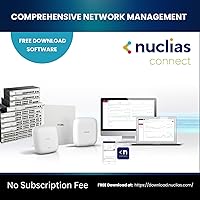
No, there is no dedicated mobile app or cloud management platform for the DGS-1100-24V2. All configuration is done through the local web interface using a browser. If cloud-based or app-driven management is important to your workflow, you may want to evaluate the Nuclias product line from D-Link, which is designed around cloud management.

The main difference comes down to the management ecosystem. UniFi switches integrate into Ubiquiti's centralized controller software, which gives you a unified view across all your network devices from a single dashboard. This D-Link managed switch has no equivalent centralized platform — each unit is managed individually through its own web UI. If you already run a UniFi network, the UniFi switch will likely fit more naturally. If you just need a capable standalone managed switch without ecosystem lock-in, the DGS-1100-24V2 holds its own at this tier.

It is a useful utility for basic troubleshooting — it can estimate cable length and flag whether a cable is open, shorted, or has an impedance mismatch. It will not replace a dedicated cable certifier for precision work, but for quickly diagnosing a suspect run without pulling out extra equipment, buyers generally find it helpful and accurate enough for everyday use.

D-Link's lifetime warranty covers hardware defects under normal operating conditions for as long as you own the product. In practice, buyers report the RMA process is handled through D-Link's support portal, and replacement units are typically shipped once a defect is verified. It does not cover physical damage, power surge damage, or misuse, so it is a standard hardware warranty rather than an all-risk guarantee. Still, having a lifetime warranty on a switch you plan to run for years is a meaningful reassurance.