Overview

The D-Link DGS-108 8-Port Gigabit Ethernet Switch has been a fixture in home and small-business networking since 2005 — and with good reason. Few unmanaged switches at this price combine a solid all-steel chassis with genuinely quiet, fanless operation. Over 21,000 Amazon reviewers have landed on a 4.8-star average, placing it consistently among the top sellers in its category. While plastic competitors hum or rattle with cheap cooling fans, this gigabit switch sits silently on a desk or mounts flat against a wall in a media room, doing exactly what it promises. No drama, no noise, no fuss.
Features & Benefits

Eight gigabit ports handle up to 1 Gbps in each direction simultaneously — meaning a NAS backup and a 4K stream can both run at full speed without throttling each other. Auto MDI/MDIX means you can grab any Cat5e, Cat6, or Cat6A patch cable without worrying about crossover compatibility. There is no app to install, no web interface to navigate, and no account to create. The DGS-108 also includes 802.1p QoS support, which helps prioritize time-sensitive traffic like video calls over background downloads — useful, though buyers expecting VLANs or advanced traffic shaping should look at managed alternatives. Energy Efficient Ethernet quietly trims power on idle or shorter cable runs.

Best For

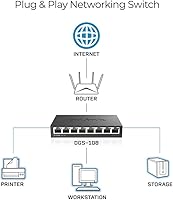
This D-Link 8-port switch is an obvious fit for anyone whose router has run out of ports and wants a wired solution without spending an afternoon reading a manual. Gamers and content creators who record or stream from a dedicated room will appreciate the completely silent operation — no fan noise bleeding into a microphone or disrupting a recording. It also suits small offices tying together a printer, a NAS, and a few workstations on one switch. Households running IPTV or multiple 4K displays benefit from built-in IGMP snooping, which keeps multicast traffic tidy. If you are still running a 100 Mbps Fast Ethernet switch, this upgrade is a straightforward, immediate win.

User Feedback

The feedback picture across thousands of buyers is unusually consistent. Most highlight the build quality as a genuine surprise — the steel housing feels far more substantial than expected when it arrives. The zero-setup experience draws repeated praise: plug it in, lights come on, everything works. On the downside, the external power brick is a recurring gripe for those running tidy cable setups, since it adds one more wall-wart to manage. A smaller group of technically experienced users note the absence of a management interface, though most acknowledge that is simply the nature of an unmanaged switch. Long-term owners routinely report years of reliability with no port failures, which, paired with the lifetime warranty, keeps satisfaction rates notably high.

Pros

  • All-steel fanless build feels noticeably more durable than plastic alternatives at a similar price point.
  • Genuinely plug-and-play — no app, no account, no configuration required at any step.
  • Auto MDI/MDIX means any standard patch cable works; no hunting for crossover cables.
  • Full gigabit speeds on all eight ports handle simultaneous backups, streaming, and browsing without bottlenecks.
  • IGMP snooping keeps IPTV and multicast traffic tidy so other devices are not flooded with irrelevant packets.
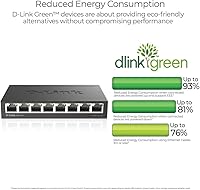
  • Energy Efficient Ethernet measurably reduces power draw on idle ports and shorter cable runs.
  • Desktop rubber feet and wall-mount keyhole slots give genuine placement flexibility without extra hardware.
  • A limited lifetime warranty on a switch this affordable is a meaningful long-term value signal.
  • Over 21,000 buyers averaging 4.8 stars reflects consistent real-world satisfaction, not a short-term spike.
  • Long-term owners regularly report multi-year operation with zero port failures, even in always-on environments.

Cons

  • The external power adapter adds a wall-wart to your setup, which is inconvenient for clean cable management.
  • No web interface or management layer of any kind — advanced traffic control is simply not possible.
  • VLAN segmentation is not supported, making it unsuitable for separating guest and internal networks.
  • Only eight ports with no expansion path; outgrowing it means buying an additional switch.
  • No SFP or fiber uplink option limits deployment to short copper runs under 100 meters.
  • 802.1p QoS prioritization is basic compared to managed switches — do not expect granular traffic shaping.
  • No port mirroring or diagnostics tools, so troubleshooting individual port issues requires external equipment.
  • The power brick uses a proprietary connector, so a lost or failed adapter requires sourcing a D-Link replacement.

Ratings

The scores below for the D-Link DGS-108 8-Port Gigabit Ethernet Switch were generated by AI after analyzing thousands of verified global buyer reviews, with spam, bot activity, and incentivized feedback actively filtered out. Every category reflects what real users experienced in day-to-day use — including the frustrations, not just the highlights. Both standout strengths and genuine limitations are represented transparently so you can make a fully informed decision.
Build Quality
93%
The all-steel chassis is the first thing reviewers notice when they open the box — it feels substantially more solid than any plastic switch at a comparable price. Long-term owners regularly report that the unit looks and performs identically after three, four, or even five years of continuous use, with no warping or port degradation.
A small number of users noted that the steel finish scratches relatively easily when slid across rough surfaces, and the bottom rubber feet on early units have been reported to lose adhesion over time in warmer environments.
Noise Level
96%
With no fan and a passively cooled metal body, the DGS-108 operates in complete silence — a quality that stands out sharply in a category where budget switches often include small, whiny fans. Streamers, podcasters, and bedroom users specifically call this out as a deciding factor that they are still glad about months later.
Passive cooling means the chassis does get warm to the touch under sustained full-load conditions, which is normal and harmless but can be surprising if you pick it up unexpectedly. There is no airflow indicator or temperature warning of any kind.
Ease of Setup
97%
Plug in power, plug in cables, done — that is the entire setup process. Reviewers from non-technical backgrounds repeatedly describe getting the switch running in under two minutes with zero frustration, which is rare enough in networking hardware to be genuinely noteworthy.
Because there is no interface or indicator beyond port LEDs, users who encounter a connectivity problem have very limited built-in diagnostic tools. Troubleshooting requires external methods, which can be confusing for less experienced users.
Network Performance
91%
The non-blocking gigabit switching engine means all eight ports can push full-speed traffic at once without throttling each other — relevant for households where multiple people are streaming, gaming, or transferring large files simultaneously. Users replacing older 100 Mbps switches report an immediately noticeable improvement in local transfer speeds.
The QoS implementation is limited to basic 802.1p traffic class tagging, which is a step above nothing but falls well short of what a managed switch can deliver. Users running demanding VoIP environments or complex traffic shaping requirements will hit a ceiling quickly.
Port Count & Flexibility
82%
18%
Eight ports is a practical number for most home offices and small media setups, covering a desktop, NAS, smart TV, gaming console, and a few IoT devices without daisy-chaining. The non-blocking architecture means no port is treated as a second-class connection.
Eight ports is also a hard ceiling with no expansion path on this unit — if you are already at seven devices and considering growth, you will need a second switch sooner than expected. There are no uplink-only or dedicated trunk ports, so one port is consumed whenever you connect this switch to a router.
Value for Money
94%
For a fanless, all-metal, gigabit switch backed by a limited lifetime warranty, the price sits at a level that most reviewers describe as a straightforward buy. The longevity reported by multi-year owners makes the per-year cost of ownership particularly low compared to cheaper plastic alternatives that fail sooner.
Buyers who only need four or five wired connections may find a smaller switch offers similar value without the extra ports. If managed features ever become a requirement down the line, this switch offers no upgrade path — it would need to be fully replaced rather than configured differently.
Energy Efficiency
88%
The IEEE 802.3az implementation actively scales down power on ports that are idle or connected to shorter cable runs, which translates to meaningful savings in always-on home or small business environments. Several technically minded reviewers specifically measured lower idle power draw compared to non-EEE switches.
The energy savings are automatic and not configurable, so users cannot prioritize aggressive power saving on specific ports while keeping others at full readiness. There is also no power consumption display or reporting of any kind.
Multicast & IPTV Support
83%
IGMP snooping prevents 4K or IPTV multicast streams from flooding every port on the switch, which directly reduces lag and jitter on devices not participating in the stream. Users with multi-room IPTV setups report noticeably cleaner playback compared to switches without this feature.
IGMP snooping on an unmanaged switch is automatic and non-configurable, which means there is no way to adjust querier settings or troubleshoot multicast group behavior if something goes wrong. Advanced IPTV deployments with custom multicast configurations may encounter edge-case issues.
Cable Compatibility
91%
Auto MDI/MDIX across all eight ports means any Cat5e, Cat6, or Cat6A cable works in any port without worrying about straight-through versus crossover types — a small but genuinely appreciated convenience that eliminates a common source of user error during setup.
The switch only accepts copper RJ45 connections with no SFP or fiber option, which limits deployment to runs under 100 meters. Users who need to bridge two rooms across a longer distance will need a media converter or a different switch entirely.
Power Supply Design
61%
39%
The included power adapter is reliable and works out of the box without any additional purchases. Users in simple desktop setups rarely mention the power brick as a problem because it tucks neatly behind the switch or under a desk.
The external brick-style adapter is a recurring complaint from users who care about cable management — it occupies a wall socket and adds a dangling cable run that internal power supplies avoid entirely. Losing or damaging the adapter requires sourcing a D-Link-specific replacement, as the connector is not universal.
Mounting Options
79%
21%
The combination of rubber feet for desktop use and built-in keyhole slots for wall mounting gives buyers real placement flexibility without purchasing extra hardware. Several users have noted that the keyhole mounting is secure and holds the unit firmly even against drywall anchors.
The keyhole slots are functional but the spacing requires precise screw placement, which some users found fiddly without a template or careful measurement. There is no rack-mount option, so this switch is not suited for 19-inch rack enclosures without a separate adapter tray.
Indicator Lights
74%
26%
Per-port LED indicators confirm link status and activity at a glance, which is sufficient for basic troubleshooting like confirming a cable is properly seated or a device is recognized. The LEDs are visible without being distractingly bright in a dark room.
The LEDs convey only link and activity status — there is no indication of negotiated speed (10/100/1000) on a per-port basis, which means you cannot visually confirm whether a device has connected at full gigabit speed without using software tools on the connected device.
Long-Term Reliability
92%
Multi-year ownership reports are disproportionately positive for this switch, with many users specifically noting that ports remain fully functional after three to six years of continuous 24/7 operation. The limited lifetime warranty backs this real-world track record with meaningful coverage.
Because it is an unmanaged device, there is no firmware update mechanism or remote monitoring — if a port silently degrades, the only way to detect it is through external testing. The warranty also applies to the original purchaser and does not transfer with the device.
Warranty & Support
81%
19%
A limited lifetime warranty on a switch in this price range is genuinely unusual and reflects D-Link's confidence in the hardware longevity. Buyers report that D-Link support honored warranty claims without excessive friction in the majority of documented cases.
The warranty is limited in scope and applies to manufacturing defects rather than accidental damage or power surge events. D-Link's customer support response times have drawn mixed feedback, with some users experiencing delays when trying to process replacements through official channels.

Suitable for:

The D-Link DGS-108 8-Port Gigabit Ethernet Switch is the right call for anyone who simply needs more wired ports without the overhead of configuration, contracts, or a learning curve. If your router has run out of ethernet connections and you want to add a NAS drive, a smart TV, a desktop, and a gaming console to the same network — this is exactly the tool for that job. Home office workers who rely on stable, interference-free wired connections will find the gigabit throughput more than adequate for video conferencing, large file transfers, and cloud backups running simultaneously. Content creators and streamers who record in a bedroom or studio will particularly appreciate the fanless steel chassis, which produces absolutely zero audible noise. Small businesses with a handful of workstations, a shared printer, and a NAS will find it handles all of that reliably without any IT involvement. Households running IPTV services or multiple 4K screens across the same local network also benefit from the built-in IGMP snooping, which prevents multicast video traffic from overwhelming every port on the switch.
Not suitable for:

The D-Link DGS-108 8-Port Gigabit Ethernet Switch is not the right choice for network administrators or power users who need any degree of traffic control beyond the basics. There is no web interface, no CLI access, no VLAN support, and no port mirroring — if those features appear anywhere on your requirements list, you need a managed switch instead. Businesses that need to segment guest traffic from internal traffic, or enforce access policies per port, will find this switch fundamentally incapable of those tasks regardless of how it is configured upstream. Users who need fiber uplinks or SFP slots for longer runs will also need to look elsewhere, as every port here is copper RJ45 only. The external power brick is a minor but real inconvenience for rack-adjacent or wall-mounted deployments where cable tidiness matters. And if eight ports is already tight for your current devices, keep in mind there is no modular expansion — you would need to add another switch or step up to a 16-port model from the start.
Specifications

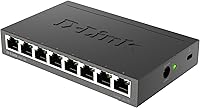
  • Ports: Eight RJ45 ports support 10/100/1000 Mbps auto-negotiating gigabit connections for full wired device coverage.
  • Switching: Non-blocking switching architecture ensures every port operates at full gigabit speed simultaneously without contention.
  • Duplex: All ports support both full and half duplex modes, negotiated automatically with each connected device.
  • Cable Support: Compatible with Cat5e, Cat6, and Cat6A UTP cables at runs up to 100 meters per port.
  • QoS: 802.1p traffic class prioritization helps time-sensitive packets such as VoIP and video reach their destination with lower latency.
  • Multicast: IGMP snooping directs multicast streams only to the ports that have requested them, reducing unnecessary network-wide flooding.
  • Energy Standard: IEEE 802.3az Energy Efficient Ethernet reduces power consumption by up to 80% on idle ports and shorter cable runs.
  • Cooling: The all-steel fanless chassis dissipates heat passively, producing zero audible noise during continuous operation.
  • Housing: The enclosure is constructed entirely from metal, providing greater durability and heat dissipation than plastic alternatives.
  • Dimensions: The unit measures 6.4″L × 4.05″W × 1.1″H, making it compact enough for a desk corner or shelf.
  • Weight: The switch weighs approximately 0.44 kg (15.5 oz), light enough for wall mounting without heavy-duty fixings.
  • Mounting: Rubber feet enable stable desktop placement, while built-in keyhole slots support direct wall mounting with no extra bracket required.
  • Power: Powered by an included external DC adapter rated at 5V and 1A; no internal power supply is built into the unit.
  • Management: Fully unmanaged — no web interface, CLI, or app is required or available; the switch operates entirely plug-and-play.
  • Warranty: D-Link provides a limited lifetime warranty covering manufacturing defects for the original purchaser.
  • Auto MDI/MDIX: Automatic MDI/MDIX detection on all ports eliminates the need for crossover cables in any connection scenario.
  • Interface Type: All eight ports use standard RJ45 connectors; there are no SFP, fiber, or uplink-only ports on this model.
  • Data Rate: Each port delivers up to 1 Gbps in each direction simultaneously for a theoretical 2 Gbps full-duplex throughput per port.

Related Reviews

D-Link DGS-1005G 5-Port Gigabit Ethernet Switch
77%
94%
Ease of Setup
58%
Reliability & Longevity
87%
Network Performance
97%
Noise Level
76%
Value for Money
More
D-Link DGS-1008P 8-Port Gigabit PoE Switch
83%
96%
Ease of Setup
83%
PoE Reliability
88%
Build Quality
97%
Noise Level
67%
Thermal Management
More
D-Link DGS-1016S 16-Port Gigabit Ethernet Switch
82%
88%
Build Quality
96%
Ease of Setup
91%
Port Count & Connectivity
97%
Noise Level
89%
Network Performance & Throughput
More
D-Link DGS-1100-08PV2 PoE+ Switch
81%
72%
PoE Power Delivery
86%
Ease of Setup
67%
Management Interface
83%
Build Quality
97%
Noise Level
More
D-Link DES-1008PA 8-Port PoE Fast Ethernet Switch
82%
94%
Ease of Setup
88%
PoE Port Reliability
91%
Build Quality & Durability
58%
Network Speed & Throughput
97%
Noise Level
More
TP-Link LS108GP
TP-Link LS108GP
81%
96%
Ease of Setup
62%
PoE Power Budget
78%
Extend Mode Performance
93%
Silent Operation
84%
Build Quality
More
D-Link DGS-1210-10 10-Port Gigabit Smart Managed Switch
88%
88%
Performance & Speed
91%
Build Quality
85%
Ease of Setup
94%
Fanless Design (Noise Level)
90%
Security Features
More
D-Link DGS-1100-24V2 24-Port Gigabit Smart Managed Switch
86%
88%
Performance
90%
Reliability
92%
Ease of Setup
89%
Energy Efficiency
91%
Quiet Operation
More
D-Link DGS-1100-16V2 16-Port Gigabit Ethernet Switch
80%
83%
Ease of Setup
67%
VLAN Configuration
84%
Build Quality
91%
Fanless Performance
76%
QoS Effectiveness
More
D-Link DGS-1100-05V2 5-Port Gigabit Smart Managed Switch
85%
91%
Value for Money
92%
Ease of Setup
88%
Performance & Reliability
89%
Energy Efficiency
93%
Quiet Operation
More

FAQ

Not at all. The DGS-108 is completely unmanaged, which means you just plug in the power adapter, connect your devices with ethernet cables, and the switch starts working immediately. There is no app to download, no web portal to log into, and no account required — ever.

Yes. This gigabit switch is brand-agnostic and connects to any router that has a spare ethernet port — whether it is from Netgear, Asus, TP-Link, or any ISP-provided modem-router. It simply extends your existing network without any reconfiguration on the router side.

Absolutely — that is one of the most common setups for the DGS-108. With eight ports running at gigabit speeds and a non-blocking switching engine, all of those devices can transfer data simultaneously at full speed without slowing each other down.

It produces zero noise. There is no fan — the all-metal chassis handles heat passively, so the only sound it makes is silence. This makes it one of the better choices for bedrooms, recording studios, or any environment where acoustic cleanliness matters.

No, and that is worth knowing upfront. The D-Link DGS-108 8-Port Gigabit Ethernet Switch is an unmanaged device, so features like VLANs, port-based access control, or traffic isolation are not available. If you need to separate guest traffic from your main network at the switch level, you would need a managed switch instead.

Any standard Cat5e, Cat6, or Cat6A patch cable will work fine up to 100 meters in length. The switch also supports auto MDI/MDIX, so you do not need to worry about whether a cable is a straight-through or crossover type — it figures that out on its own.

The power adapter is included in the box. One thing to be aware of is that it is an external brick-style adapter rather than an internal supply, which some people find slightly inconvenient when trying to keep cables tidy. D-Link includes the adapter and a quick install guide in the package.

Yes, to a meaningful extent. The switch includes IGMP snooping, which means it only sends multicast video streams to the specific ports that have requested them rather than broadcasting to every connected device. In practical terms, this reduces unnecessary network load and helps multi-room IPTV or 4K streaming run more smoothly on a busy local network.

The all-steel housing makes a genuine difference in both heat management and durability. Plastic enclosures can warp over time in warmer environments, and fan-cooled plastic switches introduce a moving part that can eventually fail. The fanless metal design here eliminates both of those concerns. Long-term owners frequently report years of continuous operation without any port failures, and the limited lifetime warranty backs that up.

Both options are supported out of the box. The bottom of the switch has rubber feet for stable desktop use, and the chassis also has keyhole mounting slots on the underside so you can hang it on screws fixed into a wall. No additional mounting hardware or bracket is needed — just two screws in the right position and the switch slots right onto them.

Where to Buy