Overview

The Cudy WR1200 AC1200 Dual-Band WiFi Router is a compact, no-frills networking device from Shenzhen Cudy Technology, a Chinese brand that has been quietly building a solid reputation in the budget networking space since its late 2021 launch. At under nine ounces, this Cudy router is easy to tuck on a shelf or reposition as your needs change. The AC1200 classification means combined theoretical speeds up to 1200Mbps — perfectly adequate for households on moderate internet plans. One honest caveat: the LAN ports are capped at 100Mbps, so gigabit internet subscribers won't see full wired speeds. For everyone else on a standard plan, it is a capable, practical box.
Features & Benefits

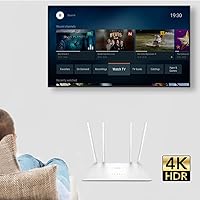
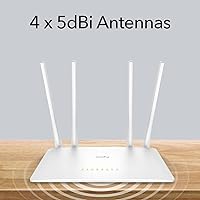
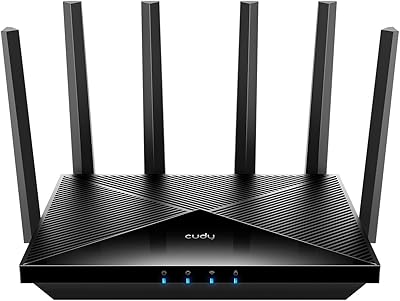
The WR1200 packs genuine versatility into a small frame. Its dual-band setup lets you push a 4K stream or online game through the faster 5GHz radio while keeping lighter traffic like email on the 2.4GHz band simultaneously. The four external 5dBi antennas make a real difference penetrating walls compared to devices with hidden internal antennas. What genuinely stands out is the built-in VPN client support — WireGuard, PPTP, and L2TP are all included, which is uncommon at this price tier. Add guest network isolation, QoS traffic prioritization, and four distinct operating modes — Router, Extender, Access Point, and WISP — and this dual-band extender-router covers a surprising range of use cases.

Best For

This Cudy router fits best for renters, students, or small households on a 100Mbps or slower internet plan — which, frankly, covers most home subscribers. It also makes a strong case for users who want a working VPN client without paying for a mid-range device. Need to extend Wi-Fi into a back bedroom or garage? The WR1200 handles that in extender or access point mode without requiring a separate purchase. Travelers who frequently connect through hotel ethernet ports will find WISP mode genuinely useful. Budget shoppers comparing entry-level options from established brands should put this on the shortlist before defaulting to a name they already recognize.

User Feedback

With a 4.4-star average across more than 350 reviews, the WR1200 has built its rating through consistent everyday performance rather than a handful of enthusiastic outliers. Buyers regularly call out straightforward initial setup and a better-than-expected app experience for a lesser-known brand. The most repeated criticism is the 100Mbps wired ceiling, which genuinely frustrates anyone who has recently upgraded to a gigabit ISP plan — a fair complaint worth weighing before buying. A smaller share of reviewers mention early firmware quirks, though subsequent updates appear to have resolved most of those concerns. Overall, this dual-band extender-router earns real-world trust from buyers who prioritize reliability and value over brand prestige.

Pros

  • Four operating modes — Router, Extender, Access Point, and WISP — make the WR1200 genuinely versatile for different living situations.
  • Built-in WireGuard, PPTP, and L2TP VPN clients are a rare and useful inclusion at this price point.
  • Four external 5dBi antennas provide noticeably better wall penetration than routers with hidden internal antennas.
  • Dual-band radios let you offload streaming or gaming to 5GHz while keeping lighter devices on 2.4GHz.
  • Guest Wi-Fi support keeps visitors off your main network without any complex configuration.
  • QoS traffic prioritization lets you ensure gaming or video calls get bandwidth first.
  • A 4.4-star average from over 350 buyers reflects consistent real-world satisfaction, not just launch hype.
  • Setup is widely praised as straightforward, even for users with limited networking experience.
  • Lightweight and compact enough to reposition freely or pack for travel without hassle.
  • Strong value for households on standard sub-100Mbps internet plans that do not need gigabit wired speeds.

Cons

  • LAN ports are capped at 100Mbps, which is a hard bottleneck for anyone on a gigabit ISP plan.
  • Only 64MB of RAM and 8MB of storage limits headroom for complex configurations or future firmware growth.
  • Cudy is a relatively unknown brand outside budget networking circles, which may give some buyers pause on long-term support.
  • Some early buyers reported firmware quirks that required patience and manual updates to resolve.
  • VPN client setup, while present, can still feel intimidating for users with no prior router configuration experience.
  • No Wi-Fi 6 support means the WR1200 will feel dated as newer client devices become the norm.
  • Mesh networking is not supported, so expanding coverage across a larger home requires additional separate hardware.
  • The mobile app experience, while functional, lacks the polish and depth found in apps from premium router brands.

Ratings

The scores below for the Cudy WR1200 AC1200 Dual-Band WiFi Router were generated by our AI engine after analyzing verified buyer reviews from multiple global marketplaces, with spam, incentivized, and bot-flagged submissions actively filtered out. Each category reflects the honest distribution of real user sentiment — strengths are credited where earned, and recurring frustrations are not glossed over. The result is a transparent, balanced scorecard that helps you weigh this router against your actual needs before buying.
Value for Money
88%
Buyers consistently point out that getting dual-band Wi-Fi, four operating modes, and a built-in VPN client at this price tier is genuinely hard to match. For households that just need a dependable everyday router without paying for features they will never use, the WR1200 delivers a strong return on a modest outlay.
A small but vocal group of reviewers feel the value equation shifts if you have a gigabit internet plan, since the 100Mbps wired ports prevent you from actually using the speed you are paying your ISP for. In that specific scenario, the savings start to feel less compelling.
Setup & Ease of Use
83%
A large share of buyers highlight how painless the initial setup process is, with the guided wizard handling most decisions automatically. Even users who describe themselves as non-technical frequently report having the router online and all devices connected within ten to fifteen minutes.
The VPN client configuration is where ease of use takes a noticeable step down — users unfamiliar with VPN credentials and server addresses often find that part confusing without external guidance. A few reviewers also note that switching between the four operating modes requires re-entering the setup wizard, which is mildly inconvenient.
Wireless Performance
76%
24%
For apartments and small homes, the dual-band setup performs reliably, with the 5GHz band handling video streaming and online gaming without obvious lag or dropouts under normal household load. Users appreciate the ability to push bandwidth-heavy devices onto 5GHz while leaving smart home gadgets on 2.4GHz.
In larger spaces or homes with thick concrete walls, signal consistency starts to drop off, and some users report the 2.4GHz band feeling sluggish when many devices are connected simultaneously. The AC1200 class is not built for demanding multi-device households, and reviewers with larger homes reflect that in their ratings.
Wired Port Performance
54%
46%
The four LAN ports are conveniently located and work reliably for plugging in a smart TV, a console, or a desktop simultaneously. For households on standard 50–100Mbps broadband plans, the ports deliver exactly what is advertised without issues.
The 100Mbps ceiling on every port is the single most repeated criticism across low-star reviews, and it is a legitimate concern. Anyone who has upgraded to a gigabit or even a 500Mbps ISP plan will find that wired devices are artificially throttled, which is a hard limitation that no firmware update can fix.
Range & Coverage
72%
28%
The four external 5dBi antennas give the WR1200 a meaningful edge over budget routers that rely on internal antennas, and buyers in one- or two-bedroom apartments typically report solid coverage throughout their space. Walls and a floor between the router and a device are generally handled without major signal degradation.
Reviewers in larger homes or multi-floor layouts consistently note that a single WR1200 is not enough to maintain a strong signal in distant rooms. Without mesh support, extending coverage requires a second device, which adds cost and complexity to what was meant to be a simple, affordable setup.
VPN Client Functionality
78%
22%
The inclusion of WireGuard alongside PPTP and L2TP is a genuine differentiator, and technically-inclined buyers frequently praise how well the VPN tunneling works once configured. Remote workers who route all their home traffic through a corporate or personal VPN server find the feature functional and stable.
Non-technical buyers often find the VPN setup opaque — the router does not come with a built-in service or a simplified configuration guide, so users need to source their own VPN provider credentials and know how to enter them correctly. This limits the feature to users who are at least somewhat comfortable with network configuration.
Build Quality
67%
33%
The WR1200 feels acceptably solid for a budget device, and the external antennas are firmly attached with no reports of them wobbling loose over time. Most buyers are satisfied that it holds up to everyday stationary use on a shelf or desk without issues.
The all-plastic casing does not inspire confidence in long-term durability, and a handful of reviewers mention concerns about the device running noticeably warm after extended use. It is functional build quality, not premium, and expectations should be set accordingly.
Multi-Mode Versatility
84%
Having Router, Extender, Access Point, and WISP modes in a single affordable device is a feature set that buyers repeatedly call out as the main reason they chose the WR1200 over single-purpose alternatives. Travelers especially appreciate being able to use WISP mode in hotels, and renters value the flexibility to reconfigure the device if their living situation changes.
Switching modes requires going back through the setup interface, which is a minor friction point compared to routers that let you toggle modes more fluidly. A few buyers also note that the Extender mode introduces a small but measurable speed drop compared to using the device purely as a router.
Mobile App Experience
71%
29%
The Cudy app receives positive comments for making initial configuration accessible on a phone without needing to open a browser and navigate an admin panel. For basic tasks like checking connected devices or adjusting Wi-Fi passwords, the app covers what most home users actually need.
The app lacks the depth that more established brands offer, with advanced features like detailed traffic monitoring, parental controls, and per-device QoS configuration either absent or buried. Users who want granular control over their network tend to migrate to the web admin panel fairly quickly.
Firmware & Software Updates
62%
38%
Cudy does release firmware updates, and buyers who experienced early bugs generally report that subsequent updates addressed the most disruptive issues. The fact that the device remains actively supported and non-discontinued is a positive signal for a budget brand.
The update cadence is inconsistent compared to larger networking brands, and there is no guarantee of long-term support as the product ages. A minority of reviewers note that certain bugs persisted across multiple firmware versions, suggesting the quality assurance process is less rigorous than buyers might hope.
Guest Network
81%
19%
The guest Wi-Fi feature works cleanly and requires minimal configuration to set up, which buyers appreciate when having visitors over. Keeping guest devices off the main network adds a meaningful layer of security without any technical overhead for the average home user.
The guest network options are fairly basic — there is no built-in bandwidth throttling for guests or time-based access scheduling, which more advanced home users might want. It handles the core use case well but does not go further than that.
QoS & Traffic Management
69%
31%
The QoS implementation is straightforward enough that gamers and streaming households can prioritize their main device without needing a networking background. Buyers who enable it generally notice a reduction in stuttering when multiple devices are competing for bandwidth simultaneously.
The QoS controls are relatively basic by current standards, offering device-level prioritization without deeper application-layer rules or real-time traffic visualization. Power users who want fine-grained bandwidth management will find the options limiting compared to mid-range competitors.
Reliability & Stability
74%
26%
The majority of buyers report that once the WR1200 is configured and settled in, it runs stably for extended periods without requiring reboots or manual intervention. For a set-and-forget home router, the day-to-day reliability holds up well based on the overall review distribution.
A recurring theme in lower-star reviews is occasional disconnection events, particularly after longer uptime periods or during heavy load. While not universal, enough buyers mention needing to power-cycle the router periodically to flag it as a real, if intermittent, concern.

Suitable for:

The Cudy WR1200 AC1200 Dual-Band WiFi Router is a strong fit for renters, students, and small households who are on a 100Mbps or slower internet plan and simply need reliable, no-fuss wireless coverage without paying a premium. If you live in an apartment or a small home where one or two rooms are all you need to cover, this Cudy router handles that without breaking a sweat. It also makes a compelling case for budget-conscious users who want a built-in VPN client — being able to route all your traffic through WireGuard or L2TP without buying a pricier device is a real, tangible advantage. Travelers and remote workers who frequently deal with hotel or office ethernet connections will appreciate the WISP mode, which lets you convert a wired connection into a private wireless network on the fly. Anyone looking to repurpose an old setup by adding an extender or access point in a secondary room will find that the WR1200 handles those roles competently as a standalone purchase.
Not suitable for:

The Cudy WR1200 AC1200 Dual-Band WiFi Router is not the right call for households that have already upgraded to a gigabit internet plan, because the wired LAN ports are capped at 100Mbps — meaning your fast ISP connection will always be bottlenecked at the router when using ethernet. Power users who need the latest Wi-Fi 6 speeds, multi-gigabit throughput, or advanced mesh networking capabilities will find this Cudy router firmly out of its depth. Large homes with multiple floors or thick concrete walls may also struggle, as the hardware is optimized for compact living spaces rather than broad coverage challenges. If you run a home lab, manage smart home devices across a large number of nodes, or expect robust firmware with frequent feature updates from a well-resourced brand, a more established and higher-specced device would serve you better. This is a practical, entry-level tool — and buyers expecting flagship-tier performance or long-term software support from a lesser-known brand should adjust expectations accordingly.
Specifications

  • Wi-Fi Standard: The WR1200 uses the 802.11ac (Wi-Fi 5) standard, supporting legacy protocols including 802.11a, b, g, and n for backward compatibility with older devices.
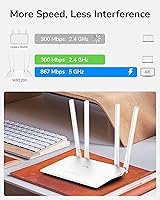
  • Max Wireless Speed: Combined theoretical wireless throughput reaches up to 1200Mbps, with the 5GHz band delivering up to 867Mbps and the 2.4GHz band up to 300Mbps.
  • Frequency Bands: The router operates on both 2.4GHz and 5GHz bands simultaneously, allowing devices to be distributed across bands based on their bandwidth needs.
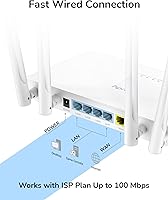
  • LAN Ports: Four 10/100Mbps LAN ports are included for wired device connections, suitable for internet plans up to 100Mbps.
  • WAN Port: One 10/100Mbps WAN port is provided for connecting to a modem or ISP gateway.
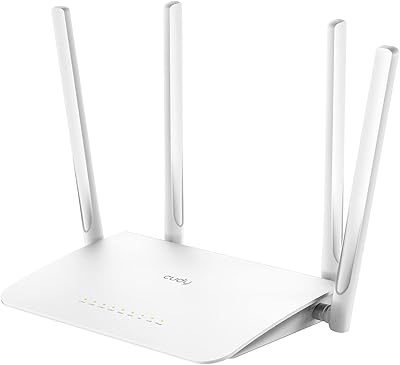
  • Antennas: Four external 5dBi omnidirectional antennas are attached to the unit to extend signal range and improve penetration through walls and obstacles.
  • Operating Modes: The device supports four distinct modes — standard Router, Wi-Fi Range Extender, Access Point, and WISP — selectable during setup.
  • VPN Clients: Built-in VPN client support includes WireGuard, PPTP, and L2TP protocols for encrypted tunneling to a remote VPN server.
  • Guest Network: The router supports a separate guest Wi-Fi network on both bands, isolating visitor traffic from the primary home network.
  • QoS Support: Quality of Service controls allow users to prioritize network traffic for specific devices or applications such as gaming consoles or video streaming.
  • RAM: The WR1200 includes 64MB of RAM to handle routing tasks and concurrent connections under typical home use conditions.
  • Storage: 8MB of onboard flash storage holds the device firmware and basic configuration data.
  • Weight: The unit weighs 8.8 ounces, making it light enough to reposition freely or carry during travel.
  • Color: The WR1200 ships in white and features a compact desktop form factor designed to blend into home or office environments.
  • In the Box: The package includes the WR1200 router, one ethernet cable, a power adapter, and a printed installation guide.
  • Manufacturer: The WR1200 is designed and manufactured by Shenzhen Cudy Technology Co., Ltd., based in China.
  • Release Date: The WR1200 was first made available for purchase in October 2021 and remains an active, non-discontinued product.

Related Reviews
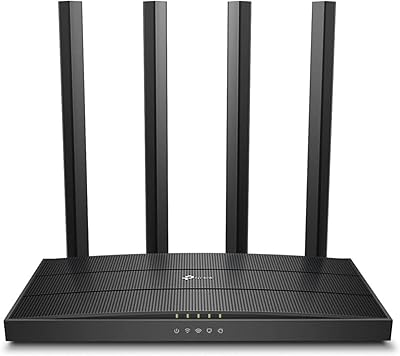
TP-Link Archer A6 AC1200 WiFi Router
76%
74%
WiFi Speed & Performance
67%
WiFi Range & Coverage
88%
Setup & Ease of Use
71%
Build Quality & Design
91%
Wired Port Performance
More
Cudy WR1300 AC1200 Gigabit WiFi Router
83%
88%
WiFi Performance
93%
Ease of Setup
85%
Signal Strength
75%
Connection Stability
80%
Build Quality
More
Cudy WR11000 WiFi 7 Tri-Band Router
74%
88%
Value for Money
76%
Wireless Performance
91%
Wired Port Quality
84%
Setup & Ease of Use
79%
Mobile App Experience
More
Asus RT-AC1200 Wireless Dual-Band Router
83%
85%
Wi-Fi Performance
91%
Ease of Setup
78%
Coverage Range
88%
Parental Controls
81%
Streaming & Gaming Performance
More
NETGEAR WAX202 WiFi 6 Dual-Band Router
84%
88%
WiFi Performance
93%
Setup & Installation
85%
App Usability
89%
Speed & Coverage
90%
Device Connectivity
More
Linksys RE6350 AC1200 Dual-Band WiFi Extender

86%
91%
Setup & Installation
88%
Wi-Fi Performance
89%
Coverage Area
85%
Dual-Band Performance
84%
Streaming & Gaming
More
ASUS RT-AX1800S
ASUS RT-AX1800S
79%
88%
Value for Money
79%
WiFi Speed & Performance
74%
Coverage & Range
83%
Setup & Ease of Use
67%
Router App Experience
More
ASUS RT-AX5400 WiFi 6 Dual-Band Router
80%
84%
WiFi Speed & Throughput
71%
Coverage & Range
88%
Setup & Ease of Use
91%
Built-in Security (AiProtection)
83%
Parental Controls
More
ASUS RT-ACRH13 AC1300 Dual Band WiFi Router
86%
88%
WiFi Performance
91%
Setup and Installation
90%
Value for Money
83%
Signal Coverage
89%
Ease of Use (Mobile App)
More
TP-Link Archer AX23 WiFi 6 Router
78%
91%
Value for Money
93%
Ease of Setup
74%
WiFi Speed Performance
67%
Range & Coverage
83%
Connection Stability
More

FAQ

It will connect and function, but you will not get gigabit speeds through the wired ports — they are capped at 100Mbps. If your ISP plan is 100Mbps or under, you will not notice any limitation. Gigabit subscribers who rely on wired connections should consider a router with gigabit LAN ports instead.

Most buyers report that setup is genuinely straightforward. You connect the router, open the Cudy app or the web-based admin panel, and follow a short wizard that walks you through selecting your mode and entering your ISP credentials. It typically takes under ten minutes for a basic router setup.

Yes, the WR1200 has a dedicated Range Extender mode. You select that mode during setup, point it at your existing Wi-Fi network, and it rebroadcasts the signal into areas with weaker coverage. It is a practical way to extend reach to a back room or a garage without buying a separate device.

The built-in VPN client lets the router connect to an external VPN server so that all traffic passing through it is encrypted and routed through that server. WireGuard is a modern, faster protocol compared to older options like PPTP. You do need a VPN service account and its configuration credentials to set it up — it does not provide a VPN service by itself. It is manageable for users comfortable with basic router settings, but complete beginners may need to follow a guide.

For casual gaming on a standard internet plan, it holds up well. The 5GHz band keeps latency lower for gaming traffic, and the QoS feature lets you prioritize your gaming console over other devices on the network. It is not built for competitive, ultra-low-latency setups, but for everyday online play it performs reliably.

No, the WR1200 does not support mesh networking. If you need to blanket a large or multi-story home with seamless roaming coverage, you would need a mesh-capable system. This Cudy router is best suited for apartments or smaller single-floor spaces where one unit is enough.

Yes, the four LAN ports let you connect up to four wired devices simultaneously — a smart TV, a gaming console, a desktop PC, and another device can all be plugged in at once. Just keep in mind the 100Mbps per-port ceiling when deciding which devices to connect by wire.

The WR1200 is made of plastic, as expected at this price level, but buyers generally describe it as sturdy enough for home use. The four external antennas feel reasonably well attached. It is not premium hardware, but there are no widespread reports of it feeling flimsy or failing from normal desk use.

Cudy does release firmware updates through their website and the admin interface. Some early buyers encountered minor bugs that were addressed in subsequent updates. Long-term support cadence is less predictable than with larger brands, so if ongoing software development is important to you, that is a fair consideration before buying.

That is exactly what WISP mode is designed for. You plug the WR1200 into the hotel room ethernet port, enable WISP mode, and the router creates a private wireless network for your devices. It is one of the more practical travel use cases for this device, and several buyers specifically mention using it this way.