Overview

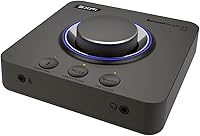
The Creative Sound Blaster X4 is the kind of external USB DAC that makes you wonder why you put up with your motherboard audio for so long. It occupies a practical middle ground — not a cheap dongle that barely improves anything, and not a bulky audiophile stack that costs a small fortune. The X4 sits comfortably on a desk, draws power entirely over USB-C, and handles both gaming surround and serious headphone listening without asking you to compromise. Physical controls, real connectivity options, and a noticeably cleaner signal path are the immediate wins over onboard audio.
Features & Benefits

Where the Sound Blaster X4 genuinely earns its place is in how much Creative packed into a unit this compact. The built-in headphone amplifier handles impedances up to 600Ω, meaning demanding cans that sound thin off a phone jack suddenly come alive. For multi-channel speaker setups, 7.1 discrete surround is supported natively; headphone users get virtual surround via Super X-Fi. The optical-in port — absent on the older X3 — lets you feed audio from a console or TV directly into the unit. Add SmartComms Kit with two-way noise cancellation, programmable EQ modes, and 24-bit/192kHz playback, and the feature list is hard to argue with at this tier.

Best For

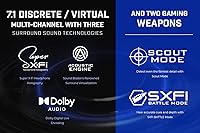
This external sound card hits a sweet spot for several distinct types of buyers. PC and Mac users who have outgrown onboard audio but do not want a full audiophile rig will find the X4 covers almost everything. Remote workers spending hours on video calls will appreciate how effectively the noise cancellation cleans up both ends of a conversation. Console gamers can route optical audio from a PS5 or Xbox straight into a quality headphone amp. Competitive FPS players get Scout Mode and SXFI BATTLE for positional awareness. Anyone running high-impedance headphones between 250Ω and 600Ω will notice the dedicated amp stage makes a real, audible difference.

User Feedback

Owner sentiment around the X4 skews positive, with the most common praise focused on how dramatically it outperforms motherboard audio — a gap that is hard to appreciate until you hear it for yourself. The physical build quality, particularly the volume knob, draws consistent compliments. The optical-in port comes up repeatedly as the feature that pushed many buyers to choose this over the older X3. Super X-Fi, however, divides opinion: some find the head-mapped virtual surround genuinely impressive, others simply leave it off and enjoy the device as a clean DAC. Driver stability on Windows has caused occasional frustration, though most users report it resolves with a straightforward reinstall or update.

Pros

  • Immediately audible improvement over onboard audio — most users notice the difference within minutes of plugging in.
  • Built-in headphone amp handles impedances up to 600Ω, bringing demanding studio headphones to life.
  • Optical-in port enables direct connection from consoles, TVs, and external sources without a PC middleman.
  • Two-way noise cancellation cleans up both sides of a call, a genuine help for busy home office environments.
  • 7.1 discrete surround output supports real multi-channel speaker setups, not just virtual processing.
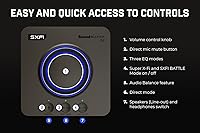
  • Physical volume knob and dedicated source-switching buttons make daily adjustments fast and tactile.
  • USB-C bus-powered design means no wall adapter — one cable gets you fully operational.
  • Settings save directly to the device, so it behaves consistently even on systems without the app installed.
  • Included accessories cover the most common setups right out of the box, with a generous 2-meter USB cable.
  • Competitive FPS-specific modes like Scout and SXFI BATTLE give gamers practical positional audio tools.

Cons

  • Driver stability on Windows can break after system updates, requiring a manual reinstall for some users.
  • Super X-Fi virtual surround is polarizing — a meaningful portion of users find the processing artificial and turn it off.
  • The SXFI mobile app setup process is fiddly, with inconsistent Bluetooth pairing and an uncertain payoff.
  • Full software feature set is largely Windows-only, leaving Mac users and console gamers with reduced functionality.
  • Very sensitive in-ear monitors may pick up a faint idle hiss at higher gain settings.
  • No balanced output limits compatibility with balanced headphone cables or studio monitors.
  • The plastic chassis shows fingerprints and minor surface wear more readily than metal alternatives.
  • Button layout lacks strong tactile differentiation, making accidental presses easy in low-light desk setups.

Ratings

The Creative Sound Blaster X4 has been evaluated by our AI system after scanning thousands of verified global user reviews, with spam, bot-generated, and incentivized feedback actively filtered out. Scores reflect the full picture — where this external sound card genuinely delivers and where real buyers have run into frustration. Both strengths and recurring pain points are weighted transparently into every category below.
Audio Quality
88%
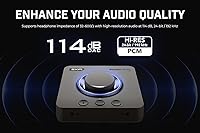
Most users coming from onboard motherboard audio report an immediately audible difference — cleaner background, more defined instrument separation, and a low-noise floor that holds up at high volumes. The 114 dB SNR and 24-bit/192kHz playback translate to a noticeably more composed listening experience with both music and in-game audio.
Seasoned audiophiles who already own a dedicated DAC in a similar or higher price bracket may find the improvement incremental rather than transformative. At very high gain settings, a faint noise floor has been noted by a small number of sensitive listeners using ultra-quiet headphones.
Headphone Amplifier Performance
91%
Driving high-impedance headphones — particularly those in the 250Ω to 600Ω range — is where this unit stands out. Users with demanding studio cans like the Beyerdynamic DT 990 or Sennheiser HD 650 consistently report that the amp stage gives those headphones the power they need to open up fully.
The amp performs best in its intended impedance range. Those using very low-impedance, highly sensitive in-ear monitors have occasionally flagged a faint hiss at idle, which becomes noticeable in quiet listening sessions and is a known trade-off with higher-gain desktop amps.
Surround Sound & Virtualization
74%
26%
For multi-channel speaker setups, 7.1 discrete output works reliably and is appreciated by home theater users who want Dolby Digital Live encoding without an expensive receiver. Competitive FPS gamers using SXFI BATTLE Mode report improved directional awareness for footsteps and environmental cues.
Super X-Fi virtual surround for headphones is genuinely divisive. Some users love the personalized head-tracking profile; others find the processing sounds artificial or over-cooked and simply switch it off. It is a feature that works well for some listeners and not at all for others — expectations need to be managed upfront.
Build Quality & Physical Controls
86%
The volume knob feels solid and precise, which buyers consistently call out as a detail that distinguishes this from cheaper USB audio devices. The unit itself is compact and dense without feeling fragile, and the button layout — with dedicated mic mute, Direct Mode, and source switching — is intuitive after a short learning curve.
The chassis is plastic, which is appropriate for the price tier but does attract fingerprints and minor scuffs over time. A few users noted that the buttons lack tactile feedback differentiation, making it easy to press the wrong one without looking, particularly in dim desk setups.
Connectivity & I/O Options
92%
The addition of an optical-in port compared to the previous X3 model is the single most-praised upgrade among long-term Creative users. Being able to feed audio from a PS5, Xbox, or TV directly into the unit without a PC intermediary opens up genuinely useful real-world setups that rival devices at this price point rarely offer.
There is no balanced output, which limits the unit's appeal for users with balanced headphone cables or balanced studio monitors. The USB-C bus-powered design is convenient for most, but a handful of users on older or lower-powered USB hubs have reported inconsistent power delivery.
Noise Cancellation & Mic Performance
79%
21%
The SmartComms Kit makes a real, practical difference for remote workers. Two-way NoiseClean suppresses both your own background noise and the noise on the other end of a call, and VoiceDetect auto-mute works reliably enough to reduce the awkward fumbling during busy work-from-home environments.
Noise cancellation performance is context-dependent — it handles steady background hum and keyboard clicks well, but struggles more with irregular or loud sudden sounds. A few users also found that heavy noise processing can slightly thin out the natural character of their voice on calls.
Software & Driver Stability
67%
33%
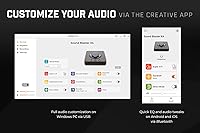
The Creative app on PC covers a wide range of adjustments — EQ, surround configuration, mic settings, and Audio Balance — and most users find it functional and reasonably responsive once set up. Settings can be saved directly to the device, which means the hardware behaves predictably even on systems where the app is not installed.
Driver stability on Windows has been a recurring issue for a meaningful minority of users, with symptoms including audio dropout after sleep or Windows updates breaking the driver. It is not a universal problem, and most users resolve it quickly, but it is a legitimate rough edge that Creative has been slow to fully iron out across driver revisions.
Mobile App & SXFI Setup
61%
39%
The mobile app enables BLE-based SXFI head profile creation, which is a genuinely novel approach to personalizing virtual surround. Users who invest the time in the setup process and find that it works for their hearing profile tend to be enthusiastic about the results.
The onboarding experience for SXFI via the mobile app is widely flagged as clunky — the photo-based head measurement process is fiddly, Bluetooth pairing can be inconsistent, and the payoff is uncertain enough that many buyers simply skip it entirely after one failed attempt.
Gaming Performance
83%
For PC gamers, the combination of Scout Mode, SXFI BATTLE, and Dolby Digital Live gives the X4 a credible feature set that holds up well against dedicated gaming DACs at a similar price. Positional audio in open-world and tactical shooters feels noticeably more spatial than basic stereo output from a headphone jack.
Console gamers are somewhat limited in how much of the gaming-specific software they can access, since the Creative app and SXFI BATTLE features are primarily PC-driven. Optical-in from a console works well for audio passthrough, but the full feature stack is not available without a PC in the chain.
Ease of Setup
82%
18%
Plug-and-play over USB-C works without drivers on both Windows and Mac for basic stereo output, which means getting audio up and running takes under a minute. The included cables — a 2-meter USB-C to USB-A and a 1-meter optical cable — cover the most common connection scenarios right out of the box.
Unlocking the full feature set requires installing the Creative app and, optionally, going through the SXFI mobile setup, which adds meaningful friction. Users who want everything working optimally from day one may find the multi-step software configuration more involved than expected for a plug-in audio device.
Value for Money
78%
22%
At its price point, the combination of a clean DAC, a capable headphone amp, optical I/O, and a communication toolkit is genuinely hard to match with a single competing device. Buyers who were previously using onboard audio almost universally feel the upgrade is well justified by what they hear immediately.
Those comparing it against dedicated DAC/amp combos from specialist audio brands at a similar spend may find the Sound Blaster X4 trades some pure audio fidelity for its broader feature set. If you only need a headphone amp and do not care about surround or comms features, there are more focused options at comparable prices.
Platform Compatibility
81%
19%
Core functionality works reliably across Windows, macOS, and as an audio passthrough device for consoles via optical. Mac users in particular appreciate that basic DAC and headphone amp operation requires no drivers at all, making it a low-friction option for mixed-OS households.
macOS users lose access to several Windows-exclusive features including full SmartComms functionality and some EQ configurations within the app. Console users are similarly restricted to hardware-level features only, which limits the value of the platform if the software suite was part of the buying decision.
Form Factor & Portability
77%
23%
The compact square footprint fits neatly on a crowded desk without dominating the space, and at just under 1.4 pounds it is light enough to pack in a bag for travel use. USB-C bus power means no wall adapter is needed, which makes it genuinely portable for remote working setups.
It is not quite pocketable or discreet enough to be a true travel DAC, and the array of ports on the back makes cable management slightly untidy if you have multiple sources connected simultaneously. Users looking for something truly compact and portable will find more minimal options available elsewhere.

Suitable for:

The Creative Sound Blaster X4 is a strong fit for anyone who has been tolerating onboard motherboard audio and wants a meaningful, all-in-one upgrade without building out a separate audiophile system. PC and Mac users who split their time between music listening, gaming, and video calls will find that this external sound card covers all three use cases from a single compact unit on their desk. Remote workers who deal with noisy home environments will particularly appreciate the two-way noise cancellation, which cleans up both sides of a call rather than just masking your own microphone. Headphone enthusiasts running high-impedance cans — anything in the 250Ω to 600Ω range — get a proper amp stage that many USB devices simply cannot provide. Console gamers who want to route optical audio from a PS5 or Xbox through a quality headphone amp will find the optical-in port makes this a genuinely practical cross-platform hub. Competitive FPS players who rely on positional audio to track opponents will find SXFI BATTLE Mode and Scout Mode give them tools that go beyond basic stereo output.
Not suitable for:

The Creative Sound Blaster X4 is not the right choice for buyers whose sole priority is the cleanest possible audio fidelity, because at this price point dedicated DAC and amp separates from specialist audio brands will outperform it on pure sound quality alone. Listeners who use very sensitive, low-impedance in-ear monitors may notice a faint idle hiss that a quieter, more focused portable DAC would not produce. Users who are deeply invested in the macOS ecosystem should be aware that several key features — including the full SmartComms Kit and certain EQ functions — are Windows-only, which meaningfully reduces the value proposition. Anyone hoping for a truly pocketable, travel-first audio device will find this unit too wide and port-heavy for that role. Buyers who are not comfortable occasionally troubleshooting drivers after a Windows update may find the software side frustrating, since a small but consistent minority of users encounters audio dropout issues that require manual intervention. Finally, those who have no interest in gaming features, surround sound, or communication tools and simply want a no-frills headphone amp will likely find more focused, better-value alternatives at a comparable spend.
Specifications

  • Audio Resolution: Supports hi-res playback at up to 24-bit / 192kHz for both analog and digital outputs.
  • Signal-to-Noise Ratio: Rated at 114 dB SNR, delivering a clean, low-noise audio signal suitable for critical listening.
  • Headphone Amp: Built-in headphone amplifier supports headphone impedances from standard consumer levels up to 600Ω.
  • Surround Support: Outputs 7.1 discrete surround for multi-channel speaker setups and virtual surround for headphones via Super X-Fi.
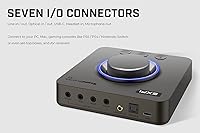
  • Inputs: Equipped with Optical-in, Line-in, and Mic-in ports for connecting a wide range of external audio sources.
  • Outputs: Provides Optical-out, Line-out, and Headset-out connections for speakers, amplifiers, and headphones.
  • Power & Connection: Bus-powered entirely over a single USB-C port — no external power adapter is required.
  • Dolby Digital: Supports Dolby Digital Live encoding for real-time surround sound output to compatible speaker systems.
  • Noise Cancellation: SmartComms Kit includes two-way NoiseClean noise cancellation and VoiceDetect auto-mute for call environments.
  • EQ Modes: Three programmable EQ presets — Music, Movies, and Footsteps — can be customized and saved directly on the device.
  • Companion App: Managed via the Creative app on PC and a BLE-connected mobile app for on-the-go EQ and SXFI adjustments.
  • Dimensions: The unit measures 5.16 x 5.16 x 1.61 inches, giving it a compact square footprint suitable for most desk setups.
  • Weight: Weighs 1.37 pounds, light enough to move between workstations or pack into a laptop bag when needed.
  • Platform Support: Compatible with Windows PC, macOS, and gaming consoles including PlayStation and Xbox via optical connection.
  • In-Box Cables: Includes a 2-meter USB-C to USB-A cable and a 1-meter optical cable, covering the most common connection scenarios immediately.
  • Manufacturer: Designed and manufactured by Creative Labs, a Singapore-based audio hardware company with decades of Sound Blaster heritage.

Related Reviews

Creative Sound Blaster Audigy FX V2
74%
83%
Audio Quality Improvement
89%
Ease of Installation
57%
Software & Driver Experience
74%
Surround Sound Performance
78%
Build Quality & Hardware
More
Creative Sound Blaster Audigy PCIe RX 7.1 Sound Card
84%
88%
Sound Quality
83%
Setup and Installation
76%
Driver Compatibility
85%
Build Quality
92%
Value for Money
More
Creative Sound Blaster X-Fi Titanium
72%
91%
Audio Quality Upgrade vs. Onboard
88%
Gaming Positional Audio
44%
Driver Installation & Setup
39%
Windows 10 / 11 Compatibility
82%
ASIO Recording Performance
More
Creative Sound Blaster Omni Surround 5.1
81%
89%
Audio Quality Improvement
76%
Ease of Installation
82%
Microphone Performance
91%
Physical Controls & Design
84%
Surround Sound Capability
More
Creative Sound Blaster AE-7
80%
93%
Audio Fidelity
91%
Headphone Amplifier Performance
71%
Value for Money
58%
Software Quality
67%
Installation & Compatibility
More
Creative Sound Blaster Play! 4
81%
88%
Audio Quality Upgrade
84%
Microphone Performance
91%
VoiceDetect Auto-Mute
79%
Noise Cancellation (Two-Way)
93%
Plug-and-Play Ease
More
Creative SBS E2900 + Sound Blaster Z SE
76%
88%
Audio Clarity & Fidelity
84%
Bass Performance
91%
Headphone Amplifier Quality
79%
Gaming Audio & Surround
58%
Software & Driver Experience
More
Creative Sound Blaster GS3
83%
94%
Form Factor & Desk Integration
84%
Overall Sound Quality
67%
Bass Performance
91%
Connectivity & Setup
82%
RGB Lighting & Aesthetics
More
Creative Sound Blaster Recon3D SB1350
69%
88%
Audio Quality Improvement Over Onboard
84%
Headphone Amplifier Performance
47%
Driver Compatibility & Installation
81%
Dolby Digital Live Output
73%
Gaming Positional Audio (Scout Mode)
More
Creative Sound Blaster Katana V2X 5.1 Gaming Soundbar
85%
91%
Sound Quality
89%
Bass Performance
78%
Ease of Setup
88%
RGB Lighting Customization
85%
Build Quality
More

FAQ

Yes, for basic stereo audio the X4 is plug-and-play on both Windows and Mac — your operating system recognizes it as a standard USB audio device without any drivers. If you want access to EQ customization, surround configuration, SmartComms, or SXFI features, you will need to install the Creative app separately.

You can connect a PS5 or Xbox to the unit using the optical-in port, which lets you route console audio through the headphone amp — a genuinely useful setup for gaming headphones. Keep in mind that the Creative app and most software features are PC-only, so on consoles you are limited to the hardware-level amp and DAC functions.

Yes, both of those headphones are well within the supported impedance range, and users with exactly those models frequently report strong results. The built-in amp is rated up to 600Ω, so it handles high-impedance studio headphones that a phone jack or typical laptop output would struggle with.

Honestly, it depends on your hearing and your headphones. Some users find the personalized virtual surround convincing and immersive; others find it sounds processed or unnatural and prefer to leave it disabled and use the device as a clean stereo DAC. It is worth trying the setup process once — if it clicks for you, great; if not, the unit is still excellent without it.

The Creative Sound Blaster X4 uses a photo-based head measurement process via the mobile app to create a personalized SXFI profile, which connects over Bluetooth. The setup works reliably for many users, but a meaningful number find the Bluetooth pairing inconsistent or the photo capture process fiddly. If you find it frustrating on the first attempt, it is worth trying once more after a fresh app install before giving up on the feature entirely.

Unfortunately, yes — a subset of Windows users experiences audio dropout or device non-recognition after major Windows updates, and it is a recurring complaint in user reviews. The fix is almost always a clean driver reinstall from the Creative support site, which resolves it for most people. It is an annoying edge case rather than a widespread daily problem, but it is worth knowing about before you buy.

Yes — the Audio Balance feature lets you mix two audio sources simultaneously using the physical volume knob. For example, you can blend USB audio from your PC with optical input from a console or TV, adjusting the balance between them on the fly without touching your computer.

Both sides, which is one of the more useful aspects of the SmartComms Kit. The two-way NoiseClean feature processes incoming audio as well as your outgoing mic signal, so background noise from the other caller is also reduced. It is not perfect in every situation, but for typical work-from-home call environments it makes a noticeable difference.

For standard consumer headphones in the 16Ω to 80Ω range, the output has plenty of headroom and most users listen at well below maximum volume. The amp is primarily designed to benefit high-impedance headphones, but it handles everyday headphones without any issues — you are not forced to use the gain for it to sound good.

The difference is almost always immediately noticeable, particularly with any headphones above mid-tier quality. Onboard audio typically has a higher noise floor, weaker amp output, and more interference from other components inside the chassis. This external sound card isolates the audio circuitry entirely, which translates to a quieter background, better channel separation, and enough power to drive headphones the way they were designed to be heard.