Overview

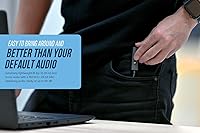
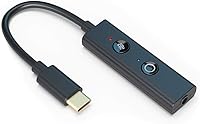
The Creative Sound Blaster Play! 4 is a slim USB-C dongle that does one thing well: it replaces your laptop's mediocre onboard audio with something noticeably cleaner. About the size of a USB drive, this USB sound adapter weighs under two ounces and slips into a bag pocket without a second thought. It works plug-and-play across Windows, Mac, PS4, and PS5 — no driver installation required on most setups. Despite its modest price, it supports 24-bit / 192 kHz hi-res audio, which puts it well above the typical budget accessory crowd. If your built-in headphone jack hisses, crackles, or just sounds flat, this is a practical fix.
Features & Benefits

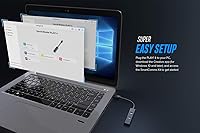
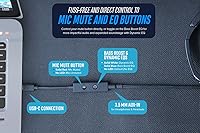
The standout on this external DAC is probably VoiceDetect auto-mute — a feature that senses when you stop talking and mutes the mic automatically, so your coworkers are not treated to keyboard clatter or background noise during pauses. Pair that with two-way noise cancellation and calls on Zoom or Teams genuinely sound more professional. A small hardware button lets you toggle between Bass Boost and Dynamic EQ on the fly, no software needed. The SmartComms Kit app on Windows unlocks additional mic tuning and call management options, though it is Windows-only — Mac users get the plug-and-play basics but not the full feature set. A USB-C to USB-A adapter is included in the box.

Best For

This USB sound adapter is a strong fit for remote workers who spend their day on video calls and want cleaner mic audio without buying a full-blown interface. Laptop users who have dealt with hiss or interference on their built-in headphone jack will notice an immediate difference. It also works well for console gamers — PS4 and PS5 support is built in, so you can use any standard headset without a separate mixer or amp. Commuters and frequent travelers will appreciate how little space it takes up. And if your desktop PC motherboard audio just does not cut it for headphone listening, this is a low-friction upgrade that does not require opening a case.

User Feedback

Across over a thousand ratings, the Play! 4 dongle holds a solid 4.2-star average, and the themes in buyer reviews are fairly consistent. The auto-mute feature draws frequent praise — people using it daily on Teams or Zoom calls say it makes a real difference in how polished they sound. On the downside, a handful of users have noted the dongle gets slightly warm during long sessions, though no one flags it as a serious concern. Mac owners should know upfront that the companion software does not run on macOS, so some advanced controls are unavailable. The combo 3.5mm jack is also worth noting if your headset uses separate mic and headphone plugs — you would need an additional adapter.

Pros

  • Immediately eliminates the hiss and interference common in built-in laptop audio jacks.
  • VoiceDetect auto-mute keeps meetings clean without any manual button-pressing during pauses.
  • Plug-and-play setup works out of the box on Windows, Mac, PS4, and PS5 — no driver hunting required.
  • At under two ounces, the Play! 4 dongle disappears into any bag or pocket without adding bulk.
  • Two-way noise cancellation makes both your voice and incoming audio cleaner on everyday calls.
  • The hardware EQ button lets you switch sound profiles instantly, even without opening any software.
  • Includes a USB-C to USB-A adapter so it works on both modern and older laptops right away.
  • SmartComms Kit on Windows gives power users meaningful control over mic sensitivity and call audio.
  • A strong ranking in its category and a high volume of positive reviews signal reliable real-world performance.
  • Works with PS4 and PS5 headsets without needing a separate mixer or console audio device.

Cons

  • Mac users lose access to the companion software, leaving key features like VoiceDetect tuning unavailable.
  • The combo 3.5mm jack requires a separate TRRS splitter for headsets with split mic and headphone plugs.
  • The dongle can run noticeably warm after several consecutive hours of use.
  • Noise cancellation handles moderate ambient noise well but struggles in genuinely loud environments.
  • The USB-C connector may loosen with heavy daily plug-and-unplug cycles over a long period.
  • No official support for Android or iOS limits usefulness for mobile-first or tablet-based workflows.
  • Only two hardware EQ presets — no granular tuning without the Windows-only software.
  • High-impedance headphones may not reach satisfying volume levels from the onboard output stage.

Ratings

The Creative Sound Blaster Play! 4 has been put through its paces by our AI rating system, which analyzed thousands of verified global buyer reviews while actively filtering out incentivized, bot-generated, and spam feedback. The scores below reflect where this USB sound adapter genuinely shines and where real users have run into friction — no sugarcoating, no inflated numbers. Both the strengths and the legitimate frustrations are baked into every category score you see here.

Audio Quality Upgrade
88%
Users coming from built-in laptop audio consistently describe the improvement as immediate and obvious — cleaner highs, less background hiss, and a noticeably wider soundstage for music and movies. The 24-bit / 192 kHz support means even discerning listeners get more than they expect at this price tier.
Seasoned audiophiles with high-impedance headphones may find the output power adequate but not exceptional. It is a meaningful step up from onboard audio, not a replacement for a dedicated desktop DAC amp.
Microphone Performance
84%
On video calls, the mic output is markedly cleaner than what most laptop mics deliver. Users in home offices with moderate ambient noise report that colleagues notice the difference on Zoom and Teams without any manual tweaking.
In noisy environments — open offices, cafes, households with kids — the mic still picks up some background chatter. The noise cancellation is effective for everyday call conditions but is not designed for broadcast or studio-level isolation.
VoiceDetect Auto-Mute
91%
This feature is the most talked-about aspect in user reviews by a wide margin. Remote workers love that it cuts mic input automatically during pauses, so typing, coughing, or background noise does not bleed into meetings without any manual intervention.
A small number of users report occasional sensitivity mismatches — very soft-spoken users sometimes trigger the mute threshold unintentionally during natural speech pauses. Adjusting sensitivity via the SmartComms app helps, but that option is Windows-only.
Noise Cancellation (Two-Way)
79%
21%
Both outgoing and incoming audio benefit from the noise cancellation, which is a genuine differentiator at this price point. Users on calls in moderately noisy spaces — home kitchens, shared apartments — say incoming audio is noticeably cleaner than through their laptop speakers.
The cancellation is competent rather than aggressive. It will not suppress loud HVAC systems or persistent street noise to a professional standard. Buyers expecting ANC headphone-level isolation will be disappointed.
Plug-and-Play Ease
93%
Across Windows, Mac, PS4, and PS5, users report the adapter is recognized instantly with no driver installation needed. For non-technical buyers who just want better audio without setup headaches, this aspect draws consistent praise in reviews.
A small subset of Linux users and older macOS versions report occasional recognition issues, though these are edge cases. The experience on the four officially supported platforms is reliably smooth.
Software (SmartComms Kit)
61%
39%
On Windows 10 and above, the SmartComms Kit adds genuinely useful layers of control — mic EQ, call enhancement modes, and VoiceDetect sensitivity tuning. Power users who spend the time configuring it get noticeably better results than out-of-the-box defaults.
The software is Windows-exclusive, which is a real limitation for Mac users who get a stripped-down experience. Even on Windows, some users describe the interface as dated and occasionally clunky compared to modern audio software.
Build Quality & Durability
74%
26%
The dongle feels solid enough for daily carry — it is not flimsy or cheap-feeling despite its lightweight construction. Most buyers who use it regularly in a bag or laptop case report no physical wear issues over months of use.
The plastic casing does not inspire premium confidence, and a few long-term users report the USB-C connector becoming slightly loose after extended daily plug-and-unplug cycles. It is durable for its category but not built to last years of rough handling.
Portability
94%
At under two ounces and smaller than most USB drives, this external DAC disappears into any bag or even a shirt pocket. Frequent travelers and commuters rate it highly specifically because it adds zero meaningful bulk to a daily carry setup.
The included USB-C to USB-A adapter is a small but necessary extra piece to keep track of. Losing it limits compatibility with older ports, and replacements add minor friction for users who travel light.
Value for Money
89%
For an accessory in this price bracket, the feature set is genuinely hard to argue with. Buyers frequently note that the auto-mute and noise cancellation features alone would justify the cost, making the audio quality upgrade feel like a bonus.
A handful of users feel the Mac experience — without software support — represents a weaker value proposition for Apple users specifically. For Windows-centric setups, the value equation is strong; for Mac users, it is more situational.
EQ & Sound Customization
72%
28%
The hardware EQ button is a practical touch — being able to switch between Bass Boost and Dynamic EQ without opening an app is convenient during gaming sessions or when switching between music and calls. Most users find the Bass Boost mode genuinely adds warmth.
Two preset modes is a limited palette for anyone who wants granular control. The Dynamic EQ can occasionally feel over-processed on certain headphone types, and there is no way to fine-tune the presets without the Windows-only software.
Headphone Jack Compatibility
66%
34%
The integrated 3.5mm jack handles standard headphones and combo headsets cleanly, which covers the majority of use cases. Users with modern gaming headsets and standard earbuds report no issues with fit or audio output levels.
The combo jack design means users with headsets that have separate mic and headphone plugs need a TRRS splitter adapter, which is not included. This is a legitimate friction point flagged by enough reviewers to be worth noting before buying.
Thermal Performance
71%
29%
Under typical daily use — a few hours of calls and music — the dongle stays at a perfectly comfortable temperature. Most users never notice any heat at all during normal workday sessions.
During extended use of four or more continuous hours, a minority of users report the adapter becoming warm to the touch. It has not been flagged as a safety concern, but it is noticeable enough that some users prefer to disconnect it between calls.
Platform & Device Compatibility
87%
Windows, macOS, PS4, and PS5 support covers a wide range of real-world setups without any extra configuration. Console gamers in particular appreciate being able to use a quality headset on PS5 without investing in a full audio interface.
Official Android and iOS support is absent, which limits usefulness for mobile-first users. Compatibility with USB-C smartphones and tablets is hit-or-miss depending on the device, and Creative does not officially support those configurations.

Suitable for:

The Creative Sound Blaster Play! 4 is a near-perfect fit for remote workers who spend a significant portion of their day on video calls and are tired of sounding like they are speaking through a tin can. If your laptop's built-in audio jack produces audible hiss, interference, or just thin, flat sound, this USB sound adapter addresses that problem immediately and without any technical setup. It is equally well-suited to PS4 and PS5 gamers who want to use a standard headset without investing in a full mixer or dedicated console audio interface. Frequent travelers and commuters will appreciate that it weighs almost nothing and takes up no meaningful space in a bag. Windows users in particular get the most complete experience, since the SmartComms Kit software unlocks mic tuning, call enhancement, and VoiceDetect sensitivity controls that make the adapter genuinely smarter over time. Even desktop PC users with noisy or underpowered motherboard audio outputs will find this a low-hassle, low-cost fix that does not require opening a case or installing a sound card.

Not suitable for:

Buyers expecting studio-grade noise isolation or broadcast-quality microphone output should look elsewhere — the Creative Sound Blaster Play! 4 is a practical call and listening upgrade, not a professional audio interface. Mac users should go in with realistic expectations: the hardware works fine for plug-and-play audio, but the SmartComms Kit software does not run on macOS, which means the VoiceDetect sensitivity tuning, advanced mic controls, and call enhancement modes are simply unavailable on Apple machines. If your headset uses separate 3.5mm plugs for mic and headphones rather than a single combined TRRS connector, you will need a splitter adapter that is not included in the box. People who need to power high-impedance audiophile headphones — anything above roughly 150 ohms — may find the output stage adequate but not satisfying for critical listening at volume. And if you are hoping to use this adapter with an Android phone or iPad as your primary device, official support is absent and real-world compatibility is inconsistent enough to make it a gamble.
Specifications

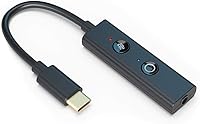
  • Audio Resolution: Supports 24-bit / 192 kHz hi-res audio playback for noticeably cleaner sound than standard onboard audio.
  • SNR: Signal-to-noise ratio of 110 dB delivers a quiet audio background with minimal hiss or interference.
  • Connector: USB-C interface with a USB-C to USB-A adapter included in the box for compatibility with older laptops and desktops.
  • Headphone Jack: Single 3.5mm combo jack supports both headphones and headsets using a TRRS connector standard.
  • Dimensions: Measures 5.43 x 0.63 x 0.31 inches, making it small enough to fit in a shirt pocket or keychain pouch.
  • Weight: Weighs 1.59 oz, adding negligible bulk to any bag or travel kit.
  • Power Source: Bus-powered via USB-C, requiring no external power supply or batteries.
  • Platform Support: Compatible with Windows 10 and above, macOS Mojave 10.14 and above, PlayStation 4, and PlayStation 5.
  • EQ Modes: Hardware EQ button toggles between two onboard presets: Bass Boost and Dynamic EQ, accessible without any software.
  • Noise Cancellation: Two-way noise cancellation processes both outgoing mic audio and incoming playback audio to reduce ambient interference during calls.
  • VoiceDetect: VoiceDetect technology automatically mutes the microphone when the user stops speaking and unmutes when speech resumes.
  • Mute Button: Dedicated hardware mute button allows direct, instant mic muting without navigating software or call app controls.
  • Companion Software: Creative SmartComms Kit software is available for Windows 10 and above only, providing advanced mic and call audio controls.
  • Microphone Input: Accepts microphone input via the shared 3.5mm TRRS combo jack; separate mic-only jacks are not supported.
  • BSR Ranking: Ranked #45 in the External Sound Cards category on Amazon at the time of review, indicating strong sustained market performance.

Related Reviews
Creative Sound Blaster Audigy FX V2
74%
83%
Audio Quality Improvement
89%
Ease of Installation
57%
Software & Driver Experience
74%
Surround Sound Performance
78%
Build Quality & Hardware
More
Creative Sound Blaster Audigy PCIe RX 7.1 Sound Card
84%
88%
Sound Quality
83%
Setup and Installation
76%
Driver Compatibility
85%
Build Quality
92%
Value for Money
More
Creative Sound Blaster X4
80%
88%
Audio Quality
91%
Headphone Amplifier Performance
74%
Surround Sound & Virtualization
86%
Build Quality & Physical Controls
92%
Connectivity & I/O Options
More
Creative Sound Blaster X-Fi Titanium
72%
91%
Audio Quality Upgrade vs. Onboard
88%
Gaming Positional Audio
44%
Driver Installation & Setup
39%
Windows 10 / 11 Compatibility
82%
ASIO Recording Performance
More
Creative Sound Blaster AE-7
80%
93%
Audio Fidelity
91%
Headphone Amplifier Performance
71%
Value for Money
58%
Software Quality
67%
Installation & Compatibility
More
Creative Sound Blaster Omni Surround 5.1
81%
89%
Audio Quality Improvement
76%
Ease of Installation
82%
Microphone Performance
91%
Physical Controls & Design
84%
Surround Sound Capability
More
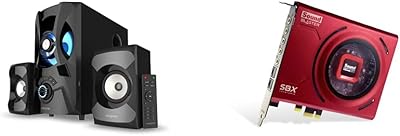
Creative SBS E2900 + Sound Blaster Z SE
76%
88%
Audio Clarity & Fidelity
84%
Bass Performance
91%
Headphone Amplifier Quality
79%
Gaming Audio & Surround
58%
Software & Driver Experience
More
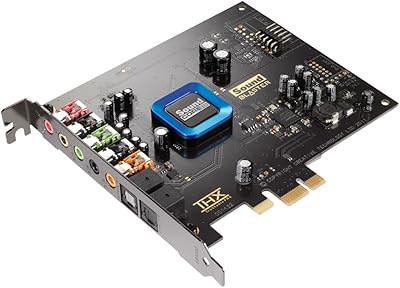
Creative Sound Blaster Recon3D SB1350
69%
88%
Audio Quality Improvement Over Onboard
84%
Headphone Amplifier Performance
47%
Driver Compatibility & Installation
81%
Dolby Digital Live Output
73%
Gaming Positional Audio (Scout Mode)
More
Creative Sound Blaster GS3
83%
94%
Form Factor & Desk Integration
84%
Overall Sound Quality
67%
Bass Performance
91%
Connectivity & Setup
82%
RGB Lighting & Aesthetics
More
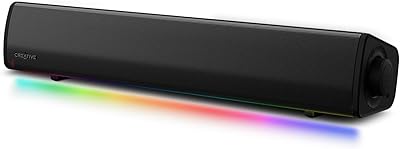
Creative Sound Blaster Katana V2X 5.1 Gaming Soundbar
85%
91%
Sound Quality
89%
Bass Performance
78%
Ease of Setup
88%
RGB Lighting Customization
85%
Build Quality
More

FAQ

On most systems, no. The adapter works plug-and-play on Windows, Mac, PS4, and PS5 — your operating system recognizes it as a standard USB audio device automatically. The optional SmartComms Kit software is available for Windows users who want extra control, but it is not required to get audio working.

Yes, the hardware itself is plug-and-play compatible with macOS Mojave and later. The important caveat is that the SmartComms Kit companion software does not run on macOS, so features like VoiceDetect sensitivity adjustment and advanced mic controls are unavailable on Apple machines. Basic audio input and output work fine without it.

Not directly. The adapter has a single combo 3.5mm jack that follows the TRRS standard, which combines mic and headphone into one plug. If your headset uses two separate 3.5mm connectors, you will need a TRRS splitter adapter to use both functions. That splitter is not included in the box.

For moderate background noise — a fan, light street noise, a quiet household — yes, it does a solid job on calls. It is not designed to suppress loud or persistent noise like a crowded open-plan office or a busy coffee shop. Think of it as a meaningful improvement over no noise cancellation, not a replacement for a soundproofed room.

The adapter listens for the presence of speech. When you stop talking for a moment, it mutes the mic automatically so background sounds do not bleed into the call. When you start speaking again, it unmutes instantly. Most users find it works reliably in everyday conditions, though very soft-spoken users occasionally find the sensitivity threshold a bit aggressive — that can be tuned in the Windows software.

Yes, it is officially supported on both PS4 and PS5. Simply plug it into the console's USB port using the included USB-A adapter, connect your headset to the 3.5mm jack, and the system should recognize it. It is a practical way to use a quality headset without buying a dedicated console audio mixer.

There is no official support for iOS or Android. Some users report that it works with certain USB-C Android phones, but compatibility is inconsistent enough that Creative does not officially back it for mobile use. If smartphone audio is your primary need, this adapter is not the safest bet.

Under normal use of a few hours, it stays cool. During extended sessions of four or more continuous hours, a small number of users have noticed it becomes warm to the touch — not dangerously hot, but noticeable. If you run long all-day call schedules, it is worth being aware of, though it has not been reported as a reliability issue.

Bass Boost adds warmth and low-end weight, which works well for music and gaming audio. Dynamic EQ applies a broader equalization curve that balances frequencies more evenly, which tends to suit voice calls and mixed-use listening better. You can switch between the two with a single button press without opening any app.

If your current jack is already quiet and interference-free, the improvement will be subtler — mostly in audio resolution and headphone dynamics. Where the USB sound adapter really earns its keep is the call-focused features: the auto-mute, noise cancellation, and hardware mute button are genuinely useful additions that a clean built-in jack still cannot provide.