Overview

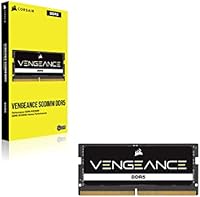
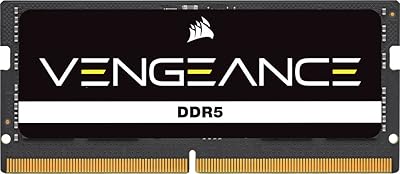
The Corsair Vengeance SODIMM DDR5 16GB Laptop RAM has been on the market since April 2022, long enough to build a solid real-world reputation beyond launch-day buzz. Corsair is one of the most recognized names in consumer memory, and this module sits at entry-level DDR5 speeds — 4800MHz with CL40-40-40-77 timings. That is the baseline spec for this generation, not an overclocked or XMP-tuned variant, so set expectations accordingly. What you get is a well-built, standard-speed module from a brand that has earned trust over decades, not a boutique enthusiast stick chasing headline numbers.

Features & Benefits

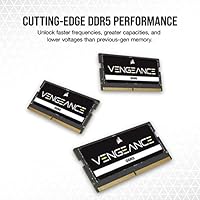
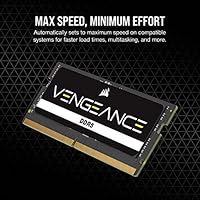
One of the more practical aspects of this DDR5 SODIMM module is how little setup it demands. Drop it into a compatible slot and it runs at its rated 4800MHz automatically — no BIOS digging required. Running at just 1.1V, it draws less power than equivalent DDR4 sticks, which matters on a laptop where battery life counts. The SODIMM form factor — distinct from the full-size DIMM used in desktops — fits a wide range of Intel and AMD laptops as well as compact systems like Intel NUC kits. Buying a single 16GB stick also leaves one slot open, giving you a clear future upgrade path to dual-channel without replacing what you already own.

Best For

This Corsair laptop RAM is best suited to practical upgraders rather than hardcore overclockers. If you just bought a DDR5-compatible laptop and want to boost its memory without brand roulette, this is a sensible choice. Students and content creators running multiple browser tabs, editing tools, and office apps will see real benefit from the bump to 16GB. It also works well for small-form-factor PC builders who specifically need SODIMM — just confirm your board or NUC kit is DDR5-compatible before buying. Starting with one stick now and adding a matching module later for dual-channel performance is a completely valid and cost-effective strategy.

User Feedback

With over 2,300 ratings averaging 4.7 stars and a top-25 ranking in Computer Memory on Amazon, this memory upgrade clearly resonates with a wide buyer base. Most positive feedback centers on straightforward installation — buyers report the module is recognized immediately without fiddling with settings, and stable daily operation is a recurring theme. On the critical side, a small number of users have flagged issues with specific laptop models or older BIOS versions not playing well with DDR5 at stock speeds. A handful also note that the real-world speed gain over DDR4 is noticeable but not dramatic for everyday tasks — which, frankly, is honest and expected at this speed tier.

Pros

  • Installs in minutes with no BIOS configuration needed — the system recognizes it at full speed automatically.
  • Corsair is a well-established brand with years of quality control and memory expertise behind it.
  • Running at just 1.1V, this DDR5 SODIMM module draws less power than DDR4, which can help with laptop thermals and battery draw.
  • The single-stick configuration leaves a slot free, making future upgrades to dual-channel straightforward and affordable.
  • Compatible with a broad range of Intel and AMD laptops, as well as compact systems like Intel NUC kits.
  • Over 2,300 buyer ratings averaging 4.7 stars signals consistent real-world satisfaction, not just launch hype.
  • Buyers consistently report stable, trouble-free operation over extended daily use.
  • Physical installation is simple — most laptops only require a screwdriver and a few minutes.

Cons

  • 4800MHz is the slowest end of the DDR5 speed range — faster kits at 5600MHz or higher are available for not much more.
  • CL40 latency timings are relatively loose for DDR5, which can matter in latency-sensitive workloads.
  • A single-channel stick delivers noticeably less memory bandwidth than a matched dual-channel configuration.
  • A small number of users have reported compatibility issues with certain laptop models or specific BIOS firmware versions.
  • Real-world performance gains over DDR4 are modest for general tasks — do not expect a dramatic transformation.
  • No XMP or overclocking support on laptop platforms means you cannot push the speed beyond its rated spec.
  • Only available as a single 16GB module, so users needing 32GB must buy two units separately, raising the total cost.
  • The black PCB design, while clean, lacks any heatspreader — though laptops rarely have the clearance for one anyway.

Ratings

The Corsair Vengeance SODIMM DDR5 16GB Laptop RAM has been put through its paces by thousands of real buyers worldwide, and our AI rating engine has analyzed that verified purchase feedback — actively filtering out incentivized reviews, bot activity, and outlier spam — to produce the scores below. The results reflect an honest picture: where this memory upgrade genuinely delivers and where it falls short for specific buyer needs.

Ease of Installation
93%
Buyers across a wide range of laptop models consistently describe installation as one of the smoothest memory upgrades they have done — a screwdriver, a few minutes, and the system boots straight into full speed. There is no BIOS configuration step, no manual profile selection, nothing extra to do.
A small number of users with slim ultrabooks noted that accessing the SODIMM slot required removing more screws than expected, and a few encountered tight retention clips. These are laptop-design issues rather than problems with the module itself, but they are worth anticipating.
System Compatibility
81%
19%
The module works reliably across a broad spread of Intel and AMD DDR5 laptops released from late 2021 onward, and most buyers report it is recognized immediately at the correct speed without any fuss. Compatibility with Intel NUC kits is also well-documented in user reports.
A recurring thread in negative feedback involves specific laptop models — particularly certain configurations from major OEMs — where the module either failed to initialize at 4800MHz or triggered boot errors until a BIOS update was applied. Not a widespread issue, but frequent enough to warrant double-checking your BIOS version before installing.
Real-World Performance
74%
26%
Users coming from 8GB DDR4 configurations notice a meaningful difference in multitasking headroom — fewer slowdowns when switching between a browser with many tabs, a video call, and a productivity app simultaneously. For students and everyday professionals, the upgrade feels impactful.
Buyers who specifically wanted a DDR5 speed boost over their existing DDR4 setups were sometimes underwhelmed, noting that 4800MHz is entry-level DDR5 and the raw bandwidth gain over fast DDR4 is not always dramatic in day-to-day tasks. Single-channel operation also limits peak bandwidth compared to a matched pair.
Value for Money
79%
21%
At its price point, this Corsair laptop RAM sits comfortably in the mid-range of the DDR5 SODIMM market, offering a trusted brand name and Corsair's tested reliability without the premium charged for faster speed bins. For buyers who just need a dependable 16GB stick, the cost-to-confidence ratio is solid.
Competing no-name or lesser-known brands offer 4800MHz DDR5 SODIMM modules at a lower price, which puts some pressure on the value argument. Buyers who prioritize pure cost efficiency over brand assurance may find better deals elsewhere, though they trade away Corsair's warranty and quality screening.
Long-Term Stability
88%
The dominant theme across long-term owner reviews is rock-solid daily reliability. Users who have been running this memory upgrade for a year or more report no crashes, no memory errors, and no degradation in system behavior — which is exactly what you want from a component you never want to think about again.
The small cohort of users who experienced incompatibility issues also reported those issues persisting even after BIOS updates in rare cases, ultimately requiring a return. These instances appear to be genuine edge cases, but they do exist and slightly temper an otherwise strong stability story.
Speed Rating Accuracy
86%
In the vast majority of tested systems, the module does exactly what it claims — boots at 4800MHz without any user intervention, and benchmark tools confirm it is running at its rated spec. The auto-configuration behavior is reliable rather than theoretical.
On a handful of platforms, particularly some AMD-based laptops with older firmware, the module defaulted to a lower JEDEC speed instead of 4800MHz until the BIOS was updated. It is a fixable situation, but it requires some technical confidence to diagnose and resolve.
Build & Physical Quality
83%
The PCB feels solid and the gold contacts are clean and well-finished on every unit buyers have described. There are no reports of bent pins, physical defects out of the box, or flimsy construction — which is the baseline expectation from Corsair and is consistently met here.
There is no heatspreader, which is expected for a laptop SODIMM but leaves some buyers feeling the module looks plain compared to desktop enthusiast RAM. This is purely cosmetic and irrelevant to performance inside a closed laptop chassis.
Packaging & Delivery Condition
77%
23%
Most buyers receive the module in a standard anti-static clamshell package that keeps it protected during transit. The packaging is minimal, which is appropriate for a component that does not need anything beyond protection from static and physical damage.
A small number of buyers reported receiving units in damaged outer packaging — though the module inside was unharmed — and a few noted the absence of any installation guide, which can unsettle first-time RAM upgraders even if the process is genuinely simple.
Power Efficiency
84%
Running at 1.1V, this DDR5 SODIMM module draws less power than equivalent DDR4 sticks, and laptop users report it runs noticeably cooler under sustained workloads. For those using a laptop unplugged for extended periods, the reduced memory power draw is a genuine, if incremental, benefit.
The efficiency advantage over DDR4 is real but modest in practical terms — users hoping for a noticeable battery life extension will be disappointed. Memory power consumption is a small fraction of overall system draw, so the real-world impact on runtime is minor.
Upgrade Path Flexibility
81%
19%
Buying a single 16GB stick is a deliberate strategy for many users who want to leave the second slot open, and it works well in practice — adding a second identical module later is straightforward and immediately enables dual-channel operation for improved bandwidth.
Running a single stick in single-channel mode does leave memory bandwidth on the table, and users who care about maximum throughput for GPU-integrated graphics tasks will notice the difference. It is an intentional trade-off, but one worth understanding before committing to a single-stick purchase.
Brand Trust & Support
87%
Corsair's reputation carries real weight here — buyers who have previously owned Corsair products express confidence in the brand, and the lifetime limited warranty is cited as a meaningful purchase factor. The support experience, when needed, is generally described as competent and accessible.
A few users noted that Corsair's warranty claim process required more documentation and waiting time than they expected. The warranty itself is strong on paper, but the speed of resolution is not always consistent across regions.
Latency Performance
63%
37%
CL40 timings are standard for 4800MHz DDR5 SODIMM modules, and for the workloads most laptop users run, the latency difference versus tighter-timed kits is imperceptible in practice. General-purpose computing is not particularly latency-sensitive.
For users who research memory specifications closely, CL40 is on the looser end of what DDR5 SODIMM can offer, and faster kits at similar speeds with tighter primaries do exist. Competitive gamers or users running latency-sensitive applications may find this a meaningful limitation.
Documentation & Setup Guidance
58%
42%
For experienced users, there is genuinely nothing to set up — the module auto-configures and the process is self-explanatory. Corsair's website also provides a compatibility checker tool that helps buyers confirm fit before purchasing.
First-time RAM upgraders frequently mention that the included documentation is minimal, and there is no printed quick-start guide in the box. Buyers who are unfamiliar with SODIMM installation or DDR5 compatibility nuances are largely left to find guidance through third-party videos or forums.

Suitable for:

The Corsair Vengeance SODIMM DDR5 16GB Laptop RAM is a strong fit for anyone who has recently purchased a DDR5-compatible laptop and wants a no-fuss memory upgrade from a brand with a proven track record. Students juggling research tabs, video calls, and document editing will find 16GB more than adequate for daily workloads, and the module installs without any technical configuration headaches. Content creators who do light video editing or photo work on a laptop — rather than a full workstation — will appreciate the reliability and the headroom that 16GB provides over a stock 8GB configuration. It also suits buyers who prefer to start with a single stick and leave the second slot open for a future capacity expansion, rather than committing to 32GB upfront. Small-form-factor PC builders and Intel NUC users who specifically require a SODIMM — not a standard desktop DIMM — will find this module physically compatible and practically effortless to deploy.
Not suitable for:

The Corsair Vengeance SODIMM DDR5 16GB Laptop RAM is not the right pick for enthusiasts chasing peak memory performance, since 4800MHz with CL40 timings sits at the lower end of the DDR5 speed spectrum and cannot be pushed further through overclocking or XMP profiles on a laptop platform. Gamers or power users who want to maximize frame rates or run memory-intensive workloads — 3D rendering, large dataset processing, high-resolution video editing — would be better served by faster DDR5 kits at 5600MHz or beyond, if their system supports them. Buyers who already have a DDR4 laptop should not purchase this module expecting it to be compatible; DDR5 and DDR4 are physically and electrically incompatible, so confirm your machine specifically supports DDR5 SODIMM before ordering. Those who need more than 16GB immediately for professional workloads like virtualization or large-scale compilation should consider purchasing a matched 2x16GB dual-channel kit from the start, as dual-channel memory provides meaningfully better bandwidth than a single stick running alone.
Specifications

  • Brand: Manufactured by Corsair, a well-established name in consumer and enthusiast memory since the 1990s.
  • Series: Part of the Vengeance SODIMM DDR5 line, designed specifically for laptops and compact systems.
  • Model Number: The official model identifier is CMSX16GX5M1A4800C40, used for warranty and compatibility verification.
  • Capacity: Comes as a single 16GB module, leaving a second SODIMM slot free for a future upgrade if needed.
  • Memory Type: Uses DDR5 SDRAM technology, the current-generation standard offering improved efficiency over DDR4.
  • Form Factor: SODIMM form factor measures 2.76 x 1.18 x 0.12 inches, designed for laptops and small-form-factor systems — not desktop motherboards.
  • Speed: Rated at 4800MHz, which is the base-level speed tier for DDR5 and the standard across most entry DDR5 systems.
  • Latency Timings: Operates at CL40-40-40-77, which are typical primary timings for 4800MHz DDR5 SODIMM modules.
  • Voltage: Runs at 1.1V, drawing less power than DDR4 modules and contributing to lower heat output in laptop environments.
  • Auto Configuration: Automatically initializes at its rated 4800MHz speed on compatible systems without requiring any manual BIOS adjustment.
  • Compatibility: Works with a broad range of Intel and AMD DDR5-compatible laptops, small-form-factor PCs, and Intel NUC kits.
  • Color: Features a plain black PCB with no heatspreader, keeping the profile compact enough for slim laptop chassis.
  • Weight: Weighs just 0.352 ounces, making it negligible in terms of any impact on a laptop's overall weight.
  • Release Date: First made available in April 2022, giving it a mature market history and a well-established reliability record.
  • Overclocking: No XMP or overclocking support is available on laptop SODIMM platforms, so the module runs strictly at its rated 4800MHz spec.

Related Reviews

Crucial 16GB DDR5 5600MHz SODIMM Laptop RAM
89%
94%
Performance for Multitasking
90%
Gaming Performance
88%
Compatibility with Intel Systems
87%
Compatibility with AMD Systems
92%
Power Efficiency (Voltage)
More
Corsair Vengeance SODIMM DDR5 32GB 5600MHz RAM
87%
92%
Performance
89%
Installation Ease
90%
Value for Money
91%
Compatibility
85%
Battery Efficiency
More
A-Tech 16GB DDR5 4800MHz SODIMM RAM
88%
91%
Performance Boost
95%
Ease of Installation
88%
Energy Efficiency
85%
Compatibility with Laptop Systems
92%
Value for Money
More
Crucial 16GB DDR5 4800MHz Laptop RAM
86%
89%
Performance Improvement
93%
Ease of Installation
88%
Multitasking Performance
91%
Compatibility with 12th Gen Intel & AMD Ryzen 7000
86%
Gaming Performance
More
Samsung 16GB DDR5 5600MHz SODIMM RAM
86%
93%
Performance
90%
Installation Ease
88%
Power Efficiency
85%
System Compatibility
91%
Value for Money
More
Corsair Vengeance RGB DDR5 16GB 5600MHz
89%
92%
Performance for Gaming
89%
Overclocking Stability
88%
RGB Lighting Customization
95%
Setup & Installation
91%
Compatibility with Intel & AMD
More
Corsair Vengeance RGB DDR5 16GB 5200MHz
87%
91%
Performance
89%
RGB Lighting Customization
92%
Ease of Installation
86%
Overclocking Stability
84%
Price-to-Performance Ratio
More
Corsair Vengeance SODIMM DDR5 32GB 4800MHz
88%
92%
Performance for Gaming
88%
Performance for Multitasking
94%
Ease of Installation
85%
Power Efficiency
83%
Value for Money
More
A-Tech 128GB DDR5 5200MHz SODIMM Laptop RAM
88%
93%
Performance
88%
Compatibility with Laptops
91%
Ease of Installation
95%
Multitasking Performance
86%
Energy Efficiency (1.1V)
More
Adamanta 16GB DDR4 2400MHz SODIMM Laptop RAM
83%
85%
Performance
92%
Value for Money
89%
Ease of Installation
88%
Compatibility
80%
Power Efficiency
More

FAQ

No — DDR4 and DDR5 are electrically and physically incompatible, so you cannot install a DDR5 module in a DDR4 slot. Before buying, check your laptop's specifications to confirm it has a DDR5 SODIMM slot. A quick look at your manufacturer's product page or the system manual will tell you definitively.

In most cases, no. This Corsair laptop RAM is designed to initialize at its rated 4800MHz automatically when inserted into a compatible system. You should not need to enter the BIOS at all for a standard installation.

No, and this is a common source of confusion. SODIMM modules are physically shorter than standard desktop DIMMs and are designed exclusively for laptops, compact PCs, and some Intel NUC kits. A desktop DDR5 DIMM will not fit in a laptop slot, and vice versa.

It depends on your budget and how you use your machine. A single 16GB stick running in single-channel is perfectly fine for general use, web browsing, and productivity tasks. However, if you do memory-intensive work like video editing or gaming, two matched sticks running in dual-channel will provide noticeably better memory bandwidth. The Corsair Vengeance SODIMM DDR5 16GB Laptop RAM is designed so you can add a second identical module later to enable dual-channel without replacing anything.

The best way is to check your laptop's service manual or the manufacturer's spec sheet, which will tell you how many SODIMM slots are present and whether any are populated from the factory. Some ultrabooks have memory soldered directly to the motherboard with no slots at all, so confirm upgradability before purchasing any RAM.

For everyday tasks — productivity, browsing, light creative work, and most gaming — 4800MHz is entirely sufficient. If you are running workloads that are heavily bandwidth-dependent, faster DDR5 options at 5600MHz or above exist and may offer a measurable improvement. For most buyers, though, the speed difference in day-to-day use is not dramatic enough to justify the premium.

For most laptops, a standard Phillips-head screwdriver is all you need to remove the access panel and install the module. The memory stick itself clicks into the slot at an angle and locks down with gentle pressure — no force required.

Corsair provides a limited lifetime warranty on their Vengeance SODIMM DDR5 memory modules. For specific warranty terms and the claims process, it is best to check Corsair's official support page directly, as conditions can vary by region.

Yes, provided the Intel NUC or mini PC in question uses DDR5 and has SODIMM slots — which most compact systems in that category do. Always verify the specific model's memory specification before buying, since some NUC generations use DDR4 rather than DDR5.

The general consensus across a large number of verified purchases is very positive — users consistently highlight trouble-free installation and stable long-term operation. The most common criticism involves edge-case compatibility issues with certain laptop models or specific BIOS firmware versions that did not immediately recognize the module at full speed. Updating the BIOS before installation resolves this in most reported cases.

Where to Buy