Overview

The Corsair Vengeance RGB 48GB DDR5 RAM is a dual-channel kit aimed squarely at enthusiast Intel 700 series desktop builders who want serious performance without stepping up to an unwieldy 64GB configuration. The 48GB (2x24GB) capacity hits an interesting middle ground — enough headroom for demanding workloads, but without the cost premium of a full 64GB setup. Running at 7200MHz, it sits near the top of what consumer DDR5 can offer right now. Corsair's Vengeance RGB line has long been a go-to for builders who care about both looks and reliability, and this kit continues that tradition. Be clear though: if your PC handles basic tasks, this is overkill.
Features & Benefits

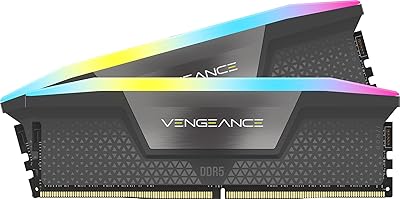
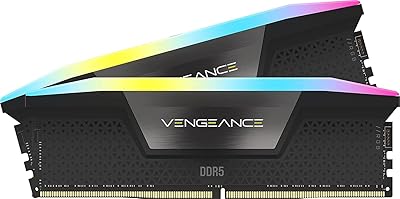
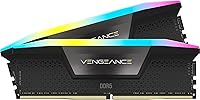
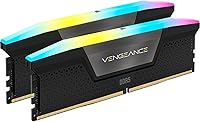
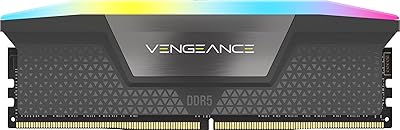
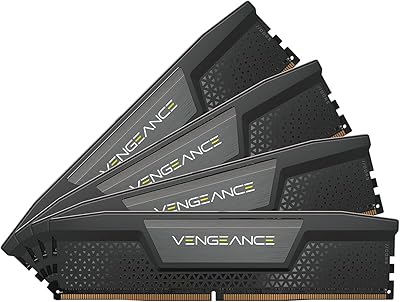
What sets this DDR5 kit apart visually is the ten-zone RGB lighting — each module carries ten individually addressable LEDs housed in a panoramic light bar, producing richer, more uniform color coverage than the simpler single-strip designs found on budget alternatives. Under the hood, an onboard voltage regulation module gives you finer control when overclocking, making the process more stable than leaving it to the motherboard's own circuitry. Intel XMP 3.0 support means you can hit rated speeds with a single BIOS toggle — no manual tuning required. You can even save custom profiles through iCUE. The 1.4V operating voltage is reasonable for 7200MHz, helping keep thermals in check during sustained loads.

Best For

The Vengeance RGB memory makes the most sense for builders on Intel 13th or 14th Gen platforms where XMP 3.0 delivers its full benefit — it's worth noting upfront that AMD users won't get the same profile flexibility here. Content creators handling video editing, 3D rendering, or large file processing will appreciate the extra capacity that 48GB provides over a typical 32GB kit. Gamers looking to future-proof their rig without going overboard will find the balance appealing too. If you're already running Corsair peripherals or cooling within iCUE, the lighting synchronization is a genuine bonus. For anyone making a DDR4 to DDR5 jump, this is a confident, high-ceiling starting point.

User Feedback

With a 4.5-star rating across nearly 500 reviews, buyer sentiment for this RAM upgrade is broadly positive. The most consistent praise centers on plug-and-play XMP setup — most users report enabling the profile in BIOS and hitting advertised speeds without any additional tinkering. The jump from 32GB to 48GB is specifically called out by upgraders who needed more breathing room but didn't want to commit to a pricier 64GB kit. On the downside, iCUE's software footprint comes up repeatedly — it's not lightweight, and a handful of users encountered initial compatibility hiccups on specific boards. Thermal performance at full load draws no major complaints, though this kit is clearly aimed at those who'll actually push it.

Pros

  • One-touch XMP 3.0 activation in BIOS gets you to 7200MHz without manual tuning or trial and error.
  • The 48GB dual-channel configuration is a practical sweet spot for creators who have outgrown 32GB but do not need a full 64GB kit.
  • Ten-zone addressable RGB per module produces visibly richer lighting coverage than single-strip alternatives.
  • Onboard voltage regulation makes overclocking adjustments more stable and precise than relying on motherboard circuitry alone.
  • At 7200MHz, this DDR5 kit sits near the top of the consumer performance range without requiring exotic cooling or extreme voltages.
  • iCUE integration lets you manage lighting, fan curves, and memory profiles from a single software interface.
  • The 1.4V operating voltage is sensible for the speed tier, with no significant thermal complaints from verified buyers.
  • Buyers upgrading from 32GB kits consistently report a noticeable difference in multitasking headroom and application responsiveness.
  • Build quality and brand reliability give this RAM upgrade a track record that budget alternatives cannot match.

Cons

  • iCUE is a resource-intensive application that runs in the background, which may frustrate users who prefer a lean software environment.
  • A handful of buyers report initial compatibility hiccups on certain Intel 700 series boards that required BIOS updates to resolve.
  • XMP 3.0 is Intel-specific, so AMD platform users miss out on the custom profile features that justify part of the price premium.
  • At this price tier, the cost-per-gigabyte is high compared to slower DDR5 kits that suit most gaming and everyday workloads.
  • The RGB light bar, while visually impressive, adds to the module height and may conflict with large air coolers in tighter cases.
  • 7200MHz speeds with CL36 timings offer diminishing real-world returns in gaming compared to more affordable mid-range DDR5 options.
  • Users who do not overclock or use iCUE gain little advantage from the onboard PMIC, paying for a feature they will not use.
  • No AMD EXPO support means Ryzen platform users cannot access native one-click overclocking profiles equivalent to XMP 3.0.

Ratings

The Corsair Vengeance RGB 48GB DDR5 RAM scores below are generated by AI after analyzing verified global user reviews, with spam, bot submissions, and incentivized feedback actively filtered out. This kit draws strong enthusiasm from enthusiast builders and content creators, but real pain points around software overhead and platform limitations are reflected here just as transparently as its strengths. The result is an honest, composite picture of how this RAM upgrade actually performs in the hands of real buyers across a wide range of use cases.
Performance at Rated Speed
91%
When XMP 3.0 is enabled on a compatible Intel 700 series board, this DDR5 kit reliably hits its 7200MHz rated speed without additional tuning. Buyers running memory-intensive applications like Premiere Pro or Blender report noticeably faster data throughput compared to their previous 32GB DDR4 setups, and stability at sustained loads has drawn consistent praise.
The real-world gaming performance gap between 7200MHz and mid-range 6000MHz DDR5 kits is narrower than the spec sheet implies, and some analytically minded buyers feel the top-tier speed is harder to justify purely for gaming workloads. Frame rate gains in most titles remain modest unless the CPU is heavily memory-bandwidth sensitive.
XMP Setup Experience
88%
The single-toggle XMP activation in BIOS is something buyers genuinely appreciate, especially those migrating from DDR4 who expected a more complex process. Most users report the kit posting at full speed on the first boot after enabling the profile, with no manual timing adjustments needed.
A recurring minority report initial boot failures or BIOS POST loops before the board settles on stable XMP settings, particularly on early 700 series firmware versions. Updating BIOS ahead of installation is strongly advisable, though this step catches some first-time builders off guard.
RGB Lighting Quality
93%
The ten-zone addressable lighting arrangement per module genuinely outperforms the simpler single-strip designs found on competing kits in this price bracket. Buyers consistently highlight the uniformity of the color coverage and the panoramic visibility from multiple viewing angles inside windowed cases, making it a standout aesthetic choice.
The light bar diffuser can show minor hotspots at certain angles depending on the LED zone transitions, which is more noticeable in static single-color modes than in dynamic effects. This is a minor cosmetic observation rather than a defect, but detail-oriented builders running photography of their rigs have noted it.
iCUE Software Experience
61%
39%
For users already embedded in the Corsair ecosystem with iCUE-compatible peripherals and coolers, the unified control over lighting, fan curves, and memory profiles from a single dashboard is a genuine convenience that competitors cannot easily match. Profile syncing across devices works reliably when the software is running cleanly.
iCUE's background resource consumption is the most consistently raised complaint across buyer reviews, with some reporting meaningful CPU and RAM overhead during idle periods. Occasional crashes and the need for periodic reinstallation on Windows updates have frustrated users who expected a more polished software experience given the premium price of the hardware.
Compatibility
74%
26%
On validated Intel 700 series boards, compatibility is strong and the QVL coverage is broad enough that most buyers do not encounter issues when pairing with popular Z790 motherboards from ASUS, MSI, or Gigabyte. The mature product age since mid-2023 means most board manufacturers have updated firmware to handle this kit reliably.
AMD platform users are effectively second-class citizens here — no EXPO support means no native one-click overclocking profile on Ryzen systems, and some AM5 boards require manual configuration to run the kit above JEDEC defaults. A small but notable share of Intel buyers also reported needing a BIOS update before XMP profiles would activate without issue.
Value for Money
67%
33%
For content creators and power users who will genuinely saturate 48GB of capacity in their workflows, the cost-per-performance ratio is more defensible than it looks at first glance. The combination of 7200MHz speed, a mature RGB implementation, and Corsair's lifetime warranty makes the total package competitive within the premium DDR5 tier.
For buyers whose workloads comfortably fit within 32GB, the price premium over slower or lower-capacity DDR5 kits yields diminishing returns that are hard to rationalize. The enthusiast speed tier commands a significant markup, and buyers on tighter budgets will find near-equivalent daily performance from kits priced considerably lower.
Thermal Management
83%
At 1.4V, this RAM upgrade runs at a sensible voltage for its speed class, and buyers report no meaningful heat-related issues during extended content creation or gaming sessions in cases with adequate airflow. The aluminum heatspreader handles passive dissipation competently without requiring active cooling modifications.
In extremely compact or poorly ventilated builds where case airflow is restricted, the heatspreader can retain more warmth than ideal during long sustained workloads. This is an edge case rather than a systemic issue, but builders with small form factor cases should factor in airflow planning before purchasing.
Overclocking Headroom
78%
22%
The onboard PMIC gives enthusiasts a more controlled environment for pushing beyond XMP defaults, and buyers who have experimented with tighter timings or modest frequency bumps report the kit handles adjustments with reasonable stability. The iCUE custom profile saving feature makes it practical to test and store multiple configurations.
Pushing meaningfully beyond 7200MHz requires significant BIOS expertise and is not guaranteed to be stable across all supported board pairings, and some buyers expecting easy headroom above the rated speed have been disappointed. The CL36 latency at 7200MHz also leaves less room for timing tightening compared to lower-frequency high-performance kits.
Build Quality & Aesthetics
89%
The physical construction of the modules feels premium — the heatspreader sits flush and firmly attached, with no flex or rattle reported by buyers who handle the modules during installation. The all-black finish on the spreader pairs cleanly with both dark and light-themed builds, and the light bar housing shows no visible seam gaps.
The module height of 1.77 inches with the light bar can create clearance conflicts with wide-body air coolers that overhang the first DIMM slot, which is a legitimate installation obstacle in some mid-tower builds. Buyers with compact air coolers or AIO setups are unlikely to encounter this, but it is worth measuring before ordering.
Capacity Usefulness
86%
The 48GB configuration is repeatedly called out by upgraders from 32GB kits as the right amount — enough to run a video editing timeline, a browser with many tabs, a game, and a system monitoring app simultaneously without paging to virtual memory. Content creators working in DaVinci Resolve or running large Lightroom catalogs specifically highlight the practical benefit.
For buyers whose primary use is gaming without simultaneous heavy background tasks, 48GB provides capacity that current software simply does not consume, making the upgrade feel speculative rather than immediately impactful. The unusual 2x24GB configuration also means adding a third or fourth module in the future is not possible on standard four-slot boards without replacing the kit.
Installation Experience
84%
Physically installing the modules is as straightforward as any standard DIMM kit — buyers report a satisfying click into the slots with no unusual force required, and the module labeling makes slot orientation clear. Most users have the hardware side of the installation completed within minutes.
The post-installation step of enabling XMP in BIOS trips up a meaningful share of less experienced builders who assume the RAM will auto-run at rated speeds. While this is an industry-wide behavior rather than a Corsair-specific issue, clearer guidance in the box documentation would reduce confusion for first-time DDR5 upgraders.
Long-Term Stability
87%
Buyers running this DDR5 kit for extended periods report no degradation in stability or performance, and Corsair's lifetime warranty provides meaningful assurance for a component that is expected to outlast multiple GPU and CPU upgrades. The PMIC-based voltage regulation is widely credited with contributing to consistent long-run reliability.
A small number of users report that XMP stability can occasionally become inconsistent after significant Windows updates or BIOS revisions, requiring a re-enable of the profile or a CMOS reset to restore full-speed operation. These are isolated reports rather than a widespread trend, but they do surface with enough regularity to mention.
Ecosystem Integration
79%
21%
For buyers already running Corsair peripherals, coolers, and fans under iCUE, this RAM upgrade slots into the existing ecosystem without friction — lighting sync across the full build is achievable with a few clicks, and the unified dashboard reduces the need for multiple manufacturer apps running simultaneously.
Buyers outside the Corsair ecosystem gain much less from the iCUE integration and may find the software an unwanted addition to their system tray. The ecosystem value is real but entirely conditional on prior or planned investment in other Corsair products, which limits how broadly this benefit applies.

Suitable for:

The Corsair Vengeance RGB 48GB DDR5 RAM is built for a specific type of builder: someone on an Intel 13th or 14th Gen platform who genuinely pushes their system hard and wants memory that won't become a bottleneck anytime soon. Content creators are probably the clearest fit — if your workflow involves editing high-resolution video, running 3D renders, or juggling large project files, the 48GB capacity gives you real working room that 32GB increasingly cannot. Gamers who stream, run background applications, or simply want to avoid another upgrade cycle in two years will also find the headroom worthwhile. If you're already running Corsair peripherals and coolers inside iCUE, the lighting synchronization adds genuine value rather than just aesthetic noise. This is also a strong pick for DDR4 users making their first DDR5 jump who want a premium, future-ready entry point without the expense of a full 64GB configuration.
Not suitable for:

The Corsair Vengeance RGB 48GB DDR5 RAM is a poor match for anyone building or upgrading a general-purpose machine used for browsing, office work, or light gaming — the performance ceiling it offers simply won't be touched in those scenarios, making it an expensive choice that delivers nothing tangible day-to-day. AMD platform users should approach with caution: XMP 3.0 is an Intel specification, and while the kit will still function, you lose the custom profile flexibility that is one of its headline features. Budget-conscious builders will find better value in slower or lower-capacity DDR5 kits that cover the same everyday bases at a noticeably lower cost. Anyone who dislikes or actively avoids third-party memory software should also think twice, since iCUE is effectively required to get the most out of the RGB and overclocking features. Finally, if your current motherboard sits outside Intel's 700 series ecosystem, XMP compatibility is not guaranteed, and you could end up running this kit below its rated speeds.

Specifications

  • Capacity: This kit provides 48GB of total memory across two 24GB DDR5 modules configured for dual-channel operation.
  • Memory Type: The modules use DDR5 SDRAM technology, the current-generation standard offering improved bandwidth and efficiency over DDR4.
  • Speed: Rated operating speed is 7200MHz, placing this kit near the top of the consumer DDR5 performance range.
  • Latency: Primary timings are CL36-46-46-116, which is typical for high-frequency DDR5 kits operating in this speed class.
  • Voltage: The kit operates at 1.4V, a moderate figure for 7200MHz DDR5 that supports stable long-term use without excessive heat output.
  • Form Factor: Both modules are standard DIMM form factor designed exclusively for desktop motherboard installation.
  • RGB Lighting: Each module carries ten individually addressable RGB LEDs housed within a full-length panoramic light bar for wide-angle visibility.
  • Software: Full RGB and overclocking control is available through Corsair iCUE software, compatible with Windows-based systems.
  • XMP Support: Intel XMP 3.0 profiles are supported, allowing one-click speed activation in BIOS and custom profile creation via iCUE.
  • Voltage Regulation: An onboard Power Management Integrated Circuit (PMIC) handles voltage regulation directly on the module for more precise overclocking control.
  • Platform: Officially validated for Intel 700 series motherboards; AMD platform compatibility is not guaranteed and XMP 3.0 profiles are Intel-specific.
  • Dimensions: Each module measures 5.43″ long by 1.77″ tall by 0.27″ wide, with the light bar adding to the overall height profile.
  • Weight: Each individual module weighs 1.76 ounces, making the full kit approximately 3.52 ounces combined.
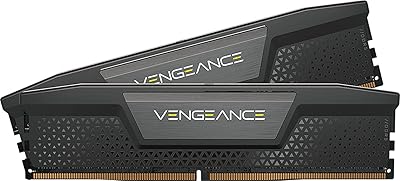
  • Color: The heatspreader and light bar housing are finished in black, with RGB illumination customizable through iCUE software.
  • Part Number: The official model number is CMH48GX5M2B7200C36, useful for verifying compatibility with QVL lists on supported motherboards.
  • Market Rank: This kit holds a #80 Best Sellers Rank in the Computer Memory category on Amazon, reflecting consistent buyer demand.
  • Release Date: The kit was first made available in July 2023, making it a mature DDR5 product with an established compatibility and firmware track record.

Related Reviews
Corsair Vengeance RGB 128GB DDR5 RAM
82%
91%
Performance at Rated Speed
93%
XMP Setup Experience
88%
RGB Lighting Quality
71%
iCUE Software Integration
78%
Overclocking Headroom
More
Corsair Vengeance RGB 16GB DDR5 Desktop RAM
79%
91%
XMP Setup & BIOS Compatibility
78%
Memory Performance
88%
RGB Lighting Quality
82%
iCUE Software Integration
86%
Build & Heatspreader Quality
More
Corsair Vengeance RGB DDR5 16GB RAM
80%
91%
Installation Ease
88%
RGB Lighting Quality
84%
Performance at Rated Speed
58%
Single-Channel Trade-off
67%
iCUE Software Experience
More
Corsair Vengeance DDR5 48GB Desktop RAM
83%
91%
Out-of-Box Compatibility
88%
Performance at Rated Speed
83%
Overclocking Headroom
86%
Capacity Value
93%
Physical Compatibility
More
Corsair Vengeance DDR5 64GB 6000MHz Desktop RAM
83%
93%
Performance at Rated Speed
91%
XMP Setup & Ease of Use
94%
Stability & Reliability
67%
Platform Compatibility
62%
Value for Money
More
Corsair Vengeance RGB 32GB DDR5 Desktop RAM
82%
93%
Performance at Rated Speed
89%
Ease of Setup
91%
RGB Lighting Quality
67%
iCUE Software Experience
82%
Compatibility Range
More
Corsair Vengeance DDR5 32GB (2x16GB) 6800MHz RAM
88%
91%
Overall Performance
94%
Gaming Performance
88%
Ease of Overclocking
89%
Software Integration (iCUE)
92%
Compatibility with Intel Systems
More
Corsair Vengeance RGB 64GB DDR5 Desktop RAM
81%
88%
Memory Performance
91%
Installation Experience
83%
Platform Compatibility
86%
RGB Lighting Quality
87%
Thermal Management
More
Corsair Vengeance RGB DDR5 32GB (2x16GB) 6200MHz
86%
92%
Performance
88%
RGB Lighting Customization
89%
Overclocking Support
85%
Build Quality
90%
Compatibility with Desktop PCs
More
Corsair Vengeance SODIMM DDR5 32GB Laptop RAM
80%
93%
Installation Ease
89%
Speed Detection & XMP
84%
Real-World Performance
76%
Platform Compatibility
67%
Latency & Timings
More

FAQ

Technically the modules will seat and run on many AM5 boards, but you should know that XMP 3.0 is an Intel-specific specification. AMD platforms use EXPO for native one-click overclocking profiles, and this kit does not carry EXPO certification. You may be able to manually configure the timings and speed, but you won't get the plug-and-play profile experience that Intel users enjoy.

No — the memory will function perfectly without iCUE installed. You'll still get the full 7200MHz performance once XMP is enabled in your BIOS. iCUE is only required if you want to customize the RGB lighting effects or create and save custom XMP profiles. If you don't care about software-controlled lighting, you can skip it entirely.

Enabling XMP in your BIOS tells your motherboard to run the memory at its rated 7200MHz speed using the pre-configured timing profile stored on the module. Without it, most boards will default to a slower JEDEC speed, typically around 4800MHz. It is a well-established, manufacturer-supported feature and is considered safe for everyday use on compatible Intel 700 series platforms.

It depends entirely on what you're doing. For gaming alone, 32GB is still more than sufficient for almost every current title. Where the extra headroom genuinely pays off is in content creation — video editing timelines, large Photoshop files, 3D rendering, or running a virtual machine alongside other applications. If your workload routinely pushes past 28-30GB of active usage, the step up is a practical one.

That's a real concern worth checking before you buy. The light bar adds height to the module profile, so if you're running a wide tower cooler with low-clearance overhang on the first DIMM slot, compatibility can be tight. Check your cooler's memory clearance spec against the 1.77-inch module height and consult your cooler manufacturer's compatibility notes when in doubt.

This is completely normal behavior. Most motherboards default to the JEDEC base speed on first boot as a safety measure. To unlock the full rated speed, enter your BIOS settings, navigate to the memory or AI Overclock Tuner section, and enable the XMP profile. Save and reboot, and you should see the kit running at 7200MHz. If you're unsure where to find this, your motherboard manual will walk you through it.

You can, but running a single module means you lose dual-channel mode, which measurably reduces memory bandwidth. The kit is designed and tested as a matched pair, and DDR5 platforms in particular benefit from dual-channel configuration. If budget is the concern, it's worth waiting until you can install both modules simultaneously rather than starting with one.

RAM doesn't produce fan noise since it's passively cooled, and verified buyers have not flagged thermal issues with this DDR5 kit under typical workloads. At 1.4V the heat output is reasonable for the speed class. The aluminum heatspreader handles dissipation adequately in a case with decent airflow. If you're running an extremely hot, poorly ventilated case, that's more of a general airflow problem than a RAM-specific one.

Yes, Corsair covers this kit with a limited lifetime warranty, which is standard for their Vengeance memory lineup. If you encounter a defective module, Corsair's support process is generally straightforward — you'll need proof of purchase and the part number handy when submitting a claim through their website.

This is one of the more consistent criticisms from existing users, and it's fair. iCUE runs as a background process and can use a noticeable amount of CPU and RAM depending on how many connected devices it's managing. For a high-end system this is unlikely to cause problems, but if you're sensitive about background software overhead or running a leaner setup, you may want to configure it to launch only when needed rather than at system startup.

Where to Buy