Overview

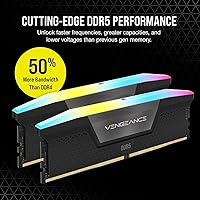
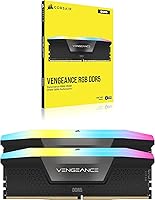
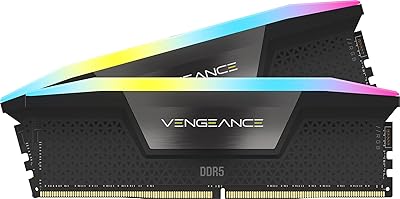
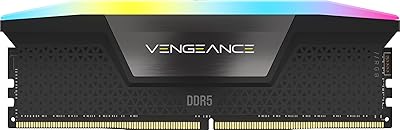
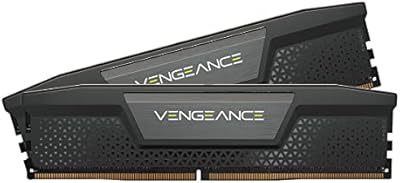
The Corsair Vengeance RGB 32GB DDR5 Desktop RAM sits squarely in the mainstream-to-enthusiast tier of the DDR5 market, targeting Intel platform builders who want a meaningful generational upgrade without chasing extreme overclocker territory. DDR5 brings a fundamentally different architecture than DDR4 — lower operating voltage, higher native frequencies, and onboard power management — and this DDR5 kit lands at 5600MHz, a speed that pairs well with current Intel 12th, 13th, and 14th Gen processors. Corsair has long been a trusted name in enthusiast memory, and the Vengeance RGB line continues that tradition: solid daily performance wrapped in a chassis built to look as good as it runs.

Features & Benefits

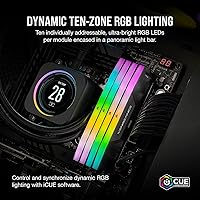
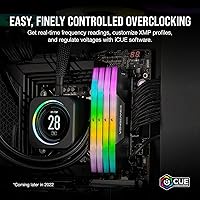
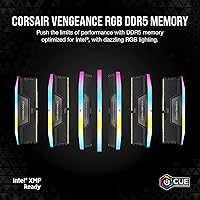
What separates DDR5 from its predecessor isn't just speed — the architecture itself is redesigned. Each module carries its own onboard voltage regulator, meaning power delivery is handled at the stick level rather than relying entirely on the motherboard, which translates to more stable behavior during both everyday use and when pushing frequencies higher. Running at 5600MHz with CL40 timings via Intel XMP 3.0, setup is as easy as enabling a single BIOS profile. The ten-zone RGB per module connects to Corsair iCUE for full lighting control, and custom XMP profiles can be saved and swapped per use case. At just 1.77 inches tall, cooler clearance rarely becomes a concern.

Best For

This DDR5 kit is built for Intel 12th, 13th, or 14th Gen desktop builders who want to drop in DDR5 and have it run properly from day one without wrestling with manual tuning. If your build already runs Corsair peripherals and you are invested in the iCUE ecosystem, the lighting integration alone makes this an easy recommendation. Content creators editing video or working in large datasets will appreciate the DDR5 bandwidth gains in memory-intensive workflows. It also suits gamers finally moving platforms who want plug-and-play reliability rather than a tuning project. One important note: XMP 3.0 is an Intel specification — AMD platform users should verify EXPO compatibility before purchasing.

User Feedback

Among verified buyers, the most consistent praise centers on hassle-free XMP activation — most report it working on the first boot with a compatible Intel board, no manual BIOS tweaking required. The RGB lighting draws strong compliments, particularly from users already running iCUE across their setups. On the critical side, a segment of buyers questions whether the real-world performance gap over fast DDR4 justifies the cost, which is a fair point for budget-focused builders. A small number of users have flagged compatibility hiccups with certain motherboard and BIOS combinations, so a quick firmware update check before installing is wise. Overall, 4.6 stars across 500-plus ratings reflects a product that consistently delivers what it promises.

Pros

  • XMP 3.0 activation is genuinely one-click in a compatible Intel BIOS — no manual tuning needed on day one.
  • Onboard voltage regulation on each module contributes to noticeably stable operation during extended workloads.
  • 5600MHz out-of-the-box speed covers gaming, streaming, and creative work without needing an upgrade in the near future.
  • The ten-zone RGB per stick looks polished and cohesive, especially inside a windowed build with other Corsair gear.
  • iCUE software lets you save multiple XMP profiles and swap them depending on the task, which is a genuinely useful feature.
  • At 1.77 inches tall, this DDR5 kit clears most large tower coolers without any compatibility headaches.
  • A 4.6-star average across hundreds of real-world buyers is a reliable signal that this kit delivers on its core promises.
  • The 2x16GB dual-channel layout is the performance-optimal configuration for the capacity, not a compromise.

Cons

  • DDR5 carries a meaningful price premium over DDR4, and the real-world gaming performance gap remains narrower than the cost difference might suggest.
  • XMP 3.0 is Intel-exclusive — AMD builders cannot rely on this kit behaving predictably without additional BIOS investigation.
  • A handful of buyers have reported needing a motherboard BIOS update before the XMP profile activates correctly, which can catch first-time builders off guard.
  • The Corsair iCUE software, while feature-rich, has a reputation for occasionally conflicting with other RGB management tools on the same system.
  • There is no low-profile version of this kit, which limits options for small form factor builds with tight vertical clearance.
  • Buyers who have no interest in RGB lighting are paying for a feature set baked into the module design with no way to opt out.
  • At higher manual overclocking targets beyond the XMP profile, some users report needing more time in the BIOS than expected to achieve stability.

Ratings

The scores below reflect an AI-driven analysis of verified global buyer reviews for the Corsair Vengeance RGB 32GB DDR5 Desktop RAM, with spam, bot-submitted, and incentivized feedback actively filtered out before scoring. Each category is evaluated on the full spectrum of real user sentiment — not just the highlights — so both the strengths and the friction points are represented honestly. The result is a balanced picture of where this DDR5 kit genuinely excels and where it leaves certain buyers wanting more.

XMP Setup & Ease of Use
91%
The vast majority of Intel platform buyers report a genuinely painless first boot experience — enable XMP 3.0 in BIOS, save, and the kit runs at 5600MHz without any further intervention. For first-time DDR5 builders especially, this kind of plug-and-play reliability removes a major source of anxiety from the build process.
A recurring minority of users hit a wall when their motherboard BIOS was outdated, requiring a firmware update before XMP would activate correctly. This is not a flaw in the kit itself, but it catches unprepared builders off guard and adds an unexpected troubleshooting step.
Performance at Rated Speed
84%
Running at 5600MHz in dual-channel mode, this Corsair memory kit delivers noticeably improved bandwidth for content creation workflows, large file handling, and memory-intensive applications compared to DDR4 equivalents. Gamers building on Intel 13th or 14th Gen platforms report smooth, stable operation with no throttling or memory-related frame drops.
In pure gaming benchmarks, the real-world frame rate uplift over well-tuned fast DDR4 is measurable but not dramatic enough to justify the platform switch cost on its own. Buyers coming purely for gaming gains sometimes feel the generational jump is less impactful than the marketing narrative suggests.
RGB Lighting Quality
88%
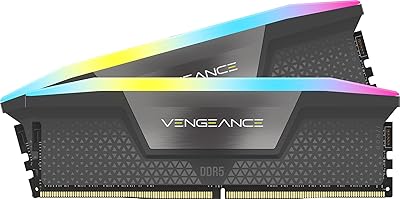
The ten-zone per-module RGB setup consistently earns praise for looking polished and even inside windowed cases, with the panoramic diffuser spreading light softly rather than creating harsh hotspots. Builders running full Corsair iCUE ecosystems report the synchronization with other devices is genuinely satisfying and cohesive.
Users who do not run iCUE are stuck with the default static lighting preset and cannot customize effects without installing the software. Those already running competing RGB platforms like Razer Synapse or ASUS Aura Sync report occasional software conflicts that require some troubleshooting to resolve.
iCUE Software Integration
76%
24%
For buyers already embedded in the Corsair ecosystem, iCUE delivers deep control over both lighting profiles and custom XMP tuning from a single interface, which is a genuine convenience that competing kits without software control cannot match. The ability to save task-specific memory profiles is a feature power users actively highlight in reviews.
iCUE has a long-standing reputation for being resource-heavier than it should be for a peripheral management tool, and conflicts with other RGB managers remain a frustration for mixed-brand setups. Several reviewers note that the software feels overbuilt for users who just want to set a lighting effect and forget it.
Stability & Reliability
89%
Long-term stability reports are overwhelmingly positive on compatible Intel boards, with users running the kit through months of heavy workloads, gaming sessions, and overnight renders without experiencing crashes or memory errors. The onboard PMIC voltage regulation appears to contribute meaningfully to this consistency.
The stability picture changes on AMD platforms, where users without EXPO-certified kits report intermittent boot failures and the need for manual timing adjustments to achieve reliable operation. A small number of Intel users also report isolated issues tied to specific motherboard and BIOS version combinations rather than the kit itself.
Value for Money
67%
33%
For Intel builders committed to a DDR5 platform build, the pricing sits at a fair point relative to competing kits at this speed and capacity tier, especially given the included RGB implementation and iCUE profile support. Buyers who need 32GB for bandwidth-heavy creative work tend to find the cost easier to justify.
Budget-conscious buyers doing honest DDR4 versus DDR5 comparisons frequently note that the performance delta in everyday and gaming workloads does not make the price premium feel proportional. The DDR5 ecosystem tax is real, and this kit sits in a range where the value proposition depends heavily on how much you benefit from the bandwidth gains.
Platform Compatibility
62%
38%
On supported Intel 12th, 13th, and 14th Gen motherboards the compatibility story is clean, with a wide range of Z690 and Z790 boards listing this model on their official QVL memory support lists. Builders sticking to the intended Intel ecosystem rarely encounter compatibility friction.
AMD users are the clear pain point here — XMP 3.0 is Intel-native, and the absence of official EXPO certification means this kit is genuinely not recommended for Ryzen builds without accepting the risk of manual tuning or suboptimal speeds. This is a meaningful limitation that affects a significant portion of the desktop PC builder market.
Build & Heatspreader Quality
83%
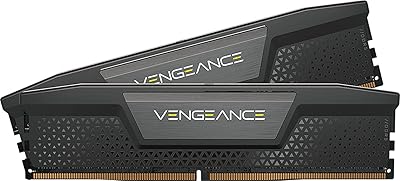
The heatspreader feels solid and the black finish looks premium without being flashy, fitting naturally into both dark and neutral build themes. The physical construction feels consistent with what you would expect from a Corsair mid-to-premium product, with no flimsy edges or uneven seating on the light bar diffuser.
The heatspreader runs warmer than some competing kits during sustained high-frequency workloads, which is expected but worth noting if you are building in a case with limited airflow. A few buyers note cosmetic scuffs on the heatspreader surface on arrival, though this appears to be a packaging rather than manufacturing issue.
Cooler Clearance
86%
At 1.77 inches tall, this DDR5 kit comfortably clears most large tower coolers including popular options like the Noctua NH-D15 and be quiet! Dark Rock Pro, which removes a common anxiety point from the build planning process. The compact height is a practical advantage that buyers with high-end air cooling specifically call out as a reason they chose this kit.
While the height is well-managed, the light bar adds a small visual bulk above the heatspreader edge that can occasionally contact unusually low-sitting cooler brackets in tight configurations. This is an edge case, but builders with very compact or unconventional cooler setups should still verify clearance before purchasing.
Overclocking Headroom
72%
28%
Buyers who want to push beyond the rated XMP speed report meaningful headroom on high-end Z790 boards, with some users achieving stable operation at 6000MHz or above through manual timing adjustments. The onboard voltage regulation provides a more controlled environment for frequency scaling than motherboard-controlled DDR4 ever did.
Achieving stable results above the XMP ceiling requires genuine BIOS knowledge and patience, and the results vary considerably depending on CPU silicon quality and board firmware maturity. For buyers expecting effortless overclocking beyond the rated profile, the experience can be more labor-intensive than anticipated.
Packaging & Unboxing
78%
22%
The retail packaging is clean and well-organized, with each module individually secured in a way that prevents transport damage and makes the unboxing feel appropriately premium for the price tier. Most buyers report modules arriving in perfect condition with no cosmetic damage.
A small but consistent number of reviews mention arriving sticks with minor scuffs on the heatspreader surface, suggesting the protective insert could be slightly more robust. The packaging is not resealable, which matters to builders who like to store original packaging for warranty or resale purposes.
Documentation & Support
74%
26%
Corsair includes clear enough setup guidance for the XMP activation process, and their online knowledge base covers most common BIOS-related setup questions thoroughly. The lifetime warranty backing gives buyers a reasonable level of confidence for a component that is expected to outlast multiple system builds.
The included physical documentation is minimal, and first-time DDR5 builders sometimes find themselves relying on community forums or YouTube guides rather than official Corsair resources for troubleshooting edge cases. Response times from Corsair support have received mixed marks in recent reviews, particularly for warranty claim processing speed.
Thermal Performance
79%
21%
Under typical desktop workloads the modules run at comfortable temperatures, and the heatspreader design dissipates heat adequately for sustained XMP operation without requiring active airflow directed specifically at the sticks. Builders in well-ventilated mid-tower cases report no thermal throttling or heat-related instability.
In compact cases with limited passive airflow over the memory slots, temperatures during prolonged high-frequency workloads can climb higher than ideal, which slightly narrows the stable overclocking window. This is less of an issue for average users but becomes relevant for small form factor enthusiasts pushing the kit hard.

Suitable for:

The Corsair Vengeance RGB 32GB DDR5 Desktop RAM is a strong match for anyone building or upgrading a desktop PC on an Intel 12th, 13th, or 14th Gen platform who wants DDR5 performance without spending hours in the BIOS. If you are a gamer or content creator who benefits from higher memory bandwidth — think video editing, 3D rendering, heavy multitasking, or streaming while gaming — the 5600MHz dual-channel configuration gives you headroom that DDR4 simply cannot match at the architectural level. It is also an especially natural fit for builders already running Corsair peripherals inside an iCUE ecosystem, since the ten-zone RGB integrates directly and cohesively rather than requiring a separate lighting controller. Enthusiasts who want the option to push frequencies higher without committing to manual timing adjustments will appreciate that the XMP 3.0 profiles can be customized and saved through software. In short, if your platform is Intel and your priorities are reliable out-of-box performance, clean aesthetics, and room to grow, this DDR5 kit checks every box.

Not suitable for:

The Corsair Vengeance RGB 32GB DDR5 Desktop RAM is not the right call for every builder, and it is worth being direct about where it falls short. AMD platform users are the most obvious group to pause here — XMP 3.0 is an Intel-native specification, and while some AMD boards support it partially, there is no guarantee of full compatibility or stability without extra troubleshooting, so AMD builders should look for kits with certified EXPO support instead. Budget-focused buyers who are weighing this against a high-quality DDR4 kit should think carefully: in many real-world gaming workloads, the tangible frame rate difference between fast DDR4 and DDR5 at this speed tier is modest, and the price premium may not feel justified if you are not doing memory-intensive creative work. Users who do not care about RGB aesthetics and have no interest in the iCUE ecosystem are essentially paying for features they will never use. Finally, anyone building a small form factor or mini-ITX system should double-check slot clearance, as this is a standard full-size DIMM with no low-profile variant in this lineup.

Specifications

  • Capacity: This kit provides 32GB of total memory across two 16GB DDR5 modules configured in dual-channel.
  • Memory Type: Uses DDR5 architecture, which offers higher native frequencies and lower operating voltage compared to DDR4.
  • Speed: Rated at 5600MHz when the XMP 3.0 profile is enabled in a compatible Intel motherboard BIOS.
  • CAS Latency: Runs at CL40-40-40-77 primary timings at the rated 5600MHz XMP frequency.
  • Voltage: Operates at 1.25V, which is lower than typical DDR4 voltages thanks to onboard per-module voltage regulation.
  • XMP Support: Includes Intel XMP 3.0 support, allowing custom profiles to be created and stored directly via Corsair iCUE software.
  • Form Factor: Standard full-size DIMM designed exclusively for desktop motherboards; not compatible with laptops or SO-DIMM slots.
  • Module Height: Each module measures 1.77 inches tall, keeping clearance conflicts with large tower CPU coolers minimal.
  • Dimensions: Each stick measures 5.43 x 0.27 x 1.77 inches, consistent with standard desktop DIMM sizing.
  • Weight: Each module weighs 1.76 ounces, which is typical for a full-size DIMM with a heatspreader and RGB diffuser.
  • RGB Zones: Each module features ten individually addressable RGB LED zones housed beneath a panoramic light bar diffuser.
  • RGB Software: Lighting and XMP profile management are handled through Corsair iCUE software, available free on Windows.
  • Color: Heatspreader and light bar housing are finished in black, suitable for both dark and neutral-themed builds.
  • Model Number: Official model identifier is CMH32GX5M2B5600C40K, useful for verifying compatibility lists on motherboard QVLs.
  • Power Regulation: Each module includes an onboard Power Management IC (PMIC) for more stable and precise voltage delivery than motherboard-controlled DDR4.
  • Platform Support: Officially optimized for Intel 12th, 13th, and 14th Gen desktop platforms; AMD compatibility is not guaranteed without EXPO support.
  • Release Date: This kit first became available in October 2022, coinciding with broader DDR5 platform adoption on Intel Alder and Raptor Lake.
  • BSR Rank: Holds a Best Sellers Rank of approximately #391 in the Computer Memory category on Amazon at time of review.
  • User Rating: Carries a 4.6 out of 5 star average rating based on over 540 verified buyer reviews.
  • Warranty: Corsair covers this kit under their limited lifetime warranty, which is standard across their Vengeance memory product line.

Related Reviews

Corsair Vengeance RGB DDR5 32GB (2x16GB) 6400MHz
88%
91%
Performance for Gaming
94%
Overclocking Stability
88%
Ease of Setup
85%
RGB Lighting Customization
90%
Compatibility with Intel Systems
More
Corsair Vengeance RGB 32GB DDR5 Desktop RAM
82%
93%
Performance at Rated Speed
89%
Ease of Setup
91%
RGB Lighting Quality
67%
iCUE Software Experience
82%
Compatibility Range
More
Corsair Vengeance RGB DDR5 32GB (2x16GB) 6200MHz
86%
92%
Performance
88%
RGB Lighting Customization
89%
Overclocking Support
85%
Build Quality
90%
Compatibility with Desktop PCs
More
Corsair Vengeance DDR5 32GB (2x16GB) 7200MHz RAM
89%
93%
Performance
94%
Speed and Responsiveness
88%
Ease of Installation
90%
Overclocking Stability
91%
Compatibility with Modern Motherboards
More
Corsair Vengeance DDR5 32GB (2x16GB) 6800MHz RAM
88%
91%
Overall Performance
94%
Gaming Performance
88%
Ease of Overclocking
89%
Software Integration (iCUE)
92%
Compatibility with Intel Systems
More
Corsair Vengeance SODIMM DDR5 32GB Laptop RAM
80%
93%
Installation Ease
89%
Speed Detection & XMP
84%
Real-World Performance
76%
Platform Compatibility
67%
Latency & Timings
More
Corsair Vengeance RGB 128GB DDR5 RAM
82%
91%
Performance at Rated Speed
93%
XMP Setup Experience
88%
RGB Lighting Quality
71%
iCUE Software Integration
78%
Overclocking Headroom
More
Corsair Vengeance RGB 16GB DDR5 Desktop RAM
79%
91%
XMP Setup & BIOS Compatibility
78%
Memory Performance
88%
RGB Lighting Quality
82%
iCUE Software Integration
86%
Build & Heatspreader Quality
More
Corsair Vengeance RGB DDR5 16GB RAM
80%
91%
Installation Ease
88%
RGB Lighting Quality
84%
Performance at Rated Speed
58%
Single-Channel Trade-off
67%
iCUE Software Experience
More
Corsair Vengeance DDR5 32GB (2x16GB) 5200MHz
91%
94%
Performance for Gaming
91%
Ease of Installation
88%
Overclocking Stability
90%
Multitasking Performance
89%
Power Efficiency (1.25V)
More

FAQ

You will need to enable the XMP 3.0 profile in your motherboard BIOS — it does not run at 5600MHz by default. The good news is that on most modern Intel boards this takes about thirty seconds: go into BIOS on first boot, find the XMP or memory profile option, select the 5600MHz profile, save, and you are done. Most buyers report it working on the very first try.

Technically the sticks will seat and the system will boot, but XMP 3.0 is an Intel specification and AMD boards use a different standard called EXPO. This Corsair memory kit does not carry official EXPO certification, so you may not be able to run it at the rated 5600MHz on an AMD platform without manual tuning, and stability is not guaranteed. If you are building on Ryzen, look specifically for a DDR5 kit with AMD EXPO support on the packaging.

For the overwhelming majority of gaming use cases, 32GB is more than sufficient today and for the foreseeable future. Most games top out well under 16GB of actual memory usage, and even with a browser and Discord running in the background you are unlikely to feel constrained. The 64GB conversation becomes relevant for professional video editors, 3D artists, or virtual machine users — not typical gamers or streamers.

The panoramic light bar design is specifically built to be visible from multiple angles, so you will get a good view through a side panel window as long as the modules are oriented in the standard upright position. The diffuser spreads the light softly across the top of each stick rather than pointing it in a single direction, which tends to look cleaner and less harsh than older single-strip designs.

iCUE is completely optional for the memory to work. Without it, the sticks will run the default static lighting preset and the XMP profile can still be enabled through your BIOS as usual. iCUE only becomes necessary if you want to customize the RGB effects, sync lighting across Corsair devices, or create and save custom XMP profiles — none of which affect raw performance.

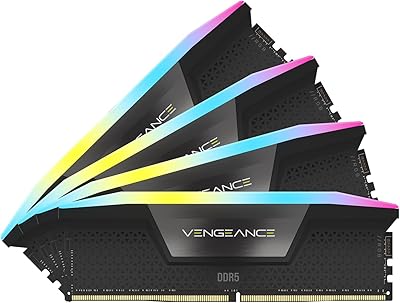
It is strongly recommended to avoid mixing memory kits from different manufacturers or speed tiers. Even if another stick is technically DDR5, mixing kits can cause stability issues, force the system to run all memory at the slowest common speed, or prevent XMP from activating at all. If you need more than 32GB, the cleanest path is to buy a second identical kit of the same model number and run all four sticks together.

Yes, Z790 is one of the primary target platforms for this DDR5 kit and compatibility is very well established. Z790 boards natively support DDR5 and most have this specific kit or the model number listed on their QVL (qualified vendor list). That said, it is always worth a quick check on your specific motherboard manufacturer's memory compatibility page just to be certain.

iCUE runs as a background process and on modern systems the resource footprint is generally light. That said, it has a reputation for occasionally causing conflicts with other RGB software tools like Razer Synapse or ASUS Aura Sync if they are running simultaneously. If you are not invested in the Corsair ecosystem, it may be worth disabling iCUE on startup to keep things tidy.

Corsair covers the Vengeance RGB DDR5 line under a limited lifetime warranty, which is one of the stronger warranty terms in the memory market. If a module fails under normal use conditions, Corsair's support process is generally straightforward: you file a claim, they verify the issue, and send a replacement. Keep your purchase receipt to make the process faster.

Yes, this DDR5 kit has headroom beyond its rated XMP speed on the right motherboard, but results vary significantly depending on your specific CPU, motherboard, and the silicon lottery of the individual sticks you receive. The onboard voltage regulator does help with stability when pushing frequencies higher. That said, going beyond XMP requires manual timing and voltage adjustments in BIOS, so it is not something to attempt casually if you are new to overclocking.