Overview

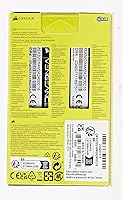
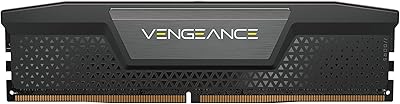
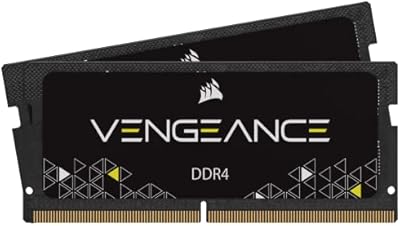
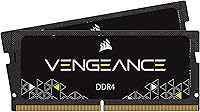
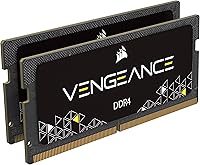
The Corsair Vengeance 32GB DDR4 SO-DIMM RAM is a dependable, well-regarded choice for anyone looking to breathe new life into an aging Intel laptop. SO-DIMM simply refers to the compact module format laptops use — different from the larger sticks found in desktops. This kit ships as two 16GB sticks, and that distinction matters: running them in dual-channel mode gives the processor faster, more balanced memory access than a single 32GB module would. Corsair has built genuine credibility in the memory market over many years. That said, this is a generation-specific kit built for 6th Gen Intel Core notebooks, so confirming compatibility with your exact machine before purchasing is essential.
Features & Benefits

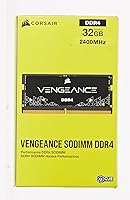
Running at 2400MHz with 16-16-16-39 timings, this SO-DIMM upgrade hits a solid balance between speed and latency for everyday workloads — browser-heavy sessions, office applications, and light creative tasks all benefit. The 1.2V operating voltage keeps power draw low, which genuinely matters when you rely on battery life throughout a workday. On compatible notebooks, the kit automatically adjusts its speed profile without requiring any BIOS changes — a quiet convenience rather than a headline feature. Installation itself is painless: seat the sticks and boot up. Corsair also backs this kit with a limited lifetime warranty, which adds meaningful peace of mind for a component you expect to outlast several years of daily use.

Best For

This Corsair memory kit is a natural fit for anyone still running a 6th Gen Intel Core i5 or i7 laptop that feels sluggish under modern demands. Students juggling a dozen browser tabs alongside a video call and a document editor will notice a real difference after upgrading to 32GB. Remote workers and light creative users handling photo editing or short video exports stand to gain similarly. It also appeals to budget-conscious upgraders who want a reputable brand without paying flagship memory prices. One honest caveat: if your laptop sits outside the 6th Gen Intel platform, this kit was not designed for it, and compatibility problems are a real possibility.

User Feedback

Most buyers report a tangible, immediate improvement in daily responsiveness after installing the Vengeance DDR4 kit — switching between apps and keeping multiple windows open feels noticeably more fluid. Quick installation is a recurring theme, with many users finishing the upgrade in under ten minutes. The feedback is not without its rough edges, though. Some users have reported physical fit issues on specific laptop models, which reinforces the need to verify compatibility beyond just the platform generation. A small number of DOA units surface in longer review threads, though Corsair's warranty handling appears to resolve most of those cases efficiently. On balance, buyers generally consider the value fair for a branded kit carrying a lifetime guarantee.

Pros

  • Running as a dual-channel pair, the two 16GB sticks deliver faster memory throughput than a single 32GB module would.
  • Installation is genuinely simple — most users complete the swap in under fifteen minutes with a basic screwdriver.
  • The 1.2V power draw is efficient enough that it does not noticeably impact battery performance under normal use.
  • Auto-overclocking on compatible notebooks means the kit runs at its rated speed without any manual BIOS changes.
  • Corsair backs this SO-DIMM upgrade with a limited lifetime warranty, which is rare at this price tier.
  • Multitasking across many apps and browser tabs becomes noticeably smoother after upgrading from 8GB or 16GB.
  • The compact SO-DIMM form factor fits both slim and standard-chassis laptops without clearance concerns.
  • Corsair's reputation for consistent quality control means fewer unpleasant surprises out of the box compared to off-brand kits.

Cons

  • Officially compatible only with 6th Gen Intel Core i5 and i7 notebooks — newer or AMD platforms are not supported.
  • Some users report physical fit inconsistencies on specific laptop models, even within the supported generation.
  • A small but documented number of buyers have received dead-on-arrival units, though warranty resolution is generally available.
  • Real-world gaming performance gains are minimal; the bottleneck in most laptops remains the GPU, not system memory.
  • No included installation guide or tools — buyers are fully responsible for sourcing instructions and hardware.
  • The 2400MHz speed rating, while adequate for everyday tasks, is on the slower end compared to newer DDR4 kits on the market.
  • Buyers on very recent or future laptop platforms will need to look elsewhere, as this kit has no forward compatibility path.
  • Value perception drops if a user later discovers their laptop has partially soldered slots limiting total upgradeable capacity.

Ratings

The scores below reflect AI-driven analysis of verified global buyer reviews for the Corsair Vengeance 32GB DDR4 SO-DIMM RAM, with spam, bot activity, and incentivized feedback actively filtered out before scoring. Each category is evaluated independently, drawing on patterns across thousands of real-world installation and daily-use experiences. Both the genuine strengths and the frustrations buyers have run into are factored transparently into every number you see here.

Compatibility Accuracy
71%
29%
When installed in a confirmed 6th Gen Intel Core i5 or i7 notebook, users report a high rate of immediate recognition and stable operation without any additional configuration. The vast majority of buyers who verified their platform beforehand had no compatibility issues whatsoever.
The narrow generational scope creates real problems for buyers who assume broader support. A notable minority of reviewers discovered mid-installation that their specific laptop model — even within the 6th Gen family — had physical slot tolerances or firmware quirks that caused fit or detection issues.
Installation Ease
89%
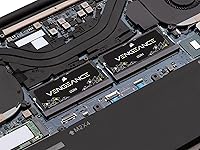
Most users describe the swap as genuinely effortless — a matter of removing a bottom panel, seating two sticks, and booting up. People upgrading from factory 8GB configurations routinely mention completing the entire process in under fifteen minutes without consulting any guide.
The kit ships with no installation documentation, which leaves less experienced users to find their own teardown instructions. A small number of reviewers flagged that the modules required firm, precise seating pressure and did not click in as intuitively as expected.
Multitasking Performance
86%
Users consistently describe a meaningful shift in how their laptops handle heavy workloads after this SO-DIMM upgrade — browsers with 20-plus tabs, multiple productivity apps, and background communication tools all running without the slowdowns they previously experienced. For remote workers and students, this is where the upgrade earns its cost.
The gains are most visible when coming from 8GB; users upgrading from 16GB report a less dramatic difference in subjective feel. Workloads that are CPU- or storage-bound show no improvement, which occasionally disappoints buyers who expected a broader performance lift.
Value for Money
78%
22%
Buyers consistently characterize the pricing as fair for a branded, warranted kit from a recognized manufacturer. Compared to unbranded alternatives at similar speeds, most reviewers feel the Corsair name and lifetime warranty justify the modest premium.
A portion of buyers note that generic or house-brand DDR4 SO-DIMM kits at equivalent specs can be found for less, which makes the value proposition less clear for cost-focused shoppers. Those who experienced DOA units also felt the return and replacement process eroded some of that perceived value.
Long-term Reliability
82%
18%
The majority of buyers who have used the Vengeance DDR4 kit for a year or more report zero stability issues — no crashes, no memory errors, and no degradation in detected capacity. Corsair's manufacturing consistency earns repeated mentions in longer-tenure reviews.
There is a small but consistent thread of DOA reports scattered across review platforms, suggesting occasional quality control gaps at the unit level. While the lifetime warranty provides a resolution path, receiving a defective module in the first place understandably frustrates buyers.
Gaming Performance
58%
42%
In memory-sensitive titles or games that genuinely benefit from headroom above 16GB, users do report slightly smoother background performance and fewer hitches during streaming or game-capture sessions. The dual-channel configuration helps modestly in CPU-bound gaming scenarios.
Most reviewers who upgraded specifically hoping for better frame rates in GPU-bound games were disappointed — and rightly so, since the GPU remains the limiting factor in nearly all laptop gaming workloads. At 2400MHz, the memory speed itself is not competitive with faster kits that some titles can leverage.
Power Efficiency
84%
Running at 1.2V keeps this Corsair memory kit within DDR4 standard power limits, and battery-conscious users note no perceptible degradation in runtime compared to their original factory modules. For students and commuters who run on battery for extended stretches, this is a genuinely practical detail.
There is no measurable improvement in battery life from the upgrade itself — it simply does not make things worse. Users hoping the low-voltage rating would translate to a noticeable runtime gain will find the impact is effectively neutral in practice.
Auto-Configuration
77%
23%
On most compatible systems, the kit runs at its rated 2400MHz speed from the first boot without any user intervention, which is a convenient default behavior that removes friction for non-technical upgraders. Users who would normally avoid the BIOS entirely appreciate not having to engage with it at all.
On a subset of compatible notebooks, the auto-configuration does not engage correctly and the system defaults to a lower speed until XMP is manually enabled. This is not a common occurrence, but it does undercut the plug-and-play narrative for affected users.
Warranty & Support
76%
24%
The limited lifetime warranty is a meaningful differentiator at this price tier, and buyers who have used Corsair's RMA process generally describe it as functional and resolved without excessive difficulty. Having a named, accountable manufacturer behind the purchase provides real peace of mind.
Support response times vary, and some buyers report waiting longer than expected for RMA confirmation. The warranty also covers manufacturing defects specifically — compatibility-related failures in unsupported platforms are unlikely to qualify, which is a distinction some buyers discover only after the fact.
Physical Fit & Form Factor
73%
27%
The standard 260-pin SO-DIMM form factor means this upgrade fits the physical slot specifications of a wide range of supported laptops, including slimmer chassis designs that have limited internal clearance. There are no oversized heat spreaders to create installation headaches.
A recurring minority complaint involves modules that feel loose or require unusually firm seating to latch correctly in specific laptop models. A few users reported that one slot accepted a stick cleanly while the other required multiple reseating attempts before the system recognized both modules.
Creative Workload Suitability
74%
26%
For light-to-moderate creative tasks — Lightroom catalogs, short timeline video edits, running design applications alongside a browser — the jump to 32GB removes what was often a genuine memory ceiling for users on the previous factory configuration. Photographers working with large RAW batches notice the headroom most clearly.
Heavier creative workflows involving large video files, 3D rendering, or complex compositing will still hit processing and storage bottlenecks long before memory becomes the limiting factor. Users with those demands likely need a more capable machine overall, not just more RAM.
Packaging & Unboxing
69%
31%
The modules arrive in protective anti-static packaging, which is the appropriate standard for memory components. Most buyers receive their sticks in good physical condition with no transit damage.
There are no extras in the box — no instructions, no tools, no compatibility reference card. For a kit targeting general consumers rather than experienced builders, the bare-minimum packaging feels like a missed opportunity to reduce buyer anxiety around the installation process.
Platform Transparency
62%
38%
The product listing clearly states the 6th Gen Intel Core platform requirement, and buyers who read the specifications carefully before purchasing rarely encounter unexpected compatibility surprises. That clarity in the spec sheet is at least consistently present.
Despite clear labeling, a significant number of negative reviews stem from buyers who purchased without checking their laptop's exact generation — suggesting the compatibility limitation is not prominent enough during the typical shopping journey. Better front-facing warnings could prevent a meaningful share of the negative experiences documented in reviews.

Suitable for:

The Corsair Vengeance 32GB DDR4 SO-DIMM RAM is the kind of upgrade that makes the most sense for people who already own a capable 6th Gen Intel Core i5 or i7 laptop and want to extend its useful life rather than replace it entirely. Students who rely on a laptop for research-heavy work — dozens of browser tabs, cloud apps, a video call running in the background — will likely feel an immediate difference in how smoothly everything runs at once. The same goes for remote workers juggling communication platforms, document editors, and project management tools simultaneously. Light creative users doing photo editing or occasional short-form video work will also appreciate the extra headroom this SO-DIMM upgrade provides, even if it won't turn a mid-range notebook into a workstation. For anyone comfortable doing a basic RAM swap and motivated by getting more from a machine they already trust, this kit strikes a practical balance between brand credibility and reasonable cost.
Not suitable for:

Buyers should understand upfront that the Corsair Vengeance 32GB DDR4 SO-DIMM RAM is explicitly built around 6th Gen Intel Core notebook compatibility, which means anyone running a 7th Gen or newer platform — or an AMD-based system — is stepping into uncertain territory that Corsair does not officially support. Gamers expecting meaningful frame-rate improvements from this upgrade will likely be disappointed; RAM speed at this tier rarely moves the needle in GPU-bound gaming scenarios, and a laptop's graphics hardware remains the bottleneck. Power users who need the absolute fastest memory available, with tighter latency profiles or higher clock speeds, will find more capable kits elsewhere. If your laptop has soldered, non-upgradeable RAM — which is increasingly common in ultrabooks — this kit is simply not an option regardless of platform. Finally, buyers who need immediate, hands-on technical support during installation may find this purchase frustrating, as the product is designed for confident DIYers rather than those who need guided setup assistance.
Specifications

  • Total Capacity: The kit provides 32GB of total system memory, split across two 16GB modules for dual-channel operation.
  • Module Count: Two individual 260-pin SO-DIMM sticks are included in the box, intended to be installed together.
  • Memory Type: The modules use DDR4 SDRAM technology, the standard for notebooks manufactured from approximately 2015 onward.
  • Form Factor: Each stick uses the 260-pin SO-DIMM form factor, which is the compact standard required by laptops and small-form-factor systems.
  • Clock Speed: The modules are rated at 2400MHz (PC4-19200), delivering reliable bandwidth for everyday multitasking workloads.
  • Latency Timings: Factory-configured timings are 16-16-16-39, representing a balanced profile suited to the 2400MHz operating speed.
  • Operating Voltage: Each module runs at 1.2V, which falls within the standard DDR4 power specification and supports efficient battery use on laptops.
  • Auto-Overclocking: On compatible notebooks, the kit automatically engages its rated speed profile without requiring manual BIOS or XMP configuration.
  • Platform Support: Corsair officially supports this kit for use with 6th Generation Intel Core i5 and i7 notebook platforms only.
  • Device Type: These modules are designed exclusively for laptops and notebooks; they are not compatible with desktop motherboards.
  • Channel Config: Installing both sticks together enables dual-channel memory operation, providing higher effective bandwidth than a single-module setup.
  • Warranty: Corsair covers this memory kit with a limited lifetime warranty, handled through their standard customer support process.
  • Brand: Manufactured by Corsair, a company with a longstanding track record in consumer and enthusiast memory products.
  • ECC Support: These modules do not support Error-Correcting Code (ECC) memory functionality, which is consistent with consumer-grade notebook RAM.
  • Heat Spreader: The modules ship without a dedicated heat spreader, which is standard practice for SO-DIMM laptop memory given thermal and space constraints.

Related Reviews
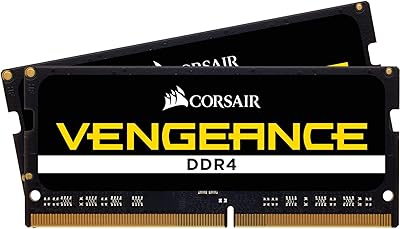
Corsair Vengeance 32GB DDR4 2666MHz SODIMM
89%
91%
Performance
94%
Installation Ease
88%
Battery Life Efficiency
90%
Compatibility with Intel Core i5/i7
92%
Value for Money
More
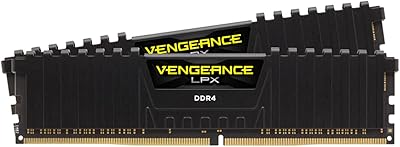
Corsair Vengeance SODIMM DDR4 32GB (2x16GB) 3200MHz
83%
93%
Installation Ease
78%
Compatibility Range
81%
Real-World Performance Gain
84%
Auto-Overclocking Reliability
88%
Thermal Performance
More
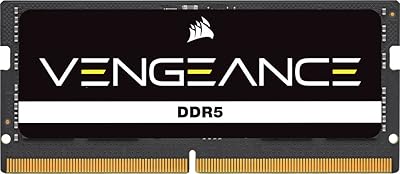
Corsair Vengeance DDR5 32GB (2x16GB) 6800MHz RAM
88%
91%
Overall Performance
94%
Gaming Performance
88%
Ease of Overclocking
89%
Software Integration (iCUE)
92%
Compatibility with Intel Systems
More
Corsair Vengeance LPX 32GB (2x16GB) DDR4 4000MHz
88%
94%
Performance for Gaming
91%
Ease of Installation
89%
Overclocking Stability
85%
Compatibility with Intel Systems
83%
Compatibility with AMD Systems
More
Corsair Vengeance DDR5 32GB (2x16GB) 7200MHz RAM
89%
93%
Performance
94%
Speed and Responsiveness
88%
Ease of Installation
90%
Overclocking Stability
91%
Compatibility with Modern Motherboards
More
Corsair Vengeance SODIMM DDR5 32GB 5600MHz RAM
87%
92%
Performance
89%
Installation Ease
90%
Value for Money
91%
Compatibility
85%
Battery Efficiency
More
Corsair Vengeance RGB RT 32GB (2x16GB) DDR4 3200MHz
86%
91%
Performance
88%
RGB Lighting Customization
93%
Ease of Installation
85%
Heat Management
75%
Compatibility with Non-AMD Systems
More
Corsair Vengeance RGB Pro 32GB DDR4 RAM
85%
91%
Performance at Rated Speed
94%
Installation Experience
89%
RGB Lighting Quality
67%
iCUE Software Experience
83%
Compatibility Range
More
Corsair Vengeance 32GB (2x16GB) DDR4 2933MHz SODIMM Memory
88%
88%
Performance for Gaming
91%
Multitasking Efficiency
95%
Ease of Installation
89%
Compatibility with Intel Laptops
86%
Compatibility with AMD Laptops
More
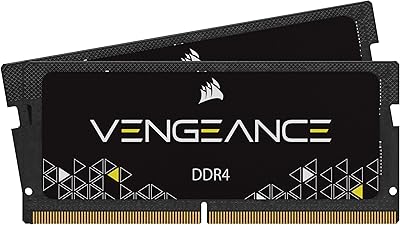
Corsair Vengeance RGB Pro DDR4 32GB 3200MHz
84%
93%
Installation & Setup
86%
Performance at Rated Speed
71%
Overclocking Headroom
91%
RGB Lighting Quality
76%
iCUE Software Integration
More

FAQ

Officially, no. Corsair lists compatibility for 6th Gen Intel Core i5 and i7 notebooks specifically. Some 7th Gen systems may accept the modules, but there is no guarantee, and Corsair does not support that configuration. It is worth checking your laptop manufacturer's memory compatibility list before ordering.

On most compatible notebooks, you do not. The kit is designed to auto-configure its speed profile on supported platforms, so the majority of users simply install the modules and boot up normally. If your laptop does not automatically detect the rated speed, a quick check in BIOS to enable the XMP or memory profile option usually resolves it.

Yes, a single 16GB stick will work on its own, but you would lose the dual-channel benefit. Running both sticks together allows the processor to access memory across two channels simultaneously, which improves overall throughput. For the best performance, install both modules.

Many laptops have a removable bottom panel that exposes the RAM slots, but an increasing number of modern ultrabooks use soldered memory that cannot be swapped out. Check your laptop's service manual or look up your specific model on the manufacturer's website before purchasing. iFixit also maintains teardown guides for many popular models.

Corsair does not officially list AMD notebook compatibility for this kit. That does not necessarily mean it will fail in every AMD system, but it is an unsupported configuration. If you have an AMD-powered laptop, look for a kit that explicitly lists AMD platform compatibility to avoid potential issues.

The most noticeable gains come from heavy multitasking — running many browser tabs alongside productivity apps, video calls, and background tools without slowdowns. If you are currently on 8GB or 16GB and regularly hit memory limits, the difference is tangible. For single-threaded tasks or gaming, the improvement is far less dramatic.

Corsair's limited lifetime warranty covers defective modules. Your first step should be to test each stick individually to isolate whether one or both are at fault. Then contact Corsair support directly through their website with your proof of purchase to initiate an RMA. Most users who have gone through this process report it is handled without significant friction.

This depends entirely on your laptop manufacturer. Some brands, like Lenovo and Dell, explicitly allow user memory upgrades without voiding the warranty. Others, particularly Apple, take a stricter position — though this kit is not compatible with Apple hardware anyway. Check your laptop's warranty terms or contact the manufacturer directly if you are unsure.

For purely casual use — web browsing, email, streaming — 16GB is still comfortable. But if you work with many applications open simultaneously, do light creative work, or run virtual machines, 32GB removes a real bottleneck. It also future-proofs the machine for a few more years as software memory demands continue to climb.

Mixing RAM can work, but it introduces risk. Different module brands, speeds, or capacities can cause instability or force all sticks to run at the slowest speed in the set. For the most reliable outcome, replace whatever is currently installed with both sticks from this SO-DIMM upgrade as a matched pair, rather than combining it with existing modules.

Where to Buy