Overview

The Buffalo DriveStation DDR Ultra 3TB External Hard Drive sits in an interesting middle ground — it targets users who need more speed than a standard desktop drive but aren't ready to spend on solid-state storage. Buffalo is a Japanese manufacturer with a long track record in data storage, and this drive has been part of their lineup since 2013. That age is worth keeping in mind, though it doesn't make the device obsolete. The 3TB capacity hits a practical sweet spot for most home and office setups. What stands out on paper is the 3-year warranty paired with 24/7 US-based phone support — genuinely rare in this category. The 3.0-star average across 236 ratings, however, signals that real-world experience is decidedly mixed.
Features & Benefits

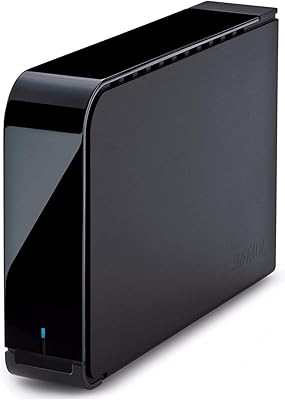
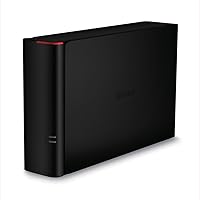
The headline feature is the 1GB DRAM cache, which acts as a high-speed buffer between your system and the spinning platters. In practice, burst transfers — moving a large batch of files at once — feel noticeably quicker than what a typical USB 3.0 drive delivers. The 7200 RPM spindle speed also helps sustain throughput during longer copy sessions, something 5400 RPM drives routinely struggle with. Connectivity is USB 3.2 Gen 1, backward compatible with older USB 3.0 ports, so you won't hit compatibility headaches. The 3.5-inch chassis supports horizontal or vertical placement, and it works with both Mac and PC right out of the box. Buffalo's Japanese manufacturing reflects a consistent commitment to build quality.

Best For

This Buffalo desktop drive makes the most sense for people who regularly move large files and want a noticeable speed improvement over a basic external drive without committing to SSD pricing. Creative professionals — photographers batch-exporting RAW files or video editors pulling footage — will appreciate the cache-assisted throughput. It also functions well as a Time Machine destination for Mac users; plug it in and it's ready without reformatting. Small business owners or home office workers archiving client files, project folders, or media libraries will find 3TB sufficient for years of steady use. And if having a real person available to call when something goes wrong matters to you, the live phone support is a genuine differentiator.

User Feedback

With 236 ratings and a 3.0-star average, this cache-boosted hard drive occupies a polarizing spot among buyers. Satisfied users consistently point to real-world speed gains over their previous drives and appreciate the sturdy, understated enclosure. On the other side, a recurring concern involves long-term reliability — some owners report failures within a couple of years, which is a legitimate worry for a device meant to safeguard important data. A handful of critics also flag audible operational noise under heavy load, which can matter in quieter work environments. It's worth noting that many reviews date back to 2013 and 2014; early complaints around driver compatibility have likely been resolved by modern operating systems and updated firmware.

Pros

  • The 1GB DRAM cache delivers noticeably faster burst transfer speeds compared to standard USB drives in the same price range.
  • A 7200 RPM spindle speed supports stronger sustained throughput than the 5400 RPM drives that dominate this market segment.
  • Works with Mac and PC straight out of the box — no reformatting or driver installation required.
  • The 3-year warranty is class-leading and provides real peace of mind for long-term storage use.
  • 24/7 US-based live phone support is a rare and genuinely useful perk when data is on the line.
  • Buffalo's Japanese manufacturing reflects consistent build quality that holds up well in everyday desktop use.
  • Supports both horizontal and vertical placement, giving flexibility for tighter desk setups.
  • USB 3.2 Gen 1 interface is broadly compatible with virtually any modern computer port.
  • 3TB capacity offers ample room for media libraries, project archives, or multi-year backups without managing multiple drives.

Cons

  • A 3.0-star average across 236 ratings signals that real-world satisfaction is far from universal.
  • Some owners report drive failures within the first two years, which is concerning for a primary storage device.
  • Audible operational noise under heavy load can be disruptive in quiet home or office environments.
  • This is still a mechanical drive — random access speeds lag well behind any SSD, regardless of the cache.
  • The drive launched in 2013, meaning it is aging hardware in a market that has moved on significantly.
  • No bus power — this desktop drive requires a wall outlet, limiting where you can use it.
  • Some buyers report the bundled software adds little value and can feel like clutter on a fresh setup.
  • At its current price point, comparable capacity SSDs are increasingly within reach, narrowing the value case.
  • The 3.5-inch form factor makes it completely impractical for mobile or travel use scenarios.

Ratings

Our editorial team ran the Buffalo DriveStation DDR Ultra 3TB External Hard Drive through a rigorous AI-assisted analysis of verified global buyer reviews, actively filtering out incentivized, bot-generated, and spam submissions to surface what real users actually experience. The scores below reflect an honest synthesis of both the genuine strengths and the recurring pain points reported across hundreds of real-world use cases. Nothing has been softened or inflated — where buyers struggled, the scores show it.
Transfer Speed
74%
26%
Users who primarily move large sequential files — RAW photo exports, video footage, full-drive backups — consistently report that the DRAM cache makes a tangible difference compared to standard desktop drives they had used before. The 7200 RPM spindle reinforces this, keeping sustained throughput from dropping off during longer copy sessions.
Outside of burst transfers, real-world random access speeds reveal the mechanical drive's limitations clearly. Buyers expecting SSD-like responsiveness across all tasks — opening applications, loading databases, working with many small files simultaneously — frequently expressed disappointment after purchase.
Reliability & Longevity
58%
42%
A portion of long-term owners report years of trouble-free operation, crediting Buffalo's Japanese manufacturing and the quality of internal components for consistent day-to-day performance with no data loss.
A notable share of reviewers report drive failures within the first two years, which is alarming for a device people trust with irreplaceable data. This single issue pulls the reliability score down significantly and is the primary driver behind the 3.0-star overall average.
Warranty & Support
88%
The 3-year warranty backed by 24/7 US-based live phone support is genuinely rare in this product category, and buyers who have needed to use it frequently describe the experience as straightforward and responsive. For users who keep important files on this drive, having a real person to call around the clock is a meaningful safety net.
A warranty is only as good as the replacement process, and a handful of buyers report friction when trying to initiate claims — particularly around proving purchase date or navigating shipping logistics for a replacement unit. It is strong coverage, but not flawless in execution.
Value for Money
63%
37%
For buyers who purchased this drive early in its lifecycle when SSD prices were much higher, the speed-per-dollar proposition was genuinely compelling — more performance than a plain spinning drive at a fraction of solid-state cost.
At its current price point, the calculus has shifted. Modern SSDs have dropped considerably in price, and several competitors offer comparable or larger capacity at similar or lower costs, making it harder to justify this Buffalo desktop drive on value grounds alone.
Noise Level
61%
39%
Under light workloads — occasional file access, background Time Machine snapshots — the drive operates quietly enough that most users in home office environments do not find it intrusive during normal working hours.
Under sustained heavy load, the 7200 RPM platters produce a noticeable operational hum and occasional clicking that several reviewers flagged as distracting, particularly in quiet editing suites or late-night work sessions where ambient noise is low.
Build Quality
79%
21%
The enclosure feels solid and purposeful — not cheap plastic — and the matte black finish resists minor scuffs well. Made-in-Japan manufacturing is reflected in the fit and finish, which holds up well compared to budget-tier alternatives in the same category.
The enclosure does not include any active cooling, and some users report the chassis getting warm after extended periods of heavy use. While not dangerous, sustained heat is a long-term concern for drive longevity in poorly ventilated desk setups.
Setup & Ease of Use
83%
Plug-in-and-go usability is one of the most praised aspects across both Mac and PC reviews. Mac users especially appreciate that Time Machine detects and prompts setup automatically, and Windows users report the drive being recognized instantly without driver installation.
Users who need cross-platform compatibility between Mac and Windows find that the out-of-box Windows formatting requires a reformat step to exFAT, which is straightforward but can catch less technical buyers off guard without prior guidance.
Compatibility
86%
The breadth of OS support — from Windows XP all the way through Windows 10 and Mac OS X 10.5 onward — means this drive connects cleanly to nearly any computer a home or small business user is likely to have sitting on their desk.
The drive predates USB-C, so users on newer laptops or Macs that have dropped legacy USB-A ports will need an adapter or hub, adding a small but real friction point that did not exist when the drive originally launched.
Storage Capacity
77%
23%
Three terabytes remains a practical and roomy amount of storage for most home office and creative professional use cases — comfortably holding years of photo libraries, project archives, or full system backups without requiring careful file management.
For power users or small teams who are actively accumulating 4K video footage, large virtual machine images, or multi-project archives, 3TB can fill up faster than expected, and this drive is not expandable without adding a second unit.
Cache Performance
71%
29%
In real-world burst scenarios — copying a 20GB folder of mixed media files, for instance — the DRAM cache noticeably reduces the time to transfer completion compared to a standard spinning drive, and several technically informed reviewers explicitly verified this with benchmark tools.
The cache benefit is most apparent during bursty workloads and fades during prolonged sequential writes once the buffer fills. Users who expected the speed advantage to apply uniformly across all operations found the real-world gains more situational than the marketing framing implied.
Design & Placement Flexibility
80%
20%
Support for both horizontal and vertical placement is a small but appreciated practical detail, allowing the drive to fit naturally into varied desk configurations without requiring a dedicated stand or additional accessories.
The footprint, while compact for a 3.5-inch desktop drive, is not insignificant, and users with very constrained desk setups may find the vertical orientation the only realistic option, especially when the power adapter cable is factored in.
Software Bundle
47%
53%
Buffalo includes backup software with the drive that serves as a starting point for users who have never set up an automated backup routine before, providing basic scheduled backup functionality without needing a third-party application.
Most reviewers with any technical background describe the bundled software as dated, limited in features, and occasionally buggy — several recommend uninstalling it immediately in favor of native OS tools or more capable third-party backup applications.
Thermal Management
59%
41%
Under typical light-to-moderate workloads, the passive cooling of the enclosure keeps temperatures within safe operating ranges, and users report no thermal throttling during standard backup operations or media streaming scenarios.
Extended heavy-use sessions — multi-hour video renders, large overnight backups — cause the enclosure to run noticeably warm, which has led some users to question long-term platter health, particularly in poorly ventilated spaces or warmer climates.

Suitable for:

The Buffalo DriveStation DDR Ultra 3TB External Hard Drive is a strong fit for anyone who regularly works with large files and wants a meaningful speed bump over a standard spinning drive without the cost of going fully solid-state. Photographers backing up RAW shoots, video editors pulling footage from an external source, or small business owners archiving client project folders will notice the difference that the DRAM cache and 7200 RPM spindle speed make during sustained transfers. Mac users will find it especially easy to set up as a Time Machine destination — no reformatting, no configuration headaches, just plug it in and go. It also suits PC users running anything from Windows 7 through Windows 10 who simply want a dependable desktop storage companion that doesn't require much thought to maintain. Perhaps most importantly, buyers who value post-purchase support will appreciate the 3-year warranty and access to a live US-based phone line, which is a level of service most competitors in this category don't offer.
Not suitable for:

The Buffalo DriveStation DDR Ultra 3TB External Hard Drive is not the right tool for everyone, and it's worth being honest about that before you commit. If your workflow demands consistently fast random read and write performance — think running applications, booting virtual machines, or editing 4K video directly from the drive — a mechanical hard drive with a DRAM cache still cannot compete with even a mid-range SSD. The 3.5-inch form factor also means this is strictly a desk-bound device; anyone needing portable storage they can toss in a bag should look at compact bus-powered options instead. Buyers who are particularly sensitive to drive noise may find the operational hum distracting in a quiet workspace. Given that this drive launched in 2013, shoppers who want the latest hardware with the longest expected product lifecycle ahead of it may reasonably prefer a newer model. And if 3TB is not enough headroom for your storage needs, this specific variant won't scale beyond what it offers.
Specifications

  • Storage Capacity: This drive offers 3TB of total storage, suitable for large media libraries, project archives, and multi-year backups.
  • Interface: It connects via USB 3.2 Gen 1, which is fully backward compatible with standard USB 3.0 ports on older computers.
  • DRAM Cache: A dedicated 1GB DRAM buffer accelerates burst transfers by holding frequently accessed data closer to the controller.
  • Spindle Speed: The internal platter spins at 7200 RPM, delivering stronger sustained read and write performance than typical 5400 RPM desktop drives.
  • Max Transfer Speed: Buffalo rates peak sequential transfer speeds at up to 408 MB/s under optimal burst conditions with cache active.
  • Form Factor: The drive uses a 3.5-inch desktop form factor and requires an AC power connection; it is not bus-powered.
  • Dimensions: The unit measures 8 x 1.8 x 5 inches, keeping the footprint compact enough for most standard desk setups.
  • Weight: At 2.21 pounds, the enclosure is solidly built without being unwieldy for desktop placement.
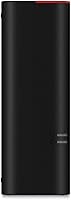
  • Placement: The enclosure supports both horizontal and vertical orientations, giving users flexibility depending on available desk space.
  • Compatibility: The drive works natively with Windows XP through Windows 10 and Mac OS X 10.5 or later without reformatting.
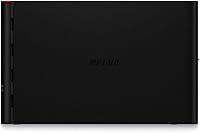
  • Color: The enclosure is finished in matte black, giving it a neutral appearance that suits most desk environments.
  • Warranty: Buffalo backs this drive with a 3-year limited warranty, which is notably longer than the 1- or 2-year coverage common in this category.
  • Customer Support: Warranty support is handled by a US-based team available 24 hours a day, 7 days a week via live phone.
  • Origin: The drive is manufactured in Japan, reflecting Buffalo's long-standing commitment to controlled production quality.
  • Model Number: The official model designation is HD-GD3.0U3, which should be referenced when contacting support or searching for firmware updates.
  • Hard Disk Type: The internal storage mechanism is a traditional mechanical hard disk, not a solid-state or hybrid drive.
  • Drive Series: This unit belongs to Buffalo's DriveStation GD product family, positioned as their cache-accelerated desktop storage line.
  • First Available: This model was first listed for sale in May 2013, making it a mature product with a long field history.

Related Reviews

Buffalo DriveStation Axis Velocity 4TB Hard Drive
73%
83%
Transfer Speed
81%
Reliability & Longevity
86%
Ease of Setup
74%
Build Quality
62%
Noise Level
More
Buffalo DriveStation Axis Velocity 8TB External Hard Drive
74%
83%
Transfer Speed
91%
Storage Capacity
88%
Setup & Ease of Use
58%
Noise Level
62%
Heat Management
More
Buffalo DriveStation Duo 8TB External Hard Drive
79%
91%
Ease of Setup
88%
RAID Reliability
93%
Data Redundancy & Protection
84%
Build Quality & Construction
61%
Drive Noise Level
More
WD My Book 3TB Desktop External Hard Drive
71%
88%
Ease of Setup
83%
Reliability
71%
Transfer Speed
54%
Software Quality
86%
Hardware Encryption
More
WD Elements Portable 3TB External Hard Drive
75%
93%
Ease of Setup
91%
Storage Capacity
67%
Transfer Speed
88%
Portability & Form Factor
63%
Build Quality & Durability
More
Seagate Ultra Touch 2TB External Hard Drive
79%
93%
Portability
88%
Design & Aesthetics
91%
Storage Capacity
57%
Transfer Speed
89%
Plug-and-Play Setup
More
Toshiba Canvio 3TB Desktop External Hard Drive
71%
93%
Ease of Setup
91%
Windows Compatibility
61%
Transfer Speed
72%
Long-term Reliability
43%
Mac Compatibility
More
WD My Passport 3TB External Hard Drive
73%
91%
Ease of Setup
64%
Transfer Speed
88%
Portability & Size
83%
Data Security
31%
Mac Compatibility
More
Maxone 2TB Ultra Slim Portable External Hard Drive
88%
94%
Portability
90%
Data Transfer Speed
88%
Build Quality
85%
Compatibility
92%
Value for Money
More
BUFFALO 1TB MiniStation PGF Portable External Hard Drive
86%
92%
Value for Money
89%
Portability
86%
Build Quality/Durability
83%
Data Transfer Speed
88%
Shock Resistance
More

FAQ

For basic use as external storage on a Mac, you may need to reformat it to APFS or HFS+ since it ships formatted for Windows. If you want to use it as a Time Machine destination, Mac OS will prompt you to erase and reformat it automatically during setup — it takes just a couple of minutes.

It depends on what you're doing. When you're copying a large batch of files at once, the 1GB cache makes a real difference — transfers kick off faster and sustain better throughput than a typical USB drive. For small, scattered file operations, the advantage is less dramatic since cache works best with larger sequential workloads.

Yes, but not simultaneously without some thought. Out of the box it's formatted for Windows, so Mac can read it but not write to it natively. If you reformat it to exFAT, both systems can read and write to it freely, though you'll lose any pre-installed software on the drive.

It produces a low, steady hum typical of 7200 RPM desktop drives. Under heavy load — large file transfers — you may hear the platters working more actively. It's not disruptive in a typical home office, but if you're used to the silence of an SSD, you'll notice the difference.

Buffalo offers a 3-year warranty with 24/7 US-based phone support, so you can call in and work through a replacement process directly with a real person. Keep your purchase receipt handy, as proof of purchase is typically required to initiate a warranty claim.

For standard HD footage it can handle direct editing reasonably well, especially during burst reads where the DRAM cache helps. For 4K or RAW video workflows where sustained random access matters, a dedicated SSD is a more reliable choice — mechanical drives, even fast ones, have inherent latency that can cause dropped frames in demanding timelines.

This is a desktop drive that requires its own AC power adapter — it does not draw power from the USB connection alone. Make sure you have an available outlet near your workstation before setting it up.

The Buffalo DriveStation DDR Ultra 3TB External Hard Drive carries a 3.0-star average, and some buyers have reported early failures, which is worth taking seriously. That said, no external hard drive should be treated as your only copy of important data. Pair it with a cloud backup or a second drive, and you'll protect yourself regardless of which brand you choose.
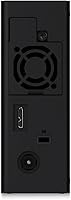
Yes, the enclosure is designed to work in both horizontal and vertical positions. Just make sure it's on a stable, flat surface and has a little breathing room around it to avoid trapping heat.

It really depends on your priorities. The hardware itself — 7200 RPM platters, DRAM cache, USB 3.2 Gen 1 — still functions perfectly well for backup and archival tasks. Where it shows its age is when you compare it to modern SSDs at increasingly competitive prices. If you need reliable, high-capacity desktop storage and aren't chasing peak performance, the DriveStation DDR Ultra still gets the job done, especially given its warranty coverage.