Overview

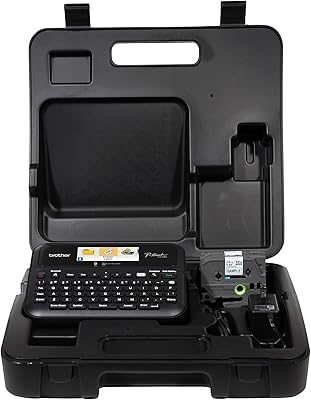
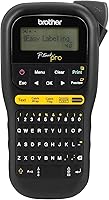
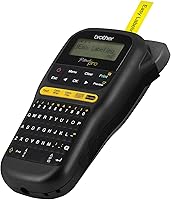
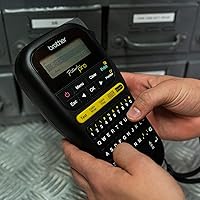
The Brother P-touch PT-H111 Label Maker sits in a practical sweet spot — capable enough for tradespeople, approachable enough for home organizers who just want their garage to stop looking like a disaster. It prints laminated TZe tape labels in four widths, so the output actually holds up in dusty workshops and damp basements rather than peeling off after a week. The unit is light enough to carry comfortably on a job site, and the detachable wrist strap is a small but genuinely useful touch. A graphical LCD screen lets you preview labels before committing to print, which saves tape and frustration in equal measure.
Features & Benefits

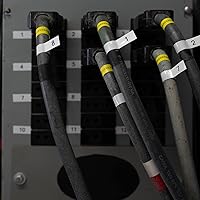
Where the PT-H111 pulls ahead of basic label makers is in its one-touch electrical keys — dedicated buttons for Cable Wrap, Cable Flag, Faceplate, and Serialize mean an electrician can knock out panel labeling without digging through menus. There are over 300 symbols and three font choices on board, which sounds like overkill until you actually need a specific electrical symbol at 7am on a job site. Labels print at up to 20mm per second at 180 dpi, producing crisp, readable text. The 2MB memory lets you save frequently used label formats, and USB connectivity opens the door to PC-based label creation when you need it.

Best For

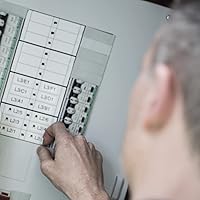
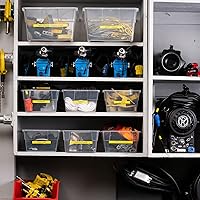
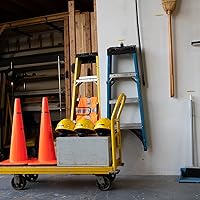
This label maker shines brightest in hands-on work environments — think electricians labeling breaker panels, contractors marking cable runs, or IT professionals organizing server racks and patch panels. It is equally at home in a garage or basement, where a hobbyist wants something that handles wider tape widths and survives a few knocks. Small business owners who need to tag shelves, bins, or equipment without a full desktop printer setup will find it a capable fit. If you are currently using a bare-bones label printer and keep running into its limitations, Brother's P-touch Pro is a natural and worthwhile step up.

User Feedback

Across close to 1,200 ratings, the PT-H111 holds a 4.7 out of 5 average, and the pattern in buyer comments is fairly consistent. People appreciate how well the printed labels hold up in real workshop conditions, and the dedicated electrical labeling keys get singled out repeatedly as a feature that genuinely saves time on the job. The honest downsides? Battery drain is a real complaint — heavy use runs through AAA batteries faster than expected, making the optional AC adapter worth considering. A few buyers also note that navigating the symbol library has a learning curve. Ongoing tape costs add up over time, and most owners recommend stocking up on TZe tape in multipacks to manage the expense.

Pros

  • Laminated TZe labels resist moisture, dust, and abrasion far better than unlaminated alternatives.
  • Dedicated one-touch keys for cable and panel labeling save real time on electrical jobs.
  • Four supported tape widths give genuine flexibility across very different labeling tasks.
  • The label preview screen cuts down on wasted tape and reprints during complex formatting.
  • Lightweight enough to carry comfortably on a job site or around a workshop all day.
  • Onboard memory for saved label templates is a practical time-saver on repetitive labeling work.
  • Over 300 symbols cover most electrical, safety, and organizational needs without needing a PC.
  • USB connectivity allows PC-based label design for users who prefer working on a larger screen.
  • Build quality holds up to workshop conditions in a way that cheaper label makers simply do not.
  • Strong long-term track record with nearly 1,200 verified buyers and a 4.7 out of 5 average rating.

Cons

  • Battery drain under heavy use is a genuine problem — budget for the AC adapter from day one.
  • The TZe tape format is proprietary, and genuine cartridges add up to a real ongoing cost.
  • No wireless or Bluetooth connectivity limits pairing with modern smartphones or tablets.
  • Navigating the symbol library without a search function is slow and genuinely frustrating.
  • The AC adapter is sold separately, which feels like a meaningful omission at this price point.
  • Third-party TZe-compatible tapes often produce weaker adhesion and shorter label lifespan.
  • The PC companion software feels dated and has compatibility issues on newer operating systems.
  • No color output means color-coded labeling systems are simply not possible with this device.
  • Saved label memory offers no backup or export option, so a reset means losing stored templates.
  • Occasional reports of the tape compartment latch feeling less secure after extended field use.

Ratings

The Brother P-touch PT-H111 Label Maker earns its strong reputation across a wide range of buyers, from professional electricians to weekend garage organizers — and the scores below reflect that diverse real-world use. Our AI has analyzed verified purchase reviews from global buyers, actively filtering out incentivized, bot-generated, and outlier feedback to surface what genuine users consistently experience. Both the standout strengths and the honest friction points are weighted into every score you see here.
Build Quality
88%
Users who take this label maker onto job sites repeatedly note that it handles drops, dust, and general workshop abuse better than most compact label printers in its class. The housing feels solid without being heavy, and the keyboard buttons maintain their tactile feedback even after extended use.
A small number of buyers have reported that the tape compartment latch feels less robust than the rest of the unit, occasionally becoming loose after heavy field use. It is not a widespread failure point, but it is worth mentioning for anyone planning daily on-site carry.
Label Durability
93%
The laminated TZe tape output is one of the PT-H111's clearest strengths. Labels applied to electrical panels, cable runs, and garage shelving consistently hold up against moisture, grime, and UV exposure without fading or peeling — exactly what tradespeople need from a professional labeling tool.
Durability is almost entirely dependent on using genuine Brother TZe tape. Users who experiment with third-party compatible tapes report noticeably weaker adhesion and faster edge lifting, particularly in high-humidity environments like basements or outdoor enclosures.
Ease of Use
76%
24%
For straightforward labeling tasks — typing text, selecting a width, and printing — the PT-H111 is intuitive enough that most buyers are productive within minutes of unboxing. The label preview function on the LCD screen is frequently praised for eliminating the trial-and-error waste common with cheaper devices.
Navigating the symbol library and formatting options for more complex labels has a real learning curve. Several buyers note that accessing specific electrical symbols or adjusting multi-line formatting requires consulting the manual, which slows down workflow until the button logic becomes second nature.
Electrical Labeling Performance
91%
The dedicated one-touch keys for Cable Wrap, Cable Flag, Faceplate, and Serialize are a genuine differentiator. Electricians and IT professionals highlight these as the main reason they chose this device over a general-purpose label maker, cutting the time needed to produce consistent, professional panel labels significantly.
The serialize and faceplate functions, while powerful, require some setup time if you are unfamiliar with the workflow. Buyers doing this type of labeling for the first time occasionally report printing a wasted strip or two before dialing in the correct settings.
Portability
86%
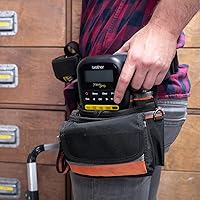
At just under a pound and with a compact footprint, the PT-H111 is easy to tuck into a tool bag or carry in one hand between work areas. The wrist strap attachment is a practical addition that makes single-handed operation more comfortable during longer labeling sessions.
Running on 6 AAA batteries does add some bulk compared to devices with built-in rechargeable cells. The optional AC adapter is a better solution for stationary use, but that requires planning ahead rather than just grabbing the device and going.
Battery Life
58%
42%
For occasional or light use — labeling a storage room over a weekend, for instance — the AAA battery setup is perfectly adequate and has the advantage of easy field replacement with standard batteries available anywhere.
Heavy continuous use drains a fresh set of AAA batteries surprisingly fast, and this is one of the most consistent complaints across buyer reviews. Electricians and contractors doing full-day labeling jobs often burn through batteries mid-project, making the separately sold AC adapter effectively a necessary purchase for professional use.
Print Quality
87%
At 180 dpi, the printed text is sharp and clean across all four supported tape widths. Even on the narrowest 3.5mm tape, characters remain legible, and the output looks professional enough for client-facing installations like labeled breaker panels or organized server rooms.
The monochrome thermal output, while crisp, offers no color options — which is a minor limitation for users who want color-coded labeling systems. Print quality also degrades noticeably if the print head is not kept clean, requiring occasional maintenance for best results.
Tape Compatibility & Variety
82%
18%
Support for TZe tapes in four widths, combined with the range of adhesive types and finishes Brother offers — including flexible ID tape for cable wrapping — gives the PT-H111 genuine versatility across very different labeling jobs without needing a second device.
The TZe tape ecosystem, while broad, is a proprietary format. Genuine Brother cartridges carry a price premium that adds up over time, particularly for heavy users. Buying in multipacks is the standard workaround, but the ongoing consumable cost is something buyers should factor in upfront.
Value for Money
79%
21%
For buyers who need electrical-specific labeling features alongside general-purpose capability, the PT-H111 occupies a sensible price point. The hardware itself is priced fairly for what it delivers, and the feature set meaningfully exceeds what budget label makers in the market offer.
When you factor in the cost of the AC adapter and an ongoing supply of TZe tape, the total cost of ownership is higher than the initial purchase price suggests. Buyers expecting a budget device with budget running costs may find the long-term economics less appealing than anticipated.
Symbol & Font Library
74%
26%
Over 300 symbols covering electrical, safety, and organizational categories means most labeling scenarios are covered without needing a PC. For an electrician identifying panel circuits or a warehouse manager categorizing bins, the on-device library handles the vast majority of real-world needs.
The navigation experience for finding less common symbols is clunky by modern standards. Without a search function, locating a specific symbol involves scrolling through categorized lists, which frustrates users who need a quick turnaround on complex labeling jobs.
Display & Interface
77%
23%
The graphical LCD is genuinely more useful than the single-line displays found on lower-tier label makers. Being able to see a rough visual representation of the final label — including line breaks and symbols — before printing reduces errors and tape waste in a meaningful way.
The screen is small by any modern standard, and in bright outdoor light or direct sunlight it can be difficult to read clearly. Users working outdoors or in brightly lit industrial spaces occasionally need to shade the screen to review their label layout properly.
Memory & Label Storage
71%
29%
The 2MB onboard memory lets users save frequently used label templates, which is a real time-saver for repetitive tasks like serialized cable labeling or recurring inventory tags. Contractors who return to the same type of job regularly will get genuine value from this feature.
The memory capacity is modest, and users with large libraries of saved templates will hit limitations. There is no cloud backup or easy export option, so a device reset or failure means stored labels are lost entirely — a minor but genuine risk for users who rely heavily on saved formats.
USB Connectivity
66%
34%
The USB port enables connection to a PC for users who prefer to design labels on a larger screen using Brother's P-touch Editor software. For users managing large label runs or needing precise formatting control, this connectivity adds a layer of flexibility the device would otherwise lack.
The PC software integration, while functional, is not as polished as dedicated desktop label-printing solutions. Some buyers find the P-touch Editor software dated and occasionally unreliable on newer operating systems, limiting how much practical value the USB feature delivers in day-to-day use.
Setup & Out-of-Box Experience
83%
Most buyers report being up and running within a few minutes of opening the box. The included tape cartridge means you can print a test label immediately, and the physical layout of the keyboard is logical enough that basic functions are discoverable without reading the manual.
The quick-start documentation is fairly minimal, and buyers who want to unlock features like serialization or faceplate labeling will need to dig into the full manual. First-time label maker users in particular may feel slightly underprepared by the out-of-box guidance provided.

Suitable for:

The Brother P-touch PT-H111 Label Maker is built for people who need labels that actually survive real conditions — not just stick-on paper tags that curl off a shelf after a week. Electricians and contractors are the most obvious fit: the dedicated electrical labeling keys make cable identification and panel organization faster and more consistent than any general-purpose label maker can manage. IT professionals dealing with patch panels, server racks, and network cable runs will find the same workflow advantages, especially for serialized labeling jobs that would otherwise eat up significant time. Home users who take organization seriously — think a properly sorted garage, a labeled breaker box, or neatly tagged holiday storage bins — will find this label maker far more capable than the basic models typically sold for household use. Small business owners who need durable asset tags, shelf labels, or equipment identification without committing to a full desktop printing solution also land squarely in the target audience. In short, if your labeling needs go beyond occasional use and you want output that holds up in a working environment, the PT-H111 delivers where it counts.
Not suitable for:

The Brother P-touch PT-H111 Label Maker is not the right tool for everyone, and being honest about that saves real frustration. Buyers who anticipate heavy, all-day printing sessions should factor in the battery drain issue seriously — the device runs on 6 AAA batteries that deplete faster than most users expect under sustained use, and the AC adapter is a separate purchase that should probably be treated as mandatory for professional daily use rather than an optional extra. Users who want color label output for color-coded filing or inventory systems will hit a hard wall here, since the output is strictly monochrome. Anyone on a tight long-term budget should also think carefully: the proprietary TZe tape cartridges carry a premium, and the cost accumulates meaningfully for high-volume users. If your labeling needs are truly occasional — a few labels a month around the house — a simpler, cheaper device will serve you just as well without the added complexity of a symbol library you will rarely use. And if you are looking for a label maker that connects wirelessly to a smartphone for modern app-based design, the PT-H111 is not that device; its connectivity is USB only.
Specifications

  • Brand: Manufactured by Brother, a well-established brand in printing and labeling equipment with a long track record in professional and consumer markets.
  • Model: The exact model designation is PTH111, part of Brother's P-touch Pro line of handheld label makers.
  • Dimensions: The unit measures 8″ wide, 4.3″ deep, and 2.2″ tall, making it compact enough to fit in a standard tool bag.
  • Weight: The device weighs 14.1 ounces, keeping it light enough for extended one-handed use during on-site labeling tasks.
  • Print Technology: Labels are produced using direct thermal printing, which requires no ink or toner — only compatible TZe tape cartridges.
  • Print Resolution: Maximum print resolution is 180 dpi, sufficient for producing sharp, clearly legible text across all supported tape widths.
  • Print Speed: The device prints at a maximum speed of 20mm per second, allowing quick label production without extended waiting between prints.
  • Tape Compatibility: Compatible exclusively with Brother genuine TZe series tape cartridges in widths of 3.5mm, 6mm, 9mm, and 12mm.
  • Tape Varieties: Supported TZe tape types include standard laminated, flexible ID for cable wrapping, extra-strength adhesive, and clear backing options.
  • Display: Features a graphical LCD screen that renders a visual preview of the label layout, including text, symbols, and line breaks, before printing.
  • Memory: Onboard storage capacity is 2MB, allowing users to save and recall frequently used label templates without recreating them from scratch.
  • Symbol Library: The device includes a built-in library of more than 300 symbols spanning electrical, safety, punctuation, and general organizational categories.
  • Fonts: Three built-in font styles are available for label text, covering basic formatting needs for professional and home labeling tasks.
  • Power Source: Powered by 6 AAA batteries for portable use, with support for an optional AC power adapter (sold separately) for stationary operation.
  • Connectivity: Equipped with a single USB port for connecting to a computer running Brother's P-touch Editor software for PC-based label design.
  • Output Type: Produces monochrome laminated labels only; no color printing capability is available on this model.
  • Special Keys: Includes four dedicated one-touch function keys — Cable Wrap, Cable Flag, Faceplate, and Serialize — for streamlined electrical labeling workflows.
  • Included Items: Package contents include the PT-H111 unit, one black-on-white flexible ID TZe tape (12mm x 8m), a wrist strap, and documentation.
  • Warranty: Covered by a Brother limited warranty; buyers should verify the exact duration and terms directly with Brother or the point of purchase.
  • Output Colors: Labels print in black text only; tape backing colors vary by cartridge type, including white, clear, and specialty finishes.

Related Reviews
Brother PT-D610BTVP Label Maker
81%
91%
Print Quality
88%
TZe Tape Compatibility & Variety
72%
Bluetooth Connectivity
67%
App Experience (iPrint&Label)
86%
Label Memory & Reprinting
More
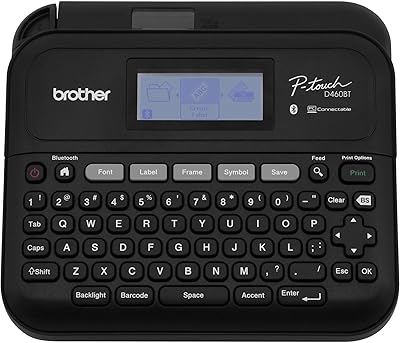
Brother P-Touch PT-D460BT Label Maker
84%
91%
Ease of Use
93%
Bluetooth Connectivity
88%
Design & Portability
85%
Label Customization
78%
Print Speed
More
Brother P-Touch PT-D410
82%
88%
Build Quality
91%
Text Clarity
54%
Tape Efficiency
86%
Software Integration
72%
Portability
More
DYMO Rhino 6000 Industrial Label Maker
87%
93%
Labeling Performance
89%
Build Quality & Durability
86%
Ease of Use
84%
Portability
88%
Connectivity & Compatibility
More
DYMO Rhino 4200 Industrial Label Maker Kit
85%
92%
Label Quality
89%
Ease of Use
90%
Durability
87%
Speed of Printing
85%
Battery Life
More
Brother ColAura VC500W Color Photo and Label Printer
84%
88%
Print Quality
91%
Wireless Connectivity
85%
Ease of Use
65%
Print Speed
90%
Portability/Size
More
DYMO LabelManager Plug N Play Label Maker
85%
90%
Ease of Use
85%
Label Quality
88%
Battery Life
92%
Portability
95%
Setup/Installation
More
Yves Saint Laurent Touche Éclat Radiant Touch #2 Luminous Ivory
85%
88%
Hydration & Skin Feel
91%
Effectiveness for Dark Circles
85%
Blendability & Texture
87%
Buildable Coverage
92%
Radiance & Glow
More
Meta Portal 10″ Touch
86%
92%
Ease of Setup
89%
Audio Quality
90%
Camera Performance
85%
Design & Aesthetics
80%
Privacy Features
More
Seagate Ultra Touch SSD 1TB
86%
92%
Value for Money
85%
Performance & Speed
94%
Portability & Design
88%
Ease of Use
87%
Cross-Platform Compatibility
More

FAQ

It works completely standalone — no computer required. You type directly on the built-in keyboard, preview on the LCD screen, and print. The USB connection and PC software are optional extras for users who prefer designing labels on a larger screen, but the vast majority of users never need them.

It uses Brother TZe series tape cartridges in four widths: 3.5mm, 6mm, 9mm, and 12mm. These are widely available from office supply stores, electronics retailers, and online. Buying in multipacks tends to bring the per-cartridge cost down meaningfully, which is worth doing if you plan to use the device regularly.

You can, but results are inconsistent. Many users report that off-brand compatible tapes produce weaker adhesion and shorter label lifespan, particularly in humid or high-traffic environments. If your labels need to last on electrical panels, cables, or outdoor surfaces, genuine Brother TZe tape is the safer investment.

It is a real and recurring complaint, so it is worth being upfront about. Under heavy or continuous use — think a full day of cable labeling on a job site — a fresh set of 6 AAA batteries can deplete faster than you would expect. For light or occasional use it is fine, but anyone planning professional daily use should seriously consider buying the AC adapter alongside the device rather than treating it as an afterthought.

Yes, and this is actually one of the strongest use cases for the PT-H111. The dedicated one-touch keys for Cable Wrap, Cable Flag, Faceplate, and Serialize are specifically designed for exactly this type of work. Electricians consistently highlight these features as a key reason they chose this device over a general-purpose label maker.

Yes, as long as you are using laminated TZe tape, which is the standard format this device uses. The lamination protects printed text from moisture, dust, and abrasion reasonably well for most workshop and basement applications. For exposure to prolonged direct sunlight or extreme outdoor conditions, Brother also offers specific TZe tape variants with stronger weather resistance.

Basic use — typing text and printing a label — is intuitive and most people figure it out within a few minutes. Where it gets more involved is navigating the symbol library and setting up multi-line or formatted labels, which can require consulting the manual until you have memorized the button logic. It is not difficult, but it is not entirely self-explanatory for first-time users tackling more complex tasks.

No — the PT-H111 has no wireless connectivity. The only external connection it supports is USB to a computer. If Bluetooth or smartphone app control is important to you, you would need to look at a different model in Brother's lineup, such as the PT-P300BT or similar Bluetooth-enabled variants.

Yes, the 2MB onboard memory lets you store label templates for reuse. This is genuinely useful for repetitive tasks like serialized cable labeling or recurring inventory tags. Just be aware that there is no way to back up or export these saved labels, so a factory reset or device failure means they are gone permanently.

It is more useful than it sounds. When you are working on a ladder, under a desk, or in a tight space and need both hands briefly, being able to let the device hang from your wrist rather than setting it down somewhere awkward is a practical convenience. It is a small detail, but tradespeople and IT professionals doing cable runs tend to appreciate it.