Overview

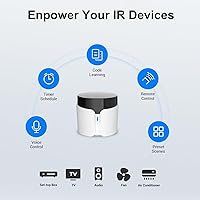
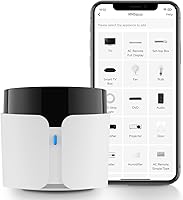
The Broadlink RM5 Plus Universal Smart Remote Hub is BroadLink's fifth-generation take on consolidating your remote-cluttered living room into a single app-controlled device. The pitch is simple: one hub replaces the pile of remotes on your coffee table. Before you buy, two things are worth knowing upfront. First, it connects only over 2.4GHz Wi-Fi — 5GHz and mesh networks are not supported. Second, it works exclusively with infrared signals, meaning it needs a clear line of sight to your appliances. Alexa and Google Home compatibility adds real hands-free value, but this is a practical, mid-range gadget, not a whole-home automation platform.
Features & Benefits

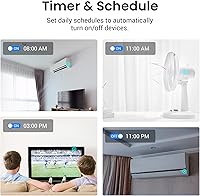
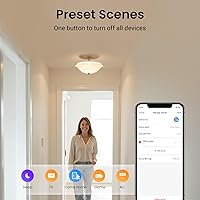
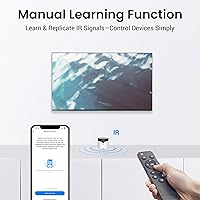
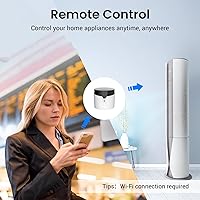
The RM5 Plus pulls from a database of over 5,000 infrared devices, covering TVs, air conditioners, fans, and set-top boxes — so most households will find their gear already listed. When something isn't in the database, the UserDefine learning panel lets you point your original remote at the hub and capture commands manually, which is genuinely useful for older equipment. The BroadLink app allows remote access from anywhere, so you can switch on the AC during your commute home. Scenes and schedules — like a one-tap Movie Night routine or timed appliance shutoffs — add real day-to-day convenience without requiring any technical setup.

Best For

This smart IR hub is a natural fit for anyone drowning in remotes — especially if most of your appliances are IR-controlled and sit in the same room. It's a particularly good entry point for smart home beginners who want voice control without wiring anything or buying expensive brand-specific ecosystems. Renters benefit here too, since there's nothing to install and nothing to leave behind. If you regularly run the air conditioner remotely before you get home, this hub pays for itself in comfort pretty quickly. It also works well for anyone with older or uncommon devices that modern smart platforms simply ignore.

User Feedback

With a 4.2-star rating across more than 600 reviews, this universal remote hub has clearly earned its place in a lot of living rooms. Buyers frequently mention easy initial setup and reliable app performance as highlights, and the broad device compatibility earns consistent praise. That said, the feedback isn't all positive. The 5GHz and mesh Wi-Fi restriction catches people off guard during setup more than almost any other issue. A smaller but vocal group notes that manually learned buttons can't be triggered through Alexa or Google Home, which is a real limitation if you rely heavily on voice control. Cloud dependency is worth watching too.

Pros

  • Broad compatibility with over 5,000 IR devices means most household appliances work right out of the box.
  • The BroadLink app lets you control everything remotely, even when you are miles from home.
  • Scene automation — like a one-tap Movie Night routine — genuinely simplifies daily habits.
  • Manual IR learning handles older or obscure devices that other smart platforms cannot recognize.
  • Setup is fast and approachable, even for buyers with no prior smart home experience.
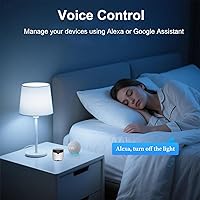
  • Alexa and Google Home integration works reliably for devices found in the BroadLink database.
  • Scheduling timers help reduce energy waste without requiring any ongoing manual effort.
  • Compact and lightweight design means it sits unobtrusively on any shelf or surface.
  • A 4.2-star rating across 600-plus real-world reviews signals dependable everyday performance.
  • The price point makes it a low-risk entry into app-based home automation.

Cons

  • No support for 5GHz or mesh Wi-Fi networks, which are increasingly common in modern homes.
  • Manually learned IR commands cannot be triggered through Alexa or Google Home — a real voice-control gap.
  • Infrared signals require direct line-of-sight, so one hub cannot cover appliances in multiple rooms.
  • Cloud dependency means a service outage or app change could disrupt your control options.
  • Wi-Fi credentials longer than 32 characters will block setup entirely, with no in-app workaround.
  • RF and Bluetooth devices are completely unsupported, limiting use in more modern AV setups.
  • The device cap of 10 appliances may feel restrictive for larger or more appliance-heavy households.
  • Some users report inconsistent app stability over time, particularly after firmware updates.

Ratings

The scores below reflect an AI-driven analysis of verified global user reviews for the Broadlink RM5 Plus Universal Smart Remote Hub, with spam, bot activity, and incentivized feedback actively filtered out before scoring. Each category is graded on real-world performance as described by actual buyers across multiple markets, not manufacturer claims. Both the strengths that earned this hub its loyal following and the friction points that frustrated buyers are transparently reflected in every score.

Setup Experience
78%
22%
Most buyers report getting the hub connected and controlling their first appliance within 10 to 15 minutes, with the BroadLink app guiding the process clearly. Users with a standard 2.4GHz network consistently describe the pairing process as intuitive, even for those who had never configured a smart home device before.
Setup frustration spikes significantly for anyone on a 5GHz-only or mesh Wi-Fi network, which is increasingly common in modern homes. The 32-character SSID and password limit also catches users off guard, forcing some to rename their network before the hub will connect at all.
Device Compatibility
88%
The pre-loaded database covering over 5,000 IR appliances means the vast majority of users find their TV, AC, or fan supported immediately without any manual configuration. This broad coverage is one of the most consistently praised aspects across reviews, particularly for households with mixed brands of older and newer appliances.
Compatibility drops off for less common brands and very old appliances, which is where the manual UserDefine learning panel becomes necessary. A small but consistent group of reviewers notes that even the learning panel occasionally fails to capture commands accurately on the first attempt.
App Performance
74%
26%
Day-to-day app reliability earns genuine praise, with most users finding the BroadLink app responsive and well-organized for controlling multiple devices. The remote-access feature — allowing control from outside the home — works consistently for users on stable internet connections and is frequently cited as a standout real-world benefit.
A recurring thread in critical reviews points to app stability issues following firmware or app updates, with some users experiencing temporary loss of device assignments or scenes. Cloud dependency also creates anxiety among users who worry about long-term service availability or what happens during an internet outage.
Voice Control
61%
39%
For appliances found natively in the BroadLink database, Alexa and Google Home integration works reliably and gives the hub a clear advantage over basic universal remotes. Users controlling their AC or TV channels by voice report that the experience feels natural once the initial skill setup is complete.
The voice control limitation for manually learned buttons is a genuine pain point that affects a meaningful segment of buyers. Users who taught the hub commands for older devices through UserDefine are surprised to find those buttons are invisible to Alexa and Google Home, which undercuts the hands-free promise for exactly the users who needed custom learning in the first place.
IR Range & Signal
71%
29%
In typical living room or bedroom setups, the hub's IR emitter reaches appliances across the room reliably, which covers the primary use case well. Users who position the hub centrally in a room generally report consistent, responsive control without signal drops.
The line-of-sight requirement is a more significant real-world constraint than some buyers anticipate, and it catches a notable number of reviewers off guard. Anyone hoping to tuck the hub behind furniture or control appliances through a doorway will find the signal blocked, limiting placement flexibility considerably.
Automation & Scenes
82%
18%
Scene creation is intuitive enough that even first-time smart home users successfully set up multi-device routines like a Movie Night sequence or a Leave Home power-off sweep. Scheduling and timer functions add practical energy-saving value, especially for AC users who want appliances to switch off automatically overnight.
More advanced automation logic — like conditional triggers or location-based rules — is limited compared to premium smart home platforms. Power users migrating from systems like Home Assistant or SmartThings may find the automation depth underwhelming for complex household routines.
Value for Money
84%
At its price point, this smart IR hub offers a compelling combination of app control, voice assistant integration, and a large device database that would cost significantly more through brand-specific smart home ecosystems. Buyers consistently describe it as a sensible, low-risk investment for consolidating remote clutter.
The value perception dips for buyers who encounter the Wi-Fi band limitation or the voice control gap for custom-learned buttons, as these constraints feel like meaningful trade-offs at any price. A handful of reviewers also note that needing one hub per room adds up in cost faster than they initially calculated.
Build Quality
69%
31%
The compact form factor fits easily on a shelf or media console without drawing attention, and most users report no hardware issues over months of daily use. The lightweight build makes it easy to reposition if needed, which is useful given the line-of-sight requirement.
The plastic casing feels utilitarian rather than premium, which some buyers note looks out of place next to higher-end home electronics. There are also occasional reports of indicator lights that are brighter than expected in a darkened room, which is a minor but mentioned annoyance.
Manual IR Learning
76%
24%
The UserDefine panel is a genuine differentiator for owners of older or obscure appliances that no modern smart platform supports, and it works well for the majority of devices users attempt to program. Several reviewers specifically credit this feature with saving them from replacing perfectly functional older equipment.
The learning process can require multiple attempts for some devices, and there is no clear feedback mechanism in the app when a signal capture fails silently. The dealbreaker for many is discovering afterward that none of the manually learned commands can be invoked through Alexa or Google Home.
Remote Access
86%
Controlling appliances from outside the home via mobile data is one of the RM5 Plus's most practically appreciated features, with AC pre-cooling being the most cited use case in positive reviews. The app loads quickly on both iOS and Android, making remote adjustments feel responsive rather than laggy.
Remote access is fully dependent on cloud connectivity, so any server-side disruption cuts off out-of-home control entirely until the issue is resolved. A small number of users report intermittent delays when sending commands remotely during peak usage periods.
Multi-Room Usability
38%
62%
For users with all their IR appliances concentrated in a single room, this universal remote hub covers the use case completely and without compromise. The hub's coverage within one room is reliable and consistent for the vast majority of buyers in that scenario.
Multi-room use is a serious limitation — infrared simply does not pass through walls, and one hub per room is the only solution, which adds cost and complexity. This is the single most common source of disappointment among buyers who assumed the device would work like a Wi-Fi signal and cover the whole home.
Alexa & Google Home Integration
63%
37%
When working with database-supported devices, the voice assistant experience is smooth and the RM5 Plus links into existing Alexa routines and Google Home automations without much configuration effort. Users who primarily control TVs and air conditioners by voice tend to find the integration meets their expectations.
The integration ceiling becomes apparent quickly for anyone with a mixed setup of database-supported and manually learned devices. The inability to unify all devices under a single voice interface creates a fragmented control experience that undermines the appeal of having a universal hub in the first place.
Energy Management
79%
21%
Scheduling appliances to turn off at set times — particularly air conditioners and fans — provides real energy savings that several buyers mention noticing on their utility bills. The timer feature is simple to configure and runs reliably in the background without requiring any ongoing user input.
Energy management features lack any smart sensing or adaptive logic, so schedules are purely time-based and do not respond to occupancy, temperature, or external conditions. Users looking for responsive, condition-triggered automation will find this falls short of dedicated smart thermostats or energy monitors.
Long-Term Reliability
72%
28%
The majority of buyers who have used the hub for six months or more report stable, consistent performance with no hardware failures, which is a meaningful indicator of build durability. BroadLink's device longevity across its RM product line also gives buyers some confidence in continued software support.
Cloud reliance raises legitimate concerns about what happens to functionality if BroadLink discontinues support or restructures its backend services in the future. A pattern of post-update instability reported by some long-term users suggests that firmware changes occasionally introduce regressions that take time to resolve.

Suitable for:

The Broadlink RM5 Plus Universal Smart Remote Hub is a strong fit for anyone who has accumulated a drawer full of remotes and wants to bring order to a living room, bedroom, or home office without spending a lot of money or hiring an installer. It works especially well for renters who cannot modify their walls or hardwire anything — you plug it in, connect it to your 2.4GHz network, and you're controlling devices within minutes. Smart home beginners will appreciate the relatively gentle learning curve, particularly compared to more complex platforms that require hubs, bridges, and separate ecosystems. If you regularly leave appliances running by accident or want to pre-cool a room before you get home, the remote app access alone is worth it. It also quietly excels for people with older IR devices that newer smart platforms have simply abandoned — the manual learning feature fills a genuine gap in the market.
Not suitable for:

The Broadlink RM5 Plus Universal Smart Remote Hub will frustrate buyers whose home routers run exclusively on 5GHz or use a mesh Wi-Fi system, since the hub simply will not connect to those networks — there is no workaround. Anyone expecting to control appliances in different rooms from a single unit will hit a hard wall, because infrared signals do not pass through walls or furniture; you need line-of-sight in the same room. Households that rely heavily on Bluetooth or RF-controlled devices should look elsewhere entirely, as this hub handles only 38KHz infrared signals. Voice control enthusiasts should also temper their expectations: any buttons you teach the hub manually through the UserDefine panel cannot be triggered via Alexa or Google Home, which is a meaningful gap if voice commands are central to how you operate your home. Finally, anyone with a Wi-Fi password or network name longer than 32 characters will need to rename their network before setup can proceed.
Specifications

  • Generation: The RM5 Plus is BroadLink's 5th-generation universal smart IR hub in the RM series.
  • IR Protocol: Operates exclusively on infrared at 38KHz; RF, Bluetooth, and other signal types are not supported.
  • Wi-Fi Band: Connects only to 2.4GHz Wi-Fi networks; 5GHz and mesh Wi-Fi systems are not compatible.
  • SSID Limit: Both the Wi-Fi network name and password must each be under 32 characters for successful pairing.
  • Device Database: Supports over 5,000 pre-programmed infrared appliances including TVs, air conditioners, fans, and set-top boxes.
  • Max Devices: A single hub can control up to 10 appliances simultaneously through the BroadLink app.
  • Voice Assistants: Compatible with Amazon Alexa and Google Home for hands-free voice command control of supported functions.
  • App Support: Managed via the BroadLink app, available on both iOS and Android mobile platforms.
  • IR Learning: The UserDefine panel allows manual IR code learning from original remotes for devices not in the database.
  • Automation: Supports custom scenes, scheduling, and timer-based automation for appliance groups or individual devices.
  • Connectivity: Uses a combined Wi-Fi receiver and IR emitter; no hub, bridge, or additional hardware is required.
  • Line of Sight: IR signals require an unobstructed line of sight to appliances and do not penetrate walls or furniture.
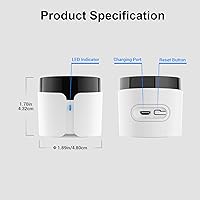
  • Dimensions: The unit measures 3.35 x 2.64 x 2.05 inches, making it compact enough to sit discreetly on any surface.
  • Weight: The hub weighs 3.56 ounces, light enough to be placed or repositioned without any mounting hardware.
  • Power: Powered via a standard USB connection; a USB power adapter is required for operation.
  • Compatibility: Works with infrared-controlled TVs, air conditioners, fans, set-top boxes, and audio systems from most major brands.
  • Cloud Dependency: Device control through the app relies on BroadLink's cloud infrastructure, requiring an active internet connection.
  • Manufacturer: Designed and manufactured by Hangzhou BroadLink Technology Co., Ltd., based in China.

Related Reviews

One for All URC7880 Universal Smart Remote Control
84%
85%
Setup & Configuration
90%
Device Compatibility
88%
Ease of Use
75%
Remote Range
91%
Shortcut Key Functionality
More
SofaBaton X1S Universal Remote Control
77%
61%
Ease of Setup
88%
Activity Programming
83%
Hub Signal Reliability
74%
Device Compatibility
81%
Build Quality
More
SofaBaton U2 Universal Remote Control
78%
71%
Ease of Setup
74%
App Experience
88%
Macro Functionality
91%
Backlit Buttons
83%
Device Compatibility
More
Universal Remote MX-990
84%
88%
Value for Money
85%
Ease of Setup
90%
Display Quality
92%
Device Compatibility
80%
Build Quality
More
Seagate Backup Plus Hub 4TB Desktop HDD
76%
88%
Storage Value
83%
Built-in USB Hub
81%
Cross-Platform Compatibility
67%
Transfer Performance
86%
Reliability & Longevity
More
Telekom Speedport Smart 4 Plus
82%
89%
Wi-Fi Performance
85%
Ease of Setup
81%
USB Port Functionality
91%
OLED Display Usability
87%
Streaming Support
More
YoLink YS6801-UC Smart Power Strip with Hub
80%
93%
Wireless Range
89%
Reliability & Uptime
78%
Value for Money
71%
Setup & Onboarding
74%
App Experience
More
Flipper Big Button Universal TV Remote
77%
93%
Ease of Use
91%
Button Design & Accessibility
74%
Compatibility & Setup
41%
Streaming Incompatibility
67%
IR Line-of-Sight Performance
More
VTech Smart HD Plus WiFi Baby Monitor
78%
83%
Video & Image Quality
86%
Night Vision Performance
88%
Battery Life
67%
App Performance & Connectivity
91%
Parent Unit Screen
More
Logitech Harmony 650 Universal Remote Control
86%
94%
Ease of Setup
88%
Button Responsiveness
85%
Display Clarity
90%
Compatibility
92%
Value for Money
More
Seagate Backup Plus Hub for Mac 8TB
84%
88%
Performance & Speed
94%
Storage Capacity
85%
Compatibility
91%
Ease of Setup
87%
Build Quality
More

FAQ

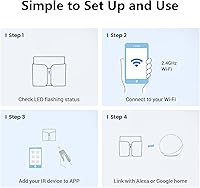
Unfortunately, no. The RM5 Plus only connects to 2.4GHz Wi-Fi networks. If your router is mesh-only or set to 5GHz exclusively, you will need to enable a 2.4GHz band separately before setup. Most dual-band routers do support this — you may just need to log into your router settings to activate it.

Not reliably. This smart IR hub uses infrared, which works like a TV remote — it needs a clear line of sight to the device it's controlling. Walls, doors, and furniture will block the signal, so for multi-room setups, you would need a separate hub in each room.

Yes, and this is one of the more useful features. The UserDefine panel lets you point your original remote at the hub and manually record each button command. It takes a few extra minutes, but it works well for older or uncommon appliances that mainstream smart home platforms often ignore.

It does, with one important caveat. Appliances and commands that are in the BroadLink database work with Alexa and Google Home voice control. However, any buttons you teach the hub manually through the UserDefine panel cannot currently be triggered via voice — that limitation is worth knowing before you buy if voice control is a priority.

No, that's one of the practical advantages here. Once the hub is set up, you can control your appliances from anywhere through the BroadLink app over a standard mobile data connection. A lot of users use this specifically to turn on the AC before they get home.

If the cloud service experiences an outage, remote control via the app will be temporarily unavailable. The hub depends on BroadLink's servers to relay commands when you're outside your home network. Local network control may still function in some scenarios, but it's worth knowing this isn't a fully offline-capable device.

Yes. The scene feature lets you group multiple appliances under one action — so a single tap could power on your TV, speaker, and fan simultaneously. You can also set timers and schedules, which is handy for things like automatically turning off devices at a set time each night.

It could. The hub requires that both your Wi-Fi network name and password are under 32 characters each. If either exceeds that limit, the connection will fail during setup. You would need to temporarily rename your network or shorten the password in your router settings before pairing the hub.

It's actually one of the more beginner-friendly options in this category. The BroadLink app walks you through setup step by step, and most common appliances are found in the database automatically. The main thing to sort out upfront is confirming you have a working 2.4GHz Wi-Fi network — once that's confirmed, most users are up and running in under 15 minutes.

The hub officially supports up to 10 devices. For most single-room setups — a TV, air conditioner, fan, and a couple of other appliances — that's plenty. If you have a very large number of IR-controlled devices spread across several rooms, you might eventually hit that ceiling and need a second unit.