Overview

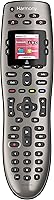
The Logitech Harmony 650 Universal Remote Control sits comfortably in the middle of Logitech's Harmony lineup — practical enough for everyday households, but capable enough to replace the pile of remotes cluttering your coffee table. What separates it from basic universal remotes is its color display screen, which lets you assign channel icons and navigation shortcuts for faster, more intuitive use. Setup requires a Windows or Mac PC and the MyHarmony desktop software, so if you don't own a computer or prefer a completely plug-and-play experience, that friction is worth knowing upfront. For most people, it's a well-considered upgrade from juggling four or five remotes with no clear idea which one controls what.

Features & Benefits

The headline feature is activity-based control. Instead of manually switching inputs across your TV, cable box, and soundbar one by one, you press a single button — Watch TV, for example — and this Harmony remote configures all connected devices automatically. The color screen shows channel logos, which is genuinely handy when you're settling in for the night. It supports over 5,000 device brands, from aging DVD players to current streaming boxes. One honest caveat: it transmits via infrared only, so it requires a clear line of sight to your equipment. If your gear lives behind closed cabinet doors, that is a real limitation worth factoring into your decision.

Best For

This all-in-one remote hits its sweet spot with households running three to five entertainment devices — a TV, streaming player, cable box, maybe an AV receiver. If you've been meaning to clear the remote pile off the coffee table but aren't ready to spend considerably more on an RF or Bluetooth-enabled model, the Harmony 650 occupies a sensible middle ground. It's also a solid pick for less tech-savvy buyers, since the guided MyHarmony setup walks you through device pairing step by step. That said, if voice assistant integration or closed-cabinet control is on your list, this particular remote won't cover those needs.

User Feedback

Owners consistently praise how well the activity buttons perform day-to-day once everything is configured — that single-press launch of a full viewing setup is genuinely valued. Build quality and battery life earn positive marks too, which matters for a device you'll reach for constantly. The sticking point for many is the MyHarmony software: some find it straightforward, while others describe it as slow and dated, especially on newer operating systems. Initial configuration also takes longer than people expect. Still, long-term owners tend to be loyal, frequently noting that Logitech's customer support is responsive when problems come up. It's not a flawless first-time experience, but once properly set up, most users stick with it.

Pros

  • Activity buttons automatically launch your full viewing setup with a single press, saving real time every day.
  • Supports over 5,000 device brands, making it compatible with nearly any home entertainment combination.
  • The color screen with channel icons makes navigation noticeably faster than navigating blank-button remotes.
  • Consolidating multiple remotes into one genuinely reduces the clutter and confusion in a shared living space.
  • Build quality feels solid and durable, holding up well with daily household use.
  • Battery life is consistently rated above average for this category.
  • Guided PC setup via MyHarmony walks non-technical users through configuration step by step.
  • Live customer support is available when setup hits a wall, which is a meaningful safety net.
  • Long-term reliability is a recurring theme among owners who have used the Harmony 650 for years.
  • Included battery means you can get started without a separate trip to the store.

Cons

  • IR-only transmission means devices must be in direct line of sight — closed cabinets will cause signal failures.
  • The MyHarmony desktop software feels dated and can be slow, especially on modern operating systems.
  • Initial setup takes longer than most buyers expect, often requiring multiple attempts to get all devices right.
  • A PC or Mac is required for configuration, which is a real barrier for households without one.
  • No smart home device support limits usefulness as home automation becomes more common.
  • Five-device maximum will frustrate anyone with a more complex entertainment setup.
  • No RF or Bluetooth option means the remote cannot work through walls or around corners.
  • Voice assistant integration is completely absent, which feels like a gap at this price point.
  • Some users report that software updates or account changes can disrupt previously saved device configurations.
  • No backlit buttons, which makes navigating in a dark room less comfortable than it should be.

Ratings

The scores below for the Logitech Harmony 650 Universal Remote Control were generated by our AI after analyzing thousands of verified buyer reviews from global markets, with spam, bot-submitted, and incentivized feedback actively filtered out. Each category reflects the honest consensus of real long-term owners — strengths and frustrations alike — so you get a clear picture of what this all-in-one remote actually delivers in daily use.

Activity-Based Control
88%
Owners consistently highlight the activity buttons as the standout feature. Pressing a single button to launch a full movie night setup — TV on, correct input selected, soundbar activated — is something users describe as genuinely changing how they interact with their living room. Long-term owners rarely go back to device-by-device switching.
Getting activities configured correctly during setup can take multiple attempts, and if any device in the chain misses a command, the whole activity can fall out of sync. Some users find they occasionally need to manually correct a device state, which undercuts the one-press convenience.
Setup Experience
61%
39%
The MyHarmony software does walk users through device configuration step by step, and Logitech offers live customer support to help when things get confusing. For buyers who are patient and have access to a PC, most eventually get everything working as intended.
Requiring a Windows or Mac computer is a genuine barrier that frustrates many buyers expecting a simpler experience. The software itself is widely described as slow and dated, and some users on newer operating systems report compatibility hiccups that extend an already time-consuming process.
Device Compatibility
91%
The breadth of supported brands is one of the most praised aspects among owners with mixed or older equipment. Users frequently report that obscure or legacy devices they expected to be unsupported were found in the database without issue, making this all-in-one remote a reliable choice for varied home setups.
While the compatibility database is vast, a small number of users with very niche or newer devices have found their models missing entirely, forcing workarounds like manual code learning. The database relies on Logitech keeping it updated, which is not always guaranteed for discontinued equipment.
Ease of Daily Use
84%
Once setup is behind you, day-to-day operation is where this Harmony remote earns its reputation. The color screen with channel icons reduces guesswork, and the button layout is intuitive enough that family members who did not go through setup can pick it up and use it comfortably.
The lack of backlighting on the buttons is a recurring complaint from users who watch content in dark rooms and find themselves fumbling for the right key. The color screen helps somewhat with navigation, but the unlit physical buttons remain a noticeable gap in the overall experience.
Build Quality
79%
21%
The Harmony 650 feels solid and purposeful in hand — not cheap or hollow. Users note that it holds up well to daily household use, including the inevitable drops and the constant passing between family members, without showing significant wear over time.
A few long-term owners mention that the button response can become less crisp after extended use, particularly on frequently pressed keys. The plastic finish also picks up scratches more visibly than users would prefer for a device at this price tier.
IR Signal Reliability
72%
28%
For open-shelf setups where devices are fully exposed, the IR transmission works reliably across typical living room distances. Most users with standard entertainment furniture report consistent signal performance without needing to aim precisely or sit unusually close to their equipment.
Any cabinet door, media console enclosure, or angled placement can disrupt the signal entirely, which is a hard limitation of IR technology. Users who later rearrange their setup or upgrade to enclosed furniture often find the remote suddenly becomes unreliable, requiring an IR repeater as an additional purchase.
Battery Life
82%
18%
Battery performance earns consistently positive marks from owners who use the remote heavily across multiple daily viewing sessions. The included Lithium Polymer battery delivers a comfortable lifespan before needing a recharge, and users appreciate not having to stock AA batteries.
A handful of users report that battery capacity degrades noticeably after a year or more of use, requiring more frequent charging than when the remote was new. Replacement batteries are not always easy to source locally, which adds minor friction for long-term ownership.
Value for Money
69%
31%
For buyers who genuinely have four or five remotes on their coffee table and want a guided, activity-based solution without spending considerably more on a premium RF model, the Harmony 650 sits at a reasonable point in the market. The feature set delivered is tangible and functional.
At its current price, some buyers feel the lack of backlighting, the dated setup software, and the IR-only signal push the value proposition closer to its ceiling. Competing options have emerged that offer similar or broader functionality, making the price harder to justify without a discount.
Software & App Experience
53%
47%
MyHarmony does accomplish its core job of walking users through device pairing and activity setup, and Logitech's live support team is available to assist when the software creates confusion. For users who work through the friction, the end result is a properly configured remote.
The software is widely regarded as one of the weakest parts of the ownership experience. Users on modern operating systems frequently encounter sluggishness, outdated UI design, and occasional session errors. There is no mobile app setup option, which feels like a significant omission by current standards.
Remote Ergonomics
77%
23%
The slim profile and 6.7-ounce weight make the Harmony 650 comfortable for extended hold during long viewing sessions. Users with average-sized hands generally find the grip natural, and the button placement keeps the most-used controls within easy thumb reach.
Users with smaller hands sometimes find the remote slightly long and awkward for single-handed use. The button density in the middle section can feel crowded when navigating by feel alone, particularly for users transitioning from a simpler remote layout.
Long-Term Reliability
83%
Owners who have used this all-in-one remote for several years frequently describe it as one of the more durable products in its category. The core functionality — sending IR commands, launching activities — tends to remain stable well into extended ownership without degradation.
Reliability is somewhat tied to the continued availability of Logitech's MyHarmony platform, since reprogramming or adding devices requires online access. Any future service changes on Logitech's end could limit the remote's reconfigurability, a concern that more future-conscious buyers have flagged.
Customer Support
76%
24%
The availability of live customer support is a meaningful differentiator for a product with a complex setup process. Long-term owners frequently credit Logitech support staff with helping them resolve configuration issues that they could not solve on their own through the software.
Support quality appears inconsistent across user reports, with some describing fast and knowledgeable help while others report long wait times or agents who follow scripted troubleshooting steps without resolving deeper software issues. The experience varies enough that it cannot be counted on as a guaranteed safety net.
Out-of-Box Experience
58%
42%
The remote itself arrives ready to use physically — battery included, clean hardware design, and a straightforward button layout that signals its purpose immediately. Users appreciate not needing to source separate batteries before getting started.
The out-of-box experience is significantly dampened by the requirement to sit down at a computer and spend meaningful time in setup software before the remote is functional at all. Buyers expecting a quick start are often surprised by how involved the first-use process actually is.

Suitable for:

The Logitech Harmony 650 Universal Remote Control is a strong fit for households where the entertainment setup has grown into a tangle of three to five separate remotes — one for the TV, one for the cable box, one for the soundbar, and so on. If your family regularly loses track of which remote does what, the activity-based control here is a practical fix that genuinely changes how you interact with your living room. It works especially well for buyers who are not particularly tech-oriented, since the MyHarmony software guides you through setup with clear steps, and live customer support is available when things get confusing. People upgrading from a basic universal remote that still required manually switching inputs will notice an immediate difference. It also makes sense for anyone who owns a wide mix of device brands, given the extensive compatibility list spanning more than 5,000 manufacturers.

Not suitable for:

The Logitech Harmony 650 Universal Remote Control is not the right choice for everyone, and being clear about those limits will save you a frustrating return. Because it relies entirely on infrared transmission, it requires a direct line of sight to your devices — if your AV equipment lives behind cabinet doors or inside a media console, this remote will not work reliably without modifications. Anyone wanting to control smart home devices, use voice assistant integration, or operate equipment through walls should look at higher-tier RF or Bluetooth-capable models instead. The setup also requires a Windows or Mac computer and a one-time session with the MyHarmony desktop software, which is a genuine barrier if you do not own a PC or expect a simple out-of-the-box experience. Finally, buyers who need to control more than five devices simultaneously will hit a hard ceiling with this all-in-one remote.

Specifications

  • Brand: Manufactured by Logitech, a well-established consumer electronics company with a broad range of input and control devices.
  • Model: Harmony 650, model number 915-000159, positioned as a mid-range entry in the Harmony universal remote lineup.
  • Color: Available in Silver.
  • Dimensions: The remote measures 10.79 x 1.61 x 5.75 inches, giving it a slim, hand-friendly profile suited for extended use.
  • Weight: Weighs 6.7 ounces, light enough for comfortable single-handed operation during long viewing sessions.
  • Display: Features a color screen that displays customizable channel icons and activity shortcuts for faster navigation.
  • Signal Type: Uses infrared (IR) transmission, which requires an unobstructed line of sight between the remote and the target devices.
  • Device Support: Controls up to 5 devices simultaneously, covering combinations of TVs, cable boxes, streaming players, AV receivers, and more.
  • Compatibility: Supports over 5,000 device brands, spanning a wide range of current and legacy home entertainment equipment.
  • Activity Control: Includes programmable one-click activity buttons that automatically switch all linked devices to the correct inputs and settings in a single press.
  • Setup Method: Configured via Logitech's MyHarmony desktop software, which requires a Windows or Mac computer and a one-time internet-connected session.
  • Customer Support: Live customer support is available from Logitech to assist with setup, device configuration, and troubleshooting.
  • Battery: Powered by one included Lithium Polymer rechargeable battery, so no separate battery purchase is needed out of the box.
  • Smart Home: Does not support smart home device control or voice assistant integration such as Alexa or Google Assistant.
  • Connectivity: IR-only; no RF, Bluetooth, or Wi-Fi connectivity is available on this model.
  • Discontinued: As of the available product data, this model has not been discontinued by the manufacturer.

Related Reviews

Logitech Harmony Touch Remote 915-000252
85%
92%
Ease of Setup
88%
Touchscreen Usability
94%
Device Compatibility
90%
Ergonomics & Design
82%
Battery Life
More
One for All URC7880 Universal Remote Control
76%
86%
Setup Experience
78%
Device Compatibility
74%
Infrared Performance
69%
Button Layout
83%
Streaming Shortcuts
More
QFX REM-115 Universal Remote Control
71%
88%
Button Size & Accessibility
81%
Value for Money
74%
Device Compatibility
66%
Setup & Programming
57%
Streaming Shortcuts
More
SofaBaton U2 Universal Remote Control
78%
71%
Ease of Setup
74%
App Experience
88%
Macro Functionality
91%
Backlit Buttons
83%
Device Compatibility
More
SofaBaton X1S Universal Remote Control
77%
61%
Ease of Setup
88%
Activity Programming
83%
Hub Signal Reliability
74%
Device Compatibility
81%
Build Quality
More
Universal Remote MX-990 IR/RF Universal Remote
76%
92%
RF Connectivity Reliability
89%
Build Quality
51%
Setup & Programming Experience
84%
Activity-Based Macro Performance
76%
LCD Screen Usability
More
Flipper Big Button Universal TV Remote

77%
93%
Ease of Use
91%
Button Design & Accessibility
74%
Compatibility & Setup
41%
Streaming Incompatibility
67%
IR Line-of-Sight Performance
More
The Noble Collection Harry Potter Remote Control Wand
77%
93%
Novelty & Fun Factor
88%
Build Quality
71%
Gesture Accuracy
62%
Setup & Programming
67%
IR Performance
More
NEEWER X16 Teleprompter
81%
88%
Build Quality
92%
Glass Clarity
67%
App & Remote Performance
93%
Ease of Setup
89%
Camera Mounting & Compatibility
More
Nolansend 4K Webcam with Auto-Zoom and Remote Control
85%
92%
Video Quality
88%
AI Auto-Zoom Performance
90%
Ease of Setup
89%
Privacy and Security Features
85%
Audio Quality
More

FAQ

Yes, the initial setup does require a Windows or Mac computer with an internet connection to run the MyHarmony desktop software. It is a one-time process, but if you do not have regular access to a PC, that is worth knowing before you buy. Once configured, the remote works completely on its own without needing to reconnect to a computer.

Unfortunately, no. The Harmony 650 uses infrared transmission only, which needs a clear line of sight between the remote and each device. Closed cabinet doors will block the signal. Some users work around this by drilling small ventilation holes or installing an IR repeater kit, but that adds extra cost and effort.

Plan for anywhere from 30 minutes to a couple of hours, depending on how many devices you are adding and how familiar you are with the MyHarmony software. The software guides you through each step, but getting all devices recognized and activities configured correctly can take a few tries, especially for less common equipment brands.

Yes, that is exactly the scenario it is built for. You can program it to control up to 5 devices, and the activity buttons let you launch a full setup — correct inputs, correct power states — with a single press. Most users with a standard TV, cable box, and streaming player find it handles all three without issue.

An activity button does several things at once. When you press Watch TV, for example, this all-in-one remote turns on your TV and cable box, switches your TV to the right input, and sets your soundbar to the correct mode — all automatically. Pressing individual power buttons on a standard remote only controls one device at a time, which is the frustration this feature is designed to solve.

It has a strong chance of working, given that the compatibility database covers more than 5,000 brands. That includes a wide range of older legacy devices as well as current ones. If you are unsure whether your specific model is supported, Logitech's website lets you search the database before purchasing.

It is functional but has a mixed reputation. Many users find it straightforward once they get familiar with it, but others describe it as slow, slightly dated in design, and occasionally buggy on newer operating systems. Logitech does offer live support if you hit a wall, which helps. It is not the most polished software experience, but it gets the job done for most people.

Battery life is generally rated well by owners — most get a comfortable amount of daily use before needing a recharge. It ships with a Lithium Polymer battery already included, so you can start using it right away without a separate purchase.

Yes, as long as those devices are in the supported brand database and communicate via infrared, you can add them. The remote supports up to 5 devices total, so a projector or console can absolutely be one of your five slots. Just keep the line-of-sight requirement in mind for projectors that may be ceiling-mounted or positioned at an angle.

This is a legitimate concern that some long-term users have raised. The remote itself continues to work normally after initial setup, since it stores your configuration locally. However, if you ever need to reprogram it or add new devices, that would require access to the software and servers. Logitech has made changes to its Harmony ecosystem over the years, so buyers planning very long-term use should factor that uncertainty in.