Overview

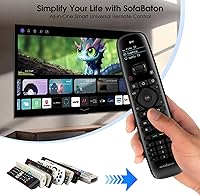
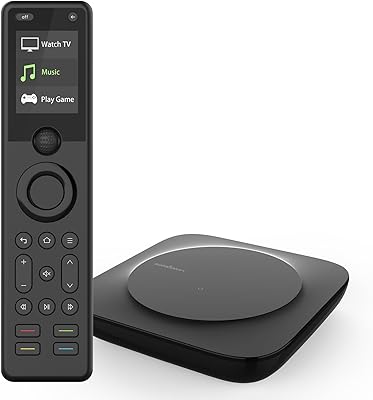
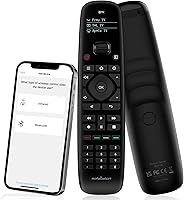
The SofaBaton U2 Universal Remote Control is a mid-range all-in-one controller built for anyone drowning in a pile of remotes. What separates it from older universal options is its app-driven setup — you're not punching in codes manually or flipping through a paper manual. The headline upgrade over its predecessor is the backlit button layout, which makes a real difference when the lights are down. One important caveat upfront: this all-in-one controller works via infrared and Bluetooth only, so WiFi-connected smart home devices are out of scope. If your setup is TV, soundbar, Blu-ray, and a streaming box, it fits well.
Features & Benefits

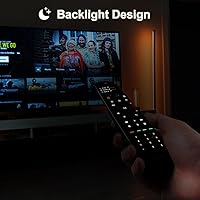
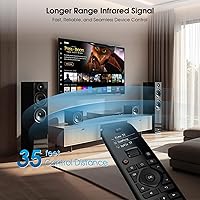
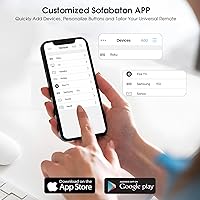
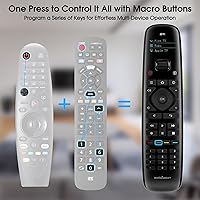
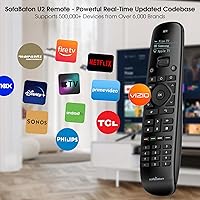
The backlit keys are the most immediately noticeable improvement — reach for this universal remote in a dark room and you can actually see what you're pressing. The macro button system is where things get genuinely useful: assign a single button to power on your TV, switch the soundbar to the right input, and launch your streaming device all at once. Setup runs through the SofaBaton app, which lets you reassign buttons, reorder functions, and add devices by entering brand and model. The code library covers over 500,000 devices across 6,000-plus brands and updates regularly. IR range extends to 35 feet with multiple transmitters, and Bluetooth and IR learning modes handle devices that fall outside the standard database.

Best For

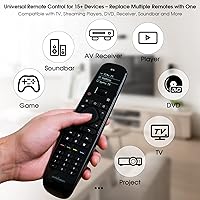
This all-in-one controller is a strong fit for anyone managing three or more AV components — a TV, a soundbar, and a streaming stick or box are the classic combo. Home theater regulars who have grown tired of switching between remotes will appreciate the macro functionality most. Dark-room watchers get obvious value from the backlit layout. It also suits buyers with older or less mainstream gear, since the large device database gives better coverage than most competitors. That said, it rewards people willing to spend 15–20 minutes in the app during initial setup. If you want to plug in two AA batteries and be done, this probably isn't the remote for you.

User Feedback

Owners who put time into the app tend to rate the U2 remote well — the backlit keys, the solid build, and reliable macro execution come up repeatedly as highlights. Where satisfaction drops is usually around setup: buyers who expected plug-and-play behavior run into the app learning curve and occasionally struggle with IR signal alignment or re-pairing after battery changes. A notable bright spot in reviews is customer support responsiveness — several users mention that SofaBaton actually added their unlisted device to the database after a direct request. The split between enthusiasts and casual users is real: someone building a dedicated media room will find it worthwhile, while a less tech-oriented buyer may find it more work than expected.

Pros

  • Backlit buttons make dark-room navigation genuinely effortless — no more fumbling or mispressing in a dim living room.
  • Macro buttons can power on and configure an entire multi-device setup with a single press.
  • The device database covers 500,000-plus devices and updates over time, making long-term compatibility more reliable than static-code alternatives.
  • Button reassignment via the app means the U2 remote can be tailored to how you actually use your system.
  • IR range reaches up to 35 feet, handling larger rooms and angled commands without signal drop.
  • SofaBaton actively adds unsupported devices to the database on request — a rare and genuinely useful support policy.
  • Bluetooth mode eliminates line-of-sight requirements for compatible devices, adding real flexibility.
  • At 4 ounces, this all-in-one controller is light enough for extended use without hand fatigue.
  • Compatible with up to 15 devices, covering virtually any realistic home entertainment configuration.

Cons

  • App setup has a real learning curve — first-time macro configuration often requires multiple attempts to get right.
  • WiFi devices are completely unsupported, which is a hard dealbreaker for smart home or IP-controlled setups.
  • Bluetooth connections occasionally drop after battery changes and do not always reconnect automatically.
  • The backlight timeout is short, requiring a tap to wake the remote before every use after brief inactivity.
  • IR signal can be sensitive to off-axis pointing, which is a problem for devices stored inside enclosed cabinets.
  • The plastic finish picks up fingerprints easily and does not feel as premium as the price might suggest.
  • Battery drain is faster than average when backlighting and macros are used heavily.
  • An account registration is required to use the app, which is an unnecessary friction point for privacy-conscious buyers.
  • Thin documentation means many users end up relying on community forums or support tickets to resolve setup issues.

Ratings

The SofaBaton U2 Universal Remote Control has been evaluated by our AI rating system after processing verified buyer reviews from global markets, with spam, bot-generated, and incentivized feedback actively filtered out. Scores reflect the genuine distribution of real-world satisfaction — including both the aspects owners consistently praise and the friction points that surface across different user types. Strengths and shortcomings are weighted equally so you get an honest picture before buying.
Ease of Setup
71%
29%
Buyers who are comfortable with smartphones generally find the app-guided process straightforward — entering a brand and model number pulls up the device in seconds, and the interface for organizing buttons is more intuitive than punching in legacy codes. Most setups are complete within 20 minutes.
For less tech-savvy users, the app dependency is a real barrier. Several reviewers mention confusion around pairing modes or finding the right code variant for their specific TV model, and a handful report needing two or three attempts before everything responded correctly.
App Experience
74%
26%
The SofaBaton app stands out for the depth of customization it offers — reassigning buttons, building macros, and reordering functions from a phone screen is genuinely more flexible than anything a traditional universal remote provides. Updates have added device support over time, which users appreciate.
The app has a noticeable learning curve, and some users report occasional sync hiccups after a phone OS update or battery swap. It also requires an account, which is a friction point for buyers who prefer not to register just to use a remote.
Macro Functionality
88%
The macro feature is consistently the most praised aspect among home theater users. Being able to press one button and have the TV power on, the soundbar switch inputs, and the streaming device wake up simultaneously is a tangible daily convenience that lives up to the marketing description.
Creating macros requires some trial and error within the app, and the timing between commands occasionally needs fine-tuning. A small number of users note that macros can misfire if IR signals overlap or if one device responds slower than expected.
Backlit Buttons
91%
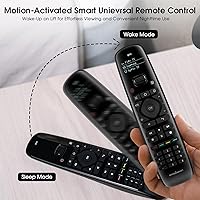
Dark-room usability is where this all-in-one controller earns its upgrade badge. The backlighting activates quickly on motion and is bright enough to read without being distracting during a movie. Buyers upgrading from non-backlit remotes consistently call this out as a meaningful improvement.
The backlight timeout is relatively short, which means reaching for the remote after a few seconds of inactivity requires a tap to wake it before you can navigate. A small number of users wanted brightness adjustment, which is not currently available.
Device Compatibility
83%
Coverage across 6,000-plus brands and a continuously updated database means this all-in-one controller handles most mainstream and many obscure AV brands without issue. Owners with older or regional gear report better-than-expected matches, and SofaBaton's willingness to add missing devices upon request is frequently cited positively.
WiFi-connected devices are entirely unsupported, which eliminates smart TVs controlled via IP, smart home hubs, and any device that relies on network commands rather than IR or Bluetooth. This is a hard limit and a genuine dealbreaker for some setups.
Build Quality & Feel
79%
21%
At just 4 ounces and 7.9 inches long, the U2 remote sits comfortably in one hand during extended sessions. The button layout feels considered rather than crowded, and the overall construction has a solidity that holds up well against daily use and occasional drops onto soft surfaces.
The plastic finish, while decent, does not feel premium at close inspection — some buyers note it picks up fingerprints easily and lacks the rubberized grip they expected at this price tier. The battery compartment cover has been flagged as slightly flimsy by a handful of reviewers.
IR Signal Range & Reliability
86%
The extended 35-foot range with multiple IR transmitters performs noticeably better than single-emitter competitors in larger rooms. Users in open-plan living spaces report reliable response even when pointing the remote at an angle rather than directly at the device.
IR alignment sensitivity comes up occasionally — a few users note that signals can drop if the remote is pointed too far off-axis, particularly for devices tucked inside entertainment cabinets. Reflective surfaces and enclosed shelving can create dead spots that require repositioning.
Macro Setup Complexity
66%
34%
Once macros are configured correctly, they execute reliably and save meaningful time for users with multi-device setups. The app provides enough guidance that experienced users can build a functional macro within a few minutes of exploring the interface.
The process of building and testing macros is not intuitive for first-time users. Getting the command sequence and timing right often requires multiple iterations, and the documentation — both in-app and in the manual — is thin enough that several buyers turned to community forums for help.
Bluetooth Performance
77%
23%
Bluetooth mode extends control to devices that do not respond to IR, adding useful flexibility for streaming boxes and select soundbars that require it. Pairing is generally stable once established and does not require line-of-sight operation the way IR does.
Re-pairing after battery changes or firmware updates is the most common Bluetooth complaint. A subset of users reports that Bluetooth connections drop unexpectedly and are not always restored automatically, requiring a manual reconnect through the app.
Button Layout & Usability
81%
19%
The physical layout prioritizes the most commonly used functions in easy thumb-reach positions, and the ability to reassign underused buttons via the app means the remote can be tailored to how you actually watch. Frequent functions like volume and input switching feel well-placed.
The sheer number of buttons can feel overwhelming initially, especially for users coming from a simpler remote. A few reviewers note that certain buttons are too closely spaced for reliable pressing without looking, which partially offsets the benefit of the backlighting.
Value for Money
78%
22%
For buyers who use the customization features — macros, button reassignment, and Bluetooth — the mid-range price delivers clear functional value over cheaper alternatives that only do basic code matching. The regularly updated device database adds long-term utility beyond the initial purchase.
Buyers who end up using only basic IR functions may feel the price is difficult to justify relative to simpler universal remotes that cost a fraction as much. The app dependency also means the value proposition partially relies on a third-party software experience remaining stable.
Customer Support
82%
18%
Adding unsupported devices to the database on request is a standout support policy that comes up organically in reviews — users with niche brands report that SofaBaton followed through within a reasonable timeframe. This kind of responsive after-sale engagement is uncommon at this price tier.
Response times for support inquiries vary, and some users report waiting longer than expected for device additions or troubleshooting replies. The support experience appears inconsistent depending on the complexity of the request and the volume of tickets at any given time.
Battery Life
73%
27%
Standard AA batteries are the power source, which makes replacements universally accessible and avoids the headache of proprietary charging. Under moderate daily use, battery life is generally adequate across several weeks of typical remote operation.
Heavy macro users and those who rely on backlit buttons frequently report shorter-than-expected battery cycles. The backlight in particular draws meaningfully more power, and a few users running complex setups mention replacing batteries more often than they anticipated.
Learning Mode Effectiveness
69%
31%
The IR learning mode is a practical fallback for devices not covered in the code database. Pointing an original remote at the U2 to copy commands works reliably for most standard functions and gives users a path forward when database codes fall short.
Learning mode is not foolproof — some proprietary command formats do not transfer cleanly, and the process requires careful execution with both remotes held steady and close together. Inconsistent results with certain high-frequency or encoded signals have been reported by a minority of users.

Suitable for:

The SofaBaton U2 Universal Remote Control is a strong pick for anyone whose coffee table has turned into a graveyard of remotes — the person who reaches for three different controllers just to watch a movie and has quietly accepted it as normal. It works especially well for home theater setups built around a TV, soundbar, streaming box, and maybe a Blu-ray player, where the macro feature genuinely pays off by collapsing a five-step power-on routine into a single button press. Dark-room watchers — whether that is late-night movie sessions or a dedicated media room with no overhead lighting — will notice the backlit buttons immediately and appreciate them every single day. It also rewards buyers with older or less mainstream AV gear, since the large and actively maintained device database gives reasonable coverage for brands that cheaper universal remotes often miss entirely. If you are comfortable spending 20 minutes with a smartphone app during initial setup and treating that investment as a one-time cost for long-term convenience, this all-in-one controller delivers real, practical value.
Not suitable for:

The SofaBaton U2 Universal Remote Control is not the right fit for buyers who want a plug-in-and-go experience with zero configuration — the app is central to how this remote works, and skipping it means leaving most of its value on the table. Anyone managing WiFi-connected devices, smart home hubs, or IP-controlled systems should look elsewhere entirely, because this all-in-one controller operates exclusively over infrared and Bluetooth with no network command support whatsoever. Less tech-comfortable users — particularly those who find smartphone apps frustrating or do not own a compatible device — may find the setup process more stressful than the remote is worth. If your entertainment setup is simple, say a single TV with its original remote working fine, the mid-range price is difficult to justify for basic channel-changing duties. And buyers who specifically need to control Alexa-integrated devices, Google Home ecosystems, or any modern smart speaker setup will hit a hard wall immediately.
Specifications

  • Brand: Manufactured by SofaBaton, a brand specializing in universal remote control solutions.
  • Model: The model designation is U2, representing a direct upgrade over SofaBaton's previous generation remote.
  • Dimensions: The remote measures 7.9 x 1.9 x 1.1 inches, sized for comfortable single-hand operation.
  • Weight: At 4 ounces without batteries, the remote is lightweight enough for extended daily use without fatigue.
  • Battery: Requires 2 standard AA batteries for operation; batteries are not included in the package.
  • Connectivity: Supports infrared (IR), Bluetooth, and IR learning mode; WiFi-based device control is not supported.
  • IR Range: Equipped with multiple IR transmitters delivering a signal range of up to 35 feet.
  • Device Database: Provides access to a cloud-hosted, continuously updated library covering 500,000-plus devices across 6,000-plus brands.
  • Max Devices: A single U2 remote can store and control up to 15 individual devices simultaneously.
  • Setup Method: Device configuration and customization are performed through the SofaBaton companion smartphone app, available for iOS and Android.
  • Backlight: All buttons feature built-in backlighting that activates on motion, enabling use in low-light or dark environments.
  • Macro Support: Dedicated macro buttons allow users to assign multi-device command sequences to a single button press.
  • Button Assignment: Buttons can be reassigned, reordered, and customized via the SofaBaton app using a cloud-based code library.
  • Compatible Devices: Works with TVs, soundbars, Blu-ray and DVD players, set-top boxes, streaming devices, and projectors.
  • Color: Available in black with a uniform matte finish across the body.
  • WiFi Support: This remote does not support WiFi-connected or network-controlled devices under any operating mode.
  • Availability: The U2 model was first made available for purchase in December 2024.
  • Price Tier: Positioned in the mid-range segment of the universal remote market, priced to reflect its app-driven feature set.

Related Reviews

SofaBaton X1S Universal Remote Control
77%
61%
Ease of Setup
88%
Activity Programming
83%
Hub Signal Reliability
74%
Device Compatibility
81%
Build Quality
More
Logitech Harmony 650 Universal Remote Control
86%
94%
Ease of Setup
88%
Button Responsiveness
85%
Display Clarity
90%
Compatibility
92%
Value for Money
More
One for All URC7880 Universal Smart Remote Control
84%
85%
Setup & Configuration
90%
Device Compatibility
88%
Ease of Use
75%
Remote Range
91%
Shortcut Key Functionality
More
QFX REM-115 Jumbo Universal Remote Control
83%
91%
Ease of Use
88%
Button Visibility (Glow-in-the-dark)
75%
Compatibility with Devices
89%
Design and Ergonomics
83%
Setup/Installation
More
Universal Remote MX-990
84%
88%
Value for Money
85%
Ease of Setup
90%
Display Quality
92%
Device Compatibility
80%
Build Quality
More
Flipper Big Button Universal TV Remote
77%
93%
Ease of Use
91%
Button Design & Accessibility
74%
Compatibility & Setup
41%
Streaming Incompatibility
67%
IR Line-of-Sight Performance
More
NEEWER X16 Teleprompter
81%
88%
Build Quality
92%
Glass Clarity
67%
App & Remote Performance
93%
Ease of Setup
89%
Camera Mounting & Compatibility
More
Nolansend 4K Webcam with Auto-Zoom and Remote Control
85%
92%
Video Quality
88%
AI Auto-Zoom Performance
90%
Ease of Setup
89%
Privacy and Security Features
85%
Audio Quality
More
VITADE 862Pro 1080P 60FPS Webcam with Remote Control
88%
89%
Video Quality
94%
Ease of Use
85%
Lighting Performance
88%
Audio Clarity
70%
Field of View
More
The Noble Collection Harry Potter Remote Control Wand
77%
93%
Novelty & Fun Factor
88%
Build Quality
71%
Gesture Accuracy
62%
Setup & Programming
67%
IR Performance
More

FAQ

You technically need the SofaBaton app to get the most out of this remote — it is how you add devices, configure macros, and reassign buttons. Basic IR functions may work with manual code entry, but the app is central to the experience and skipping it means missing most of what makes the U2 remote worth buying.

It depends on how you define control. The SofaBaton U2 Universal Remote Control can control most smart TVs via infrared for functions like power, volume, and input switching. However, it does not support WiFi-based or IP control commands, so any app-launching or network-dependent features on your smart TV will not be reachable through this remote.
Most users with a standard setup — a TV, soundbar, and one streaming device — report being fully configured within 15 to 25 minutes. Setting up basic device control is quick; building and testing macros takes a bit more time depending on how many steps you include in each sequence.

Closed cabinets are a challenge for any IR-based remote, including this one. IR signals require a relatively clear line of sight to reach the device sensor. If your equipment is behind solid doors, consider leaving a small gap or using a Bluetooth-compatible device where possible, since Bluetooth does not require line of sight.

The database covers 500,000-plus devices across 6,000-plus brands, which is broad enough to handle most mainstream and many regional or older brands. If your device is not found during setup, SofaBaton offers an IR learning mode as a fallback, and their support team has a track record of adding missing devices to the database upon direct request.

Your device configurations and macro assignments are stored in the cloud via the SofaBaton app, so they are not lost when you swap batteries. That said, some users report that Bluetooth pairings occasionally need to be re-established after a battery change, which can be done through the app in a minute or two.

The remote itself is a physical device shared by whoever picks it up — there is no user authentication on the hardware side. The app account is used for setup and configuration, but once the remote is programmed, anyone in the household can use it without needing to log in.

The backlight activates on motion and turns off after a short period of inactivity to conserve battery. The timeout is fairly quick, so if you set down the remote and pick it up a few seconds later, you may need to press a button or give it a shake to wake the backlight before navigating.

The SofaBaton app allows you to build macros with multiple sequential commands, covering a realistic home theater startup or shutdown routine without issue. The practical limit is generous enough that most users never hit a ceiling — common macros like powering on three devices and switching inputs run reliably within the supported range.

Not at all. You can add new devices to this all-in-one controller at any time through the app without affecting your existing configurations. The cloud-based setup means your current button assignments and macros stay intact, and you simply add the new device and assign it to an available slot or button as needed.

Where to Buy