Overview

The Flipper Big Button Universal TV Remote was built around a single idea: watching TV should not be a puzzle. For elderly users, or anyone living with dementia, Alzheimer's, or impaired vision, a standard remote is genuinely overwhelming — dozens of tiny, identical buttons, cryptic symbols, and functions nobody needs. This simplified remote strips all of that away deliberately. It handles IR-based TVs, cable boxes, and soundbars, but it is not trying to do everything. Streaming devices are not supported, and that is actually the point. At a mid-range price, it sits comfortably as a thoughtful, practical gift — the kind a caregiver or adult child buys because they are tired of getting calls about accidentally muted TVs.
Features & Benefits

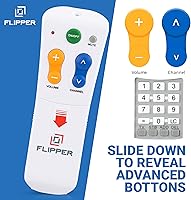
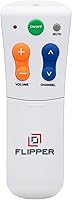
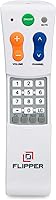
What makes the Flipper remote stand out is not what it does — it is what it does not do. There are only six usable functions: power, channel up and down, volume up and down, and mute. That is it. The buttons are large, color-coded, and tactile, meaning someone with low vision or shaky hands can find what they need by feel alone. A silicone cover hides any remaining buttons, and the firmware actively resists accidental reprogramming — a surprisingly thoughtful detail. You can set up to 25 favorite channels, so users cycle through only what they actually watch. It works via infrared with major providers like Xfinity, Spectrum, and DirecTV, plus most mainstream TV brands. One real caveat: it requires a clear line of sight to the IR receiver.

Best For

This senior-focused clicker is the right buy for a specific type of household — one still running traditional cable or satellite. If your parent or grandparent uses Xfinity, Spectrum, or a similar provider and watches on a Samsung, LG, Vizio, or comparable TV, this fits well. It is particularly valuable for people with dementia or Alzheimer's, where a simplified interface genuinely reduces daily confusion and frustration. Caregivers who are tired of re-explaining how to change a channel will likely appreciate it just as much as the person using it. That said, if the household has cut the cord and relies on Roku, Apple TV, or a Fire Stick, there is no streaming support at all — by design.

User Feedback

Buyers consistently find this simplified remote easy to gift — adult children frequently mention setting it up for a parent and watching them use it without any assistance, which says a lot. The overall build feels solid, and the silicone button cover gets called out specifically for feeling clean and durable. On the critical side, a handful of buyers were caught off guard by the lack of streaming compatibility — the product is upfront about this, but it is easy to miss when shopping quickly. A few users also ran into IR line-of-sight issues with cable boxes tucked behind furniture. The initial programming process draws mixed reviews; it is manageable, but typically requires a tech-savvy family member to complete it correctly.

Pros

  • Only six large, color-coded buttons mean seniors can operate the TV without confusion or help.
  • Tactile button design lets users with low vision navigate by touch alone.
  • Firmware protection prevents accidental reprogramming, so settings stay stable over time.
  • The silicone button cover hides unused controls, keeping the interface clean and uncluttered.
  • Up to 25 favorite channels can be pre-programmed, cutting out hundreds of irrelevant ones.
  • Works reliably with major cable providers including Xfinity, Spectrum, DirecTV, and Dish.
  • Lightweight at 4 ounces — easy to hold for extended periods, even with limited grip strength.
  • Makes a genuinely useful gift for caregivers shopping for an elderly parent or loved one.
  • Compatible with a wide range of mainstream TV brands including Samsung, LG, Vizio, and TCL.

Cons

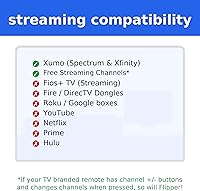
  • No streaming device support at all — Roku, Apple TV, Fire TV, and Google TV users are out of luck.
  • Initial programming almost always requires a caregiver or family member to complete — it is not self-service.
  • Infrared-only operation means it stops working if the cable box is hidden behind furniture or inside a cabinet.
  • Re-programming favorite channels after a cable plan change requires starting the setup process over.
  • No digital or video setup guide makes troubleshooting harder for non-technical buyers.
  • Batteries are not included, which is a small but annoying oversight for a product marketed as a ready-to-gift item.
  • Soundbar compatibility is inconsistent — less common brands may not pair reliably.
  • The price feels steep to buyers who later realize their setup is not compatible with infrared-only control.

Ratings

The ratings below for the Flipper Big Button Universal TV Remote were generated by our AI system after analyzing thousands of verified global buyer reviews, with spam, bot activity, and incentivized feedback actively filtered out. Scores reflect a balanced picture of real ownership experiences — the genuine strengths that make caregivers and family members recommend it, alongside the friction points that frustrated buyers who had different expectations. Both sides are represented honestly.
Ease of Use
93%
This is where the simplified remote earns its reputation. Seniors and users with dementia or Alzheimer's consistently report being able to operate it independently after a single session, which is a meaningful outcome. Caregivers describe finally being free of daily phone calls about accidentally changed settings.
A small number of users note that even six buttons can briefly confuse someone in the late stages of cognitive decline, particularly distinguishing channel from volume controls. It is rare feedback, but worth considering for users with more advanced needs.
Button Design & Accessibility
91%
The large, color-coded, tactile buttons are widely praised by users with low vision, arthritis, or reduced hand strength. Multiple reviewers specifically mention that the buttons can be identified by touch alone, which makes a real practical difference during nighttime TV watching.
A few buyers with very large hands found the remote slightly narrow for comfortable extended holding, and some wished the color contrast between buttons was even more pronounced for users with severe visual impairment. These are minor points, but worth noting.
Compatibility & Setup
74%
26%
For households on traditional cable — Xfinity, Spectrum, DirecTV, Dish — the pairing process works reliably across a wide range of TV brands including Samsung, LG, and Vizio. When a caregiver handles the initial programming, most report it going smoothly within a few minutes.
The setup process is not truly self-service for the target user — it almost always requires a family member or caregiver to complete. Non-tech-savvy adults occasionally struggle with the programming steps, and a handful of reviewers reported needing multiple attempts before it synced correctly with their cable box.
Streaming Incompatibility
41%
59%
To its credit, the product is transparent about not supporting streaming devices, and buyers who read carefully go in with the right expectations. For households still on cable or satellite, this limitation is entirely irrelevant to daily use.
This is the single largest source of negative reviews. Buyers who own Roku, Fire TV, Apple TV, or Google TV boxes — or who use streaming apps as their primary content source — find the remote essentially non-functional for their setup. The frustration is real, even if the limitation is documented.
IR Line-of-Sight Performance
67%
33%
In living rooms with open TV setups where the cable box is visible and unobstructed, the IR signal performs reliably. Users in standard furniture arrangements rarely report signal issues, and the range is sufficient for most typical room sizes.
When cable boxes are tucked inside media consoles, behind TV panels, or inside closed cabinets — which is surprisingly common — the remote simply stops working without an IR extender. This catches buyers off guard and adds an unexpected extra purchase or furniture rearrangement to the setup process.
Build Quality & Durability
83%
The silicone button cover is a recurring highlight in positive reviews, described as feeling solid, well-fitted, and durable rather than cheap or flimsy. The overall remote body feels substantial for its size and weight, giving it a reassuring quality feel as a gift item.
A small number of long-term users report the silicone cover loosening slightly after extended daily use, and a few mention that battery contacts show wear faster than expected. These are not widespread complaints, but they surface often enough to note.
Value for Money
79%
21%
Buyers who purchase this as a gift for a parent or loved one overwhelmingly feel it is worth the mid-range price, particularly given the peace of mind it provides. The specialized design justifies the cost compared to a generic cheap remote that would require constant intervention.
A segment of buyers — particularly those who purchased for themselves rather than as a gift — feel the price is steep for a remote with only six functions. Compared to a standard universal remote at a fraction of the cost, the value proposition requires buying into the accessibility-focused design philosophy.
Caregiver Setup Experience
71%
29%
Tech-comfortable caregivers and adult children generally get through the programming process without major issues. The instruction manual is reasonably clear, and the firmware protection means that once it is set up correctly, it tends to stay that way without needing repeated adjustments.
The setup is not plug-and-play for everyone. Users who are less comfortable with remote programming report confusion around the code-search process, and the absence of a strong guided digital setup resource — like a step-by-step video — leaves some buyers frustrated at the start.
Favorites Channel Feature
86%
The ability to store up to 25 favorite channels is one of the more quietly appreciated features. Family members set it up once with the channels their loved one actually watches, and from that point forward the user never has to scroll past irrelevant content again.
The process of programming the favorites list adds another layer to the initial setup that some caregivers find tedious. If a user's regular channels change — due to a cable plan adjustment, for example — re-programming the favorites list requires revisiting the process entirely.
Size & Weight
88%
At 4 ounces and 7 inches long, the remote is light enough for elderly users with limited grip strength to hold comfortably for extended periods. The slim profile also means it is easy to find on a couch or chair without it being lost between cushions.
Some users with more advanced motor impairments find even this weight tiring to hold for long sessions, and a small number wished for a stand or cradle accessory to keep it within reach. These are edge-case needs, but they appear in reviews from households dealing with more severe physical limitations.
Accidental Reprogramming Prevention
89%
The firmware-level protection against accidental reprogramming is genuinely useful in practice. Caregivers report that even when a confused user presses buttons repeatedly or in unusual sequences, the remote does not lose its settings — a real-world reliability that earns consistent praise.
A small number of users who intentionally wanted to update or re-program the remote after initial setup found the protection mechanism slightly frustrating to navigate. The safeguard is helpful in most cases, but it does create a minor friction point when legitimate changes are needed.
Gift Presentation & Packaging
72%
28%
Several reviewers specifically purchased this as a gift and found the packaging presentable enough to give directly. The remote itself looks purposeful and accessible rather than institutional, which matters when giving it to a proud, independent senior.
The packaging is functional rather than premium, and a handful of buyers note it does not feel as polished as the price point might suggest for a gift purchase. A small improvement in unboxing presentation would go a long way given how frequently this item is purchased as a gift.
Soundbar Compatibility
68%
32%
For users with a soundbar connected to their TV setup, the remote can be programmed to handle basic volume control across the soundbar alongside the TV, which reduces the number of devices a senior needs to manage.
Soundbar compatibility is narrower than TV and cable box support, and not all models pair reliably. A few users with less common soundbar brands found the IR codes unavailable or unreliable, and the product listing does not specify supported soundbar models in detail.

Suitable for:

The Flipper Big Button Universal TV Remote was designed with a very specific person in mind, and when it lands with the right user, it genuinely delivers. Seniors living independently who have started struggling with the 40-plus-button remotes that come standard with modern cable subscriptions will find this a real relief — there are only six functions to worry about, and each one is large, color-coded, and easy to locate by touch alone. It is an especially strong fit for individuals dealing with early to moderate dementia or Alzheimer's, where a simplified, consistent interface reduces daily confusion without requiring caregiver intervention every evening. People with low vision, arthritis, or reduced hand strength also benefit directly from the tactile button design and lightweight build. Caregivers and adult children who are tired of re-explaining how to change a channel — or who live far from an elderly parent — will likely see this as one of the more practical purchases they can make. The favorites channel feature adds another layer of value for households that watch the same handful of channels repeatedly, eliminating the need to navigate through hundreds of irrelevant options.
Not suitable for:

The Flipper Big Button Universal TV Remote is a poor match for any household that has moved away from traditional cable or satellite television. If the primary viewing setup relies on a Roku stick, Apple TV, Fire TV, Google TV box, or any streaming-first device, this remote will not work — it has no navigation buttons and no streaming app support, full stop. Cord-cutters who use Netflix, YouTube, or Prime Video as their main content sources should look elsewhere entirely. Beyond streaming, buyers who expect a truly plug-and-play experience may be frustrated: the initial programming and favorites setup almost always requires a tech-comfortable caregiver or family member to complete correctly. Anyone whose cable box is tucked inside a closed media console or positioned behind the TV will need to purchase a separate IR extender before the remote functions reliably — an extra step and an extra cost that is easy to overlook. Finally, users in the late stages of cognitive decline who need hands-on assistance regardless of the device may not benefit as much as those in earlier stages who are still capable of independent, routine TV use.
Specifications

  • Brand: Manufactured and sold by Flipper, a brand focused on accessibility-driven consumer electronics.
  • Dimensions: The remote measures 2 x 2 x 7 inches, giving it a slim, hand-friendly profile suitable for users with reduced grip strength.
  • Weight: At 4 ounces, the remote is light enough for extended holding without causing hand or wrist fatigue.
  • Connectivity: Uses infrared (IR) transmission exclusively, requiring a clear, unobstructed line of sight to the receiving device.
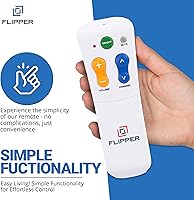
  • Active Buttons: Only six functions are accessible: power on/off, channel up, channel down, volume up, volume down, and mute.
  • Max Devices: Supports up to three IR devices simultaneously, typically a TV, a cable or satellite box, and a soundbar.
  • Compatible Providers: Works with major cable and satellite providers including Xfinity, Spectrum, DirecTV, Dish, AT&T, and Verizon.
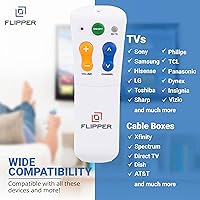
  • Compatible TVs: Pairs with mainstream IR television brands including Samsung, LG, Vizio, TCL, Panasonic, and Insignia, among others.
  • Streaming Support: Does not support streaming devices or platforms including Roku, Apple TV, Google TV, Fire TV, or any streaming application.
  • Favorites Channels: Allows programming of up to 25 favorite channels so users can cycle through only the content they regularly watch.
  • Button Cover: Includes a silicone cover that conceals unused or unnecessary buttons, keeping the interface visually clean and less confusing.
  • Reprogramming Lock: Custom firmware actively prevents accidental reprogramming, ensuring settings remain stable after initial caregiver setup.
  • Battery Type: Requires 2 AA batteries to operate; batteries are not included in the package.
  • Input Button: No input-switching button is present, which is intentional to reduce confusion for users unfamiliar with input modes.
  • Navigation Buttons: No directional navigation, menu, or cursor buttons are included, making it incompatible with menu-driven interfaces.
  • First Available: This product was first listed for sale in December 2023, making it a relatively recent release in the accessibility remote category.
  • ASIN: The Amazon Standard Identification Number for this product is B0CR5S1BCN.

Related Reviews

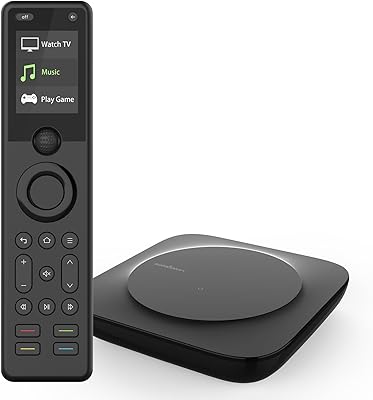
SofaBaton X1S Universal Remote Control
77%
61%
Ease of Setup
88%
Activity Programming
83%
Hub Signal Reliability
74%
Device Compatibility
81%
Build Quality
More
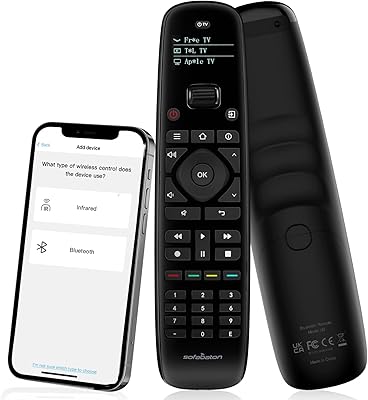
SofaBaton U2 Universal Remote Control
78%
71%
Ease of Setup
74%
App Experience
88%
Macro Functionality
91%
Backlit Buttons
83%
Device Compatibility
More
Universal Remote MX-990
84%
88%
Value for Money
85%
Ease of Setup
90%
Display Quality
92%
Device Compatibility
80%
Build Quality
More
Logitech Harmony 650 Universal Remote Control
86%
94%
Ease of Setup
88%
Button Responsiveness
85%
Display Clarity
90%
Compatibility
92%
Value for Money
More
One for All URC7880 Universal Smart Remote Control
84%
85%
Setup & Configuration
90%
Device Compatibility
88%
Ease of Use
75%
Remote Range
91%
Shortcut Key Functionality
More
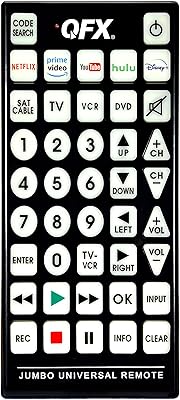
QFX REM-115 Jumbo Universal Remote Control
83%
91%
Ease of Use
88%
Button Visibility (Glow-in-the-dark)
75%
Compatibility with Devices
89%
Design and Ergonomics
83%
Setup/Installation
More
MantelMount MM815 Motorized Remote Control Pull Down TV Mount
86%
86%
Ease of Installation
92%
Motorized Operation Smoothness
88%
Build Quality
91%
Swivel and Height Adjustment Flexibility
85%
Heat Sensor Effectiveness
More
LIVE PARTY HD 1080P TV Remote Hidden Camera
83%
88%
Video Quality
91%
Ease of Use
65%
Battery Life
83%
WiFi Connectivity
94%
Design and Discreetness
More
Perlegear PGTVS36 Universal Swivel TV Stand
76%
86%
Build Quality
89%
Swivel Performance
83%
Height Adjustability
84%
Stability & Safety
74%
VESA Compatibility
More
Hemudu Universal TV Stand with Mount, 19–43 inch TVs
85%
88%
Build Quality & Durability
91%
Ease of Assembly
85%
Adjustability & Flexibility
87%
Space-Saving Design
90%
Stability & Support
More

FAQ

Yes, the Flipper remote is compatible with Xfinity cable boxes using infrared. The one thing to check is whether the cable box is in an open, visible location — if it is tucked behind the TV or inside a closed cabinet, the IR signal will not reach it and you may need to pick up an IR extender separately from Amazon.

Unfortunately, no. The Flipper Big Button Universal TV Remote does not support any streaming devices, including Roku, Fire TV, Apple TV, or Google TV boxes. It also cannot open or navigate streaming apps. If your dad primarily uses a streaming device rather than a cable or satellite box, this remote is not the right fit for his setup.

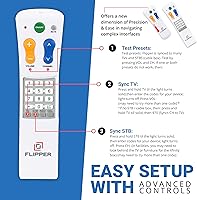
Realistically, the initial setup — programming the remote to the TV and cable box, and loading favorite channels — is best handled by a caregiver or family member. The process is not overly complicated, but it does involve following a code-search or auto-search routine that can be confusing for someone unfamiliar with remote programming. Once it is set up, your mother should be able to use it entirely on her own.

You can store up to 25 favorite channels. A caregiver sets these up during the initial configuration, and from then on the user just cycles through that curated list rather than scrolling through hundreds of channels. It is one of the more practical features for households where someone watches the same handful of channels every day.

That is actually one of the things this simplified remote handles well. The firmware is specifically designed to resist accidental reprogramming, so random button pressing or holding buttons down will not wipe the configuration. Once it is set up correctly, it tends to stay that way.

It can control a soundbar as long as the soundbar uses infrared connectivity, which most traditional soundbars do. You would program it during setup alongside the TV and cable box. Keep in mind that compatibility is not guaranteed for every soundbar model, and less common brands may not have a matching IR code in the remote's database.

Yes, the silicone cover can be removed, but that somewhat defeats its purpose. The cover is designed to hide buttons that would confuse the primary user, and removing it exposes a more complex button layout. For most caregivers setting this up, the cover stays on permanently after programming is complete.

Possibly. IR signals can pass through glass, but the angle and thickness of the glass panel, combined with the distance involved, can reduce reliability. If the doors are closed during TV watching, you may experience intermittent signal issues. An IR extender — a small, inexpensive device available on Amazon — is the cleanest solution and routes the IR signal directly to the box regardless of where it is positioned.

The remote is configured as a single setup for up to three devices in one location. It is not designed to switch between entirely different room configurations. If you wanted to use it in two rooms, you would need to purchase a second unit and set each one up separately for the devices in that room.

It depends on the stage. For someone in the early to moderate stages who can still follow simple, consistent actions, this senior-focused clicker tends to work well — the limited buttons and familiar routine help a lot. For someone in a more advanced stage who needs hands-on assistance regardless of the device, the remote may not provide as much independent benefit, though it can still reduce caregiver interruptions during routine TV time.

Where to Buy