
Overview

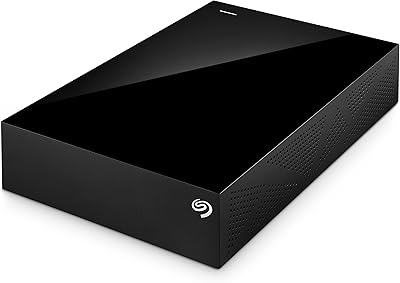
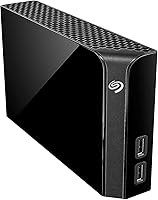
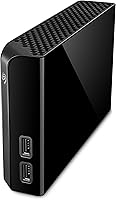
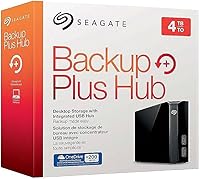
The Seagate Backup Plus Hub 4TB Desktop HDD is one of those rare external drives that actually earns its desk space by doing more than just storing files. Think of it less as a passive hard drive and more as a desktop storage hub — it pairs 4TB of local storage with two extra USB ports for charging your phone or offloading a camera card. It works with both Windows and Mac out of the box, and Seagate throws in a four-month Adobe Creative Cloud Photography subscription as a genuine bonus. One thing worth knowing upfront: this is a 3.5-inch drive that needs its own AC power adapter, so it lives on your desk permanently.

Features & Benefits

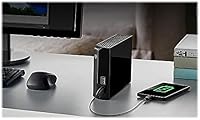
Four terabytes gives most home offices and creative workflows plenty of breathing room — think years of RAW photo shoots, 4K video projects, or full system backups. The Backup Plus Hub connects to your computer via a single USB 3.0 cable, while two front-facing USB ports let you plug in a flash drive or keep a phone charged without reaching behind your machine. Transfer speeds reflect honest spinning-disk performance: large sequential copies move at a comfortable pace, but this is not an SSD replacement. Mac users get a bundled NTFS driver included, meaning full read-write access on macOS without reformatting or buying extra software. The slim vertical footprint keeps desk presence minimal for a drive this size.

Best For

This Seagate hub drive is a natural fit for home office setups where desk clutter is already a daily battle. If you run Time Machine on a Mac or Windows Backup for routine system protection, the always-on desktop form factor suits that workflow well. Photographers and videographers will appreciate having a dedicated local home for large RAW and video archives, especially when cloud storage fees start adding up. The built-in USB ports are genuinely useful if your laptop is short on connections. It also works well for anyone who regularly switches between Mac and Windows machines, thanks to the included driver. Just remember it needs a wall outlet — this drive does not travel.

User Feedback

With close to 10,000 ratings and a 4.5-star average, the Backup Plus Hub has earned a solid long-term reputation. What comes up most often in positive reviews is how much people value having built-in USB ports right on the drive — it genuinely reduces cable clutter. Quiet operation and dependable day-to-day reliability are also frequently praised. On the downside, some Windows users report drive spin-down problems, where the unit sleeps unexpectedly and requires a manual workaround to stay awake. Mac users occasionally note the NTFS driver installation adds an extra setup step. A handful of reviewers also mention that the power brick contributes meaningful cable bulk to an otherwise tidy setup.

Pros

  • Four terabytes of local storage handles years of photos, videos, and full system backups without breaking a sweat.
  • The two built-in USB ports let you charge a phone or connect a flash drive without adding another hub to your desk.
  • Works with both Windows and Mac out of the box, with no need to reformat for cross-platform use.
  • The included NTFS driver gives Mac users full read-write access — no extra software purchase required.
  • Quiet operation makes it easy to forget it is running in the background during long work sessions.
  • Slim vertical design keeps the desktop footprint smaller than you might expect from a 3.5-inch drive.
  • Bundled Adobe Creative Cloud Photography access adds real value for anyone who edits photos regularly.
  • Near-universal praise across close to 10,000 ratings points to long-term reliability as a genuine strength.
  • The always-on AC-powered design is ideal for automated backup routines that run overnight.

Cons

  • Requires an AC power adapter, so it is permanently desk-bound and cannot travel with you.
  • Spinning-disk speeds are noticeably slower than SSDs, which matters if you edit directly off the drive.
  • Some Windows users report frustrating drive sleep or spin-down issues that require manual configuration fixes.
  • The power brick adds its own cable to your desk, which partially offsets the hub tidiness benefit.
  • Mac users need to install the NTFS driver before full functionality kicks in, which adds a setup step on day one.
  • The Backup Plus Hub has no hardware encryption or password protection built in, which matters for sensitive data.
  • At 2.34 pounds and with an external power supply, desk relocation or reorganization is mildly inconvenient.
  • Only two downstream USB ports means the hub benefit runs out quickly if you have multiple peripherals.

Ratings

The scores below reflect our AI-driven analysis of thousands of verified buyer reviews for the Seagate Backup Plus Hub 4TB Desktop HDD, with spam, incentivized, and bot-flagged submissions actively filtered out before any scoring was applied. We examined feedback from home office users, photographers, videographers, and everyday PC and Mac users across multiple global markets to ensure the ratings reflect a realistic cross-section of real-world experience. Both the standout strengths and the recurring frustrations are represented transparently — nothing has been glossed over to make the product look better than it is.

Storage Value
88%
Four terabytes goes a long way for most home and creative users — reviewers consistently note that a single drive holds years of RAW photo archives, full system backups, and video project files without running out of room. For the desktop backup use case, few competing options at this tier offer the same capacity-to-reliability ratio.
Power users managing 4K multicamera projects or large music production libraries occasionally find 4TB fills faster than expected, particularly if they rely on this as their sole local storage. Those who need room to grow would be better served looking at higher-capacity variants in the same family.
Built-in USB Hub
83%
The two front-facing USB 3.0 ports are consistently one of the most praised aspects across reviews — users love being able to charge a phone or offload a camera card without reaching behind their monitor or computer tower. For anyone working at a desktop with limited accessible ports, it genuinely reduces clutter in a meaningful way.
Two ports is enough for light use but runs out quickly if you have multiple peripherals to juggle. A small number of users also report that the hub ports occasionally lose power when the drive enters a deep sleep state, which can interrupt charging unexpectedly.
Cross-Platform Compatibility
81%
19%
The Backup Plus Hub handles Windows natively and ships with a licensed NTFS driver for Mac, which removes the need to reformat or buy additional software. Users who switch between operating systems — or share a drive between a Windows desktop and a MacBook — appreciate that the setup covers both without friction.
Mac users do have to install the NTFS driver manually before full read-write access kicks in, which catches some buyers off guard who expected true plug-and-play behavior on macOS. A handful of reviewers noted the driver installation felt slightly dated in its interface compared to modern macOS design conventions.
Transfer Performance
67%
33%
For sequential tasks like overnight Time Machine backups, bulk photo imports, or moving large video files from one folder to another, the USB 3.0 connection delivers adequate throughput for a spinning hard disk. Reviewers who use it primarily for backup and archiving rarely report speed as a complaint.
This is a traditional spinning HDD, and it shows when compared to modern SSDs — direct editing of high-bitrate 4K footage off this drive produces lag for many users. Anyone expecting SSD-like responsiveness will be disappointed; the drive is built for storage capacity, not raw speed.
Reliability & Longevity
86%
Long-term reliability is one of the most frequently mentioned positives across the review base — users describe drives that have run continuously for several years without failure. Seagate’s reputation in consumer hard drive manufacturing and the drive’s sustained bestseller ranking both support the pattern of dependable everyday performance.
A subset of reviewers report drive failures after the two-year warranty window, which is not unusual for spinning disks but is worth factoring into long-term expectations. As with any mechanical hard drive, maintaining a secondary backup of critical data remains advisable regardless of brand.
Setup Experience
76%
24%
Windows users typically have the drive up and running within minutes of plugging it in, with no software installation required for basic operation. The physical setup is equally simple — one USB cable to the computer, one power cable to the wall, and the hub is ready.
Mac users face a slightly longer onboarding process due to the NTFS driver installation, and a few reviewers found the driver documentation sparse. The Adobe CC redemption process also requires drive registration, which adds another step that occasionally trips up less tech-savvy buyers.
Noise & Heat
82%
18%
Reviewers consistently describe the drive as quiet enough to ignore during normal desk work — the ambient hum is low, and active read-write clicks are soft compared to older external drives. Users who keep it running continuously for automated backups report no distracting noise during focused work.
Under sustained heavy read-write loads, the drive produces slightly more audible clicking than during idle operation, which some users in quiet recording or studio environments notice. Heat buildup during long intensive transfers is mild but present — the enclosure gets warm to the touch, though not alarmingly so.
Build Quality
74%
26%
The enclosure feels solid enough for a permanently desk-mounted device, with a stable base that does not shift or vibrate noticeably during operation. The vertical orientation is well-balanced and the drive does not feel cheap or flimsy in hand.
The plastic construction is functional but unremarkable — it does not have the premium feel of some competing enclosures in the same price bracket. A few reviewers noted minor scuffing or surface marks appearing over time, though this is purely cosmetic and does not affect performance.
Power & Cable Management
61%
39%
The AC-powered design means the drive never struggles for power, and the two hub ports deliver consistent charging output without the instability that can come with bus-powered hubs drawing from a single USB connection. For a permanently placed desk device, the dedicated power supply makes sense.
The power brick is bulky and adds a second cable to your desk setup — which somewhat undercuts the cable-reduction benefit of the built-in hub. Reviewers with tightly managed cable setups specifically call out the adapter as an annoyance, especially when desk real estate is limited.
Software Bundle
71%
29%
The four-month Adobe Creative Cloud Photography Plan is a genuinely useful add-on for photographers who edit in Lightroom or Photoshop — at current Adobe subscription rates, it represents meaningful real-world savings for new subscribers. Reviewers who were between Adobe plans found it a welcome bonus that offset part of the drive’s cost.
The redemption process requires registering the drive within a specific window, which some buyers miss — the offer is not prominently communicated after purchase. Users already on active Adobe subscriptions get nothing out of it, and availability is restricted in certain countries, so it is not a universal benefit.
Sleep & Power Management
54%
46%
For Mac users running Time Machine or Windows users with straightforward backup schedules, the drive’s automatic sleep behavior is mostly unobtrusive and helps reduce unnecessary wear during long idle periods. Buyers who run scheduled overnight backups and leave the drive alone during the day rarely encounter problems.
This is one of the clearest recurring pain points in the review base — a notable share of Windows users report unpredictable spin-down behavior that causes the drive to become temporarily unresponsive mid-session. Fixing it typically requires diving into Windows power settings or third-party utilities, which is not the experience buyers expect from a plug-and-play device.
Desktop Footprint
79%
21%
The slim vertical profile keeps the drive’s surface footprint smaller than most 3.5-inch desktop drives, and at under 7 inches tall it fits neatly beside a monitor or tower without drawing attention. Reviewers with compact workstations appreciate that it does not dominate their desk.
The required power adapter means there are always at least two cables running from this unit, which limits how cleanly it can integrate into a minimalist desk setup. Users who wanted a single-cable solution will need to adjust their expectations before purchasing.
Value for Money
84%
When you factor in the 4TB capacity, the built-in USB hub functionality, the included Mac NTFS driver, and the Adobe CC bundle, reviewers generally feel the overall package justifies its price point relative to a plain external drive at the same capacity. The long track record of reliability adds to the perception of good long-term value.
Buyers who only need straightforward storage and have no use for the hub ports or Adobe subscription may find more cost-efficient options from competing brands at the same capacity tier. The price reflects the added functionality — those who won’t use the extras pay for them regardless.

Suitable for:

The Seagate Backup Plus Hub 4TB Desktop HDD is built squarely for people who live and work at a desk and need a permanent, reliable home for large amounts of data. Photographers and videographers are an especially natural fit — storing RAW files, Lightroom catalogs, or 4K footage locally on a drive this size means less time worrying about cloud fees and more time actually working. Home office users who run automated backups through Time Machine on Mac or Windows Backup will appreciate the always-on desktop setup, since the drive is powered independently and stays connected 24/7. Mac users in particular get a meaningful convenience here: the included NTFS driver means you can read and write files on macOS without reformatting or hunting for a paid workaround. If your desk is already crowded with cables and you are quietly wishing your external drive also handled a phone charger or a flash drive, this desktop storage hub consolidates both needs into one device.

Not suitable for:

The Seagate Backup Plus Hub 4TB Desktop HDD is not the right tool for anyone who needs portable storage they can toss in a bag. It requires an AC power adapter and is physically bulky enough that it genuinely belongs on a desk, not in a backpack. Users who need fast transfer speeds for video editing in real time should also look elsewhere — this is a spinning hard disk drive, and while it handles sequential file copies well, it cannot compete with a solid-state drive on sustained read-write performance. People with very limited desk space may find that the power brick adds unwanted cable clutter, partially undermining the hub convenience it offers. Anyone already invested in a high-port USB hub or NAS system will likely find the built-in ports redundant rather than useful. Finally, buyers who need more than 4TB of capacity right now should consider a larger variant from the same family, as this specific model does not expand beyond what it ships with.

Specifications

  • Storage Capacity: The drive offers 4TB of total storage, suitable for large media libraries, full system backups, and long-term archiving.
  • Form Factor: It uses a 3.5-inch internal hard disk housed in a slim vertical enclosure designed for permanent desktop placement.
  • Host Interface: The drive connects to your computer through a single USB 3.0 cable, compatible with USB 2.0 ports at reduced transfer speeds.
  • Hub Ports: Two downstream USB 3.0 ports on the front of the unit allow you to charge devices or connect USB accessories independently of your computer.
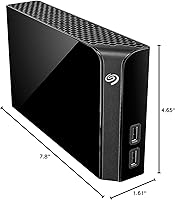
  • Dimensions: The enclosure measures 4.65 x 1.61 x 7.8 inches, keeping its desk footprint compact relative to its internal drive size.
  • Weight: The unit weighs 2.34 pounds, making it stable on a desk but not practical for regular transport.
  • Power Supply: The drive requires an included AC power adapter and cannot draw power from a USB port alone.
  • Compatibility: It works natively with Windows PCs and, with the included NTFS driver installed, supports full read-write access on macOS as well.
  • Mac NTFS Driver: Seagate includes a licensed NTFS-for-Mac driver in the box, enabling write access on macOS without reformatting the drive or purchasing third-party software.
  • Transfer Technology: As a spinning hard disk drive, sequential transfer speeds are appropriate for backups and file archiving but are significantly slower than solid-state drives.
  • Bundled Software: A four-month Adobe Creative Cloud Photography Plan subscription is included and must be redeemed within one year of drive registration.
  • Platform Support: Compatible with both Windows PCs and Mac computers, covering the vast majority of desktop and laptop users.
  • Drive Type: The internal mechanism is a traditional spinning magnetic hard disk, not a solid-state or hybrid drive.
  • Average Rating: The drive holds a 4.5-out-of-5-star average across approximately 9,830 customer ratings on Amazon.
  • Market Rank: It ranks at number 245 in the External Hard Drives category on Amazon, reflecting sustained long-term popularity.
  • Manufacturer: Made by Seagate, a well-established storage brand with decades of experience in consumer and enterprise hard drive manufacturing.
  • Model Series: Part of the Seagate Backup Plus Hub lineup, which spans multiple capacity tiers up to 14TB.
  • Release Date: This model was first made available in June 2016 and remains in active production without a manufacturer discontinuation notice.

Related Reviews
Seagate Backup Plus Hub for Mac 8TB
84%
88%
Performance & Speed
94%
Storage Capacity
85%
Compatibility
91%
Ease of Setup
87%
Build Quality
More
Seagate Backup Plus 3TB Desktop External Hard Drive
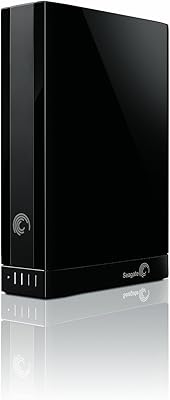
85%
87%
Performance & Speed
92%
Setup & Installation
89%
Value for Money
94%
Capacity & Storage
80%
Build Quality
More
Seagate Backup Plus 2TB Desktop External Hard Drive
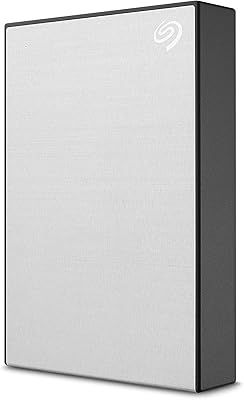
86%
94%
Ease of Use
87%
Data Transfer Speed
96%
Compatibility with Mac and PC
93%
Setup and Installation
85%
Build Quality
More
Seagate Backup Plus Slim 1TB
88%
88%
Performance & Transfer Speed
91%
Build Quality & Durability
95%
Portability & Size
90%
Ease of Setup
93%
Compatibility with Windows/Mac
More
Seagate 1TB Desktop HDD ST1000DM003
81%
92%
Value for Money
75%
Performance
85%
Reliability
90%
Ease of Installation
68%
Speed
More
Seagate 3TB Desktop HDD ST3000DM001
84%
88%
Performance
94%
Storage Capacity
92%
Value for Money
68%
Noise Levels
85%
Ease of Installation
More
Seagate Backup Plus Slim 2TB for Mac
87%
87%
Performance and Speed
92%
Ease of Use
94%
Portability and Size
88%
Build Quality and Design
90%
Compatibility (Mac & Windows)
More
Seagate Enterprise Capacity ST4000NM0023 4TB HDD
87%
94%
Data Transfer Speed
91%
Reliability Under Load
88%
Integration with RAID Systems
90%
Durability
85%
Ease of Setup
More
Seagate IronWolf 4TB NAS Internal Hard Drive
83%
86%
Reliability & Endurance
93%
NAS Compatibility
88%
RAID Performance
79%
Noise & Vibration
84%
Heat Management
More
CLX Set Gaming Desktop - AMD Ryzen 9 5900X, 32GB RAM, GeForce RTX 3060, 500GB SSD, 4TB HDD
88%
94%
Gaming Performance
91%
Graphics Quality
88%
Value for Money
89%
Cooling Efficiency
92%
Storage Capacity
More

FAQ

Yes, there is one extra step for Mac users. The Seagate Backup Plus Hub 4TB Desktop HDD ships with an NTFS-for-Mac driver that you need to install before the drive allows full read and write access on macOS. Without it, your Mac can read files from the drive but cannot write to it. The installation is straightforward and takes just a few minutes.

Generally yes — since the Backup Plus Hub draws power from its own AC adapter rather than your computer, the front USB ports can supply charging power independently. That said, behavior may vary slightly depending on your specific power management settings, and a small number of users have noted the drive can enter a deep sleep mode that briefly interrupts charging.

It will work, but at USB 2.0 speeds, which are considerably slower than what USB 3.0 offers. For occasional backups or archiving on an older machine, that is usually acceptable. If you are regularly moving large video files or doing Time Machine backups, a USB 3.0 port will make a noticeable difference in how long transfers take.

It depends on the video format. For standard 1080p footage, editing directly off this Seagate hub drive is usually fine. For high-bitrate 4K RAW files, the spinning disk may struggle to keep up smoothly during playback-heavy editing. Most professionals use a drive like this for archiving and backup rather than as an active editing scratch disk.

This is a known issue for a subset of Windows users. The fix usually involves adjusting your Windows power settings to prevent USB devices from being suspended, or using Seagate’s own SeaTools utility to tweak the drive’s power management behavior. It is not a universal problem, but it is worth knowing about before you buy if your workflow depends on instant access at all times.

No, this desktop storage hub is a direct-attached storage device only, meaning it connects to a single computer via USB. It does not have an Ethernet port or Wi-Fi capability. If you need storage accessible from multiple devices on a network, you would need a NAS device or a router with USB storage sharing.

Yes, the drive comes pre-formatted in NTFS, which is Windows-native. On Windows machines it works immediately. On a Mac, you need to install the included NTFS driver first — or you can reformat it to exFAT if you prefer a format that both systems handle natively without any driver installation.

Most users describe it as very quiet — typical of a well-built 3.5-inch desktop drive. You will hear a faint hum when it is running and a soft clicking sound during active data reads and writes, but it is unlikely to be noticeable in a normal office environment. It is certainly not disruptive in the way that older external drives could be.

For anyone who uses Lightroom or Photoshop regularly, the four-month Adobe CC Photography subscription bundled with the Backup Plus Hub has genuine monetary value. You do need to register the drive and redeem the offer within a year of purchase, and it is not available in all countries. If you already subscribe to Adobe CC, it is less useful — but for new users or those on a break from a paid plan, it is a real bonus.

Seagate covers this drive with a two-year limited warranty. Their support options include online diagnostics through the SeaTools software, a web-based support portal, and phone support. The brand has a long track record in the consumer storage market, and replacement processes for failed drives within the warranty period are generally considered straightforward by most users who have gone through it.

Where to Buy