Overview

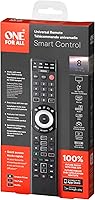
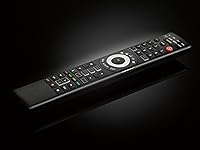
The One for All URC7880 Universal Remote Control is a mid-range multi-device remote built for households tired of juggling four or five clickers just to watch TV. What sets it apart from older universal remotes is the free smartphone app that guides you through setup — no more hunting through code booklets. It handles up to eight devices and claims compatibility with over 7,000 brands, which covers most home entertainment setups comfortably. One important caveat: this universal remote uses infrared only, meaning it needs a clear line of sight to whatever you're controlling. It's a solid everyday performer, but don't expect it to replace a dedicated smart-home controller.

Features & Benefits

The smartphone app setup is genuinely the URC7880's strongest card. You download the free app, select your devices by category and brand, and the app walks you through pairing — no numeric codes, no trial and error. For devices that aren't in the database, the infrared learning feature lets you point your old remote at the URC7880 and copy commands directly. Three dedicated shortcut keys give you one-press access to streaming apps like Netflix, Amazon Prime, or YouTube, which is handy if you switch services often. The remote reaches about 10 meters, more than enough for a standard living room, and the button layout is grouped logically so navigation stays intuitive.

Best For

This multi-device clicker hits the sweet spot for a few specific types of buyers. If your coffee table is buried under remotes for the TV, soundbar, Blu-ray player, and Sky Q box, consolidating them here makes a real difference. It's also a strong pick for less tech-savvy users — the app-guided setup is far more forgiving than manual code entry, and there's no programming knowledge required. Cord-cutters who bounce between streaming apps and live TV will appreciate the dedicated shortcut keys. And if you own older or niche gear that other universals can't recognize, the learning feature is a genuine fallback. Budget-conscious buyers get reliable multi-device control without paying for touchscreen features they may not need.

User Feedback

Across buyer reviews, a few clear patterns emerge. On the positive side, most people find the app-based setup refreshingly painless compared to legacy universal remotes, and device pairing tends to stick reliably. Build quality draws decent marks too — it feels sturdy enough for daily use at this price tier. That said, some buyers are caught off guard opening the box to find no batteries included, so keep a pair of AAs on hand. A handful of users miss backlit keys for dim-room use, and the IR-only design frustrates anyone who assumed Bluetooth or RF connectivity. Compatibility with very new or obscure device models can be hit-or-miss, though the learning feature resolves most of those gaps.

Pros

  • App-guided setup is straightforward and removes the frustration of manual code entry entirely.
  • Supports up to 8 devices, covering most full home entertainment setups without compromise.
  • The infrared learning feature rescues compatibility with older or unlisted devices effectively.
  • Three streaming shortcut keys make switching between Netflix, Prime, and YouTube genuinely quick.
  • Claimed compatibility with over 7,000 brands means most common household gear is covered.
  • At around 10 meters of range, this universal remote handles typical living room distances comfortably.
  • Build quality feels solid and durable for everyday use at this price tier.
  • Button grouping is logical enough that most users navigate without needing to consult instructions.
  • The free setup app also lets you track which device the remote is currently operating.
  • One for All is a well-established brand in the universal remote category, adding a layer of confidence.

Cons

  • Infrared-only connectivity means the remote stops working if anything blocks the line of sight.
  • No batteries included — a small but surprisingly common frustration reported at unboxing.
  • No backlit keys, which makes late-night or dim-room use noticeably less comfortable.
  • Compatibility with very new or obscure device models can be unreliable without the learning workaround.
  • Setup requires a smartphone nearby, which adds a dependency some users would rather avoid.
  • The URC7880 has no RF or Bluetooth support, ruling it out for controlling devices inside closed cabinets.
  • A subset of users find certain button placements awkward after extended use.
  • No rechargeable battery option means ongoing reliance on disposable AA cells.

Ratings

The scores below for the One for All URC7880 Universal Remote Control were generated by our AI system after analyzing thousands of verified buyer reviews from global markets, with spam, bot-generated submissions, and incentivized feedback actively filtered out. Each category reflects the full spectrum of real user experience — not just the highlights — so both the strengths and the friction points are honestly represented. Where buyers broadly agreed, scores reflect that confidence; where opinions split, the numbers and commentary make that tension clear.
Setup Experience
86%
Most buyers describe the smartphone app setup as a genuine breath of fresh air compared to the old code-booklet approach. The step-by-step guidance means even less tech-savvy users can get multiple devices paired without frustration, and the process rarely takes more than a few minutes per device.
A small but vocal group of users dislike the dependency on a smartphone, particularly older buyers who would prefer a fully self-contained process. Occasional app glitches during initial pairing have also been reported, requiring a restart to resolve.
Device Compatibility
78%
22%
With support for over 7,000 brands and up to 8 devices, this multi-device clicker handles the vast majority of common home entertainment setups without issue. Sky Q, soundbars, Blu-ray players, and media streamers all tend to pair reliably when the device brand is well-established.
Buyers with recently released hardware or niche regional brands occasionally hit dead ends in the database, and while the learning feature covers many of these gaps, it adds an extra step that not everyone expects to need. A handful of users report that even the learning workaround struggles with certain proprietary signal formats.
Infrared Performance
74%
26%
At distances up to around 10 meters, the IR signal performs consistently well for typical living room use, and most users find the response time feels immediate rather than laggy. The angular range is broad enough that you don't need to aim with surgical precision from across the room.
The infrared-only design is the single most divisive aspect of the URC7880 among buyers — those who assumed it would work through cabinet doors or around corners are frequently disappointed. Anyone with an enclosed AV rack or a projector in a tricky position will find the line-of-sight requirement a hard barrier.
Button Layout
69%
31%
Button grouping is generally logical, with navigation controls, device selectors, and shortcut keys placed in sections that make intuitive sense during daily use. Users who previously owned other One For All remotes tend to adapt quickly to the layout.
Mixed feedback on ergonomics is consistent across reviews — some users find certain function buttons cramped or awkwardly positioned for thumb reach, and the absence of backlit keys is a recurring frustration for anyone using the remote in a dimmed or dark room.
Streaming Shortcuts
83%
The three dedicated shortcut keys are one of the more practically useful features for cord-cutters, letting you jump directly into Netflix, Amazon Prime, or YouTube without navigating through a menu. The ability to reassign them via the app adds flexibility for users who prefer other services.
Three keys is a reasonable number but feels limiting for households that rotate between four or more streaming platforms regularly. Users who reassign the keys sometimes report having to redo the configuration after a battery swap if settings are not retained.
Build Quality
77%
23%
For a remote at this price tier, the physical construction earns consistent praise — the plastic feels solid rather than hollow, buttons have a satisfying click, and the overall form factor holds up well to being dropped or tossed onto a couch repeatedly over time.
It is not a premium-feeling device in hand, and buyers coming from higher-end remotes will notice the difference in materials immediately. A small subset of longer-term users report button wobble developing after extended daily use.
Learning Feature
81%
19%
The infrared learning capability is a genuine safety net for anyone with older gear or devices outside the main database, and it works reliably for the vast majority of users who try it. The process of holding the original remote up and copying commands is straightforward once you understand the steps.
The learning feature requires the original remote to still be functional, which is not always the case for older or replacement scenarios. It also stores a limited number of custom commands, which can feel restrictive if a device has a complex original remote with many specialized buttons.
Value for Money
82%
18%
Buyers broadly feel this multi-device clicker delivers a fair return for the asking price, particularly given the app-based setup and the breadth of device compatibility. Replacing four or five individual remotes with one reliable unit is a tangible quality-of-life improvement most users are happy to pay for.
A minority of buyers feel the price is slightly high given the lack of backlit keys, no included batteries, and the IR-only connectivity — features they associate with remotes at a lower price point. When compared side-by-side with competing universals offering RF or Bluetooth at similar prices, value perception drops.
Range & Responsiveness
79%
21%
The 10-meter rated range holds up well in practice for standard rectangular living room layouts, and response latency is low enough that channel-surfing and volume adjustments feel natural rather than sluggish. Most users do not experience signal drop-off within normal viewing distances.
In larger or irregularly shaped rooms, the effective range can feel shorter than advertised, particularly if the user is at an angle rather than directly facing the device. Thick or tinted TV bezels that partially obscure IR receivers can also reduce responsiveness.
App Quality
71%
29%
The companion app is free, available on both major platforms, and serves its core function well — guiding users through setup and letting them verify which device they're currently controlling from their phone. Regular updates have improved device database coverage over time.
The app experience is functional rather than polished, and several users describe the interface as dated or unintuitive beyond the basic setup flow. Occasional connectivity issues between the app and the remote during initial configuration have been reported across both iOS and Android users.
Ergonomics & Grip
72%
28%
The remote is lightweight at under 4 ounces and sized generously enough to fit adult hands without cramping, making it comfortable to hold through longer viewing sessions. The slight taper toward the top helps with directional aiming during use.
The surface finish offers minimal grip texture, which some users find slippery during casual single-handed use from a sofa armrest. The remote's length, while giving it a premium feel, can feel slightly unwieldy for users with smaller hands.
Unboxing Experience
58%
42%
The packaging is clean and retail-ready, and the inclusion of a printed setup guide alongside the app instructions means buyers have at least a basic reference on hand from the moment they open the box.
The absence of batteries in the box is the single most commented-upon unboxing disappointment — a minor but repeatedly mentioned frustration that catches buyers off guard, especially those who expect to set the remote up immediately. The overall packaging is functional but not particularly impressive for the price tier.
Multi-Device Switching
76%
24%
Switching between up to 8 programmed devices is handled through dedicated device selector buttons at the top of the remote, which most users find quick and reliable once the initial setup is complete. Daily switching between TV, soundbar, and STB becomes second nature within a few days.
Controlling more than 3 or 4 devices simultaneously — for example, an activity that requires adjusting the TV input, switching the soundbar mode, and controlling a streaming box in sequence — requires multiple button presses and device switches rather than a single activity command. Users coming from smart remotes with activity-based macros will notice this gap.

Suitable for:

The One for All URC7880 Universal Remote Control is an excellent fit for anyone whose living room has quietly accumulated a pile of remotes over the years. If you're managing a TV, a soundbar, a Sky Q box, and a Blu-ray player all at once, consolidating them into a single clicker makes a real, daily difference. The smartphone app setup is particularly well-suited to users who aren't comfortable punching in code sequences the old-fashioned way — the guided process takes most of the friction out of getting started. Cord-cutters will find the dedicated streaming shortcut keys a genuine convenience, especially if swapping between Netflix, YouTube, and live TV is part of the daily routine. It also works well for households with a mix of older and newer gear, since the infrared learning feature can copy commands from original remotes when a device isn't in the database. If you want reliable, no-fuss multi-device control without spending heavily on a premium touchscreen remote, this multi-device clicker sits in a practical sweet spot.
Not suitable for:

Buyers who rely on RF or Bluetooth connectivity to control devices tucked inside cabinets or in adjacent rooms will find a hard limitation here — the URC7880 is strictly infrared, which means it requires a clear, unobstructed line of sight to every device it controls. This rules it out for anyone with an AV cabinet with closed doors or a projector mounted behind a wall. It's also not the right tool for smart-home enthusiasts hoping to tie their remote into a broader ecosystem of Wi-Fi or app-controlled devices. If your setup includes very recently released hardware or highly niche equipment, compatibility isn't guaranteed, and while the learning feature covers many gaps, it's an extra step that some buyers would rather not take. Users who watch TV in low light and consider backlit keys a non-negotiable will likely feel the absence here. And anyone who prefers a completely self-contained setup without needing a smartphone nearby during configuration may find the app-dependent process mildly inconvenient.

Specifications

  • Brand: Manufactured by One For All, a well-established brand specializing in universal remote controls and antenna products.
  • Model: This remote carries the model designation URC7880, part of One For All's Smart Control range.
  • Dimensions: The remote measures 9.4 x 4.8 x 1.1 inches, giving it a full-sized grip that suits most adult hands comfortably.
  • Weight: At 3.52 ounces without batteries, the remote is light enough for extended use without feeling flimsy.
  • Connectivity: Uses infrared (IR) technology exclusively, requiring a direct, unobstructed line of sight between the remote and each device.
  • Control Range: Rated for an effective range of approximately 10 meters, which covers the majority of standard living room setups.
  • Device Capacity: Can be programmed to control up to 8 separate devices simultaneously, including TVs, soundbars, set-top boxes, and media players.
  • Brand Compatibility: Compatible with over 7,000 device brands, spanning televisions, audio equipment, streaming devices, Blu-ray players, and more.
  • Setup Method: Configuration is handled through a free companion smartphone app, available for both iOS and Android, replacing traditional code-entry setup.
  • Learning Feature: Built-in infrared learning capability allows the remote to copy and store commands directly from an existing original remote control.
  • Shortcut Keys: Includes 3 dedicated shortcut buttons that can be assigned to streaming services such as Netflix, Amazon Prime, or YouTube.
  • Compatible Devices: Designed to work with televisions, soundbars, set-top boxes, Sky Q, Blu-ray players, media players, audio devices, and IR-compatible game consoles.
  • Power Source: Requires 2 AA batteries, which are not included in the box and must be purchased separately before first use.
  • Color: Available in black with a standard matte finish suited to most home entertainment environments.
  • Availability: First made available in December 2017 and remains an active, non-discontinued product in One For All's lineup.

Related Reviews

Logitech Harmony 650 Universal Remote Control
75%
88%
Activity-Based Control
61%
Setup Experience
91%
Device Compatibility
84%
Ease of Daily Use
79%
Build Quality
More
QFX REM-115 Universal Remote Control
71%
88%
Button Size & Accessibility
81%
Value for Money
74%
Device Compatibility
66%
Setup & Programming
57%
Streaming Shortcuts
More
Universal Remote MX-990 IR/RF Universal Remote
76%
92%
RF Connectivity Reliability
89%
Build Quality
51%
Setup & Programming Experience
84%
Activity-Based Macro Performance
76%
LCD Screen Usability
More
SofaBaton X1S Universal Remote Control
77%
61%
Ease of Setup
88%
Activity Programming
83%
Hub Signal Reliability
74%
Device Compatibility
81%
Build Quality
More
SofaBaton U2 Universal Remote Control
78%
71%
Ease of Setup
74%
App Experience
88%
Macro Functionality
91%
Backlit Buttons
83%
Device Compatibility
More
Flipper Big Button Universal TV Remote
77%
93%
Ease of Use
91%
Button Design & Accessibility
74%
Compatibility & Setup
41%
Streaming Incompatibility
67%
IR Line-of-Sight Performance
More
VITADE 862Pro 1080P Streaming Webcam
75%
78%
Video Quality
84%
Ring Light Performance
88%
Remote Control
91%
Ease of Setup
53%
Digital Zoom Quality
More
NEEWER X16 Teleprompter
81%
88%
Build Quality
92%
Glass Clarity
67%
App & Remote Performance
93%
Ease of Setup
89%
Camera Mounting & Compatibility
More
Nolansend 4K Webcam with Auto-Zoom and Remote Control
85%
92%
Video Quality
88%
AI Auto-Zoom Performance
90%
Ease of Setup
89%
Privacy and Security Features
85%
Audio Quality
More
The Noble Collection Harry Potter Remote Control Wand
77%
93%
Novelty & Fun Factor
88%
Build Quality
71%
Gesture Accuracy
62%
Setup & Programming
67%
IR Performance
More

FAQ

Yes, the URC7880 is specifically listed as compatible with Sky Q boxes. Since it uses infrared, just make sure the front of your Sky Q unit has a clear line of sight to the remote — it won't work through cabinet doors.

The setup process is designed around the free companion app, so having a smartphone nearby does make things significantly easier. That said, One For All also provides a manual code-entry method as a fallback if you prefer not to use the app.

That's where the infrared learning feature comes in. You point your original remote at the One For All URC7880 Universal Remote Control and it copies the signals directly, so even obscure or older brands that aren't listed can usually be added this way.
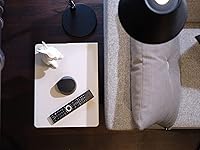
Unfortunately, no. Infrared signals can't pass through solid cabinet doors or walls, so every device needs a clear, direct line of sight. If your setup involves enclosed furniture, you'd need a remote with RF or Bluetooth capability instead.

Up to 8 devices in total — which covers a typical setup of TV, soundbar, set-top box, Blu-ray player, streaming stick, and more with room to spare.

The three shortcut keys come pre-assigned to popular streaming services, but you can reassign them through the app to whatever service or input you prefer, which is handy if you use a platform other than the defaults.

It can control some game consoles, but only if those consoles support infrared input. Most modern consoles like PlayStation or Xbox use Bluetooth for their controllers and don't have IR receivers, so compatibility there is limited.

Yes, you'll need two AA batteries which are not included in the package. It's worth grabbing a fresh pair before you start the setup process so you can get everything running in one go.

No, this multi-device clicker does not have backlit keys, which is one of the more commonly mentioned limitations in user feedback. If you frequently use your remote in a dark room, that's worth factoring into your decision.

The rated range is around 10 meters, which is roughly 33 feet and more than sufficient for most living rooms. In practice, users report reliable performance across typical viewing distances as long as the IR path is clear.