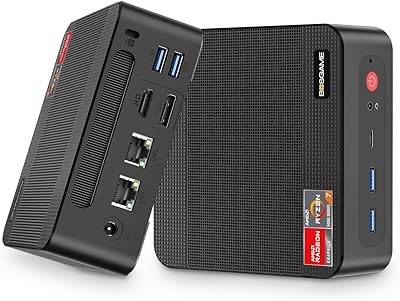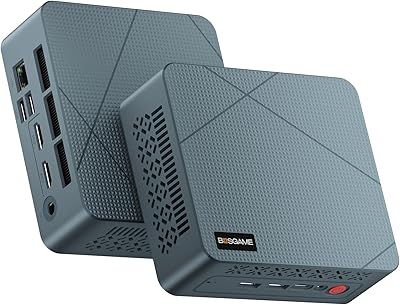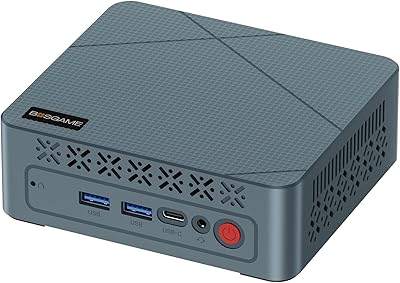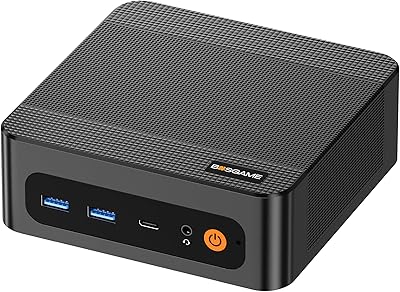
Overview

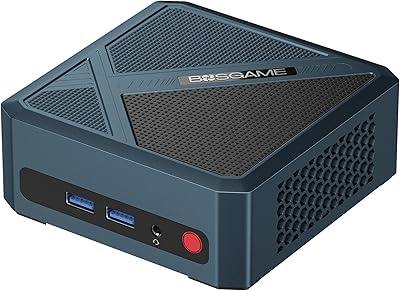
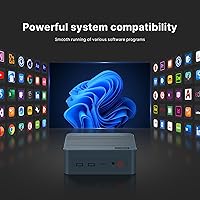
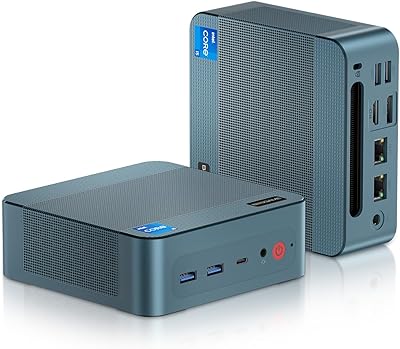
The BOSGAME P2 Plus Mini PC squeezes a 12th-gen Intel Core i7-12700H — a chip more commonly found in premium laptops — into a box that weighs under three pounds and barely occupies a corner of your desk. It ships ready to work: Windows 11 Pro is pre-installed, 32GB of DDR5 RAM is already seated, and a 512GB NVMe SSD handles the OS and applications from day one. Both can be upgraded later. For anyone tired of a hulking tower dominating their workspace, this compact desktop makes a compelling case that size and raw processing power don't have to be a trade-off.

Features & Benefits

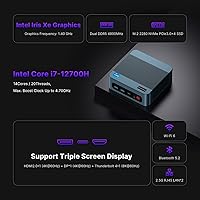
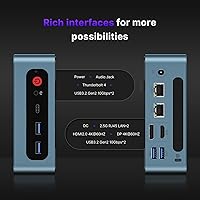
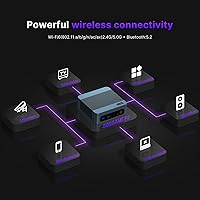
The i7-12700H is the real story here. With 14 cores — six performance and eight efficiency — it handles video editing timelines, parallel compilation jobs, and dozens of browser tabs without flinching. Memory runs at DDR5 4800MHz, noticeably quicker than the DDR4 systems it replaces, and a second empty M.2 slot (PCIe Gen4 x4) means storage expansion is a screwdriver job. The Thunderbolt 4 port supports eGPU enclosures, 40Gbps transfers, and 8K output — genuinely uncommon at this price point. Dual 2.5G Ethernet, WiFi 6, and Bluetooth 5.2 mean you're covered whether you're cabling into a managed switch or connecting wirelessly across the room.

Best For

This mini PC earns its place on the desks of people who genuinely need multi-monitor setups — three 4K displays driven simultaneously is a real productivity tool for traders, engineers, or anyone juggling complex workflows. IT professionals will appreciate the dual 2.5G LAN for firewall builds or home lab networking. Developers running virtual machines or Docker workloads benefit from the fast RAM and an expansion slot waiting for a second SSD. Linux and Ubuntu compatibility broadens its appeal well beyond the Windows crowd. If you're replacing a dated tower and want something that won't feel outdated in three years, the BOSGAME P2 Plus is worth serious consideration.

User Feedback

Buyers generally report strong satisfaction with day-to-day performance — light to moderate workloads run quietly, and the build feels solid for its size. The price-to-performance ratio comes up frequently as a genuine highlight. Where feedback grows more cautious is under sustained heavy loads: a handful of users noticed thermal throttling during extended rendering or large compilation jobs, a fair limitation to understand before buying. Setup was described as mostly painless, though a few flagged minor BIOS quirks out of the box. Support responsiveness was rated positively by most who needed it. Nobody is using this as a gaming rig — integrated graphics set firm limits there — but as a workhorse desktop, overall satisfaction runs high.

Pros

  • The i7-12700H delivers genuine desktop-class CPU performance in a package smaller than most lunch boxes.
  • 32GB of DDR5 RAM at 4800MHz is a meaningful step up from budget mini PCs still shipping with DDR4.
  • Triple 4K output across HDMI, DisplayPort, and Thunderbolt 4 simultaneously is a rare capability at this price tier.
  • Dual 2.5G Ethernet opens up advanced networking scenarios most compact desktops simply cannot support.
  • The empty PCIe Gen4 M.2 slot makes storage upgrades straightforward and affordable down the road.
  • Thunderbolt 4 support, including eGPU compatibility, adds a credible upgrade path if graphics needs grow.
  • WiFi 6 and Bluetooth 5.2 ensure the wireless side of the equation is not an afterthought.
  • Windows 11 Pro ships pre-installed, so it is genuinely ready for business use straight out of the box.
  • Linux and Ubuntu compatibility broadens its appeal well beyond typical plug-and-play mini PC buyers.
  • The 30-day return window and 1-year hardware warranty offer reasonable purchase confidence for a lesser-known brand.

Cons

  • Intel Iris Xe graphics impose hard limits — do not expect playable frame rates in modern games.
  • Thermal throttling under sustained heavy workloads is a realistic concern given the small chassis.
  • Only four USB 3.0 ports is tight for users with multiple peripherals; a hub becomes a near-necessity.
  • The single Thunderbolt 4 port means eGPU users sacrifice their best display output option simultaneously.
  • BOSGAME is a relatively niche brand, so long-term firmware support and driver updates are less predictable than tier-one vendors.
  • Some buyers have reported minor BIOS quirks that require a firmware check before the system runs optimally.
  • The 512GB base SSD may feel cramped quickly for users storing large media libraries or VM disk images.
  • No discrete GPU option exists in this form factor without adding an external enclosure, which adds cost and desk clutter.

Ratings

The scores below were generated by AI after analyzing verified user reviews from buyers worldwide, with spam, bot-submitted, and incentivized feedback actively filtered out. The BOSGAME P2 Plus Mini PC earns strong marks in several critical categories, but this analysis does not shy away from the areas where real buyers ran into friction. Both the highlights and the honest shortcomings are reflected in every score.

CPU Performance
91%
The i7-12700H consistently impresses users coming from older desktops or entry-level mini PCs. Compiling code, running multiple virtual machines, and editing 4K footage all proceed without the sluggishness buyers feared from a compact machine. The performance-per-dollar ratio is frequently cited as the single biggest reason buyers chose this over competitors.
A small number of users doing sustained, back-to-back heavy workloads — extended encoding runs or large-scale data processing — have reported clock speed dips that suggest thermal limits are being approached. It is not a dealbreaker for most, but buyers with truly continuous heavy workloads should keep it in mind.
Thermal Management
67%
33%
Under everyday office workloads — browsing, video calls, light coding, document editing — the system stays cool and nearly silent. Many buyers run this machine for hours without the fan becoming intrusive, which matters in quiet home office or shared workspace environments.
This is where the most consistent criticism surfaces. When the processor is pushed hard for extended periods, thermal throttling is a real and documented behavior, not just a theoretical concern. Users doing long rendering jobs or sustained compilation have measured clock speed reductions that affect completion times noticeably.
Memory & Storage
88%
Shipping with DDR5 at 4800MHz rather than the DDR4 still found in many competing mini PCs gives this compact desktop a tangible edge in memory bandwidth-sensitive tasks. The 512GB NVMe SSD is fast enough for OS and app use, and the second M.2 slot makes upgrading storage a straightforward, tool-accessible job.
The base 512GB fills up faster than buyers expect once a few large applications, VM disk images, or media libraries are installed. The primary SSD slot runs on PCIe Gen3 rather than Gen4, which is a minor but real step down from what the expansion slot offers.
Display & Multi-Monitor Support
89%
Triple 4K output working simultaneously across HDMI, DisplayPort, and Thunderbolt 4 is genuinely well-executed here. Stock traders and engineers running three-monitor setups report that all three displays come up cleanly without driver headaches, which is not always the case with mini PCs claiming multi-display support on paper.
The HDMI port is version 2.0 rather than 2.1, which limits maximum refresh rate at 4K to 60Hz — not a problem for productivity users, but worth knowing. Buyers who want high-refresh-rate 4K on any display will need to route through Thunderbolt 4 or DisplayPort.
Connectivity & Networking
93%
Dual 2.5G Ethernet ports set this compact desktop apart from virtually everything else at its price point. IT professionals using it for pfSense builds, home lab routing, or NAS connections consistently call out the networking suite as the feature that sealed the purchase. WiFi 6 performs reliably for users who prefer wireless setups.
There are only four USB Type-A ports, and with a keyboard, mouse, external drive, and USB hub, they fill up quickly. There is no USB4 port beyond the single Thunderbolt 4 connection, so peripheral-heavy setups will almost certainly need a hub or dock from day one.
Build Quality
82%
18%
The chassis feels more solid than the price bracket might suggest. Buyers who expected a hollow, plasticky feel report being pleasantly surprised by the rigidity and weight distribution. The compact footprint also pairs well with VESA mounting brackets for a genuinely clean desk setup.
It does not feel like a machined-aluminum premium device, and the plastic shell shows fingerprints and minor scuffs over time. A few buyers noted that the port layout on the rear panel requires reaching around or partially moving the unit when swapping cables frequently.
Noise Level
84%
For a machine with this level of processing power, the fan noise under light loads is genuinely unobtrusive. Users doing office work, streaming, or casual browsing throughout the day report that the machine blends into the background acoustically, which is a real quality-of-life advantage over larger tower PCs.
Under CPU-intensive workloads the fan becomes clearly audible, which can be distracting in very quiet rooms. It never reaches the loud whine of a gaming laptop, but buyers expecting near-silence under all conditions will be disappointed when pushing the processor hard.
Setup Experience
79%
21%
Windows 11 Pro comes activated and ready to use, so most buyers are productive within minutes of unboxing. The physical setup is straightforward — cable routing is logical, and the included HDMI cable means a basic single-monitor setup requires nothing extra from the box.
A meaningful minority of buyers encountered BIOS quirks or suboptimal default settings out of the box that required a firmware update or manual adjustment before the system ran at its best. Linux users generally found driver support workable but noted that a bit of configuration is expected rather than plug-and-play.
Graphics Capability
53%
47%
Intel Iris Xe handles the display output side of things well — driving three 4K monitors cleanly is the job it was designed for, and it does it reliably. Light media playback, casual 2D applications, and hardware-accelerated video decode all perform acceptably for everyday use.
As a GPU for anything demanding, Iris Xe hits its ceiling quickly. Modern games at 1080p are either unplayable or require settings so low the experience is not worthwhile. GPU-accelerated rendering in professional creative software is also noticeably constrained, and buyers who need real graphics horsepower must budget for a Thunderbolt 4 eGPU enclosure separately.
Value for Money
88%
The combination of a 12th-gen H-series processor, DDR5 RAM, Thunderbolt 4, and dual 2.5G Ethernet in a single compact unit at this price tier is difficult to match from competing brands. Buyers repeatedly cite the specification density relative to cost as the primary driver of their satisfaction.
The value calculation changes if you need to add a USB hub, a second SSD, or eventually an eGPU — those additions push the total cost up meaningfully. Buyers on a fixed budget should price out the full setup they actually need rather than evaluating the base unit price in isolation.
Linux Compatibility
77%
23%
Ubuntu and other mainstream Linux distributions install and run without major obstacles, making this a legitimate option for developers, home lab operators, and technical users who have no interest in Windows. The hardware — particularly the networking stack — is well-supported by current Linux kernels.
WiFi and Bluetooth drivers occasionally require minor manual intervention on some Linux distributions, and suspend or resume behavior has been inconsistent for a subset of users. It is not a certified Linux workstation, so buyers should expect to spend some time on initial configuration rather than a zero-effort install.
Upgradeability
86%
The accessible M.2 expansion slot and standard SODIMM RAM slots mean upgrading storage and memory is a realistic option rather than a theoretical one. Buyers who started with the base 512GB SSD report that adding a second NVMe drive is a five-minute job requiring only a small screwdriver.
The CPU is soldered and cannot be replaced, so the i7-12700H is the permanent ceiling for processing power regardless of how the platform ages. The Thunderbolt 4 port handles some future-proofing, but the onboard processing architecture is fixed from day one.
Warranty & Support
74%
26%
The 30-day return window is long enough to genuinely evaluate the machine under real working conditions, and the 1-year hardware warranty covers the most likely failure window for consumer electronics. Buyers who contacted support for firmware or setup questions generally reported receiving useful responses.
BOSGAME does not have the established support infrastructure of larger PC brands, and long-term parts availability or warranty service for out-of-warranty repairs is uncertain. A handful of buyers described slower-than-expected response times during peak periods, which is worth factoring in if rapid support is a priority.
Portability
81%
19%
At 2.7 pounds and roughly the footprint of a thick hardcover book, this machine is easy to move between locations — home office to conference room, or packed in a bag for travel. The compact power adapter reinforces its portability relative to a traditional desktop setup.
It is not a laptop replacement for true mobile use since it still requires a monitor, keyboard, and power source to function. The port density and cable requirements mean that breaking down and rebuilding the setup repeatedly adds friction that limits how often most buyers actually move it.

Suitable for:

The BOSGAME P2 Plus Mini PC is genuinely well-matched to professionals who need serious processing power but have no interest in a full desktop tower eating up floor space. Home office workers handling video editing, data analysis, or software development will find the i7-12700H more than capable for daily demands, and the triple 4K display support makes it particularly compelling for stock traders or engineers who depend on multi-monitor workflows. IT administrators and network enthusiasts get something rare at this size: dual 2.5G Ethernet ports that enable real home lab setups, pfSense builds, or NAS connectivity without an add-in card. Developers will appreciate the empty PCIe Gen4 M.2 slot for storage expansion and the Linux and Ubuntu compatibility, which signals that this compact desktop was designed with a technically fluent audience in mind. If your work is CPU-bound rather than GPU-bound, this machine covers a surprisingly wide range of serious use cases.

Not suitable for:

The BOSGAME P2 Plus Mini PC is not the right call for anyone whose primary workload leans heavily on graphics — Intel Iris Xe integrated graphics are functional for display output and light media work, but they are not a substitute for a discrete GPU in any meaningful sense. Gamers looking to run modern titles at reasonable frame rates will hit a wall quickly, and creative professionals doing GPU-accelerated rendering in DaVinci Resolve or similar tools will feel the constraint. While Thunderbolt 4 technically allows an external GPU enclosure, that adds significant cost and bulk that undercuts the whole compact premise. Buyers who run sustained, heat-intensive workloads — think hours of continuous transcoding or large-scale compilation — should also research thermal behavior carefully, as small enclosures with powerful processors can throttle under prolonged stress. Finally, anyone who needs more than four USB ports or requires USB4 beyond the single Thunderbolt 4 port may find the I/O layout limiting without a hub.

Specifications

  • Processor: Intel Core i7-12700H with 14 cores (6P + 8E) and 20 threads, boosting up to 4.7GHz with a 24MB cache.
  • RAM: 32GB DDR5 SODIMM running at 4800MHz, expandable to a maximum of 64GB via two slots.
  • Primary Storage: 512GB PCIe Gen3 NVMe SSD handles the operating system and primary application storage.
  • Second M.2 Slot: An empty PCIe Gen4 x4 M.2 2280 slot is available for adding a second NVMe SSD at any time.
  • Graphics: Intel Iris Xe integrated graphics drive display output; no discrete GPU is included.
  • Display Output: Supports three simultaneous 4K displays via HDMI 2.0, DisplayPort 1.4, and Thunderbolt 4.
  • Thunderbolt 4: Single Thunderbolt 4 port delivers 40Gbps bandwidth and supports eGPU enclosures and 8K output.
  • Ethernet: Dual 2.5G Ethernet ports allow wired networking, link aggregation, or advanced multi-WAN configurations.
  • WiFi: Intel AX201 adapter provides WiFi 6 (802.11ax) connectivity for fast, low-latency wireless networking.
  • Bluetooth: Bluetooth 5.2 is built in for connecting peripherals, headsets, and other wireless devices.
  • USB Ports: Four USB 3.0 Type-A ports are available for external drives, input devices, and accessories.
  • Operating System: Windows 11 Pro comes pre-installed; the hardware also officially supports Ubuntu and other Linux distributions.
  • Dimensions: The unit measures 6.54 x 6.46 x 4.1 inches, making it compact enough to mount behind a monitor.
  • Weight: At 2.7 pounds, this compact desktop is light enough to travel with or reposition easily.
  • Warranty: Covered by a 1-year hardware warranty with a 30-day risk-free return window from date of purchase.

Related Reviews
BOSGAME P2 Mini PC (Intel Core i5-12600H, 32GB RAM, 512GB SSD)
79%
88%
Performance for Everyday Tasks
91%
Value for Money
74%
Build Quality & Design
76%
Thermal Management & Noise
86%
Display & Multi-Monitor Support
More
BOSGAME M4 Plus Mini PC, AMD Ryzen 9 7940HS, 32GB RAM, 1TB SSD
86%
91%
Performance
87%
Build Quality
93%
Connectivity
82%
Gaming Performance
89%
Multitasking
More
BOSGAME Mini PC P4 Plus (Ryzen 7 5825U, 32GB/1TB)
80%
91%
Value for Money
83%
CPU Performance
61%
Thermal Management
94%
Connectivity & Networking
88%
Multi-Display Support
More
GMKtec G9 Plus Mini PC NAS
82%
86%
Performance
92%
Ease of Setup
88%
Storage Expansion Flexibility
91%
Network Speed
84%
Cooling & Thermal Management
More
BOSGAME Mini PC E3 (N150, 16GB/512GB)
79%
88%
Value for Money
74%
Processing Performance
91%
Multi-Display Support
89%
Connectivity & Ports
76%
Build Quality & Design
More
BOSGAME M2 Mini PC Ryzen 9 7940HS 32GB RAM 1TB SSD
89%
93%
Performance
88%
Build Quality
90%
Gaming Experience
92%
Multitasking Efficiency
91%
Connectivity & Networking
More
BOSGAME E2 Mini PC 16GB/512GB
80%
88%
Value for Money
83%
Performance for Everyday Tasks
76%
Build Quality & Design
61%
Thermal Management & Fan Noise
82%
Display Output & Multi-Monitor Support
More
BOSGAME P5 Mini PC with AMD Ryzen 7 6800H, 32GB RAM, 512GB SSD
86%
88%
Performance
85%
Value for Money
94%
Compactness & Size
90%
Multitasking Ability
86%
Cooling & Noise Control
More
GMKtec Nucbox G2 Plus Mini PC Intel N150 12GB RAM 256GB SSD
85%
88%
Performance for Everyday Use
91%
Connectivity Options
93%
Multi-Display Support
94%
Energy Efficiency
85%
Size & Portability
More
BOSGAME P6 Mini PC with AMD Ryzen 9 6900HX, 32GB RAM, 1TB SSD
88%
91%
Overall Performance
94%
Gaming Performance
89%
Multitasking and Productivity
87%
Build Quality
90%
Cooling System
More

FAQ

Yes, and it works well in practice. You connect one display via HDMI 2.0, a second via DisplayPort 1.4, and a third through the Thunderbolt 4 port. All three can output at 4K resolution simultaneously, which is genuinely useful for trading setups or multi-panel workflows.

It is fully upgradeable. The machine uses standard DDR5 SODIMM slots, so you can swap or add modules up to a total of 64GB. Just make sure you purchase DDR5 SODIMMs specifically, as they are not compatible with older DDR4 sticks.

Under light to moderate workloads — browsing, documents, video calls — the fan is barely noticeable. It does spin up more audibly under sustained CPU load, which is expected given the power of the i7-12700H in a small chassis. It is not disruptive for most office environments.

The CPU side of editing — cutting, color grading with CPU effects, timeline scrubbing — is handled comfortably by the i7-12700H. Where you may hit limits is GPU-accelerated effects and rendering, since Intel Iris Xe integrated graphics are considerably less powerful than a dedicated GPU. For occasional editing it works; for professional high-volume production work, the GPU constraint will slow you down.

Absolutely. The hardware officially supports Ubuntu and Linux, which makes the BOSGAME P2 Plus Mini PC a reasonable choice for a home lab, lightweight server, or developer workstation. The dual 2.5G Ethernet ports are particularly useful for routing or NAS builds on Linux.

Yes, eGPU enclosures connected via Thunderbolt 4 are supported. This is a legitimate upgrade path if you find the integrated graphics limiting down the road. Keep in mind that eGPU enclosures themselves add significant cost, so factor that into the overall budget if GPU performance is a priority.

For its size and price tier, the build is generally considered solid. The chassis feels sturdy rather than hollow, and the weight distribution is balanced. It does not feel like a premium aluminum workstation, but it is far from flimsy — most buyers report being pleasantly surprised by how substantial it feels.

Casual or older games can run at reduced settings, but this is not a gaming machine in any meaningful sense. Intel Iris Xe is integrated graphics with no dedicated VRAM, so modern titles at 1080p will struggle or simply not run well. If gaming is part of why you are buying a compact desktop, you should look at options with at least a discrete mobile GPU.

It ships ready to use, but checking for a BIOS update shortly after setup is good practice. A small number of buyers have reported minor quirks that were resolved after a firmware update. Spending ten minutes on this before loading your software is worth it for long-term stability.

The unit comes with the mini PC itself, a power adapter, and an HDMI cable in most configurations. You will need to supply your own monitor, keyboard, and mouse. If you plan to use all three display outputs simultaneously, you may also need a DisplayPort cable and a USB-C to DisplayPort or Thunderbolt cable depending on your monitors.