Overview

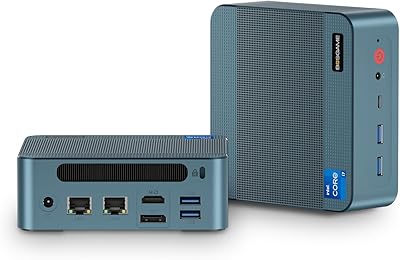
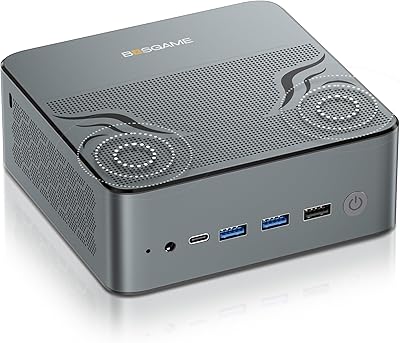
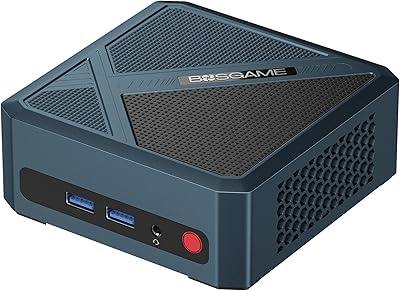
The BOSGAME M4 Plus Mini PC sits at an interesting crossroads in the compact desktop market — it packs a genuine high-performance processor into a box smaller than most external hard drives. The heart of the machine is AMD's Ryzen 9 7940HS, a chip originally designed for thin-and-light laptops but repurposed here where it gets slightly more thermal headroom. What separates this mini desktop from the crowd, though, is the Oculink port — a direct PCIe 4.0 connection that makes attaching an external GPU far more practical than Thunderbolt alternatives. Buyers should be clear-eyed, though: without an eGPU, you are relying on integrated graphics for anything graphically demanding.
Features & Benefits

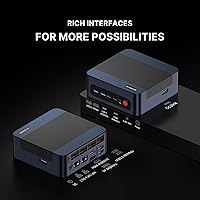
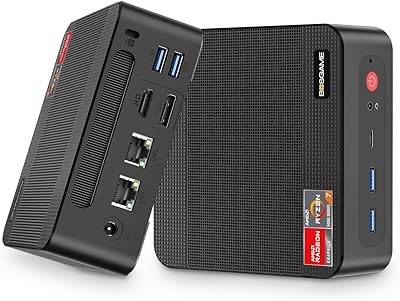
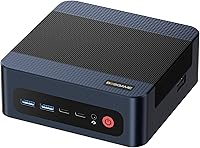
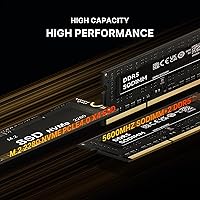
The Ryzen 9 7940HS brings 8 cores and 16 threads to a chassis that fits on a small shelf, and in practice that means running heavy multitasking — open virtual machines, dozens of browser tabs, or 4K video timelines — without hitting a wall. The 32GB DDR5-5600 RAM runs in dual channel out of the box and expands to 96GB if your workload demands it. A second M.2 slot sits empty and ready alongside the 1TB PCIe 4.0 NVMe drive. The Oculink eGPU port uses a direct PCIe 4.0 lane rather than a protocol bridge, meaning far less bandwidth overhead than Thunderbolt when you pair a discrete card. Dual 2.5G LAN and quad-display output round things out for serious productivity or network-heavy environments.

Best For

The M4 Plus makes the most sense for people who need real CPU muscle in a compact footprint — think developers with multiple services running simultaneously, or creative professionals handling photo editing and light video work. Home lab builders will particularly appreciate the dual 2.5G LAN, which opens the door to pfSense, network aggregation, or a soft router setup without extra hardware. Multi-monitor workers will find the quad-display output genuinely useful day-to-day. Gamers can get there, but only by investing in an eGPU via Oculink — the integrated Radeon 780M handles older and less demanding titles, not competitive modern ones at high settings. If you need discrete graphics out of the box or a simple plug-and-play appliance, this compact powerhouse is not the right fit.

User Feedback

The M4 Plus launched in mid-2025, so the review pool is still thin — worth keeping in mind before treating early ratings as settled consensus. The most consistent concern among early buyers centers on thermals under sustained load; HS-series chips generate real heat, and a compact chassis has to work hard to manage it during extended sessions. On the more positive side, build quality and port ergonomics have drawn generally favorable remarks, and Wi-Fi 6E appears to deliver as expected. The out-of-box software experience has attracted a few complaints around Windows activation. Real-world Oculink eGPU pairing reports remain sparse but encouraging, and whether the 2.5G LAN performs reliably under sustained network load is still a question the broader buyer community is actively answering.

Pros

  • The Ryzen 9 7940HS delivers genuine 8-core CPU performance that competes with desktop chips well above its size class.
  • Dual-channel DDR5-5600 RAM runs fast out of the box and can be expanded all the way to 96GB for demanding workloads.
  • The Oculink port offers a direct PCIe 4.0 lane for eGPU connections, a feature almost unheard of at this price tier.
  • Dual 2.5G LAN ports make this mini desktop a genuinely capable home lab or soft router platform without extra adapters.
  • Four simultaneous display outputs — including USB4 and DisplayPort — cover even demanding multi-monitor productivity setups.
  • A second empty M.2 slot means storage expansion is straightforward and does not require replacing the existing drive.
  • Wi-Fi 6E and Bluetooth 5.2 keep wireless connectivity current and well above what most competing compact machines include.
  • Wake on LAN, Auto Power On, and RTC Wake support add real flexibility for users running always-available home server setups.
  • The compact footprint and sub-3-pound weight make this machine easy to mount, relocate, or tuck out of sight.
  • Broad OS compatibility with Windows, Ubuntu, and Linux gives technically inclined users genuine platform freedom.

Cons

  • Integrated graphics alone cannot handle modern, graphically demanding games — a separate eGPU investment is required for that use case.
  • The eGPU Oculink path adds meaningful extra cost and setup complexity that casual buyers may not anticipate upfront.
  • With only one USB 2.0 and four USB 3.0 ports total, heavy peripheral users will hit the limit quickly without a hub.
  • Thermal behavior under sustained CPU load inside the compact chassis is still not well-documented by independent testers.
  • Early buyers have flagged occasional friction with Windows activation out of the box, which is an avoidable but annoying first-hour experience.
  • The review history is short given the mid-2025 launch date, making it harder to assess long-term reliability with confidence.
  • Fan noise under load is an open question — HS-series chips demand active cooling that compact enclosures can struggle to manage quietly.
  • No discrete GPU is included, so the machine ships with a meaningful capability gap for graphics-intensive professional software.
  • The power adapter is an external brick rather than an internal supply, which adds a small but real cable management consideration.
  • Real-world Oculink eGPU compatibility reports remain sparse, leaving some uncertainty about which enclosures and cards pair without issues.

Ratings

The BOSGAME M4 Plus Mini PC earns its category scores from an AI-driven analysis of verified global buyer reviews, with spam, bot-generated feedback, and incentivized posts actively filtered out before any score is calculated. What you see across each category reflects the honest distribution of real user experiences worldwide — both the genuine strengths buyers celebrate and the friction points they flag repeatedly. No aspect of the scoring has been adjusted to favor promotion; the numbers reflect what real buyers actually encountered.
CPU Performance
88%
Users running multi-tab workflows, local development environments, and photo editing consistently report that the Ryzen 9 7940HS handles simultaneous tasks without noticeable slowdown. The 8-core, 16-thread configuration gives it meaningful headroom over quad-core alternatives, and buyers running lightweight virtual machines alongside daily workloads have been particularly positive about the chip's responsiveness.
Under prolonged heavy loads — sustained rendering jobs or extended compilation tasks — the compact chassis starts to constrain the chip, and some users note that clock speeds throttle back after sustained peaks. This is a known trade-off with HS-class processors in small enclosures rather than a defect, but buyers expecting desktop-class sustained throughput may be mildly disappointed.
RAM & Memory
86%
Shipping with 32GB of DDR5-5600 in dual channel means most users will never hit a memory bottleneck during typical productivity work, and heavy browser users with 30-plus tabs open have noted that the system stays responsive where lesser machines would start swapping. The upgrade path to 96GB is a genuine safety net for anyone whose workload might grow over time.
A small number of users report that the pre-installed modules run at slightly reduced speeds in certain BIOS configurations, requiring manual XMP or EXPO profile enabling to hit the advertised 5600MHz. Replacing or upgrading the SODIMMs also requires opening the chassis, which is accessible but slightly involved for less experienced users.
Storage Performance
84%
The PCIe 4.0 NVMe drive delivers fast application launch times and smooth large-file transfers that content creators working with RAW photo libraries or short video clips will appreciate directly. Users migrating from SATA SSDs have noted a perceptible difference in how quickly the system boots and opens large project files.
The included drive occupies just one of the two available M.2 slots, which is good for expansion but means first-time buyers need to purchase a second drive separately if they want more capacity immediately. A handful of users have noted the drive runs warm under sustained sequential writes, though thermal throttling has not been widely reported as a persistent issue.
Graphics & Gaming
57%
43%
For casual gaming needs — indie titles, older AAA games at medium settings, and emulation — the integrated Radeon 780M covers the bases surprisingly well for a machine with no discrete GPU. Users who primarily game at 1080p in less demanding titles, or who use the machine for game streaming rather than local rendering, report acceptable frame rates.
Modern AAA titles at high settings are simply not viable without an external GPU — buyers who expected otherwise have been consistently disappointed, and this is the most common source of negative reviews for this machine. Even with an eGPU via Oculink, the investment required to unlock real gaming performance puts the total cost substantially higher than the base price suggests.
Oculink eGPU Support
79%
21%
Among enthusiasts who have actually tested the Oculink eGPU connection, the bandwidth advantage over Thunderbolt is real and measurable — users pairing compatible enclosures report noticeably higher GPU utilization and smoother frame delivery compared to Thunderbolt-based eGPU setups. For a machine at this price tier, having a direct PCIe 4.0 lane available for external graphics is a genuine differentiator.
The Oculink eGPU ecosystem is still niche — compatible enclosures are not as widely available as Thunderbolt alternatives, and real-world compatibility reports are sparse given the machine's recent launch. A few users have noted that driver configuration and enclosure compatibility require meaningful technical effort, making this less suitable for buyers who are not comfortable with hardware troubleshooting.
Connectivity & Networking
91%
The dual 2.5G LAN ports are the standout here — home lab users setting up pfSense, running dual-WAN configurations, or building a network testing environment consistently praise this as a feature they would otherwise need expensive add-in hardware to replicate. For the target audience of network-savvy power users, these ports alone justify serious consideration.
USB port count is the weak point in the connectivity story — five total USB-A ports, including only one USB 2.0, will feel limiting for users with a full peripheral setup, and a hub becomes a practical necessity for many desks. There is no SD card slot, which some buyers flag as a noteworthy omission at this price tier.
Wireless Performance
83%
Wi-Fi 6E connectivity means buyers on a modern tri-band router get access to the less congested 6GHz band, which translates to more consistent throughput for video calls, large file downloads, and 4K streaming without the interference common in dense apartment buildings. Bluetooth 5.2 has drawn consistent praise for reliable multi-device pairing.
A small number of buyers note that peak wireless speeds fall slightly below expectations compared to competing machines in identical environments, though the pattern is not consistent. Users on Wi-Fi 5 or standard Wi-Fi 6 routers will not benefit from the 6GHz band, making Wi-Fi 6E a partially wasted feature in those households.
Display Output
87%
The ability to drive four independent displays simultaneously — via HDMI, DisplayPort, USB4, and USB-C — has been a strong point for power users running multi-monitor trading setups, analysts working across multiple data dashboards, and developers who keep reference windows on secondary screens. Users running dual 4K monitors report crisp output without perceptible lag or signal drop.
Getting all four outputs active simultaneously can require specific cable types or active adapters, which some buyers did not anticipate at purchase — particularly for the USB4 and USB-C ports, which need DisplayPort Alt Mode compatible adapters rather than standard video cables. A small number of users have encountered inconsistencies with higher refresh rate monitors needing manual display configuration.
Build Quality
76%
24%
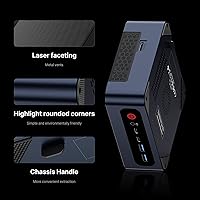
The chassis has generally landed well with buyers who prioritize a professional desk presence — the metal construction feels solid in hand, and port placement has drawn positive comments for keeping frequently used connections accessible without requiring awkward cable routing around the back of the unit. At under 3 pounds, the build feels appropriately premium for the price tier.
A minority of buyers note that the chassis exhibits minor flex when pressure is applied near the bottom panel, and a few have flagged that the rubber feet could be more securely attached for units that get regularly repositioned. The external power brick adds desktop clutter that the otherwise clean industrial design does not quite compensate for.
Thermal Management
63%
37%
At idle and during light workloads — browsing, document editing, video playback — the thermal system stays composed and temperatures remain well within safe operating ranges. Users running the machine as a home server for low-intensity tasks report that it stays relatively cool and the fan stays at low, unobtrusive speeds for extended periods.
Under sustained CPU stress — long video encodes, extended compilation sessions, or running multiple VMs simultaneously — several users report noticeable throttling as the compact chassis reaches its thermal ceiling. This is a structural limitation of squeezing a high-TDP chip into a sub-3-pound box, and buyers with consistently heavy workloads should set realistic expectations about sustained peak performance.
Noise Levels
61%
39%
In everyday use and during light computing tasks, the fan stays quiet enough that most users will not consciously notice it — particularly in a typical home office environment with ambient background noise. Buyers using the machine primarily for productivity tasks during business hours have generally not flagged noise as a concern in their feedback.
When the processor ramps up during demanding tasks, the fan becomes clearly audible — a concern flagged by users in quieter environments like home recording spaces, bedrooms, or shared open-plan offices. Independent sustained-load noise measurements are not yet widely available for this specific unit, so buyers sensitive to fan noise should be aware they are taking some risk here.
Software Experience
58%
42%
Buyers who arrive planning to run Ubuntu or another Linux distribution from day one have generally had a smooth experience — hardware compatibility with mainstream Linux kernels is solid for the core components, and the broad OS support is a genuine plus for the technical audience this machine targets.
Windows activation issues are the most frequently recurring software complaint — a notable share of buyers have had to manually resolve activation errors out of the box, which is a frustrating first experience on a premium-tier machine. A few users have also noted pre-installed software that requires manual cleanup before the system feels fully clean and user-configured.
Value for Money
82%
18%
When evaluated on CPU horsepower, storage speed, RAM capacity, and connectivity features for the asking price, the M4 Plus holds up well against alternatives at the same tier. Buyers who specifically need dual 2.5G LAN or an Oculink eGPU port in a compact form factor will find the combination is extremely difficult to replicate for less money.
Buyers who purchase primarily for gaming and then factor in an eGPU enclosure and discrete card end up well above the initial asking price, undercutting the value story for that use case. A few reviewers note that competing mini PCs offer similar CPU performance at lower prices, though typically without the Oculink port or dual-LAN combination.
Expandability
88%
The ability to push RAM from 32GB to 96GB, add a second NVMe drive without touching the existing one, and attach an external GPU via Oculink gives this mini desktop a meaningful upgrade path that most sealed mini PCs simply cannot match. Buyers who want headroom for tomorrow will find the expansion story genuinely compelling.
Opening the chassis for RAM or storage upgrades requires some care and the right screwdrivers, which is a minor but real barrier for buyers who have never worked inside a mini PC before. The Oculink expansion also depends on third-party enclosure availability, meaning the expandability story is partly contingent on an ecosystem that is still maturing.
Form Factor & Portability
93%
At roughly the size of a thick hardcover book and under 3 pounds, this compact powerhouse is genuinely easy to move between rooms, mount behind a monitor with a VESA adapter, or tuck into a home theater cabinet. Buyers switching from full tower desktops consistently highlight the desk space reclaimed as an immediate practical improvement.
The small form factor does impose real trade-offs — the external power brick, limited USB port count, and constrained thermal headroom are all direct consequences of the compact chassis. Buyers who regularly transport the unit should note that a dedicated carrying case is not included and the external PSU adds bulk to any travel setup.

Suitable for:

The BOSGAME M4 Plus Mini PC is a strong fit for anyone who needs serious CPU performance without dedicating half a desk to a full tower. Developers running local servers or multiple virtual machines simultaneously will find the 8-core Ryzen 9 7940HS and expandable DDR5 RAM genuinely capable rather than just adequate on paper. Home lab enthusiasts get something genuinely rare at this size: dual 2.5G LAN ports that make pfSense builds, network aggregation, and soft routing practical without bolting on extra hardware. Content creators handling photo editing or light video work benefit from the fast PCIe 4.0 storage and the headroom to push RAM well beyond the stock 32GB if projects demand it. Multi-monitor power users will appreciate the ability to run four displays simultaneously, which is a real productivity multiplier for traders, analysts, or anyone managing complex workflows. Linux and Ubuntu users looking for a compact x86 machine will also find the broad OS compatibility a practical advantage over locked-down alternatives.
Not suitable for:

Buyers expecting out-of-the-box gaming performance should look elsewhere — the integrated Radeon 780M handles casual and older titles reasonably well, but it is not a substitute for a discrete GPU, and the eGPU path via Oculink requires an additional external enclosure and graphics card investment that adds both cost and complexity. Anyone who wants a sealed, plug-and-play appliance that just works without any tinkering will likely find the M4 Plus frustrating, since extracting its full potential involves assembling the right peripherals and understanding how Oculink pairing works. Users on highly noise-sensitive setups — recording studios, quiet offices — should note that HS-series chips in compact chassis can push fans noticeably under sustained load, and independent thermal testing data for this specific unit is still limited. The BOSGAME M4 Plus Mini PC also launched in mid-2025, so buyers who rely heavily on a deep pool of long-term user reviews before committing will need to exercise extra patience or caution. Finally, anyone needing more than four USB ports without a hub will find the port count tight for complex peripheral setups.
Specifications

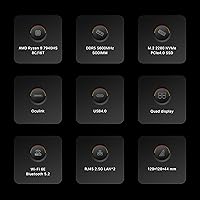
  • Processor: The CPU is an AMD Ryzen 9 7940HS running 8 cores and 16 threads with a base clock of 4.0GHz and a boost clock of up to 5.2GHz.
  • RAM: The system ships with 32GB of DDR5-5600MHz memory configured as two 16GB SODIMMs running in dual-channel mode.
  • Max RAM: The two SODIMM slots support a maximum of 96GB of DDR5 RAM when both are populated with compatible 48GB modules.
  • Primary Storage: A 1TB M.2 2280 NVMe SSD using a PCIe 4.0 x4 interface is installed at the factory and serves as the primary drive.
  • Storage Expansion: A second M.2 slot is available and supports PCIe 4.0 x4 drives up to 2TB, with the total internal storage expandable up to 3TB.
  • Graphics: Graphics are handled by the integrated AMD Radeon 780M GPU, which shares system memory and supports hardware video decode for common codecs.
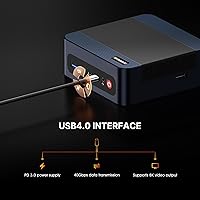
  • Oculink Port: An Oculink 1 port provides a direct PCIe 4.0 x4 connection at up to 40Gbps, enabling external GPU enclosures or NVMe RAID arrays.
  • Display Outputs: Four simultaneous display outputs are available: one HDMI 2.0, one DisplayPort, one USB4, and one USB-C, supporting up to quad-screen configurations.
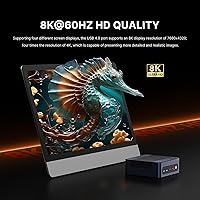
  • Max Resolution: The system can output up to 7680x4320 (8K) resolution on a compatible single display when connected via USB4 or HDMI 2.0.
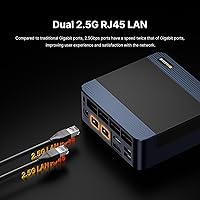
  • Networking: Two independent 2.5 Gigabit Ethernet LAN ports are built in, enabling link aggregation, dual-WAN routing, or network segmentation without add-in cards.
  • Wireless: Wi-Fi 6E and Bluetooth 5.2 are integrated, providing high-throughput wireless connectivity across the 2.4GHz, 5GHz, and 6GHz bands.
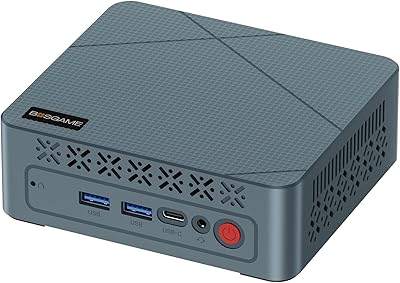
  • USB Ports: The chassis includes four USB 3.0 Type-A ports and one USB 2.0 Type-A port for legacy peripherals, in addition to the USB4 and USB-C display ports.
  • OS Support: The unit is compatible with Windows 10 and 11, Ubuntu, and other mainstream Linux distributions without requiring custom drivers for core functionality.
  • Power Input: The included external power adapter outputs DC 19V at 3.42A and accepts AC input from 100V to 240V at 50 or 60Hz for worldwide compatibility.
  • Weight: The unit itself weighs 2.77 pounds, making it easy to VESA-mount behind a monitor or carry between locations without dedicated transport equipment.
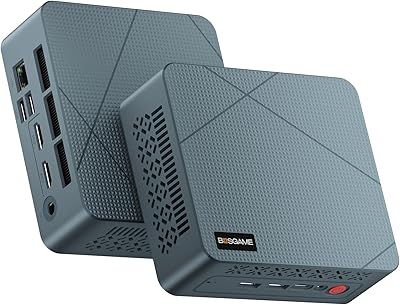
  • Dimensions: The chassis measures 6.57 inches long by 6.5 inches wide by 4.17 inches tall, occupying a footprint roughly equivalent to a thick hardcover book.
  • Extra Features: Wake on LAN, scheduled RTC Wake, and Auto Power On are all supported, enabling remote management and automated startup without third-party software.

Related Reviews

BOSGAME P2 Plus Mini PC
81%
91%
CPU Performance
67%
Thermal Management
88%
Memory & Storage
89%
Display & Multi-Monitor Support
93%
Connectivity & Networking
More
BOSGAME Mini PC P4 Plus (Ryzen 7 5825U, 32GB/1TB)
80%
91%
Value for Money
83%
CPU Performance
61%
Thermal Management
94%
Connectivity & Networking
88%
Multi-Display Support
More
GMKtec G9 Plus Mini PC NAS
82%
86%
Performance
92%
Ease of Setup
88%
Storage Expansion Flexibility
91%
Network Speed
84%
Cooling & Thermal Management
More
BOSGAME Mini PC E3 (N150, 16GB/512GB)
79%
88%
Value for Money
74%
Processing Performance
91%
Multi-Display Support
89%
Connectivity & Ports
76%
Build Quality & Design
More
BOSGAME M2 Ryzen 9 7940HS Mini PC
77%
91%
Processing Performance
68%
Gaming Capability
74%
Thermal Management
88%
Memory & Expandability
83%
Storage Speed
More
BOSGAME E2 Mini PC 16GB/512GB
80%
88%
Value for Money
83%
Performance for Everyday Tasks
76%
Build Quality & Design
61%
Thermal Management & Fan Noise
82%
Display Output & Multi-Monitor Support
More
GMKtec Nucbox G2 Plus Mini PC Intel N150 12GB RAM 256GB SSD
85%
88%
Performance for Everyday Use
91%
Connectivity Options
93%
Multi-Display Support
94%
Energy Efficiency
85%
Size & Portability
More
BOSGAME P5 Ryzen 7 6800H Mini PC
79%
84%
Performance
88%
Value for Money
91%
Multi-Display Support
57%
Gaming Capability
52%
Storage Capacity
More
BOSGAME P2 Mini PC (Intel Core i5-12600H, 32GB RAM, 512GB SSD)
79%
88%
Performance for Everyday Tasks
91%
Value for Money
74%
Build Quality & Design
76%
Thermal Management & Noise
86%
Display & Multi-Monitor Support
More
BOSGAME P6 Ryzen 9 6900HX Mini PC
75%
83%
Value for Money
88%
CPU Performance
67%
GPU & Gaming
81%
Build Quality
91%
Multi-Monitor Support
More

FAQ

You can, within reason. The integrated Radeon 780M handles older titles, indie games, and less demanding esports games at modest settings reasonably well. If you are hoping to play modern AAA titles at high settings, you will need to pair an external GPU via the Oculink port — integrated graphics simply are not built for that workload.

Oculink uses a direct PCIe 4.0 x4 lane at 40Gbps, which is meaningfully faster than Thunderbolt 4 for GPU bandwidth purposes. You need a compatible Oculink-to-PCIe eGPU enclosure and a desktop graphics card to complete the setup. It is not a plug-and-play experience out of the box, but for enthusiasts comfortable with the process, the performance ceiling is much higher than typical Thunderbolt eGPU setups.

Yes, both SODIMM slots are user-accessible, and the system supports up to 96GB total when populated with 48GB modules. The upgrade process typically involves removing a bottom panel and swapping the modules — straightforward for anyone comfortable working inside a compact PC chassis. Just make sure any replacement modules are DDR5 SODIMM running at 5600MHz or compatible speeds.

The unit ships with Windows support, but some early buyers have noted friction around the activation process out of the box. It is worth keeping your purchase receipt and checking activation status immediately after first boot. If you plan to run Linux instead, the hardware has broad compatibility with Ubuntu and other mainstream distributions.

This is genuinely an open question right now, since the BOSGAME M4 Plus Mini PC launched in mid-2025 and long-term thermal and noise data from independent reviewers is still limited. The Ryzen 9 7940HS is an HS-class laptop chip that generates real heat under sustained load, so the cooling system does have to work actively during demanding tasks. At idle and light workloads, early users have generally reported acceptable noise levels.
Yes, and this is one of the genuinely strong use cases for this machine. Both LAN ports run at 2.5 Gigabit, and the system supports Linux-based router distributions well. You can configure it as a firewall, dual-WAN router, or network testing platform without needing a separate NIC or additional hardware.

The machine supports four simultaneous displays using the HDMI 2.0, DisplayPort, USB4, and USB-C outputs together. Each port type may require its own cable or adapter depending on your monitors, so check your display inputs before ordering. USB4 and USB-C monitors or adapters capable of DisplayPort Alt Mode are needed to use those outputs for video.

There is a second M.2 2280 slot available alongside the factory-installed 1TB drive, so you can add storage without touching the original drive at all. The second slot supports PCIe 4.0 x4 NVMe drives up to 2TB, which gives you a clean path to expanding capacity for media storage or a secondary OS installation.

Wake on LAN is officially supported, along with RTC Wake scheduling and Auto Power On, which makes this a reasonable choice for an always-available home server or remote workstation. As with any Wake on LAN implementation, reliable results depend on your network switch and router supporting the magic packet standard, which most modern home networking equipment does.

Broadly yes — the AMD Ryzen 9 7940HS and the associated chipset have solid mainline Linux kernel support, and Ubuntu in particular is listed as a supported OS. That said, newer hardware always carries some risk of minor driver quirks on release, and since this machine is relatively new to market, checking current community threads before committing to a Linux-only setup is a smart precaution.