
Overview

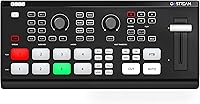
The Osee GoStream Deck is a compact, all-in-one live streaming switcher that punches well above its mid-range price point, targeting solo creators, small production teams, and houses of worship. Unlike purely software-based workflows, it gives you a physical T-bar and dedicated hardware buttons — a real difference when you are switching cameras in front of a live audience. It competes directly with the Blackmagic ATEM Mini Pro, adding direct three-platform streaming over Ethernet out of the box. Fair warning: NDI HX support requires a separately purchased license, and the feature set is dense enough that total beginners should expect a genuine learning curve.

Features & Benefits

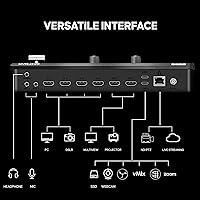
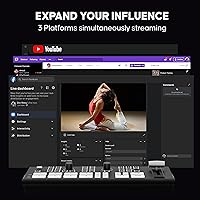
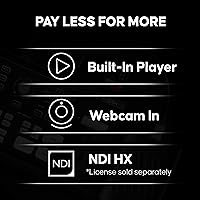
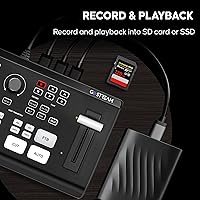
Connect up to four HDMI cameras or sources, plus a configurable AUX channel that handles a webcam, NDI HX feed, or MP4 file — handy for playing pre-recorded intros without a second device. The built-in Ethernet streaming lets you broadcast to YouTube, Facebook, and a custom RTMP destination all at once, no laptop required. Simultaneously, this video mixer records to an SD card or USB SSD at high bitrates, giving you a local archive without extra hardware. The keying tools — chroma key, PIP, logo overlays, lower-thirds — are genuinely broadcast-grade for the price, and the audio processing chain includes a compressor, noise gate, and full EQ.

Best For

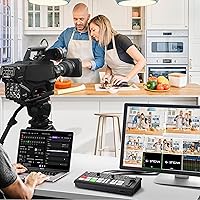
This streaming switcher is a strong fit for church production teams that need reliable multi-camera switching without a dedicated operator — the auto-switching feature helps here, even if it is not flawless in every environment. Podcast hosts running panel discussions will appreciate the chroma key and lower-third tools for adding professional polish on a modest budget. Small event crews handling conferences, weddings, or corporate streams benefit from the compact footprint and PC-free operation. Educators managing hybrid classrooms with multiple camera angles will find the MultiView monitoring output genuinely practical. If cutting laptop dependency during live productions is a priority, the GoStream Deck addresses that directly.

User Feedback

Buyers consistently praise the solid build quality for the price and how natural the T-bar feels after a short practice session. Direct Ethernet streaming draws particular appreciation from church volunteers who cannot manage OBS on a laptop mid-service. The recurring frustration is the NDI HX licensing situation — many buyers feel that capability should be bundled at this price rather than sold separately. The built-in menu is comprehensive but takes real time to learn; users describe it as dense rather than intuitive initially. A handful of reports flag heat during extended sessions, worth watching for continuous multi-hour broadcasts. Customer support is generally described as responsive and helpful.

Pros

  • Streams to three platforms simultaneously over Ethernet — no laptop required during the live show.
  • Records locally to SD card or USB SSD at the same time as streaming, so you always leave with an archive copy.
  • Built-in audio processing — compressor, noise gate, EQ, de-esser — is a genuine differentiator at this price point.
  • The physical T-bar and dedicated hardware buttons make camera switching feel natural and reliable under pressure.
  • Chroma key, PIP, logo overlays, and lower-thirds are all included, giving small productions a broadcast-quality look.
  • Compact and light enough to fit in a camera bag and set up on any desk or sound console.
  • Free PC control software for both Mac and Windows expands configuration options well beyond the hardware panel.
  • MultiView monitoring output lets a solo operator see all sources and stream status on a single second display.
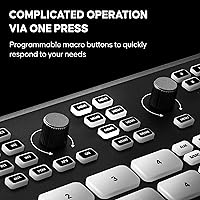
  • Eight instant-access hardware macros cover the most common live actions without touching the menu.
  • Customer support is multilingual and generally responsive, which matters for non-technical operators troubleshooting mid-week.

Cons

  • NDI HX input requires a separately purchased license — it is not included at the base price.
  • The built-in menu is dense and takes real time to learn; expect a few practice runs before going live.
  • Mic inputs are 3.5mm only, which means XLR microphones need a separate adapter and can introduce noise floor issues.
  • Recording sessions are capped at five hours per file, which can catch operators off guard during all-day events.
  • Voice-based auto-switching misfires in noisy or high-energy environments and should not be relied on as a hands-off solution.
  • A fast SD card is mandatory for high-bitrate recording — budget cards cause dropped frames and add to the real cost of ownership.
  • The external power brick adds another cable to manage, which slightly complicates setup for traveling operators.
  • Advanced macro programming and detailed audio routing essentially require the PC software — true standalone configuration has real limits.
  • Some users report the unit runs warm during extended multi-hour sessions, worth monitoring in poorly ventilated setups.
  • Build quality, while solid, does not match the metal chassis of competing units at a similar or slightly higher price.

Ratings

The Osee GoStream Deck earned its scores through AI analysis of verified global buyer reviews, with spam, bot-submitted, and incentivized feedback actively filtered out before any score was calculated. Ratings reflect the honest consensus of real users — church production volunteers, independent podcasters, and small event crews — who put this video mixer through its paces in live, high-stakes situations. Both the standout strengths and the genuine frustrations are transparently represented in every category below.

Value for Money
83%
For a hardware switcher that streams to three platforms simultaneously, records locally, and handles keying without a PC, buyers consistently feel they are getting broadcast-capable tools at a price that would have been unthinkable a few years ago. Church teams on tight budgets particularly note how much production value this unit unlocks.
The NDI HX license being sold separately erodes that value perception for anyone who budgeted expecting it to be included. A few buyers felt the total landed cost crept closer to premium territory once they factored in the add-on.
Build Quality
78%
22%
The chassis feels sturdy and purposeful for its size and weight class. The T-bar has a satisfying, dampened travel that users describe as noticeably better than budget-tier switchers, and the buttons have a tactile click that inspires confidence during live events.
Some reviewers noted the plastic housing does not feel as premium as the Blackmagic ATEM Mini Pro's metal shell. A few users flagged minor flex in the casing under pressure, which is not a dealbreaker but is noticeable if you handle both units back to back.
Ease of Setup
61%
39%
Plugging in HDMI sources and getting a basic program output going is genuinely straightforward. Users with prior switcher experience report being up and running within an hour, and the free PC software helps flatten the curve for initial configuration.
Total beginners — particularly church volunteers with no A/V background — frequently describe the built-in menu as intimidating and dense. The documentation, while improving, still leaves some advanced features underdocumented, leading to forum hunting for answers.
Direct Streaming Reliability
86%
Streaming directly to YouTube, Facebook, and a custom RTMP endpoint over Ethernet without a laptop is the feature that earns the most genuine praise. Users report stable, dropout-free streams across multi-hour worship services and corporate events when connected to a solid network.
Streaming performance is heavily dependent on network quality, and a few users experienced instability when relying on congested Wi-Fi through a router rather than a direct wired connection. RTMP credential setup can also be fiddly on first configuration.
Audio Processing
74%
26%
Having a compressor, noise gate, de-esser, and full EQ built into a switcher at this price is a genuine differentiator. Podcast hosts and panel-show producers note that audio from mics connected directly to the 3.5mm inputs sounds noticeably cleaner on-stream than running through a basic mixer.
The 3.5mm mic inputs are a limiting factor for more serious audio setups that use XLR microphones — an adapter is required, and it adds a potential noise floor. Users doing high-end broadcast work note the audio chain is solid but not a replacement for a dedicated audio mixer.
Keying & Overlay Tools
81%
19%
The combination of upstream chroma key, downstream logo keyer, PIP, and lower-thirds support gives small productions a legitimate broadcast look. Church graphics teams and podcast producers praised how reliably the green-screen key held up under consistent studio lighting.
The chroma key quality degrades noticeably in uncontrolled lighting environments — a well-lit green screen is essentially mandatory to get clean edges. Users attempting to key in variable ambient light reported fringing and inconsistent pull.
Auto-Switching Accuracy
58%
42%
When it works well — in a controlled podcast or panel environment with clear audio separation between speakers — the voice-based auto-switching handles camera cuts competently and reduces the need for a dedicated operator during conversational content.
In noisier environments like live worship or event spaces with ambient crowd sound, the feature can misfire and cut to the wrong camera at the wrong moment. Most experienced users treat it as a helpful assist rather than a hands-off solution.
Recording Performance
79%
21%
Simultaneous streaming and local H.264 recording at high bitrates means you leave every event with a clean archive copy, which editors appreciate. The ability to record to an affordable USB SSD keeps storage costs low compared to proprietary media formats.
Each recording session is capped at five hours, which catches some users off guard during marathon conference days or extended worship events. The SD card speed requirement is also strict — budget cards cause dropped frames, so the hidden cost of a fast card should be factored in.
Transition & Effects Variety
76%
24%
Eighteen user-selectable transition patterns with a six-layer composition engine gives productions real creative range beyond a simple cut or dissolve. Users running event streams noted that the variety of wipes and effects helped their broadcasts feel polished without requiring post-production.
Some of the transition patterns feel more novelty than practical, and a handful of users noted the customization options for modifying patterns are not always obvious in the menu. For minimalist productions, the abundance of options can feel like noise.
Multiview Monitoring
77%
23%
Having a fully configurable multiview output on a second display — showing all sources, tally status, audio meters, and streaming status simultaneously — is a real operational advantage during live events. Solo operators particularly valued being able to see everything at a glance on a single screen.
The multiview layout options, while flexible, take time to configure correctly. A few users found that labeling and source identification on the multiview was less clear than expected until they invested time in the menu settings.
PC-Free Operation
82%
18%
The ability to run a full multi-camera live stream from power-on without touching a laptop is a core selling point that delivers in practice. Church tech teams and solo event operators consistently highlight this as a key reason they chose this switcher over OBS-dependent solutions.
Some advanced features — particularly macro programming beyond the eight hardware buttons and detailed audio routing — essentially require the PC software to configure properly. Fully PC-free operation works best once the unit has been pre-configured at a desk before the live event.
Macro & Automation
67%
33%
Having eight instant-access macros on the hardware panel covers the most common repetitive actions during a live show — switching to a title card, triggering a lower-third, or cutting to a break. Up to 100 macros via the PC software gives advanced users real programmability.
Creating and editing macros through the built-in hardware menu is cumbersome; most users end up relying on the PC software for anything beyond the basics. Macro files can be exported and imported via SD card, but the workflow for managing them is not intuitive out of the box.
NDI HX Support
53%
47%
When the license is purchased and activated, NDI HX input opens up a whole new range of source options — PTZ cameras, wireless phone feeds, and screen captures — that make this video mixer significantly more versatile for growing productions.
The fact that NDI HX requires a separate paid license is a recurring point of frustration and feels like a bait-and-switch to buyers who assumed it was included. The licensing process itself has also drawn complaints about clarity and ease of activation.
Portability & Footprint
84%
At 500g and roughly the size of a thick paperback book, this streaming switcher travels easily in a camera bag and sets up on a church sound desk or conference table without consuming valuable real estate. Users who cover multiple venues per week praised the compact form factor.
The external 12V DC power supply adds one more cable and brick to manage, which slightly undercuts the portability story. A built-in power supply would have been a cleaner solution for traveling operators.
Customer Support
72%
28%
Osee actively promotes multilingual customer support, and many buyers report receiving helpful, responsive replies when troubleshooting firmware or configuration issues. The brand appears genuinely engaged with its user base compared to some competitors at this price tier.
Support quality appears inconsistent depending on the complexity of the issue — straightforward setup questions get fast answers, but more advanced technical problems sometimes result in delayed or generic responses. Firmware update communication could also be more proactive.

Suitable for:

The Osee GoStream Deck is built for people who need broadcast-capable live streaming without the complexity of a full production setup or the ongoing dependency on a laptop running OBS. Church and house-of-worship teams are arguably the best fit — the hardware control panel means a volunteer can manage camera cuts confidently without deep technical training, and the direct Ethernet streaming removes the single-point-of-failure risk that comes with a PC in the signal chain. Podcast hosts running panel discussions will get real mileage from the built-in keying tools, lower-third overlays, and voice-based auto-switching, which collectively give a two-person show a polished, professional look on a modest budget. Small event production crews covering corporate conferences, weddings, or community broadcasts will appreciate that the whole setup — switching, streaming, and recording — fits in a camera bag and runs from a single box. Educators managing hybrid classrooms with multiple camera angles also land squarely in the target audience, especially when IT support is limited and simplicity of operation matters as much as feature depth.

Not suitable for:

Buyers expecting NDI HX support to be ready out of the box will be disappointed — it requires a separately purchased license, and if that capability is central to your workflow, you should factor that cost in before committing. The Osee GoStream Deck is also not the right tool for production environments that rely on professional XLR microphones or SDI camera connections, since neither is natively supported without adapters or workarounds. Broadcasters who need rock-solid auto-switching in noisy, high-energy environments — like live concerts or sports events — should temper expectations, as the voice-based camera switching works best in controlled conversational settings rather than chaotic live stages. Anyone coming from a zero A/V background and expecting to be fully operational on day one without any research or setup time will likely find the menu system and initial configuration more demanding than anticipated. Finally, buyers comparing this unit to the Blackmagic ATEM Mini Pro Extreme or Roland V-1HD+ and prioritizing metal build quality, SDI connectivity, or a more mature software ecosystem may find those alternatives worth the additional cost.

Specifications

  • Dimensions: The unit measures 252.4 × 49.3 × 107.3 mm (W × H × D), making it compact enough to sit on a church sound desk or conference table without occupying significant space.
  • Weight: The device weighs 500g (shipping weight 1,160g including packaging and accessories), light enough to carry in a standard camera bag.
  • Video Inputs: Four HDMI Type-A inputs support formats from 720p50 up to 1080p59.94/60, plus a configurable AUX channel that can be assigned to a webcam, NDI HX source, or internal MP4 player.
  • Video Outputs: Two HDMI outputs are provided — one for program output and one for MultiView monitoring — plus one USB Type-C output for use as a webcam source in OBS, Zoom, or vMix.
  • Streaming: The Ethernet port (10/100/1000 BaseT) supports simultaneous RTMP streaming to three destinations at up to 10 Mb/s total output bandwidth.
  • Recording: H.264 recording to SD card or USB SSD is supported at up to 70 Mb/s, with each session limited to a maximum of five hours per file.
  • Playback: MP4 file playback from SD card or USB SSD is supported at up to 70 Mb/s, with three modes available: Play Once, Repeat, and Sequential.
  • Audio Inputs: Two 3.5mm stereo mini-jack inputs (MIC 1 and MIC 2) support microphone-level, mic-with-power, and line-level signals.
  • Audio Output: One 3.5mm stereo headphone output with adjustable monitoring level is provided for real-time audio quality checks during live production.
  • Audio Processing: The built-in audio mixer includes fader, balance, delay, low-cut filter, de-esser, noise gate, compressor, and a full parametric equalizer per channel.
  • Video Effects: The composition engine supports 18 user-selectable transition patterns, one upstream keyer (chroma and luma), one downstream keyer, PIP, Super Source with two video overlays, and two color generators.
  • NDI HX Support: NDI HX input is supported as a configurable AUX source but requires a separately purchased license activation to enable — it is not included at the standard purchase price.
  • Macro System: Eight macros are accessible directly from the hardware control panel, with up to 100 macros programmable and manageable via the free PC software.
  • Auto-Switching: Voice-based camera auto-switching detects the active speaker and triggers a cut or close-up transition automatically, designed primarily for conversational podcast and panel formats.
  • Control Options: The unit can be operated via the onboard hardware panel, the built-in menu system, free PC software for Mac and Windows, or a Companion (Stream Deck) module for expanded control.
  • Power: The device runs on an external 12V DC power supply and consumes approximately 12W during normal operation.
  • SD Card Slot: One SD card slot supports recording, video and still image playback, stream key import, profile import/export, and firmware upgrades — cards with read/write speeds supporting up to 80 Mb/s are recommended for high-bitrate recording.
  • Tally System: An open Tally API allows users to build custom tally light systems over the network, compatible with third-party tally hardware and software.
  • MultiView Monitoring: The MultiView output is fully configurable and can simultaneously display program, preview, all four HDMI inputs, UVC source, audio meters, tally status, recording status, and streaming status on a single connected monitor.
  • Operating Temperature: The unit is rated for use between 5°C and 40°C (41°F to 104°F), suitable for typical indoor venue and studio environments.

Related Reviews
Travel9to5 The Photography Deck
88%
94%
Portability
88%
Ease of Use for Beginners
80%
Build Quality
90%
Photography Tips Coverage
85%
Durability
More
Elgato Stream Deck Neo
89%
91%
Value for Money
93%
Ease of Setup
88%
Customizability
89%
Software Compatibility
85%
Build Quality
More
Elgato Stream Deck Mini
85%
93%
Ease of Setup
88%
Build Quality
91%
Key Customization
86%
Multi-Action & Macro Depth
89%
App Integration Breadth
More
TEAC W-1200
TEAC W-1200
81%
92%
Digital Archiving Quality
88%
Motor Stability & Pitch Control
74%
Noise Reduction Performance
71%
Build Quality & Chassis
84%
Recording Versatility
More
Funai DV220FX5 Dual Deck DVD and VHS Player
85%
88%
Performance
90%
Ease of Setup
92%
Sound Quality (Dolby Digital)
87%
Video Quality
84%
Build Quality
More
Osee T5+ 5.5-inch Camera Monitor
79%
91%
Outdoor Brightness
88%
Value for Money
86%
False Color & Exposure Tools
83%
MySets Workflow System
67%
Build Quality
More
PyleUSA PT659DU.5 Dual Stereo Cassette Tape Deck
78%
88%
Digital Conversion (USB/MP3)
67%
Build Quality & Construction
82%
External Recording & Microphone Integration
76%
Audio Playback Clarity
78%
Value for Money
More
Deck of Scarlet Threeway Solid Lip Oil - Pink Provocateur
88%
89%
Hydration and Moisture
92%
Buildable Color
88%
Non-Sticky Texture
94%
Vegan and Cruelty-Free
85%
Smoothness and Application
More
Panasonic PV-D4733S Double Feature DVD/VCR Combination Deck
77%
86%
Value for Money
91%
DVD Playback Quality
67%
VHS Playback Quality
80%
Ease of Use
61%
Build Quality
More
Motorola X Sol Republic Deck Bluetooth NFC Wireless Speaker
83%
87%
Sound Quality
91%
Portability
88%
Battery Life
92%
Bluetooth Range
89%
Ease of Setup
More

FAQ

No — that is one of the main reasons people choose this unit. As long as you have a wired Ethernet connection, the GoStream Deck handles streaming directly to up to three RTMP destinations like YouTube, Facebook, or a custom server without any computer in the loop. A PC is optional for advanced configuration and macro programming, but it is not required during the live event itself.

NDI HX input is not included at the standard purchase price — it requires a separately purchased license to activate. This catches a lot of buyers off guard, so if NDI camera feeds or wireless phone inputs are core to your workflow, make sure to factor that additional cost into your budget before buying.

Yes, simultaneous streaming and local recording is fully supported. You can broadcast to three platforms over Ethernet while recording an H.264 file to an SD card or USB SSD at the same time. Just keep in mind that each recording session has a five-hour file limit, and you will need a fast SD card — at least one rated for 80 Mb/s write speeds — to handle the highest recording bitrates without dropped frames.

You can connect up to four standard HDMI cameras directly, plus one additional source through the configurable AUX channel, which can be a USB webcam, an NDI HX feed (with license), or the internal MP4 player. It does not have SDI inputs natively, so cameras with SDI-only outputs will need an SDI-to-HDMI converter.

It is manageable, but expect a learning curve. The hardware T-bar and physical buttons are intuitive once you have practiced with them, and basic streaming setup is not overly complicated. Where people struggle is the built-in menu system, which is feature-rich but dense — plan for a few rehearsal sessions before going live in front of a congregation. The free PC software helps a lot for initial setup.

It works well in controlled environments — think a two- or three-person podcast recorded in a quiet room with good mic separation. In louder or more chaotic settings like a live worship band, a crowd, or a noisy conference hall, it tends to misfire and cut to the wrong camera. Most experienced users treat it as a helpful assist in the right context rather than a fully hands-off solution.

Not directly — the audio inputs are 3.5mm stereo mini-jack only. You can use an XLR-to-3.5mm adapter or a small preamp to bridge the gap, but that adds cost and a potential noise floor issue. If you are running a serious audio setup with multiple XLR mics, a dedicated audio mixer feeding the 3.5mm inputs is a more reliable solution.

A handful of users have noted the device runs warm during extended multi-hour sessions, particularly in enclosed or poorly ventilated spaces. It is not a widespread failure issue, but it is worth giving the unit some breathing room — do not stack it under other equipment or put it inside a closed case while running. In normal open-air setups at typical indoor temperatures it handles long sessions without problems.

Yes, the USB Type-C output presents the unit as a webcam source, so OBS, vMix, Zoom, and similar software will recognize it immediately. You can use it as a hardware front-end that feeds a polished, switched video signal into your preferred software, which gives you the best of both worlds — hardware control plus software flexibility.

The two units are closely matched in price and target audience, but they take slightly different approaches. This video mixer adds direct three-platform streaming without a PC and includes a voice-based auto-switching feature that the ATEM Mini Pro lacks. The ATEM Mini Pro has a more established software ecosystem, a more premium metal chassis, and arguably a gentler initial learning curve for newcomers. If built-in direct streaming and hardware auto-switching are priorities, this switcher has the edge; if you value Blackmagic's ecosystem and build quality, the ATEM is worth the look.