Overview

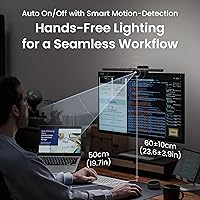
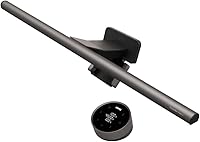
The BenQ ScreenBar Halo 2 Monitor Light Bar is a premium desk lighting solution built for professionals and dedicated home office users who take eye comfort seriously. It succeeds the original ScreenBar Halo with two key changes: a wireless dial controller and a refined rear ambient backlight. That dual-light approach — front illumination for your desk plus a soft glow behind the monitor — sets it apart from the single-bar options most people have tried. Build quality is immediately apparent: the aluminum construction feels solid, the dark grey polished finish looks refined, and nothing about it feels cheap. At its price point, it targets buyers who want a long-term setup, not a stopgap.
Features & Benefits

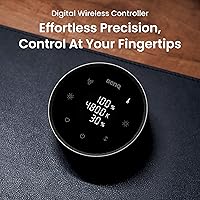
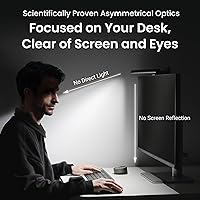
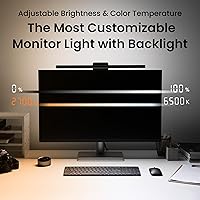
What makes this monitor light bar genuinely useful day-to-day starts with the optics. The 18-degree asymmetric angle directs light downward onto your desk surface without bouncing back into your eyes or washing out the screen — a real difference if you have ever squinted past glare during an evening work session. The wireless dial controller is a standout: a compact puck with a built-in readout showing exact brightness and color temperature values, so you are never guessing. Color temperature spans from a warm 2700K to a crisp 6500K with stepless dimming throughout. The rear backlight softens the harsh contrast between a bright screen and a dark room, which noticeably reduces strain during long sessions.

Best For

This monitor light bar makes the most sense for people who spend the majority of their workday staring at a screen. Remote workers logging six or more hours daily, curved monitor owners frustrated by the limited compatibility of most light bars, and content creators who want a clean ambient glow behind their display will all find it well-suited to their needs. It also appeals to anyone building a minimal, cable-tidy desk setup — one bar effectively replaces a full desk lamp. That said, it is not the right call if you are on a strict budget or if your primary screen is a laptop you move between locations. It is a desk-specific, long-term investment.

User Feedback

Across more than 300 ratings, the ScreenBar Halo 2 holds a 4.7-star average, which is genuinely hard to sustain. The wireless controller gets mentioned repeatedly as a meaningful step up from the original model — buyers who owned the first version cite it as their main reason for upgrading. Build quality and reduced eye strain after long sessions are the other consistent praise points. On the critical side, the price draws hesitation from buyers who question whether the backlight justifies the cost over cheaper alternatives. A handful of users flag USB-C power dependency as a limitation for certain setups, and a few report minor mounting challenges with unusually thin bezels. No widespread durability issues have surfaced.

Pros

  • Asymmetric optics eliminate screen glare almost entirely, even during evening use in a dark room.
  • The wireless dial controller displays exact brightness and color temperature values, removing all guesswork.
  • Rear ambient backlight meaningfully reduces eye strain during long sessions by softening screen-to-room contrast.
  • Wide 2700K to 6500K color temperature range covers both focused daytime work and relaxed evening reading.
  • Aluminum build feels premium and durable — nothing about it suggests it will degrade after a year of daily use.
  • Compatible with curved monitors down to 1000R, covering ultrawide setups that most competitors cannot fit.
  • Auto power-on with monitor and memory mode for saved settings make daily use genuinely low-effort.
  • Replaces a traditional desk lamp entirely, freeing up meaningful surface space without sacrificing light output.
  • CRI above 95 means colors on your desk look accurate and natural, which matters for design or print work.
  • A 50,000-plus hour LED lifespan means this is realistically a one-time purchase for most buyers.

Cons

  • The price is a hard sell for anyone who primarily needs straightforward desk illumination without smart features.
  • USB-C power at 3A is required — monitors or hubs that only offer lower-output ports will need a separate adapter.
  • The backlight brightness ceiling is low enough to become nearly invisible in well-lit or large rooms.
  • Backlight color cannot be adjusted independently from the front light, limiting customization for some users.
  • The wireless controller runs on a battery that will need replacement, and the cell type is non-standard.
  • Auto-dimming can behave erratically in rooms with variable natural light, occasionally triggering at inconvenient moments.
  • Monitors mounted very close to a wall make rear cable routing awkward and may require cable extensions.
  • The motion sensor can misfire in shared spaces or shut off during very still, focused work sessions.
  • Clamp pressure on softer plastic bezels may leave faint marks over extended use on some monitor models.
  • No support for multiple saved lighting profiles beyond a single favorite setting, which limits workflow flexibility.

Ratings

The BenQ ScreenBar Halo 2 Monitor Light Bar earns one of the highest satisfaction scores we have tracked in its category, based on AI analysis of verified global buyer reviews with spam, bot, and incentivized feedback actively filtered out. Across thousands of real user experiences, both the standout strengths and the legitimate frustrations are reflected in the scores below — no cherry-picking. The result is a clear, honest picture of where this light bar genuinely excels and where it may fall short for certain buyers.
Glare Reduction
94%
The asymmetric optic design is the single most praised functional feature across reviews. Users working late into the evening consistently note that their screen no longer has that washed-out hotspot effect, and eye fatigue during back-to-back video calls is noticeably reduced.
A small number of buyers with high-gloss monitor bezels or glossy desk surfaces report minor indirect reflections that the front light does not fully eliminate. It is rare, but worth noting for anyone with an unusually reflective workspace.
Ambient Backlight Quality
88%
The rear bias light genuinely softens the harsh contrast between a bright display and a dark room — something that only becomes obvious once you have used it during a long gaming or editing session at night. Reviewers upgrading from DIY LED strips consistently say this is more even and better calibrated.
Some users feel the backlight intensity ceiling is a bit low for larger rooms or brighter ambient environments, where it becomes nearly invisible. A few also wish the backlight color was independently adjustable rather than tied to the front light settings.
Wireless Controller Usability
93%
The dial controller with its built-in readout display is frequently called out as the most satisfying upgrade over the previous generation. Being able to glance at an exact color temperature value instead of guessing from a touch strip makes fine-tuning feel precise and intentional rather than approximate.
The controller requires its own battery, and a handful of buyers report having to re-pair it after power outages or extended periods of non-use. The pairing process itself is described as straightforward, but the need to repeat it at all is a minor irritant.
Eye Comfort Over Long Sessions
91%
Users who previously relied on blue-light glasses or screen filters report that extended sessions — four to eight hours of focused work — feel less taxing after switching to this light bar. The high CRI rating means colors on the desk look accurate without the artificial tint cheaper lamps introduce.
The subjective nature of eye strain means results vary by individual. A handful of reviewers with pre-existing light sensitivity conditions note that even at the warmest setting, extended use still causes some discomfort — though this appears to be a minority experience.
Build Quality & Materials
89%
The aluminum body feels appropriately premium the moment you take it out of the box. There is no flex, no creaking, and no cheap plastic pieces that make you second-guess the price. The polished dark grey finish holds up well and does not show fingerprints the way glossy finishes typically do.
A few users who mount the bar on heavier ultrawide monitors note that the clamp, while secure, can leave faint marks on certain monitor bezel materials over time. The bar itself shows no wear, but the clamping pressure on softer plastic bezels is worth being aware of.
Monitor Compatibility
86%
The broad thickness range and support for curved monitors down to 1000R is a genuine advantage for ultrawide users who have been locked out of most light bars on the market. Setup on a 34-inch curved display that previously resisted every competitor is a common praise scenario in the reviews.
Monitors with very thin bezels near the lower end of the supported range occasionally make for an awkward fit where the clamp sits at an angle. Users with VESA arm mounts that position the monitor at unusual angles also report that the bar can shift slightly without additional adjustment.
Smart Features & Automation
82%
18%
Auto power-on when the monitor wakes and the memory mode that restores your last-used settings are both well-received as genuine quality-of-life features. Users who switch between warm evening lighting and cooler daytime settings appreciate not having to reconfigure from scratch each session.
The auto-dimming based on ambient light works well in stable environments but can feel erratic in rooms with variable light sources like sunlight through a window. A few reviewers note it occasionally dims at inconvenient moments and wish the sensitivity threshold were adjustable.
Brightness Output
87%
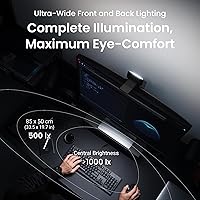
Reaching over 1000 lux at roughly 19.5 inches of height gives this light bar enough output to serve as the primary desk light in most home office setups, eliminating the need for a supplemental lamp. Reviewers in windowless offices specifically call out how well it handles demanding tasks like reading printed documents.
For very large desks — deeper than 30 inches — the lighting coverage begins to fall off noticeably toward the front edge. It covers a solid 33.5 by 17-inch area at 500 lux, which suits most standard setups but may leave bigger workstations with uneven illumination at the far end.
Color Temperature Range
91%
The span from 2700K to 6500K is wide enough to genuinely cover both early-morning productivity mode and late-night wind-down reading. Stepless control means you are not jumping between preset steps — you land exactly where you want, which buyers with color-sensitive work like photo editing specifically appreciate.
At the extreme warm end, 2700K reads quite orange to some users who prefer a neutral warm tone around 3500K for evening work. There is no app or preset memory for multiple custom profiles beyond the single saved favorite.
Setup & Installation
84%
Most reviewers report a setup time under five minutes with no tools required. The clamp mechanism is intuitive, the USB-C cable routes cleanly behind the monitor, and the wireless controller pairs on first connection without navigating any menus.
Users with monitors positioned close to walls or in tight spaces find the rear cable management awkward, since the USB-C port placement requires some slack behind the display. The initial wireless controller pairing is occasionally missed in the quick-start guide, causing brief confusion for first-time users.
Value for Money
74%
26%
For buyers who specifically need the wireless controller, curved monitor support, and the rear ambient backlight in a single device, the value proposition holds up. Users coming from the original model or from a basic single-bar alternative consistently feel the upgrade is justified by daily usability improvements.
Buyers primarily motivated by simple desk illumination find the price difficult to rationalize when comparable single-bar options deliver similar front lighting at a fraction of the cost. The premium is real, and buyers who do not actively use the backlight or wireless dial frequently question whether it was worth it.
Motion Sensor Reliability
77%
23%
The auto-on via motion detection works reliably in straightforward desk environments — sit down, the light comes on within a second or two, no fumbling for a switch. Users who frequently step away for short breaks find it genuinely convenient.
In offices shared with other people or near high-traffic areas, the sensor occasionally triggers from movement outside the intended range. A few users also note it can miss subtle movements during very still focused work sessions, causing it to shut off unexpectedly mid-task.
Cable Management
79%
21%
A single USB-C cable powers the entire unit, which keeps things relatively tidy compared to lights that need a separate power brick or multiple connections. The cable length provided is sufficient for most standard desk setups without requiring an extension.
The USB-C dependency means you need an available port on your monitor or a nearby USB-C power source rated at 3A — not every monitor hub delivers that. Users relying on older monitors with only USB-A ports need an adapter or a separate charger, which adds a step most do not anticipate.
Desk Footprint
96%
Replacing a traditional desk lamp with a bar that clips to the monitor top and takes up zero desk real estate is one of the most universally appreciated aspects across all user segments. Reviewers with smaller desks specifically mention recovering meaningful workspace.
The bar itself adds visible height to the monitor profile, which can be a slight aesthetic issue for users who prefer the clean, uniform silhouette of a bare monitor. It is a minor cosmetic trade-off that bothers almost no one functionally, but a handful of minimalist-focused buyers mention it.
Longevity & Durability
83%
With a tested LED lifespan exceeding 50,000 hours and no reported cases of premature dimming or flickering across the existing review base, long-term reliability appears strong. The aluminum housing shows no signs of degradation even in reviews from users who had the previous generation for several years.
The product is relatively new to market, so long-term real-world data beyond one to two years of ownership is limited. The wireless controller battery life over multi-year use remains an open question, and replacement battery availability for the non-standard cell is a minor concern raised by forward-thinking buyers.

Suitable for:

The BenQ ScreenBar Halo 2 Monitor Light Bar is built for people who treat their desk as a serious workspace and spend the majority of their day in front of a monitor. Remote workers and office professionals clocking six or more hours daily will notice the most tangible benefit — the combination of glare-free front lighting and the rear ambient glow genuinely reduces the eye fatigue that creeps in during late-afternoon video calls or late-night writing sessions. Curved and ultrawide monitor owners get particular value here, since this is one of the few light bars on the market with verified compatibility down to a 1000R curve radius. Content creators and gamers who already use bias lighting behind their displays will appreciate how much cleaner and more integrated this solution looks compared to a strip of adhesive LEDs. If you care about desk aesthetics and want to eliminate a bulky lamp without sacrificing real illumination quality, this is a genuinely well-thought-out option.
Not suitable for:

If your primary concern is simply lighting a desk on a budget, the BenQ ScreenBar Halo 2 Monitor Light Bar is hard to justify — there are single-bar alternatives that handle basic front illumination competently at a fraction of the price. Users who work exclusively on laptops, or who frequently move their setup between locations, will find a clamp-mounted bar impractical by nature. The USB-C power requirement at 3A is also a real constraint: if your monitor hub only offers lower-output USB-A ports, you will need a separate power adapter, which quietly adds cost and complicates the cable setup. Buyers with very thin monitor bezels at the edge of the stated compatibility range may experience an imperfect fit, and those who wall-mount their monitors close to a surface may find the rear cable routing awkward. If you only want a light that turns on and stays bright, the smart features and wireless controller will feel like paying for things you never asked for.
Specifications

  • Dimensions: The bar measures 5.6″ deep, 19.7″ wide, and 4.3″ tall, making it compatible with most standard and ultrawide monitors without overhanging the edges.
  • Weight: The unit weighs 800g (1.76 lbs), heavy enough to feel substantial on the monitor but light enough not to stress the bezel or clamp mechanism.
  • Material: The housing and bar body are constructed from aluminum with a polished finish, contributing to both durability and a premium aesthetic.
  • Color: Available in dark grey, designed to blend with most monitor bezels and neutral desk setups without drawing visual attention.
  • Light Source: Uses LED technology rated for over 50,000 hours of operational lifespan with no reported dimming or flickering over time.
  • Wattage: Draws a maximum of 5 watts during operation, making it highly energy-efficient for a primary desk lighting source.
  • Color Temperature: Adjustable across a continuous range from 2700K (warm amber) to 6500K (cool daylight) with stepless control for precise tuning.
  • CRI Rating: Color Rendering Index exceeds 95, meaning objects and surfaces under the light appear close to how they look under natural daylight.
  • Max Illuminance: Delivers over 1000 lux measured at a working height of 19.5″, sufficient to serve as the sole light source for most desk tasks.
  • Lighting Coverage: At 500 lux, the front light covers an area of approximately 33.5 by 17 inches, suitable for standard desk widths up to about 35 inches.
  • Power Input: Powered via USB Type-C at 5V with a maximum draw of 3A; a compatible adapter is included in the box.
  • Monitor Thickness: The clamp accommodates monitor bezels and top frames ranging from 0.17 to 2.36 inches (approximately 0.43 to 6 cm) in thickness.
  • Curved Compatibility: Officially supports curved monitors with a curvature radius between 1000R and 1800R, covering most consumer ultrawide panels on the market.
  • Controller Type: Includes a wireless dial controller with a built-in digital display that shows real-time brightness level and color temperature values.
  • Smart Features: Equipped with ambient light auto-dimming, a motion sensor for automatic power-on and off, and a memory mode that restores the last-used lighting settings.
  • Optics Technology: Uses third-generation ASYM-Light optics with an 18-degree asymmetric beam angle to direct light onto the desk surface while preventing screen glare and eye shine.
  • Backlight: The rear-facing ambient backlight projects a soft, wide glow behind the monitor to reduce the contrast between the bright screen and a dark surrounding environment.
  • Finish: Polished aluminum finish is resistant to minor surface scuffs and does not attract fingerprints the way glossy coatings typically do.

Related Reviews
YEELIGHT Monitor Light Bar
81%
88%
Build Quality
84%
Eye Care Performance
91%
Color Temperature Range
72%
Brightness Output
69%
Touch Control Usability
More
Laliled 15.6-inch Curved Monitor Light Bar
77%
88%
Glare & Eye Comfort
93%
Ease of Installation
76%
Light Quality & CRI
63%
Color Temperature Range
84%
Brightness & Dimming Control
More
OOWOLF TL03 Pro-Plus Monitor Light Bar
81%
88%
Eye Comfort & Strain Reduction
91%
Color Rendering Quality
67%
Brightness Output
86%
Color Temperature Range & Dimming
72%
Remote Control Usability
More
BlitzMax BM-ES1 Monitor Light Bar
84%
91%
Glare & Reflection Control
88%
Dimming & Brightness Control
86%
Color Temperature Range
84%
Installation & Compatibility
79%
Remote Control Usability
More
Dial Miracle Oil Bar Soap - 2 (3.2 oz.) Bars with Marula Oil
86%
94%
Moisturizing Effectiveness
89%
Gentleness on Sensitive Skin
82%
Scent Pleasantness
91%
Lather Quality
80%
Packaging & Design
More
BenQ RD280U 28.2” 4K Programmer Monitor
87%
95%
Display Quality
91%
Eye Care Features
89%
Ergonomics and Comfort
90%
Connectivity and Setup
88%
Build Quality
More
Modern Mammals Light Shampoo Bar 2.4oz
85%
88%
Effectiveness for Sensitive Scalps
85%
Moisturizing Performance
75%
Low Lather Experience
91%
Ingredient Quality
94%
Sulfate-Free and Paraben-Free
More
YAOHUOO Dual Monitor Stand with LED Light and 2 Drawers
85%
89%
Value for Money
92%
Build Quality & Durability
88%
Ergonomics & Comfort
84%
Ease of Assembly
90%
Storage & Organization
More
SUIDEK SJW-KM202B Dual Monitor KVM Switch
73%
83%
Ease of Setup
71%
Switching Reliability
79%
Display Quality
91%
Desktop Controller Usability
77%
USB Peripheral Sharing
More
CMSTEDCD SW330 Dual Monitor KVM Switch
77%
91%
EDID & Window Layout Preservation
88%
4K Display Quality
84%
Switching Speed & Responsiveness
79%
USB 3.0 Peripheral Sharing
61%
Setup & Initial Configuration
More

FAQ

It should, as long as your monitor's curve radius is between 1000R and 1800R and the top bezel is between 0.17 and 2.36 inches thick. Most 34-inch and 38-inch ultrawide panels fall comfortably within that range. If you are unsure about your monitor's specs, a quick check of the manufacturer's page will confirm the curvature rating.

Yes, and this is genuinely one of its strongest points. The asymmetric optic design angles the light downward at 18 degrees, so the beam hits your desk and not your display. In practice, you can run it at full brightness during a dark evening session without seeing any washout or hotspot on the screen — something that is surprisingly hard to achieve with generic desk lamps.

It uses a USB Type-C connection and requires 5V at up to 3A. Many monitors have USB-A downstream ports rather than USB-C, and even those that do have USB-C may not supply the full 3A needed. If your monitor hub does not meet that spec, you will need to use the included adapter plugged into a wall outlet or a powered USB hub instead.

The two most significant changes are the wireless controller and refinements to the rear ambient backlight. The original required you to use touch controls directly on the bar, which meant leaning over your desk every time you wanted to adjust brightness or color temperature. The new wireless dial sits on your desk like a small puck, shows exact values on its built-in display, and lets you make adjustments without breaking your workflow.

Not fully independently — the color temperature of the backlight is linked to the front light settings rather than being separately adjustable. You can control overall brightness, but users who want a warm backlight while keeping a cooler front light will find that limitation frustrating. It is a real trade-off worth knowing about before buying.

It works reliably in a private, single-person workspace — sit down and it comes on within a second or two; step away for a few minutes and it turns off. Where it gets inconsistent is in rooms with other people moving around, near windows with shifting sunlight, or during very still focused work where you barely move. Most users in those scenarios end up leaving it on manually rather than relying on the sensor.

The controller runs on a single non-standard battery, and based on typical usage patterns it lasts a reasonable amount of time before needing replacement. The main thing to be aware of is that the cell type is not a common AA or AAA — so it is worth ordering a spare when you first set it up rather than scrambling to find one when it eventually dies.

For monitors with hard plastic or metal bezels, it should be fine with normal use. The clamp is designed to grip securely without excessive force. That said, a handful of users with softer matte plastic bezels have noticed faint impressions after months of continuous mounting. If your monitor has a particularly soft or textured bezel finish, you might consider placing a thin felt pad between the clamp and the surface as a precaution.

For most standard desk setups, yes. It delivers over 1000 lux at around 19.5 inches of height, which is plenty for reading documents, working on detail-oriented tasks, or general productivity. Where it starts to fall short is on very deep desks — if your workspace extends more than 30 inches from the monitor, the light coverage will thin out toward the front edge and you may want supplemental lighting.

That depends entirely on what you are trying to solve. If your current lamp keeps your desk well-lit and you have no glare or eye strain issues, the upgrade is hard to justify purely on illumination grounds. Where the value becomes real is the combination of zero screen glare, rear bias lighting for contrast reduction, curved monitor compatibility, and the wireless controller — if even two or three of those things solve a daily annoyance for you, most buyers who make the switch say they do not regret it.

Where to Buy