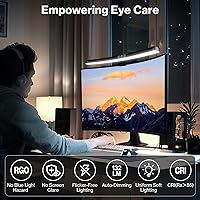
Overview

The Laliled 15.6-inch Curved Monitor Light Bar is a practical, no-fuss desk lighting solution that sits right on top of your monitor and plugs into any USB port — no outlet hunting required. At its price point, it targets people who want decent task lighting without sacrificing desk space to a traditional lamp. What sets it apart from cheaper alternatives is its asymmetrical optical design, which angles light downward onto your workspace rather than bouncing it back into your eyes or onto the screen. It launched in early 2024 and has already climbed to a respectable rank among USB reading lamps, which says something about how well it fills a specific, underserved need.
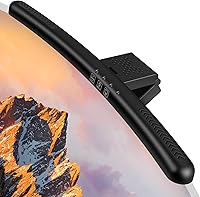
Features & Benefits

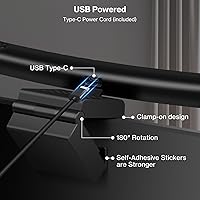
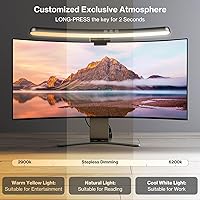
The three color temperature presets — warm (2900K), neutral (4100K), and cool (6200K) — cover the most common working scenarios, though it is worth being upfront: you get three fixed stops, not a continuous spectrum. Brightness, however, is fully stepless, so you can dial it in precisely. The touch control panel responds cleanly, and the built-in one-hour timer is a genuinely useful nudge to step away from the screen. Positioning is flexible — the clip angle adjusts 180 degrees, the lamp head tilts 90 degrees, and the silicone-padded clip grips monitors anywhere from 1 to 5cm thick. A CRI above 85 means colors on your desk look reasonably true, which matters for any detail work.

Best For

This curved desk lamp makes the most sense for people logging long hours at a single-monitor home office or study setup. It is particularly well-suited to late-night gamers who want soft ambient desk lighting without any wash on their screen. If your desk is already cramped, the monitor-top mounting frees up the surface area a traditional lamp would eat. It is also a solid first dedicated desk light for anyone who has been getting by with just overhead room lighting. Anyone prone to eye fatigue from flickering lights or harsh fluorescent fixtures should find the flicker-free LED output a noticeable improvement in day-to-day comfort.

User Feedback

With a 4.2-star average across over 560 ratings, the Laliled light bar lands in solidly positive territory — not a runaway hit, but clearly meeting expectations for most buyers. Reviewers consistently point to easy clip-on installation and the absence of screen glare as the standout wins. The touch controls also draw praise for being responsive without requiring a heavy hand. On the flip side, some users wish the cord were longer, and a handful have flagged that the plastic construction feels lightweight. A few mention reduced brightness after extended months of use. For what it costs, most buyers come away satisfied — just do not expect premium build quality.

Pros

  • Clips on in under a minute with zero tools — genuinely one of the easiest desk lighting setups available.
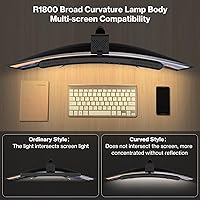
  • Asymmetrical optics keep light off your screen, solving the most common complaint about desk lamps near monitors.
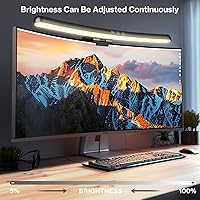
  • Stepless dimming lets you land on exactly the brightness you need rather than jumping between preset levels.
  • Flicker-free LED output is a real comfort win for users sensitive to eye fatigue during long work sessions.
  • Frees up your entire desk surface by mounting directly on the monitor rather than occupying a footprint below.
  • Three color temperature modes cover warm evening work, neutral daytime tasks, and bright focused reading adequately.
  • The built-in one-hour timer is a thoughtful nudge to take eye breaks that most users forget to take on their own.
  • USB-powered design means no separate adapter — any spare port on a laptop, hub, or monitor gets it running.
  • Non-slip silicone padding on the clip holds firm on most standard monitor bezels without scratching the surface.
  • At its price point, the overall feature set outpaces most bare-bones competitors in the same category.

Cons

  • Only three fixed color temperature presets with no way to fine-tune or blend between them.
  • The USB cable is shorter than most users expect, forcing workarounds if your ports are not close to the monitor.
  • Hinge tension on the lamp head tends to loosen after months of repeated angle adjustments.
  • The one-hour timer cannot be customized or extended, which disrupts long uninterrupted work sessions.
  • Coverage width may feel insufficient for ultrawide monitor setups, leaving outer edges dimmer than the center.
  • The ABS plastic shell creaks noticeably when repositioning, which undermines confidence in long-term durability.
  • Touch panel occasionally registers accidental inputs when brushing past it during normal desk movements.
  • Some users with glossy or highly reflective monitor bezels still notice minor edge reflections at peak brightness.
  • Lamp head can drift downward over time on well-worn units, requiring manual readjustment to maintain beam angle.
  • Not a good fit for dual-monitor setups where even coverage across both screens matters.

Ratings

The Laliled 15.6-inch Curved Monitor Light Bar has been scored across 12 performance categories by our AI review engine, which analyzed verified global buyer feedback while actively filtering out incentivized, bot-generated, and duplicate submissions. Scores reflect genuine satisfaction patterns — not just averages — so both the genuine strengths and the recurring frustrations are represented honestly. Where users consistently agreed, the scores are firm; where opinions split, that tension shows up too.
Glare & Eye Comfort
88%
The asymmetrical optics genuinely do what they promise — light falls on the desk surface rather than washing back into the screen or straight into the eyes. Users working 6 to 8 hours a day on writing, coding, or reading tasks report noticeably less end-of-day eye fatigue compared to using overhead room lighting alone.
A small number of users with ultrawide or very glossy monitors found residual reflections along the bottom edge of their screens, particularly at higher brightness settings. The effect is minor for most, but people with light-sensitive eyes may still notice it during late-night sessions.
Ease of Installation
93%
The snap-on clip mechanism genuinely takes under a minute — no tools, no cable management puzzles, just set it on top and plug in the USB. Reviewers across skill levels, including those who describe themselves as non-technical, consistently call it one of the most painless hardware additions to their desk setup.
The clip is calibrated for monitors between 1 and 5cm thick, which covers most standard panels, but users with unusually thin bezel-free monitors or thick-framed older displays have reported a loose or overly tight fit that required repeated repositioning.
Light Quality & CRI
76%
24%
With a CRI above 85, colors on the desk surface look reasonably true — good enough for everyday office tasks, light sketching, or reviewing printed documents. The flicker-free output is consistently appreciated by users who are sensitive to the subtle strobing of cheaper LED panels.
The CRI rating is adequate but not exceptional. Photographers, illustrators, or anyone doing color-critical work will likely find it insufficient for professional judgment calls. It sits comfortably in the midrange and should not be mistaken for a studio-grade light source.
Color Temperature Range
63%
37%
Three preset modes — 2900K, 4100K, and 6200K — cover the core use cases reasonably well. The warm setting works nicely for winding-down evening sessions, and the cool white is punchy enough for focused daytime work without feeling clinical.
There are only three fixed stops, with no way to land between them. Users who prefer something between neutral and warm, or who want fine-tuned control over ambiance the way competing lamps offer, will find this limiting. It is a meaningful trade-off at this price, but worth knowing upfront.
Brightness & Dimming Control
84%
Stepless dimming is a real advantage here — you are not jumping between three preset brightness levels but sliding smoothly to exactly what you need. Users who alternate between bright daytime work and low-lit evening reading particularly appreciate not having to squint or strain to find a usable middle setting.
At maximum brightness, some users with smaller or more reflective desk surfaces found the output a touch aggressive. The touch panel itself can occasionally register accidental inputs when brushed during normal reach-over movements, nudging brightness up or down unexpectedly.
Touch Control Responsiveness
81%
19%
The touch interface registers cleanly in normal use — a light tap cycles through color modes and a hold adjusts brightness without requiring deliberate effort. Most reviewers describe it as intuitive enough to operate without looking, which matters when you are mid-task and just need a quick adjustment.
A handful of users report occasional missed inputs, particularly in very dry climates or during winter months when static buildup can interfere with capacitive sensors. It is an intermittent issue rather than a systemic flaw, but it does surface in the feedback with enough regularity to be worth noting.
Build Quality & Materials
61%
39%
The ABS plastic shell feels solid enough for daily handling, and the silicone padding on the clip adds a layer of grip that prevents the kind of desk-jostle wobbling common in cheaper monitor lamps. For a product in this price tier, the construction is adequate and clearly functional.
It does not feel premium. The plastic creaks slightly when adjusting the angle, and a noticeable portion of longer-term reviewers mention that the hinge tension loosens over several months of use, causing the lamp head to drift downward over time. For an item meant to stay in place all day, that is a legitimate durability concern.
Adjustability & Positioning
78%
22%
The combination of a 180-degree adjustable clip and 90-degree lamp head tilt gives meaningful flexibility for hitting the right angle on your desk surface. Users with non-standard desk heights or monitors raised on stands have managed to get a comfortable beam position without much trial and error.
The adjustment range sounds generous on paper, but the actual useful arc for avoiding glare while hitting the full desk surface is narrower in practice. Users with deep desks or dual-tier setups found the coverage area fell short of what they needed without repositioning the clip frequently.
1-Hour Auto-Off Timer
72%
28%
The timer is a surprisingly thoughtful inclusion at this price point. Users who do focused reading blocks or tend to lose track of time during work sessions find it a useful nudge to step away and rest their eyes, which aligns with how the lamp is marketed toward eye comfort.
There is no way to customize the duration — it is a fixed one-hour cycle with no snooze or disable toggle. For users who work in long uninterrupted stretches and find the auto-off disruptive, this is an annoyance rather than a feature. A few reviewers explicitly disabled it by not using the timer mode at all.
Cable Length & Power Delivery
58%
42%
USB power means there is no need for a separate wall adapter — any spare port on a monitor, laptop, or USB hub does the job. This keeps the setup clean and reduces cable clutter, which aligns well with the space-saving intent of a monitor-mounted lamp.
The cable is on the shorter side, and this is one of the most repeated criticisms in the review pool. Users with monitors positioned further from their USB hub or tower PC often find themselves cable-hunting or needing an extension. It is a fixable problem, but it should not be a problem in the first place.
Desk Space Efficiency
91%
Sitting entirely on top of the monitor, this curved desk lamp reclaims every inch of desk real estate a traditional lamp would have occupied. For compact setups — small apartments, dorm rooms, or tightly packed multi-monitor arrangements — the freed-up surface space is a genuine quality-of-life upgrade.
The lamp does add visible mass to the top of the monitor, which some users with slim, aesthetically minimal setups find visually intrusive. It is a minor point, but for buyers who care about the overall look of their desk, it is worth considering before committing.
Value for Money
82%
18%
Relative to what it costs, this monitor light bar delivers a solid set of functional features — glare-free optics, stepless dimming, three color modes, and tool-free installation. For buyers making their first upgrade from relying solely on ceiling lights, the improvement in working comfort is immediate and noticeable.
Buyers stepping down from a mid-range or premium monitor lamp may find the build and feature set underwhelming. The value equation works well at entry level, but it starts to feel like a compromise if you are comparing it against more refined alternatives that cost only modestly more.

Suitable for:

The Laliled 15.6-inch Curved Monitor Light Bar is a strong fit for anyone who spends the bulk of their working day in front of a single monitor and has grown tired of relying on harsh overhead lighting or a bulky desk lamp that eats into their workspace. Remote workers and students who clock long sessions on writing, studying, or coding tasks will get the most out of its glare-free illumination and stepless dimming, which lets you fine-tune the light level as daylight shifts throughout the day. Gamers who prefer a softly lit desk environment during evening sessions — without any wash bleeding back onto their screen — will find the asymmetrical optics genuinely useful rather than just a marketing claim. It also makes practical sense for anyone working in a tight space: apartments, dorm rooms, or shared office nooks where a traditional lamp simply is not a realistic option. If you are currently getting by with no dedicated task lighting at all, this curved desk lamp represents a meaningful and immediately noticeable upgrade in daily comfort.
Not suitable for:

The Laliled 15.6-inch Curved Monitor Light Bar is not the right tool for buyers who need precision color accuracy in their work. Photographers reviewing edits, graphic designers checking color proofs, or illustrators doing detail work will find a CRI above 85 is adequate for general tasks but falls short of the standard that professional color judgment demands. Users who want granular control over color temperature — rather than jumping between three fixed presets — will likely find this curved desk lamp frustrating after a few days of use. Those with ultrawide monitors or curved screens that extend well beyond the standard 15 to 16-inch width will also face uneven coverage, with the outer edges of a wide display receiving noticeably less illumination. Anyone who values long-term build durability over upfront affordability should temper expectations: the hinge tension on the lamp head has a track record of loosening over several months of regular angle adjustments, and the plastic construction reflects the price tier it occupies.
Specifications

  • Size: The lamp bar measures 15.6 inches in length with a curved profile, designed to span the top of a standard single monitor.
  • Weight: The unit weighs approximately 14.5 oz (410 g), light enough to sit stably on most monitors without tipping the display.
  • Light Source: Uses flicker-free LED technology to reduce eye strain during extended work or study sessions.
  • Color Temperatures: Offers three fixed presets: warm white at 2900K, neutral white at 4100K, and cool white at 6200K.
  • Dimming: Brightness is adjustable via stepless dimming, allowing smooth transitions across the full output range rather than fixed brightness steps.
  • Color Rendering: Color Rendering Index (CRI) is rated above 85, suitable for general desk tasks and everyday reading with reasonably accurate color reproduction.
  • Power Source: Powered entirely via USB corded connection; no batteries required and no separate power adapter is included or needed.
  • Controls: Features a capacitive touch-sensitive control panel for switching color modes and adjusting brightness without physical buttons.
  • Timer: Includes a built-in one-hour auto-off timer mode designed to prompt regular eye rest breaks during prolonged use.
  • Clip Compatibility: The snap-on clip accommodates monitor bezels ranging from 1 to 5 cm in thickness, covering most standard desktop displays.
  • Clip Adjustment: The mounting clip offers 180 degrees of angular adjustment to optimize positioning across different monitor heights and desk configurations.
  • Lamp Head Tilt: The lamp head itself can be tilted through a 90-degree range, allowing fine-tuned control over the beam direction on the desk surface.
  • Materials: The body is constructed from ABS plastic, with non-slip silicone padding on the clip base to protect monitor surfaces and improve stability.
  • Mounting Type: Tool-free snap-on tabletop clip design allows installation and repositioning in under a minute without any hardware or adhesives.
  • Optical Design: Employs an asymmetrical optical design that directs light downward onto the desk surface rather than toward the screen or the user's eyes.
  • Indoor Use: Rated for indoor use only; the unit is not water resistant and should not be used in humid, wet, or outdoor environments.
  • Dimensions: Product dimensions are approximately 15.67″ deep, 5.16″ wide, and 3.43″ high in its mounted configuration.
  • Included Components: Each unit ships with the lamp bar and a USB power cable; no adapter, remote, or additional accessories are included in the box.

Related Reviews

Topmonitor P15.6/2.5K Portable Monitor 15.6-inch 2560×1680
86%
94%
Display Quality
90%
Portability/Size/Weight
91%
Color Accuracy
87%
Connectivity (USB-C, HDMI)
85%
Build Quality
More
SKitphrati 15.6-Inch BNC Surveillance Monitor
65%
78%
Value for Money
88%
Connectivity
84%
Setup & Installation
57%
Image Quality
53%
Brightness & Visibility
More
InnoView INVPM406 15.6-inch Portable Monitor

75%
91%
Ease of Setup
83%
Display Clarity
78%
Portability & Build
62%
USB-C Compatibility
88%
Value for Money
More
HotYeah 15.6-inch Portable Monitor
86%
91%
Display Quality
95%
Portability & Weight
88%
Compatibility & Connectivity
89%
Ease of Use & Setup
60%
Speaker Quality
More
LUMIPIX 15.6-Inch Portable Monitor
84%
91%
Portability
89%
Display Quality
93%
Ease of Setup
87%
Connectivity
84%
Build Quality
More
UPERFECT DS15607 15.6-inch 4K Portable Monitor
67%
88%
Color Accuracy
91%
Image Sharpness
57%
Brightness & Visibility
86%
Connectivity
79%
Portability & Weight
More
Anyuse PM1561P 15.6-inch Portable Monitor
74%
91%
Portability & Form Factor
84%
Image Clarity
72%
Setup & Compatibility
74%
Build Quality & Durability
61%
Brightness & Outdoor Usability
More
Westinghouse 15.6 Inch Portable Monitor
82%
88%
Display Quality
92%
Portability
86%
Connectivity Options
94%
Ease of Setup
80%
Build Quality
More
VILVA V156F1 15.6-inch Portable Monitor
69%
74%
Display Quality
61%
Portability
82%
Connectivity & Compatibility
67%
Build Quality
83%
Value for Money
More
CAPERAVE 15.6-inch Portable Monitor
85%
88%
Display Quality
92%
Portability
93%
Setup and Ease of Use
90%
Compatibility
80%
Gaming Performance
More

FAQ

The lamp is 15.6 inches long, which works well for standard 24 to 27-inch monitors. On ultrawides — typically 34 inches or wider — it will sit centered on the top bezel and illuminate the middle portion of your desk adequately, but you may notice the outer edges of a very wide setup get less coverage. It is functional, just not optimized for ultrawide use.

The asymmetrical optical design is a real and effective engineering choice, not just a buzzword. Light is directed downward onto your desk rather than forward toward your eyes or backward onto the screen. Most users notice a genuine difference compared to a standard desk lamp positioned nearby. That said, if your monitor has a particularly glossy bezel or a very reflective bottom edge, you may still catch a faint reflection at peak brightness.

Yes — stepless dimming means you can bring the output down to a very low level, not just cycle between a few preset steps. It is one of the more practical features for late-night use. The warm 2900K mode combined with a low brightness setting is comfortable enough for most people working or reading in a dark room.

The clip is designed for bezels between 1 and 5 cm thick, and the silicone padding provides a reasonable amount of grip across that range. Very thin bezel-free monitors at the lower end of that scale may feel slightly less secure, particularly if your desk vibrates from typing. If your monitor is thinner than 1 cm, you will likely have fit issues.

Cable length is one of the most common complaints from buyers of this monitor light bar, and it is worth taking seriously. If your USB port is on the back of a tower positioned some distance from the monitor, you may need an extension cable. Plugging into a port on the monitor itself, a nearby hub, or the side of a laptop is usually fine without any additional cables.

Yes, the lamp switches off automatically after one hour when the timer mode is active. You just tap the control panel to turn it back on. If you find it disruptive during long uninterrupted work sessions, you can simply avoid activating the timer mode; it is an optional feature, not the default operating mode.

Yes, the curved lamp bar shape is actually designed with curved monitors in mind, as it follows a similar arc that aligns with the top edge of a curved display. The clip mechanism works the same way regardless of screen curvature, as long as the top bezel thickness falls within the 1 to 5 cm range.

A short tap on the touch control panel cycles through the three color presets in sequence — warm, neutral, and cool. Holding your finger on the panel adjusts brightness up or down. There is no separate app, remote, or button; everything is handled through that single touch surface on the lamp body.

This is an honest concern based on real user feedback. The hinge feels firm when the lamp is new, but a portion of longer-term users report that the lamp head begins to drift downward after several months of regular angle adjustments. It is not an immediate issue, but it is a known trade-off at this price tier. If you plan to set it and leave it in one position without frequent repositioning, it holds up better.

The included cable uses a standard USB-A connector. If your setup only has USB-C ports — common on newer laptops — you will need a USB-C to USB-A adapter or a hub with a standard USB-A output. The lamp draws modest power, so virtually any adapter or hub that provides USB-A output will work without issue.