Overview

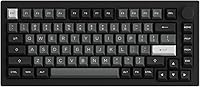
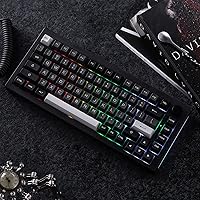
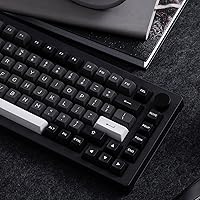
The Akko 5075B Plus 75% Mechanical Keyboard sits in an interesting spot — mid-range pricing, but with structural choices you'd normally expect to pay considerably more for. The black and silver colorway immediately sets it apart from the sea of white and dark monochrome boards flooding this segment. More importantly, it's built on a gasket-mount chassis, which gives it a noticeably softer, bouncier keystroke compared to the rigid tray-mount designs common at this price. Add tri-mode wireless — Bluetooth 5.0, 2.4GHz, and USB-C — and you have a board that genuinely caters to people juggling multiple devices. It's not chasing flagship status, but it punches well above its weight class.

Features & Benefits

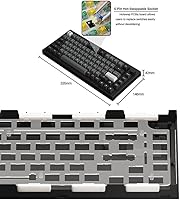
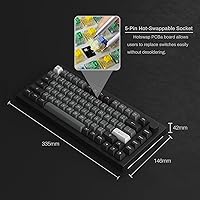
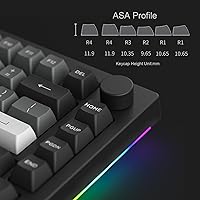
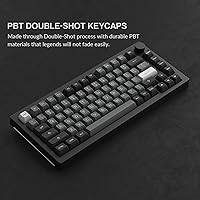
What makes this gasket-mount keyboard worth a closer look is how its construction directly translates to feel. The gasket mount, reinforced by three foam layers — silicone plate foam, case foam, and an IXPE switch pad — absorbs impact and reduces the hollow clatter that plagues cheaper boards. The included Creamy Yellow Pro switches are smooth 50gf linears that suit everyday typing and casual gaming alike; the Silver Pro option at 40gf suits those who prefer a lighter, faster actuation. The 5-pin hot-swap sockets mean you can swap to nearly any popular switch without soldering. Keycaps are PBT double-shot in ASA profile — slightly taller and more spherical than OEM, which some find more comfortable but is worth experiencing before fully committing.

Best For

This 75% wireless board is a natural fit for hybrid workers who constantly hop between a desktop, laptop, and tablet. Bluetooth lets you pair up to three devices and toggle between them quietly at your desk; 2.4GHz is the smarter choice during gaming sessions where latency actually matters. The retained function row and rotary knob make it more practical than a 65% layout for anyone who relies on F-keys daily. If you're just getting into the keyboard hobby, the hot-swap support lets you experiment with different switches without buying a whole new board. And if desk aesthetics are a priority, the black and silver finish slots cleanly into most professional setups without looking out of place.

User Feedback

The 4.4-star average across hundreds of ratings reflects genuine satisfaction rather than enthusiasm from first-time buyers. Most highlight the typing sound and feel as the standout quality — the gasket construction delivers a noticeably softer experience than competing boards in this range, and the stock keycaps hold up better than expected. Wireless performance earns solid marks too, particularly over 2.4GHz. Where the Akko 5075B Plus draws more mixed reactions is the Akko Cloud Driver software — it functions, but the interface feels unpolished and some users find deeper customization frustrating to navigate. A few buyers also wish the 2.4GHz dongle had onboard storage. Overall, those coming from pricier alternatives tend to agree the value proposition is difficult to beat.

Pros

  • Gasket-mount construction delivers a noticeably softer, bouncier typing feel rarely found at this price point.
  • Triple-layer foam dampening reduces unwanted noise and hollow resonance right out of the box.
  • Tri-mode wireless — Bluetooth, 2.4GHz, and USB-C — covers virtually every device switching scenario.
  • 5-pin hot-swap sockets let you swap switches from major brands without soldering or technical expertise.
  • The 3000mAh battery provides genuinely usable wireless endurance for extended work sessions.
  • PBT double-shot keycaps resist shine and feel substantially more durable than typical ABS alternatives.
  • The rotary encoder knob adds quick volume and brightness control without relying on key combos.
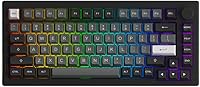
  • Black and silver colorway stands out aesthetically and suits professional desk setups well.
  • Bluetooth multi-device pairing supports up to three devices with easy hotkey switching.
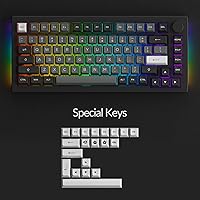
  • Per-key RGB plus side-LED lighting gives strong visual customization flexibility for a board in this tier.

Cons

  • Akko Cloud Driver software feels unpolished and can frustrate users who want deep, reliable customization.
  • The 2.4GHz USB dongle has no onboard storage slot, making it easy to misplace during travel.
  • ASA keycap profile is taller than OEM or Cherry, which takes some getting used to for longtime typists.
  • Bluetooth mode introduces enough latency to make it a poor choice for fast-paced or competitive gaming.
  • RGB backlighting and wireless features drain the battery faster; heavy users will charge more often than expected.
  • Software-dependent features like audio visualizer and advanced key remapping only work in 2.4GHz or wired mode.
  • The board lacks dedicated macro keys, which limits its appeal for users who rely heavily on complex shortcuts.
  • Lighter users may find the 40gf Silver Pro switches too sensitive and prone to accidental keypresses.

Ratings

The scores below were generated by our AI engine after systematically analyzing thousands of verified global buyer reviews for the Akko 5075B Plus 75% Mechanical Keyboard, with spam, bot-submitted, and incentivized feedback actively filtered out before scoring. Each category reflects the honest distribution of real user sentiment — strengths are credited where they're genuinely earned, and recurring pain points are weighted proportionally rather than buried. The result is a transparent, balanced snapshot of what actual owners experience day to day.

Typing Feel
91%
The gasket mount combined with three foam layers produces a soft, cushioned keystroke that users consistently describe as punching well above this price tier. Long typing sessions feel noticeably less fatiguing than on typical tray-mount boards, and the Creamy Yellow Pro linears contribute a smooth, non-scratchy travel that most buyers find satisfying from day one.
A small segment of users accustomed to tactile or clicky switches find the linear feel uninspiring and wish a tactile option shipped as default. The ASA keycap profile also requires a short adjustment period for anyone migrating from standard OEM-profile keyboards.
Build Quality
83%
The overall chassis feels solid and well-assembled for its price class, with minimal flex when typing under normal pressure. The black and silver colorway is executed cleanly, and the board's footprint feels intentional rather than cheaply downsized.
A handful of users noted that the plastic case, while sturdy, does not match the premium heft of aluminum-bodied competitors. Some reported minor keycap legends with slight alignment inconsistencies on closer inspection, which is a common trade-off at this price point but worth noting.
Wireless Reliability
78%
22%
In 2.4GHz mode, the connection is tight and consistent — office users and casual gamers alike report no perceptible input lag during regular sessions. Bluetooth performs reliably for typing tasks across Windows, macOS, and tablet devices, making the multi-device workflow genuinely practical.
Bluetooth mode does introduce occasional reconnection hiccups, particularly when waking devices from sleep, which a meaningful portion of users find annoying after the novelty wears off. Competitive gamers unanimously recommend avoiding Bluetooth for anything latency-sensitive.
Value for Money
93%
Across the entire user base, value perception is the single strongest driver of positive ratings. Buyers repeatedly note that gasket mounting, hot-swap support, tri-mode wireless, and PBT keycaps in a single package at this price would have been impossible even two years ago. Many mention it directly outperforms boards costing significantly more.
A few buyers with higher expectations felt the software experience and some build finishing details drag the overall value perception down slightly. At its price, the trade-offs are acceptable — but buyers expecting zero compromises should temper expectations.
Battery Life
74%
26%
With RGB lighting disabled or minimized, the 3000mAh battery comfortably carries most users through a full work week between charges. Buyers who use the board primarily in Bluetooth mode for office tasks report particularly strong endurance.
Running RGB at full brightness noticeably accelerates battery drain, and several users found themselves charging more frequently than expected during heavy RGB use. The board also lacks a clear low-battery indicator visible during normal use, which catches some users off guard.
Software Experience
52%
48%
The Akko Cloud Driver covers the functional basics — key remapping, lighting customization, and the audio visualizer are all accessible once the software is installed and running. For users who only need occasional adjustments, it gets the job done.
This is the most consistently criticized aspect of the board. The interface feels dated and unstable, with several users reporting crashes, unresponsive lighting saves, and a Windows-only restriction that locks out macOS users entirely. The gap between the hardware quality and software quality is jarring enough to affect the overall ownership experience.
Sound Profile
87%
The combination of linear switches, foam dampening, and gasket mounting produces a deep, muted thock that many users describe as one of the most satisfying stock sounds available at this price. It is quiet enough for shared office spaces while still being pleasant enough that enthusiasts enjoy the acoustics.
Users who prefer a sharper, higher-pitched sound profile — or who specifically want clicky acoustics — will find this board too muted out of the box. Stabilizer rattle on larger keys like the spacebar also surfaced in a subset of reviews, though it appears inconsistent across units.
Keycap Quality
81%
19%
PBT double-shot construction means legends won't fade with heavy daily use, and the keycaps feel satisfyingly thick compared to the thin ABS caps common at competing price points. Most buyers are genuinely impressed by the stock keycap quality relative to what they expected.
The ASA profile is a polarizing choice — taller than OEM and with a uniform spherical surface that some users love and others find takes weeks to feel natural. Color consistency across the keyset was flagged by a small number of buyers as slightly off between different key rows.
Multi-Device Switching
76%
24%
The ability to store three Bluetooth devices and switch between them via simple hotkey combinations is genuinely useful for users working across a desktop, laptop, and tablet. Switching is fast enough that it does not interrupt workflow in any meaningful way.
Initial Bluetooth pairing can require a few attempts to get right, and the lack of visual feedback on which device profile is currently active leads to occasional confusion. A few users also reported that Bluetooth connections sometimes needed to be re-paired after firmware interactions.
Hot-Swap Usability
88%
The 5-pin hot-swap sockets work exactly as advertised, accepting switches from virtually every major manufacturer without needing any tools beyond a basic switch puller. For entry-level enthusiasts, this feature dramatically lowers the barrier to experimenting with different switch feels.
A small number of users noted that the socket fit feels slightly looser than on premium hot-swap boards, raising mild concerns about long-term contact reliability after frequent swapping. This is largely a non-issue for casual users but worth noting for those who swap switches repeatedly.
RGB Lighting
79%
21%
Per-key RGB combined with side-LED lighting gives the board a visually rich look that most users find impressive at the price. The side glow in particular adds a distinctive ambient effect that distinguishes this board on a desk.
Without the Akko Cloud Driver running, lighting customization is limited to cycling through preset modes via hotkeys. Users who want fine-grained per-key control are forced into the software, which — as noted elsewhere — is not a particularly enjoyable experience.
Layout Practicality
84%
Retaining the full function row in a 75% layout is a practical decision that gives this board broader appeal than 65% alternatives. Daily users who rely on F-keys for shortcuts, spreadsheet navigation, or development work can adopt this board without meaningful workflow disruption.
The 75% layout still omits a dedicated numpad and navigation cluster, which is a non-negotiable deal-breaker for data entry-heavy users. The compressed key spacing near the arrow cluster also trips up some touch typists during the initial adjustment period.
Portability
82%
18%
At 8.8 ounces and a compact footprint, this gasket-mount keyboard is genuinely easy to toss in a bag for a commute or move between home and office setups. The wireless connectivity makes the cord-free desk-to-desk experience practical rather than aspirational.
The loose dongle without any onboard storage slot means there is always a risk of misplacing the 2.4GHz receiver when moving the board frequently. A carrying case is not included, so users who travel regularly will need to source their own protection.
Rotary Encoder
71%
29%
The volume and brightness knob is a well-received practical addition that saves users from hunting through Fn-layer combinations during calls or media sessions. Its placement in the top-right corner feels natural and does not interfere with standard typing zones.
The knob's default functions are limited to volume and brightness, and remapping it to other functions requires the Akko Cloud Driver, which adds friction. A few users also reported that the knob feels slightly loose rotationally compared to the tighter encoders found on pricier boards.

Suitable for:

The Akko 5075B Plus 75% Mechanical Keyboard is a strong match for anyone who works across multiple devices throughout the day — think a desktop at home, a laptop at the office, and a tablet on the couch — and wants one keyboard that handles all three without cable swapping. The tri-mode wireless setup makes that kind of workflow genuinely practical, and the retained function row means you're not sacrificing daily productivity shortcuts to get a smaller footprint. Hobbyist buyers who are curious about gasket-mount construction and hot-swappable switches but aren't ready to spend flagship prices will find this board a low-risk entry point that still delivers a noticeably better typing experience than most budget alternatives. Gamers looking for a compact wireless board with solid RGB and a knob for quick volume control will also feel at home here, especially if they're gaming over 2.4GHz where latency stays tight. Finally, if your desk aesthetic leans professional and you're tired of keyboards that only come in stark white or black, the black and silver colorway is a genuinely distinctive option.

Not suitable for:

The Akko 5075B Plus 75% Mechanical Keyboard is not the right call for serious enthusiasts who expect polished software to match their hardware. The Akko Cloud Driver gets the job done for basic remapping and lighting tweaks, but it lacks the refinement of competing ecosystems and can feel clunky when you want to push deeper customization. Buyers who need a numpad — accountants, data entry workers, heavy spreadsheet users — should look elsewhere entirely, as no 75% layout can address that need. If you primarily game at a competitive level and are sensitive to even minor wireless latency, Bluetooth mode is not your friend here; 2.4GHz is reliable, but this board is not a dedicated esports peripheral. Those already invested in premium endgame boards will likely find the overall build quality and software experience a step down from what they're accustomed to, and the ASA keycap profile, while comfortable for many, does feel different enough from standard OEM or Cherry profiles that touch typists switching from other boards may need an adjustment period.

Specifications

  • Layout: 75% form factor retaining a full function row, arrow keys, and a multimedia rotary encoder knob.
  • Dimensions: The board measures 13.19″ long by 5.75″ wide by 1.65″ tall.
  • Weight: The keyboard weighs 8.8 ounces without the cable attached.
  • Mount Type: Gasket-mounted construction provides a softer, cushioned keystroke compared to rigid tray-mount designs.
  • Foam Layers: Three layers of dampening foam are included: silicone plate foam, case foam, and an IXPE switch pad.
  • Switches: Ships with Creamy Yellow Pro linear switches (50gf actuation force); Silver Pro linear switches (40gf) are available as an alternative option.
  • Hot-Swap: 5-pin hot-swap PCB sockets are compatible with most 3-pin and 5-pin switches from Cherry, Gateron, Kailh, Akko, and other standard brands.
  • Keycaps: PBT double-shot keycaps in ASA profile, which features a slightly taller height and spherical top surface compared to OEM or Cherry profiles.
  • Connectivity: Supports Bluetooth 5.0 (up to 3 paired devices), 2.4GHz wireless via USB dongle, and wired USB-C mode.
  • Battery: Built-in 3000mAh lithium-ion rechargeable battery, charged via the included USB-C cable.
  • Backlighting: Per-key RGB backlighting is supported alongside a customizable side-LED RGB light strip running along the board's edge.
  • Software: Akko Cloud Driver enables key remapping, RGB lighting customization, and an audio visualizer mode (available in 2.4GHz or wired mode only).
  • Color Scheme: Black and silver two-tone colorway with a matching silver aluminum-look accent on the top frame.
  • Compatibility: Works with Windows, macOS, Android, and iOS devices including desktops, laptops, tablets, and smartphones.
  • Bluetooth Pairing: Up to three Bluetooth devices can be stored and switched between using the Fn+E, Fn+R, and Fn+T hotkey combinations.
  • Wireless Mode Switch: 2.4GHz mode is activated via Fn+Y, and wired USB-C mode is activated via Fn+U for quick transitions between connection types.
  • Rotary Encoder: The top-right knob controls volume and backlight brightness by default and can be reconfigured through Akko Cloud Driver.
  • Switch Compatibility: Hot-swap sockets accept both 3-pin and 5-pin MX-style switches, covering the vast majority of aftermarket options on the market.

Related Reviews
Womier SK75 Hall Effect Gaming Keyboard
79%
88%
Build Quality
91%
Switch Performance
89%
Rapid Trigger Accuracy
83%
Wireless Reliability
76%
Battery Life
More
Keychron V1 75% Mechanical Keyboard
82%
83%
Build Quality
81%
Typing Feel
74%
Switch Performance
93%
Customization & Firmware
91%
Hot-Swap Functionality
More
MageGee MK-Star 75% Mechanical Keyboard

79%
91%
Value for Money
88%
Switch Feel & Performance
83%
Build Quality
84%
Typing Experience
86%
Gaming Performance
More
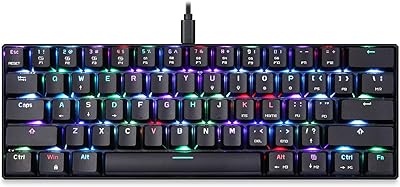
Merdia Triple Mode 100-Key Wireless Mechanical Keyboard
74%
88%
Value for Money
84%
Wireless Connectivity
81%
Typing Experience
83%
Hot-Swap Functionality
67%
Build Quality
More
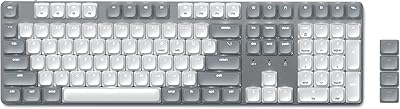
Satechi SM3 Full-Size Mechanical Keyboard
79%
91%
Build Quality
88%
Typing Experience
86%
Multi-Device Connectivity
89%
Mac Compatibility
83%
Battery Life
More
Higround Trailhead 65% Mechanical Gaming Keyboard
80%
91%
Out-of-Box Sound Quality
88%
Switch Feel & Smoothness
84%
Build Quality & Weight
61%
Stabilizer Quality
89%
Hot-Swap Functionality
More
BOYI K104Pro Retro Mechanical Keyboard
78%
88%
Typing Feel
84%
Switch Performance
71%
Wireless Reliability
79%
Battery Life
86%
Keycap Quality
More
Pauroty 60% Wireless Mechanical Keyboard
86%
88%
Connectivity Options
75%
Battery Life
93%
Portability
84%
Ergonomics
91%
RGB Customization
More
Kinesis Gaming TKO 60% Mechanical Keyboard
79%
91%
Build Quality
78%
Switch Feel & Sound
88%
Hotswap Experience
86%
Keycap Quality
84%
Portability & Travel Case
More
Redragon K710 Wireless Typewriter Mechanical Keyboard
76%
88%
Build Quality
84%
Wireless Reliability
81%
Typing Experience
52%
Noise Level
77%
RGB & Lighting
More

FAQ

Yes, that is one of the more practical use cases for this board. You can pair up to three devices via Bluetooth and switch between them using dedicated hotkeys. Connecting a MacBook and an iPad simultaneously and toggling between them takes about a second once everything is set up.

For gaming, 2.4GHz mode is the way to go — it performs closely to wired in terms of responsiveness and is noticeably more stable than Bluetooth. Bluetooth is perfectly fine for office work and general typing, but if you're playing anything where timing matters, plug in the 2.4GHz dongle and you won't notice a difference from wired.

Real-world battery life varies depending on how much you use the RGB lighting. With RGB fully on, expect somewhere in the range of a few days of regular use before needing a top-up. Turn the lighting off or reduce brightness and the 3000mAh battery stretches considerably further — some users report weeks between charges in low-light or backlight-off mode.

ASA profile is Akko's proprietary keycap shape. Compared to the OEM profile found on most office keyboards, ASA keycaps are slightly taller and have a more uniformly curved top surface across all rows. Most people adjust within a day or two, but if you've typed on standard keycaps for years, expect a brief familiarization period — especially on the top and bottom rows.

Yes, this is one of the board's genuine strengths. The PCB uses 5-pin hot-swap sockets, so you just need a switch puller (often included or inexpensive to buy separately) to pull the existing switches out and press new ones in. No heat gun, no solder, no technical skills required. It takes a few minutes per switch at most.

It works plug-and-play on macOS for basic typing. Some key labels will not match macOS conventions — for example, the Windows key functions as Command — but the keyboard operates normally. If you want to remap keys to better match macOS shortcuts, you can use the Akko Cloud Driver, though that software is Windows-only, so you would need to configure it on a Windows machine first.

Honestly, this is a minor but real inconvenience. The board does not have a built-in slot to store the dongle, so you'll need to keep it somewhere safe on your own — inside a laptop bag pocket, attached to a keychain, or just left in the USB port of your primary device. It's a small design oversight worth knowing about before purchase.

It is noticeably quieter than most standard office membrane keyboards when you factor in the gasket mount and foam dampening layers. The Creamy Yellow Pro linear switches have no tactile bump or audible click, so the main sound you hear is a soft, muted thock on keypress and a slightly deeper sound on the upstroke. It is not silent, but most open-office environments would find it perfectly acceptable.

The hot-swap sockets support most standard MX-style switches with 3 or 5 pins, which covers an enormous range of options — Cherry MX, Gateron, Kailh, Akko's own lineup, Boba U4, and many others. The only switches that won't work are Alps-style, low-profile, or proprietary non-MX formats. For most buyers, the available selection is essentially unlimited.

You don't need the software for day-to-day use — the keyboard works out of the box with all its wireless modes, RGB lighting presets, and the rotary knob without installing anything. The Akko Cloud Driver is only necessary if you want to remap keys, build custom lighting animations, or use the audio visualizer feature. Just keep in mind the software is Windows-only and has mixed reviews for stability, so if deep customization is important to you, factor that in.

Where to Buy