Overview

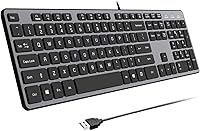
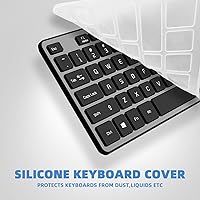
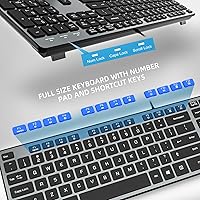
The B.Friend KB1430 Wired Keyboard enters a crowded budget market with one meaningful differentiator: scissor-switch keys, a mechanism you'd normally find on laptop keyboards rather than a sub-thirty-dollar desktop board. It's a full-size, ultra-slim wired keyboard aimed squarely at students and home office users who want something quieter and more refined than a typical cheap membrane board. B.Friend claims over three decades in keyboard manufacturing — take that with a grain of salt, but the build doesn't feel entirely hollow either. The package includes a keyboard cover protector and a one-year replacement warranty, which adds tangible peace of mind at this price tier.

Features & Benefits

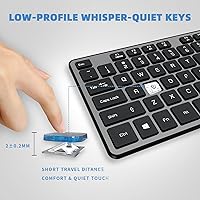
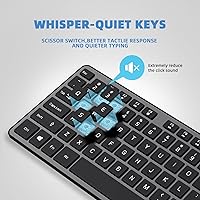
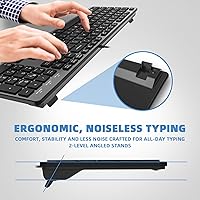
At 105 keys with a 2mm key travel, typing on this scissor-switch keyboard feels noticeably more controlled than mushy membrane alternatives — closer to a laptop keyboard than a traditional desktop one. The matte UV-coated keycaps do a decent job resisting the greasy shine that plagues cheaper boards after a few months of use. A folding tilt stand lets you adjust the angle, which matters more than people expect during long typing sessions. There's no driver installation required — plug the USB-A connector in and you're typing within seconds. The brand claims roughly 90% noise reduction versus mechanical keyboards, and while that figure is hard to verify independently, the keys are genuinely quiet in practice.

Best For

This slim wired keyboard is a strong fit for anyone sharing a workspace — a dorm room, an open-plan office, or a late-night home setup where loud keystrokes would be unwelcome. It's also a practical upgrade for someone coming off an aging, rattly membrane keyboard who isn't ready to spend on a premium mechanical board. The low-profile slim form suits tidy or compact desk setups well. That said, it's strictly a Windows affair — there's no Mac or Linux compatibility listed, no backlighting, and no wireless option. If those features matter to you, this isn't the right pick. For a reliable, no-fuss secondary keyboard, though, it punches reasonably well for the price.

User Feedback

With over 1,600 ratings averaging 4.3 stars, the KB1430 has earned a broadly positive reputation among everyday buyers. Recurring praise centers on how quiet the keys feel compared to what users had before, and several reviewers note the slim profile looks noticeably cleaner on a desk than expected. On the critical side, some buyers flag that the plastic build feels lightweight in a way that borders on flimsy, and a handful mention the cable is shorter than ideal for certain desktop configurations. Opinions on the included keyboard cover are split — useful dust protection for some, a forgettable freebie for others. Long-term durability beyond a few months remains a recurring question in the reviews.

Pros

  • Scissor-switch keys feel noticeably more controlled and comfortable than typical budget membrane keyboards.
  • Quiet enough for shared workspaces, open offices, and late-night typing sessions without disturbing others.
  • Plug-and-play USB-A setup works instantly on Windows machines with zero driver installation required.
  • The slim, low-profile design keeps the desk footprint small and the aesthetic clean.
  • Matte UV-coated keycaps resist shine and fingerprint buildup better than bare plastic alternatives.
  • A free keyboard cover and a one-year replacement warranty add real value to the package.
  • Over 1,600 verified buyers give it a 4.3-star average, reflecting broadly reliable everyday performance.
  • The folding tilt stand provides a meaningful wrist angle adjustment for longer typing sessions.
  • Broad Windows compatibility spans from Windows 7 all the way through Windows 11 without any issues.

Cons

  • The plastic chassis feels lightweight in a way that raises questions about durability under heavy daily use.
  • Cable length is short enough to be inconvenient for desktop towers placed on the floor or to the side.
  • No backlighting makes the keys hard to read in dim or dark environments.
  • Key wobble on corner and edge keys is a recurring complaint pointing to inconsistent build tolerances.
  • Strictly Windows-only — Mac and Linux users have no supported path to use this keyboard.
  • The included keyboard cover fits loosely on some units and ends up unused for many buyers.
  • Only one fixed tilt angle from the stand, with no option for a more subtle or aggressive incline.
  • No wireless option at all, which limits placement flexibility compared to similarly priced competitors.
  • Long-term durability beyond the first year remains an open question given the product's short market history.

Ratings

The B.Friend KB1430 Wired Keyboard was evaluated by our AI rating engine after processing verified global buyer reviews, with automated filters applied to remove incentivized, duplicate, and bot-generated submissions. What remains reflects honest day-to-day experiences from students, remote workers, and home office users who actually typed on it. Scores capture both where this slim scissor-switch keyboard genuinely delivers and where it falls short of expectations.

Typing Comfort
83%
The scissor-switch mechanism gives the keys a satisfying, controlled feel that most buyers didn't expect at this price point. Reviewers frequently compare the experience to typing on a laptop keyboard — a meaningful compliment for a desktop board. Long typing sessions feel noticeably less fatiguing than on a standard membrane keyboard.
A few users with larger hands found the slim key profile slightly cramped during extended writing sessions. The 2mm travel, while laptop-like, won't satisfy anyone who prefers deeper, more tactile feedback from their keystrokes.
Noise Level
88%
Quiet typing is the single most praised aspect of this keyboard across hundreds of reviews. Buyers working in shared apartments or open offices consistently note that it doesn't draw annoyed glances from people nearby. Late-night typing sessions are genuinely unobtrusive.
A small number of reviewers mention that the spacebar produces a slightly louder click than the rest of the keys, which stands out precisely because everything else is so quiet. It's a minor issue but worth noting for noise-sensitive environments.
Build Quality
61%
39%
The keyboard feels reasonably solid under normal typing pressure, and the matte keycap finish helps it look cleaner for longer than glossy alternatives. For a budget board, the overall construction passes the basic durability bar most everyday users require.
The plastic chassis is the most common complaint — several buyers describe it as feeling lightweight in a way that suggests it won't survive rough handling. Key wobble on a few keys, particularly in the corners, is a recurring criticism that points to inconsistent manufacturing tolerances.
Value for Money
86%
At its price tier, the combination of scissor-switch keys, a free keyboard protector, and a one-year replacement warranty is a genuinely strong package. Buyers upgrading from a rattly budget membrane board consistently feel they got noticeably more for their money.
The value proposition weakens if you compare it to slightly pricier options that add backlighting or a braided cable. Users who pushed the price comparison found a few competitors offering comparable quality with more features for just a few dollars more.
Key Feel & Actuation
79%
21%
The 2mm key travel strikes a nice balance for touch typists who prefer a shallower stroke. Most reviewers adapted quickly, especially those already accustomed to laptop keyboards, and reported fewer typing errors after a short break-in period.
Users coming from mechanical keyboards found the actuation feedback underwhelming — there's no satisfying tactile bump or audible confirmation of a registered keystroke. For heavy typists who rely on that feedback, the experience can feel a little flat.
Slim Profile & Desk Fit
91%
At just 0.3 inches tall, this scissor-switch keyboard sits noticeably lower than most desktop keyboards, which makes a real difference on tighter desks. Reviewers with minimalist setups or compact home offices specifically call out how neatly it fits without dominating the workspace.
The slim profile does mean there's very little wrist clearance built into the board itself without raising the tilt stand. Users with larger desks or who prefer a more elevated typing angle may find the ergonomics less ideal than expected.
Keycap Durability
74%
26%
The matte UV coating on the keycaps holds up better than bare plastic in the medium term — shine and finger grease take noticeably longer to appear compared to typical budget keyboards. Buyers who've owned it for several months confirm the lettering hasn't faded under daily use.
Some reviewers question how long the UV coating will last beyond the one-year mark under heavy daily use. There's limited long-term evidence available given the product's relatively recent launch date, which leaves durability beyond year one as an open question.
Cable Quality & Length
57%
43%
The USB-A connection is immediately plug-and-play — no software, no drivers, no setup friction. For users who just want to connect and get to work, this simplicity is genuinely appreciated, especially on older Windows machines.
Cable length is one of the more consistent complaints from buyers with desktop towers placed on the floor or to the side of the desk. The cable reaches comfortably on most laptop setups but can feel just short enough to be inconvenient in certain desktop configurations.
Tilt Stand & Ergonomics
72%
28%
The built-in folding stand offers a meaningful improvement in wrist angle for buyers who prefer a slightly elevated typing position. Several reviewers noted less wrist tension during long work-from-home days after adjusting the stand.
The tilt stand only provides one fixed angle, which limits personalization. Users who prefer a more aggressive or more subtle incline have no middle-ground option, and a couple of reviewers mention the stand feet feel slightly unstable on smooth desk surfaces.
Setup & Compatibility
93%
True plug-and-play performance is consistently confirmed across user reviews — on Windows 7, 10, and 11 machines alike, the keyboard is recognized instantly with zero configuration. For less tech-savvy buyers, this kind of frictionless setup is a genuine relief.
Compatibility is strictly limited to Windows, which is a hard wall for Mac or Linux users. There is no workaround documented, and buyers who assumed broader compatibility have left frustrated reviews after discovering this limitation post-purchase.
Included Accessories
68%
32%
The free keyboard cover is a thoughtful addition that a portion of buyers genuinely use — particularly in dusty home environments or households with young children who treat keyboards as snack surfaces. It adds perceived value to the overall package.
Opinions on the cover are split almost evenly. Many reviewers consider it a flimsy afterthought that doesn't fit snugly enough to feel protective. A keyboard cover that doesn't stay in place during typing sessions quickly ends up in a drawer.
Aesthetics & Colorway
77%
23%
The grey matte finish is understated and pairs cleanly with most monitor and desk setups without looking cheap or garish. Buyers working in professional home offices appreciate that it doesn't scream budget peripheral from across the room.
There's only one color option in this variant, which limits personalization. A few buyers were hoping for a darker charcoal or white colorway to better match their existing peripherals, and the absence of any RGB or backlight makes it visually plain after dark.
Warranty & After-Sales Support
81%
19%
A one-year replacement warranty is a meaningful commitment for a keyboard at this price, and several reviewers confirm that the brand's customer service responded within the promised 24-hour window when issues arose. That responsiveness builds real confidence for budget buyers.
The warranty covers replacement only, not repair, which means a defective unit requires a return-and-replace process rather than a quick fix. A handful of buyers found the return logistics mildly cumbersome depending on their region.

Suitable for:

The B.Friend KB1430 Wired Keyboard is a practical choice for students, remote workers, and anyone who spends long hours typing in environments where noise is a genuine concern — think shared dorm rooms, open-plan offices, or late-night work sessions with a partner asleep nearby. The scissor-switch mechanism makes it a meaningful upgrade over the mushy, clicky membrane keyboards that often ship with budget desktop setups, and the slim profile fits naturally on smaller desks without demanding prime real estate. Windows users who just want to plug in and start working without installing drivers or configuring software will find the setup experience genuinely painless. It also makes a solid secondary or backup keyboard for someone who already owns a primary board but needs a reliable spare without spending much. If your priority is quiet, comfortable everyday typing on a Windows machine and you're not chasing premium build materials, this scissor-switch keyboard delivers a reasonable experience for the money.

Not suitable for:

Buyers hoping to use the B.Friend KB1430 Wired Keyboard on a Mac or Linux machine will hit an immediate wall — there is no listed compatibility outside the Windows ecosystem, and no driver workaround is documented. Anyone who types in low-light conditions regularly will also be disappointed, as there is no backlighting of any kind, making keys difficult to read in a dim room. Users who prefer the tactile bump and audible click of a mechanical keyboard will likely find the scissor-switch feedback too flat and understated for their taste. The plastic chassis, while adequate for light daily use, is not built to withstand rough handling or a demanding travel schedule, so it is not the right pick for anyone who moves their keyboard frequently. Wireless enthusiasts will need to look elsewhere entirely, as this is a strictly wired board with no Bluetooth or RF option. If long-term build durability beyond a year of heavy use is a deciding factor for you, the limited owner history on this relatively recent product means the answer remains genuinely uncertain.

Specifications

  • Switch Type: Uses scissor-switch mechanisms under each key, the same low-profile switch architecture found in most modern laptop keyboards.
  • Key Count: Full-size 105-key QWERTY layout including a dedicated numpad, function row, and standard navigation cluster.
  • Key Travel: Each key registers at 2mm of travel distance, providing a shallow, controlled stroke suited to fast typists.
  • Noise Reduction: Scissor-switch design is rated by the manufacturer to produce approximately 90% less noise than a comparable mechanical keyboard.
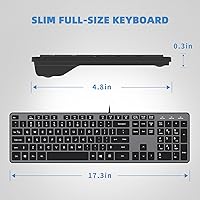
  • Dimensions: The keyboard measures 17.3 x 4.8 x 0.3 inches (44 x 12 x 0.8 cm), keeping the footprint compact for a full-size board.
  • Weight: The unit weighs 1.46 pounds, making it lightweight enough to reposition easily on a desk or carry between locations.
  • Keycap Finish: Keycaps are coated with a matte UV finish using a high-density printing process designed to resist shine and character fading.
  • Connection: Connects via a standard USB-A plug with true plug-and-play support — no drivers or software installation required.
  • Compatibility: Officially supports Windows 11, 10, 8, 7, 2000, XP, and Vista; no listed support for macOS or Linux operating systems.
  • Tilt Stand: A built-in folding stand on the underside allows the keyboard to be raised to a fixed elevated angle for improved wrist posture.
  • Rated Lifespan: The scissor-switch keys are rated by the manufacturer for up to 5 million keystrokes under normal daily use conditions.
  • Material: The chassis and keycaps are constructed from plastic, with a matte surface treatment on the top face of the board.
  • Color: Available in grey with a uniform matte finish across the keycap surfaces and keyboard body.
  • Included Items: Each purchase includes the keyboard itself, one keyboard cover/protector skin sized to fit the board, and a printed user manual.
  • Warranty: Covered by a one-year replacement warranty, with customer support accessible via email with a stated 24-hour response time.
  • Model Number: The official model designation is KB1430-Grey, as listed by the manufacturer B.FRIENDit on the product packaging.

Related Reviews
Macally SLIMKEYCA Wired Keyboard
88%
87%
Typing Comfort
90%
Build Quality
93%
Compactness & Space Saving
95%
Ease of Setup
85%
Key Responsiveness
More
KNOWSQT Wired Computer Keyboard
85%
89%
Design & Aesthetics
83%
Typing Experience
94%
Ease of Setup
88%
Build Quality
70%
Key Press Feel
More
X9 Performance X9ERGOKEY Ergonomic Split Keyboard
77%
83%
Ergonomic Comfort
67%
Wrist Rest Quality
61%
Key Feel & Typing Experience
58%
Build Quality & Durability
88%
Layout & Key Coverage
More
Evoluent Wired Compact Keyboard
86%
91%
Ergonomics and Comfort
88%
Build Quality and Durability
85%
Typing Experience
93%
Portability and Size
96%
Setup and Installation
More
X9 Performance X9BLKEYLP7CB Wired Keyboard and Mouse Combo
77%
88%
Key Readability
83%
Backlight Effectiveness
94%
Ease of Setup
71%
Mouse Comfort
62%
Build Quality
More
Atelus USB Wired Backlit Keyboard
87%
91%
Typing Comfort
88%
Backlight Visibility
83%
Build Quality
86%
Key Responsiveness
85%
Ergonomics
More
MCSaite Super Mini 78-Key USB Keyboard
78%
91%
Portability & Size
94%
Ease of Setup
61%
Typing Experience
72%
Build Quality
68%
Cable Quality & Length
More
Acebaff CK140U Wired Keyboard for Mac
85%
91%
Typing Experience
88%
Ergonomics
84%
Build Quality
95%
Ease of Setup
90%
Compatibility
More
HP 400 Backlit Wired Keyboard
86%
89%
Backlighting Performance
87%
Typing Comfort
82%
Ergonomics
91%
Build Quality
85%
Portability
More
Keychron C2 Wired Mechanical Keyboard
84%
91%
Typing Experience
89%
Build Quality
88%
Customization Options
84%
Ergonomics
90%
Compatibility
More

FAQ

No, the B.Friend KB1430 Wired Keyboard is listed as compatible with Windows only — specifically Windows 11, 10, 8, 7, XP, and Vista. There is no documented support for macOS or Linux, and no driver workaround is officially available. If you're on a Mac or Linux machine, you'll want to look at a different keyboard.

Not at all. Just plug the USB-A connector into any open port on your Windows PC and it works immediately. There's no setup software, no account creation, nothing to configure. It's genuinely plug-and-play in the most literal sense.

Quite quiet, in practical terms. The scissor-switch design eliminates most of the clatter associated with standard membrane or mechanical keyboards. Most users describe it as closer to the sound of typing on a laptop keyboard — present but not disruptive. The spacebar is slightly louder than the other keys, but it's not a major issue for most environments.

Honestly, opinions are split. Some buyers genuinely use it to protect the keyboard from dust when it's not in use, especially in dusty home setups or households with kids. Others find it fits loosely and ends up stored away after the first week. It's a nice bonus but shouldn't factor heavily into your decision either way.

The cable length is on the shorter side, which is one of the more consistent complaints from buyers. It works fine for most laptop setups or desks where the computer is at the same level as the keyboard. If your desktop tower sits on the floor some distance away, the cable may not comfortably reach without an extension.

No, there is no backlighting of any kind on this keyboard. The keys are not illuminated, which means typing in a dark or dimly lit room can be difficult if you're not a touch typist. If backlit keys are important to you, this board isn't the right fit.

Very similar, actually — which is the point. The scissor-switch mechanism and 2mm key travel are essentially the same technology used in most laptop keyboards. If you're already comfortable typing on a laptop and want that same feel on a desktop, this slim wired keyboard transitions naturally. Users who prefer deeper mechanical key travel may find it underwhelming.

The folding stand only offers one fixed angle — there's no multi-position adjustment. It either lies flat or tilts up to a single preset incline. For most people that angle is comfortable enough, but if you have specific ergonomic preferences or need a more precise tilt, the lack of options is a real limitation.

The keyboard is rated for up to 5 million keystrokes, which should be plenty for everyday typing. That said, the plastic build feels noticeably lightweight, and a handful of buyers have flagged minor key wobble on edge keys. It holds up well for light to moderate daily use, but it's not built for punishment, and long-term durability beyond the first year is still an open question given how recently this model launched.

The keyboard comes with a one-year replacement warranty, and the brand's customer support team is reachable by email with a stated 24-hour response time. The warranty covers replacement of the unit rather than individual repairs, so if something goes wrong, you'd typically go through a return-and-replace process. Several buyers confirm the support team was responsive when they needed help.