Overview

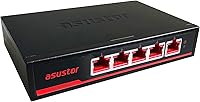
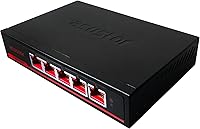
The Asustor ASW205T 5-Port 2.5G Network Switch sits squarely in the sweet spot for home lab builders and NAS enthusiasts who have outgrown gigabit but aren't ready to spend serious money on 10G infrastructure. Built around Realtek's RTL8731 and RTL8221B chipset combination — a pairing with a solid reputation in the prosumer networking world — this compact network switch punches above its price tier in build quality. The all-metal housing feels immediately different from the plastic-bodied budget switches that flood this category. It's quiet, wall-mountable, and genuinely well-considered for the kinds of home setups where aesthetics and noise levels actually matter.
Features & Benefits

Five 2.5Gbps RJ45 ports give this 2.5G switch a total switching capacity of 25Gbps — real headroom for moving large files across a local network without the bottlenecks common to standard gigabit gear. The fanless design is genuinely appreciated once you tuck it behind a TV or mount it in a media cabinet; there's simply nothing to hear. Jumbo Frame support up to 12K and a 16K MAC address table make a tangible difference for NAS transfers or editing workflows pulling from network storage. Setup requires nothing more than plugging in cables — no app, no login, no configuration required at all. The wall-mount bracket ships in the box, which is a nice practical touch.

Best For

The ASW205T is an obvious fit for anyone running a 2.5GbE NAS at home — the kind of setup where you're constantly moving large media libraries or backup archives and gigabit has become the clear bottleneck. Video editors and photographers who shuttle hefty RAW or 4K files between workstations will notice the difference right away. Home lab builders who want to step up from gigabit without committing to 10G prices will find this compact network switch hits a sensible middle ground. It also suits small home offices where silence matters as much as throughput. Worth noting: five ports is the ceiling, so plan your topology accordingly if you're connecting more than a handful of devices.

User Feedback

Buyers consistently highlight two things: how quick the setup is and how solid the unit feels in hand. The metal build quality draws particular attention from people accustomed to cheaper plastic switches. On the flip side, a handful of users have flagged that the unit runs noticeably warm under sustained heavy load — understandable for a fanless design, but worth keeping in mind if it will live in an enclosed space. Real-world throughput reportedly matches the rated 2.5G spec for most buyers. Compatibility beyond Asustor devices is not an issue; this switch works with any 2.5GbE adapter or NIC without fuss. The most common complaint is simply the port count — five isn't enough for larger or growing setups.

Pros

  • Real-world throughput consistently matches the rated 2.5Gbps spec, according to verified buyers.
  • The all-metal housing feels durable and premium — a clear step above plastic switches in the same tier.
  • Completely fanless operation means it runs silently in any room without adding to ambient noise.
  • Plug-and-play setup works out of the box with no app, account, or configuration required.
  • Wall-mount bracket is included in the box, making clean installs straightforward from day one.
  • Compatible with any 2.5GbE device regardless of brand — not limited to Asustor hardware.
  • Jumbo Frame support up to 12K noticeably smooths large file transfers over a local network.
  • Compact dimensions make the ASW205T easy to fit in tight spots, media cabinets, or small desk setups.
  • Auto-negotiation across 2.5G, 1G, and 100Mbps means it works with older devices on the same network.
  • Power consumption tops out at just 10W, keeping it cheap and efficient to run continuously.

Cons

  • Only five ports available — no workaround if your setup needs more connections than that.
  • No management features at all; VLANs, QoS, and traffic monitoring are completely off the table.
  • The unit runs noticeably warm under heavy sustained load, which could be a concern in enclosed spaces.
  • Rated maximum operating temperature of 40°C leaves little margin in warm rooms or cabinets without airflow.
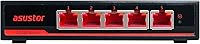
  • The red accent design may clash with neutral or professional-looking setups where aesthetics matter.
  • No PoE support, so powered devices like access points will still need separate power adapters.
  • Five-port topology requires careful planning; growing networks will outgrow this switch relatively quickly.
  • No indicator lights beyond basic link and activity LEDs — diagnosing connectivity issues is limited.

Ratings

The scores below were generated by AI after systematically analyzing verified buyer reviews for the Asustor ASW205T 5-Port 2.5G Network Switch from markets worldwide, with spam, incentivized, and bot-flagged submissions actively filtered out before scoring. Each category reflects the genuine distribution of praise and frustration real users have reported — nothing is glossed over. Where this 2.5G switch excels and where it genuinely falls short are both represented transparently.
Build Quality
93%
The metal enclosure is the detail buyers mention most unprompted, especially those coming from plastic-bodied budget switches. Handling the ASW205T for the first time tends to reset expectations — it feels dense and properly engineered, not like a device that will crack if it falls off a shelf or gets knocked around during a home office reorganization.
A small number of buyers noted the red accent detailing on the ports feels slightly at odds with more neutral home setups or minimalist desk aesthetics. It is a minor cosmetic issue rather than a structural one, but for buyers who care about how hardware looks in a media cabinet, it is worth considering.
Throughput Performance
89%
Real-world transfer speeds across the five ports consistently land close to the rated 2.5Gbps ceiling in buyer testing, which is not always a given with budget networking hardware. Users copying large video archives or backup sets between a NAS and a workstation report noticeably shorter wait times compared to their old gigabit setups.
A handful of users noted that achieving peak throughput required both endpoints to have quality 2.5GbE adapters — a cheap or older USB adapter on one end can cap performance well below the switch's capability. The switch itself is not the bottleneck in these cases, but buyers should budget for endpoint upgrades if needed.
Ease of Setup
96%
Plug in the power, plug in the cables, done. Buyers with no networking background consistently describe the setup as completely stress-free, which is meaningful in a category where even unmanaged switches occasionally have quirks. There are no drivers to install, no firmware to flash out of the box, and no app permissions to navigate.
The absolute simplicity is also its ceiling — if anything behaves unexpectedly, there are no diagnostics, no logs, and no interface to investigate. Most buyers never encounter this problem, but those who do are entirely reliant on isolating issues through cable swaps and device restarts.
Thermal Management
67%
33%
Under typical home networking loads — a NAS transfer here, a backup there — the fanless design handles heat without any perceptible issues, and the metal housing distributes warmth evenly rather than developing hot spots. Buyers using it in open-air environments or with basic ventilation report no heat-related problems after extended periods.
Under sustained heavy traffic, particularly in warmer rooms or enclosed media cabinets, the unit runs noticeably warm. The 40°C maximum operating temperature rating leaves limited margin in summer or in spaces without airflow, and a handful of buyers have flagged concern about long-term reliability if the thermal ceiling is regularly approached.
Port Count & Layout
61%
39%
For a targeted NAS-plus-two-or-three-devices setup, five ports is actually a comfortable fit, and the compact physical footprint that comes with it makes placement much easier than a larger switch. Buyers who went in knowing what they needed report no frustration with the port count at all.
Five ports is genuinely limiting for anyone with a growing device list, and it is the most frequently cited disappointment in buyer reviews. There is no option to expand within the same unit, and adding a second downstream switch to gain ports introduces a potential throughput bottleneck if that second switch is only gigabit.
Noise Level
98%
Completely silent operation is not a marketing claim here — there is no fan at all, and buyers consistently confirm there is nothing to hear. Users who have placed this compact network switch in living rooms, bedrooms, and recording-adjacent home offices specifically call out the silence as a reason they chose it over alternatives.
There is essentially no meaningful noise complaint to report, which is a straightforward outcome of the fanless design. The only theoretical negative is that the absence of active cooling is precisely what creates the thermal constraints noted elsewhere — the two trade-offs are directly linked.
Value for Money
82%
18%
Buyers generally feel the metal build, reliable throughput, and wall-mount inclusion justify the price premium over cheaper plastic 2.5G switches. In the context of what a 2.5GbE unmanaged switch costs from other brands, the ASW205T sits at a competitive price point with a stronger physical product than most rivals at the same tier.
A small segment of budget-focused buyers feel the port limitation makes the per-port cost harder to justify when cheaper five-port options exist. For users who only need basic 2.5G connectivity and have no preference for build quality, the savings from a plastic alternative may feel more appealing.
Wall-Mount Usability
84%
Including the mounting hardware in the box is a practical detail that buyers appreciate — it signals the feature was properly thought through rather than just listed on a spec sheet. The light weight of the unit makes the actual installation straightforward, and the result is a tidy, clutter-free install that stays out of the way in media closets or utility spaces.
The wall-mount orientation leaves the ports facing downward on some wall configurations, which a few buyers found slightly awkward when routing cables neatly. It is a minor inconvenience rather than a serious problem, but worth considering during installation planning.
Compatibility
91%
Working with every 2.5GbE device tested regardless of manufacturer — QNAP, Synology, Intel, Realtek-based adapters — this compact network switch has generated very few compatibility reports. Auto-negotiation down to 1Gbps and 100Mbps also means older devices integrate cleanly into the same switch without needing a separate connection point.
A small number of users reported brief link negotiation delays when first connecting certain older gigabit devices, though this resolved itself within seconds and was not a persistent issue. There are no documented incompatibilities with major NAS platforms or common USB-to-2.5G adapters.
Aesthetics
74%
26%
The black metal body with red accent lighting has a purposeful, enthusiast-oriented look that fits naturally alongside gaming PCs, NAS towers, and home lab equipment. Buyers building out a visually cohesive setup around dark hardware tend to find it fits in without looking out of place.
The red accents are a polarizing design choice — buyers with neutral or white-themed home office setups mention it stands out in a way they did not anticipate from product photos. It is entirely subjective, but the aesthetic is clearly targeted at a specific type of buyer rather than being universally neutral.
Indicator Lights
63%
37%
Link and activity LEDs on each port give a quick visual confirmation that connections are live and traffic is flowing, which is enough for the straightforward use cases this switch is designed for. Buyers running simple home setups have no real complaints about the basic LED feedback.
For anyone doing even mild troubleshooting, the lack of per-port speed indicators is a genuine inconvenience — you cannot tell at a glance whether a device has negotiated at 2.5G or dropped to 1G. Several buyers specifically wished for speed-status LEDs, a feature present on some competing switches in this category.
Longevity & Reliability
78%
22%
Buyers who have run the ASW205T continuously for a year or more report no failures or degradation in performance, which builds reasonable confidence in the hardware durability. The metal housing and conservative 10W power draw both suggest a design built for sustained, always-on operation.
The long-term thermal question remains open for units installed in warm or enclosed spaces — there is not yet enough multi-year data to draw firm conclusions about how heat exposure affects lifespan at the upper operating range. Most buyers are satisfied, but the thermal ceiling is a variable that could matter over a three-to-five year horizon.

Suitable for:

The Asustor ASW205T 5-Port 2.5G Network Switch is a strong match for home users who have already invested in a 2.5GbE-capable NAS and are tired of gigabit acting as the bottleneck during large file transfers. Photographers, video editors, and content creators who regularly push big files across a local network will get tangible, real-world speed gains without needing to step into the more expensive and complex world of 10G equipment. Home lab enthusiasts who want a capable, well-built switch that doesn't embarrass itself sitting on a desk or mounted on a wall will appreciate the metal construction and clean aesthetic. It's also a natural fit for small home offices where silence is non-negotiable — no fan means no noise, period. If you're the type who values plug-and-play simplicity and just wants faster local networking without touching a single configuration menu, this compact network switch was essentially built for you.
Not suitable for:

The Asustor ASW205T 5-Port 2.5G Network Switch is not the right call if you need more than five ports — there's no expanding around that hard ceiling, and daisy-chaining switches introduces its own complications. Anyone who needs VLAN support, link aggregation, traffic prioritization, or any form of network management should look elsewhere entirely; this is a strictly unmanaged switch with no software layer whatsoever. Businesses or power users running demanding, always-on workloads in warm or enclosed spaces should be cautious — the fanless design has a rated maximum operating temperature of 40°C, and several users have noted it runs warm under sustained load. If your network already has more than a handful of devices or is likely to grow significantly, five ports will feel limiting surprisingly fast. Buyers chasing the absolute lowest price in the 2.5G switch category may also find cheaper plastic alternatives, though they will be giving up the build quality that sets this 2.5G switch apart.
Specifications

  • Ports: Five RJ45 ports each support 2.5Gbps, with auto-negotiation down to 1Gbps and 100Mbps for backward compatibility with older devices.
  • Switching Capacity: Total non-blocking switching capacity is 25Gbps across all five ports simultaneously.
  • Chipset: Powered by a Realtek RTL8731 and RTL8221B combination, a well-regarded pairing in the prosumer networking segment.
  • Jumbo Frames: Supports Jumbo Frames up to 12K bytes, which helps reduce CPU overhead and improves throughput for large file transfers.
  • MAC Address Table: The MAC address table holds up to 16K entries, providing efficient switching performance in moderately complex home or small office networks.
  • Packet Buffer: Onboard packet buffer memory is 4.1Mbit, helping manage brief traffic bursts without dropping packets.
  • Management: Fully unmanaged — no web interface, no software, and no configuration is required or available.
  • Cooling: Entirely fanless; passive heat dissipation through the metal enclosure with a maximum rated operating temperature of 40°C.
  • Housing: Enclosure is constructed from metal, providing structural durability and acting as a passive heatsink for the internal components.
  • Dimensions: The unit measures 140mm wide by 90mm deep by 28mm tall, making it compact enough for tight installs or wall mounting.
  • Weight: Unit weighs 350g (approximately 0.77 lb), keeping wall-mount installation simple without heavy-duty hardware.
  • Power Draw: Maximum power consumption is 10W, making it inexpensive to run continuously around the clock.
  • Wall Mount: Wall-mounting hardware is included in the box, supporting clean rack-free installs in media closets or behind workstations.
  • Certifications: Holds FCC, CE, VCCI, BSMI, C-TICK, and KCC certifications, covering regulatory compliance across North America, Europe, Japan, Taiwan, Australia, and South Korea.
  • Cable Compatibility: Cat 5e cables are sufficient to achieve full 2.5Gbps speeds, though Cat 6 or Cat 6a will also work without issue.
  • Color: Finished in black with red accent detailing on the port indicators, giving it a visually distinct enthusiast aesthetic.
  • Interface Type: All five ports use the standard RJ45 connector format, compatible with every common Ethernet cable type in use today.
  • Power Input: Comes with an included power adapter, so no separate power supply purchase is necessary out of the box.

Related Reviews

TP-Link TL-SG105-M2 5-Port 2.5G Unmanaged Switch
82%
91%
Throughput Performance
96%
Ease of Setup
88%
Build Quality
71%
Thermal Management
63%
Port Count & Expandability
More
VIMIN 6-Port 2.5G Unmanaged Network Switch
83%
88%
Throughput Performance
84%
Build Quality
93%
Setup & Ease of Use
67%
SFP+ Port Usability
96%
Fanless Noise Level
More
Tenda SE105 5-Port 2.5G Unmanaged Switch
83%
97%
Ease of Setup
91%
Port Speed Performance
93%
Value for Money
67%
Build Quality
78%
Thermal Management
More
TRENDnet TEG-S350 5-Port 2.5G Network Switch
78%
88%
Value for Money
91%
Network Performance
94%
Ease of Setup
86%
Build Quality
97%
Noise Level
More
Zyxel MG-105 5-Port 2.5G Unmanaged Switch
80%
93%
Network Performance
97%
Ease of Setup
89%
Value for Money
62%
Build Quality
98%
Noise Level
More
TP-Link TL-SG108-M2 8-Port 2.5G Unmanaged Switch
81%
93%
Network Performance
97%
Ease of Setup
89%
Build Quality
74%
Thermal Management
81%
Value for Money
More
TEROW 4-Port 2.5G 2-Port SFP+ Network Switch
81%
93%
Value for Money
96%
Ease of Setup
88%
Port Performance & Link Stability
71%
SFP+ Port Compatibility
84%
Build Quality & Materials
More
ienRon 6-Port 2.5Gb PoE Switch with 2-Port 10Gb SFP+
85%
86%
Performance
91%
Ease of Setup
88%
PoE Power Delivery
84%
Build Quality
93%
Fanless Operation
More
VIMIN 10-Port 2.5G Unmanaged Switch
79%
96%
Ease of Setup
89%
Port Performance
84%
Build Quality
67%
Thermal Management
71%
SFP Uplink Usability
More
Goalake 8-Port 2.5G Ethernet Switch
80%
91%
Port Count & Configuration
88%
Throughput & Switching Performance
93%
Ease of Setup
79%
Build Quality & Materials
96%
Fanless & Noise Level
More
BrosTrend 8-Port 2.5G Unmanaged Switch
83%
93%
Port Speed Consistency
96%
Ease of Setup
61%
Build Quality
74%
Thermal Performance
91%
Value for Money
More

FAQ

Not at all. This is a fully unmanaged switch, which means you plug in the cables and it works immediately. There is no configuration interface, no mobile app, and no account to create. If the concept of network switches has ever felt intimidating, this is honestly one of the simplest devices you can add to a home network.

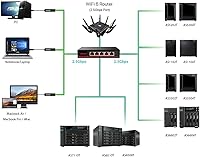
Yes, completely. The ASW205T works with any device that has a 2.5GbE network port, regardless of brand — desktop PCs, laptops with USB-to-2.5G adapters, NAS units from QNAP or Synology, and so on. It also auto-negotiates down to 1Gbps or 100Mbps for older devices, so you can mix and match equipment on the same switch without issues.

Yes, Cat 5e is officially rated for 2.5Gbps at standard home networking distances. You do not need to rewire with Cat 6 just to use this switch, which is one of the practical advantages of 2.5G over 10G, where cable quality becomes more critical.

It does run warm under heavy sustained load — that is a known trade-off with fanless designs. The rated maximum operating temperature is 40°C, which means an enclosed cabinet with poor airflow could become a problem during long, intensive transfers. Leaving a few inches of open space around the unit or mounting it with some ventilation nearby is a sensible precaution.

Yes, the wall-mount bracket is included in the box so you do not need to source anything separately. The compact dimensions and light weight make the actual installation straightforward, and wall mounting is a practical option if you want to keep it out of the way in a media closet or home office.

It depends on your timeline. The Asustor ASW205T 5-Port 2.5G Network Switch will auto-negotiate down to 1Gbps for your current hardware, so it will function as a regular gigabit switch in the meantime. If you are planning to add a 2.5GbE NAS or upgrade a workstation in the near future, buying this now makes sense. If that upgrade is years away, a cheaper gigabit switch might be the more practical call for now.
No. Being unmanaged means there is zero support for VLANs, QoS, link aggregation, port mirroring, or any other managed-switch feature. If those capabilities matter to your setup, you will need to step up to a managed switch, which comes at a higher price and added complexity.

Completely silent. There is no fan at all, so the only sounds in the room will be whatever else you have running. This is one of the genuinely practical reasons to choose this compact network switch over fan-cooled alternatives, especially in a bedroom, living room, or shared workspace.

The metal housing consistently comes up as a highlight in buyer feedback. People who have previously used budget plastic switches tend to notice the difference immediately when handling this one. It feels more substantial, and the metal body also serves as passive cooling, which is a functional benefit rather than just an aesthetic one.

Whether five ports is enough depends entirely on your setup. For a NAS, one or two workstations, and maybe a media player or desktop, it covers most home configurations comfortably. You can technically connect a second switch to one of the ports to expand your port count, but that second switch then becomes a bottleneck if it is only gigabit-capable. Plan your topology before buying if you have more than four or five devices that need 2.5G speeds.

Where to Buy