Overview

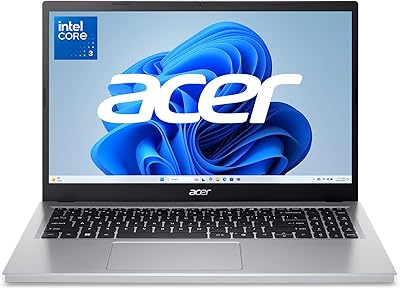
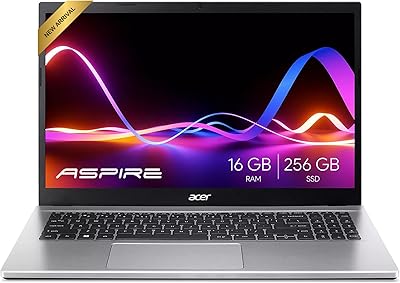
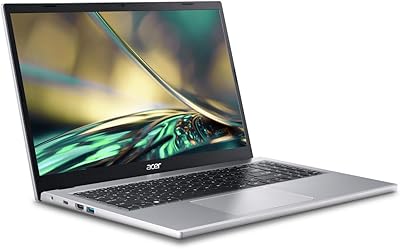
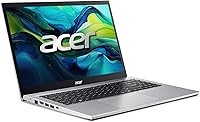
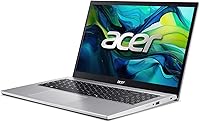
The Acer Aspire Go 15 512GB Laptop arrived on the market in early 2025 and quickly climbed to a strong position among the best-selling traditional laptops on Amazon — worth noting for a machine at this price. At its core is AMD's Ryzen 7 5825U, an 8-core processor that delivers real multitasking muscle, though it's worth being upfront: this is a last-generation chip, not the latest silicon. What it offers is a capable daily driver in a slim 0.78-inch frame weighing under four pounds — practical for carrying to class or around the home. Expect nothing here for gaming or creative production. For everyday computing, though, this Acer hits its mark.
Features & Benefits

The 15.6-inch FHD IPS display is honest about what it is: a solid panel for watching content and knocking out spreadsheets, not a color-grading monitor. It's bright enough for indoor use but won't win any outdoor visibility awards. Where the Aspire Go 15 genuinely impresses is in day-to-day speed — the PCIe Gen4 SSD makes boot times and app launches feel snappy in a way that older budget laptops rarely managed. Pair that with 16GB of DDR4 RAM and you can run a dozen browser tabs, a video call, and a document open simultaneously without much complaint. Wi-Fi 6 and HDMI 2.1 round out a port lineup that covers most real-world needs without hunting for adapters.

Best For

This mid-range Acer laptop finds its strongest audience among students and home office regulars. If your day revolves around writing papers, joining Zoom calls, or working through cloud-based apps, the Aspire Go 15 handles all of it comfortably. The 15.6-inch screen is a genuine advantage for anyone tired of squinting at a smaller display without spending extra. Families sharing a laptop for browsing, streaming, and school homework will find it reliable and easy to manage. It's also a meaningful upgrade path for anyone still on a several-year-old budget machine — the jump in SSD responsiveness alone tends to feel like a significant refresh. Just don't bring it to a gaming session.

User Feedback

Owners of the Aspire Go 15 generally come away satisfied with keyboard comfort and real-world battery endurance — many report getting through a full workday without reaching for the charger. The SSD speed gets consistent praise from people upgrading from older machines. That said, a few patterns emerge on the critical side. The display brightness draws complaints from users working near windows or in brighter rooms. Build quality is another common thread — the chassis flexes more than some would like, as is typical for plastic-bodied laptops at this price. Fan noise under sustained load occasionally surfaces in feedback. And Windows 11's built-in Copilot feature divides users: some find it handy, others immediately disable it.

Pros

  • The 8-core Ryzen 7 processor handles multitasking comfortably — no sluggishness during typical workday tasks.
  • A PCIe Gen4 SSD makes boot times and file loading noticeably faster than older budget laptops.
  • 16GB of RAM is genuinely generous at this price and keeps heavy browser sessions running smoothly.
  • Wi-Fi 6 and HDMI 2.1 mean the connectivity won't feel outdated anytime soon.
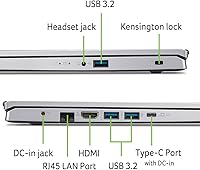
  • Four USB 3.0 ports plus a full-function USB-C gives you real flexibility without needing a hub.
  • Battery life holds up well through a full workday under moderate use.
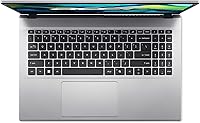
  • The backlit keyboard and fingerprint reader are practical additions that feel above the price point.
  • The 15.6-inch screen offers comfortable screen real estate for productivity without a premium price tag.
  • The Aspire Go 15 is slim and light enough to move around the home or campus without much effort.

Cons

  • Display brightness struggles in well-lit rooms or near windows, making outdoor use uncomfortable.
  • The plastic chassis flexes noticeably under pressure — build rigidity lags behind pricier competitors.
  • The Ryzen 7 5825U is a last-generation chip, which matters if long-term platform relevance is a priority.
  • Fan noise becomes audible under sustained workloads like long video calls or large file transfers.
  • Integrated graphics make this mid-range Acer laptop completely unsuitable for gaming or video editing.
  • Windows 11 Copilot integration feels intrusive to users who prefer a leaner, less cluttered experience.
  • No optical drive, which is a minor but real inconvenience for buyers who occasionally need disc access.
  • DDR4 RAM, while plentiful at 16GB, is an older memory standard compared to DDR5 found in newer rivals.

Ratings

The scores below for the Acer Aspire Go 15 512GB Laptop were generated by our AI engine after analyzing thousands of verified global buyer reviews, with spam, bot-submitted, and incentivized feedback actively filtered out. Each category reflects a genuine balance of what real users praised and where they ran into frustrations — nothing is glossed over. From everyday performance to long-term durability, the ratings aim to give you an honest picture before you commit.
Everyday Performance
84%
Users consistently report that the Aspire Go 15 handles the typical workday without complaint — browser-heavy sessions, Office documents, and video conferencing all run smoothly. The 16GB of RAM means switching between a dozen tabs and a Zoom call rarely causes the kind of lag that frustrates on cheaper machines.
The Ryzen 7 5825U is a last-generation processor, and buyers who do any sustained CPU-heavy work — large spreadsheet calculations, long exports — will notice it isn't as snappy as newer-gen alternatives. It's capable, but not fast enough to feel future-proof for power users.
SSD Speed & Storage
88%
The PCIe Gen4 SSD is one of the standout wins on this machine and users upgrading from older HDDs or SATA SSDs notice the difference immediately. Boot times are quick, apps open without the usual wait, and large file moves complete faster than most buyers expect at this price tier.
Five hundred and twelve gigabytes fills up quicker than expected once Windows, updates, and a few productivity apps are installed, and some users find themselves managing storage within the first few months. There is no second drive bay option confirmed, so expansion means relying on external storage.
Display Quality
67%
33%
The 15.6″ FHD IPS panel is comfortable for indoor streaming, document work, and casual video calls, and the narrow bezels give it a cleaner look than older budget laptops in the same size class. Viewing angles are acceptable and colors look natural enough for everyday content.
Brightness is the recurring complaint — in a bright room or near a window, the screen washes out and forces users to reposition constantly. Color accuracy falls short for any photo or video editing work, and those coming from better panels will notice the limitations quickly.
Battery Life
79%
21%
Under realistic mixed-use conditions — a combination of browsing, writing, and the occasional video call — the Aspire Go 15 gets most users through a full workday without needing a charge. Students and remote workers in particular highlight this as one of the more pleasant surprises.
The 10-hour rating is optimistic; actual endurance under heavier multitasking or brighter display settings tends to land closer to 6 to 7 hours. Battery drain accelerates noticeably when running video calls back-to-back, which is a common real-world use case for this laptop's audience.
Build Quality & Durability
61%
39%
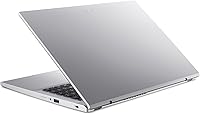
The slim 0.78-inch profile looks clean and the silver finish is neutral enough to work in both personal and professional settings. For light daily carry between rooms or in a well-padded bag, most users find it holds up fine under normal handling.
The all-plastic chassis flexes when pressure is applied to the lid or palm rest, which is a common friction point in user feedback. Several buyers noted the feel doesn't inspire much confidence for long-term durability, especially compared to metal-frame competitors at a similar price.
Keyboard & Typing Experience
82%
18%
The backlit keyboard earns consistent praise for comfort during extended writing sessions, with key travel and spacing that feels better than the price tag suggests. The numeric keypad is a practical bonus for users who regularly work with numbers or data entry.
Key feedback is on the softer side, which divides users — typists who prefer a tactile click find it underwhelming, even if it's fine for casual typing. The backlight has limited brightness levels, which some find insufficient in very dark environments.
Connectivity & Ports
86%
Four USB 3.0 ports plus a full-function USB-C and HDMI 2.1 is a genuinely practical port setup that covers most everyday needs without reaching for a hub. Wi-Fi 6 support means fast, stable connections on modern routers and less interference in crowded environments like apartments or campus networks.
There is no SD card reader, which frustrates photographers or users who regularly transfer files from cameras. The USB-C port, while full-function, does not support Thunderbolt, which limits its appeal for users considering high-bandwidth peripherals or external GPU docks.
Graphics & Visual Tasks
43%
57%
Integrated AMD Radeon graphics handle everyday visual output without issue — HD video playback, web content, and light photo browsing all work without a hitch. For its intended audience of students and home users, it does exactly what is expected.
Anything beyond basic visual tasks runs into hard limits quickly. Modern gaming is essentially off the table, and video editing or serious photo retouching produces frustrating lag. Users who bought this expecting any graphics headroom for creative work consistently express disappointment.
Fan Noise & Thermal Management
63%
37%
During light work, the fan stays quiet and many users describe the machine as near-silent during typical browsing and document sessions. For quiet office or library environments, this baseline behavior is appreciated.
Under sustained loads — long video calls, large uploads, or running multiple apps simultaneously — the fan spins up to an audible level that some users find distracting. Thermal management is adequate but not refined, and the bottom of the chassis gets warm during extended use.
Software & Bloatware
58%
42%
AcerSense is genuinely useful for toggling performance modes and keeping an eye on battery health without diving into system settings. Windows 11 Home is a stable base and the Copilot key gives quick access to AI assistance for users who want it.
The machine ships with a noticeable amount of pre-installed software that many users remove immediately. The Copilot integration is a divisive point — users who prefer a lean setup find it intrusive, and disabling some of the bundled Acer utilities requires more effort than it should.
Webcam & Audio Quality
66%
34%
Acer's noise-reduction technology does make a real difference during video calls in louder environments — voices come through cleaner than on many comparable laptops. For standard Zoom or Teams calls in a typical home setting, performance is acceptable.
The webcam resolution is basic and shows its limits in lower light, producing grainy footage that users with external webcams immediately notice. Speakers are adequate for personal listening but thin-sounding for anything that demands room-filling audio.
Portability & Weight
76%
24%
At under four pounds and less than an inch thick, the Aspire Go 15 is manageable for daily transport in a standard backpack without causing shoulder fatigue over a commute. The slim profile fits comfortably in most laptop sleeves designed for 15-inch machines.
It is not in the ultrabook category, and users who have carried thinner, lighter machines will notice the difference over a full day of travel. The 15.6-inch footprint also means it takes up meaningful bag space compared to smaller alternatives.
Value for Money
81%
19%
For its target audience, the combination of a Ryzen 7 processor, 16GB of RAM, and a Gen4 SSD at this price point represents a strong package that outpunches many competitors with weaker specs. Buyers upgrading from older budget machines get a noticeable improvement across the board.
Users who stretch their expectations toward creative work, gaming, or premium build quality will feel the value proposition weaken. The last-gen CPU and plastic chassis are the trade-offs that justify the price, and those trade-offs matter more as time goes on.
Setup & Out-of-Box Experience
73%
27%
Most users report a straightforward setup experience — Windows 11 guided setup is smooth and the machine is ready to use quickly after unboxing. The fingerprint reader enrollment is easy and Windows Hello login works reliably from the first use.
The pre-installed software and Windows 11 account requirements frustrate users who prefer a clean local setup. Several buyers also noted that initial Windows updates take a meaningful chunk of time and SSD space before the laptop feels fully ready to use.

Suitable for:

The Acer Aspire Go 15 512GB Laptop is a strong fit for anyone whose computing needs revolve around the everyday essentials — writing, browsing, video calls, and streaming. College students will appreciate the balance of a large 15.6-inch screen, a full-day battery, and a weight that doesn't punish a backpack. Remote workers who live in browser tabs, spreadsheets, and cloud-based tools will find the Ryzen 7 processor and 16GB of RAM more than sufficient for smooth daily operation. Families sharing a household laptop for homework, entertainment, and light admin tasks will get reliable, frustration-free performance. It also makes a genuinely worthwhile upgrade for anyone still running a five-year-old budget machine — the Gen4 SSD alone changes how responsive a laptop feels in everyday use.
Not suitable for:

The Acer Aspire Go 15 512GB Laptop is the wrong choice for buyers expecting to do anything graphics-intensive. The integrated AMD Radeon GPU simply cannot handle modern gaming, 4K video editing, or serious photo retouching — those tasks require a dedicated graphics card this machine doesn't have. The Ryzen 7 5825U is a capable processor, but it belongs to an older generation, so buyers who want the latest performance efficiency or AI-accelerated hardware features will find newer chips more compelling. The display, while decent for indoor use, lacks the brightness and color accuracy that creative professionals or anyone working frequently near windows would need. If you travel constantly and need the lightest possible machine, the nearly 4-pound chassis is also worth factoring in compared to thinner ultrabooks in a similar price range.
Specifications

  • Processor: Powered by the AMD Ryzen 7 5825U, an 8-core, 16-thread mobile processor running at up to 4.5GHz boost clock.
  • RAM: 16GB of DDR4 SDRAM provides ample memory for multitasking across productivity apps, browsers, and video calls.
  • Storage: A 512GB PCIe Gen4 SSD handles fast boot times, quick app launches, and everyday file management without bottlenecking performance.
  • Display: 15.6″ Full HD IPS panel at 1920x1080 resolution with a narrow bezel design for a cleaner, more immersive viewing area.
  • Graphics: Integrated AMD Radeon graphics share system memory and handle everyday visual tasks, web content, and HD video playback.
  • Operating System: Ships with Windows 11 Home, including access to the built-in Copilot AI assistant via a dedicated keyboard key.
  • Battery Life: Rated for up to 10 hours of battery life under typical mixed-use conditions including browsing and document editing.
  • Weight: The laptop weighs 3.92 pounds, making it manageable for daily commutes between home, campus, or the office.
  • Dimensions: Measures 14.29 x 9.5 x 0.78 inches, fitting a slim profile that slides easily into most standard laptop bags and backpacks.
  • Wireless: Wi-Fi 6 (802.11ax) and Bluetooth are built in, supporting faster wireless speeds and reduced network congestion on modern routers.
  • Ports: Connectivity includes four USB 3.0 ports, one full-function USB Type-C port, and an HDMI 2.1 output for external displays.
  • Keyboard: Features a backlit keyboard with a numeric keypad, making data entry and low-light typing more comfortable and practical.
  • Security: An integrated fingerprint reader provides a fast, password-free login option through Windows Hello.
  • Audio & Video: Acer PurifiedVoice and TNR (Temporal Noise Reduction) technology improve microphone clarity and webcam image quality during video calls.
  • Software Tools: AcerSense provides a single interface for managing battery modes, performance settings, and storage optimization.
  • Blue Light Filter: Acer BluelightShield allows users to reduce blue light emission from the display, which is useful for extended work sessions.
  • Optical Drive: No optical drive is included, which is standard for modern slim laptops of this class.
  • Color: Available in Silver, giving the chassis a clean, neutral appearance suitable for both personal and professional settings.

Related Reviews
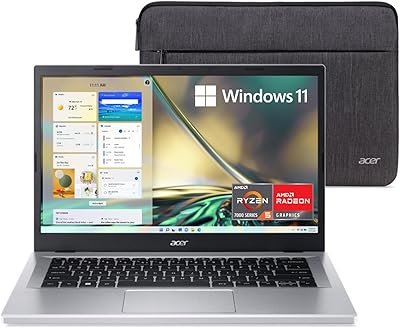
Acer Aspire 3 A315-24PT-R0UX 15.6″ Laptop 16GB 512GB SSD
86%
91%
Performance
87%
Battery Life
88%
Display Quality
93%
Portability
82%
Build Quality
More
Acer Aspire 1 15.6-inch Laptop
70%
83%
Value for Money
78%
Display Quality
54%
Processing Performance
61%
Battery Life
63%
Build Quality
More
Acer Aspire Go 15 AG15-32P-39R2
74%
87%
Display Quality
93%
Battery Life
84%
Portability & Weight
62%
Storage Capacity
73%
Processing Performance
More
ASUS Vivobook Go 15 E1504FA
72%
88%
Value for Money
83%
Build Quality
74%
Performance
61%
Display Quality
69%
Battery Life
More
Acer Aspire 3 Ryzen 3 7330U 15.6″ 256GB
69%
88%
Value for Money
76%
Performance for Daily Tasks
83%
Display Quality
86%
RAM & Multitasking
51%
Storage Capacity
More
Acer Aspire 3 A315-44P-R7GS 15.6″ Ryzen 7 5700U 16GB 512GB SSD

86%
91%
Performance
88%
Multitasking Capability
94%
Storage Speed
90%
Display Quality
70%
Graphics Performance
More
Acer Aspire 3 Laptop | AMD Ryzen 5 7430U | 64GB RAM | 1TB SSD | 15.6″ FHD

84%
89%
Performance
91%
Display Quality
87%
Multitasking Capability
78%
Build Quality
82%
Keyboard Comfort
More
HP 2020 15 15.6″ HD Touchscreen Laptop, Intel Core i5-1035G1, 16GB RAM, 512GB SSD
82%
89%
Performance
75%
Display Quality
90%
Portability
80%
Battery Life
85%
Build Quality
More
Acer Chromebook 315 15.6-inch Laptop
72%
83%
Value for Money
79%
Battery Life
81%
Display Size & Usability
51%
Display Sharpness
58%
Performance
More
Acer Aspire 3 Spin 14 (A3SP14-31PT)
74%
88%
Display Quality
83%
Convertible Versatility
91%
Value for Money
47%
Storage Capacity
74%
Performance (Daily Tasks)
More

FAQ

Yes, for everyday multitasking it holds up well. With 16GB of DDR4 RAM and a capable 8-core processor, you can comfortably run a video call, several browser tabs, and a document editor simultaneously without noticeable slowdown. It's not built for heavy rendering or compiling, but for typical daily workloads it performs reliably.

It's a practical choice for most college use cases. Writing papers, attending online classes, using cloud-based tools, and casual streaming all fall comfortably within what this machine handles well. The all-day battery rating and relatively light weight make it easy to carry between classes or dorm and library.

Only very light ones. The integrated AMD Radeon graphics share system memory and are not designed for modern gaming. Older indie titles or casual browser games will run fine, but anything graphically demanding will struggle or simply not run at playable frame rates. If gaming is a priority, a laptop with a dedicated GPU is the better fit.

It's decent for indoor streaming. The 15.6″ FHD IPS panel offers a wide enough viewing angle and enough sharpness for Netflix, YouTube, or video calls. The main limitation is brightness — in a well-lit room or near a sunny window, the screen can look a bit dim. It's not a color-accurate display for any professional media work, but for casual viewing it does the job.

No, Microsoft Office is not pre-installed. The laptop ships with Windows 11 Home, which includes access to the free web-based versions of Word, Excel, and PowerPoint through a Microsoft account. A full Microsoft 365 subscription would need to be purchased separately if you require the desktop apps.

For most everyday users, 512GB is a reasonable starting point — it's enough for the operating system, your applications, and a solid library of documents, photos, and downloads. Whether internal storage can be expanded depends on whether the M.2 slot is accessible, which varies by unit configuration. Connecting an external drive or using cloud storage is always a practical option for extra space.

Under light tasks like browsing or document editing, the fan is quiet or even silent. During more sustained workloads — long video calls, large file transfers, or running multiple heavy apps — the fan does spin up and becomes audible. It's not distractingly loud, but in a quiet room you will notice it.

AcerSense is Acer's built-in utility app that lets you switch between performance modes, monitor battery health, and manage storage. It's genuinely useful for toggling between a quiet low-power mode and a higher-performance setting depending on what you're doing. It's not essential to use, but it does make managing the laptop's behavior more straightforward than digging through system settings.

Generally, yes. Windows Hello fingerprint login is a convenient feature and most users find it registers and unlocks quickly after the initial setup. Like all fingerprint sensors, it can occasionally miss on the first try, but it's far more responsive than typing in a password every time.

At under four pounds and less than an inch thick, it's comfortable enough to carry in a backpack without strain. The build is plastic, which keeps the weight down but means the chassis has a bit more flex than metal-body alternatives. Day-to-day, the keyboard is comfortable for extended typing sessions and the overall layout feels sensibly designed for productivity-focused use.

Where to Buy