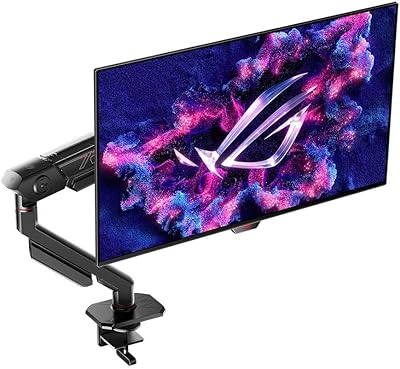
ASUS ROG Swift PG49WCD 49-inch Gaming Monitor
ASUS ROG Swift PG49WCD 49-inch Gaming Monitor — image 1
ASUS ROG Swift PG49WCD 49-inch Gaming Monitor — image 2

ASUS ROG Swift PG49WCD 49-inch Gaming Monitor — image 3
ASUS ROG Swift PG49WCD 49-inch Gaming Monitor — image 4
ASUS ROG Swift PG49WCD 49-inch Gaming Monitor — image 5
ASUS ROG Swift PG49WCD 49-inch Gaming Monitor — image 6
ASUS ROG Swift PG49WCD 49-inch Gaming Monitor — image 7
ASUS ROG Swift PG49WCD 49-inch Gaming Monitor — image 8
ASUS ROG Swift PG49WCD 49-inch Gaming Monitor — image 9
ASUS ROG Swift PG49WCD 49-inch Gaming Monitor — image 10
ASUS ROG Swift PG49WCD 49-inch Gaming Monitor — image 11

ASUS ROG Swift PG49WCD 49-inch Gaming Monitor — image 12

ASUS ROG Swift PG49WCD 49-inch Gaming Monitor — image 13
ASUS ROG Swift PG49WCD 49-inch Gaming Monitor — image 14
77%
23%

Overview

The ASUS ROG Swift PG49WCD 49-inch Gaming Monitor landed in late 2023 as ASUS's answer to the growing appetite for single-screen immersion — and it's not a subtle piece of hardware. At 49 inches wide in a 32:9 aspect ratio, it physically dominates a desk; you'll want at least a 55-inch-deep surface and enough room to sit back roughly three feet to take in the full width comfortably. What separates this ROG ultrawide from the VA-panel competition at this size is its QD-OLED panel technology, which delivers per-pixel contrast that VA simply can't replicate. This is a considered, premium purchase — not something you pick up on a whim.

Features & Benefits

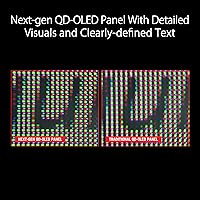
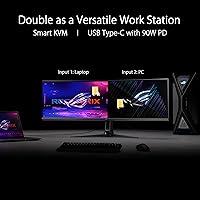
The PG49WCD's QD-OLED delivers a 0.03ms response time that keeps motion blur essentially absent in competitive shooters, while true per-pixel lighting means blacks are genuinely black — not the gray you see on most large-panel displays. The resolution sits at 5120x1440 at 144Hz, which is spectacular to look at but demands real GPU muscle; realistically, you'll need a high-end current-generation card to maintain full refresh rates in demanding titles. The built-in Smart KVM switch lets you share a keyboard and mouse between two machines without extra hardware — handy for a dual-workstation setup, though it won't substitute a full KVM for complex multi-device needs. A 90W USB-C port handles laptop charging and video in a single cable, and the thermal management design — custom heatsink plus graphene rear — is specifically built to reduce the heat that accelerates OLED wear.

Best For

If you spend serious time in sim racing or flight simulators, the panoramic 32:9 view wraps around you in a way that a standard widescreen monitor simply cannot. Dual-PC users and anyone running a laptop alongside a desktop will get real daily value from the KVM and USB-C charging combo. Content creators who need accurate, wide-gamut color for photo or video work — and still want to game on the same display — will appreciate the 99% DCI-P3 coverage. The PG49WCD also makes a strong case for anyone replacing two 27-inch monitors with a single panel to reclaim desk space. Console gamers, though, should look elsewhere; current PlayStation and Xbox hardware doesn't natively support this resolution, so you'd be leaving real capability on the table.

User Feedback

With around 76 ratings at the time of writing, the feedback pool is still relatively thin — these are mostly early-adopter impressions rather than a long-term consensus. That said, recurring themes emerge. On the positive side, buyers consistently highlight the image quality and color vibrancy as genuinely impressive in real use. Burn-in anxiety is the most common concern, which is understandable for OLED at this price; ASUS addresses it through a uniform brightness mode and the thermal design, though no solution is foolproof with heavy static content. Some users have also noted minor inconsistencies with G-SYNC behavior at non-native resolutions and occasional firmware quirks. The rating sits at 3.8 out of 5 — respectable, but a small sample size means it could shift considerably as more long-term owners weigh in.

Pros

  • QD-OLED per-pixel contrast makes blacks genuinely dark, giving fast-paced games a visual depth VA panels can't match.
  • The 0.03ms response time keeps motion trailing virtually nonexistent, even in competitive or high-speed gameplay scenarios.
  • 99% DCI-P3 color coverage and Delta E under 2 make this ROG ultrawide credible for serious color-critical work.
  • Built-in Smart KVM switches keyboard and mouse between two computers without needing any extra hardware or software.
  • 90W USB-C Power Delivery lets laptop users connect display and charging through a single cable.
  • The 32:9 format genuinely transforms sim racing and flight simulators, wrapping peripheral vision in a way dual monitors rarely achieve.
  • HDMI 2.1 and DisplayPort 1.4 with DSC provide solid connectivity options for both current PC setups and next-gen devices.
  • Custom heatsink and graphene rear panel reflect real engineering investment in managing OLED heat over the long term.
  • Matte surface finish cuts reflections effectively in brighter rooms without noticeably softening image sharpness.

Cons

  • Driving 5120x1440 at 144Hz in AAA titles demands a high-end GPU; mid-range cards will hit a performance wall quickly.
  • Burn-in remains a legitimate long-term concern for heavy static-content users, despite ASUS's built-in mitigation features.
  • At nearly four feet wide and over 25 pounds, this super-ultrawide OLED needs a large, structurally solid desk to mount safely.
  • The Smart KVM is convenient for simple two-device setups but falls short for users with more complex multi-device switching needs.
  • Peak HDR brightness of 1000 nits applies to only a small portion of the screen, limiting impact on large bright image areas.
  • Early user reports flag occasional G-SYNC compatibility inconsistencies and firmware quirks that may require troubleshooting.
  • Brightness uniformity toward panel edges has been noted by some early adopters as noticeably inconsistent.
  • With under 100 ratings, long-term reliability data is still thin — buying early means accepting some degree of unknown risk.
  • The 32:9 aspect ratio has uneven software support outside of gaming; some productivity applications handle the wide canvas awkwardly.

Ratings

The scores below for the ASUS ROG Swift PG49WCD 49-inch Gaming Monitor were generated by our AI engine after analyzing verified purchase reviews from buyers worldwide, with spam, bot-generated, and incentivized submissions actively filtered out. Each category score reflects the honest consensus of real owners — early adopters who put this panel through demanding gaming sessions, creative workflows, and daily productivity use. Both genuine strengths and recurring frustrations are weighted equally, giving you a transparent and well-rounded picture before committing to a purchase at this price tier.

Image Quality
94%
The QD-OLED panel produces the kind of contrast that stops people mid-game — blacks are genuinely black rather than dark gray, and colors carry a saturation that VA and IPS panels at this size simply cannot deliver. In games with dynamic lighting, the difference between shadow detail and lit areas is striking, especially in open-world and atmospheric horror titles.
A portion of early owners noted that edge brightness is not perfectly uniform — in scenes with large dark backgrounds, slight luminance variation toward the corners can be visible on close inspection. This is not unusual for curved panels of this size, but at this price level some buyers expected flawless uniformity straight out of the box.
Color Accuracy
91%
Content creators who switched from traditional IPS displays frequently called out the color vibrancy as a revelation, particularly when working with HDR footage or wide-gamut photo files. The factory Delta E calibration means most users get accurate output right away without needing to spend time building manual profiles.
A handful of users found that achieving fully accurate color at maximum brightness required some manual adjustment, as the panel can lean slightly oversaturated in its default mode for critical print-prep work. Photographers and colorists working to strict delivery specifications may want a hardware colorimeter to verify output rather than relying on factory calibration alone.
Gaming Performance
88%
The combination of 144Hz and a sub-millisecond response time makes this panel feel remarkably crisp in fast-paced shooters and racing games — motion is clean and ghosting is essentially nonexistent. The panoramic 32:9 curve takes things further for sim racers and flight sim enthusiasts, providing a peripheral field-of-view advantage that a standard widescreen simply cannot replicate.
The main frustration is the GPU ceiling — sustaining the full 5120x1440 at 144Hz in a demanding AAA title genuinely requires high-end current-generation hardware, and mid-range card owners frequently find themselves dialing back either resolution or refresh rate. Some users also reported occasional G-SYNC behavior inconsistencies at non-native resolutions that required driver-level workarounds to resolve.
HDR Performance
78%
22%
In HDR-mastered content, this super-ultrawide OLED delivers impressively vivid highlights and deep shadow detail that most LCD-based competitors at this size cannot replicate. The per-pixel dimming means there is no blooming or halo effect around bright objects in dark scenes, which is especially noticeable in atmospheric or cinematic game environments.
The 1000-nit peak brightness applies only to a highlight window covering roughly 3% of the screen, so large bright scenes — open skies, snowfields, daylight exteriors — do not reach anywhere near that luminance in practice. Users comparing this to high-performance mini-LED monitors found the sustained full-screen brightness noticeably lower when HDR content is predominantly bright.
Value for Money
67%
33%
For users who actively use the combination of QD-OLED image quality, built-in KVM, and USB-C docking, the PG49WCD consolidates what would otherwise be a multi-display, multi-device setup into a single piece of hardware. That kind of consolidation carries genuine monetary value for the right buyer — particularly those replacing two monitors and a separate KVM switch simultaneously.
For buyers who primarily need a gaming display and will rarely use the KVM or USB-C charging, the price premium is hard to justify against competing 49-inch VA ultrawides that cost considerably less. The long-term OLED burn-in uncertainty also weighs on perceived value — you are making a larger bet on panel longevity than with a more conventional LCD-based alternative.
Build Quality
83%
The monitor has a solid, premium feel consistent with ASUS's ROG lineup, and the stand holds the panel firmly with no noticeable wobble even during more animated gaming sessions. The overall chassis design is restrained enough that this panel works equally well in a professional creative workspace as it does in a dedicated gaming setup.
At 25.7 pounds, installation is realistically a two-person job — mounting or repositioning this ROG ultrawide alone is awkward and carries a genuine risk of panel damage. The stand also does not offer seamless compatibility with all third-party VESA monitor arms, which limits desk-mounting flexibility for users who prefer a smaller stand footprint.
Connectivity & Ports
86%
Having DisplayPort 1.4 with DSC, HDMI 2.1, and a 90W USB-C port covers the connectivity needs of almost any modern PC setup. The two USB 3.2 hub ports let you keep peripherals plugged into the monitor and have them follow your active input — a genuinely useful arrangement for a shared desktop-and-laptop desk.
With only three video inputs total, users running more than two source devices will need an external switcher on top of the monitor's own port selection. Cable management at the rear is also fiddly once the panel is installed given its depth and weight, which makes initial setup less straightforward than expected for a monitor at this price.
Smart KVM
72%
28%
For the core use case — sharing one keyboard and mouse between a desktop and a laptop on the same desk — the built-in KVM works reliably without any additional hardware. The ability to transfer files between connected machines via USB 3.2 is a practical daily bonus that saves time during typical workday transitions between devices.
Users with more complex needs — multiple audio outputs, more than two devices, or the need to switch headsets alongside peripherals — quickly discovered the limits of what a monitor-integrated KVM can do versus a dedicated hardware unit. It also falls short for anyone managing two full desktop setups where independent audio routing between sources is required.
Burn-in & Longevity
61%
39%
ASUS has taken the burn-in issue more seriously than many competitors by engineering active thermal management — the custom heatsink and graphene rear panel work together to keep operating temperatures lower, which is a meaningful hardware investment for long-term durability. The optional uniform brightness mode and automatic pixel-shift routines also provide real day-to-day mitigation for static-heavy use cases.
Burn-in on OLED panels is a genuine long-term concern, especially for users who display static game HUDs or fixed desktop layouts for many hours daily — no software mitigation fully eliminates this risk. With only 76 ratings available so far, there simply is not enough long-term ownership data to confidently assess how this panel holds up over three or more years of heavy use.
Panel Uniformity
69%
31%
For the majority of gaming content — dynamic scenes with constantly shifting lighting — the PG49WCD's uniformity is perfectly acceptable, and most users reported no distracting irregularities during normal gameplay. The matte coating also helps mask minor luminance variations that might be more visible on a glossy surface.
A recurring early-adopter complaint involves brightness consistency toward the panel edges — in dark, wide scenes with minimal action such as loading screens or cutscenes, some buyers noticed the corners appeared slightly dimmer or carried a subtle color temperature shift. For a display at this price point, tighter quality control on uniformity would be a reasonable expectation.
Software & Firmware
63%
37%
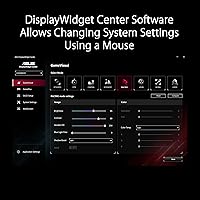
The ASUS Display Widget Center lets users adjust brightness, color profiles, and OLED-specific options like pixel shift and uniformity modes directly from the desktop without navigating a physical on-screen menu. For dual-PC users relying on the KVM, this desktop-level control is a genuine quality-of-life improvement over button-based OSD navigation.
A number of early adopters reported intermittent firmware issues — refresh rate drops, G-SYNC recognition failures after sleep, and occasional KVM switching delays — that required driver reinstalls or monitor restarts to resolve. The software experience does not yet match the hardware ambitions, and the firmware update cadence for this model has left some users waiting longer than expected for fixes.
Ergonomics
74%
26%
The stand offers height, tilt, and swivel adjustments that cover the practical range most desk setups require, and the build feels stable enough that the panel does not flex or shift during normal repositioning. Once dialed in for a specific seating distance and position, the curve and screen proportions feel genuinely comfortable for extended gaming or work sessions.
The sheer physical size makes initial positioning a two-person job — at nearly four feet wide and over 25 pounds, there is genuine risk of damaging the panel if handled alone. Users on smaller desks have found that the stand's footprint leaves little room for a full-size keyboard and mousepad, requiring a larger desk surface than many initially anticipated.
Productivity Use
79%
21%
The wide 32:9 canvas is legitimately useful for tasks that benefit from horizontal real estate — video timelines, multi-window code editors, financial dashboards, and side-by-side document workflows all feel noticeably more spacious than on a standard 16:9 monitor. The wide color gamut coverage also makes it capable for color-accurate creative work without needing a separate dedicated display.
Not all productivity software handles the 32:9 aspect ratio gracefully — video conferencing apps, office suites, and browsers can feel unwieldy at full width, requiring constant manual window sizing to keep content readable and organized. Users who spend significant time on document-heavy or reading-focused tasks may find the extreme horizontal stretch more disorienting than genuinely practical.

Suitable for:

The ASUS ROG Swift PG49WCD 49-inch Gaming Monitor is purpose-built for a specific kind of power user — someone who wants a single wide-format display to replace a dual-monitor setup or fully commit to an immersive simulation experience. Sim racing and flight simulator enthusiasts get the most out of the 32:9 panoramic field of view, where peripheral fill genuinely changes how the experience feels at a hardware level. People who work across two machines — whether a desktop-and-laptop combo or a dual-PC workstation — will find the built-in Smart KVM a practical daily convenience, saving them from cable-swapping or separate switching hardware. Content creators who need accurate, wide-gamut color for photo or video work alongside a capable gaming panel will appreciate the 99% DCI-P3 coverage and near-reference color accuracy. Anyone tired of managing two monitors, bezels, and mismatched brightness levels will also find the clean single-panel setup a meaningful quality-of-life improvement.

Not suitable for:

The ASUS ROG Swift PG49WCD 49-inch Gaming Monitor is a poor fit for anyone who hasn't honestly audited their desk space and GPU horsepower before buying. At nearly four feet wide and over 25 pounds, it demands a genuinely deep, sturdy surface — compact setups will struggle to accommodate it ergonomically or safely. Console-primary gamers should look elsewhere entirely; current PlayStation and Xbox hardware doesn't natively support this resolution, meaning you'd be running a scaled-down image on a panel that commands a premium specifically for its native pixel density. Mid-range GPU owners will find it difficult to sustain 144Hz at full 5120x1440 in demanding AAA titles, which largely defeats the purpose of the high refresh rate. Anyone who displays static content for extended periods — HUD-heavy games, news feeds, or fixed desktop layouts — should carefully weigh the long-term OLED burn-in risk, since no mitigation fully eliminates it. If the KVM and USB-C docking features aren't relevant to your workflow, it's worth asking whether a less expensive panel might serve you just as well.

Specifications

  • Panel Type: Uses a QD-OLED panel that combines quantum dot color enhancement with per-pixel self-emissive OLED lighting, enabling true blacks alongside a wide color gamut.
  • Screen Size: The viewable display area measures 49 inches diagonally, placing it among the largest single-panel desktop monitors currently available for consumer use.
  • Resolution: Native resolution is 5120x1440 pixels (Dual QHD), delivering approximately 109 pixels per inch across the full 32:9 canvas.
  • Aspect Ratio: The 32:9 aspect ratio is the horizontal equivalent of two standard 16:9 monitors placed side by side with no bezel gap between them.
  • Refresh Rate: Supports a maximum refresh rate of 144Hz, providing noticeably smoother motion than standard 60Hz or 75Hz panels in supported games and applications.
  • Response Time: Rated at 0.03ms gray-to-gray response time, which keeps pixel trailing and motion blur at a minimum during fast-paced gameplay.
  • Peak Brightness: Reaches up to 1000 nits peak brightness in HDR mode, though this maximum applies only to a highlight window covering roughly 3% of the total screen area.
  • Color Gamut: Covers 99% of the DCI-P3 color space, making it suitable for HDR content and color-sensitive creative work including photo editing and video grading.
  • Color Accuracy: Factory-calibrated to a Delta E value below 2, meaning color deviation is small enough for most professional and prosumer color-critical workflows.
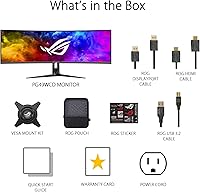
  • Connectivity: Offers one DisplayPort 1.4 with DSC support, one HDMI 2.1 input, and one USB-C port delivering up to 90W Power Delivery for simultaneous display and laptop charging.
  • USB Hub: Includes two USB 3.2 downstream ports built into the monitor body for connecting peripherals such as keyboards, mice, or external storage devices.
  • Sync Support: Certified as G-SYNC Compatible, enabling adaptive sync with supported NVIDIA graphics cards to eliminate screen tearing without requiring a discrete G-SYNC hardware module.
  • KVM Switch: Features a built-in Smart KVM that routes a single keyboard and mouse between two connected computers, with USB 3.2 file transfer capability between those devices.
  • Surface Finish: The panel uses a matte anti-glare coating that reduces reflections under ambient lighting conditions without significantly softening perceived image sharpness.
  • Weight: The monitor including the stand weighs 25.7 pounds, which is typical for a 49-inch panel of this construction but requires a desk surface with adequate structural support.
  • Dimensions: With the stand attached, the monitor measures 47.1 inches wide, 16.8 inches tall, and 11.1 inches deep, requiring a desk at least 48 inches wide for a proper fit.
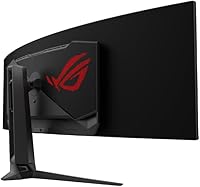
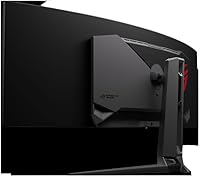
  • Thermal Design: Incorporates a custom heatsink paired with a graphene-coated rear panel to actively dissipate heat and reduce the thermal stress that can accelerate OLED panel wear over time.

Related Reviews
ASUS ROG Swift PG38UQ 38-inch Gaming Monitor
80%
93%
Image Quality
81%
HDR Performance
94%
Console Compatibility
88%
Motion Clarity
91%
Color Accuracy
More
ASUS ROG Swift PG279QM 27-inch 1440p Gaming Monitor
86%
93%
Display Quality
95%
Performance for Gaming
89%
Build Quality
91%
Color Accuracy
72%
Ease of Setup
More
ASUS ROG Swift PG32UQ 32-inch Gaming Monitor
67%
83%
Image Quality
54%
HDR Performance
78%
Refresh Rate & Smoothness
81%
Console Compatibility
41%
Panel Uniformity
More
ASUS ROG Swift PG27AQDM-R 27-inch OLED Gaming Monitor
88%
94%
Display Quality
92%
Color Accuracy
91%
Refresh Rate and Response Time
88%
Build Quality
89%
Ease of Setup
More
ASUS ROG Swift PG32UCDM 32-inch OLED Monitor
82%
96%
Image Quality
93%
Motion Performance
94%
Color Accuracy
78%
HDR Performance
74%
Burn-In Risk & Longevity
More
ASUS ROG Swift PG27UCDM 27-inch Gaming Monitor
82%
96%
Image Quality
97%
Black Levels & Contrast
93%
Gaming Performance
91%
Color Accuracy
88%
Text Clarity
More
ASUS ROG Swift PG278Q 27″ 1440P Gaming Monitor
86%
93%
Display Quality
91%
Gaming Performance (Refresh Rate & Response Time)
88%
Ergonomics (Adjustable Stand)
90%
G-SYNC Functionality
77%
Color Accuracy
More
ASUS ROG Strix XG49VQ 49-inch Ultrawide Gaming Monitor
76%
93%
Gaming Immersion
89%
Refresh Rate & Smoothness
91%
Display Immersion & Curve
78%
Color Accuracy & Gamut
58%
Resolution & Pixel Density
More
ASUS ROG PG27AQDP 27-inch OLED Gaming Monitor
81%
97%
Refresh Rate Performance
96%
Panel Contrast & Black Levels
94%
Response Time & Motion Clarity
91%
Color Accuracy
63%
HDR Performance
More
ASUS ROG Strix XG259QNS 24.5-inch Gaming Monitor
80%
93%
Motion Clarity
91%
Input Responsiveness
78%
Refresh Rate Value
67%
Image Quality
88%
Build Quality
More

FAQ

The ASUS ROG Swift PG49WCD 49-inch Gaming Monitor is genuinely demanding at its native resolution — you will want a top-tier current-generation card, such as an RTX 4080 or 4090, to sustain 144Hz in graphically intensive AAA titles. Mid-range cards can handle the resolution comfortably in lighter or older games, and for productivity tasks the GPU requirements are far more relaxed. If your primary use is simulators, esports titles, or creative work, a high-mid-range card will likely serve you well.

It is a legitimate concern worth thinking about honestly, not something to wave away. ASUS has built in several mitigations — a uniform brightness mode, pixel-shift routines, and a custom heatsink with graphene backing that keeps panel temperatures lower than typical OLED designs. That said, if you run games with persistent on-screen overlays like minimaps, health bars, or static taskbars for many hours daily, some risk accumulates over years of ownership. The practical guidance is to enable the built-in protections, vary your content where you can, and avoid leaving static images on screen during long idle periods.

You can connect either console via the HDMI 2.1 port, but neither the PS5 nor Xbox Series X outputs the native 5120x1440 resolution — both are built around 4K at a 16:9 ratio. The result is a letterboxed or scaled image that is not what you are paying a significant premium for on this panel. This ROG ultrawide is clearly optimized for PC gaming, and console-primary users would be better served by a dedicated 4K display.

You connect two computers to the PG49WCD — typically one via DisplayPort and another via USB-C or HDMI — then plug your keyboard and mouse into the monitor's built-in USB hub. The KVM lets you switch input and peripheral control between both machines without touching a cable, and it even supports file transfers between devices over USB 3.2. It is genuinely convenient for a simple desktop-plus-laptop arrangement, but it is not a replacement for a dedicated hardware KVM if you need audio switching, more than two devices, or more complex peripheral management.

For most ultrabooks and mid-range laptops, yes — 90W is enough for full-speed charging while the display is active. High-performance laptops that draw more than 90W under heavy load may charge more slowly or simply hold battery level rather than gaining charge during demanding sessions. It is worth checking your laptop's rated power consumption before assuming single-cable docking will work flawlessly in every scenario.

With the stand, the panel spans 47.1 inches wide, so you realistically need a desk at least 48 to 55 inches wide to avoid a cramped setup. Depth matters too — the stand footprint is about 11 inches deep, and sitting roughly 3 feet back from the screen is recommended to comfortably take in the full width without straining your eyes. A desk in the 55-to-60-inch range with at least 28 to 30 inches of depth is a sensible practical minimum.

G-SYNC Compatible means NVIDIA has validated the panel for adaptive sync, but it does not include the dedicated G-SYNC hardware module found in NVIDIA's premium-tier certified displays. In everyday use the difference is minimal for most gamers — screen tearing is eliminated and frame pacing is smooth. Where full G-SYNC hardware can theoretically pull ahead is at very low frame counts with low-framerate compensation, but the vast majority of users will not notice a tangible difference during normal gaming.

Running below native resolution can introduce noticeable scaling softness, and some early users have reported that non-native resolutions occasionally cause unexpected behavior with adaptive sync as well. For desktop productivity or casual lighter games it typically performs acceptably, but for a competitive or high-refresh gaming session you really want to stay at the native 5120x1440 — which, again, demands a capable GPU to drive properly.

The QD-OLED panel produces rich, vibrant colors and genuinely deep blacks that work beautifully for cinematic content, but the 32:9 aspect ratio creates a practical challenge — most films are mastered in 21:9 or standard 16:9, so black bars on the sides or top are the norm depending on your source. Truly native 32:9 streaming content is rare. It can be a rewarding viewing experience for the right material, but it is not as well-suited to casual movie watching as a 21:9 ultrawide would be.

Matte coatings do introduce a slight diffusion compared to glossy panels, which some users notice during very dark scenes or in a pitch-black room. The practical benefit is that in a normally lit workspace the finish dramatically reduces distracting reflections, improving day-to-day usability. For most gaming and productivity scenarios the tradeoff is clearly worthwhile, though if you specifically value the most vivid, glass-like image quality in a fully controlled dark environment, a glossy-panel alternative may suit you better.

Where to Buy