Overview

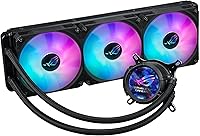
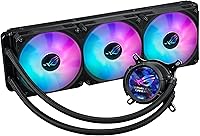
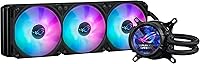
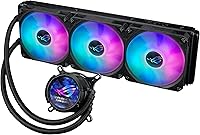
The ASUS ROG Strix LC III 360 Cooler is ASUS's most capable 360mm AIO to date, aimed squarely at enthusiast builders who won't compromise on thermals or aesthetics. It sits alongside the Corsair iCUE H150i and NZXT Kraken 360 in terms of price and ambition, but the 2.1″ IPS LCD panel sets it apart from the crowd — and from previous ROG AIO generations. Socket support is broad, covering Intel LGA 1700, 1200, and 115X as well as AMD AM4 and AM5. That said, the premium price demands honest scrutiny: buyers who don't need the LCD or deep Aura integration might find comparable cooling from less expensive alternatives.

Features & Benefits

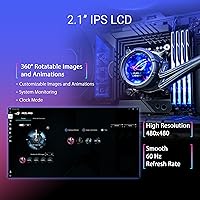
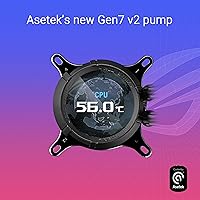
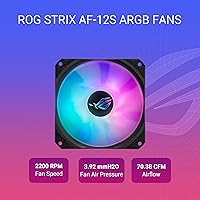
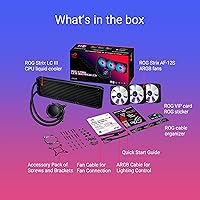
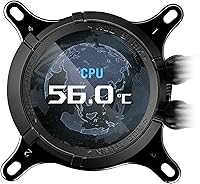
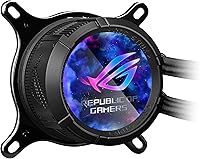
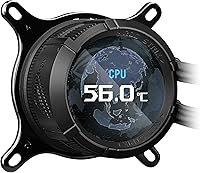
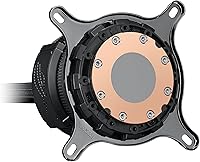
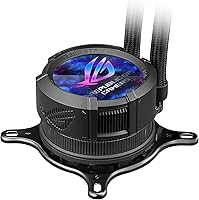
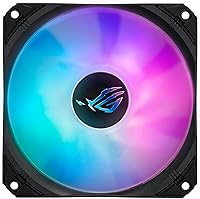
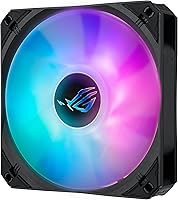
The Asetek Gen7 v2 pump is the real workhorse here — the redesigned cold plate makes a tangible difference when cooling chips with high power draw, putting this liquid cooler in the same thermal conversation as top-tier competition. The three ROG STRIX AF-12S ARGB fans each push 70.38 CFM and drop to completely silent operation at low loads, which is genuinely appreciated during everyday tasks. The 2.1″ LCD rotates a full 360 degrees and can pull live sensor data, display custom art, or show the time — useful for on-screen monitoring without additional software overlays. Sleeved 400mm tubes round out a package that feels built to last.

Best For

This 360mm AIO is a natural fit for anyone running an Intel Core i9 or AMD Ryzen 9 processor — chips that need serious heat dissipation to maintain boost clocks under sustained load. ROG and ASUS motherboard owners get the most out of it, since Aura Sync integration ties fans, pump head, and board lighting together without extra configuration. Content creators and streamers will appreciate the LCD for keeping an eye on temperatures without alt-tabbing out of their workflow. Those upgrading from a 240mm AIO or a beefy air cooler should see a meaningful drop in peak temps, though case compatibility with a 360mm radiator should be confirmed first.

User Feedback

Buyers consistently praise the build quality and the LCD panel's customization depth, with many noting it holds up well against similarly priced options from competing brands in real-world temperature tests. The friction point that comes up most often is Armoury Crate — the software is required for full LCD control, and its reputation for being bloated is well-documented among experienced builders. Installation gets mixed notes: most Intel LGA 1700 users report a straightforward process, while AM5 builders occasionally flag confusion around bracket compatibility. At maximum fan speed, noise is noticeable; most reviewers recommend dialing in a custom fan curve to keep acoustics in check during everyday use.

Pros

  • The Asetek Gen7 v2 pump with its redesigned cold plate delivers competitive thermal performance against other top-tier 360mm AIOs.
  • The 2.1″ IPS LCD is sharp and genuinely useful for monitoring temps or displaying custom graphics without third-party tools.
  • Three ARGB fans drop to completely silent 0dB operation during light workloads, making idle and browsing sessions nearly noiseless.
  • Reinforced sleeved tubing feels durable and looks far more premium than standard bare rubber alternatives.
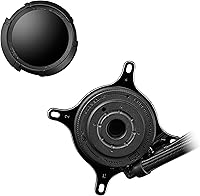
  • Broad socket support covers Intel LGA 1700, 1200, 115X, and AMD AM4 and AM5, reducing upgrade-path concerns.
  • Aura Sync integration ties fans and pump head lighting to compatible ASUS motherboards with minimal manual configuration.
  • The 400mm tube length gives real flexibility for radiator placement in both mid-tower and full-tower cases.
  • Build quality is consistently praised by buyers, with the pump head and fan construction feeling solid and well-finished.
  • The LCD panel rotates a full 360 degrees, so it reads correctly regardless of radiator orientation in your case.

Cons

  • Full LCD functionality requires Armoury Crate, which many experienced builders find bloated and occasionally buggy.
  • At maximum fan speed the noise level is noticeable — a custom fan curve is practically necessary for comfortable daily use.
  • AM5 bracket installation has caused confusion for some builders; the included hardware instructions could be clearer.
  • The premium price is difficult to justify if you are not running a high-TDP processor or an ASUS-centric build.
  • Armoury Crate updates have occasionally caused LCD display issues, introducing software reliability concerns post-install.
  • Buyers on non-ROG motherboards lose much of the lighting integration value they are partially paying for.
  • At 5.29 pounds, the assembled radiator-and-fan stack is on the heavier side, which matters for shipping and case handling during builds.
  • No native support for third-party lighting ecosystems like iCUE or NZXT CAM, limiting flexibility for mixed-brand setups.

Ratings

Our AI-generated scores for the ASUS ROG Strix LC III 360 Cooler are based on a deep analysis of verified global user reviews, with spam, bot activity, and incentivized feedback actively filtered out before scoring. The ratings reflect the full picture — where this liquid cooler genuinely excels and where real buyers have run into friction — so you can make a confident, informed decision.

Thermal Performance
88%
Under sustained workloads — long Blender renders, hours of streaming while gaming, or extended Prime95 runs — this 360mm AIO keeps high-TDP chips like the Ryzen 9 and Core i9 at competitive temperatures compared to similarly priced Corsair and NZXT alternatives. The Asetek Gen7 v2 cold plate update is a genuine improvement over its predecessor, not just a spec-sheet claim.
At stock fan curves, a handful of users noted the cooler runs slightly warmer than expected until fans ramp up past the midpoint, which can be jarring for those used to more aggressive defaults. It does not pull significantly ahead of the competition thermally, so buyers seeking a clear performance lead may be underwhelmed.
Noise Levels
79%
21%
The 0dB fan-stop mode is the standout acoustic feature here — during browsing, video playback, or light productivity tasks, the system runs near silently because the fans simply stop spinning. Builders who keep their PCs in shared living spaces or recording environments particularly appreciate this during off-peak hours.
Push the fans toward their 2200 RPM ceiling and the noise becomes clearly audible, sitting at 36 dB(A) in a quiet room — noticeable if your case has mesh panels. Most experienced users end up creating a custom fan curve to avoid this, which adds a setup step that less technical buyers may not anticipate.
LCD Display
84%
The 2.1″ IPS panel is sharp and bright enough to read at a glance through a tempered glass side panel, and the 360-degree rotation means it stays upright regardless of radiator orientation. Content creators especially appreciate being able to glance at CPU temperature during a livestream without pulling up an overlay.
The display is only as useful as the software behind it, and getting the most out of it requires Armoury Crate — software that a vocal portion of the enthusiast community considers bloated and intrusive. Without it, the LCD defaults to a static display and offers no customization whatsoever.
Software Experience
57%
43%
Once Armoury Crate is installed and stable, the LCD customization options are genuinely broad — system monitoring layouts, custom GIF uploads, and clock modes all work as advertised. For users already living inside the ASUS software ecosystem, it integrates reasonably well with existing Aura Sync profiles.
Armoury Crate's reputation among builders is well-earned: update-related bugs that temporarily break LCD functionality, background resource usage that some users consider excessive, and a UI that feels more complex than it needs to be. Several reviewers specifically flagged software instability as their biggest frustration with this liquid cooler post-installation.
Build Quality
92%
The reinforced sleeved tubing, metal radiator construction, and solid pump head finish consistently draw praise from buyers who have handled competing AIOs at this price tier. Nothing flexes where it shouldn't, and the overall package feels like it will hold up through multiple system builds over several years.
The plastic components on the fan frames, while standard for the category, do feel slightly at odds with the premium price point when handled directly. A small number of users reported minor cosmetic inconsistencies in the pump head finish out of the box, though functional issues were rare.
Installation Experience
74%
26%
LGA 1700 installation is consistently described as clean and straightforward, with the bracket hardware aligning well and the 400mm tube length giving enough slack to route without straining. Experienced builders generally get this liquid cooler seated and posting within 20 to 30 minutes.
AM5 installation generates more mixed feedback — the mounting guide is not as intuitive as it could be, and a subset of users needed to consult community forums to confirm the correct bracket orientation. First-time AIO builders on AMD platforms may find the process more stressful than it should be at this price point.
ARGB Lighting
86%
When paired with a compatible ASUS motherboard, the Aura Sync integration produces a genuinely cohesive lighting result across fans, pump head, and board — one profile controls everything without juggling multiple apps. The ARGB output on the fans is vivid and evenly distributed, holding up well in side-panel showcase builds.
On non-ASUS motherboards the lighting still works, but synchronization with other brands requires third-party workarounds that are hit or miss. Users with mixed-brand setups frequently noted that managing the ROG LC III 360 lighting separately from the rest of their build is a minor but persistent annoyance.
Fan Performance
83%
The ROG STRIX AF-12S ARGB fans move a healthy 70.38 CFM each and provide enough static pressure to push air effectively through the radiator, even at moderate RPMs. Builders running positive pressure configurations inside their cases report good overall airflow balance when these fans are used as intake or exhaust.
At maximum RPM the fan noise is the primary acoustic complaint from buyers, and the stock fan curve trends toward higher speeds more readily than some competing AIOs at similar loads. Getting the acoustic balance right requires active tuning rather than trusting the default profile.
Value for Money
67%
33%
For ROG ecosystem users who will actively use the LCD, take advantage of Aura Sync, and are cooling a genuinely power-hungry CPU, the feature set justifies the cost relative to flagship offerings from Corsair and NZXT at comparable pricing. The build quality and Asetek pump pedigree add to the long-term value case.
For anyone outside the ASUS ecosystem or running a mid-range processor that does not push thermal limits, the premium is harder to rationalize — competing 360mm AIOs deliver similar real-world temperatures at meaningfully lower prices. The software dependency also introduces a long-term risk if Armoury Crate support changes down the road.
Compatibility Range
91%
Covering Intel LGA 1851, 1700, 1200, and 115X alongside AMD AM5 and AM4 means this cooler spans the full current-generation platform range and several legacy ones, which matters for builders who swap CPUs between generations without replacing their cooling loop. Very few prospective buyers will hit a compatibility wall.
LGA 1851 support is listed but some users flagged that bracket kits for that socket required downloading updated installation documentation from ASUS's support page rather than finding it in the box. The hardware itself works, but documentation completeness for newer sockets lags slightly.
Pump Reliability
87%
The Asetek Gen7 v2 pump has a solid reliability record based on user reports across the wider AIO market, and the ROG LC III 360 inherits that foundation. Long-term owners reporting 12-plus months of daily use without pump noise degradation or coolant issues are common in community threads.
A small but present group of reviewers reported audible pump whine during the first few days of operation, which in most cases settled down after a brief break-in period. Those who experienced persistent pump noise beyond that window noted the warranty process was functional but time-consuming.
Tube Quality
89%
The reinforced sleeved tubing is noticeably more premium than the bare rubber found on entry-level AIOs, resisting kinking during cable management and maintaining its shape after being routed around case obstructions. Multiple builders noted it held its position cleanly without needing zip ties to keep it tidy.
The tube length of 400mm, while generous for most builds, can feel slightly short in very large full-tower cases where the radiator is mounted at the top and the CPU socket sits lower on an extended ATX board. Not a deal-breaker, but worth mapping out before installation.
Aesthetics
88%
The pump head design integrates cleanly with ROG motherboard aesthetics, and the sleeved tubing adds a finished look that bare-tube coolers at lower price points cannot match. The combination of the LCD panel and synchronized ARGB fans makes for one of the stronger visual packages in the 360mm AIO category.
The aesthetic is heavily ROG-branded, which is a deliberate choice but means it can look out of place in builds centered around a different design language or color scheme. Buyers going for an all-white or minimalist build will find the ROG styling hard to reconcile with their overall theme.

Suitable for:

The ASUS ROG Strix LC III 360 Cooler is best matched to enthusiast builders who are running power-hungry processors — think Intel Core i9 or AMD Ryzen 9 chips — and need a cooling solution that can handle sustained high-TDP loads without throttling performance. It's an especially strong pick for anyone already invested in the ROG or ASUS ecosystem, since Aura Sync brings the pump head, ARGB fans, and motherboard lighting into one cohesive look with minimal setup friction. Content creators and streamers who want a live temperature or system stats readout without running a separate overlay will find the 2.1″ LCD genuinely practical rather than just decorative. Builders upgrading from a 240mm AIO or a premium air cooler should see meaningful thermal headroom gains, particularly during long rendering or encoding sessions. If your case supports a 360mm radiator and your build calls for something that performs and looks the part, this liquid cooler is a well-rounded choice.

Not suitable for:

The ASUS ROG Strix LC III 360 Cooler is a harder sell for buyers who aren't already in the ASUS ecosystem, because the LCD display's full functionality is locked behind Armoury Crate — software that has a well-documented reputation for being resource-heavy and occasionally unreliable. If you're running a non-ROG motherboard and have no plans to use Aura Sync, you're essentially paying a premium for features that won't reach their potential in your setup. Budget-conscious builders or anyone cooling a mid-range processor that doesn't push thermal limits will likely find that a solid 240mm AIO or a high-end air cooler delivers comparable real-world temperatures at a noticeably lower cost. Cases with restricted radiator clearance are another practical concern — 360mm support is not universal, so smaller mid-tower owners need to verify compatibility before committing. Finally, anyone who prefers a purely plug-and-play experience with no software dependency should look elsewhere, as this cooler's strongest features all require software configuration to unlock.

Specifications

  • Radiator Size: The radiator measures 394 x 121 x 27 mm, placing it in the standard 360mm class compatible with most mid-tower and full-tower cases.
  • LCD Display: A 2.1″ IPS panel with 480x480 resolution runs at 60Hz and rotates a full 360 degrees to stay readable in any radiator orientation.
  • Pump: The Asetek Gen7 v2 pump features a redesigned cold plate engineered to improve heat transfer efficiency over the previous generation.
  • Fans: Three ROG STRIX AF-12S ARGB fans, each 120mm, are included and spin at up to 2200 RPM for active cooling.
  • Airflow: Each fan delivers up to 70.38 CFM of airflow with a static pressure rating of 3.92 mmH2O.
  • Noise Level: Maximum fan noise is rated at 36 dB(A), with a 0dB silent mode that stops the fans entirely during low-load operation.
  • Tube Length: The reinforced, sleeved tubes measure 400mm, providing enough slack for flexible radiator positioning inside the case.
  • Intel Support: Compatible Intel sockets include LGA 1851, LGA 1700, LGA 1200, and LGA 115X.
  • AMD Support: Compatible AMD sockets include AM5 and AM4, covering all current-generation Ryzen processors.
  • Lighting: ARGB lighting on both the fans and pump head is compatible with ASUS Aura Sync for synchronized RGB control across supported motherboards.
  • Power: The cooler operates at 12V and draws 10 watts, connecting via a standard 3-pin connector.
  • Dimensions: The overall unit dimensions are approximately 15.5 x 4.7 x 1.1 inches including the radiator assembly.
  • Weight: The complete assembly weighs 5.29 pounds, typical for a 360mm AIO with three fans attached.
  • Materials: Construction uses a combination of metal and plastic, with metal used for the radiator core and fan frames.
  • Software: Full LCD customization and Aura Sync lighting control require ASUS Armoury Crate software, available as a free download.

Related Reviews
ASUS ROG Ryujin III 360 AIO Cooler
83%
93%
Cooling Performance
88%
Pump Quality & Reliability
87%
Fan Performance
74%
Noise Levels
91%
LCD Display Functionality
More
ASUS ROG RYUO III 360 ARGB AIO Liquid CPU Cooler
87%
94%
Cooling Performance
91%
RGB Customization
75%
Installation Ease
90%
Build Quality
88%
Noise Level
More
ASUS ROG RYUO III 240 ARGB AIO Liquid CPU Cooler
88%
94%
Cooling Performance
88%
Noise Level
91%
Aesthetic Appeal
75%
Ease of Installation
92%
RGB Customization
More
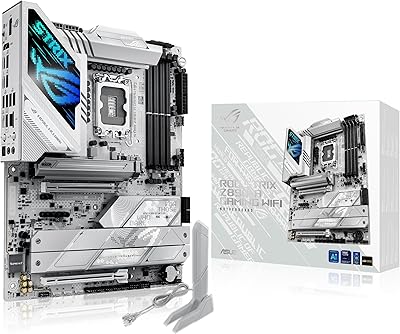
ASUS ROG STRIX Z890-A GAMING WIFI
91%
96%
Performance Stability
94%
Overclocking Capability
92%
Thermal Management
90%
Build Quality
88%
Ease of Installation
More
ASUS ROG XG27AQDMG 27-inch OLED Gaming Monitor
79%
96%
Image Quality
93%
Refresh Rate Performance
48%
Glare & Reflections
91%
Response Time & Motion Clarity
67%
Burn-in Risk & Longevity
More
ASUS ROG Strix XG27AQMR 27” Gaming Monitor
87%
94%
Gaming Performance
91%
Visual Quality
88%
Build Quality
96%
Refresh Rate & Response Time
87%
Color Accuracy
More
ASUS ROG Strix Z390-E Gaming Motherboard

88%
93%
Gaming Performance
90%
Overclocking Capabilities
88%
Wi-Fi Performance
85%
Ease of Installation
91%
Durability & Build Quality
More
ASUS Prime LC 360 ARGB White Edition
87%
95%
Cooling Performance
92%
RGB Lighting Quality
84%
Ease of Installation
89%
Build Quality
78%
Compatibility with Cases
More
ASUS ROG Strix B650E-I Gaming WiFi Motherboard
87%
93%
Performance
88%
Cooling Efficiency
90%
Installation Ease
91%
Connectivity (WiFi 6E, LAN)
85%
Build Quality
More
ASUS ROG Strix B850-I Mini-ITX Motherboard
82%
91%
Build Quality
88%
BIOS Usability
93%
Power Delivery
74%
Thermal Management
89%
Connectivity & I/O
More

FAQ

Yes, the ROG LC III 360 includes AM5 bracket support out of the box. That said, a handful of users have noted the AM5 installation instructions could be clearer, so it is worth reading through the full bracket guide before starting rather than relying on the quick-start sheet.

You do need Armoury Crate for full LCD functionality — things like displaying custom images, system stats, or switching display modes all go through the software. The cooler will still operate and cool your CPU without it, but the LCD will be limited to a default display until the software is set up. If Armoury Crate is something you prefer to avoid, that is a real trade-off worth factoring into your decision.

At maximum fan speed the noise is rated at 36 dB(A), which is audible in a quiet room. Most users find the default fan curve acceptable, but setting up a custom curve in Armoury Crate or your motherboard's fan control software to keep RPMs moderate during typical workloads makes a noticeable difference in day-to-day acoustics.

Most mid-tower cases support 360mm radiators, but not all do, so you should verify your specific case's radiator clearance specs before purchasing. The radiator itself is 394 x 121 x 27 mm, and the 400mm tube length gives you reasonable flexibility in positioning. Checking your case manufacturer's compatibility list is the safest step.

Yes, LGA 1700 is fully supported and is one of the most straightforward installations for this cooler. The included bracket hardware covers LGA 1700 alongside LGA 1851, 1200, and 115X, so Intel users across several generations are covered without needing an adapter kit.

Absolutely — it will cool your CPU regardless of motherboard brand. However, Aura Sync lighting synchronization only works with ASUS motherboards, so on a non-ASUS board the ARGB fans and pump head will still light up but won't sync automatically with your motherboard's lighting ecosystem.

It means the three fans stop spinning entirely when CPU temperatures are low enough — typically during light tasks like web browsing, video playback, or office work. The pump continues running to circulate coolant, but the absence of fan noise makes the system noticeably quieter during those periods. Fans spin back up automatically as temperatures rise.

Once configured through Armoury Crate, yes — it can show real-time CPU temperature, clock speed, load percentage, and other system metrics directly on the 2.1″ panel. It is genuinely handy for keeping an eye on thermals without needing an on-screen overlay, though initial setup through the software is required.

In community comparisons and user-shared benchmarks, this liquid cooler performs on par with top 360mm competition from Corsair and NZXT when cooling high-TDP chips. The Asetek Gen7 v2 pump and redesigned cold plate contribute to solid results, particularly under sustained workloads. It is not dramatically ahead of the pack thermally, but it holds its own at this tier.

Thermal paste comes pre-applied to the cold plate from the factory, which is standard for Asetek-based AIOs. You do not need to purchase or apply paste separately for the initial installation. If you ever remove and reseat the cooler in the future, you will want to clean off the old paste and apply a fresh coat at that point.

Where to Buy