


Overview

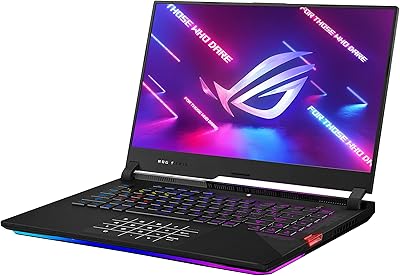
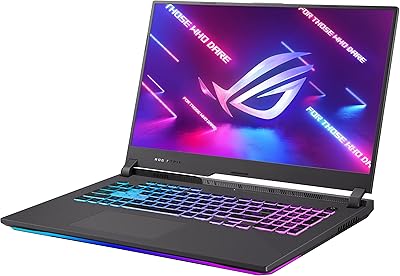
The ASUS ROG Strix G17 17.3″ Gaming Laptop occupies a sweet spot for gamers who want genuine desktop-class performance in a portable package without climbing into flagship pricing. ASUS ROG has earned its standing in the gaming laptop market, and this ROG Strix G17 reflects that pedigree with a capable Ryzen 7 and RTX 3060 pairing built for strong 1080p output. The seller has bumped the configuration to 32GB of RAM and a 2TB SSD, which meaningfully raises the value over standard stock. One honest caveat: the Ryzen 7 4800H runs on AMD’s Zen 2 architecture, not the newer Zen 3 or Zen 4 designs, so buyers planning long-term should factor that in.

Features & Benefits

The 144 Hz IPS display is one of the first things you appreciate when gaming — motion stays sharp and fluid in fast-paced titles where a standard 60 Hz screen would blur. The RTX 3060 handles most modern games at high settings in 1080p without issue, and can manage ray tracing in lighter workloads. ROG’s Intelligent Cooling system, with dual fans and heat pipes running through the chassis, keeps temperatures stable during extended sessions. Connectivity is solid: Wi-Fi 6 and Bluetooth 5.1 handle wireless, while the USB-C port supports DisplayPort output and G-SYNC. The 4-zone RGB keyboard is a nice touch, though key travel and layout comfort will depend on how you type.

Best For

This gaming laptop is a natural fit for a few specific types of buyers. If you spend most of your time on 1080p titles and don’t want the overhead of managing a 4K display, the 17-inch screen gives you plenty of real estate without the performance hit. VR-ready certification makes it a practical choice for headset owners who need a capable machine without a full desktop setup. Students or creators who also game will find the generous RAM and 2TB of storage genuinely useful day to day. It’s not the right pick if you need a machine that runs light on a single battery charge all day — but for plugged-in gaming and creative work, it does the job well.

User Feedback

Buyers generally respond well to the Strix G17’s build quality and display brightness, with most praising how well it handles competitive titles at 1080p. The common frustrations are predictable for a laptop in this class: fan noise under load can get noticeably loud, and battery life during gaming typically lands between two and four hours — don’t expect to play unplugged for long stretches. Some users have raised questions about the seller-upgraded RAM and SSD, since the original seal was opened for those modifications; the included one-year warranty on those parts helps, but it’s a fair point to consider. ASUS’s Armoury Crate software has also drawn criticism for bloatware, which is worth knowing going in. At 5.7 pounds, this isn’t a machine you’ll forget you’re carrying.

Pros

  • The 144 Hz IPS display keeps fast-paced games smooth and visually sharp with minimal motion blur.
  • RTX 3060 handles the vast majority of modern games at high settings in 1080p without breaking a sweat.
  • 32GB of RAM means heavy multitasking, streaming, and creative workloads rarely cause slowdowns.
  • 2TB of onboard SSD storage is generous enough that most users will never feel cramped for space.
  • Wi-Fi 6 support puts this gaming laptop ahead of older wireless standards for latency-sensitive online play.
  • VR-ready certification makes it a legitimate portable option for headset owners without a desktop.
  • ROG’s cooling system does a solid job sustaining performance during long gaming sessions.
  • The USB-C port with DisplayPort and G-SYNC support adds real flexibility for external monitors and creative setups.
  • ASUS ROG’s build quality and brand support give buyers more confidence than lesser-known gaming brands.
  • The large 17-inch screen is a meaningful upgrade in comfort for extended gaming or media sessions.

Cons

  • Fan noise under sustained load can get loud enough to be distracting in quiet environments.
  • Battery life during gaming is realistically two to four hours — a power outlet is a near-constant requirement.
  • The Ryzen 7 4800H is a Zen 2 chip, which puts it behind current-gen AMD processors in efficiency and raw throughput.
  • The original seal was opened by the seller for upgrades, which may concern buyers who prefer factory-sealed units.
  • At 5.7 pounds, the Strix G17 is not a comfortable daily commuter bag companion for most people.
  • ASUS Armoury Crate software ships with bloatware that some users find annoying to clean up.
  • The 1080p panel, while excellent at 144 Hz, leaves no room to grow if you later want higher-resolution gaming.
  • The seller warranty on upgraded components is separate from the standard ASUS manufacturer warranty, adding a layer of complexity if something goes wrong.
  • Windows 10 Home is the included OS, meaning buyers will eventually need to manage a Windows 11 upgrade themselves.
  • Thick chassis dimensions mean this machine takes up noticeable desk and bag space compared to slimmer alternatives.

Ratings

The scores below reflect an AI-driven analysis of verified global user reviews for the ASUS ROG Strix G17 17.3″ Gaming Laptop, with spam, bot activity, and incentivized feedback actively filtered out to ensure the results reflect genuine buyer experiences. Each category captures both the praise and the frustrations real owners report after extended daily use. Nothing is glossed over — if a weak point consistently surfaced across reviews, it is reflected in the score.

Gaming Performance
88%
Most owners report that the RTX 3060 and Ryzen 7 pairing handles popular titles like Cyberpunk 2077, Apex Legends, and Elden Ring at high settings in 1080p with framerates that stay well above 60 fps. For the price tier, this combination punches hard and rarely bottlenecks in the games this machine is aimed at.
The Ryzen 7 4800H is a Zen 2 chip, and in CPU-intensive workloads or newer titles that lean heavily on the processor, it starts to show its age compared to Zen 3 and Zen 4 laptops. Users pushing demanding simulation or strategy titles have noticed the gap more than those sticking to shooters.
Display Quality
84%
The 144 Hz IPS panel is one of the most consistently praised aspects of this gaming laptop. Gamers switching from 60 Hz screens immediately feel the difference in competitive shooters, and the IPS panel delivers solid color accuracy and decent brightness for a gaming-focused display.
At 17 inches, 1080p resolution results in a pixel density that is noticeably lower than smaller laptops at the same resolution. Users doing detailed creative work or reading fine text at close range sometimes find the sharpness underwhelming compared to QHD alternatives in a similar price bracket.
Build Quality
82%
18%
ASUS ROG’s chassis construction earns consistent praise for feeling solid and premium without being flashy. The aluminum-capped lid resists flex better than many plastic competitors, and the overall assembly quality holds up well after months of daily desk use.
Some users note that the textured plastic base picks up oils and dust visibly over time, requiring regular cleaning to keep it looking presentable. A few owners have flagged minor flex in the keyboard deck under heavy typing pressure, though it does not affect functionality.
Thermal Management
76%
24%
The ROG Intelligent Cooling system keeps the CPU and GPU temperatures within stable operating ranges during extended gaming sessions, which is a genuine achievement for a laptop chassis. Users running back-to-back gaming hours report that performance throttling is minimal when the machine is on a hard flat surface.
Sustained performance comes at a thermal cost in a different way — the underside of the chassis gets noticeably warm, making lap gaming uncomfortable after 30 to 40 minutes. The dual fans work hard to compensate, which leads directly into the noise concerns users frequently raise.
Fan Noise
58%
42%
When the machine is under light loads — browsing, streaming video, or doing office work — the fans stay reasonably quiet and unobtrusive. Casual users who game occasionally rather than for multi-hour sessions find the noise acceptable in those shorter bursts.
Under sustained gaming load, the fans ramp up to a level that is hard to ignore without headphones. Multiple reviewers describe it as similar to a small jet engine at full throttle, which is disruptive in shared spaces like dorm rooms, offices, or living rooms where others are nearby.
Battery Life
43%
57%
During very light tasks — document editing, low-brightness video playback, or web browsing with the performance mode dialed back — some users squeeze up to five or six hours out of a charge, which is reasonable for a gaming laptop in this class.
Under real gaming conditions, expect two to four hours before the charger is needed. This is a desk machine at heart, and buyers who anticipated all-day unplugged use were consistently disappointed. The power adapter is large and adds meaningful weight to any bag you carry.
RAM & Storage Value
91%
The seller-upgraded 32GB of DDR4 RAM and 2TB PCIe SSD represent a meaningful jump in practical value over base configurations. Gamers with large libraries, content creators managing raw video files, and multitaskers running multiple heavy apps simultaneously benefit noticeably from this headroom.
The upgrade was performed by the seller, meaning the factory seal was opened before delivery. While a one-year seller warranty covers these components, buyers who are particular about receiving factory-fresh, untouched hardware may feel uneasy, and warranty service routing could be more complex if issues arise.
Keyboard & Typing Experience
72%
28%
The 4-zone RGB backlighting is well-implemented and adds genuine visual appeal without feeling gimmicky. Key spacing on the full-size layout is comfortable for extended gaming sessions, and most users report that gaming inputs feel responsive and accurate.
Typists coming from dedicated productivity laptops find the key travel shallower than ideal for long writing sessions. The inclusion of a numpad, while useful for some, compresses the main key cluster slightly and shifts the touchpad off-center, which takes an adjustment period for new users.
Connectivity & Ports
86%
Three full-size USB-A ports cover most peripheral setups without needing a hub, and the USB-C port with DisplayPort and G-SYNC support adds real flexibility for connecting external monitors or charging via compatible adapters. Wi-Fi 6 delivers noticeably lower ping in crowded networks compared to older wireless standards.
There is no SD card reader, which content creators who work with camera footage frequently cite as a missing convenience. Ethernet is also absent natively, meaning wired network users need a USB adapter — an extra purchase that feels avoidable on a machine at this price point.
VR Readiness
83%
The Strix G17 clears the recommended hardware thresholds for most popular VR headsets, including Meta Quest linked via PC and SteamVR titles. Users have reported smooth VR sessions in titles like Beat Saber, Half-Life: Alyx, and Superhot VR without significant frame drops.
The RTX 3060’s 6GB of VRAM starts to feel constrained in more graphically demanding VR experiences at higher quality settings. Users pushing the limits of hardware-intensive VR titles occasionally report dropped frames that break immersion, and the laptop’s weight makes tethered play with a headset slightly awkward.
Software & Bloatware
54%
46%
ASUS Armoury Crate does provide genuine utility for adjusting fan curves, switching performance profiles, and controlling RGB lighting from a single interface. Users who take the time to configure it properly find it a useful hub for system management.
Out of the box, the software suite ships with multiple companion apps that most users have no use for and describe as bloatware. Several reviewers report that Armoury Crate itself can be resource-hungry and has occasionally caused startup slowdowns or background process conflicts that required manual cleanup.
Portability
61%
39%
For a 17-inch gaming laptop, 5.7 pounds is not extreme, and users who primarily move it between a bedroom and a living room or carry it occasionally to a LAN party find the form factor manageable. The large screen is a genuine perk when you get it set up.
Daily commuters and students who carry their laptop everywhere find 5.7 pounds plus a large power brick a real burden over time. The 17-inch footprint also does not fit cleanly in most standard backpacks designed for 15-inch machines, requiring a dedicated larger bag.
Value for Money
79%
21%
When you factor in the upgraded 32GB RAM and 2TB SSD alongside the RTX 3060 and 144 Hz display, the overall package offers strong component density for the price tier. Buyers comparing it to similarly specced stock configurations from other brands generally consider it a competitive deal.
The Zen 2 processor is the most significant caveat to the value argument — paying a premium price for a previous-generation CPU means buyers are starting with reduced longevity headroom from day one. Shoppers who can stretch to a Zen 3 or Zen 4 alternative may find better long-term return on investment.
Multitasking & Productivity
85%
With 32GB of RAM, this gaming laptop handles heavy multitasking confidently — streaming on Twitch while gaming, running a virtual machine alongside a browser, or editing timelines in video software without constant slowdowns. It genuinely doubles as a capable workstation for hybrid users.
The Ryzen 7 4800H, while solid for its generation, falls behind Zen 3 chips in single-core performance, which affects responsiveness in some productivity applications that do not scale well across multiple cores. CPU-bound rendering tasks take noticeably longer than on more current-generation laptop processors.

Suitable for:

The ASUS ROG Strix G17 17.3″ Gaming Laptop is a strong match for gamers who want a large, immersive screen and enough GPU muscle to run modern titles at high settings without constant compromises. If you mostly game at a desk and plug in while playing, the performance-to-price ratio here is genuinely competitive for what you get out of the box. VR enthusiasts who need a portable machine that clears the hardware bar for most headsets will find this a practical and capable option. Students or creators who split their time between gaming, video editing, and heavy multitasking will also benefit from the upgraded 32GB of RAM and 2TB of storage, which removes the need to buy additional drives or immediately swap components. Anyone who values a plug-and-play experience over tinkering will appreciate that this configuration is ready to go from day one.

Not suitable for:

Buyers who need all-day battery life should look elsewhere — the ASUS ROG Strix G17 17.3″ Gaming Laptop, like most machines in its class, will give you roughly two to four hours unplugged under real gaming conditions, and that number drops fast under load. If you are sensitive about purchasing refurbished or seller-modified hardware, the fact that the original seal was opened for RAM and SSD upgrades may give you pause, even with the included one-year seller warranty on those components. Frequent travelers or commuters who need something lightweight and slim will find 5.7 pounds and a 1.11-inch thick chassis more burden than they want in a bag every day. Competitive buyers eyeing long-term future-proofing should also note that the Ryzen 7 4800H is a Zen 2 chip, meaning it sits a full generation or two behind current AMD laptop processors — which matters if you plan to keep this machine for four or five years. Finally, anyone hoping to run games at 1440p or 4K will run into the limits of both the display resolution and the RTX 3060’s VRAM ceiling.

Specifications

  • Display: 17.3-inch IPS panel with a 144 Hz refresh rate, delivering smooth motion for fast-paced gaming at Full HD resolution.
  • Resolution: 1920 x 1080 pixels (Full HD), optimized for high-framerate 1080p gaming rather than 4K output.
  • Processor: AMD Ryzen 7 4800H, an 8-core, 16-thread Zen 2 chip clocked up to 4.2 GHz, well-suited for gaming and multitasking workloads.
  • Graphics: NVIDIA GeForce RTX 3060 with 6GB of dedicated VRAM, capable of running most modern games at high settings in 1080p.
  • RAM: 32GB of DDR4 memory, upgraded by the seller from the standard configuration, with a one-year seller warranty on the upgrade.
  • Storage: 2TB PCIe SSD, seller-upgraded from stock, providing fast load times and ample space for a large game library.
  • Wireless: Wi-Fi 6 (802.11ax) and Bluetooth 5.1 are built in, offering low-latency wireless connectivity for both gaming and peripherals.
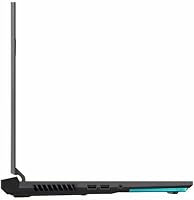
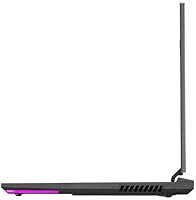
  • Ports: Three USB 3.2 Gen 1 Type-A ports, one USB 3.2 Gen 2 Type-C with DisplayPort and G-SYNC support, and one HDMI 2.0b output.
  • Keyboard: 4-zone RGB backlit keyboard with customizable lighting, controllable through the ASUS Armoury Crate software.
  • Audio: A combined headphone and microphone jack is included for wired headset use.
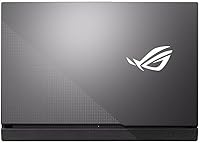
  • Cooling: ROG Intelligent Cooling system uses dual fans and heat pipes routed through an aluminum-capped lid and textured base for sustained thermal management.
  • Operating System: Ships with Windows 10 Home pre-installed; upgrading to Windows 11 is supported but must be handled by the user.
  • Weight: 5.7 pounds, making it a desk-oriented portable rather than a lightweight commuter machine.
  • Dimensions: 11.1 x 15.55 x 1.11 inches, a footprint typical of a full-size 17-inch gaming chassis.
  • VR Support: Officially VR-Ready, meeting the minimum and recommended hardware requirements for most consumer VR headsets.
  • Battery: Powered by three included Lithium-Ion cells; expect roughly 2 to 4 hours of real-world battery life under gaming loads.
  • Warranty Note: The original factory seal was opened by the seller to perform RAM and SSD upgrades; a separate one-year seller warranty covers those upgraded components.

Related Reviews
ASUS ROG Strix G17 (2021) Gaming Laptop
84%
91%
Performance
89%
Cooling Efficiency
88%
Display Quality
70%
Battery Life
85%
Portability
More
ASUS ROG Strix XG17AHP 17.3″ Portable Monitor
77%
93%
Display Smoothness
91%
Portability
89%
Included Accessories
58%
Battery Life
82%
Connectivity
More
ASUS ROG Strix G17 2021 Gaming Laptop
72%
93%
Gaming Performance
89%
Display Quality
88%
Thermal Management
58%
Fan Noise
41%
Battery Life
More
ASUS ROG Strix G16 2023 Gaming Laptop
72%
93%
Gaming Performance
91%
Thermal Management
88%
Display Quality
84%
Build Quality
81%
Keyboard & Trackpad
More
ASUS ROG Strix SCAR 18 Gaming Laptop

76%
97%
Gaming Performance
94%
Display Quality
92%
CPU & Multitasking
83%
Thermal Management
61%
Fan Noise
More
ASUS ROG Strix G16 Gaming Laptop
74%
91%
Gaming Performance
93%
Display Quality
88%
Thermal Management
53%
Fan Noise
47%
Battery Life
More
ASUS ROG Strix G16 (2025) RTX 5070 i9 32GB
78%
93%
Gaming Performance
86%
Thermal Management
88%
Display Quality
91%
CPU Performance
84%
Build Quality
More
ASUS ROG Strix G15 2021 Gaming Laptop
74%
93%
Gaming Performance
89%
Display Quality
88%
Thermal Management
84%
Build Quality
91%
CPU Performance
More
ASUS ROG Strix G18 Gaming Laptop
74%
94%
Gaming Performance
91%
Display Quality
88%
Thermal Management
61%
Fan Noise
38%
Battery Life
More
ASUS ROG Strix Scar 15 Gaming Laptop
76%
94%
Gaming Performance
91%
Display Quality
89%
CPU & Multitasking
83%
Thermal Management
82%
Keyboard & Input
More

FAQ

It holds up well for 1080p gaming. The RTX 3060 paired with the Ryzen 7 4800H can handle most current titles at high settings without dropping into unplayable territory. The processor is a Zen 2 chip, which is a couple of generations behind today’s latest AMD laptop CPUs, so it won’t be cutting-edge in three or four years — but for the next couple of years of gaming, it’s still a capable setup.

That depends on your comfort level with seller-modified hardware. The upgrades themselves — 32GB of RAM and a 2TB SSD — are genuinely useful additions that raise the value above a stock configuration. The seller does include a one-year warranty on those components, which provides some protection. If you are specifically looking for a factory-sealed, untouched unit, that preference is worth weighing against the added storage and memory you get here.

Noticeably loud under sustained load. The ROG Intelligent Cooling system does its job keeping temperatures in check, but the trade-off is fan noise that can be disruptive in a quiet room. Most gamers use headphones during play, which masks it, but if you sit in an open office or shared space, expect people nearby to notice.

During active gaming, plan on two to four hours before needing to plug in. Lighter tasks like web browsing or document work will stretch that a bit further, but this is not a machine designed for all-day unplugged use. Keep the charger accessible if you’re away from a desk for extended periods.

Yes, it meets the hardware requirements for most consumer VR headsets, including popular options from Meta and Valve. The RTX 3060 and Ryzen 7 combination clears the recommended specs for the majority of current VR titles. It’s a practical choice if you want a portable VR-capable machine without building a full desktop.

Yes. The USB-C port supports DisplayPort output and G-SYNC, so you can connect a compatible external monitor and take advantage of adaptive sync. The HDMI 2.0b port also gives you a second output option if you prefer a standard cable connection.

Armoury Crate is ASUS’s bundled software suite for managing fan profiles, RGB lighting, and performance modes on ROG laptops. It works, but it ships with additional companion apps that many users consider bloatware. You can uninstall the extras and keep only what you need, or use a third-party fan control utility if you prefer a cleaner setup.

At 17 inches, 1080p is on the lower end of pixel density compared to a 15-inch screen at the same resolution, but in practice it looks fine for gaming at a normal viewing distance. You probably won’t notice the difference sitting a foot or two away during fast gameplay. Where it shows more is in fine text or detailed static images if you sit very close.

The RAM and SSD have already been upgraded by the seller, so you are starting with a generous configuration. That said, the ROG Strix G17 chassis does have accessible upgrade slots on most hardware revisions, though you should verify compatibility before purchasing additional components. Given that you already have 32GB of RAM and 2TB of storage, most users won’t feel the need to upgrade anytime soon.

Quite well, actually. The 8-core Ryzen 7 and 32GB of RAM give it enough headroom to handle video editing in tools like DaVinci Resolve or Premiere Pro at 1080p without constant slowdowns. Streaming gameplay works smoothly too, since the CPU has enough cores to encode in the background while the GPU handles the game. It is a solid dual-purpose machine for creators who also game.

Where to Buy