Overview

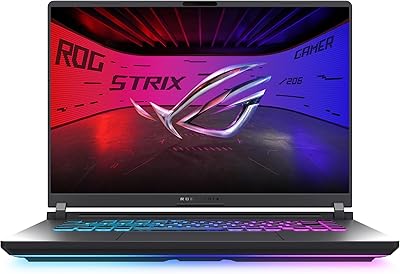
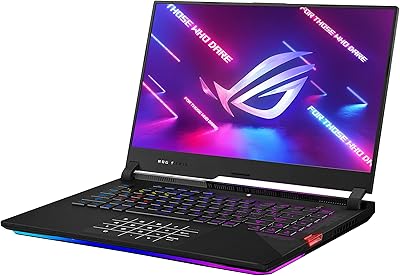
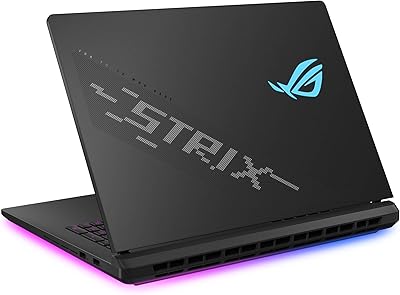
The ASUS ROG Strix G16 2023 Gaming Laptop sits in a compelling spot in the market — powerful enough to handle demanding titles at high settings, yet practical enough as a daily driver. The 13th Gen Intel Core i7-13650HX paired with an RTX 4060 running at 140W max TGP represents a genuine generational step forward, not merely a spec refresh. The 16:10 display adds vertical screen real estate that makes a noticeable difference during both gaming and productivity work. Aesthetically, the Eclipse Gray chassis is restrained by gaming laptop standards — no aggressive angles or loud branding. Just know going in: this is a plugged-in performer, and its weight makes that clear.

Features & Benefits

What separates the ROG Strix G16 thermally is ASUS's use of liquid metal cooling on the CPU — specifically Thermal Grizzly's Conductonaut Extreme. Unlike standard thermal paste, liquid metal conducts heat far more efficiently, helping the processor sustain higher clock speeds during long sessions instead of throttling. A third intake fan, unusual at this price tier, adds meaningful airflow headroom. The MUX Switch with Advanced Optimus routes frames directly from the GPU to the display, bypassing the integrated chip for a tangible performance gain. The 165Hz panel covers 100% sRGB and supports Dolby Vision, striking a solid balance between competitive responsiveness and color accuracy. Wi-Fi 6E rounds things out for anyone on a modern router.

Best For

This gaming laptop makes the most sense for gamers who stay plugged in and want to push frame rates without compromise. It is a particularly strong fit for anyone upgrading from older GTX 10- or RTX 20-series hardware — the performance gap is meaningful. College students who need one machine for coursework and gaming will appreciate the 16:10 screen advantage and fast storage. Light content creators doing streaming or video editing will benefit from the accurate color coverage too. That said, if you travel frequently, carry a laptop all day, or genuinely need strong unplugged battery life, the 5.51-pound chassis and modest real-world battery endurance may give you pause before committing.

User Feedback

Owners of ASUS's Strix G16 consistently point to thermal management and display quality as standout strengths — the machine holds its clock speeds well during extended sessions, which is exactly what you want from a system this capable. The SSD speed earns praise too. On the downside, 512GB fills quickly with modern titles, so factor in a storage upgrade if your game library is large. The built-in speakers are underwhelming at this tier; a headset or external audio becomes practically necessary. Fan noise under full load is audible and in line with machines of this class, but noise-sensitive users should know upfront. Build quality and keyboard feel earn consistently positive marks.

Pros

  • Sustained gaming performance holds up well over long sessions thanks to liquid metal cooling and a triple-fan system.
  • The RTX 4060 running at full 140W TGP delivers noticeably more performance than power-limited competitors.
  • MUX Switch provides a real, usable performance boost with no complicated manual configuration required.
  • The 16:10 panel adds meaningful vertical screen space that makes multitasking and productivity feel less cramped.
  • DDR5 memory and a PCIe 4x4 SSD keep load times short and multitasking smooth.
  • Wi-Fi 6E support future-proofs the wireless connection for anyone with a modern router.
  • The Eclipse Gray design is understated enough to use in professional or academic settings without drawing attention.
  • Keyboard feel and overall chassis rigidity earn consistently positive marks from real owners.
  • 100% sRGB coverage and Dolby Vision make the display genuinely useful for color-sensitive creative work.
  • Adaptive-Sync support reduces screen tearing without needing a separate G-Sync or FreeSync monitor.

Cons

  • 512GB of base storage disappears quickly when modern titles routinely demand 50 to 100GB each.
  • Real-world gaming battery life falls well short of the six-hour manufacturer estimate.
  • At 5.51 pounds, this gaming laptop is not something you will want to carry around all day.
  • Fan noise under full load is clearly audible and can be distracting in quiet environments.
  • Built-in speaker quality is a weak point — a headset or external speakers are practically a necessity.
  • Only two USB 3.0 ports may feel limiting for users with multiple peripherals.
  • The power adapter adds bulk and weight to your carry setup, making travel more cumbersome.
  • No optical drive, which is a non-issue for most but worth noting for niche use cases.

Ratings

The scores below reflect an AI-driven analysis of verified global user reviews for the ASUS ROG Strix G16 2023 Gaming Laptop, with spam, bot-generated, and incentivized feedback actively filtered out before scoring. Each category is calibrated to real ownership experiences — not manufacturer claims — so both the standout strengths and the genuine frustrations are represented honestly. Where the machine earns high marks, it earns them; where it falls short, that is reflected too.

Gaming Performance
93%
Owners repeatedly note that the RTX 4060 at full 140W TGP punches well above what competing laptops with the same chip deliver at lower power limits. Titles like Cyberpunk 2077, Elden Ring, and Apex Legends run smoothly at high settings, and the MUX Switch provides a measurable frame rate boost that users actually notice during competitive play.
At native 1920x1200, demanding titles on ultra settings can occasionally push the GPU close to its limits, and some users feel the step up to a higher-resolution panel would have better matched the GPU's capabilities for single-player cinematic experiences.
Thermal Management
91%
The liquid metal CPU thermal interface and triple-fan system keep sustained performance impressively stable during hour-long gaming sessions — reviewers frequently mention that clock speeds hold steady rather than dropping off over time, which is the key difference between this and cheaper cooling solutions. This translates directly to more consistent frame rates the longer you play.
The thermal system does its job, but it runs the fans hard to do it — under full load the noise level is a real trade-off, and a small number of users report that the bottom of the chassis becomes quite warm when gaming on a lap or soft surface.
Display Quality
88%
The 165Hz refresh rate combined with Adaptive-Sync and 100% sRGB coverage hits a practical sweet spot — competitive gamers get the fast response they need, and the accurate color reproduction makes it genuinely usable for photo editing and streaming work without a separate monitor. Dolby Vision support for content consumption is a bonus that users appreciate.
The FHD resolution on a 16-inch panel is the recurring criticism — pixel density is acceptable but not sharp, and buyers accustomed to QHD displays will notice the difference. Brightness levels under direct sunlight also draw some complaints from users who work near windows.
Build Quality
84%
The chassis feels solid and purposeful — the lid resists flex, the keyboard deck does not bow under pressure, and the hinge mechanism earns consistent praise for its smooth, well-damped action. For a gaming laptop, the Eclipse Gray finish also manages to look professional enough for office or classroom use.
A handful of users note that the plastic elements around the bottom panel feel less premium compared to the top lid, and the Eclipse Gray finish shows fingerprints and minor scuffs more readily than darker matte finishes. Nothing structural, but noticeable on close inspection.
Keyboard & Trackpad
81%
19%
The keyboard gets consistent praise for its key travel and tactile feedback — it does not feel mushy or shallow the way budget gaming keyboards often do, and the per-key RGB backlighting is well-implemented for those who use it. Typists doing extended productivity work find it genuinely comfortable over long sessions.
The trackpad is functional but undersized relative to the laptop's footprint, and several users note it feels like an afterthought given that most buyers will pair this machine with an external mouse anyway. Precision tracking for fine cursor work is adequate but not class-leading.
Cooling System Noise
58%
42%
In lighter workloads — browsing, document work, video streaming — the fans stay quiet enough to use in a library or shared office space without drawing attention. The system ramps intelligently rather than blasting at full speed constantly, which users on productivity tasks appreciate.
Under gaming load, the fan noise is hard to ignore without a headset. Users in quiet environments report it is noticeably loud, and a few describe it as a consistent distraction for roommates or family members in the same room. This is an inherent trade-off of the powerful cooling design, not a defect, but it is a real daily reality.
Battery Life
47%
53%
With Advanced Optimus managing GPU switching automatically, the battery lasts reasonably well during low-intensity tasks like note-taking, web browsing, or video calls — users doing classroom work report getting through a few hours without hunting for an outlet.
The six-hour manufacturer claim falls apart during any real gaming session, where owners consistently report one and a half to two and a half hours of actual use. The power adapter is large and necessary to carry, which undermines the laptop's usability as a truly portable device for gamers away from a desk.
Storage
62%
38%
The PCIe Gen 4x4 SSD is fast — game load times and Windows boot speeds are snappy, and users switching from older SATA or PCIe Gen 3 systems notice the difference right away. The drive performs well and reliably across extended use.
512GB is the sticking point for nearly every critical review. Modern AAA games routinely demand 80 to 100GB each, meaning a handful of titles consumes most of the drive. Upgrading becomes a near-necessity for serious gamers, adding cost and effort that buyers should factor into their budget from day one.
Speaker Quality
44%
56%
For basic tasks — voice calls, YouTube background audio, system notification sounds — the built-in speakers are functional and adequately loud. They serve their purpose in a pinch and are fine for occasional casual media consumption.
At this price tier, the speakers are a genuine weak point. Bass is thin, stereo separation is narrow, and at higher volumes there is audible distortion. The overwhelming consensus from users who care about audio is that a headset or external speaker is not optional — it is essential from day one.
Value for Money
83%
When you account for the full 140W GPU power limit, the liquid metal cooling, the MUX Switch, and the DDR5 platform, the ROG Strix G16 offers more raw gaming capability per dollar than most competitors at the same price point. Buyers upgrading from older hardware consistently feel the generational performance gap justifies the spend.
The 512GB SSD and the absence of a higher-resolution display option are the two places where costs were clearly cut, and both are noticeable omissions at this tier. Factor in the likely cost of a storage upgrade and a gaming headset and the true total price of ownership nudges higher than the sticker suggests.
Portability
51%
49%
The chassis is relatively slim at 0.89 inches thick for the hardware it houses, and it fits in most laptop backpacks without issues. For moving between a desk and a couch, or from one room to another, it is perfectly manageable.
At 5.51 pounds plus a hefty power brick, daily carry across a campus or through travel is genuinely tiring. Users who bought this expecting a laptop they could comfortably use on battery away from home frequently express regret — this is a desk-based machine that happens to be movable, not a portable one.
Wireless Connectivity
86%
Wi-Fi 6E support is a genuine advantage for users on modern routers — lower latency and faster speeds in congested wireless environments make online gaming more stable. Users in shared apartments or dorms with crowded Wi-Fi networks specifically call out the improved reliability compared to older Wi-Fi 5 laptops.
The USB port selection is the connectivity complaint that surfaces most often — two USB 3.0 Type-A ports is limiting for users running a mouse, headset, and external drive simultaneously, and the absence of a card reader or additional ports frustrates content creators who need to offload footage regularly.
Software & Out-of-Box Experience
74%
26%
ASUS's Armoury Crate software gives users straightforward control over performance profiles, fan curves, and the MUX Switch in one place. Most users find the initial setup smooth, and Windows 11 Home runs without obvious issues from the first boot.
Armoury Crate ships with more background processes than many users prefer, and a subset of reviewers report it occasionally causes sluggishness or requires reinstallation after updates. The pre-installed software bloat is a minor but recurring complaint, and some users disable it entirely in favor of manual profile control.

Suitable for:

The ASUS ROG Strix G16 2023 Gaming Laptop is built for people who game hard and are tired of watching their hardware struggle to keep up. If you spend most of your time at a desk — whether in a dorm room, a home office, or a bedroom setup — and you want a machine that can run demanding titles at high settings without throttling after twenty minutes, this is a strong contender. Gamers upgrading from aging GTX 10- or RTX 20-series systems will feel an immediate, tangible difference in performance and responsiveness. The 16:10 display also makes it genuinely usable for productivity tasks, so students and young professionals who want one machine for both work and play are well-served here. Light content creators who stream or do occasional video editing will appreciate the color-accurate panel without needing to invest in a separate monitor.

Not suitable for:

If you carry your laptop across a campus or through airports regularly, the 5.51-pound weight and the need to haul a power brick will get old fast — the ROG Strix G16 is not a commuter machine. The manufacturer's six-hour battery estimate is best treated as a ceiling under light use; real gaming sessions will drain the battery far sooner, meaning unplugged performance is a secondary concern at best. Buyers who need to store a large game library will find the 512GB base SSD fills uncomfortably fast, and while the drive is likely upgradeable, that is an added cost and effort to plan for. Anyone sensitive to fan noise should also think carefully — under sustained load this machine runs its cooling system hard and audibly, which is simply the nature of a high-TGP laptop in a chassis of this size. Finally, if strong built-in audio matters to you, the speakers fall short of what you might expect at this price point.

Specifications

  • Processor: Intel Core i7-13650HX (13th Gen) with 14 cores and a boost clock up to 4.9GHz, suited for both gaming workloads and CPU-intensive multitasking.
  • Graphics Card: NVIDIA GeForce RTX 4060 Laptop GPU running at up to 140W Max TGP, providing full-power performance uncommon in many competing configurations.
  • RAM: 16GB of DDR5 memory clocked at 4800MHz, offering faster bandwidth than DDR4 systems for smoother multitasking and gaming performance.
  • Storage: 512GB PCIe Gen 4x4 NVMe SSD delivering fast sequential read and write speeds for quick boot times and reduced in-game load screens.
  • Display: 16-inch FHD panel at 1920x1200 resolution with a 16:10 aspect ratio, 165Hz refresh rate, 100% sRGB coverage, Dolby Vision, and Adaptive-Sync support.
  • Cooling System: Triple-fan architecture combined with Thermal Grizzly Conductonaut Extreme liquid metal thermal interface on the CPU for sustained thermal management under load.
  • GPU Switching: MUX Switch with Advanced Optimus allows the system to route frames directly from the discrete GPU, improving gaming performance by approximately 5 to 10 percent.
  • Wireless: Wi-Fi 6E (802.11ax) and Bluetooth are included, supporting faster and less congested wireless connections on compatible routers.
  • Operating System: Windows 11 Home comes pre-installed, providing access to the latest Microsoft features and DirectX 12 Ultimate support.
  • Battery Life: Rated up to 6 hours by the manufacturer under light use conditions; real-world gaming sessions will consume power significantly faster.
  • Weight: The chassis weighs 5.51 pounds (approximately 2.5kg), reflecting its high-performance internal components rather than a portability-first design.
  • Dimensions: The laptop measures 13.94 x 10.39 x 0.89 inches, keeping a relatively slim profile given its cooling hardware and 16-inch display.
  • USB Ports: Two USB 3.0 Type-A ports are included for connecting peripherals such as mice, headsets, and external drives.
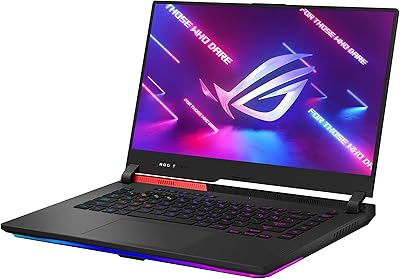
  • Color: Available in Eclipse Gray, a subdued finish that avoids the overtly aggressive styling common in gaming laptops.
  • GPU VRAM: The RTX 4060 features 8GB of GDDR6 VRAM, providing sufficient headroom for high-settings gaming at 1080p and light workstation tasks.
  • Screen Ratio: The 16:10 aspect ratio provides extra vertical screen real estate compared to standard 16:9 displays, benefiting productivity and immersive gameplay alike.
  • Power Input: The system operates at 20V DC input and requires the included power adapter for full-performance operation and charging.
  • Optical Drive: No optical drive is included, consistent with modern thin-and-light gaming laptop designs that prioritize internal airflow and weight savings.

Related Reviews
ASUS ROG Strix G16 Gaming Laptop, i9-14900HX, RTX 4060, 16GB RAM, 1TB SSD
83%
94%
Gaming Performance
90%
Multitasking Performance
92%
Display Quality
74%
Thermals/Cooling System
61%
Battery Life
More
ASUS ROG Strix G16 (2025) RTX 5070 i9 32GB
78%
93%
Gaming Performance
86%
Thermal Management
88%
Display Quality
91%
CPU Performance
84%
Build Quality
More
ASUS ROG Strix G16 (2025) G615JMR-AS74 1TB
80%
92%
Raw Gaming Performance
88%
Thermal Management
91%
Display Quality
54%
Portability
42%
Battery Life
More
ASUS ROG Strix G17 (2021) Gaming Laptop
84%
91%
Performance
89%
Cooling Efficiency
88%
Display Quality
70%
Battery Life
85%
Portability
More
ASUS ROG Strix SCAR 18 (2025) Gaming Laptop
84%
94%
Gaming Performance
92%
Display Quality
89%
Cooling System
88%
Build Quality
75%
Battery Life
More
ASUS ROG Flow Z13 (2023) Gaming Laptop Tablet, 1TB SSD
85%
94%
Gaming Performance
92%
Display Quality
88%
Portability
61%
Battery Life
91%
Build Quality
More
ASUS ROG Strix G17 Gaming Laptop, Ryzen 7 4800H, RTX 3060, 32GB RAM, 2TB SSD
83%
93%
Performance
89%
Display Quality
85%
Build Quality
65%
Portability
62%
Battery Life
More
ASUS ROG Strix G15 (2021) Gaming Laptop, Ryzen 9 5900HX, RTX 3070, 16GB RAM, 1TB SSD
87%
94%
Gaming Performance
91%
Graphics Quality
92%
Display Quality
89%
Thermal Performance
72%
Battery Life
More
ASUS ROG Strix G17 (2021) Gaming Laptop, Ryzen 9 5900HX, RTX 3070, 16GB RAM, 1TB SSD
82%
94%
Gaming Performance
88%
Thermal Management
91%
Display Quality
70%
Battery Life
62%
Portability/Weight
More
ASUS ROG Strix G15 (2022) Gaming Laptop, Ryzen 7 6800H, GeForce RTX 3050, 16GB RAM, 512GB SSD
83%
89%
Performance
91%
Display Quality
92%
Cooling System
62%
Battery Life
70%
Portability/Weight
More

FAQ

Under sustained gaming load, the fans are clearly audible — this is not a quiet machine when it is working hard. In everyday tasks like browsing or light productivity work, it stays reasonably quiet, but expect noticeable fan noise during demanding sessions. If you are in a quiet room, a headset will help mask it.

Yes, the ROG Strix G16 supports RAM and SSD upgrades, which is genuinely useful given the 512GB base storage fills up quickly with modern games. It is worth checking ASUS's official documentation or teardown guides for your specific model number before purchasing aftermarket parts to confirm slot availability and supported capacities.

Honestly, it can feel tight. Many modern AAA titles alone demand 80 to 100GB, so if you plan to keep several games installed at once, 512GB will not last long. Upgrading the SSD or adding an external drive is something a lot of owners end up doing shortly after purchase.

The MUX Switch bypasses the integrated GPU when routing frames to the display, which removes a processing bottleneck and delivers roughly 5 to 10 percent better gaming performance. With Advanced Optimus, the laptop handles this switch automatically based on what you are doing, so you do not have to dig into settings every time you switch between gaming and lighter tasks.

It handles light-to-moderate content creation work well. The display covers 100% sRGB and supports Dolby Vision, making it more color-accurate than most gaming laptops at this tier. For 1080p video editing, streaming, or graphic design work, it performs capably alongside its gaming duties. Heavier 4K editing workflows would push its limits, but for most creators it is a solid dual-purpose machine.

The 6-hour estimate reflects light use — think browsing and document editing with display brightness turned down and performance modes lowered. During actual gaming sessions, you can expect somewhere between 1.5 and 2.5 hours before needing to plug back in. Plan to keep the charger nearby whenever gaming is on the agenda.

Liquid metal is a thermally superior alternative to standard thermal paste applied between the CPU and its heat spreader. It conducts heat more efficiently, which helps the processor hold higher clock speeds during extended gaming sessions rather than slowing down to manage temperatures. As a user, you do not need to interact with it — ASUS applies it at the factory. The only thing to be mindful of is keeping the laptop from extreme tilting for prolonged periods, as liquid metal can migrate if the device is stored vertically for a long time.

It depends on your tolerance for carrying weight. At 5.51 pounds plus a power adapter, the ASUS ROG Strix G16 2023 Gaming Laptop is noticeably heavier than a thin-and-light laptop. For a short commute or occasional travel it is manageable, but if you are walking across a large campus multiple times a day, you will feel it. Portability is not its strength — sustained performance is.

They are serviceable for casual use but underwhelming for a laptop in this price range. Most owners who care about audio quality end up using a gaming headset or external speakers fairly quickly. For gaming, voice chat, and YouTube content they are fine, but do not expect anything impressive from them.

Yes, the ROG Strix G16 supports external displays, and with the MUX Switch enabled, you can route output through the discrete GPU for maximum performance. Check the available output ports on your specific unit — this model includes video output options that pair well with a secondary monitor for a dual-display productivity or gaming setup.

Where to Buy