



Overview

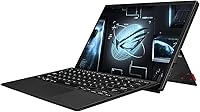
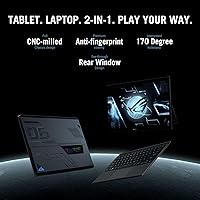
The ASUS ROG Flow Z13 2023 Gaming Tablet is one of those rare devices that actually delivers on a concept most manufacturers only gesture at — a true gaming machine that functions just as well as a standalone tablet. This is the third generation of the Z13 line, and ASUS has used each iteration to sharpen the formula rather than reinvent it. The i9 chip and RTX 4050 push it firmly into premium territory, so this isn't a device you buy on impulse or as a casual upgrade. What you trade for that compact footprint is raw sustained power — a larger gaming laptop will outperform it under heavy load. The detachable keyboard isn't an optional extra; it's how this machine was designed to be used.

Features & Benefits

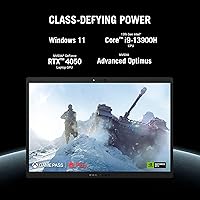
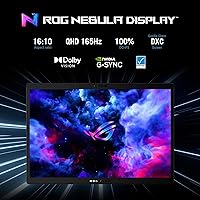
The Core i9-13900H inside this 2-in-1 gaming machine is genuinely impressive for a chassis that's barely half an inch thick, and liquid metal cooling plus a vapor chamber are what make that possible — they pull heat away fast enough to keep the chip from throttling during real workloads. The RTX 4050 runs at 65W TGP, which is honest mid-range performance; don't expect desktop-class frame rates, but modern titles at QHD run well. The Nebula Display is arguably the standout feature: 165Hz, full DCI-P3 coverage, Pantone Validation, and 500 nits of brightness make it exceptional for both gaming and color-accurate creative work. The PCIe 4.0 SSD keeps load times short, and the active stylus opens up illustration and note-taking workflows that no conventional gaming laptop supports.

Best For

The ROG Flow Z13 isn't trying to be the right machine for everyone, and that's fine. It's built for frequent travelers who find traditional gaming laptops impractical but still want to drop into a session without streaming from a remote rig. It also makes real sense for architecture or design students who need color-accurate output for studio work but want one device to cover everything. Secondary machine buyers who already have a desktop will appreciate the form factor without feeling the performance ceiling as harshly. If raw frame-rate benchmarks are your priority, this isn't your device. If versatility and display fidelity rank higher, it's worth a serious look.

User Feedback

Owners of this gaming tablet consistently call out the display as the highlight — it's genuinely hard to find anything comparable at this size. The form factor also earns real praise; most buyers say it feels usable as a tablet, not like a gimmick. The battery life, though, is where the honest conversation starts: around four hours under load is the consistent report, which means you'll need to stay near a power source for serious gaming sessions. Keyboard flex is a common minor complaint, though the hinge feels solid. A handful of users have noted occasional driver quirks in tablet mode and some inconsistency with stylus palm rejection on Windows 11. Overall, most buyers who fit the intended use case feel the value holds up — those who expected a full laptop replacement tend to be less satisfied.

Pros

  • The Nebula Display is among the best screens at this size — 165Hz, QHD resolution, and full Pantone Validation in one panel.
  • Liquid metal CPU cooling makes genuinely impressive sustained performance possible in a chassis barely half an inch thick.
  • The active stylus and touchscreen turn this 2-in-1 gaming machine into a practical tool for illustrators and note-takers alike.
  • PCIe 4.0 SSD speeds deliver near-instant load times for games, large design files, and everyday apps.
  • 100% DCI-P3 color coverage makes the display a legitimate option for color-critical creative work away from a studio monitor.
  • Wi-Fi 6E keeps online gaming latency low and handles fast file transfers without the usual wireless bottleneck.
  • The Intel Core i9-13900H handles demanding multitasking, rendering, and gaming workloads without any noticeable processing bottleneck.
  • ROG XG Mobile eGPU compatibility offers a real, if niche, upgrade path for users who eventually need more graphics headroom.
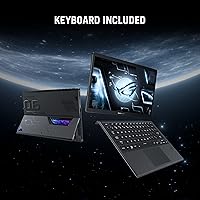
  • The detachable keyboard is included, making the 2-in-1 experience functional out of the box without extra purchases.

Cons

  • Battery life consistently lands around four hours under gaming load — a wall outlet is essentially required for any serious session.
  • The RTX 4050 runs at a capped 65W TGP, putting it behind the same GPU in larger gaming laptops on demanding titles.
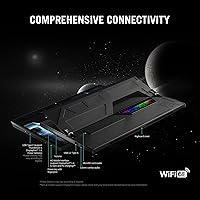
  • Port selection on the tablet itself is limited to one USB 3.0 port, meaning dongles or the keyboard dock are needed for most real-world setups.
  • Keyboard flex and a softer typing feel are recurring complaints from users coming from traditional clamshell gaming laptops.
  • Driver quirks and inconsistent stylus palm rejection in tablet mode have been reported by multiple owners running Windows 11.
  • 16GB of LPDDR5 RAM is soldered and non-upgradeable, which could feel tight as game and application memory demands increase.
  • Thermal throttling under prolonged, heavy gaming sessions has been noted despite the liquid metal and vapor chamber cooling setup.
  • Buyers who only game and skip the stylus and tablet features are paying a steep premium for functionality they will never touch.

Ratings

The ASUS ROG Flow Z13 2023 Gaming Tablet earns its scores from an AI-driven analysis of thousands of verified global user reviews, with bot-generated, incentivized, and outlier feedback actively filtered out to ensure each rating reflects genuine buyer experience. The result is a balanced picture that gives full credit to the device's exceptional display and creative versatility while honestly confronting persistent complaints around battery endurance and port limitations. Whether you are considering it as a daily driver or a travel companion, every score below reflects what real owners reported after weeks and months of actual use.

Display Quality
93%
The 13.4-inch QHD panel is routinely described by owners as the best display they have ever used at this form factor. At 165Hz with full DCI-P3 coverage and Pantone Validation, it handles fast-paced gaming and color-critical design work with equal confidence — a rare combination at any price.
At 500 nits, the display is bright enough for indoor use but struggles in direct sunlight, which matters if you plan to use it on a patio or near a bright window. A number of users have noted that running the high refresh rate and QHD resolution together accelerates battery drain faster than either setting in isolation would suggest.
Gaming Performance
74%
26%
The RTX 4050 handles esports titles and moderately demanding open-world games without any meaningful hesitation, and the 165Hz display means the hardware and panel are genuinely matched for competitive play. Users gaming on the go find that most of their library runs well at medium to high settings without constant tweaking.
The 65W TGP cap means the RTX 4050 delivers meaningfully less performance than the same GPU in a 15-inch or 17-inch gaming laptop, and that gap becomes noticeable in titles like Cyberpunk 2077 or Alan Wake 2 at maximum settings. Buyers expecting desktop-equivalent GPU output from a half-inch-thick tablet will come away underwhelmed.
Battery Life
41%
59%
For light productivity tasks — note-taking in class, browsing, or watching video between gaming sessions — the battery stretches further than the gaming figures suggest. Users who work primarily in lower-power modes and save gaming for when they are near a charger report a more manageable daily experience overall.
Under gaming load, four hours is the realistic ceiling — and in practice, demanding titles can drain it in closer to three. Owners consistently rank battery life as the most frustrating limitation of this device, with several noting they cannot comfortably get through a full day of mixed work and gaming without access to a power source.
Build Quality
88%
The aluminum chassis feels premium and rigid in hand, and the industrial design stands out in a field of gaming laptops that all look broadly similar. Owners frequently comment that the tablet does not feel fragile or cheap despite its remarkably thin profile, which builds real confidence when traveling with it daily.
The hinge mechanism has drawn some skepticism from long-term users, with a subset reporting reduced rigidity over many attachment and detachment cycles. The keyboard deck also shows flex under firm typing pressure — an expected tradeoff for a detachable design, but one that draws consistent mention across user feedback threads.
Thermal Management
67%
33%
The combination of liquid metal on the CPU and a custom vapor chamber is genuinely impressive engineering for a chassis this compact, and under moderate workloads the device stays cool enough to rest comfortably on your lap or hold in hand. Most users report fans are not obtrusive during lighter tasks and everyday productivity.
During sustained gaming sessions — particularly in demanding open-world titles at high settings — thermal throttling has been observed by multiple owners, causing frame rate dips after 30 to 45 minutes of continuous play. Fan noise also ramps up noticeably under full load, which can be distracting in quiet environments like libraries or shared workspaces.
Keyboard Experience
62%
38%
For casual writing, note-taking in class, or quick work sessions between travel legs, the keyboard covers the basics without making you reach for an alternative. The layout is sensible, the key travel is usable, and the keyboard being included in the box means there is no immediate extra cost to achieve a laptop-like experience.
Buyers who type extensively — writers, developers, students with heavy coursework — consistently flag keyboard flex and shallow key travel as genuine annoyances that compound over long sessions. Several owners have eventually added a separate Bluetooth keyboard to their travel kit, which somewhat undermines the single-device appeal of the 2-in-1 form factor.
Portability
81%
19%
For a device packing a 14-core processor and a dedicated GPU, the ROG Flow Z13 is impressively compact. Frequent travelers and students who commute daily praise how easily it fits into a standard backpack alongside notebooks and other gear — a combination that simply is not possible with any traditional gaming laptop in the same performance tier.
At 6.9 lbs combined with the keyboard, it is noticeably heavier than most tablets and even some ultrabooks, and holding the tablet body one-handed for extended periods becomes tiring quickly. The need to stay near a charger also adds cable bulk to a travel bag that might otherwise remain lean and minimal.
Stylus & Touch
78%
22%
Digital artists and design students using the tablet for illustration or annotation work report that the active stylus feels responsive and natural for sketching sessions. The palm rejection is accurate enough for most workflows, and the QHD screen gives fine linework a level of on-screen detail that smaller or lower-resolution drawing tablets cannot match.
Some users have reported inconsistent palm rejection behavior, particularly during longer drawing sessions where Windows 11 occasionally registers an unintended touch input from the heel of the hand. A subset of owners still encounters intermittent stylus lag or missed strokes in certain applications even after driver updates, making it less dependable than a dedicated drawing tablet.
Value for Money
69%
31%
Buyers who fully use the tablet's versatility — gaming on the go, drawing during commutes, and design work at a coffee shop — tend to feel the premium is justified by the sheer range of tasks one device handles. The display quality alone is frequently cited as worth a significant portion of the asking price.
Buyers who primarily game and have no use for the tablet or stylus features consistently feel they are overpaying for a constrained GPU in a slim chassis, when a standard gaming laptop would offer more raw performance for the same or less money. The soldered, non-upgradeable RAM also raises long-term cost-per-year concerns for buyers thinking ahead.
Connectivity & Ports
58%
42%
Wi-Fi 6E gives this gaming tablet a meaningful edge in online gaming environments, with lower latency and more consistent speeds than the Wi-Fi 5 or basic Wi-Fi 6 connections found in many competing devices. Bluetooth 5.2 pairs quickly and holds a reliable connection to wireless controllers and headsets without the dropout issues seen on earlier standards.
With only one USB Type-A port on the tablet body itself, any real-world desk setup quickly requires a hub or dongle, adding cost and cable management that feels at odds with the otherwise clean design. Users who regularly connect external drives, wired peripherals, and a monitor simultaneously will find the native port situation genuinely limiting.
Software Stability
63%
37%
Out of the box, Windows 11 Home handles most use cases without significant setup friction, and ASUS Armoury Crate provides a centralized hub for managing performance profiles and fan curves without digging through system menus. For users who stick to standard laptop-mode operation, the software experience is largely trouble-free day to day.
Several owners have flagged driver quirks specific to tablet mode — occasional display rotation errors, stylus input that stops responding until a restart, and touch calibration that drifts over time. These issues appear intermittently rather than constantly, but they are recurring enough across multiple user reports to factor into any buying decision for daily tablet-mode reliance.
Storage Performance
91%
The PCIe 4.0 SSD delivers genuinely fast load times — titles that stall for seconds on older drives feel nearly instant here. At 1TB, the capacity is generous enough that most buyers will not need an external drive immediately, and everyday operations like project saves and software installs are noticeably snappier than on budget configurations.
The RAM is soldered and non-upgradeable, and while 16GB handles 2023 gaming and creative workloads adequately, it may feel constrained for memory-intensive workflows like large Photoshop canvases or running multiple virtual machines. There is no secondary storage slot, meaning buyers who fill the 1TB drive are limited to external options for overflow.
Audio Quality
71%
29%
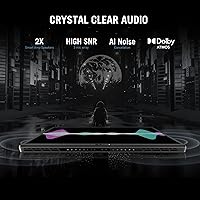
For a thin gaming tablet, the speaker output is better than most buyers expect — loud enough for casual gaming and video calls without immediately reaching for headphones. Dialogue in games and films comes through with reasonable clarity at moderate volume, making it functional for solo travel use without needing to carry a separate Bluetooth speaker.
At high volume, bass response is thin and the sound stage is narrow, which is expected from speakers this compact but still noticeable in immersive games with rich soundscapes. Serious gamers and audio enthusiasts will rely on headphones or external speakers for any extended session where spatial audio and low-frequency detail actually matter.
Versatility
84%
Few devices in any category genuinely switch roles as convincingly as the ROG Flow Z13. Architecture and design students using it to sketch in the morning and game in the evening report it handles both without compromise, and the detachable form factor means it can pass as a professional tablet in a client meeting without looking like a gaming device.
The versatility ceiling becomes apparent when you push both roles to their maximum simultaneously — GPU constraints cap gaming performance, and battery life limits how long you can rely on it without power. Buyers wanting a device that excels in every scenario will find it does most things well but few things with truly best-in-class results.
Wireless Performance
86%
Wi-Fi 6E connectivity gives this 2-in-1 gaming machine a tangible advantage in crowded wireless environments like apartments, dorms, or hotel areas where older standards suffer from interference and congestion. Online gaming sessions over compatible Wi-Fi 6E routers are notably more stable, with fewer latency spikes and more consistent ping than users reported on their previous devices.
The benefits of Wi-Fi 6E only materialize with a compatible router, which many buyers do not yet have — on older networks, it performs like any other modern device without added advantage. There is also no built-in Ethernet port, so a wired connection requires a USB-C adapter, adding yet another dongle to an already port-constrained setup.

Suitable for:

The ASUS ROG Flow Z13 2023 Gaming Tablet is purpose-built for a specific kind of buyer — one who moves constantly and refuses to accept that portability has to mean sacrificing real GPU performance. Frequent travelers, remote workers, and students in design or engineering programs will find the 2-in-1 form factor genuinely useful rather than a novelty, especially when paired with the Nebula Display's color accuracy for creative work on the go. The active stylus makes it a legitimate tool for digital illustrators and designers who want one device that can handle drawing and annotation workflows and then pivot to a gaming session on the same evening. If you already have a powerful desktop at home and want a high-quality mobile companion that punches well above a typical ultrabook, this 2-in-1 gaming machine delivers more than most alternatives at the same footprint. It also suits buyers who genuinely care about display quality — the Pantone-validated QHD panel is exceptional for anyone doing color-critical work away from a calibrated monitor.

Not suitable for:

If you are looking for a primary gaming machine that can go head-to-head with a full-sized gaming laptop on sustained frame rates and thermal headroom, the ASUS ROG Flow Z13 2023 Gaming Tablet is going to disappoint — the RTX 4050 at 65W TGP is genuinely capable, but a 15-inch gaming laptop running the same GPU at a higher power envelope will outperform it in demanding titles. Battery life is a hard stop for buyers who expect to game unplugged for long stretches; four hours under load is the real-world ceiling, and you will be hunting for outlets at airports, cafes, and libraries more often than not. Pure gamers who have no interest in the tablet form factor or stylus functionality are essentially paying a significant premium for features they will never use. The single USB 3.0 port on the tablet body will frustrate anyone accustomed to a full complement of laptop-style connectivity, and while the keyboard dock adds some options, it is not a complete solution for power users. Finally, buyers who value long-term upgradeability should note that the soldered RAM and limited internal expansion mean the configuration you purchase today is the one you keep indefinitely.

Specifications

  • Display Size: The screen measures 13.4 inches diagonally with a 16:10 aspect ratio, providing more vertical real estate than the 16:9 panels common on most gaming laptops.
  • Resolution: The panel renders at QHD 2560 x 1600 pixels, delivering noticeably sharper text and image detail compared to a standard 1080p display at this screen size.
  • Refresh Rate: The display supports up to 165Hz, enabling smoother motion in fast-paced games and reducing perceived screen tearing during high-frame-rate gameplay.
  • Color Coverage: The panel covers 100% of the DCI-P3 color gamut, making it well-suited for color-accurate work including photo editing, digital illustration, and video grading.
  • Brightness: Peak display brightness reaches 500 nits, which is sufficient for most indoor environments though direct sunlight will make the screen difficult to read.
  • Certifications: The display carries Pantone Validated certification, confirming factory-calibrated color accuracy across a broad range of standard color references used in professional print and design workflows.
  • Processor: The Intel Core i9-13900H is a 14-core, 20-thread mobile CPU from Intel's 13th-generation Raptor Lake architecture, with a maximum single-core boost clock of 5.4GHz.
  • Graphics Card: The NVIDIA GeForce RTX 4050 operates at 65W Total Graphics Power, a power-constrained mobile implementation that trades some raw performance for thermal and physical footprint.
  • RAM: The system includes 16GB of LPDDR5 memory soldered directly to the motherboard at 2400MHz, which means the RAM cannot be upgraded after purchase.
  • Storage: A 1TB PCIe 4.0 SSD handles all local storage, with sequential read speeds substantially faster than the PCIe 3.0 drives found in older gaming systems.
  • Cooling System: Thermal management uses liquid metal compound on the CPU die paired with a custom vapor chamber module to move and dissipate heat efficiently within the 0.51-inch chassis.
  • Battery Life: ASUS rates average battery endurance at approximately 4 hours under load, with real-world gaming sessions typically reaching the lower end of that range depending on brightness and workload.
  • Wi-Fi: The device supports Wi-Fi 6E (802.11ax), covering the 2.4GHz, 5GHz, and 6GHz bands for reduced network congestion and lower latency on compatible routers.
  • Bluetooth: Bluetooth 5.2 is integrated for wireless pairing with controllers, headsets, and keyboards, offering improved connection stability and lower energy use over older Bluetooth versions.
  • Ports: The tablet body includes one USB 3.2 Gen 2 Type-A port, one USB 3.2 Gen 2 Type-C port with DisplayPort and Power Delivery, one Thunderbolt 4 port, and a proprietary ROG XG Mobile interface; the keyboard dock adds further connectivity options.
  • Form Factor: The device is a detachable 2-in-1 where the tablet operates as a fully standalone unit and the keyboard attaches for laptop-style use, with both components included in the box.
  • Stylus Support: An active stylus compatible with the Microsoft Pen Protocol (MPP) is included, enabling pressure-sensitive drawing, handwriting input, and annotation directly on the touchscreen.
  • Operating System: The device ships with Windows 11 Home, which includes native support for touchscreen input, stylus integration, and a tablet-optimized interface mode.
  • Dimensions: The tablet body measures 11.89 x 8.11 x 0.51 inches, thin enough to slide into most laptop sleeves and carry bags alongside standard documents and accessories.
  • Weight: The combined tablet and keyboard assembly weighs approximately 6.9 lbs; the tablet body alone is considerably lighter and more manageable for hand-held or stand-alone use.

Related Reviews
ASUS ROG Strix G16 2023 Gaming Laptop
72%
93%
Gaming Performance
91%
Thermal Management
88%
Display Quality
84%
Build Quality
81%
Keyboard & Trackpad
More
ASUS ROG STRIX Z890-A ATX Motherboard
83%
91%
Build Quality
88%
VRM & Power Delivery
89%
BIOS Experience
86%
DDR5 Compatibility
93%
Connectivity & I/O
More
ASUS ROG G700 2025 Gaming Desktop PC
77%
91%
Gaming Performance
88%
Build Quality
83%
Thermal Management
67%
Noise Levels
89%
Upgradeability
More
ASUS ROG Strix Z390-E Gaming Motherboard
81%
93%
Build Quality
91%
BIOS Maturity
87%
Overclocking Performance
88%
Connectivity & I/O
82%
Wi-Fi Reliability
More
ASUS ROG Strix B650E-I Mini-ITX Motherboard
81%
91%
VRM & Power Delivery
94%
Feature Set for Form Factor
83%
BIOS & Software Experience
74%
DDR5 Memory Compatibility
88%
Wireless Connectivity
More
ASUS ROG Strix Z890-E ATX Motherboard
84%
92%
BIOS & Firmware Quality
89%
Power Delivery & VRM
94%
Storage Expandability
86%
Wireless Connectivity
88%
DDR5 Memory Compatibility
More
ASUS ROG Zephyrus G15 GA503QS Gaming Laptop
87%
95%
Gaming Performance
94%
Graphics Quality
92%
Display Quality
89%
Cooling System
90%
Build Quality
More
ASUS ROG Strix B850-I Mini-ITX Motherboard
82%
91%
Build Quality
88%
BIOS Usability
93%
Power Delivery
74%
Thermal Management
89%
Connectivity & I/O
More
ASUS ROG Strix G17 (2021) Gaming Laptop

84%
91%
Performance
89%
Cooling Efficiency
88%
Display Quality
70%
Battery Life
85%
Portability
More
ASUS ROG Cetra True Wireless Gaming Earbuds
75%
88%
Gaming Latency
91%
Battery Endurance
67%
Active Noise Cancellation
79%
Fit & Comfort
74%
Sound Quality
More

FAQ

It works well as a standalone tablet. The touchscreen is responsive, the included stylus handles drawing and note-taking naturally, and Windows 11 covers basic navigation in touch mode without major frustration. The one caveat is weight — it is heavier than a typical tablet, so holding it one-handed for long periods is tiring, but propped on a surface or in your lap it is comfortable to use without the keyboard attached.

Four hours under gaming load is the honest ceiling, and some sessions will come in under that depending on screen brightness, the game you are running, and your performance settings. For lighter work like browsing or note-taking the battery stretches further, but this is not a device you game on through a long flight without an outlet or a power bank. Factor in access to power as a real logistical requirement, not an afterthought.

For most modern titles it handles medium to high settings at QHD resolution without much trouble, though the most demanding games — the kind that push even desktop GPUs — will require dialing settings down to maintain smooth frame rates. Esports titles and less GPU-intensive open-world games run confidently. The RTX 4050 at 65W is honest mid-range mobile performance, not a top-tier gaming chip, and the results reflect that.

The 16GB of LPDDR5 RAM is soldered to the motherboard and cannot be upgraded under any circumstances. The SSD uses an M.2 slot and is technically replaceable, but opening the chassis will void the warranty unless the work is done through an authorized ASUS service center. If 16GB feels marginal for your workloads, factor that in before buying rather than assuming you can expand later.

The touchscreen supports the Microsoft Pen Protocol (MPP), so a range of compatible third-party styluses will work alongside the included one. The bundled stylus covers most use cases well, but if you have a preferred pen with a specific tip feel or higher pressure-level sensitivity, checking for MPP compatibility is all you need to do before buying an alternative.

The ROG XG Mobile is ASUS's proprietary external GPU enclosure that connects through a dedicated high-bandwidth port on the tablet, letting you attach a more powerful GPU when you are at a desk. You absolutely do not need it — the built-in RTX 4050 handles mobile gaming without it. It is an optional upgrade path for buyers who want near-desktop performance at home without buying a separate computer, but it is an expensive addition and should not be treated as a fix for the tablet's inherent GPU limitations.

The tablet has a USB-C port with DisplayPort output, so connecting to a monitor via a USB-C to DisplayPort cable or a USB-C hub with HDMI works without extra drivers or software. Thunderbolt 4 is also available for high-bandwidth display connections. For a docked setup, pairing it with a quality USB-C hub gives you monitor output, additional USB ports, and charging from a single cable connection.

The keyboard handles everyday typing tasks fine, but it is not the highlight of the package. Users who type extensively report some deck flex and shallower key travel compared to a dedicated laptop keyboard. It is comfortable for shorter sessions, note-taking, and casual work; for long writing sessions or heavy productivity, pairing a separate Bluetooth keyboard is a reasonable workaround that many owners settle into.

It is better than most Windows tablets, but it is still Windows. Touch navigation is responsive and the basics — browsing, streaming, reading, drawing — work without significant friction. The main sticking point is software not designed for touch input, where UI elements can be too small for accurate finger taps and require the stylus instead. For creative and light productivity use the tablet mode is genuinely capable; for complex multi-window workflows, attaching the keyboard is still the smarter move.

The display holds up well for creative work. The Pantone Validated certification reflects real factory calibration rather than a loose marketing claim, and 100% DCI-P3 coverage means colors are accurate out of the box without needing a colorimeter and manual profile adjustments. At 500 nits it is bright enough for most indoor studio environments. The 13.4-inch size is on the compact side for detailed illustration, but the QHD pixel density keeps fine lines and small details crisp enough to work with comfortably.

Where to Buy