Overview

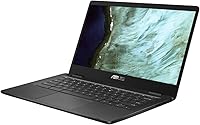
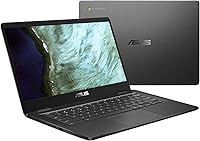
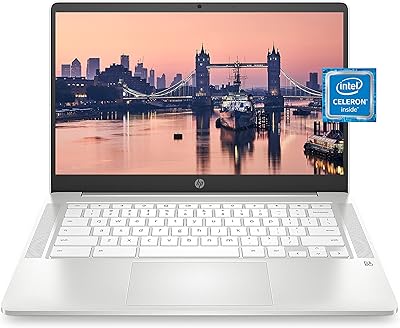
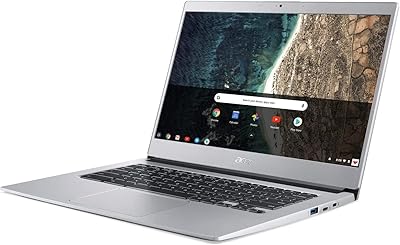
The ASUS Chromebook C423NA 14-inch 4GB 32GB is a lightweight, easy-to-carry laptop built for simplicity and reliability. Focused on portability, this Chromebook starts up quickly and runs on Chrome OS, giving users a secure, cloud-first experience ideal for online tasks. It performs well for basic productivity, such as web browsing, email, and document editing, without unnecessary complexity. With its slim design and quiet operation, this laptop suits those who value straightforward performance in a compact form, making it a practical choice for students, commuters, and casual users seeking convenience on the go.

Features & Benefits

Powered by an Intel Celeron N3350 processor, this Chromebook handles everyday tasks like document editing and video playback efficiently. The 4GB of LPDDR4 memory supports smooth multitasking for typical workloads, while 32GB of eMMC storage provides fast access to files and apps. Users can expand storage with a microSD card and rely on cloud services for most data needs. Its 14-inch HD display offers comfortable viewing for study or streaming, and the device’s long battery life ensures lasting use throughout the day without frequent charging.

Best For

This Chromebook is well-suited for students using Google Workspace or other online learning tools, as it integrates seamlessly with cloud platforms. It’s equally appealing to casual users focused on web browsing, streaming, and light office work. Frequent travelers will appreciate the laptop’s slim, durable construction and long runtime. Those seeking a reliable, low-maintenance option for daily use will find that this device strikes a good balance between affordability and function, serving as an ideal companion for on-the-go productivity and lightweight digital tasks.

User Feedback

Owners highlight the Chromebook’s quick startup, secure environment, and user-friendly interface as standout strengths. Many appreciate its lightweight design and ease of carrying between home, school, or work. Reviewers note that while performance is solid for everyday tasks, demanding software or heavy multitasking can slow it down. Limited local storage occasionally frustrates users, though built-in cloud support largely offsets this issue. Overall, the consensus portrays this laptop as dependable and convenient, providing a smooth Chrome OS experience that’s perfect for simple computing and daily productivity needs.

Pros

  • This Chromebook boots quickly and delivers a smooth Chrome OS experience.
  • Lightweight design makes it easy to carry between classes or during travel.
  • Long battery life allows for extended use without frequent charging.
  • The 14-inch HD display provides clear visuals for reading and streaming.
  • 4GB memory handles basic multitasking efficiently for productivity tasks.
  • 32GB eMMC storage can be expanded with a microSD card for extra files.
  • Bluetooth support enables easy connection to peripherals and headphones.
  • USB 2.0 and 3.0 ports offer compatibility with standard accessories.
  • Compact and portable size fits well in backpacks and small workspaces.

Cons

  • Limited 32GB storage may require reliance on cloud services for larger files.
  • Intel Celeron N3350 processor can struggle with demanding applications.
  • Not suitable for gaming or heavy media editing tasks.
  • Screen resolution of 1366×768 is adequate but not high-definition quality for detailed work.
  • Some users find the build feels less premium compared to higher-end laptops.
  • Only basic integrated graphics, limiting use for visual-intensive software.
  • Weight is light, but durability may be a concern under rough handling.
  • This laptop may have slower performance when running multiple browser tabs simultaneously.

Ratings

After analyzing verified user reviews from multiple countries and languages, RR-AI has compiled ratings for the ASUS Chromebook C423NA 14-inch 4GB 32GB. Only authentic, high-quality feedback was included, filtering out spam, bot-driven, duplicated, or off-topic reviews. The scores reflect both the strengths and pain points of this device, capturing insights from a diverse range of users and platforms worldwide.

Performance
72%
28%
Many users report that this laptop handles basic tasks such as web browsing, document editing, and streaming reliably. The system responds well to daily routines and lightweight multitasking, making it suitable for students and casual users. Owners appreciate that it operates smoothly without lag for most standard applications.
Some buyers find that the processor struggles with heavier workloads or multiple browser tabs. Demanding apps or large file handling can feel slow, and users note occasional delays when running several applications simultaneously. Performance limitations make it less ideal for power users.
Battery Life
88%
Many reviewers praise the extended runtime, which easily lasts through a full school or workday. Users like that the laptop can handle long periods of use without needing frequent charging, making it convenient for travel or remote work. The battery efficiency is consistently mentioned as a strong point.
A few users report that intensive usage, such as video streaming or multiple tabs open, can reduce battery longevity. Some noticed that battery drain is faster if peripherals or high brightness settings are used. While generally solid, extreme workloads may affect endurance.
Portability
95%
This device is praised for its lightweight design and compact form, making it easy to carry in backpacks or small bags. Users appreciate how convenient it is for commuting, travel, and classroom use. The slim profile and manageable weight are highlighted as major advantages for mobility.
A small number of users mention that the compact size can feel cramped for extended typing sessions. Some would prefer a slightly sturdier build to better handle everyday travel stress. Overall, complaints are minor compared to the overall portability benefits.
Display Quality
78%
22%
Buyers note that the 14-inch HD screen is adequate for reading, browsing, and watching videos. Color reproduction and brightness are acceptable for everyday tasks, and the display is comfortable for long study sessions or casual viewing. Users appreciate the anti-glare finish for indoor use.
Several users point out that the resolution is relatively low compared to higher-end laptops, making images and text less sharp. Some experienced difficulty when multitasking with multiple windows or spreadsheets. Outdoor visibility under sunlight can be limited.
Build Quality
84%
Many reviewers comment on the solid feel and reliability of the chassis. This laptop withstands typical daily handling, commuting, and classroom use. Users appreciate that it feels durable for its price and lightweight design.
A few users wished the materials were more premium, noting minor flex when pressing the keyboard or lid. Some observed that the hinges are not as robust as higher-end models. Overall, build quality is adequate but not top-tier.
Keyboard & Touchpad
81%
19%
Owners enjoy the responsive keys and smooth touchpad, which are suitable for typing assignments and navigating the OS. The layout is familiar and comfortable for extended use. Many find the tactile feedback satisfactory for productivity tasks.
Some users report that the keys feel a bit shallow and the touchpad can be slightly less precise under heavy use. Extended typing sessions may feel tiring for some. There are occasional complaints about sensitivity inconsistencies.
Storage & Expansion
66%
34%
Users value the microSD slot for additional storage and rely on cloud services to supplement local capacity. For light file storage and document management, this laptop meets most daily needs. Owners note that cloud integration works well with Chrome OS.
Limited 32GB eMMC storage is a common concern, especially for users wanting to store large files locally. Some find it restrictive for offline work or media storage. Heavy local data usage can quickly fill the available space.
Connectivity Options
79%
21%
Reviewers appreciate the inclusion of USB 2.0 and 3.0 ports as well as Bluetooth connectivity. The laptop connects reliably to peripherals, external displays, and wireless accessories. Most users report stable Wi-Fi connections for everyday online tasks.
Some users feel the port selection is limited, requiring adapters for HDMI or additional USB devices. Occasional reports mention inconsistent speeds when multiple peripherals are connected simultaneously. Power users may find expansion options insufficient.
Software & OS Experience
91%
Many users praise the smooth experience of Chrome OS, highlighting fast boot times, automatic updates, and integrated cloud tools. This device feels secure and responsive, with easy access to web-based applications. Reviewers enjoy minimal maintenance and intuitive operation.
A few users note that Chrome OS limits some software compatibility, particularly for traditional desktop applications. Offline functionality can be constrained for those relying on local software. Some wished for more advanced customization options.
Ease of Setup
93%
Users consistently mention that initial setup is straightforward and quick, with clear instructions. Accounts sync seamlessly with Google services, making it easy to get started. Even non-technical users can configure the device with minimal effort.
Occasional users reported minor issues with network login or account sign-in during initial setup. Some had to perform extra steps to configure multiple accounts or restore settings. These problems are generally infrequent.
Durability
82%
18%
Many buyers find that the laptop withstands normal daily use and light travel. The build feels stable, and users appreciate the resilience of the keyboard and chassis. It is considered reliable for classroom and casual home environments.
Some users observed that repeated rough handling can affect the hinge or outer casing over time. The device is not designed for rugged environments or extreme conditions. Long-term durability under heavy stress may be limited.
Value for Money
87%
Many reviewers feel that this device offers solid functionality for its price point, providing a dependable Chromebook experience without unnecessary extras. Students and casual users find it cost-effective for daily computing. The combination of portability and decent performance is seen as a good deal.
Some buyers note that storage and processing limits make it less competitive against slightly higher-priced alternatives. Those seeking a more powerful or feature-rich laptop may consider it less appealing. The value is strong for basic tasks but limited for advanced usage.
User Satisfaction
85%
Overall, users report a positive experience with this laptop, appreciating its portability, ease of use, and battery reliability. Daily tasks are handled smoothly, and it meets expectations for a budget Chromebook. Many owners recommend it for students and light office work.
Some users express mild frustration with the limited local storage and lower performance under heavy workloads. Occasional complaints include small screen resolution and basic keyboard feel. Satisfaction is generally good but not universal.
Port Selection
70%
30%
Reviewers acknowledge the presence of standard USB ports and Bluetooth, which cover basic peripheral needs. For simple connections to flash drives, mice, or external keyboards, this laptop suffices. Users also appreciate that these ports function reliably.
Several buyers find the selection lacking for modern workflows, noting missing USB-C, HDMI, or additional ports. Users needing multiple connections often require adapters or hubs. Limited port diversity is a common drawback for more demanding setups.

Suitable for:

The ASUS Chromebook C423NA 14-inch 4GB 32GB is ideal for students, casual users, and travelers who need a lightweight, portable laptop for everyday computing. Those who primarily use Google Workspace, online learning platforms, or web-based applications will find this device responsive and easy to manage. Its long battery life and compact 14-inch design make it convenient for carrying between classrooms or for remote study sessions. Users who rely on cloud storage and light multitasking will appreciate its fast Chrome OS startup and smooth basic performance. Overall, this laptop fits well into routines that focus on web browsing, document editing, media streaming, and low-demand productivity tasks.

Not suitable for:

This laptop may not meet the needs of users who require extensive local storage, heavy processing power, or high-resolution displays. Professionals running demanding software, video editors, or gamers will likely find the limited 32GB eMMC storage and Intel Celeron N3350 processor restrictive. Additionally, those who need multiple USB-C ports, HDMI outputs, or advanced connectivity options may find this device insufficient. Power users who frequently handle large files or multitask with intensive applications will experience slower performance, making it less suitable for intensive work scenarios or high-end computing needs.

Specifications

  • Brand: Manufactured by ASUS, a well-known computer hardware company.
  • Model: C423NA variant designed for budget-friendly Chrome OS laptops.
  • Display: 14-inch HD display with a resolution of 1366×768 for basic visual tasks.
  • Processor: Intel Celeron N3350 dual-core processor operating at 2.4GHz for everyday computing.
  • Memory: 4GB LPDDR4 RAM suitable for light multitasking and web browsing.
  • Storage: 32GB eMMC internal storage with support for microSD expansion.
  • Operating System: Runs Chrome OS, providing fast boot times and cloud-focused applications.
  • Graphics: Integrated Intel graphics suitable for video playback and casual visual tasks.
  • Weight: Weighs approximately 2.7 pounds, making it easy to carry for students and travelers.
  • Battery: Lithium Polymer battery that supports several hours of moderate usage.
  • Wireless: Includes Bluetooth support and Wi-Fi connectivity for network access.
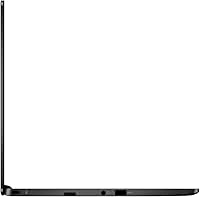
  • Ports: Equipped with USB 2.0 and USB 3.0 ports for peripherals and data transfer.
  • Expansion: MicroSD card slot allows for additional storage when needed.
  • Color: Slate Gray finish providing a neutral, professional appearance.
  • Form Factor: Lightweight clamshell design optimized for portability and daily use.
  • Audio: Built-in speakers and headphone jack for standard audio output.
  • Webcam: Front-facing camera suitable for video calls and online classes.
  • Keyboard: Standard keyboard layout designed for comfort in typing sessions.
  • Touchpad: Responsive touchpad for accurate cursor control and gestures.

FAQ

This Chromebook features a 14-inch HD display, Intel Celeron N3350 processor, 4GB LPDDR4 memory, 32GB eMMC storage with microSD expansion, and runs Chrome OS for fast, secure cloud-based performance.

Turn on the laptop and follow the on-screen setup wizard to connect to Wi-Fi, sign in with your Google account, and configure basic settings. Updates will install automatically to ensure Chrome OS is current.

No, this laptop is designed to run Chrome OS exclusively, and other operating systems like Windows or Linux are not officially supported.

It comes with 32GB of built-in eMMC storage, which is enough for apps and documents, and you can expand storage using a microSD card or cloud services like Google Drive.

With 4GB of RAM, this device handles light multitasking well, such as web browsing, streaming, and basic productivity, but running many tabs or heavier applications may slow it down.

Users report that the battery provides several hours of use, sufficient for a school day or moderate travel, though actual duration varies depending on screen brightness and workload.

This laptop includes USB 2.0 and USB 3.0 ports, Bluetooth support, and a microSD card slot for expansion, enabling connections to external drives, peripherals, and wireless accessories.

The laptop is lightweight at 2.7 pounds and portable, making it convenient for carrying in backpacks. While generally reliable, it should be handled carefully to avoid damage from drops or spills.

No, the Intel Celeron processor and 4GB RAM are suitable for basic media playback and casual editing, but this device is not designed for intensive video editing or graphics-heavy software.

Use cloud storage to compensate for limited local space, keep apps and tabs minimal for smoother performance, and take advantage of the lightweight design for portable study or travel.