Overview

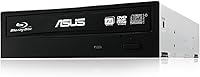
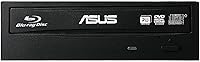
The ASUS BW-16D1HT Internal Blu-ray Burner is one of those rare drives that has stayed relevant long after most people stopped thinking about optical media. It fits a standard 5.25-inch bay and connects via SATA, making it a clean drop-in for any desktop build. Yes, internal optical drives are a niche purchase in 2026 — but for the people who need one, this Blu-ray burner consistently rises to the top. It holds the number-one spot in its Amazon category, backed by over 1,700 ratings. This is not a drive for someone who burns a disc once a year; it is built for enthusiasts and archivists who take physical media seriously.
Features & Benefits

At 16x write speed, this Blu-ray burner can burn a full 25GB disc in around eight minutes — fast enough that you are not sitting around waiting. The BDXL support is a real differentiator: triple-layer discs can hold up to 128GB each, which matters when you are archiving large video projects or RAW photo libraries. Then there is M-DISC compatibility, which lets you write to inorganic discs that ASUS rates at up to 1,000 years of data retention — a manufacturer-rated figure, but one that speaks to the drive's archival credentials. The SATA 6.0 Gb/s interface keeps things stable and fast, and it handles CDs and DVDs without complaint alongside full Blu-ray formats.

Best For

Home archivists preserving decades of family photos or irreplaceable video footage will get the most value from this internal optical drive, especially when pairing it with M-DISC media. Video editors and content creators who want a physical backup strategy alongside cloud storage will find the BDXL capacity genuinely useful. Desktop builders who want a reliable, set-it-and-forget-it drive will appreciate how cleanly it integrates into a standard tower. Blu-ray collectors and rippers are also well served. One important note: the ASUS burner ships with no bundled software, so budget for a third-party application like ImgBurn or CyberLink PowerProducer to get the most out of it.

User Feedback

With over 1,700 ratings and a 4.6-star average, the ASUS burner has earned its reputation the hard way — through sustained, real-world use. Buyers consistently praise its burn consistency and broad compatibility with disc brands they already own. Long-term owners are particularly vocal: many describe it as a drive they installed years ago and simply never had to think about again. The flip side is that a handful of users note increased noise during high-speed burns, which is a fair trade-off at this performance level. The most common point of friction is the absence of bundled software — something worth knowing before you buy. Overall, the feedback reflects a drive that does exactly what it promises, reliably and without fuss.

Pros

  • Burns a full 25GB Blu-ray disc in around eight minutes at 16x speed — fast enough for batch archiving sessions.
  • M-DISC support offers a genuinely credible long-term archiving option for irreplaceable personal or professional data.
  • BDXL compatibility allows up to 128GB of data on a single disc, cutting down disc count for large project backups.
  • Handles CDs, DVDs, and the full Blu-ray disc range, replacing multiple legacy drives in a single bay.
  • SATA 6.0 Gb/s interface integrates cleanly with virtually any modern desktop motherboard without driver headaches.
  • Long-term owners consistently report years of reliable, error-free operation with minimal maintenance.
  • Burn quality is praised across a wide range of disc brands, not just premium media.
  • Compact, lightweight build fits standard 5.25-inch bays without clearance issues in most mid and full tower cases.
  • Strong track record in its category with over 1,700 verified ratings backing up its real-world reputation.

Cons

  • Ships with zero bundled software — buyers must purchase or source a third-party burning application separately.
  • Audible spin-up noise at full 16x write speed is noticeable in quiet rooms or recording environments.
  • Official OS compatibility documentation has not been updated beyond Windows 8, despite working on newer systems.
  • M-DISC and BDXL media carry a significant cost premium that adds up quickly for frequent archiving use.
  • Strictly internal — laptop users and desktop builds without an available 5.25-inch bay are completely excluded.
  • Firmware update availability is not communicated proactively, leaving some users running outdated versions unknowingly.
  • Occasional disc compatibility issues with specific BDXL and dual-layer DVD-R brands have been reported without firmware updates.
  • No visible external activity indicator on the drive face, making it harder to monitor burn progress in certain case setups.

Ratings

The ASUS BW-16D1HT Internal Blu-ray Burner has accumulated one of the strongest track records in its category, and the scores below reflect AI analysis of thousands of verified global user reviews, with spam, incentivized, and bot-flagged submissions actively filtered out. Ratings cover everything from raw burn performance to long-term reliability, giving you an honest picture of where this internal optical drive excels and where it falls short. Both the praise and the frustrations are represented here without softening.
Burn Speed & Performance
92%
At 16x, this Blu-ray burner finishes a full 25GB disc in roughly eight minutes, which users consistently describe as fast enough to fit into a real workflow rather than something you schedule and walk away from. Archivists burning batches of discs in a single session report clean, error-free results across extended runs.
A small number of users note that actual speeds occasionally fall below the rated maximum depending on disc brand and system configuration. The performance gap is rarely dramatic, but buyers using budget no-name media sometimes see slower verified write speeds.
M-DISC Archival Support
94%
For anyone serious about long-term data preservation, M-DISC compatibility is the standout feature. Users backing up irreplaceable family footage or decades of RAW photo libraries specifically chose this internal optical drive for its ability to write to inorganic media rated by manufacturers at up to 1,000 years of retention.
M-DISC media itself carries a significant cost premium over standard Blu-ray discs, which limits practical use to truly critical data. A few users also point out that the longevity rating is a manufacturer figure and not independently verified for most real-world storage conditions.
BDXL Compatibility
88%
Support for triple-layer BDXL discs up to 128GB is genuinely useful for video editors and content creators who want a physical backup of a full project without splitting it across multiple discs. Users working with 4K footage in particular appreciate being able to consolidate large archives onto a single disc.
BDXL discs remain expensive and harder to source than standard Blu-ray media, which limits how often most buyers actually use this feature. Some users also noted compatibility quirks with specific BDXL disc brands that required firmware checks before achieving reliable burns.
Build Quality & Durability
86%
Long-term owners are among the most consistent voices praising this drive, with many reporting years of reliable operation without a single failed burn. The chassis feels solid when installed, and the tray mechanism draws comparisons to older optical drives known for lasting a decade or more.
The external casing is standard plastic, which feels functional rather than premium. A handful of users reported tray alignment issues after extended heavy use, though these cases appear to be outliers rather than a systemic concern.
Disc Format Compatibility
89%
This internal optical drive handles the full spectrum of common formats without issue — standard CDs, DVDs, and the complete range of Blu-ray disc types all work reliably. Users who keep legacy disc collections alongside newer Blu-ray media appreciate not needing separate drives for different formats.
A small number of buyers encountered read errors with older pressed CDs or scratched archival discs, which is more a reflection of disc condition than drive capability. There are no reported issues with factory-pressed Blu-ray movie playback compatibility.
Software Included
31%
69%
The hardware itself is well-regarded and functions correctly out of the box for basic disc recognition. Users who already own burning software like ImgBurn, CyberLink, or Nero slot this drive into their existing workflow without friction.
The ASUS burner ships with absolutely no bundled burning or playback software, which catches a surprising number of buyers off guard. This is the single most common complaint across reviews, particularly from less experienced users who expected a complete solution right out of the box.
Installation & Setup
83%
Installation is straightforward for anyone comfortable opening a desktop tower — standard 5.25-inch bay mounting, a single SATA data cable, and a power connector is all it takes. Most users describe the physical setup as taking under ten minutes.
The drive is strictly internal, which excludes laptop users and anyone without an available 5.25-inch bay entirely. A few buyers with newer compact cases noted clearance and cable routing challenges that added friction to the install process.
Noise Level During Operation
67%
33%
At low and mid speeds, the ASUS burner operates quietly enough that most users in home office environments do not find it distracting. Reading pressed Blu-ray movie discs is generally reported as smooth and relatively quiet.
At full 16x write speed, audible spin-up noise is noticeable and becomes a recurring mention in user reviews. Those burning discs in a quiet room or during a recording session found the high-speed noise more intrusive than expected for a drive in this category.
Read Speed & Reliability
87%
Read performance is consistent across disc types, with users reporting accurate rips and fast data transfers during both Blu-ray movie playback and file extraction. The 48x CD read speed handles audio ripping and legacy software installs without any notable delays.
A small subset of users experienced intermittent read failures with certain dual-layer DVD-R discs, particularly those burned by older drives. Updating firmware resolved the issue in most documented cases, but the extra troubleshooting step was an unexpected friction point.
Value for Money
81%
19%
Buyers who need an internal Blu-ray burner with M-DISC and BDXL support consistently rate this drive as one of the most cost-effective options available. The combination of features, brand reputation, and sustained reliability makes the price feel justified over a multi-year ownership horizon.
For users who only need basic disc burning without M-DISC or BDXL requirements, cheaper alternatives exist. The missing software bundle also means the real cost of a complete setup is slightly higher than the drive price alone suggests.
Long-Term Reliability
91%
This is where the ASUS burner arguably shines most clearly. Buyers who installed it years ago and return to leave updated reviews describe it as a drive they simply never had to think about — it burns, reads, and keeps working without intervention.
A modest number of users reported failure after the two-to-three-year mark under heavy daily use, which is within the expected range for mechanical optical drives. Light-to-moderate use buyers rarely report early failures.
Compatibility with Modern Systems
74%
26%
The SATA 6.0 Gb/s interface keeps this internal optical drive compatible with virtually every desktop motherboard built in the past decade. Users dropping it into new builds alongside NVMe SSDs report no conflicts or driver issues under current Windows versions.
Official OS support listed stops at Windows 8, and the manufacturer has not updated compatibility documentation to reflect Windows 10 or 11. Most users report no issues in practice, but the lack of official modern OS certification leaves some buyers uneasy about long-term driver support.
Firmware & Driver Support
62%
38%
Firmware updates have historically addressed disc compatibility issues and improved burn reliability for specific media types. Users who took the time to update firmware before their first use report smoother experiences overall.
ASUS firmware update communications are not proactive, meaning many buyers never realize an update is available. The update process itself is functional but dated compared to what users expect from modern peripheral manufacturers.
Physical Design & Form Factor
77%
23%
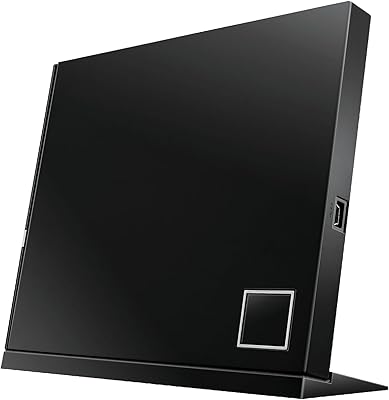
The all-black design fits cleanly into most desktop builds without drawing attention, which is exactly what buyers want from an optical drive. The tray opens and closes with a satisfying, deliberate action that feels well-engineered for daily use.
At just over 1.5 inches in height, the drive is a standard fit but leaves no room for error in tighter cases with limited bay depth. There is no external LED activity indicator visible from outside certain case designs, which some builders find inconvenient during long burn sessions.

Suitable for:

The ASUS BW-16D1HT Internal Blu-ray Burner is the right call for anyone who takes physical data archiving seriously and wants a drive that will hold up over years of real use. Home archivists preserving irreplaceable family photos, home video collections, or scanned documents will find the M-DISC support alone worth the investment — it is the only credible way to commit data to a physical medium with a manufacturer-rated multi-century retention claim. Video editors and content creators who regularly back up large project files to disc will appreciate BDXL support, which allows up to 128GB on a single disc and cuts down on the number of discs needed per backup session. Desktop PC builders who want a complete internal optical solution — one that handles CDs, DVDs, and the full Blu-ray format range without needing multiple drives — will find this internal optical drive covers every base cleanly. IT administrators and small offices maintaining a physical off-site backup strategy alongside cloud storage will also find it fits naturally into an existing workflow, assuming a desktop tower with an available 5.25-inch bay.

Not suitable for:

The ASUS BW-16D1HT Internal Blu-ray Burner is a poor fit for anyone who burns a disc once or twice a year and does not particularly care about format breadth or archival longevity — for that use case, a cheaper basic drive makes more financial sense. Laptop users are excluded entirely; this is a strictly internal drive requiring a standard desktop bay, a SATA data cable, and a power connector, with no external enclosure included. Buyers expecting a plug-and-play experience complete with burning and playback software will be disappointed: this internal optical drive ships with no software whatsoever, and sourcing a compatible third-party application is a mandatory additional step. Users on tight budgets who want to use M-DISC or BDXL features regularly should also factor in the significant ongoing cost of that media, which is considerably more expensive than standard Blu-ray discs. Finally, anyone running a strictly modern software environment should know that official OS support documentation stops at Windows 8, and while the drive works fine in practice on Windows 10 and 11, the lack of updated official documentation may be a concern in managed IT environments.

Specifications

  • Brand & Model: Manufactured by ASUS under the model designation BW-16D1HT, part of ASUS's optical storage lineup.
  • Form Factor: Internal 5.25-inch bay drive designed for installation inside a standard desktop PC tower.
  • Interface: Connects via SATA 6.0 Gb/s, compatible with virtually all modern desktop motherboards.
  • BD Write Speed: Maximum Blu-ray disc write speed of 16x, enabling a full 25GB single-layer disc burn in approximately 8 minutes.
  • BD Read Speed: Maximum Blu-ray disc read speed of 16x for fast data retrieval and playback.
  • CD Read Speed: Reads standard CDs at up to 48x, supporting audio ripping and legacy software installs.
  • BDXL Support: Compatible with BDXL triple-layer discs, supporting up to 128GB of data storage on a single disc.
  • M-DISC Support: Supports M-DISC inorganic archival media, which carries a manufacturer-rated data retention estimate of up to 1,000 years.
  • DVD Compatibility: Reads and writes standard DVD formats including DVD-R, DVD+R, DVD-RW, DVD+RW, and DVD-RAM.
  • CD Compatibility: Reads and writes standard CD formats including CD-R and CD-RW across all common disc sizes.
  • Dimensions: Physical dimensions measure 1.59 x 6.9 x 5.69 inches (H x W x D), fitting standard 5.25-inch drive bays.
  • Weight: Drive unit weighs approximately 1 pound, making it easy to handle during installation.
  • Color: Available in black, suited for most desktop tower interiors and standard bezel designs.
  • Voltage: Operates at 220 volts; buyers in 110V regions should verify PSU compatibility or use an appropriate adapter.
  • OS Support: Officially listed as compatible with Windows XP, Windows Vista, Windows 7, and Windows 8.
  • Bundled Software: No burning or playback software is included; a compatible third-party application must be sourced separately.
  • Rotational Speed: Maximum disc rotational speed is rated at 48x, used during high-speed CD read operations.
  • Hardware Platform: Designed for desktop PC platforms with a minimum recommended CPU of Intel Pentium D 945 at 3.4GHz or equivalent.
  • System RAM: Manufacturer recommends a minimum of 1GB of system RAM for stable operation with compatible software.
  • Available Storage: At least 10GB of free hard drive space is recommended for software installation and disc image handling.

Related Reviews
ASUS SBW-06D5H-U External Blu-ray Burner
84%
92%
Write Speed
88%
Portability
85%
Compatibility
80%
Build Quality
90%
Ease of Use
More
Panasonic UJ240 Internal Blu-ray Burner Drive
74%
88%
Write Reliability
91%
Format Compatibility
86%
Installation Ease
79%
Build Quality
77%
Read Performance
More
Asus 90DD0200-B20010 Blu-Ray Writer
86%
91%
Write Speed
88%
Energy Efficiency
95%
Compatibility with OS
76%
Ease of Installation
84%
Reliability
More
OWC Mercury Pro External Blu-ray Drive
78%
93%
Build Quality
89%
Burn Reliability
91%
M-DISC Compatibility
88%
Mac Compatibility
82%
Windows Compatibility
More
ASUS SBC-06D2X-U External Blu-Ray Combo Drive

66%
78%
Ease of Setup
67%
Disc Read Reliability
59%
DVD & CD Write Performance
82%
BDXL Compatibility
44%
Mac Compatibility
More
NOLYTH Portable External Blu-ray Drive
71%
91%
Portability & Form Factor
88%
Plug-and-Play Setup
44%
Blu-ray Playback Software Experience
71%
Disc Read & Write Performance
67%
Build Quality & Materials
More
DID A R Blu-ray Player RM
83%
88%
Picture Quality
85%
Audio Performance
92%
Ease of Setup
91%
Compatibility with Formats
80%
Build Quality
More
Yaeonku 50GB External Blu-ray Drive
70%
86%
Plug-and-Play Setup
78%
Blu-ray Read & Burn Performance
89%
Dual-Interface Connectivity
41%
Software & Playback Experience
83%
Compatibility Across Operating Systems
More
Wintale Portable External Blu-ray Drive

72%
91%
Ease of Setup
72%
Read Performance
69%
Write & Burn Reliability
44%
Software & Out-of-Box Readiness
61%
Build Quality
More
Sony BDP-S1700 Blu-ray Disc Player
78%
93%
Ease of Setup
88%
Disc Playback Quality
78%
DVD Upscaling
84%
Load & Boot Speed
57%
Streaming App Selection
More

FAQ

Officially, the ASUS BW-16D1HT Internal Blu-ray Burner only lists support up to Windows 8 in its documentation, but the vast majority of users report it working without any issues on both Windows 10 and Windows 11. The drive is recognized automatically via standard SATA drivers, so in practice you are unlikely to run into problems. If you are deploying it in a managed IT environment that requires official OS certification, that missing documentation could be a sticking point.

The drive does not come with any software, so you will need to source that separately before you can burn anything. For disc burning, ImgBurn is a popular free option for basic BD-R writes, while CyberLink Power2Go and Nero Burning ROM are well-regarded paid options with broader format support. For Blu-ray movie playback, CyberLink PowerDVD is the most widely used solution. Factor this additional cost into your purchase decision if you do not already own compatible software.

M-DISC is an archival disc format that uses an inorganic stone-like recording layer instead of the organic dye used in standard Blu-ray media. The manufacturer rates it at up to 1,000 years of data retention under proper storage conditions, though that figure has not been independently verified over that timespan. M-DISC media costs considerably more than standard Blu-ray discs, so it is really best suited for data you genuinely cannot afford to lose — irreplaceable family footage, critical business records, or long-term personal archives. For routine backups, standard BD-R discs are a more economical choice.

This internal optical drive is strictly for desktop PCs with an available 5.25-inch drive bay. It requires a SATA data connection and a standard Molex or SATA power connector from your desktop power supply. There is no external enclosure included, and it will not physically fit in a laptop. If you need Blu-ray burning on the go, you would need to look at an external USB Blu-ray burner instead.

At lower speeds it is relatively quiet, but at full 16x Blu-ray write speed the spin-up noise becomes noticeably audible. In a typical home office with ambient noise it is not particularly distracting, but if you are recording audio nearby or working in a very quiet environment, you will hear it. Some users choose to burn at a slightly reduced speed — around 8x or 12x — which meaningfully cuts the noise while adding only a few extra minutes to the burn time.

Thanks to BDXL support, this Blu-ray burner can write to triple-layer BDXL discs holding up to 128GB per disc. That makes it particularly useful for large video project backups or archiving bulk photo libraries without splitting data across multiple discs. Standard single-layer Blu-ray discs hold 25GB, and dual-layer discs hold 50GB, all of which are also fully supported.

The hardware itself is fully capable of reading pressed Blu-ray movie discs, but ripping commercial Blu-rays involves bypassing copy protection, which most standard burning software does not support out of the box. Third-party tools exist for this purpose, but that falls outside the scope of what ASUS supports or documents for this drive. For non-commercial personal backup of discs you own, that is a legal and software question rather than a hardware one.

The physical installation is straightforward as PC components go. You slide the drive into an available 5.25-inch bay in your tower, connect a SATA data cable from the drive to your motherboard, and connect a power cable from your power supply to the drive. Most desktop cases use tool-free rails or two screws to secure it. The whole process typically takes under fifteen minutes if you are comfortable opening your case, though first-timers may want to watch a quick tutorial video beforehand.

This internal optical drive handles the full range of common optical formats — CDs, DVDs in all standard variants, and the complete Blu-ray disc range including BD-R, BD-RE, BD-ROM, and BDXL. You do not need a separate drive for legacy media, which is one of the reasons buyers with mixed disc collections find it practical as a single all-in-one solution.

Long-term reliability is consistently one of the most praised aspects of this Blu-ray burner in user feedback. Many owners who installed it three, four, or even five years ago describe it as a drive they simply set up and never had to revisit. Burn quality has remained consistent for most users over extended ownership, and mechanical failures appear to be relatively uncommon outside of very heavy daily-use scenarios. It is one of the stronger arguments for choosing this drive over less established alternatives.

Where to Buy