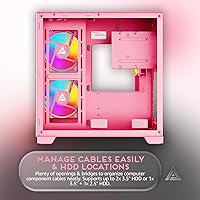
Overview

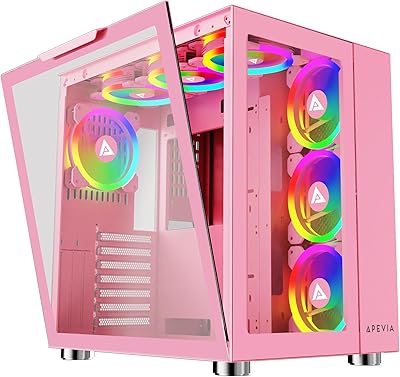
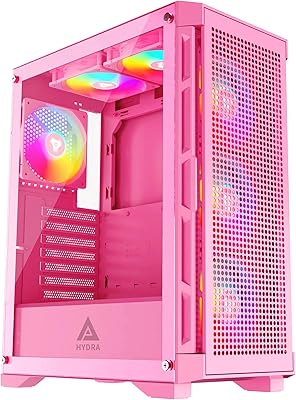
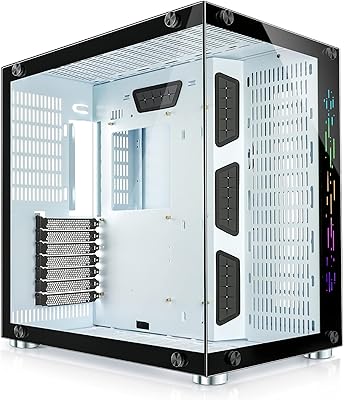
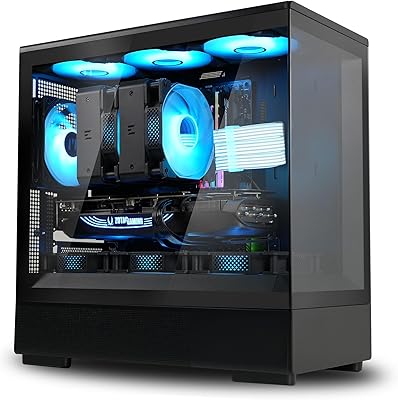
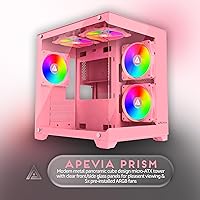
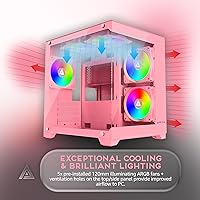
The Apevia Prism-PK Micro-ATX Gaming Case is a compact and sleek PC case designed for gamers who want both performance and style. This micro-ATX case features dual tempered glass panels that allow users to showcase their build, while offering ample room for a range of components. The case supports up to 7 fans for enhanced airflow, ensuring your components stay cool during intense gaming sessions. With customizable RGB lighting and a modern design, this Apevia case offers both aesthetics and functionality for PC builders looking to create a standout setup.

Features & Benefits

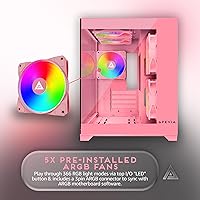
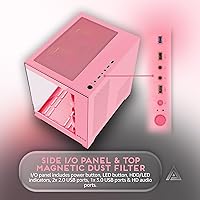
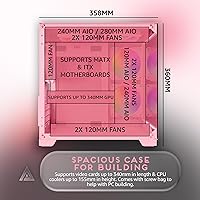
The Apevia Prism-PK comes equipped with 5 pre-installed 120mm ARGB fans, offering 366 lighting modes to customize your PC's look. The case supports graphics cards up to 340mm and CPU coolers up to 155mm, ensuring compatibility with most high-performance components. Magnetic dust filters on the top and bottom panels help keep your build clean and airflow efficient. Additionally, the front panel includes convenient ports such as USB 3.0, 2x USB 2.0, and HD audio, making it a practical choice for everyday use.

Best For

The Apevia Prism-PK is best suited for gamers and PC enthusiasts who want a compact, yet feature-packed case. Those who value RGB customization and airflow performance will appreciate its flexible fan support and lighting options. It’s also a good choice for users looking for a stylish case with tempered glass panels to show off their internal components. Additionally, builders focused on cable management and dust reduction will find its design highly functional.

User Feedback

User reviews of the Apevia Prism-PK are largely positive, with praise for its clean design and effective airflow management. Many users appreciate the customizable RGB lighting and the ease of cleaning with the magnetic dust filters. However, some users have noted difficulty fitting larger graphics cards or CPU coolers due to the case’s compact size. Despite this, its overall build quality and design features make it a popular choice among users who want a visually appealing and functional case for their builds.

Pros

  • The dual tempered glass panels provide a premium, sleek aesthetic that appeals to gamers seeking a visually striking setup.
  • With support for up to 7 fans and 5 pre-installed ARGB fans, the case offers excellent airflow for high-performance builds.
  • RGB customization options with 366 modes allow for a highly personalized lighting experience.
  • Ample space for graphics cards up to 340mm makes it a great choice for users with larger GPUs.
  • Magnetic dust filters simplify cleaning and maintain airflow efficiency over time.
  • The rear-mounted power supply design helps optimize internal space and improves cable management.

Cons

  • Some users report difficulties fitting larger CPU coolers, as it only supports up to 155mm in height.
  • The case can be tight for large graphics cards, limiting compatibility with some high-end models.
  • While airflow is generally good, certain high-end setups may require additional cooling beyond the pre-installed fans.
  • The case’s compact design may not be suitable for users building extremely powerful or bulky systems.
  • Noise levels can be noticeable under load, which might be a concern for noise-sensitive users.
  • Front panel ports, while functional, could be more varied in terms of USB type and additional connectivity options.

Ratings

After analyzing verified user reviews worldwide from multiple platforms and languages, the ratings for this Apevia Prism-PK Micro-ATX Gaming Case reflect a diverse mix of strengths and potential concerns. We filtered out spam, bot-driven, duplicated, off-topic, and exaggerated reviews to ensure only authentic feedback informed these results. Overall, users appreciate its design and airflow, while some report compatibility issues with larger components. Both positive and negative aspects are considered in the scores to give you an accurate overview of its performance and value.

Design & Aesthetics
88%
Users rave about the striking RGB lighting and the sleek, modern look of this micro-ATX case. Many highlight the dual tempered glass panels, which not only improve visibility of internal components but also give the case a premium appearance. It's seen as a perfect match for gamers looking to showcase their setups.
On the downside, a few users mention that while the lighting looks great, it can be a bit overpowering in darker environments. Some also note that the glass panels attract fingerprints, requiring more frequent cleaning to maintain its pristine look.
Airflow & Cooling Performance
91%
The case's ability to house up to 7 case fans is highly appreciated, ensuring excellent airflow throughout. Reviewers have shared that the 5 pre-installed 120mm ARGB fans provide sufficient cooling, even for high-performance components. The airflow system helps keep temperatures in check during long gaming sessions or demanding tasks.
However, some buyers point out that the placement of fans can make it tricky to achieve optimal airflow, especially for those with large graphics cards. There's also feedback about needing additional cooling solutions if using power-hungry components, as the stock fan setup may not be enough for extreme setups.
Ease of Cleaning
87%
One of the standout features for many users is the magnetic dust filters, which make it incredibly easy to keep the case clean. These filters are simple to remove and wash, reducing the hassle of dust buildup. The design is particularly appreciated by those who want to maintain their gaming rig without too much maintenance.
Despite the easy-to-remove filters, some users have mentioned that dust still manages to accumulate in hard-to-reach corners. Others feel that cleaning the tempered glass panels requires extra care to avoid smudges, which can be a minor inconvenience.
Build Quality
85%
The overall build quality of this case impresses many users, with the metal frame offering solid support. It's sturdy enough to handle heavy components, and the dual-glass panels add to its premium feel. Most users find that it holds up well over time, even with regular handling during setup or transport.
Some buyers have pointed out that while the build is solid, the case can feel a bit bulky and difficult to maneuver. A few also mention that the quality of the metal could be better, with minor issues like sharp edges that require care when assembling.
RGB Customization
92%
This case shines in terms of RGB customization, offering an impressive 366 lighting modes that cater to various preferences. Many users enjoy experimenting with the colors and lighting effects, creating dynamic setups. The control options are easy to navigate, making it a hit among gamers who love personalizing their rigs.
However, a small number of users note that while the RGB options are vast, they can be overwhelming for those who prefer simpler setups. Additionally, some wish there was more control over syncing the lights with other PC components for a more seamless effect.
Compatibility with Large Components
65%
35%
The case does a good job accommodating most standard components, offering ample space for components up to 340mm in length. Users with moderate setups often find that it fits well, especially when using mid-tier GPUs and cooling solutions.
However, many users experience compatibility issues when attempting to install larger GPUs or high-end CPU coolers. Some have mentioned that the limited clearance for certain components leads to difficulties during assembly, with parts not fitting as easily as expected.
Cable Management
80%
20%
Users appreciate the cable management features, with enough room behind the motherboard tray to hide cables. The case's design makes it relatively easy to route cables cleanly, keeping the interior tidy and enhancing airflow. Gamers with moderate experience find this to be a helpful aspect of their build.
Some users feel that while the cable management is decent, the space behind the tray could be more generous for larger power supplies or bundles of cables. A few also report that the cable management options aren't as versatile as in other cases of similar size.
Noise Levels
75%
25%
The case's cooling fans perform relatively quietly, even under load. Users who prioritize quieter setups are happy with the noise levels, finding that the system remains manageable without distracting noise. The airflow setup works efficiently without generating much fan hum.
However, some reviewers have mentioned that, at full load, the case can still produce noticeable noise, especially when the fans are cranked up to higher speeds. Those sensitive to noise might find it less ideal for very quiet environments.
Port Accessibility
82%
18%
With a front panel featuring USB 3.0, USB 2.0, and an HD audio port, the accessibility of ports is another highlight. Users find it easy to connect their peripherals, making the case convenient for quick plug-and-play operations. It's a well-rounded set of ports for everyday use.
While the front panel ports are generally appreciated, some users have noted that the placement might not be ideal for those with desk setups that limit easy access. Also, a few users wish there were more USB 3.0 ports, especially for high-speed data transfer.
Ease of Assembly
79%
21%
The case's design makes it relatively simple to assemble, even for those with minimal building experience. The intuitive layout and clear instructions ensure most users can get everything in place without too much hassle. The cable management options also make the assembly process smoother.
On the flip side, some users report that while assembly is generally easy, it can be tricky to fit everything neatly when dealing with larger components. The lack of more modular options might make installation slightly frustrating for those who prefer maximum flexibility.
Overall Value for Money
90%
Many buyers consider this case an excellent value for money. Given its range of features, including the RGB customization, fan support, and clean design, it offers solid performance at a competitive price. Reviewers appreciate that the case delivers premium features without breaking the bank.
However, a small portion of users feel that while the case offers good value, it could still benefit from additional premium features like better materials or more advanced cooling options. Some feel that there are similar cases on the market with slightly better build quality or airflow for the same price.
Customer Support
78%
22%
Some users report a positive experience with the brand's customer service when handling minor issues or product inquiries. They found the support team helpful and responsive to their concerns, which added to the overall satisfaction with the case.
On the other hand, there are complaints about slow response times and occasional difficulty getting in touch with customer support. A few users mentioned that their issues took longer to resolve than expected, which may be a concern for those who prefer more immediate assistance.

Suitable for:

The Apevia Prism-PK Micro-ATX Gaming Case is ideal for gamers and PC builders looking for a compact yet stylish case that doesn't compromise on performance. Its eye-catching design, with customizable RGB lighting and dual tempered glass panels, makes it a great choice for those who want to showcase their gaming rigs. Additionally, users who prioritize airflow and cooling will benefit from the ample fan support, with up to 7 fans and 5 pre-installed ARGB fans that help maintain optimal temperatures. This case is also perfect for individuals seeking an easy-to-clean design, with magnetic dust filters that make regular maintenance a breeze. Overall, this case suits gamers and PC enthusiasts looking for a balanced blend of aesthetics, performance, and practicality in a micro-ATX form factor.

Not suitable for:

However, the Apevia Prism-PK Micro-ATX Gaming Case may not be the best choice for those with large, high-performance components. Some users have reported issues with fitting larger graphics cards or bulky CPU coolers, as it offers limited clearance for these parts. This can be particularly problematic for gamers or professionals who need to build high-end systems with demanding hardware. Additionally, while the case offers good airflow, some users noted that achieving optimal cooling can be tricky, especially for more powerful setups. Those who prioritize a quiet environment may also find the noise levels at full load to be slightly higher than desired, making this case less suitable for noise-sensitive users.

Specifications

  • Case Type: Micro-ATX case designed for compact gaming builds.
  • Dimensions: Measures 14.09 x 10.82 x 14.17 inches (L x W x H).
  • Weight: Weighs approximately 9.81 lbs for a sturdy yet compact build.
  • Fan Support: Supports up to 7 case fans for optimal airflow.
  • Pre-installed Fans: Includes 5x 120mm ARGB fans with customizable RGB lighting.
  • RGB Modes: Features 366 different RGB lighting modes for customization.
  • Graphics Card Compatibility: Compatible with graphics cards up to 340mm in length.
  • CPU Cooler Compatibility: Supports CPU coolers up to 155mm in height.
  • Drive Space: Offers space for 2x 3.5″ or 1x 3.5″ + 1x 2.5″ drives.
  • Tempered Glass Panels: Dual tempered glass panels provide a stylish and durable exterior.
  • Cooling Options: Equipped with magnetic dust filters for easy cleaning and improved airflow.
  • Front Ports: Includes USB 3.0, two USB 2.0, and HD audio ports on the front panel.
  • Power Supply Mounting: Power supply is mounted at the rear of the case for better airflow.
  • Material: Constructed with durable metal for a robust and reliable structure.
  • Form Factor: Micro-ATX form factor, suitable for compact and mid-sized builds.
  • Cable Management: Includes built-in cable management features for a clean and organized setup.
  • Ventilation: Multiple fan mounting locations ensure excellent ventilation and cooling.
  • Dust Management: Removable magnetic dust filters on multiple areas for easy maintenance.
  • Audio Support: Equipped with an HD audio port for superior sound connectivity.

FAQ

The Apevia Prism-PK Micro-ATX Gaming Case offers a compact design with dual tempered glass panels, customizable RGB lighting, and ample space for up to 7 case fans. It also includes 5 pre-installed ARGB fans and features magnetic dust filters for easy cleaning and airflow optimization.

This micro-ATX case supports up to 7 case fans, including the 5 pre-installed 120mm ARGB fans. This ensures excellent airflow and cooling performance, which is ideal for gaming PCs or high-performance setups.

The Prism-PK case can accommodate graphics cards up to 340mm in length, making it compatible with most modern GPUs. However, users with extremely large or high-end graphics cards may want to double-check their GPU’s size before purchasing.

No, the Apevia Prism-PK Micro-ATX Gaming Case has a CPU cooler height limitation of 155mm. If you plan to use a larger cooler, you may need to consider an alternative case with more space for bigger coolers.

This case features a rear cable management system that helps keep cables organized and out of sight. It also provides space for routing cables behind the motherboard tray, improving airflow and the overall clean look of your build.

Yes, the Prism-PK gaming case includes magnetic dust filters on the top, bottom, and front of the case. These filters are easy to remove and clean, helping to maintain airflow and keep your PC components dust-free.

The front panel of the Apevia Prism-PK Micro-ATX case includes USB 3.0, two USB 2.0 ports, and an HD audio port for easy connectivity with peripherals and audio devices.

This compact micro-ATX case is best suited for smaller or mid-sized builds. It offers enough space for powerful components but might be tight for users building extremely high-end or bulky gaming PCs.

Building a PC in this case is relatively straightforward, thanks to its user-friendly design and cable management features. However, users with large GPUs or coolers may find it a bit cramped, so it's important to check compatibility before starting your build.

Some users report that the case can be tight for larger GPUs or CPU coolers, making installation difficult for high-end builds. Additionally, while the airflow is good, some users suggest adding extra cooling for extremely high-performance setups.