Overview

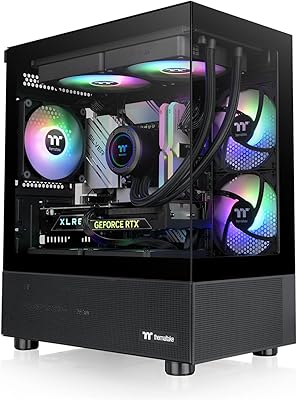
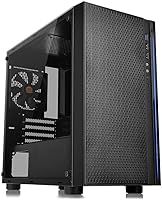
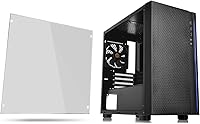
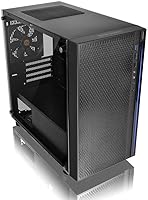
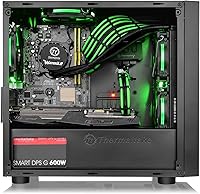
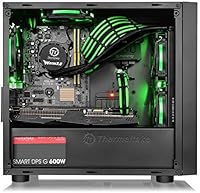
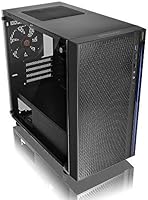
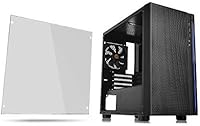
The Thermaltake Versa H18 Micro ATX Case has been around since early 2018, and for a budget small-form-factor chassis, it has aged surprisingly well. The tempered glass side panel is the obvious draw — it gives the build a windowed look that used to cost considerably more. A bottom-mounted PSU shroud keeps the interior looking tidy, which matters when a glass panel is showing everything off. With over 2,000 ratings and a 4.6-star average on Amazon, it clearly resonates with builders. If you want a windowed case without stretching your budget, this is a legitimate starting point.

Features & Benefits

The mesh front panel moves more air than a solid panel would, though keep in mind the case ships with minimal fans, so adding your own is likely necessary. The built-in blue LED strip provides ambient lighting right out of the box, but it cannot be switched off — worth knowing if you prefer a neutral or RGB-controlled aesthetic. AIO support up to 280mm is genuinely impressive for a chassis this compact. The full-length PSU cover and four hidden drive bays round out a feature set that punches well above its price tier, making the Versa H18 a surprisingly capable shell for the money.

Best For

The Versa H18 is a natural fit for anyone building a compact gaming rig or a home-office machine on a tighter budget. It works especially well when paired with a Micro ATX board and a 240mm or 280mm AIO cooler — the chassis has the clearance for it, which not every case at this price can claim. First-time builders tend to appreciate the straightforward, unfussy layout. If you are working from a small desk or just want to keep things compact without giving up a windowed panel, this compact chassis delivers genuine value. It is less suited to high-airflow or heavily expanded builds.

User Feedback

Across thousands of reviews, a clear pattern emerges. Buyers consistently single out the tempered glass quality as a standout, with many noting it looks far more expensive than it is. On the critical side, cable management space behind the motherboard tray is tight — thicker cables and modular PSU harnesses can be a real squeeze. The limited fan mounting options and minimal stock fan count are common complaints worth planning around. That said, overall build quality draws repeated praise, and very few buyers report fit or finish problems. For a budget Micro ATX option, this Micro ATX case has clearly earned its standing.

Pros

  • The tempered glass side panel looks and feels far more premium than the price suggests.
  • Supports AIO liquid coolers up to 280mm, which is rare at this compact size and price tier.
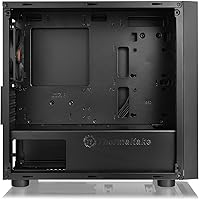
  • The full-length PSU shroud does a great job hiding cables and tidying the interior visually.
  • Four hidden drive bays keep storage out of sight without eating into visible build space.
  • Front I/O includes USB 3.0, two USB 2.0 ports, and HD Audio — all the basics covered.
  • The mesh front panel offers better passive airflow than solid-panel rivals in the same class.
  • Built-in LED lighting adds visual character straight out of the box, no extra hardware needed.
  • Consistently praised for solid build quality across thousands of verified buyer reviews.
  • Compact footprint makes it a practical choice for small desks or confined spaces.
  • Straightforward internal layout makes it approachable for first-time PC builders.

Cons

  • Ships with very few pre-installed fans, so additional cooling purchases are almost certainly needed.
  • The blue LED strip cannot be turned off, limiting compatibility with custom lighting setups.
  • Cable management space behind the motherboard tray is tight enough to cause real frustration.
  • Fan mounting options are limited, which constrains cooling configurations for warmer builds.
  • The blue-only LED is fixed, so builders wanting RGB or neutral lighting are out of luck.
  • No dust filters are included on key intake areas, which can accelerate internal dust buildup.
  • The narrow interior width makes installing thicker aftermarket CPU coolers a careful exercise.
  • Build dates back to 2018, so newer cases at similar prices may offer better overall fan support.

Ratings

The Thermaltake Versa H18 Micro ATX Case has been scored by our AI engine after parsing thousands of verified global buyer reviews, with spam, bot activity, and incentivized feedback actively filtered out. The scores below reflect an honest cross-section of real builder experiences — strengths and frustrations alike — so you can make a genuinely informed decision before buying. Where this compact chassis shines and where it falls short are both represented transparently across every category.

Value for Money
91%
For builders on a tight budget, the price-to-feature ratio here is hard to argue with. A tempered glass panel, PSU shroud, and 280mm AIO support at this price point would have been unthinkable a few years ago, and buyers consistently note they expected far less for the money.
The value equation does weaken slightly once you factor in the cost of purchasing additional fans, which most builds will need. If you are budget-capped, those added expenses can chip away at the initial savings.
Build Quality
84%
The steel chassis feels solid and does not flex noticeably when carrying or positioning the case, which reassures builders during installation. The tempered glass panel in particular draws repeated praise for feeling far more substantial than the price implies.
Some users have noted that smaller internal panels and brackets feel thinner than the main shell, and a handful of buyers report minor fit inconsistencies around the front panel clips. Nothing catastrophic, but perceptible to careful hands.
Tempered Glass Panel
88%
The glass side panel is one of the clearest wins here — it provides a clean window into the build without the scratching or yellowing that plagued acrylic panels in older budget cases. Builders showing off RGB components or clean cable work genuinely benefit from it.
The glass is real and will crack if mishandled, and there is no carry handle or padding included to protect it during transport. A small but real concern for anyone building at a desk with limited clear workspace.
Cooling Performance
61%
39%
The mesh front panel does allow noticeably more air to enter compared to sealed competitors, and the front radiator support up to 280mm gives thermal-conscious builders real flexibility when choosing an AIO cooler.
Straight out of the box with no fans installed, airflow is essentially non-existent beyond passive convection. Buyers expecting decent temperatures without adding fans will be disappointed, and the limited fan mounting points restrict how aggressively you can configure the cooling later.
Cable Management
58%
42%
The full-length PSU shroud is a genuine quality-of-life feature — it hides power supply cables and drive connections completely, making even a messy build look presentable through the glass panel. First-time builders especially appreciate not having to perfectly route every wire.
The space behind the motherboard tray is tight enough to cause real frustration, particularly with non-modular power supplies or thick braided cable extensions. Several builders report having difficulty closing the rear panel after routing cables, which is a known pain point at this size class.
AIO Compatibility
86%
Supporting radiators up to 280mm in a Micro ATX chassis is a standout feature that gives this case a clear edge over several competitors in the same price bracket. Builders pairing it with popular 240mm or 280mm AIOs from major brands report clean, fuss-free installations.
Fitting a 280mm radiator does require careful planning around fan placement and cable routing, and clearance can become tight depending on your specific AIO model and tube length. Always verify your AIO dimensions against the case interior before committing.
Storage Options
72%
28%
Four hidden drive bays — two for 2.5-inch SSDs and two for 3.5-inch hard drives — cover the needs of most compact builds comfortably. Tucking them behind the PSU shroud keeps them invisible through the side panel, which builders with glass-side setups appreciate.
The bays are hidden partly because access to them is not the most convenient once the build is complete. Swapping drives post-build requires more disassembly than on cases with dedicated tool-free bay systems, which can be mildly frustrating for users who frequently change storage.
Front I/O
74%
26%
Having a USB 3.0 port, two USB 2.0 ports, and HD Audio on the front panel covers the practical day-to-day needs of most users without overcomplicating the front panel layout. The port placement is accessible without being awkwardly positioned.
In 2024 and beyond, the absence of a USB-C port on the front I/O is a real gap — many peripherals, phones, and accessories now rely on it as the primary connection. For a case originally designed in 2018 this is understandable, but it is increasingly noticeable.
LED Lighting
53%
47%
The built-in blue LED strip provides instant visual character without any setup cost or additional hardware, which is a welcome bonus for budget builders who want their rig to look alive without buying separate lighting kits.
The inability to turn the LED strip off is a consistent complaint, and the fixed blue color means it clashes with virtually every other RGB lighting system on the market. Builders with red, white, or ARGB ecosystems will find the strip more of an annoyance than an asset.
Fan Support
55%
45%
The case does have multiple fan mounting positions that accept standard 120mm and 140mm fans, giving builders a reasonable upgrade path for improving airflow after the initial build is complete.
The total number of supported fan positions is limited compared to newer cases at a similar price, and zero fans come pre-installed, meaning buyers need to budget for cooling hardware from the start. This is probably the most common complaint across verified reviews.
Ease of Build
78%
22%
The interior layout is logical and uncluttered, which first-time builders consistently find reassuring. Component installation follows a predictable order, and the PSU shroud helps contain the visual chaos of loose cables during the build process.
The tight rear cable management channel and the lack of pre-drilled standoff guides for different board sizes can slow down the build for newcomers. A few buyers also noted that motherboard standoffs require manual installation, which is not always clearly communicated.
Footprint & Size
83%
The compact dimensions make this case genuinely practical for small desks, home theater setups, or office environments where a full mid-tower would feel out of place. The relatively low width of around 205mm means it can sit comfortably in tighter spaces.
The compact form factor is a deliberate trade-off, not a flaw, but buyers occasionally underestimate how little interior room remains once a GPU, AIO radiator, and PSU are installed. Planning your component list carefully before purchasing the case is strongly advised.
Aesthetics
81%
19%
The combination of a matte black steel exterior and tempered glass side gives the Versa H18 a look that punches above its weight class. The clean lines and minimal branding mean it does not look aggressively gamer-branded, which suits home-office builders as well.
The fixed blue LED and the lack of any design customization options mean the aesthetic is locked in from day one. Buyers who want a fully blacked-out, neutral, or multi-color look will need to work around the lighting constraint rather than with it.
Packaging & Shipping Protection
69%
31%
Most buyers report that the case arrives in acceptable condition with basic foam padding around the key panels. The tempered glass panel is typically wrapped separately, which reduces the risk of transit scratches.
A subset of reviewers note that the packaging feels minimal for a glass-paneled product, and a small but notable number of buyers report minor cosmetic damage on arrival. For a product with a fragile glass component, slightly more robust packaging would be welcome.

Suitable for:

The Thermaltake Versa H18 Micro ATX Case is a strong match for budget-conscious builders who want their rig to look good without committing to a larger or more expensive chassis. If you are working with a Micro ATX motherboard and plan to cool your system with a 240mm or 280mm AIO, this case accommodates that setup more comfortably than most competitors at the same price. It is also an excellent pick for anyone building a compact gaming or home-office PC where desk space is genuinely limited. First-time builders in particular tend to appreciate the clean internal layout — the full-length PSU shroud hides cable clutter and makes the build process less intimidating. The tempered glass panel lets you show off the finished result without spending extra on a premium enclosure.

Not suitable for:

The Thermaltake Versa H18 Micro ATX Case is not the right choice for builders who need serious airflow headroom or plan to run a high-TDP system with multiple fans in a push-pull configuration. The case ships with minimal pre-installed fans, and the available mounting points are limited, so buyers expecting strong out-of-the-box thermal performance will likely be disappointed. The blue LED strip is hardwired on with no disable option, which is a real dealbreaker if you are building around a custom RGB theme or simply prefer a clean, light-free aesthetic. Cable management space behind the motherboard tray is noticeably tight, so anyone using a non-modular power supply or thick cable extensions should plan for a frustrating build experience. Enthusiast builders chasing maximum expandability or ATX board compatibility should look elsewhere entirely.

Specifications

  • Form Factor: Supports Micro ATX motherboards only; ATX and Mini-ITX boards are not compatible with this chassis.
  • Dimensions: The case measures 398mm (H) x 205mm (W) x 439mm (D), making it notably compact for a windowed chassis.
  • Weight: The unit weighs 10.21 lbs, which is typical for a steel-and-glass Micro ATX enclosure in this class.
  • Side Panel: A tempered glass side panel is installed on the left side, offering a clear view of the internal components.
  • Front Panel: The front features a mesh panel with a built-in, always-on blue LED strip for ambient lighting.
  • PSU Support: The power supply mounts at the bottom of the case and is concealed beneath a full-length PSU shroud cover.
  • AIO Cooling: The chassis supports all-in-one liquid coolers with radiators up to 240mm or 280mm in the front mount position.
  • Drive Bays: Includes two hidden 2.5-inch bays and two hidden 3.5-inch bays, all located behind the PSU shroud.
  • Front I/O: Front connectivity includes one USB 3.0 port, two USB 2.0 ports, and one HD Audio combo jack.
  • Materials: The main structure is constructed from SPCC alloy steel, with the side panel made from tempered glass.
  • Cooling Method: Cooling relies on air circulation through fan mounting positions; no fans are pre-installed from the factory.
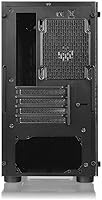
  • Expansion Slots: The case provides expansion slots suited to Micro ATX boards, supporting standard full-length graphics cards.
  • Color: Available in black only; the exterior finish is a matte black coating on the steel panels.
  • Brand: Manufactured by Thermaltake, a Taiwan-based PC hardware brand with a long history in cases and cooling.
  • Model Number: The official model identifier is CA-1J4-00S1WN-01, which can be used to verify compatibility and locate documentation.
  • Release Date: The case was first made available in January 2018 and has not been discontinued by the manufacturer.
  • PSU Orientation: The power supply is oriented with a bottom mount, which helps lower the system center of gravity slightly.
  • LED Lighting: The integrated blue LED strip is hardwired and has no on/off toggle or controller included in the package.

Related Reviews
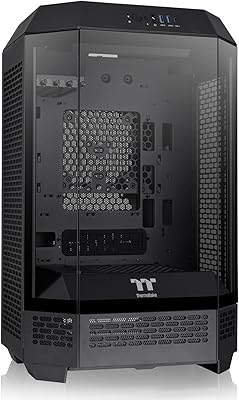
Thermaltake Tower 300 Black Micro-ATX Case
84%
88%
Cooling Performance
90%
Build Quality
85%
Design and Aesthetics
82%
Size and Compatibility
80%
Ease of Setup
More
Thermaltake Versa H21 ATX Mid Tower Case
69%
91%
Ease of Assembly
86%
Interior Space
73%
Airflow & Ventilation
58%
Build Quality & Materials
67%
Cable Management
More
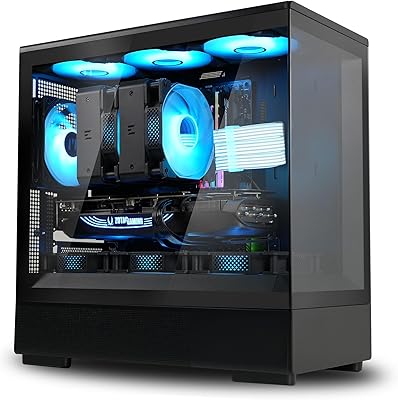
Thermaltake View 170 TG ARGB Micro-ATX Case
88%
91%
Build Quality
89%
Cooling Performance
94%
Design & Aesthetics
72%
Cable Management
88%
Ease of Assembly
More
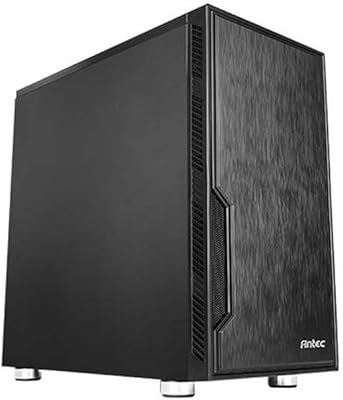
Antec VSK10 Micro-ATX Case
82%
88%
Cooling Performance
85%
Build Quality
70%
Cable Management
90%
Airflow Support
78%
Ease of Installation
More
Zalman P10 Micro ATX Case
84%
86%
Build Quality
90%
Cooling Performance
87%
Ease of Cable Management
91%
Aesthetic Design
83%
Compatibility with Components
More
ASUS Prime AP201 Micro ATX Case
86%
91%
Cooling Performance
89%
Ease of Assembly
88%
Cable Management
86%
Build Quality
87%
Thermal Management
More
darkFlash DB330M Micro-ATX PC Case
86%
88%
Cooling Performance
91%
Design and Aesthetics
90%
Ease of Setup
85%
Build Quality
89%
Value for Money
More
NZXT H3 Flow Micro-ATX Case
86%
94%
Cooling Performance
88%
Build Quality
85%
Space Efficiency
90%
GPU Compatibility
82%
Ease of Setup
More
Okinos Aqua 3 Micro-ATX PC Case
76%
93%
Visual Design
81%
Build Quality
68%
Airflow & Cooling
89%
Value for Money
86%
Front I/O & Connectivity
More
ASUS A21 Micro ATX PC Case
84%
92%
Cable Management
89%
Airflow Efficiency
85%
Build Quality
90%
Interior Space & Compatibility
87%
Design Aesthetics
More

FAQ

No, it does not ship with pre-installed fans. You will need to purchase fans separately, which is worth factoring into your total build budget. The case does have fan mounting positions available for standard 120mm and 140mm fans.

Unfortunately, no. The built-in blue LED strip is always on when the system is powered and there is no physical switch or software control to disable it. If you are building around a custom RGB theme or prefer no lighting, this is a real limitation to consider before buying.

No, the Versa H18 is designed strictly for Micro ATX boards. Full-size ATX motherboards will not fit. If you are unsure which form factor your board is, check the manufacturer spec sheet before ordering.

The case supports AIO coolers with radiators up to 280mm, which is mounted at the front. That is generous for a chassis this compact, and it means popular 240mm and 280mm AIOs from brands like Corsair, NZXT, and be quiet! should fit without issue.

Yes, it slides or latches off fairly easily depending on your exact revision, and most builders report it is straightforward to manage during the build process. Just handle it carefully on a soft surface since it is real glass and will crack if dropped.

It is noticeably tight — typically around 15 to 18mm of clearance, which is on the lower end. Thinner modular cables will fare better than fat non-modular bundles. If you are using a non-modular PSU, plan extra time and patience for routing cables neatly.

Yes, the case accommodates full-length GPU cards. That said, always cross-check your specific card length against the interior dimensions, especially if you are running a large triple-fan card, since extra-long models can get close to the drive bay area.

It helps compared to a sealed solid-panel front, since air can pass through more freely. However, with no fans installed out of the box, you will not notice a meaningful airflow improvement until you add your own intake fans. Think of the mesh as a good foundation rather than a complete cooling solution.

It is a solid choice for either scenario. The compact footprint works well on a smaller desk, and the tempered glass side makes it presentable enough for a living room setup. The always-on blue LED is worth noting if you want a low-key aesthetic in a shared space.

It remains competitive for the price, largely because the core feature set — tempered glass, PSU shroud, AIO support up to 280mm — was ahead of its class when it launched and still holds its own. Newer alternatives may offer better fan mounting options or addressable RGB support, so if those features matter to you, it is worth comparing current-year options before deciding.

Where to Buy