
Overview

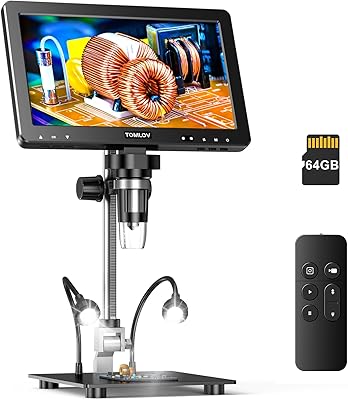
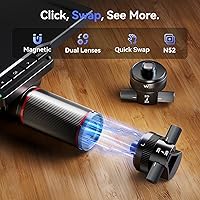
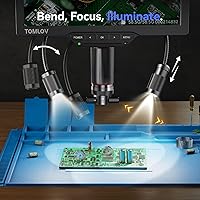
The TOMLOV TM3K-3D Digital Microscope occupies a serious middle ground between hobbyist-grade USB scopes and full industrial bench units. What separates it from the flat top-down alternatives crowding this category is its true 3D side-viewing capability — letting you inspect solder joints and component edges from angles a conventional overhead camera simply cannot reach. The dual magnetic lens system is worth understanding before you buy: two swappable lenses cover different working distances and fields of view, snapping in and out without tools. The built-in 7-inch IPS screen means you can power up and get to work without routing anything through a laptop. Keep in mind this is a dedicated desktop tool — compact, but not designed to travel.

Features & Benefits

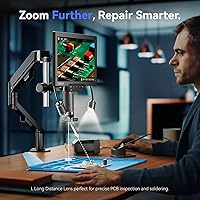
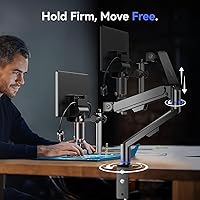
The 3D side-viewing mode is the headline feature, and it earns its place. When you are reflowing a tight SMD pad or checking a via partially hidden under a component, seeing the joint from the side rather than straight down genuinely changes how you work. Switching between the wide-angle W lens and the long-distance L lens takes seconds — the magnetic mount clicks firmly with no wobble. The 3K display holds up well during extended sessions, with colors that stay accurate rather than washing out under fatigue. The gooseneck arm holds its position reliably once set. HDMI output lets you mirror to a larger monitor, and the included 64GB card means you can start recording work immediately without hunting for extra hardware.

Best For

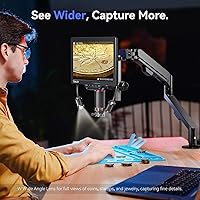
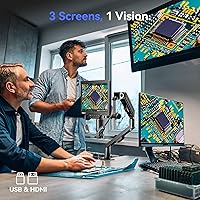
This 3D soldering microscope is a natural fit for anyone doing PCB repair or soldering at a serious level — hobbyists who have outgrown magnifying glasses and professionals who need consistent, fatigue-free viewing. Coin collectors will appreciate the wide-angle W lens, which captures surface relief and mint marks without distortion. Watchmakers and jewelry inspectors benefit from the side-viewing angle, which reveals depth and texture that a top-down setup flattens entirely. Teachers and content creators can plug into a projector or larger display via HDMI and share their work in real time. If you have been relying on a phone camera or a basic clip-on loupe, this dual-lens desktop microscope represents a meaningful step up in both capability and comfort.

User Feedback

With a 4.3-star average across well over 200 ratings, the TOMLOV TM3K-3D has earned broadly positive reception — though not without nuance. Most buyers single out image sharpness and the practical usefulness of the 3D viewing mode as standout strengths, and the magnetic lens swap draws consistent praise for being fast and tool-free. On the critical side, some users report a learning curve when first configuring 3D mode, and a handful note that the gooseneck arm can require occasional retightening over time. Compatibility with older HDMI displays has come up in a few cases. The bundled repair mat and 64GB card are generally seen as genuinely useful additions rather than filler — a small but appreciated part of the package.

Pros

  • True 3D side-viewing opens up angles that standard top-down microscopes cannot reach during PCB work.
  • Magnetic lens swapping is fast, tool-free, and clicks into place with satisfying firmness.
  • The 7-inch IPS screen is sharp enough to work from directly without needing an external monitor.
  • 3K resolution holds up well during long sessions, reducing the eye strain common with lower-res displays.
  • HDMI output makes it easy to mirror to a larger screen or record for teaching and content creation.
  • The 64GB storage card and repair mat are included out of the box, so you can start working immediately.
  • The metal body feels sturdy and well-built relative to similarly priced plastic-chassis competitors.
  • The wide-angle W lens is particularly strong for coin and jewelry inspection across a full frame.
  • Gooseneck arm offers a wide range of positioning without requiring additional mounting hardware.
  • At 2 pounds, the unit is light enough to reposition on a bench without effort.

Cons

  • The 3D mode has a noticeable learning curve and may frustrate users expecting instant results.
  • The gooseneck arm can lose its set position over time and may need occasional retightening.
  • Compatibility with older or budget HDMI displays is not guaranteed and has caused issues for some buyers.
  • The 7-inch screen, while capable, may feel limiting when reviewing fine details across a wide component.
  • No wireless or Wi-Fi connectivity means sharing or transferring recordings requires physical media.
  • This dual-lens desktop microscope is a desk-only instrument with no practical portable or field use case.
  • The 3D side-viewing feature, while useful, adds complexity that casual or infrequent users may never fully utilize.
  • Software interface and on-device menu navigation have been described as unintuitive by some users.

Ratings

The scores below for the TOMLOV TM3K-3D Digital Microscope were generated by our AI system after analyzing verified buyer reviews from global marketplaces, with spam, bot-submitted, and incentivized feedback actively filtered out. We weighted feedback from confirmed purchasers who described hands-on use across soldering, coin inspection, watchmaking, and electronics repair. Both the genuine strengths and the recurring frustrations are reflected transparently in every category score.

Image Clarity
88%
Users consistently praised how sharp and color-accurate the 3K IPS display looks during extended soldering sessions, noting that fine solder bridges and lifted pads are clearly distinguishable without needing to adjust brightness constantly. The display holds up well even under the task lighting conditions typical of a repair bench.
A handful of users noted that at the extreme end of the magnification range, image sharpness drops off noticeably and some chromatic fringing appears around high-contrast edges. For the majority of practical working magnifications this is not an issue, but maximum zoom is less reliable than mid-range.
3D Viewing Mode
79%
21%
When it works well, the 3D side-viewing mode genuinely changes how you approach PCB inspection — being able to rotate the view around a solder joint and check for cold joints or bridging from the side is something flat-camera scopes simply cannot offer. Users working on watch movements and micro-components reported it as the single feature that justified the purchase.
The learning curve is real and should not be underestimated. Several buyers reported spending a full session just figuring out how to position the unit for consistent 3D results, and a few gave up on the mode entirely after frustration. It rewards patience, but first-time microscope users may find it more confusing than helpful.
Lens Swap System
91%
The magnetic dual-lens mechanism is one of the most consistently praised design choices in user feedback. Switching from the wide-angle W lens to the long-distance L lens mid-session takes only a few seconds, with no tools and no fiddly alignment required — a practical advantage when you are moving between coin inspection and soldering work in the same sitting.
A small number of users flagged that the magnetic connection, while firm under normal use, can feel slightly less secure if the lens is bumped laterally during repositioning. It has not been reported as causing lens drops, but users working near the edge of a crowded bench should be mindful of accidental contact.
Display Quality
86%
The 7-inch IPS panel received strong marks for reducing eye strain during long repair sessions, which is a genuine concern for anyone doing micro-soldering for hours at a stretch. Colors are rendered with enough accuracy that users can distinguish flux residue, oxidation tones, and trace coloring on PCBs without second-guessing what they are seeing.
The screen size, while adequate for solo work, can feel limiting when reviewing fine detail across a wide component layout. A few users mentioned wishing for a 10-inch option, and at certain viewing angles the brightness can appear slightly uneven — noticeable mostly when the ambient lighting in the workspace is very dim.
Build Quality
83%
The metal body gives this dual-lens desktop microscope a noticeably more solid feel compared to the plastic-chassis competitors in a similar price range. Users noted it does not flex or creak when adjusting the arm, and the overall finish looks professional enough to sit on a workshop bench or in a small repair shop without looking out of place.
While the main body is metal, some of the smaller fittings and connector surrounds feel less premium on close inspection. Nothing has been reported as breaking under normal use, but the quality is not entirely uniform across every component and a few users felt the price warranted a slightly tighter overall fit and finish.
Arm Stability
72%
28%
The gooseneck arm offers a wide range of positions and can be set to hold the unit at unusual angles that a rigid fixed arm could not achieve, which users found helpful when working on awkwardly oriented PCBs or large coin trays. Initial positioning is generally firm and does not require repeated adjustment mid-task.
Drift and gradual loosening after repeated repositioning is the most commonly cited mechanical complaint across user feedback. Over weeks of regular use, some buyers found themselves retightening more frequently than expected. This is a known characteristic of gooseneck designs in general, but it does come up often enough to be a legitimate consideration.
Ease of Setup
74%
26%
Basic setup — unboxing, attaching the arm, inserting the lens, and powering on — is straightforward and most users reported being operational within minutes. The standalone screen means there is no driver installation or software configuration required to get a live image, which is a meaningful advantage over USB-only alternatives.
Where setup becomes less smooth is in configuring the 3D mode and navigating the on-device menu system, which several buyers described as unintuitive. Users who skipped reading the manual found themselves confused by the mode-switching interface, and the documentation could do a better job of walking through the 3D calibration steps.
HDMI & USB Output
81%
19%
The HDMI output proved genuinely useful for teachers and repair shop owners who want to display work on a wall screen or record sessions for training purposes. Connecting to a modern monitor or capture card is plug-and-play with no additional configuration needed in most setups, and the output signal quality matches the on-device display well.
Compatibility with older HDMI displays is inconsistent, and a non-trivial number of users reported no signal or resolution mismatches when connecting to TVs or monitors from an earlier generation. Buyers planning to use the HDMI output with legacy equipment should verify compatibility or test early in the return window.
Value for Money
77%
23%
Users who regularly perform PCB repair, micro-soldering, or precision inspection tend to feel the price is well justified relative to what similar tools in the category offer — particularly given the 3D side-viewing capability, the standalone screen, and the bundled accessories that add immediate utility. The metal construction also reinforces the sense of durability relative to cheaper alternatives.
Casual or infrequent users are more likely to feel the price is harder to justify, especially if they find the 3D mode underused. A few buyers noted they spent more than they needed to for their actual use case, suggesting this unit is best purchased when you have a clear, recurring need for its more advanced capabilities.
Bundled Accessories
82%
18%
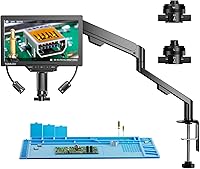
The included 64GB memory card and repair mat are regarded by the majority of buyers as genuinely useful rather than token additions. The repair mat in particular was appreciated by users doing component-level rework, providing a clean non-slip surface that complements the microscope setup naturally from day one.
The repair mat is functional but basic — it will not replace a proper anti-static ESD mat for sensitive electronics work, and experienced repair technicians may already own better versions of both included items. For that audience, the bundled accessories add less incremental value than they would for a first-time buyer.
Light Source
78%
22%
The LED gooseneck light received positive marks for being independently positionable, allowing users to direct illumination specifically at the subject rather than relying on ambient room lighting. This makes a real difference when inspecting reflective surfaces like coin fields or lacquered PCB traces where glare control matters.
A few users found the light intensity fixed rather than smoothly adjustable, which created hotspots on highly reflective surfaces. Jewelers and coin inspectors in particular mentioned that controlling the angle precisely was necessary to avoid washout, and that the light demands more fiddling than a diffused ring-light alternative would.
Software & Interface
61%
39%
For basic functions — live view, image capture, video recording — the on-device interface gets the job done without requiring any external software. Users who stick to straightforward tasks rarely reported interface-related frustrations, and day-to-day operation is manageable once the menu layout becomes familiar.
The interface design is one of the weaker aspects of the overall package. Menu navigation has been described as unintuitive by a recurring subset of buyers, particularly around toggling between viewing modes and accessing recording settings. It does not feel designed with the end user in mind, and a firmware update that improved the UX would make a meaningful difference.
Magnification Range
84%
The working magnification range covers the practical needs of most target use cases well — from a broad enough field of view for full coin inspection to close enough detail for reading component markings on dense PCBs. Users doing watch and jewelry work praised the range as versatile without requiring manual lens changes for most tasks.
The advertised 2000x maximum is a digital interpolation figure rather than optical, and image quality at extreme zoom is noticeably softer than at mid-range settings. Buyers expecting industrial-grade optical performance at peak magnification will find the real-world upper limit less impressive than the specification implies.

Suitable for:

The TOMLOV TM3K-3D Digital Microscope is genuinely well-suited to anyone who works regularly with small components and has grown frustrated by the flat, top-down perspective that most desktop scopes offer. Electronics hobbyists and repair technicians will get the most out of it — being able to view a solder joint from the side, rather than staring down at it, is a practical advantage during rework sessions where joint geometry actually matters. Coin collectors and numismatists benefit from the wide-angle lens, which renders surface relief and edge detail with real clarity across the full frame. Watchmakers and jewelry inspectors will appreciate how the side-viewing mode reveals depth that overhead cameras simply compress away. Teachers or YouTube-style content creators who want to record and display close-up work via HDMI will find the built-in screen and output options genuinely convenient. If you are currently squinting through a loupe or propping up a phone camera, this dual-lens desktop microscope is a substantial and well-rounded upgrade.

Not suitable for:

The TOMLOV TM3K-3D Digital Microscope is not the right choice for buyers who need portability — this is a fixed desktop instrument, and its gooseneck arm and dedicated screen make it unsuitable for fieldwork or travel kits. Anyone expecting instant plug-and-play simplicity with the 3D mode should be aware there is a real learning curve involved; it takes time and some experimentation to get the most out of the 360° rotation feature, and impatient users may find it more confusing than helpful at first. Buyers with older HDMI display setups should verify compatibility before purchasing, as a small number of users have reported issues with legacy equipment. If your work involves purely biological or slide-based specimen viewing under high magnification, the feature set here is skewed toward industrial and collector use cases rather than lab science. Those who only need occasional, casual magnification would likely be better served by a far simpler and less expensive tool.

Specifications

  • Model: This unit is manufactured by TOMLOV under the model designation TM3K-3D.
  • Display: Features a 7-inch IPS screen delivering 3K UHD resolution with wide viewing angles and accurate color reproduction.
  • Lens System: Includes two magnetically attached interchangeable lenses: a wide-angle W lens for broad field inspection and a long-distance L lens for unobstructed close-up work.
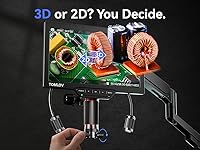
  • Viewing Mode: Supports 3D side-viewing with full 360° rotational imaging, allowing inspection of components from multiple lateral angles.
  • Magnification: Offers a maximum magnification of 2000x, suitable for detailed inspection of fine electronic components, coins, and specimens.
  • Stand: Uses a flexible 360° articulating gooseneck arm that allows full positional adjustment across a compact desk footprint.
  • Dimensions: The unit measures 11 x 3 x 12 inches, making it a fixed desktop instrument rather than a portable device.
  • Weight: Weighs approximately 2 pounds, light enough to reposition on a workbench without difficulty.
  • Body Material: Constructed with a metal body that provides structural rigidity and durability compared to plastic-chassis alternatives.
  • Light Source: Equipped with an LED gooseneck light that provides adjustable, focused illumination directly at the subject.
  • Connectivity: Provides both HDMI and USB output ports, enabling connection to external monitors or recording devices.
  • Storage: Includes a 64GB memory card in the box, allowing immediate on-device recording and image capture without additional purchases.
  • Power Input: Operates at 5 volts, compatible with standard USB power adapters commonly used for desktop accessories.
  • Viewing Angle: Rated at a 178-degree real angle of view, ensuring minimal distortion across the full frame of the display.
  • Included Accessories: Ships with a repair mat and 64GB card included, providing practical day-one utility for electronics and repair work.
  • Operating Mode: Functions as a standalone unit with its built-in screen, requiring no PC or external software for basic operation.

Related Reviews
TOMLOV DM702 Digital Coin Microscope 10-inch
78%
88%
Display Quality
74%
Magnification Performance
83%
Build Quality & Durability
86%
Lighting System
84%
Stand & Working Space
More
TOMLOV DM9 Pro Digital Microscope
83%
88%
Magnification Performance
92%
Image Quality
86%
Lighting Adjustability
84%
Build Quality
79%
Ease of Setup
More
TOMLOV DM9 Max 10.1″ Digital Microscope
77%
88%
Display Quality
74%
Magnification Performance
78%
Build Quality
71%
Stand & Stability
93%
Ease of Setup
More
TOMLOV P10 Evo Handheld Digital Microscope
78%
93%
Portability
91%
Ease of Use
74%
Optical Clarity
82%
Display Quality
54%
Battery Life
More
TOMLOV TM4K-AF Max 4K Digital Microscope
80%
88%
Autofocus Performance
83%
Image Clarity
71%
Display Quality
79%
Build Quality
67%
Arm Stability
More
Andonstar AD407 Pro Digital Soldering Microscope
81%
91%
Image Clarity
93%
Build Quality
89%
Stand Stability & Adjustability
88%
UV Filter & Lens Protection
86%
Display Quality
More
National Geographic Kids Digital Handheld Microscope
81%
88%
Ease of Use for Kids
83%
Image & Screen Quality
71%
Magnification Performance
79%
Battery Life
91%
Kit Completeness & Value
More
Andonstar AD266S 7-Inch 5-Lens Digital Microscope
74%
83%
Image Clarity
88%
Lens Versatility
81%
Build Quality
79%
Value for Money
76%
LCD Display
More
Ahalfcit Digital Microscope 500X
83%
88%
Magnification Quality
91%
Ease of Use
92%
Portability
83%
Battery Life
89%
Display Quality
More
MAXLAPTER Pocket 100X Digital Microscope
74%
91%
Portability & Form Factor
88%
Ease of Use
63%
Image & Optical Quality
71%
Screen Quality
74%
UV Light Performance
More

FAQ

It works completely standalone. The built-in 7-inch screen handles all display functions, so you can power it up and start inspecting without connecting it to a PC or installing any software. The HDMI and USB ports are there if you want to mirror to a larger monitor or transfer recordings, but they are optional.

Very easy — the magnetic attachment system means you just pull one lens off and snap the other on. There are no screws or alignment pins involved. Most users get comfortable with the swap in the first session, and the connection is firm enough that the lens does not shift during normal use.

The W lens is a wide-angle option best suited for subjects like coins, jewelry, or insects where you want to see the full specimen in one frame. The L lens is a longer-distance lens designed for soldering and PCB work, where you need extra clearance between the lens and the board so your hands and tools can move freely underneath.

There is a learning curve — it is worth being honest about that. Getting the positioning and rotation dialed in for your specific task takes some experimentation, especially the first few times. Most users find it clicks into place after a session or two, but if you expect it to be instantly intuitive out of the box, you may need to adjust your expectations a little.

It works with most modern HDMI displays without any issues. A small number of users have reported compatibility problems with older or budget HDMI equipment, so if you are planning to use it primarily with a legacy display, it is worth checking whether your screen supports the output resolution before committing.

It holds its position well under normal conditions, but like most gooseneck designs it can gradually loosen with repeated repositioning. A few users have noted needing to retighten it after extended use. It is not a structural flaw so much as a characteristic of the form factor, and it is easy to address when it occurs.

Yes. The 64GB card included in the box enables on-device video recording and image capture directly from the unit. You can also connect via HDMI to an external capture device or monitor if you want a larger display for streaming or teaching purposes.

It can handle basic specimen viewing, but the feature set is primarily oriented toward industrial and inspection use cases — soldering, coin collecting, jewelry, and similar tasks. If biological slide work under controlled high magnification is your main application, a dedicated laboratory microscope would likely serve you better.

The 3K IPS display is genuinely one of the stronger points of this unit. Colors are accurate and the image stays crisp at typical working magnifications, which matters a lot during long repair sessions where a dim or washed-out display causes real fatigue. It is not a professional broadcast-grade panel, but for its intended use it performs well above average.

Most buyers consider it a practical addition rather than padding. It protects small components from rolling off the desk and provides a non-slip surface under your work. It will not replace a purpose-built ESD mat for sensitive electronics work, but for general soldering, coin handling, or jewelry inspection it does the job well enough that you will likely use it regularly.