Overview

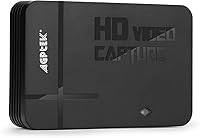
The AGPTEK NC-VG0025 HD Game Capture Card is a standalone recorder that saves gameplay footage directly to USB storage — no PC required. It supports both HDMI and AV inputs, so it works with current-gen consoles and older hardware alike. First available in late 2016, it sits in the budget-to-mid range and still holds a spot on Amazon's bestseller charts with over 350 customer ratings. One thing buyers absolutely need to know before purchasing: streaming is not supported. That limitation catches a surprising number of people off guard and is the source of many frustrated reviews that could have been avoided with a closer read of the product description.
Features & Benefits

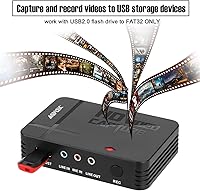
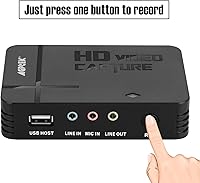
The AGPTEK recorder handles 1080p video recording via HDMI, saving directly to a USB flash drive (up to 128GB, formatted as FAT32 or NTFS) or an external hard drive up to 2TB. The AV input is a real bonus — it lets you capture footage from classic consoles that most modern capture cards have long abandoned. There is also a built-in mic input, though it strictly requires a 3.5mm TRS microphone; standard TRRS headsets used with phones will not work here. The unit is compact at 5.9 by 3.1 by 4.1 inches, works with both USB 2.0 and 3.0 drives, and comes with a 12-month warranty.

Best For

This standalone recording device suits casual gamers who just want to save clips without dealing with streaming software or subscriptions. Retro gaming fans benefit particularly from the AV input — if you are still playing on a PS2, original Xbox, or classic Nintendo hardware, legacy console support is notably hard to find at this price. Beginners will appreciate that there is no software setup involved; you plug in a compatible drive, press record, and go. The mic input is also useful for anyone wanting basic commentary built into their footage. It is compact and portable enough to throw in a bag for a friend's place or a local gaming event.

User Feedback

Reviews for this capture card are decidedly mixed, and the split is pretty telling. The most common praise centers on ease of setup — buyers who simply wanted a way to record footage without installing software largely came away happy. The frustration tends to fall into two camps: people who missed the no-streaming limitation and expected more, and those whose USB drives went unrecognized by the device. Mic audio gets described as thin but functional for basic commentary. A number of users also flagged inconsistent recording quality during longer sessions. At a 3.4-star average, this is a device that delivers for the right use case but comes up short for anyone expecting more.

Pros

  • Records gameplay directly to USB storage with no PC or software installation required.
  • Supports both HDMI and AV input, covering modern and legacy consoles in one device.
  • Compact enough to fit in a backpack and use comfortably at a friend's place.
  • Works with USB 2.0 and 3.0 drives, as well as external hard drives up to 2TB.
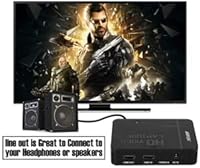
  • Built-in mic input lets you add voice commentary directly into the recorded file.
  • Plug-and-play setup means beginners can start capturing footage within minutes.
  • Includes a 12-month warranty, offering basic protection against defective units.
  • AV input support is genuinely rare at this price point, making it valuable for retro gamers.

Cons

  • Recording quality can be inconsistent, with artifacts and frame issues reported during longer sessions.
  • No streaming support — buyers expecting Twitch or YouTube functionality will be flat-out disappointed.
  • Only 3.5mm TRS microphones work; standard TRRS phone headsets produce distorted or no audio.
  • USB drives must be formatted to FAT32 or NTFS — the device gives no error if they are not.
  • There is no preview screen or real-time monitoring, so recording problems often go unnoticed until playback.
  • Official OS support does not extend to Windows 10 or macOS, limiting modern system compatibility.
  • No settings or controls for bitrate, resolution output, or file format — everything is fixed by the device.
  • Status indicators are too basic to warn users when storage runs out or a drive disconnects mid-session.
  • Build quality feels budget-grade, with ports that may loosen over time with regular use.

Ratings

The AGPTEK NC-VG0025 HD Game Capture Card has been scored by our AI system after analyzing verified buyer reviews from global markets, with spam, bot-generated, and incentivized feedback actively filtered out. The ratings below reflect an honest synthesis of real-world experiences — covering both what this standalone recorder genuinely does well and the areas where buyers consistently run into friction. Expect a balanced picture, not a polished sales pitch.
Ease of Setup
83%
The most praised aspect across positive reviews is how little effort it takes to get recording. Buyers appreciated that there is no driver installation or software configuration — plug in a USB drive, connect the console, and you are capturing footage within minutes. For first-timers, that simplicity is a genuine relief.
A notable share of users hit unexpected snags with USB drive compatibility. Drives that were not formatted to FAT32 or NTFS were simply not recognized, and the device gives little indication of why — leaving beginners troubleshooting without clear guidance.
Video Recording Quality
61%
39%
For a budget-tier device, the HDMI recording output is respectable in controlled conditions. Casual gamers recording shorter sessions in stable environments generally found the footage usable for personal archives or sharing with friends, especially at 1080p input.
Inconsistency is the recurring complaint here. Longer recording sessions sometimes produced artifacts, dropped frames, or unexpected quality dips. The 1080p label reflects input capability, not guaranteed output fidelity, and users expecting crisp results comparable to mid-range PC-based capture cards often came away disappointed.
Console Compatibility
78%
22%
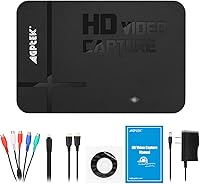
Supporting both HDMI and AV input in one device is a genuine advantage. Retro gaming fans using older PlayStation or Nintendo hardware found it one of the few budget options that could actually handle composite AV signals without needing a separate adapter or workaround.
Compatibility claims on the product listing are broad, and some users found specific console and cable configurations behaved unpredictably. A handful of buyers reported intermittent signal issues with certain HDMI setups, suggesting the input handling is not entirely bulletproof across all hardware combinations.
Microphone Input & Commentary
54%
46%
Having a built-in 3.5mm mic input is a thoughtful inclusion at this price point. Users who owned a basic TRS microphone and wanted to narrate their gameplay found it functional enough for casual commentary mixed directly into the recorded file.
The TRS-only requirement trips up a lot of buyers. Standard TRRS headsets — the kind most people have lying around from their phones — do not work correctly here, and the resulting audio can be distorted or absent entirely. Even with a compatible mic, audio quality was described as thin and noticeably compressed.
No-PC Recording Convenience
81%
19%
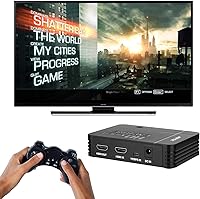
Recording directly to a USB drive or external hard drive without a computer in the loop is genuinely useful. Buyers who wanted to capture footage in living rooms, at a friend's place, or at small local tournaments appreciated not having to drag a laptop along just to save clips.
The standalone convenience comes with real trade-offs in control and flexibility. There is no preview screen, no real-time monitoring, and no way to verify recording status easily. Users who ran into storage or format issues often did not realize anything went wrong until they went to play back the footage later.
Streaming Capability
12%
88%
There is not much positive to say here by design — this device was never built for streaming. Buyers who read the listing carefully and accepted that upfront had no complaints on this front specifically.
A disproportionate number of negative reviews stem entirely from this single limitation. Many buyers assumed any capture card would support live streaming to platforms like Twitch or YouTube. The frustration is understandable, but the limitation is stated — the issue is that it is easy to miss before purchasing.
Build Quality & Portability
69%
31%
The unit is compact and light enough to toss into a backpack without a second thought. At under a foot in any dimension and just 12 ounces, it does not feel like a burden to carry, and the casing holds up reasonably well to regular transport.
The plastic housing feels budget-grade to the touch, and a few buyers noted that the ports felt slightly loose after extended use. It is not a device that inspires confidence in long-term durability, particularly for users who plan to use it frequently or handle it roughly.
Value for Money
66%
34%
For a buyer with straightforward needs — record some gameplay, maybe add a voice note, no streaming required — the price-to-function ratio is reasonable. It does what it says it does often enough to feel like an acceptable spend for casual use.
The value equation falls apart if your needs push even slightly beyond basic recording. Buyers who needed reliable consistency, proper mic support, or streaming found themselves buying again shortly after, making the initial purchase feel like a wasted step rather than a savings.
USB Drive Compatibility
57%
43%
Support for both USB 2.0 and 3.0 drives, as well as external hard drives up to 2TB, gives buyers a fair amount of flexibility in what storage they use. Users with USB 3.0 drives formatted correctly reported smooth write performance during normal recording sessions.
Drive formatting is a silent dealbreaker for many buyers. FAT32 and NTFS are the only accepted formats, and the device offers no on-screen error message when an incompatible drive is inserted. Users who formatted drives differently — or assumed any drive would just work — often had no footage to show after a recording session.
Software Requirement
88%
Not needing any software at all is one of the cleaner aspects of this capture card. There is no disc to install, no account to register, and no driver conflicts to manage — a refreshing contrast to many PC-based capture solutions that require ongoing software maintenance.
The flip side of having no software is having no control interface whatsoever. You cannot adjust bitrate, change recording format, or review settings. For users who want even a minimal level of configuration, the absence of any app or utility leaves the experience feeling blunt and inflexible.
Warranty & Support
58%
42%
A 12-month warranty is included, which at least offers a baseline of protection for buyers who receive a defective unit. Some users reported that AGPTEK was responsive to warranty claims during the coverage period.
Post-warranty support appears thin, and documentation included with the device is minimal. Buyers who encountered technical issues outside the warranty window — or who needed help diagnosing USB compatibility problems — found the support experience lacking in substance and follow-through.
Recording Format Flexibility
47%
53%
For buyers who simply want a file they can copy off a drive and share, the output format is functional enough for basic needs. The device handles the encoding internally, removing any need for post-processing knowledge on the user's part.
There is no option to select recording format, resolution output, or compression level. What you get is what the device decides, and some users found the resulting file sizes and formats awkward to work with on modern editing software or video platforms without additional conversion steps.
Indicator Feedback & Status Visibility
43%
57%
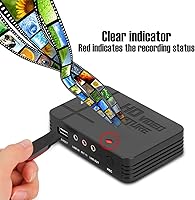
The device does include basic LED indicators that signal power and recording state. For straightforward sessions where everything is working correctly, these provide just enough feedback to confirm the unit is active.
The indicators are too minimal to diagnose problems in real time. If a drive disconnects mid-session, or if storage runs out, there is no clear alert. Several buyers lost extended recording sessions without realizing anything went wrong until they checked the drive afterward.

Suitable for:

The AGPTEK NC-VG0025 HD Game Capture Card is a practical pick for casual gamers who want a fuss-free way to save gameplay clips without setting up a PC or subscribing to any software. If you play on a PS4, Xbox One, or even older consoles connected via AV cables, this standalone recorder handles the job without demanding much technical knowledge. Retro gaming enthusiasts will find the AV input especially useful — very few devices at this price point still bother supporting composite signals from legacy hardware. Beginners who are intimidated by PC-based capture setups will appreciate that recording is essentially plug-and-play: insert a properly formatted USB drive, connect your console, and you are good to go. It also suits anyone who needs a portable solution they can throw in a bag and use at a friend's place or a casual gaming meetup without hauling extra equipment.
Not suitable for:

The AGPTEK NC-VG0025 HD Game Capture Card is a poor fit for anyone whose primary goal is live streaming — this device has no streaming functionality whatsoever, and no firmware update or workaround will change that. Content creators who need reliable, consistent 1080p output for YouTube uploads or professional archives will likely find the recording quality too unpredictable for regular use. If you rely on a standard TRRS headset for mic input — the kind that ships with most smartphones — you will run into audio problems, since the device only supports 3.5mm TRS microphones. Users who expect to grab any USB drive off the shelf and start recording immediately should know that drives must be formatted to FAT32 or NTFS, and the device provides no clear error message when an incompatible drive is used. Anyone on Windows 10 or a Mac should also approach with caution, as official OS support stops at Windows Vista, Windows 7, and Windows 8, which may create compatibility headaches depending on your setup.
Specifications

  • Brand: Manufactured and sold by AGPTEK, a consumer electronics brand specializing in budget-tier audio and video accessories.
  • Model Number: The official model number for this unit is NC-VG0025.
  • Video Input: Accepts both HDMI and composite AV input signals, enabling compatibility with a wide range of consoles across different generations.
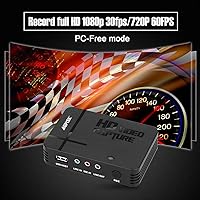
  • Max Resolution: Supports up to 1080p video input via HDMI; this reflects input capability and does not guarantee equivalent output recording fidelity.
  • Storage Support: Records directly to USB flash drives up to 128GB (FAT32 or NTFS format) or external hard drives up to 2TB.
  • USB Compatibility: Compatible with both USB 2.0 and USB 3.0 flash drives and external storage devices.
  • Mic Input: Features a 3.5mm TRS microphone input for recording voice commentary; TRRS headsets are not compatible with this port.
  • Streaming Support: This device does not support live streaming to any platform; it is designed exclusively for local recording to external storage.
  • PC Requirement: No computer is required to operate this device; it functions as a fully standalone recorder without any software installation.
  • OS Compatibility: When connected to a computer for file management, officially supported operating systems are Windows Vista, Windows 7, and Windows 8.
  • Compatible Consoles: Tested and listed as compatible with Xbox 360, Xbox One, PlayStation 3, and PlayStation 4.
  • Power Source: Powered via AC connection; no internal battery is present.
  • Dimensions: The unit measures 5.9 x 3.1 x 4.1 inches, making it compact enough for portable use.
  • Weight: Weighs 12 ounces, light enough to carry in a bag without noticeable bulk.
  • Color: Available in black only.
  • Warranty: Comes with a 12-month manufacturer warranty covering defects in materials and workmanship.
  • First Available: This product was first listed for sale in December 2016 and remains actively available.
  • Power Interface: Connects to power via a standard AC adapter; no USB bus-powered operation is supported.

Related Reviews
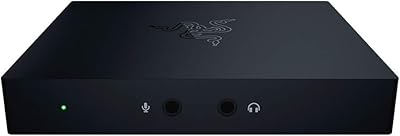
Razer Ripsaw HD Game Streaming Capture Card
84%
88%
Performance
92%
Setup & Installation
89%
Latency
91%
Video Quality
77%
Audio Mixing Features
More
Elgato Game Capture 4K Pro
88%
97%
Passthrough Performance
94%
Capture Fidelity
96%
Input Latency
91%
VRR Implementation
88%
Build Quality
More
Mirabox HSV3217 4K Capture Card
79%
91%
Ease of Setup
74%
Video Capture Quality
88%
HDMI Passthrough Performance
82%
Software Compatibility
61%
Build Quality
More
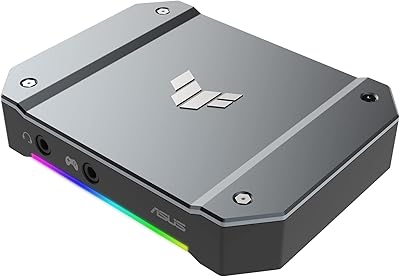
ASUS TUF Gaming Capture Box CU4K30
89%
96%
Build Quality
94%
Ease of Setup
91%
Console Compatibility
74%
Recording Frame Rates
88%
Audio Integration
More
AGPTEK 4K HDMI Video Capture Card VG0061
83%
88%
Video Capture Quality
91%
Ease of Setup
85%
Latency
72%
Software Compatibility
90%
Versatility (Device Compatibility)
More
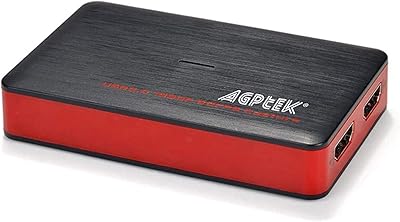
MYPIN MYPIN-4K60-AVGC Capture Card
70%
83%
Ease of Setup
67%
Video Recording Quality
71%
4K Passthrough Performance
61%
Software Compatibility
69%
Audio Capture & Mic Input
More
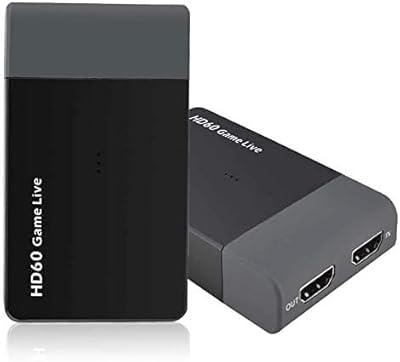
UNISHEEN UC2500H USB 3.0 Game Capture Card
86%
91%
Video Capture Quality
88%
Ease of Setup
85%
Compatibility with Platforms
93%
HDMI Loop-Through Performance
80%
Software Integration
More
Y&H ezcap261 USB 3.0 HDMI Capture Card

73%
88%
Ease of Setup
82%
1080p Streaming Performance
41%
4K Capture Viability
76%
Pass-Through Quality
53%
Build Quality
More
XIIXMASK MS2131 Video Capture Card
85%
92%
Chassis Build Quality
88%
Thermal Management
87%
1080p Stream Stability
93%
Value for Money
84%
Plug-and-Play Simplicity
More
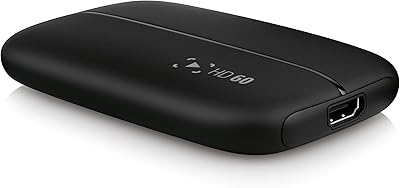
Elgato Game Capture HD60
87%
92%
Performance
94%
Ease of Setup
89%
Streaming Quality
85%
Value for Money
93%
Flashback Recording
More

FAQ

No, you do not. This is one of the main selling points of the device — it records directly to a USB flash drive or external hard drive without any computer in the loop. Just connect your console, plug in a compatible storage drive, and hit record.

No, and this is the most important thing to understand before buying. This device has no streaming capability at all — it is designed purely for local recording to external storage. If live streaming is your goal, you will need a different product entirely.

Your USB flash drive must be formatted as either FAT32 or NTFS. This trips up a lot of buyers because the device gives no error message if the drive format is wrong — it just will not record. Before your first session, double-check the format on your computer.

Almost certainly not. Standard phone and gaming headsets use a TRRS connector, which has four contact points and carries both mic and stereo audio. This device only accepts a TRS microphone — a three-contact plug used by dedicated standalone mics. Using a TRRS headset will result in no audio or distorted audio.

If your older console outputs via composite AV cables — the red, white, and yellow connectors — then yes, the AV input on this device should handle it. This is genuinely one of the more useful features for retro gaming fans, since many modern capture cards have dropped AV support entirely.

USB flash drives up to 128GB are supported, and external hard drives up to 2TB will also work. Just remember the formatting requirement — FAT32 or NTFS — applies to both drive types.

The device accepts a 1080p HDMI input signal, but keep expectations realistic — the recorded output quality can vary, and longer sessions sometimes show inconsistencies like dropped frames or compression artifacts. It is solid for casual use, but not a substitute for a dedicated PC-based capture solution if quality is a priority.

Officially, the supported operating systems are Windows Vista, 7, and 8. Windows 10 and macOS are not listed as supported. Some users have had luck running it on Windows 10, but there is no official guarantee, and compatibility issues are possible depending on your system configuration.

That depends on your drive size and the bitrate of the recording. There is no hard time limit built into the device itself, but a few users have reported that very long sessions can sometimes result in quality degradation or unexpected file issues. For important recordings, it is worth doing shorter test sessions first.

No, there is no preview screen or monitoring output on this device. You will not be able to confirm recording quality in real time. The LED indicators show basic status, but they will not alert you if storage runs out or if a drive disconnects mid-session, so it is worth checking your drive space before you start.