Overview

The Adafruit Circuit Playground Express is Adafruit's refined follow-up to their original Classic board, rebuilt around a 32-bit ARM Cortex M0 processor that runs noticeably faster and more capably than older 8-bit designs. What makes this little board stand out isn't just the chip — it's the philosophy behind it. Everything you'd typically need to wire up separately is already on board: lights, sensors, touch inputs, even a speaker. It works with both CircuitPython and Arduino, so whether you're a complete newcomer or someone who's been soldering headers for years, there's a comfortable entry point. For what you get, the price sits at a genuinely reasonable level for this feature density.
Features & Benefits

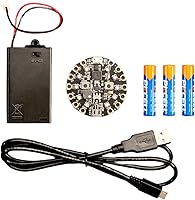
At its core, this little board runs at 48MHz with 2MB of flash storage — that storage is what lets CircuitPython work its drag-and-drop magic. You literally copy a Python file onto the board like a USB drive and it runs. The 10 onboard NeoPixel LEDs can be programmed for anything from simple animations to reactive light displays. There's a light sensor, thermometer, accelerometer, and capacitive touch pads all built in. Plug it into a computer via Micro-USB and it can act as a keyboard, mouse, or MIDI device with no additional drivers. Toss in three AAA batteries and it runs completely untethered.

Best For

This microcontroller kit is a natural fit for students and educators who want physical computing without spending an hour configuring drivers or wiring breadboards. Kids can get an LED pattern running in minutes; experienced hobbyists can build wearables, sound-reactive props, or custom MIDI controllers with the same hardware. If you're moving someone from block-based coding toward real Python, the live file system makes that transition feel surprisingly approachable. Workshop facilitators love it because a mistake in code won't brick the board — you just fix the file and save. Developers prototyping quick USB gadgets will also find it saves considerable setup time compared to starting from scratch.

User Feedback

With a 4.6 out of 5 rating across over 140 reviews, this microcontroller kit holds up well. Buyers frequently mention Adafruit's documentation as a standout — the learning guides are detailed, free, and written for humans rather than engineers. Educators specifically note how fast students can move from unboxing to running code, often within a single class period. On the critical side, the board operates at 3.3V, which means you'll need a level shifter when connecting to older 5V components — not a dealbreaker, but worth knowing upfront. A few advanced users have also bumped into RAM limitations when running more complex CircuitPython scripts. For the use cases this board targets, most buyers report it delivers exactly what they needed.

Pros

  • Completely self-contained — sensors, LEDs, speaker, and touch inputs require zero external wiring to get started.
  • CircuitPython makes coding as simple as editing a text file and saving it; no compile step, no upload button.
  • Works as a USB keyboard, mouse, or MIDI device out of the box — no drivers needed on modern operating systems.
  • Adafruit's free learning guides are genuinely excellent, covering beginner through intermediate projects in real depth.
  • Runs untethered on three AAA batteries, making wearable and portable builds genuinely practical.
  • Hard to permanently damage through software mistakes, which makes it ideal for classroom environments.
  • Still actively supported and updated years after release, which is uncommon in the hobbyist hardware market.
  • Compatible with both CircuitPython and Arduino IDE, giving users flexibility as their skills grow.
  • Ten onboard NeoPixel LEDs allow rich visual feedback and animations without a single extra component.
  • The circular form factor fits neatly into costume, craft, and wearable projects where board shape actually matters.

Cons

  • RAM is limited enough that running several CircuitPython libraries simultaneously causes memory errors on complex projects.
  • The 3.3V logic level requires level shifters when connecting to common 5V sensors and modules — an unexpected extra step.
  • The onboard speaker is too quiet for any project where ambient noise is a factor.
  • Micro-USB port can loosen over time with repeated daily plugging and unplugging, especially in classroom settings.
  • Onboard temperature sensor readings drift noticeably from calibrated references, limiting real measurement use cases.
  • IR range is short and susceptible to interference from bright overhead lighting in typical classroom or workshop environments.
  • No battery level indicator means portable projects can shut down mid-demo without any warning.
  • Arduino IDE support exists but is clearly secondary — tutorials and library coverage lag well behind the CircuitPython experience.
  • Buying in classroom quantities adds up in cost, and there is no meaningful bulk discount through standard retail channels.
  • More recent Adafruit boards offer USB-C and more RAM at comparable prices, making this a slightly dated choice for new buyers without specific compatibility reasons.

Ratings

The Adafruit Circuit Playground Express earns strong marks across the board in our AI-assisted analysis, which processed verified buyer reviews from multiple global sources while actively filtering out incentivized, bot-generated, and low-signal feedback. Scores reflect what real users — students, educators, hobbyists, and professional makers — consistently reported after hands-on use. Both the genuine strengths and the honest frustrations are represented here, so you can make an informed decision without the marketing noise.
Beginner Accessibility
93%
Users with zero hardware experience consistently report getting LEDs blinking and sensors responding within their first session. The drag-and-drop nature of CircuitPython — where you save a file to the board like a USB stick and it just runs — removes the usual setup headaches that scare newcomers away from microcontrollers.
Complete beginners who try to push beyond the starter tutorials can hit a wall fairly quickly, especially when trying to wire external components. The 3.3V logic level isn't explained prominently in the packaging, and first-timers have occasionally damaged external modules by assuming standard 5V compatibility.
Onboard Feature Density
91%
Having ten NeoPixel LEDs, a microphone, speaker, accelerometer, temperature sensor, light sensor, and capacitive touch inputs all on a single circular board is genuinely rare at this price tier. Makers report being able to prototype complete interactive projects — light-reactive props, clap-controlled animations — without touching a breadboard.
The trade-off for packing so much onto one board is that the layout can feel cramped when you need to access the alligator-clip pads while components are already attached. A few users also note that the onboard speaker, while useful for feedback tones, is too quiet for any real audio project in a noisy environment.
CircuitPython Experience
89%
CircuitPython turns this little board into one of the most approachable coding platforms available for physical computing. The live CIRCUITPY drive means you edit code in any text editor, save the file, and the board restarts instantly — no compile step, no upload button, no waiting.
RAM is genuinely limited, and users who try to import multiple CircuitPython libraries simultaneously start hitting memory errors. This is a known constraint of the hardware, not a software bug, but it does mean complex projects requiring several sensor libraries running concurrently are not realistic on this platform.
Build Quality & Durability
84%
The circular PCB feels solid and well-manufactured, with no reports of trace cracking or connector failures under normal classroom use. Educators specifically appreciate that students can make mistakes in code all day without risking permanent hardware damage — the board is hard to brick.
The Micro-USB port, as with most boards of this era, is the most vulnerable physical point. A few long-term users report connector loosening after extended use, particularly in settings where the cable gets plugged and unplugged repeatedly throughout the school day.
Documentation & Community Support
96%
Adafruit's learning guides for this microcontroller kit are genuinely among the best in the hobbyist hardware space — detailed, illustrated, and written for real humans rather than engineers. The community forums are active, and Adafruit staff have a visible presence answering questions, which is unusual for a hardware manufacturer at this scale.
Almost no meaningful criticism here, though a handful of users note that some of the more advanced project guides assume familiarity with Python that isn't explicitly flagged upfront. Intermediate hobbyists occasionally find themselves having to cross-reference external Python documentation mid-project.
Arduino Compatibility
77%
23%
The ability to program this board through the Arduino IDE gives experienced makers a familiar environment and access to the broader Arduino library ecosystem. For users already comfortable with C++ sketching, switching between this and other Arduino-compatible boards is mostly painless.
Arduino support, while functional, is clearly the secondary experience — CircuitPython is where Adafruit invests its documentation and tutorial energy. Some Arduino-specific libraries require manual porting or workarounds, and the getting-started experience for Arduino users is noticeably less polished than it is for the Python pathway.
Value for Money
88%
For the combination of processor capability, onboard peripherals, and the quality of ongoing software and documentation support, this microcontroller kit represents solid value. Buying equivalent functionality piecemeal — sensors, LEDs, breakout boards, and a base microcontroller — would cost considerably more and require significant wiring effort.
Budget-conscious buyers, particularly those purchasing in classroom quantities, may find the per-unit cost adds up. There are cheaper single-board options available, though they sacrifice either the onboard feature set, CircuitPython support, or the quality of accompanying educational resources.
Portability & Battery Use
79%
21%
AAA battery support means this little board can run completely untethered, which opens up wearable and portable prop projects without needing a power bank or tethered USB cable. The weight is minimal and the circular shape fits neatly into costume and craft projects.
Battery life varies significantly based on how many NeoPixels are lit at full brightness — running all ten LEDs at white draws enough current to drain standard AAA batteries faster than users expect. There is no onboard battery level indicator, so projects can die mid-demo without warning.
HID & MIDI Functionality
86%
The ability to present as a keyboard, mouse, or MIDI device over USB without installing any special drivers is a genuine time-saver for developers building custom controllers or accessibility devices. Several makers report shipping finished MIDI foot pedals and custom macro keyboards built entirely around this board.
HID functionality works reliably, but the implementation has quirks — rapid key output can sometimes overwhelm host computers, and MIDI timing precision is sufficient for most hobbyist projects but not tight enough for professional performance applications where sub-millisecond latency matters.
Sensor Accuracy & Reliability
74%
26%
For educational and prototyping purposes, the onboard sensors perform well enough to teach concepts and trigger meaningful interactions. The LIS3DH accelerometer in particular is responsive enough for gesture detection and tilt-based inputs without any calibration effort.
None of the onboard sensors are laboratory-grade, and users trying to use the temperature sensor for precise environmental monitoring report readings that drift noticeably from calibrated reference devices. The light sensor similarly gives relative rather than absolute lux values, which limits its use in scientific applications.
IR Transmitter & Receiver
71%
29%
The built-in IR transmitter and receiver work well for simple remote control projects and two-board communication, which is a useful feature for classroom activities and interactive installations. Adafruit provides library support and working examples that make setup straightforward.
Range and reliability of the IR components are limited compared to dedicated IR modules, and users report that ambient light in bright classrooms can interfere with reception. It is functional for close-range demos but not robust enough for projects that require reliable operation across a room.
Platform Longevity
92%
Released in 2017 and still actively sold, updated, and supported, this microcontroller kit has demonstrated unusual staying power in a market where hardware products are often discontinued within two years. CircuitPython itself continues to receive updates, meaning the board keeps improving without any hardware changes.
Being an older design, the board will not receive hardware revisions to address known limitations like RAM capacity or USB standard upgrades. Users investing in this platform long-term should be aware that newer Adafruit boards now offer more memory and USB-C connectivity at a similar price point.
Setup Time
91%
Out of the box, this little board requires no driver installation on modern operating systems — it mounts as a standard USB drive. From unboxing to running a first script typically takes under ten minutes, which is significantly faster than most competing platforms in this category.
Windows users on older operating system versions have occasionally reported driver conflicts that add friction to the initial setup. The fix is well-documented by Adafruit, but it does mean the experience is not universally plug-and-play across all environments.

Suitable for:

The Adafruit Circuit Playground Express is an ideal starting point for anyone who wants to learn physical computing without spending hours wrestling with wiring diagrams or software configuration. It's particularly well-matched to educators and parents looking for a hands-on coding tool that kids can actually use on day one — the drag-and-drop Python workflow means a student can write code in a regular text editor, save it to the board like a USB drive, and watch it run immediately, with no compilation or upload steps involved. Hobbyists who want a single board capable of handling light, sound, motion, and touch inputs without building a rats-nest of wires on a breadboard will find this microcontroller kit delivers a surprisingly complete toolkit out of the box. It also suits developers who need to prototype USB peripherals — custom keyboards, MIDI controllers, or macro pads — quickly and without driver headaches. Workshop facilitators running group sessions particularly benefit from the platform's durability and the depth of Adafruit's free learning resources, which are detailed enough to carry a complete beginner through progressively complex projects.

Not suitable for:

The Adafruit Circuit Playground Express has real limitations that make it a poor fit for certain buyers, and it's worth being honest about them. If your project requires interfacing with standard 5V components — older sensors, shields, or modules designed for classic Arduino boards — the board's 3.3V logic level creates compatibility friction that demands level shifters and extra planning, which is not ideal for someone who just wants things to work without extra steps. Developers building RAM-hungry applications will hit a ceiling fairly quickly; the onboard memory is tight, and loading multiple CircuitPython libraries simultaneously can trigger memory errors that require real workarounds. Anyone looking for production-grade sensor accuracy — precise temperature logging, scientific data collection, or reliable long-range IR communication — will find the onboard components functional for demos but not rigorous enough for serious measurement tasks. If you already have solid Arduino experience and a well-stocked parts bin, the all-in-one format may actually feel limiting rather than convenient, since the fixed onboard layout can't be reconfigured the way a modular breadboard setup can. Finally, buyers needing USB-C connectivity or newer wireless features should look at more recent Adafruit boards before committing here.

Specifications

  • Processor: Runs on an ATSAMD21 ARM Cortex M0 chip clocked at 48MHz, offering significantly more processing headroom than traditional 8-bit microcontrollers.
  • Logic Voltage: Operates at 3.3V logic, which requires level shifters when interfacing with legacy 5V components or modules.
  • Flash Storage: Includes 2MB of SPI Flash memory used primarily to store CircuitPython code, libraries, and associated project files.
  • NeoPixel LEDs: Features 10 individually addressable RGB NeoPixel LEDs arranged in a ring around the board's perimeter.
  • Sensors: Onboard sensors include a light sensor, a thermistor for temperature readings, and an LIS3DH triple-axis accelerometer for motion and tilt detection.
  • Audio: Equipped with a built-in PDM microphone for sound input and a small onboard speaker capable of outputting tones and basic audio feedback.
  • Touch Inputs: Provides multiple capacitive touch pads along the board's edge, which respond to direct finger contact without requiring physical buttons.
  • IR Connectivity: Includes an IR transmitter and receiver pair for short-range remote control signals and two-board communication projects.
  • USB Interface: Micro-USB port handles both power delivery and data, and can enumerate as a serial port, HID keyboard, mouse, joystick, or MIDI device without additional drivers.
  • Power Options: Can be powered via Micro-USB or through a 3-AAA battery holder, enabling fully portable and untethered operation.
  • Dimensions: Board measures 5.71 x 3.35 x 1.38 inches in its retail packaging configuration.
  • Weight: Complete unit weighs 3.84 ounces, making it lightweight enough for wearable and costume integration.
  • Compatible IDEs: Fully supported by both the CircuitPython environment and the Arduino IDE, giving users a choice of programming language and workflow.
  • Manufacturer: Designed and manufactured by Adafruit Industries, a New York-based open-source hardware company known for educational electronics.
  • Model Number: Official Adafruit model number is 3517, also listed on Amazon as ASIN B0764MCBNR.
  • First Available: Originally released in October 2017 and remains actively sold and supported as of the current date.
  • Battery Requirement: Portable operation requires 3 AAA batteries, which are not included in the base kit packaging.

Related Reviews
Roku Express 2022
Roku Express 2022
89%
96%
Ease of Setup
91%
Streaming Performance
89%
Remote Usability
93%
Content Access Variety
88%
Smart Home Compatibility
More
Motu Audio Express Hybrid
85%
91%
Audio Quality
88%
Ease of Use
90%
Portability
84%
Software Integration
89%
Build Quality
More
Roku Express 4K (2022)
80%
93%
Ease of Setup
87%
Streaming Performance
88%
Picture Quality
82%
Remote Usability
91%
Value for Money
More
MOTU MIDI Express 128
85%
88%
Setup and Installation
92%
Build Quality
85%
Connectivity and Compatibility
90%
Scalability and Expansion
87%
Performance in Live Settings
More
Wireless Express Mini Boombox WE-BB
83%
85%
Sound Quality
92%
Portability
65%
Battery Life
88%
Bluetooth Connectivity
90%
LED Lights
More
Ubiquiti Networks UniFi Express UX-US
84%
92%
Value for Money
89%
Ease of Setup
86%
WiFi Coverage & Speed
83%
Power Efficiency
88%
Reliability & Stability
More
Adafruit Bluefruit LE Sniffer v2.0
84%
92%
Performance and Accuracy
96%
Compatibility with Wireshark
89%
Ease of Use
85%
Build Quality and Durability
87%
Portability and Size
More
Epson Expression Premium XP-600 Printer
82%
88%
Print Quality
92%
Ease of Setup
58%
Ink Usage Efficiency
89%
Mobile Printing Experience
85%
Connectivity & Compatibility
More
OWC Express 1M2 8TB NVMe SSD
91%
96%
Read/Write Performance
92%
Build Quality
90%
Thermal Management
88%
Ease of Setup
94%
Connectivity Options
More
Audio Express Koe B102 Bookshelf Speakers
84%
90%
Sound Clarity
75%
Bass Performance
88%
Build Quality
85%
Ease of Setup
80%
Power Handling
More

FAQ

Not really. CircuitPython is designed specifically for beginners — you write code in a plain text editor, save the file onto the board like you would a USB drive, and it runs immediately. Adafruit also provides a huge library of free, step-by-step project guides that start from absolute zero. Most people have LEDs blinking within their first 15 minutes.

It works genuinely well for both. Younger students around age 10 and up can follow Adafruit's beginner guides with minimal adult help, especially using the CircuitPython workflow. Adults and serious hobbyists also use it for more complex builds like custom MIDI controllers or wearable costumes. The platform scales further than it first appears.

Yes, Arduino IDE support is fully available. That said, Adafruit clearly puts more development effort into the CircuitPython side — the tutorials, library support, and community Q&A are all richer there. If you are already comfortable with Arduino C++ sketching, it works fine, but expect to do a bit more independent research compared to the Python path.

This is an important one to get right before buying. The board runs at 3.3V logic, not 5V, which means some older sensors and shields designed for standard Arduino boards may not interface correctly or could even be damaged. For most modern breakout boards this is not an issue, but if you have a specific 5V component in mind, check its datasheet for 3.3V compatibility first.

The 2MB of flash storage is generous enough for typical CircuitPython projects, libraries, and even small audio or image files. The real constraint is RAM, not storage — the chip has a limited amount of working memory, and if your project needs to load several libraries simultaneously, you can run into memory errors. It is fine for most beginner and intermediate projects but hits a ceiling on more complex multi-feature applications.

On macOS and most modern Linux systems, it shows up immediately as a USB drive with no setup required. Windows 10 and 11 also work driver-free in most cases. Older versions of Windows may need a one-time driver install, which Adafruit documents clearly on their website. Overall the setup experience is much faster than most microcontroller boards.

Yes, three AAA batteries power it completely independently. This makes it practical for wearables, interactive props, and anything else where a USB cable would be inconvenient. Just note that running all ten NeoPixel LEDs at full white brightness draws current quickly, so battery life depends heavily on how demanding your project is.

It is useful for tones, beeps, and basic feedback sounds, but it is genuinely small and quiet. In a quiet room it is audible; in a typical classroom or workshop environment it gets lost. For any project where sound quality or volume actually matters, you would want to wire up an external speaker or amplifier board.

This is one of the most reassuring things about this platform for classroom use — a buggy script cannot permanently damage the hardware. If your code crashes, the board either stops or restarts, and you simply fix the file and save it again. You can make coding mistakes all day without any risk to the hardware itself.

It is a fair question given the 2017 release date. The hardware is older, and Adafruit now sells boards with more RAM, USB-C, and wireless capabilities at similar prices. That said, this microcontroller kit still has one of the best beginner-to-intermediate learning ecosystems available, and the sheer volume of tutorials and community projects built around it is a genuine advantage. If your goal is learning or classroom use, it remains a strong choice. If you need modern connectivity or more memory headroom, check Adafruit's current lineup before committing.