Overview

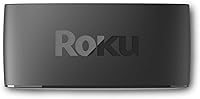
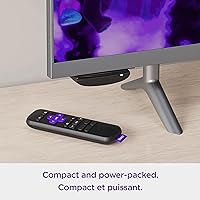
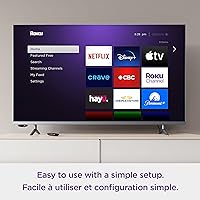
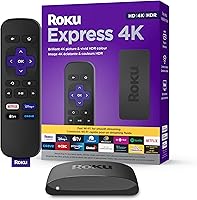
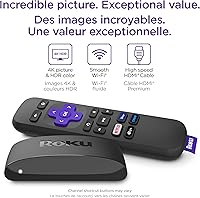
The Roku Express 4K (2022) is Roku's entry-level answer to the growing demand for affordable 4K streaming. Plug it into any HDMI port, connect to Wi-Fi, and you are watching in minutes — there is genuinely little else to configure. The box itself is small enough to disappear behind your TV, and Roku includes a premium HDMI cable in the box, which is a welcome touch. What really sets this Roku streamer apart is the Roku OS — a clean, platform-neutral interface packed with thousands of free and paid channels, with no push toward any single tech ecosystem.
Features & Benefits

Picture quality is where the Express 4K earns its keep — 4K and HDR support means content on a compatible TV looks noticeably sharper and more vibrant than standard HD. The dual-band Wi-Fi helps, though it is worth being honest: on a congested 2.4GHz network you may still hit occasional hiccups; connecting via 5GHz makes a real difference. The included remote handles TV power and volume, so you can ditch at least one extra remote. And if you misplace it, the free Roku mobile app on your phone steps in perfectly, adding voice search as a bonus.

Best For

This little streaming box makes the most sense as a second or third TV upgrade — think bedroom, guest room, or a kitchen set that deserves better than cable. It is also a solid starting point for anyone cutting the cord for the first time; the interface does not assume technical knowledge. If you already own a 4K TV but your current streamer tops out at 1080p, this is a practical fix. People who dislike being steered toward Amazon or Google content will appreciate the neutral platform. It is also well-suited for older family members who simply want large buttons and no confusion.

User Feedback

Most owners highlight two things immediately: setup takes minutes and the remote is intuitive right out of the box. Streaming quality on a reliable Wi-Fi connection draws consistent praise, especially for 4K content. The complaints that do surface tend to cluster around occasional menu lag — the interface can feel sluggish during heavy use or after software updates. Users switching from Fire Stick sometimes find the button layout takes a short adjustment period. A smaller group wishes the device supported USB playback for local media files, which it does not. On the brighter side, several buyers specifically appreciated the included HDMI cable as an unexpected extra.

Pros

  • Setup takes under five minutes and requires zero technical experience to complete.
  • The included HDMI cable means everything you need is genuinely in the box.
  • Roku OS is one of the cleanest, least pushy interfaces in the budget streaming category.
  • 4K HDR streaming on a compatible TV delivers a noticeably sharper, richer picture than 1080p devices.
  • Dual-band Wi-Fi gives users on a 5GHz network a consistently smooth streaming experience.
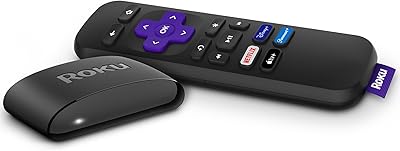
  • The remote controls TV power and volume, cutting down on remote clutter on your couch.
  • The free Roku mobile app adds voice search and doubles as a backup remote when needed.
  • The discreet form factor disappears behind virtually any TV without adding bulk.
  • Roku OS supports thousands of channels, covering every major streaming service without gaps.
  • Battery-included remote and straightforward packaging make this a genuinely ready-to-use gift.

Cons

  • No USB port means local media files stored on external drives simply cannot be played.
  • Voice search requires the mobile app — there is no voice button on the physical remote.
  • Menu navigation can feel sluggish after extended use or following a software update.
  • Streaming reliability drops meaningfully on congested 2.4GHz networks or in Wi-Fi dead zones.
  • No dedicated mute button on the remote, which users notice more than expected in daily use.
  • Users switching from Fire Stick or Google TV face an adjustment period with the button layout.
  • The device has no Ethernet port, so wired connectivity is not an option for unstable Wi-Fi situations.
  • App updates depend on Roku approval cycles, causing some services to lag behind competing platforms.
  • Performance on large 4K displays with older SD or 720p content can look noticeably soft.

Ratings

The Roku Express 4K (2022) has been evaluated by our AI system after combing through thousands of verified global buyer reviews, with spam, bot-submitted, and incentivized feedback actively filtered out. Scores reflect a balanced picture — where this little streaming box genuinely shines and where real users have run into friction. Strengths and pain points are weighted equally so you can make a confident, informed decision.
Ease of Setup
93%
Users across age groups consistently report being up and running within five minutes. The guided on-screen setup is clear enough that even first-time cord-cutters rarely need outside help, and the included HDMI cable means there is nothing extra to hunt for before getting started.
A small number of users on older TVs reported confusion around HDCP handshake errors during initial setup. Those without a strong Wi-Fi signal near the TV occasionally had to reposition their router or use a Wi-Fi extender before the setup would complete cleanly.
Streaming Performance
87%
On a solid 5GHz connection, the Express 4K handles 4K HDR content without visible buffering or quality drops. Users watching Netflix, Hulu, and Disney Plus in 4K describe the experience as consistently smooth during typical evening streaming sessions.
Performance is noticeably more dependent on network quality than some competing devices. Users on crowded 2.4GHz networks, or in homes with thick walls between the router and TV, report more frequent buffering pauses and occasional resolution downgrades mid-stream.
Picture Quality
88%
Buyers who upgraded from older 1080p streamers to this Roku streamer frequently comment on how much more vibrant their 4K HDR content looks. Colors appear richer and detail in dark scenes improves noticeably on HDR-capable TVs, which users find rewarding without needing any manual calibration.
The device itself does not upscale lower-resolution content particularly aggressively, so users watching older SD or 720p streams on large 4K displays may notice softness. HDR benefits are also TV-dependent — viewers with budget panels may not see the full gains.
Remote Usability
82%
18%
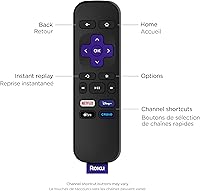
The simplified remote layout is a genuine selling point for households that have accumulated too many remotes. TV power and volume controls work reliably across most major TV brands, and the button spacing is comfortable enough that users rarely press the wrong key by accident.
Users switching from Fire Stick or Apple TV sometimes find the layout adjustment takes a few days. There is no dedicated mute button, which a surprising number of buyers flagged as a daily annoyance. Voice search is also absent from the physical remote and requires the mobile app.
Value for Money
91%
At its price point, the Express 4K is difficult to argue against for secondary TVs or anyone entering the streaming world without wanting to overspend. The inclusion of a premium HDMI cable reinforces that sense of getting slightly more than you paid for right out of the box.
Users who later discover they want features like private listening, a voice remote, or USB media playback will need to upgrade to a higher Roku tier. For a primary living room TV, the value calculus shifts — spending more on a Roku Streaming Stick 4K becomes justifiable.
Interface & Navigation
74%
26%
Roku OS remains one of the cleaner, less cluttered interfaces in the budget streaming space. There are no aggressive ecosystem pushes toward a particular brand, and the home screen layout is easy to customize with your most-used channels front and center.
Menu navigation can feel sluggish, particularly after a software update or when the device has been running for several hours without a restart. Several users describe a half-second delay between button presses and on-screen response that becomes noticeable during channel browsing.
App & Channel Selection
89%
The Roku channel store covers virtually every major streaming service, plus a large catalog of free ad-supported channels through The Roku Channel. Users appreciate not having to check whether a particular service is supported before buying.
A handful of niche or regional streaming apps are absent from the Roku store, which matters to users outside North America or those seeking specific international content. App update schedules are also controlled by Roku, so some services lag slightly behind their Fire TV counterparts in feature parity.
Build Quality & Design
78%
22%
The compact rectangular form factor is genuinely discreet — it sits flat behind almost any TV without adding visible bulk. The plastic casing feels sturdy enough for a device that will mostly sit untouched once installed, and the white finish stays clean over time.
The device does run slightly warm after extended use, which a small number of users mentioned in their reviews. The casing is all plastic with no premium feel, though at this price tier that is an expected trade-off rather than a genuine complaint.
Wi-Fi Reliability
76%
24%
Dual-band support is a real advantage over single-band budget streamers — users with 5GHz networks available close to their TV report stable, consistent connections over long periods. Switching between bands is handled automatically without user intervention.
The antenna performance is average at distance. Users whose TVs sit far from their router, or in rooms with interference from neighboring networks, report more connectivity instability than they experienced with wired or more powerful streaming devices. A physical Ethernet option is not available on this model.
Mobile App Integration
81%
19%
The Roku mobile app functions as a capable backup remote and adds voice search that the physical remote lacks. Users who have lost or misplaced the remote find the app fills the gap well, and private listening through headphones is available via the app, which the remote cannot offer.
Relying on the app for voice search means your phone needs to be nearby and charged, which some users find less convenient than a dedicated voice button on the remote. Initial app pairing occasionally requires a restart of either the app or the device to complete correctly.
Local Media Playback
41%
59%
For users purely focused on streaming internet content, the absence of local playback features is largely a non-issue. The device does exactly what most buyers need without any gaps in the core streaming experience.
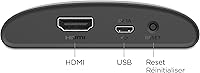
There is no USB port, so playing locally stored video files is simply not possible on this Roku streamer. Users who keep movies or home video collections on external drives will need a separate solution or a different device entirely. This is a meaningful limitation for a segment of buyers.
Initial Load & Boot Speed
72%
28%
Cold boot from powered off to home screen takes around 30 to 45 seconds, which is acceptable for a device most users leave in standby rather than fully powering down. Waking from standby is fast and feels nearly instant in normal use.
After prolonged use or following OS updates, some users report the device becomes noticeably slower to load channel apps. A manual restart typically restores normal speed, but it is an extra step that more powerful streamers do not require as frequently.
Power & Energy Use
84%
The USB power delivery keeps energy consumption low, and many users power the device directly from a spare USB port on their TV to avoid using an additional wall outlet. Power draw is minimal even during active 4K streaming sessions.
A small number of users found that powering from a TV USB port caused the device to lose power when the TV entered standby, leading to longer boot times than expected. Using the included wall adapter solves the issue but occupies an extra outlet.
Out-of-Box Experience
88%
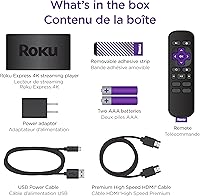
Opening the box and finding a premium HDMI cable already included removes a common friction point buyers face with budget streaming devices. Batteries are pre-included in the remote as well, so the entire setup genuinely requires nothing extra from the buyer before watching.
The quick-start guide is minimal, which suits most users fine but leaves those less comfortable with technology to rely on the on-screen prompts alone. A more detailed printed guide would help the older audience segment that Roku clearly targets with this remote design.

Suitable for:

The Roku Express 4K (2022) is a strong fit for anyone who wants a straightforward, no-fuss upgrade to 4K streaming without committing to a premium price. It works particularly well as a bedroom or guest room TV upgrade — situations where you want a capable device but have no desire to spend heavily on a primary setup. First-time cord-cutters will appreciate how little technical knowledge the setup demands; the guided process and clean Roku OS remove most of the friction that usually accompanies switching away from cable. Households with older family members will find the simple remote layout genuinely easier to hand off than the cluttered alternatives from competing platforms. It also makes good sense for anyone who already owns a 4K TV but is currently stuck streaming in 1080p — the jump in picture quality on HDR content is noticeable enough to justify the switch on its own.
Not suitable for:

Buyers looking for a single device to anchor a primary living room setup with every feature included will likely hit the limits of this little streaming box sooner than expected. There is no USB port, so anyone who keeps a personal library of locally stored movies or home videos on an external drive will need a different solution entirely. The physical remote lacks a voice search button, which feels like a real omission for users who have grown accustomed to hands-free navigation on Fire TV or Google TV devices. People in homes with weak or congested Wi-Fi signals — particularly those far from their router — may experience more buffering frustration than they would with a wired device or a more powerful streaming stick. Power users who want private listening through a remote headphone jack, advanced audio passthrough, or a more responsive interface during heavy multitasking will likely find themselves outgrowing the Express 4K within a year and should consider stepping up to a higher-tier Roku model from the start.

Specifications

  • Brand: Manufactured by Roku, one of the most established names in the dedicated streaming device market.
  • Model: Roku Express 4K (2022), model number 3940CA2.
  • Dimensions: The device measures 1.7 x 5.6 x 0.8 inches, making it compact enough to sit flat and hidden behind most TVs.
  • Weight: The unit weighs just 1.6 oz, so it adds no noticeable bulk to any TV setup.
  • Resolution: Supports 4K UHD and HD (720p) output, with automatic resolution matching based on TV capability.
  • HDR Support: Compatible with HDR content, delivering improved contrast and color depth on HDR-capable displays.
  • Wi-Fi: Dual-band Wi-Fi supports both 2.4GHz and 5GHz networks for improved streaming stability.
  • Connectivity: Connects to TVs via HDMI; no Ethernet port or USB port is included on this model.
  • Power: Powered via USB, either through a TV USB port or the included USB wall adapter.
  • Operating System: Runs Roku OS, a platform-neutral interface with access to thousands of free and paid streaming channels.
  • Remote: Includes a Roku Simple Remote with dedicated TV power, volume up/down, and mute controls for compatible TVs.
  • Voice Control: Voice search is not available on the physical remote but is accessible through the free Roku mobile app.
  • Mobile App: The Roku mobile app, available for iOS and Android, functions as an alternative remote and adds voice search and private listening.
  • Included Accessories: Box includes the streaming device, a premium HDMI cable, a USB power cable and adapter, and a Simple Remote with 2 AA batteries pre-installed.
  • Batteries: Remote requires 2 AA batteries, which are included in the box at purchase.
  • Local Media: The device does not support USB media playback; locally stored video or audio files cannot be played directly.
  • Color: Available in white (color code white-70).
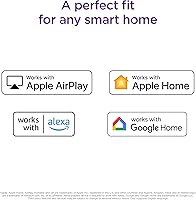
  • Platform Compatibility: Works with any HDMI-equipped TV regardless of brand, with no ecosystem or account lock-in beyond a Roku account.

Related Reviews

Roku Express 2022
Roku Express 2022
89%
96%
Ease of Setup
91%
Streaming Performance
89%
Remote Usability
93%
Content Access Variety
88%
Smart Home Compatibility
More
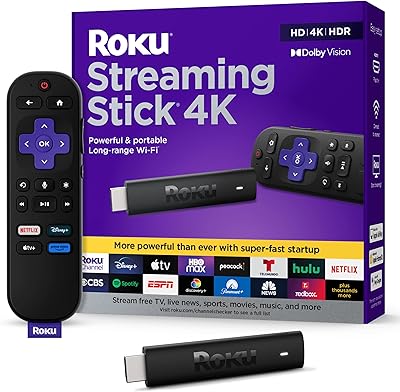
Roku Streaming Stick 4K
82%
93%
Ease of Setup
88%
Picture Quality
79%
Wi-Fi Performance
84%
Remote Usability
91%
App & Content Library
More
Roku Ultra 4K Streaming Player (2017)
85%
92%
Streaming Quality (4K & HDR)
89%
Voice Remote Functionality
74%
Wi-Fi Connectivity
95%
Ease of Setup
88%
App Compatibility
More
Hisense 43R6G 43-Inch 4K Roku TV
86%
94%
Picture Quality
91%
HDR Performance
88%
Color Accuracy
90%
Smart TV Interface
92%
Streaming App Availability
More
Roku Express HD Streaming Media Player (2018)
87%
92%
Value for Money
95%
Ease of Setup
90%
Picture Quality (1080p)
88%
Remote Control Functionality
65%
Wi-Fi Connectivity
More
Roku Select Series 50-Inch 4K Smart TV
78%
91%
Smart Platform Experience
78%
Picture Quality
88%
Value for Money
54%
Audio Performance
71%
Gaming Performance
More
Roku Streambar 9102MX Spanish Edition
82%
93%
Bilingual Interface & Language Support
78%
Audio Quality
82%
4K & HDR Picture Performance
86%
Value for Money
91%
Ease of Setup
More
Roku 55-Inch Pro Series 4K QLED TV
86%
94%
Display Quality
90%
Gaming Performance
88%
HDR Performance
85%
Ease of Setup
65%
Sound Quality
More
Roku Pro Series 75-inch 4K QLED TV
83%
88%
Picture Quality
86%
HDR Performance
83%
Local Dimming
91%
Gaming Performance
93%
Smart TV & OS
More
Roku Plus Series 65-Inch 4K QLED Smart TV
87%
94%
Picture Quality
89%
Ease of Setup
91%
Streaming Performance
88%
Design and Build
75%
Sound Quality
More

FAQ

Yes, a free Roku account is required to activate and use the device. Creating one takes a couple of minutes online, and you do not need a paid subscription just to set it up — a free account gets you through the entire activation process and gives you access to free channels immediately.

Absolutely. The Express 4K works with any TV that has an HDMI input, smart or not. It handles all the streaming itself, so your TV just needs to display what the device sends it. An HDMI cable is included in the box, so you will not need to buy one separately.

The included Simple Remote has buttons for TV power, volume, and mute that work with most major TV brands right out of the box. In some cases you may need to go into the Roku settings to pair the remote to your specific TV model, but the process takes under a minute.

The Roku Express 4K (2022) is the same hardware regardless of where it is sold; the model number 3940CA2 is consistent across retailers. Some bundles may vary in what accessories are included, so it is worth confirming the HDMI cable is part of the package before buying.
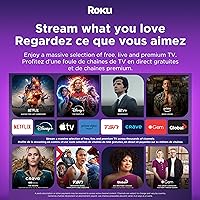
Yes, and there is quite a bit available. Roku provides its own free ad-supported channel called The Roku Channel, which includes movies, TV shows, and live news. Beyond that, apps like Tubi, Pluto TV, and Peacock (free tier) are all available without a paid subscription.

The dual-band Wi-Fi is genuinely helpful here — if your router supports 5GHz and your TV is reasonably close to it, streaming stays stable. That said, if your TV sits far from the router or in a room with poor signal, you may experience more buffering than expected. There is no Ethernet port, so you cannot use a wired connection as a fallback.

Yes, the free Roku mobile app on iOS or Android works as a full remote replacement. It actually adds features the physical remote lacks, including voice search and private listening through your phone's headphone jack or Bluetooth headphones.

This Roku streamer supports HDR10 but does not support Dolby Vision. For most users watching Netflix, Hulu, or Prime Video in 4K HDR, HDR10 covers the majority of available content, so it is rarely a practical limitation on this device.

Most people are watching content within five to ten minutes of opening the box. You plug in the HDMI cable, power the device, follow the on-screen steps to connect to Wi-Fi, and log in or create a Roku account. The prompts are clear and written for general audiences, not tech enthusiasts.

No, this is one of the more notable limitations of the Express 4K. There is no USB port on the device, so locally stored media files cannot be played back. If you rely on a personal video library on an external drive, you would need a different device — or a media server solution that streams over your home network to a compatible Roku app.

Where to Buy