

Overview

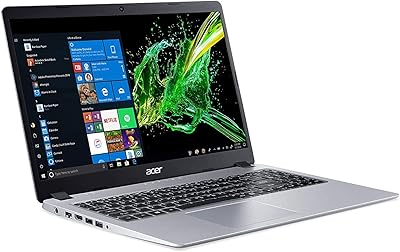
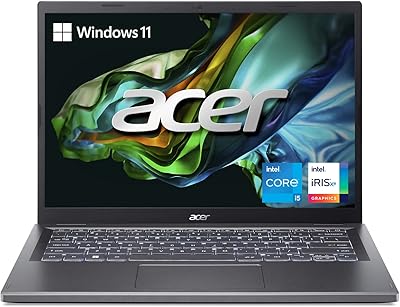
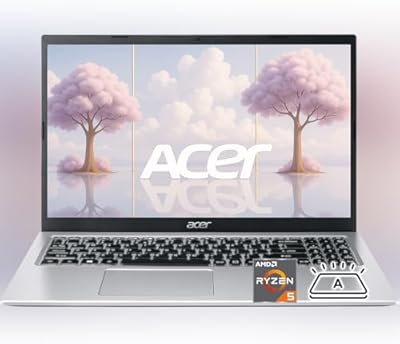
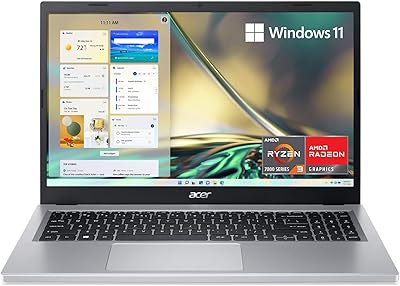
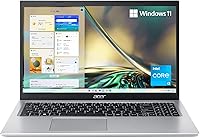
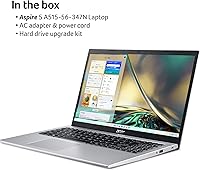
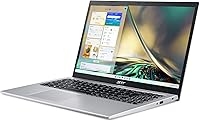
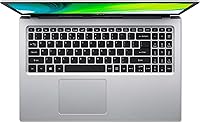
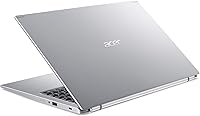
The Acer Aspire 5 A515-56-347N Laptop is a no-fuss, budget-conscious machine built for students and everyday home users who need reliable performance without breaking the bank. Released in late 2022, this slim Acer features a clean silver chassis and weighs just 3.64 pounds — easy enough to carry between classes or from room to room. One thing worth knowing upfront: it ships with Windows 11 S Mode, which limits app installs to the Microsoft Store only unless you manually switch out. For browsing, streaming, and document work, that constraint rarely matters — but understanding it before you buy matters a lot.

Features & Benefits

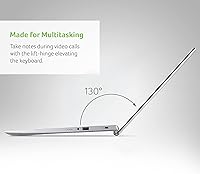
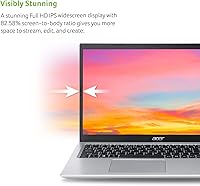
The 15.6-inch Full HD IPS display is genuinely one of the standout aspects of this budget laptop — colors are accurate, viewing angles hold up well, and the narrow bezels give it a more modern look than you might expect at this price. The Intel Core i3-1115G4 handles light workloads just fine: browsing multiple tabs, writing documents, joining video calls. Don't expect miracles with heavier tasks. Boot times are quick thanks to the NVMe SSD, though 128GB fills up fast — factor that in. Wi-Fi 6 and the tilting hinge that lifts the keyboard for airflow are both quiet but practical upgrades worth noting.

Best For

This budget laptop hits its sweet spot with students, remote workers, and anyone needing a solid daily driver for light tasks. If your workflow lives in a browser or inside Microsoft 365, S Mode restrictions will barely register as a problem. It doubles well as a shared household machine for streaming and school assignments. At just under four pounds, this slim Acer is comfortable enough for a backpack commute. That said, if you regularly install software from outside the Microsoft Store or keep large photo and video files locally, the 128GB ceiling will become a headache — plan for external storage from the start.

User Feedback

Buyers consistently praise the display quality for this price range — many say it looks sharper and brighter than they expected. Keyboard feel and overall build quality get positive mentions too. On the other side, storage is the most common complaint: 128GB gets eaten up by Windows updates faster than most people anticipate, and users who did not plan ahead end up frustrated. A number of buyers were caught off guard by S Mode when they tried to install an app that was not in the Microsoft Store — fixable, but jarring if you are not expecting it. Real-world battery life consistently falls short of what the spec sheet suggests.

Pros

  • The 15.6-inch Full HD IPS display delivers sharp, well-saturated visuals that punch above its price class.
  • At 3.64 pounds, this slim Acer is light enough to carry comfortably in a bag all day.
  • Wi-Fi 6 support keeps wireless performance current and future-ready for modern routers.
  • NVMe SSD storage means fast boot times and snappy app launches compared to older hard-drive laptops.
  • The tilting hinge design genuinely improves typing ergonomics and helps with airflow during longer sessions.
  • 8GB of RAM handles everyday multitasking — multiple browser tabs, documents, and calls — without slowing down.
  • Both the RAM slot and drive bay are open, making affordable upgrades a real option down the line.
  • Build quality and keyboard feel are consistently praised by buyers for a machine at this price point.
  • Integrated Alexa voice support adds a convenient hands-free layer for reminders, music, and quick questions.
  • Three USB 3.0 ports plus HDMI output cover most everyday connectivity needs without needing a hub.

Cons

  • 128GB of built-in storage fills up faster than expected once Windows updates and apps accumulate.
  • Windows 11 S Mode restricts app installs to the Microsoft Store, which catches many buyers off guard.
  • Real-world battery life consistently falls well short of the ambitious figures listed in the specs.
  • The i3-1115G4 struggles noticeably when pushed beyond light productivity or casual multitasking.
  • Only one USB 2.0 port alongside the three USB 3.0 ports is a minor but noticeable port-mix inconsistency.
  • Integrated Intel UHD graphics rule out any meaningful gaming or GPU-accelerated creative work.
  • No optical drive may be a dealbreaker for users who still rely on physical media.
  • Memory speed at 2400MHz is on the slower end even for DDR4, leaving some everyday performance on the table.

Ratings

The ratings below for the Acer Aspire 5 A515-56-347N Laptop were generated by our AI system after analyzing thousands of verified global user reviews, with spam, bot-submitted, and incentivized feedback actively filtered out. Each score reflects the honest balance of real buyer experiences — where this slim Acer genuinely delivers and where it falls short in everyday use.

Display Quality
84%
The 15.6″ Full HD IPS panel consistently earns praise from students and home users who spend hours reading, writing, or watching content. Colors stay accurate across wide viewing angles, which matters when sharing the screen with someone sitting beside you.
Some users note the brightness ceiling feels limiting in well-lit rooms or near windows, requiring screen repositioning rather than just bumping up brightness. It is a solid display for the price tier, but it does not compete with higher-end IPS panels on contrast depth.
Performance
67%
33%
For the tasks this budget laptop was designed around — browsing, document editing, video calls, and light multitasking — the i3-1115G4 holds up reliably without frustrating lag. Boot times are noticeably quick thanks to the NVMe SSD, which makes the daily startup experience feel snappier than the specs might suggest.
Push it past a dozen browser tabs, run a local app alongside a video call, or attempt anything remotely CPU-intensive and the cracks start to show. Users doing light creative work or running local databases report the processor becoming a genuine bottleneck within a fairly short time.
Storage
43%
57%
The NVMe SSD delivers fast file access and application load times that are meaningfully better than older SATA drives. Users who rely on cloud storage and keep minimal local files report the setup working fine for their day-to-day needs.
128GB is the most consistently flagged frustration across buyer reviews — Windows 11 alone consumes a large portion, and cumulative updates steadily erode what remains. Several users describe running into low-storage warnings within the first few months, well before they felt they had downloaded much at all.
Build Quality
76%
24%
Buyers frequently express positive surprise at how solid this slim Acer feels given its price point — the chassis does not flex excessively during typing, and the hinge mechanism feels stable through daily open-and-close cycles. The overall fit and finish reads closer to a mid-range laptop than a budget one.
The plastic construction does show scuffs and minor marks with regular use, and the lid picks up fingerprints visibly on the silver finish. A few users mention the chassis feeling slightly less rigid under pressure on the keyboard deck compared to aluminum-bodied competitors.
Battery Life
54%
46%
Light use — a document open, background music, minimal tab switching — can stretch the battery to a respectable duration for a budget machine. Users who stay close to an outlet and treat the battery claims as a ceiling rather than an expectation tend to report fewer complaints.
Real-world battery performance consistently falls well short of the advertised figures, with most users reporting five to seven hours under mixed everyday use. Students relying on this for a full day of classes without a charger nearby report needing to manage usage carefully or risk running out before the day ends.
Keyboard & Typing
78%
22%
The ergonomic tilting hinge is a practical touch that users notice — it angles the keyboard slightly upward when the lid opens, reducing wrist strain during extended writing sessions. Key spacing and travel are adequate enough that most users adapt quickly without retraining their fingers.
The keyboard lacks backlighting, which is a notable omission for students who work in dimly lit environments like lecture halls or libraries at night. A few users also find the key feedback slightly shallow compared to laptops that prioritize typing experience more deliberately.
Software & OS
61%
39%
Windows 11 S Mode provides a genuinely cleaner and more secure out-of-box experience, and users who stay within its boundaries — primarily Microsoft Store apps and web-based tools — appreciate the reduced exposure to malware and unwanted software. The setup process is straightforward for non-technical users.
S Mode catches a meaningful number of buyers off guard when they try to install common tools like VLC, Chrome, or productivity software not available in the Microsoft Store. Switching out of S Mode is free and permanent, but the process is not intuitive and the restriction itself frustrates users who did not anticipate it.
Portability
83%
At 3.64 pounds and a slim 0.7-inch profile, this budget laptop slips into most backpacks without adding significant bulk or weight — students switching between home and campus find it easy to carry all day. The compact footprint also makes it practical on small desks or tray tables.
The 15.6-inch screen size, while excellent for usability, does mean the overall footprint is wider than ultrabook-class machines, which can feel snug in tight spaces like economy airline seats or small cafe tables. The power adapter adds additional bag weight that buyers sometimes forget to factor in.
Wireless Connectivity
87%
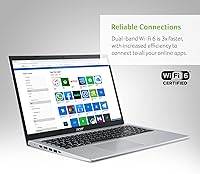
Wi-Fi 6 support stands out as a forward-thinking inclusion at this price tier, delivering noticeably faster and more stable wireless performance on compatible routers compared to older Wi-Fi 5 laptops. Users in congested networks — apartment buildings, student dorms — report fewer dropped connections.
Wi-Fi 6 only benefits users who already own a compatible router, and many buyers in this price segment are still running older hardware at home. Bluetooth connectivity works reliably for peripherals but a handful of users mention occasional pairing delays with certain headphones.
Port Selection
71%
29%
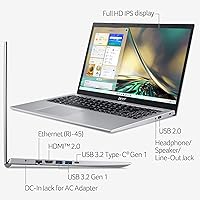
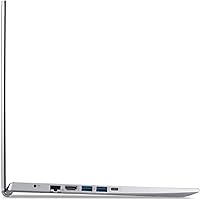
Three USB 3.0 ports cover most practical daily needs — external drives, a USB hub, a wired mouse — without forcing users to disconnect and swap constantly. The HDMI output works reliably for connecting to TVs or external monitors, which students and remote workers find genuinely useful.
The inclusion of a USB 2.0 port alongside the three USB 3.0 ports feels like an odd holdover, particularly for users who plug in high-speed devices without checking which port they are using. The absence of a USB-C or Thunderbolt port is increasingly noticeable as peripherals shift toward that standard.
Microphone & Audio
72%
28%
Acer Purified.Voice noise cancellation makes a tangible difference on video calls — users working or studying in moderately noisy environments report that background sounds are filtered out more effectively than on comparable budget laptops. Call quality feedback from the other end of the line is generally positive.
Speaker output is adequate for casual listening but lacks the volume and low-end presence needed for filling a room with sound. Users who regularly watch lectures, movies, or use the laptop as a primary audio source often find themselves reaching for headphones or an external speaker.
Value for Money
77%
23%
For a user whose needs fit squarely within what this slim Acer was built for — web browsing, cloud-based work, streaming, and light documents — the overall package represents a reasonable return on investment. The IPS display and Wi-Fi 6 inclusion in particular feel like genuine value adds at this tier.
Users who bump into the storage ceiling, purchase an external drive, and potentially upgrade RAM quickly find the total cost creeping toward more capable alternatives they could have bought outright. The value proposition depends heavily on having modest expectations and a plan for the storage limitation from day one.
Thermal Management
68%
32%
Under light everyday workloads the laptop runs cool and quiet, which users appreciate during video calls or study sessions where fan noise would be distracting. The tilting hinge that angles the base slightly off the desk does contribute modestly to airflow underneath the chassis.
During extended periods of higher CPU activity — longer video streams, multiple applications running simultaneously — the fan becomes audible and the bottom of the chassis grows noticeably warm. The cooling system is not designed for sustained performance loads and behaves accordingly.

Suitable for:

The Acer Aspire 5 A515-56-347N Laptop is a strong fit for students who need a dependable, portable machine to handle coursework, research, and video calls without spending a lot. If your daily computing life revolves around a web browser, Google Docs, Microsoft 365, or streaming video, this slim Acer will handle all of it without complaint. It also works well as a shared household computer where multiple family members need occasional access for light tasks. The 15.6-inch Full HD IPS display makes it genuinely comfortable for long reading or study sessions, which matters more than most people realize at this price tier. Anyone looking for a lightweight secondary laptop to travel with or keep in a bag will appreciate how little it weighs at 3.64 pounds.

Not suitable for:

The Acer Aspire 5 A515-56-347N Laptop is not the right call for anyone who depends on software that lives outside the Microsoft Store — creative professionals, developers, or even gamers will immediately run into the walls that Windows 11 S Mode puts up, and while you can switch out of S Mode for free, it is a friction point that should not surprise you on day one. The 128GB SSD is a genuine limitation: between the operating system footprint, Windows updates, and normal app installs, you can find yourself uncomfortably close to full within a few months of daily use. This budget laptop is also not built for processing-heavy work — video editing, 3D rendering, or running complex local software will push the i3 processor and integrated graphics to their limits quickly. If long unplugged sessions away from an outlet are important to you, real-world battery life tends to fall noticeably short of what the spec sheet implies.

Specifications

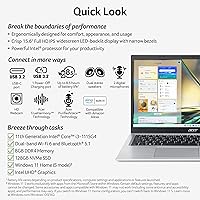
  • Processor: Intel Core i3-1115G4 dual-core processor with a base speed that scales up to 4.1GHz via Turbo Boost for handling everyday workloads.
  • RAM: 8GB DDR4 SDRAM running at 2400MHz, with one open upgrade slot available for future memory expansion.
  • Storage: 128GB NVMe solid-state drive offers fast read and write speeds, with one additional drive bay available for a secondary upgrade.
  • Display: 15.6″ Full HD IPS panel with 1920x1080 resolution, a 16:9 aspect ratio, and an 82.58% screen-to-body ratio with narrow bezels.
  • Operating System: Windows 11 Home in S Mode comes pre-installed, restricting app installs to the Microsoft Store unless the user manually switches out of S Mode.
  • Graphics: Intel UHD Graphics integrated into the processor handles everyday display tasks, web content, and light media playback without a discrete GPU.
  • Wireless: Wi-Fi 6 (802.11ax) and Bluetooth are built in, providing fast and reliable wireless connectivity compatible with modern routers and peripherals.
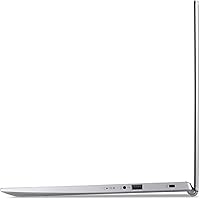
  • Ports: Connectivity includes one USB 2.0 port, three USB 3.0 ports, and one HDMI output for connecting to external displays or projectors.
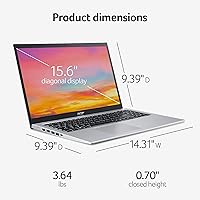
  • Weight: The laptop weighs 3.64 pounds, making it practical for carrying in a bag for commutes, classes, or light travel.
  • Dimensions: Physical footprint measures 14.31 x 9.39 x 0.7 inches, keeping the profile slim enough for most standard laptop sleeves and bags.
  • Battery: A built-in Lithium-Ion battery is included; real-world battery duration typically falls noticeably short of the maximum figures cited in product specifications.
  • Audio & Mic: Acer Purified.Voice technology applies digital signal processing to reduce background noise and improve microphone pickup accuracy during calls and voice commands.
  • Voice Assistant: Amazon Alexa is integrated directly into the laptop for hands-free queries, calendar checks, music playback, and smart home control.
  • Optical Drive: No optical drive is included; users needing to read or write CDs or DVDs will require an external USB optical drive.
  • Color & Build: The chassis is finished in silver and is constructed with a slim profile suited to everyday consumer use rather than rugged or enterprise environments.
  • Chipset Brand: Intel supplies both the processor and the integrated graphics chipset, with no third-party discrete GPU present in this configuration.
  • Memory Type: System memory uses the DDR4 SDRAM standard at 2400MHz, which is functional for everyday tasks though on the conservative end of the DDR4 speed range.
  • Release Date: This model was first made available in November 2022, based on 11th Generation Intel architecture rather than more recent processor generations.

Related Reviews
Acer Aspire 5 A515-57-53T2 Laptop
83%
88%
Overall Performance
91%
Display Quality
74%
Battery Life
76%
Keyboard Comfort
84%
Portability
More
Acer Aspire 5 A515-45-R74Z Laptop
83%
87%
Overall Performance
91%
Battery Life
72%
Display Quality
89%
Portability
90%
Build Quality
More
Acer Aspire 5 A515-58MT
77%
83%
Overall Performance
81%
Build Quality
86%
Display Quality
84%
Keyboard & Typing Experience
88%
RAM & Multitasking
More
Acer Aspire 5 A515-55-35SE
79%
76%
Performance
88%
Value for Money
82%
Battery Life
89%
Portability
80%
Build Quality
More
Acer Aspire 5 A514-56M-576D Laptop
83%
88%
Performance for Productivity
91%
Display Clarity and Quality
85%
Portability and Design
80%
Battery Life
83%
Thermal Performance
More
Acer Aspire 3 Laptop | AMD Ryzen 5 7430U | 64GB RAM | 1TB SSD | 15.6″ FHD
84%
89%
Performance
91%
Display Quality
87%
Multitasking Capability
78%
Build Quality
82%
Keyboard Comfort
More
Acer Aspire 3 Spin 14 (A3SP14-31PT)
74%
88%
Display Quality
83%
Convertible Versatility
91%
Value for Money
47%
Storage Capacity
74%
Performance (Daily Tasks)
More
Acer Aspire 3 A315-24P-R7VH 15.6-inch
79%
88%
Display Quality
92%
Value for Money
46%
Storage Capacity
83%
Everyday Performance
86%
Portability & Weight
More
Acer Aspire 1 A115-31 15.6-inch Laptop
62%
84%
Battery Life
71%
Value for Money
67%
Display Quality
51%
Performance
43%
Storage Adequacy
More
Acer Aspire 3 A314-23P-R3QA Laptop
82%
91%
Value for Money
88%
Performance for Daily Tasks
82%
Battery Life
85%
Display Quality
90%
Portability & Weight
More

FAQ

S Mode means the laptop will only install apps downloaded from the Microsoft Store — you cannot run a standard .exe installer from the web. For browsing, streaming, Microsoft 365, and most school tools, this is rarely an issue. If you need software like Adobe apps, Discord, or Steam, you will need to switch out of S Mode first, which is free and takes about two minutes in Settings.

Honestly, it is tight. Windows 11 itself takes up a significant chunk, and cumulative updates chip away at what is left over time. If you keep most of your files in OneDrive, Google Drive, or on an external drive, you can manage. For anyone planning to store a lot of photos, videos, or offline software locally, investing in an affordable external SSD or upgrading the internal drive through the available drive bay is a smart move from the start.

Yes, and this is one of the more buyer-friendly aspects of this slim Acer. There is one open RAM slot that accepts standard DDR4 SODIMMs, and there is a second drive bay available for adding a larger SSD. Neither upgrade requires professional help if you are comfortable with basic laptop disassembly, though it does void any remaining warranty coverage.

It handles them well. The built-in microphone uses Acer Purified.Voice noise cancellation to cut down on background noise, which makes a real difference in noisy environments like dorm rooms or shared spaces. The processor and 8GB of RAM are plenty for running a video call alongside a few browser tabs.

Only very light ones. The integrated Intel UHD Graphics can handle casual browser-based games and older titles at low settings, but anything from the last few years will either run poorly or not at all. This budget laptop was simply not designed with gaming in mind, and expecting otherwise will lead to frustration.

The 15.6″ IPS panel is a genuine highlight of this machine. IPS technology means colors stay accurate and consistent even when you are not looking at the screen straight-on, which is more than you get from cheaper TN panels common at this price point. Buyers frequently call it one of the better screens available in this budget range.

It is one of the more practical choices for students on a tighter budget. It covers browsing, writing, research, online classes, and video calls without any real strain. The main thing to plan for is the 128GB storage limit — pairing it with a cloud storage subscription or an external drive from day one avoids the most common frustration buyers report.

Real-world usage gets considerably less than what the spec sheet suggests. Expect somewhere in the range of five to seven hours under typical mixed use — browsing, documents, and occasional video. Heavy streaming or multiple tabs running simultaneously will bring that number down further. Carrying the charger for full-day use is a reasonable habit to build.

For a budget-class laptop, the keyboard gets consistently positive feedback. The ergonomic tilting hinge lifts the rear of the laptop slightly when opened, which angles the keyboard in a more natural position and helps with comfort during extended typing. Key travel is acceptable, and the layout is standard enough that there is very little adjustment period.

Yes, the built-in HDMI port makes that straightforward. You can mirror the display or extend your desktop to a second screen with a standard HDMI cable. This is particularly useful for students who want a larger workspace when working from a desk at home.