Overview

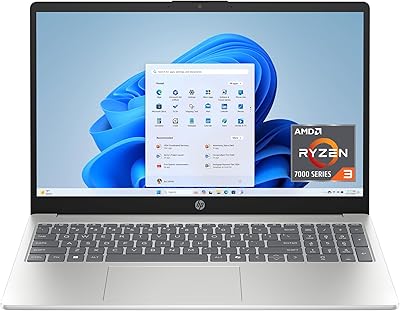
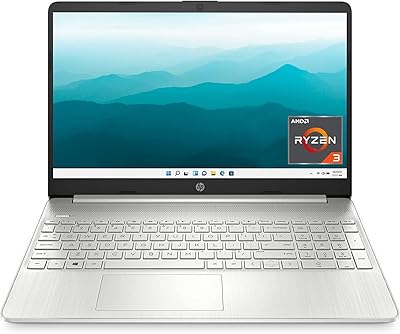
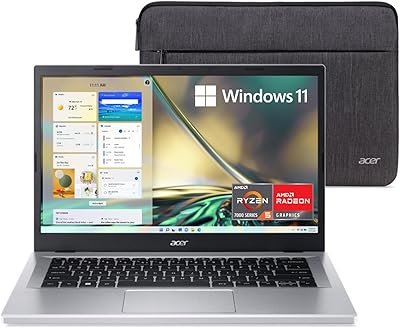
The Acer Aspire 3 Ryzen 3 7330U 15.6″ 256GB is a practical, no-frills laptop aimed at students, families, and budget-conscious remote workers who need a dependable daily machine without overspending. At under four pounds, this Acer Aspire is easy to carry between classes or rooms without feeling like a burden. The AMD Ryzen 3 7330U handles everyday tasks well — think web browsing, video calls, and light document work — without much fuss. The 15.6-inch Full HD IPS display is a real highlight at this price point, offering decent colors and sharp text. Storage is the honest caveat here: 256GB fills up faster than most people anticipate.
Features & Benefits

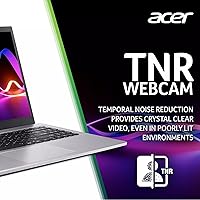
The Aspire 3 runs on AMD's Ryzen 3 7330U quad-core chip, which covers the bases for daily computing — juggling browser tabs, hopping on video calls, editing documents. It won't handle video rendering or intense multitasking, but that's not the point. 16GB of RAM is where this machine punches above its weight — that's a lot of memory at this price tier, keeping things smooth even with several apps open simultaneously. Wi-Fi 6 support is a practical addition, especially useful in crowded home networks or shared dorms. The webcam's built-in noise reduction also delivers noticeably cleaner audio and video than you'd typically expect at this price.

Best For

This budget laptop is a strong fit for students who want something dependable for classes, research, and assignments without the stress of carrying an expensive device. Families looking for a shared home computer will find it easy to use and maintain, with Windows 11 keeping things familiar. Remote workers who live in video meetings and cloud-based apps will get by comfortably, particularly thanks to the solid webcam and fast wireless. Travelers and commuters will appreciate the slim, sub-four-pound build that slides right into a backpack. What it isn't suited for is creative work or gaming — keep expectations realistic and it will serve you well.

User Feedback

Buyers consistently highlight the display sharpness and the generous memory as real surprises given the asking price. The complaints that come up most are about storage — once the OS and basic software are installed, free space shrinks quickly, and most users recommend pairing it with external storage from day one. The lack of a backlit keyboard is a genuine inconvenience for anyone who types in low-light settings. Battery life divides opinion; lighter users report solid endurance, while those running multiple tabs and apps see notably shorter sessions. The chassis is plastic through and through, which some buyers find acceptable and others find underwhelming — though it's hard to argue with the value on offer.

Pros

  • 16GB of RAM at this price tier is genuinely rare and keeps daily multitasking smooth without upgrades.
  • The Full HD IPS display delivers sharp, clear visuals that most budget laptops in this range simply cannot match.
  • Wi-Fi 6 support provides a noticeably more stable connection in busy home networks or crowded dorms.
  • The webcam noise reduction works better than expected, making video calls cleaner without a dedicated microphone.
  • At under four pounds, the Aspire 3 is comfortable to carry all day without back or shoulder strain.
  • Fast NVMe SSD storage means quick boot times and snappy app launches despite the modest capacity.
  • Windows 11 comes pre-installed and the machine is ready to use almost immediately out of the box.
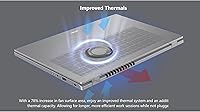
  • The improved thermal design keeps the laptop cooler during moderate workloads than older budget Acer models.
  • For students and light home users, this budget laptop delivers reliable daily performance without requiring any additional investment.

Cons

  • 256GB of storage fills up fast — most users need external storage or cloud backup within the first month.
  • No backlit keyboard makes typing uncomfortable in dim rooms, coffee shops, or late-night study sessions.
  • The plastic chassis flexes under pressure and feels noticeably less durable than metal-body alternatives.
  • Real-world battery life falls well short of the advertised figure under any meaningful workload.
  • Only one USB 3.0 port and two older USB 2.0 ports make connecting multiple modern peripherals a headache.
  • Fan noise becomes clearly audible during sustained tasks, which can be distracting in quiet environments.
  • Display brightness is insufficient for comfortable outdoor use or working near bright windows.
  • Pre-installed bloatware slows down the out-of-box experience and requires manual cleanup to get the best performance.
  • No USB-C port limits compatibility with modern docks, displays, and fast-charging accessories.

Ratings

The Acer Aspire 3 Ryzen 3 7330U 15.6″ 256GB has been evaluated using AI-driven analysis of verified global user reviews, with spam, bot-generated, and incentivized submissions actively filtered out to ensure the scores reflect genuine ownership experiences. Ratings cover everything from daily performance and display quality to the frustrations buyers actually mention after weeks of real use. Both the strengths that make this budget laptop stand out and the shortcomings that cause buyer hesitation are reflected transparently in each score below.
Value for Money
88%
For buyers on a tight budget, getting 16GB of RAM and a Full HD IPS screen in the same package is hard to argue with. Most users feel they received more than expected for the price, particularly compared to similarly priced rivals that ship with half the memory or a lower-quality display.
The 256GB SSD and plastic build are constant reminders of where cost was cut. Buyers who need a machine that lasts more than a few years without an upgrade investment may find the overall value less compelling once storage fills up.
Performance for Daily Tasks
76%
24%
Browsing, streaming, email, and video calls all run without noticeable lag, and having 16GB of RAM means the system handles a dozen open tabs without complaint. Students and remote workers doing standard office work rarely hit a wall during typical daily sessions.
Anything beyond light productivity — think large spreadsheets, multiple video streams, or even some browser-based tools — starts to expose the limits of the Ryzen 3 chip. Users expecting snappy responsiveness under heavier workloads consistently report sluggishness.
Display Quality
83%
The 15.6-inch Full HD IPS panel regularly draws praise for delivering clear, sharp visuals at a price point where TN panels still dominate. Colors look accurate enough for everyday media consumption and video calls, and the narrow bezels give it a more premium appearance than expected.
Brightness is a recurring criticism — outdoor use or brightly lit rooms can make the screen harder to read comfortably. It is not a panel that impresses photographers or anyone who needs color-critical accuracy, and some units show uneven backlight toward the edges.
RAM & Multitasking
86%
16GB of DDR4 is one of the most frequently praised aspects of the Aspire 3 across user reviews. It means the machine can keep several apps running simultaneously without the slowdowns that plague many budget laptops stuck at 8GB.
The RAM is soldered or paired with limited upgrade paths on some configurations, so buyers who want more down the line may not have that option. A few users also note that the integrated graphics pull from system memory, slightly reducing available RAM under load.
Storage Capacity
51%
49%
The NVMe SSD delivers fast read and write speeds compared to older eMMC or SATA drives, so the system boots quickly and files open without delay. For someone disciplined about cloud storage and streaming rather than local libraries, 256GB can technically be enough.
This is the most common complaint in user reviews by a wide margin. After Windows 11, drivers, and basic apps are installed, available space can drop below 180GB before the buyer has added a single personal file. Most owners end up buying external storage within the first month.
Battery Life
69%
31%
Light users — those doing occasional browsing, document editing, or watching a video — report getting through a full workday on a single charge without much anxiety. The improved thermal design appears to contribute to more consistent power draw during low-intensity sessions.
The advertised 11-hour figure does not hold up under anything resembling real-world mixed use. Running video calls, multiple browser tabs, and background apps simultaneously drains the battery significantly faster, with many users reporting closer to 5 to 7 hours in practice.
Build Quality & Portability
63%
37%
At under four pounds, the Aspire 3 is genuinely easy to carry around campus or between rooms, and the slim profile fits into most standard backpacks without a problem. For a machine at this price, the overall assembly feels solid enough for daily use.
The all-plastic chassis is a recurring point of criticism — it flexes slightly under pressure, particularly around the keyboard deck, and the lid shows fingerprints easily. Buyers used to metal-body laptops will feel the difference immediately and may question long-term durability.
Keyboard Comfort
61%
39%
Key travel is reasonable for a budget laptop, and the layout is standard enough that most users adapt quickly. Casual typists working in well-lit environments generally find it acceptable for extended writing sessions.
The absence of a backlit keyboard is a real usability hit for anyone who works in dim environments — classrooms, bedside tables, or coffee shops with low lighting. Several reviewers specifically called this out as a dealbreaker, noting it feels like an unnecessary omission.
Webcam & Video Call Quality
74%
26%
The HD webcam with Acer's noise reduction technology performs noticeably better than what budget laptop cameras typically deliver. Video call participants regularly comment on cleaner audio, with background noise like fans or street sound filtered out more effectively than expected.
In low-light conditions, the webcam struggles despite the TNR processing — images become noticeably grainy during evening calls or in rooms without strong overhead lighting. It is a step above average, but not a replacement for a dedicated external webcam for professionals.
Wireless Connectivity
81%
19%
Wi-Fi 6 support makes a tangible difference in homes or dorms with congested networks and multiple connected devices. The connection stays stable during video calls and large file transfers in ways that older Wi-Fi standards often fail to manage.
Bluetooth connectivity has drawn occasional complaints about intermittent drops when paired with headphones or peripherals. A small number of users also reported inconsistent Wi-Fi performance depending on router compatibility, though this appears to be a minority experience.
Thermal Management
72%
28%
The enlarged fan surface area does appear to help — the laptop runs cooler during moderate workloads than previous Aspire generations, and users report being able to work for longer stretches without the machine becoming uncomfortably hot on the lap.
Under sustained load, fan noise becomes clearly audible, which some users find distracting during quiet work environments. The bottom of the chassis can still get warm after extended sessions, particularly when placed on soft surfaces like a bed or couch.
Software & Out-of-Box Experience
66%
34%
Windows 11 comes pre-installed and ready to use, which simplifies setup for less tech-savvy buyers. The interface is familiar to most users and the machine is genuinely ready to go within minutes of first boot.
Bloatware is a common complaint — several pre-installed apps and trials clutter the system from day one, and removing them is an extra step many casual users do not know to take. Some reviewers noted these background processes contributed to slower initial performance.
Port Selection
58%
42%
Having a USB 3.0 port available means faster transfers when connecting external drives, which is especially useful given the limited onboard storage. The port layout is straightforward and accessible without needing adapters for standard accessories.
Two USB 2.0 ports feel dated in 2025, and the absence of a USB-C or Thunderbolt port is a notable gap for users who want to connect modern peripherals or displays. Buyers who rely on multiple simultaneous connections will likely need a hub.
Display Brightness & Outdoor Usability
57%
43%
Indoors under controlled lighting, the IPS panel provides a comfortable viewing experience with decent contrast. The anti-glare coating helps reduce reflections in average office or home lighting conditions.
Outdoor use is genuinely challenging — brightness tops out at a level that many users find insufficient in direct sunlight or near windows. This is one of the most consistent criticisms tied specifically to the display, separate from its color quality.
Audio Quality
55%
45%
The built-in speakers are adequate for casual media consumption like YouTube videos or online lectures, and the microphone noise reduction helps compensate for the modest speaker output during calls.
Bass response is nearly nonexistent, and volume at maximum can sound thin or slightly distorted. Users who enjoy music or rely on clear audio for entertainment will almost certainly want to use headphones or an external speaker.

Suitable for:

The Acer Aspire 3 Ryzen 3 7330U 15.6″ 256GB is genuinely well-matched for students who need a dependable, portable machine for classes, research papers, and video calls without spending a lot. Families looking for a shared home computer will find it easy to set up and use across different skill levels, and the Full HD IPS display makes it comfortable for both kids doing homework and parents checking email. Remote workers whose daily routine revolves around browser-based apps, video conferencing, and document editing will get by without frustration, especially with 16GB of RAM keeping things responsive. Frequent travelers and commuters who prioritize portability will appreciate the fact that this machine slides into a backpack at under four pounds without occupying much space. If your computing needs are fundamentally everyday — streaming, browsing, light productivity — the Aspire 3 covers that ground reliably and without overpaying.
Not suitable for:

Buyers who plan to push a laptop beyond everyday tasks should look elsewhere, and the Acer Aspire 3 Ryzen 3 7330U 15.6″ 256GB makes no attempt to hide that reality. Video editors, graphic designers, and anyone running creative software will hit the ceiling of the Ryzen 3 chip and integrated graphics quickly, resulting in genuinely sluggish performance that becomes frustrating in short order. Gamers — even those targeting casual or older titles — will find the integrated Radeon graphics struggle to deliver a smooth experience. Anyone who stores large local media libraries, downloads a lot of software, or works offline with bulky files will find 256GB of storage disappears faster than expected, and there is no graceful way around that without external storage or cloud workarounds. People who regularly type in dim environments will miss the absent backlit keyboard, and professionals who rely on USB-C connectivity or modern port ecosystems will find the selection limiting. If longevity and upgradeability matter to you, the plastic build and constrained hardware ceiling make this a less compelling long-term investment.
Specifications

  • Processor: AMD Ryzen 3 7330U quad-core processor with a boost clock up to 4.4 GHz, designed for efficient everyday computing tasks.
  • RAM: 16GB of DDR4 SDRAM provides ample memory for multitasking across multiple browser tabs, office applications, and video calls simultaneously.
  • Storage: 256GB NVMe SSD delivers fast boot and file access speeds, though available space decreases significantly after OS and software installation.
  • Display: 15.6-inch Full HD IPS panel with a 1920x1080 resolution, 16:9 aspect ratio, and narrow bezels for a clean, modern viewing experience.
  • Graphics: AMD Radeon integrated graphics handle everyday media playback and light visual tasks, but are not designed for gaming or GPU-intensive workloads.
  • Wireless: Wi-Fi 6 (802.11ax) with 2x2 MU-MIMO technology ensures stable, fast wireless connectivity even in environments with many competing devices.
  • Webcam: HD front-facing camera with Acer TNR (Temporal Noise Reduction) technology improves image clarity under low-light conditions during video calls.
  • Microphone: PurifiedVoice AI Noise Reduction technology filters background sounds to deliver cleaner audio during online meetings and calls.
  • Battery Life: Rated for up to 11 hours of use on a single charge, though real-world duration varies based on workload and screen brightness settings.
  • Weight: The laptop weighs 3.94 pounds, making it light enough for daily commutes and backpack carry without significant strain.
  • Dimensions: Physical dimensions measure 21 x 14 x 3 inches (L x W x H), fitting comfortably into most standard laptop sleeves and backpacks.
  • Operating System: Ships with Windows 11 pre-installed, ready to use out of the box with no additional OS purchase or setup required.
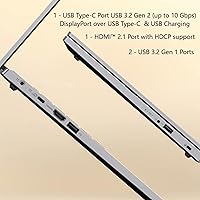
  • USB Ports: Includes two USB 2.0 ports and one USB 3.0 port for connecting peripherals, though no USB-C port is available on this model.
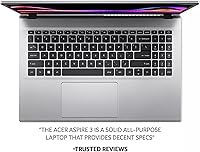
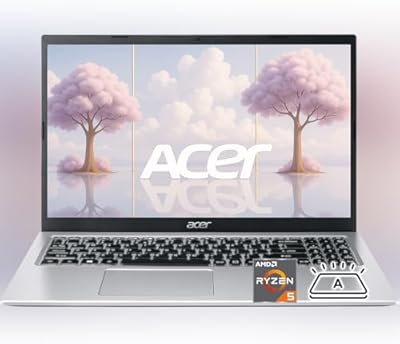
  • Keyboard: Full-size keyboard without backlighting, which limits comfortable typing visibility in low-light or dark environments.
  • Audio: Built-in stereo speakers deliver adequate sound for casual media consumption, with PurifiedVoice microphone support for clearer call audio.
  • Thermal Design: Upgraded fan system features 78% more surface area than previous generations, providing an additional 17% thermal capacity for sustained workloads.
  • Memory Type: DDR4 SDRAM is used for system memory, offering reliable performance for the processor architecture at this price tier.
  • Chipset: Intel chipset infrastructure supports the AMD processor and peripheral connectivity across the motherboard.
  • Battery Type: One lithium-ion battery pack is included and integrated into the chassis, not designed for user replacement without technical assistance.
  • Aspect Ratio: The 16:9 widescreen aspect ratio is well-suited for video streaming, document work, and web browsing on the 15.6-inch panel.

Related Reviews
Acer Aspire 3 A315-44P-R7GS 15.6″ Ryzen 7 5700U 16GB 512GB SSD
86%
91%
Performance
88%
Multitasking Capability
94%
Storage Speed
90%
Display Quality
70%
Graphics Performance
More
Acer Aspire 3 Laptop | AMD Ryzen 5 7430U | 64GB RAM | 1TB SSD | 15.6″ FHD

84%
89%
Performance
91%
Display Quality
87%
Multitasking Capability
78%
Build Quality
82%
Keyboard Comfort
More
HP 15.6-inch Laptop 15-ef0021nr, Ryzen 3 3200U, 8GB RAM, 256GB SSD
82%
92%
Value for Money
85%
Performance
83%
Build Quality
89%
Portability
81%
Battery Life
More
Acer Aspire 3 A315-24PT-R0UX 15.6″ Laptop 16GB 512GB SSD
86%
91%
Performance
87%
Battery Life
88%
Display Quality
93%
Portability
82%
Build Quality
More
Lenovo IdeaPad Gaming 3 15.6″ FHD Laptop - Ryzen 5 6600H, RTX 3050, 8GB RAM, 256GB SSD
82%
91%
Value for Money
87%
Gaming Performance
74%
Battery Life
79%
Display Quality
82%
Build Quality
More
HP Laptop 15-fc0099nr
71%
83%
Value for Money
71%
Performance
88%
Battery Life
61%
Display Quality
84%
Touchscreen Responsiveness
More
HP 15 Laptop, Ryzen 3 5300U, 8GB RAM, 256GB SSD
79%
91%
Value for Money
88%
Portability
85%
Battery Life
82%
Performance
65%
Display Quality
More
Lenovo IdeaPad Slim 3 15″ Ryzen 5 7535HS 16GB 256GB SSD
86%
94%
Performance
91%
Multitasking Capability
88%
Display Quality
85%
Build Quality
90%
Portability
More
Lenovo Ideapad 3 Laptop, 15.6″, Intel Core i3, 12GB RAM, 256GB SSD
84%
92%
Value for Money
85%
Performance for Everyday Tasks
90%
Portability and Weight
75%
Display Quality
80%
Battery Life
More
HP 15.6-inch Laptop, AMD Ryzen 7 5700U, 8GB RAM, 256GB SSD
81%
89%
Value for Money
91%
Battery Life
88%
Portability
87%
Processor Performance
71%
Display Quality
More

FAQ

Honestly, it depends on how you use it. After Windows 11 and standard apps are installed, you might be left with around 180GB of free space. If you rely heavily on cloud storage services like OneDrive or Google Drive and stream rather than download media, you can make it work. That said, most users find themselves wanting more room within a few months, so budgeting for an external drive or USB stick from the start is a smart move.

Not comfortably. The Ryzen 3 chip and integrated graphics are not built for that kind of workload. You might be able to open the software and edit very short, low-resolution clips, but rendering will be painfully slow and the experience will be frustrating. For video editing, you really want a dedicated GPU and a more powerful processor.

No, it does not. This is one of the more common complaints from buyers. If you frequently type in dim rooms, coffee shops at night, or in bed with the lights off, that missing backlight becomes a real inconvenience. It is worth factoring in before you buy if low-light typing is part of your routine.

The official figure is up to 11 hours, but that number reflects light, controlled usage. In real-world mixed use — video calls, multiple browser tabs, streaming — most users land somewhere between 5 and 7 hours. It is enough to get through a school day or a work morning without a charger, but you will likely want to plug in by afternoon.

This depends on the specific unit configuration, and Acer has not made upgradeability a priority on the Aspire 3 line. In some configurations, one RAM slot may be accessible, but in others the memory is partially soldered. It is best to assume limited upgrade potential and choose accordingly at purchase time.

Better than you might expect from a budget laptop. The HD webcam combined with Acer's noise reduction processing keeps your image reasonably clear and your audio clean during calls on Zoom, Teams, or Google Meet. Low-light performance is where it struggles most — evening calls without a good light source can look grainy. For daytime or office use, it gets the job done without needing an external webcam.

For basic coding in Python, web development, or light data work using tools like Jupyter Notebook, it is capable enough. The 16GB of RAM is a real advantage here compared to entry-level machines. However, if your program involves running large datasets, machine learning models, or compiling large codebases regularly, you will start to notice slowdowns. It suits introductory-level coursework well but has limits at the advanced end.

At just under four pounds and with a slim profile, the Aspire 3 is genuinely easy to carry. It fits in a standard backpack without bulk, and you will not feel it wearing you down between classes. The charger adds a bit of weight, but the laptop itself travels light.

Under light tasks like browsing or streaming, it stays cool. During longer sessions with more demanding work — sustained downloads, multiple apps running, or even extended video calls — the bottom of the chassis gets warm, and the fan kicks in noticeably. It is manageable on a desk but can be uncomfortable on your lap during heavier use.

The port selection is modest: two USB 2.0 ports, one USB 3.0 port, and an HDMI output. There is no USB-C port, which is a gap if you use modern accessories or want to connect a USB-C monitor or hub. If your setup involves more than a mouse and a USB drive, a basic USB hub is worth picking up alongside this machine.