Overview

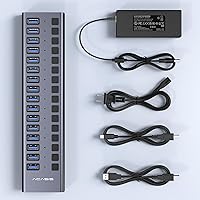
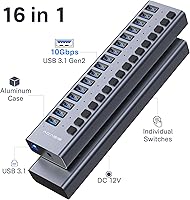
The ACASIS HS082 16-Port USB 3.1 Hub is built for the kind of power user who has outgrown every compact dongle they have ever owned. Sitting flat on a desk at under nine inches long, this 16-port hub packs serious connectivity into an aluminum alloy chassis that feels far more durable than the plastic alternatives at a similar price. Unlike bus-powered hubs that borrow headroom from your computer, it ships with a dedicated 96W adapter to keep all ports stable under load. On the market since 2018 and holding a top-100 category ranking, it has a track record worth noting. That said, this is a desktop fixture, not something you toss in a laptop bag.
Features & Benefits

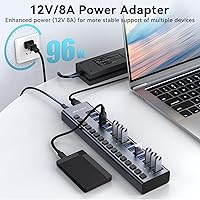
Each of the 16 ports on this powered USB hub has its own physical toggle switch, so you can cut power to a specific device — say, a slow-charging tablet — without yanking a cable or rebooting the entire hub. Running on the USB 3.1 Gen 2 standard, it reaches up to 10Gbps, roughly ten times the throughput of older USB 3.0 hubs; lab tests show real-world read speeds approaching 920MB/s with compatible NVMe enclosures. The 12V 8A power supply is sized to handle simultaneous load across all ports, and select ports offer fast-charge support at up to 12V 1.2A. The whole setup installs without drivers across Windows, macOS, and Linux.

Best For

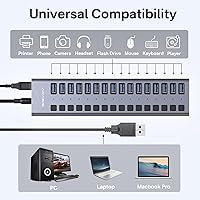
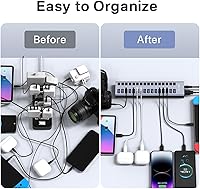
This 16-port hub makes the most sense for people whose desks have become a tangle of hubs daisy-chained together. Video editors and photographers juggling multiple external drives, card readers, and capture devices will find 16 independently switched ports a genuine relief. It works equally well in a home office where one machine needs to anchor a printer, a webcam, a keyboard-and-mouse receiver, a backup drive, and still have ports left over. The per-port switch design also suits anyone who hot-swaps devices frequently, since you can cycle individual ports without interrupting everything else. It is a less natural fit for laptop users who move between locations regularly.

User Feedback

Buyers running NVMe enclosures through the ACASIS hub consistently report transfer speeds that track closely with the advertised figures, which is not always the case with budget alternatives. The aluminum body gets warm under sustained load but rarely uncomfortably so, and that matters when devices run overnight. On the downside, the power brick is genuinely large — owners with cramped desks or limited outlet space flag it as an inconvenience. Bandwidth sharing across port groups is a question that surfaces repeatedly, and it is worth researching for your specific workload before committing. A small number of users have noted intermittent disconnections after extended uptime, though this appears limited to a minority of units.

Pros

  • Sixteen independently switched ports eliminate the need to physically unplug devices to cut power to them.
  • Real-world transfer speeds with NVMe enclosures track closely to the advertised 10Gbps ceiling.
  • The 96W dedicated power adapter keeps all ports stable even under simultaneous full-port load.
  • Aluminum housing passively dissipates heat during extended high-throughput sessions without a fan.
  • Plug-and-play setup works immediately across Windows, macOS, and Linux with zero driver installation.
  • Hot-swapping is reliable and clean, with devices mounting and unmounting without hub restarts.
  • The slim profile keeps the footprint minimal on a desk despite housing 16 full-size USB-A ports.
  • Select ports deliver fast-charge output, useful for powering phones and tablets alongside data devices.
  • Backed by FCC, UL, CE, and UKCA certifications, signaling consistent safety and compliance standards.
  • A market presence since 2018 and a top-100 category ranking suggest this powered USB hub is not a flash-in-the-pan product.

Cons

  • The power brick is physically large and can be difficult to place cleanly in cramped outlet or desk setups.
  • The host cable is notably stiff, making tidy cable routing around a desk harder than it should be.
  • Bandwidth may be shared across port groups rather than dedicated per port, affecting simultaneous high-speed transfers.
  • No USB-C ports are included, making this hub a poor fit for modern MacBook-centric workflows.
  • Fast-charging does not support USB Power Delivery or Quick Charge protocols, limiting compatibility with newer flagship devices.
  • A minority of long-term users report intermittent device drop-offs after extended continuous uptime.
  • Port toggle switches sit close together and lack clear LED status indicators, which complicates use in low-light environments.
  • The hub has no anti-slip base or mounting points, so it can shift on smooth desk surfaces when cables are pulled.
  • Port labeling can fade with sustained heavy use, reducing legibility over time.
  • Setup documentation is minimal and does not address bandwidth or port-assignment optimization for demanding multi-drive configurations.

Ratings

The ACASIS HS082 16-Port USB 3.1 Hub scores below are generated by AI after analyzing verified global buyer reviews, with spam, incentivized, and bot-flagged feedback actively filtered out before scoring. Across hundreds of real-world assessments from editors, studio technicians, and home office users, this powered USB hub earned strong marks in several key areas while showing genuine weaknesses in others. Both the highlights and the friction points are reflected transparently in each category score.
Data Transfer Speed
88%
Users running NVMe enclosures through this hub consistently report real-world read speeds near 900MB/s, which tracks closely with the advertised 10Gbps ceiling. That kind of throughput is roughly ten times what older USB 3.0 hubs can deliver, and buyers transferring large video project files notice the difference immediately.
Some users question whether full 10Gbps is available per port or shared across port groups, and the answer depends heavily on the host controller in their PC. When multiple high-bandwidth devices run simultaneously, a few reviewers noted speed drops that suggest the internal bandwidth is being divided rather than dedicated.
Build Quality
91%
The aluminum alloy shell earns consistent praise for feeling solid and well-finished compared to the plasticky alternatives common in this port-count range. Buyers who have owned cheaper hubs specifically call out the rigidity of the chassis and the snug fit of the port openings as signs of genuine manufacturing care.
A handful of reviewers note that the port labeling can fade with heavy use, and the individual toggle switches, while functional, feel slightly loose on some units. Nothing catastrophic, but for a hub expected to run 24/7 in a studio environment, minor tactile inconsistencies do get noticed over time.
Power Delivery & Stability
86%
The dedicated 12V 8A adapter is sized generously enough that users report stable device behavior even when all 16 ports are occupied simultaneously. Fast-charge capable ports handle phones and tablets without throttling data devices sharing the same hub, which is a real advantage in mixed-use desk setups.
The power brick itself is physically large, and the attached cable is stiff enough to fight against tidy cable management. Users with limited surge protector space or cramped under-desk setups flag this as a genuine inconvenience rather than a minor nuisance.
Heat Management
83%
Passive cooling through the aluminum body handles sustained workloads well enough that most users never feel the need to monitor temperatures. The hub stays warm to the touch under heavy load but rarely reaches a point that causes concern, especially compared to plastic-bodied alternatives that can become noticeably hot.
Under prolonged, high-intensity use with multiple drives spinning simultaneously, the body does accumulate heat that some users find uncomfortable if the hub is placed in an enclosed or poorly ventilated space. No thermal shutdowns have been widely reported, but airflow around the unit is worth considering in tight rack or shelf arrangements.
Per-Port Switch Design
89%
The independent switch on each port is one of the features buyers return to praise repeatedly. Being able to power-cycle a single misbehaving device without disrupting everything else connected is genuinely useful for anyone who manages a mix of always-on and occasionally-used peripherals at a busy workstation.
The switches are small and sit close together along the hub body, which can make precise operation tricky without looking directly at the unit. A few users wished the switches had clearer LED indicators to distinguish active from inactive ports at a glance, particularly in low-light environments.
Long-Term Reliability
72%
28%
The majority of buyers who have owned this hub for a year or more report no significant issues, and the product's continuous market presence since 2018 suggests it is not plagued by systematic failure rates. For most desktop workstation users running moderate loads, day-to-day reliability is solid.
A meaningful minority of reviewers report intermittent device drop-offs after months of continuous uptime, with some ports eventually failing to recognize devices reliably. Whether this reflects a batch quality issue or normal wear under heavy use is unclear, but it is a recurring enough theme to factor into a buying decision for mission-critical setups.
OS Compatibility
92%
Plug-and-play operation across Windows, macOS, and Linux is confirmed by buyers on a wide range of machines, including older systems running Windows 7 and various Linux distributions. No driver installation is needed in any reported case, which makes setup genuinely effortless even for less technical users.
A small number of macOS users on newer Apple Silicon machines mention occasional enumeration quirks where a device connected mid-session takes longer than expected to mount. This is not unique to this hub but is worth knowing if a Mac-centric workflow depends on instant device recognition.
Hot-Swap Support
84%
Hot-swapping works reliably across the board according to buyer reports, with devices connecting and disconnecting cleanly without requiring hub restarts. This is particularly appreciated in edit suite environments where storage drives are swapped frequently throughout a working day.
Occasionally, after a rapid sequence of hot-swap events on the same port, a device fails to remount until the port toggle is cycled. It is not a frequent complaint, but users in high-swap workflows should be aware it can happen and factor that into their setup expectations.
Cable & Connector Quality
74%
26%
The included host cable is long enough to reach most tower PC rear panels without strain, and the USB-A connectors on the hub itself feel secure with no obvious wobble when devices are plugged in. Buyers appreciate that the hub does not require a proprietary cable to connect to the host machine.
The host cable is notably stiff, which makes routing it cleanly around a desk harder than it should be. Several reviewers also note that the cable feels like a slight quality step down relative to the hub body itself, suggesting it may be the first component to show wear in a demanding environment.
Port Count & Layout
87%
Sixteen ports in a body under nine inches long is a genuinely impressive ratio, and the layout keeps all ports accessible without crowding wider USB-A connectors against each other. Buyers consolidating multiple smaller hubs into one unit consistently report that 16 ports is enough to eliminate port hunting entirely from their workflow.
All 16 ports share the same face of the hub, which means the overall cable bundle facing one direction can look cluttered on an open desk. Users who prefer symmetrical cable routing or need ports distributed across multiple sides will find the single-sided layout limiting.
Value for Money
81%
19%
Relative to what comparable 16-port USB 3.1 hubs cost from other established brands, the pricing here sits in a reasonable range for the feature set delivered. Buyers who previously paid more for hubs with fewer ports or lower power adapters specifically call out the cost-to-port ratio as favorable.
Budget-focused buyers comparing it against generic no-name hubs on price alone will find the premium harder to justify without caring about build quality or port stability. If long-term reliability concerns do materialize after the return window closes, the value proposition weakens considerably.
Setup & Installation
93%
Out-of-box setup is as fast as it gets — plug in the power adapter, connect the host cable, and devices are recognized immediately across every operating system tested by buyers. No configuration, driver downloads, or system restarts are required under normal conditions.
The instruction sheet is minimal and does not address common questions around bandwidth sharing or optimal port assignment for high-throughput devices. First-time hub users who want guidance on getting the best performance out of all 16 ports simultaneously will need to look elsewhere for answers.
Fast Charging Performance
77%
23%
Phones and tablets charge noticeably faster through the designated fast-charge ports compared to standard USB charging, and buyers appreciate being able to power mobile devices from the hub without dedicating a separate wall adapter. The 12V 1.2A output is sufficient for most Android and older iOS devices.
The fast-charge implementation does not support modern protocols like USB Power Delivery or Qualcomm Quick Charge by name, which means flagship smartphones that expect PD negotiation will default to slower charge rates. This is a limitation worth knowing for users who rely on fast charging as a primary feature rather than a convenience.
Physical Footprint
85%
The slim profile keeps desk real estate usage minimal relative to the number of ports provided. Buyers who position it behind a monitor stand or along a desk edge find it unobtrusive, and the weight is light enough that it does not drag cables or shift position during normal use.
Because the hub lays flat and offers no mounting points or anti-slip base, it can migrate across a smooth desk surface when cables are connected or disconnected repeatedly. A simple rubber base or optional mount bracket would resolve this, but neither is included out of the box.

Suitable for:

The ACASIS HS082 16-Port USB 3.1 Hub was built for people whose desks have become a port-scarcity problem, and it solves that problem well for a specific kind of user. Video editors and photographers who juggle multiple external drives, card readers, and capture devices simultaneously will get the most out of the 10Gbps throughput and the per-port switching, which lets them power-cycle a single device without disrupting everything else in their workflow. Home office workers who need one machine to anchor a printer, a webcam, a backup drive, a keyboard-and-mouse receiver, and still have ports to spare will find 16 independently switched ports genuinely liberating compared to the daisy-chained hub chaos many of them are currently living with. Small production studios and edit bays that need stable, always-on connectivity across a lot of storage and peripheral devices will also appreciate the 96W dedicated power supply, which is sized to handle full-port loads without the voltage sag that plagues bus-powered alternatives. If your core frustration is constantly running out of USB ports on a desktop or tower workstation, this powered USB hub is a rational, well-matched solution.

Not suitable for:

The ACASIS HS082 16-Port USB 3.1 Hub is a poor fit for anyone expecting a portable or travel-friendly accessory — it is a desk fixture with a large power brick, a stiff host cable, and a form factor designed to stay in one place. Laptop users who move between locations regularly will find the setup cumbersome, and the absence of any USB-C ports means it offers nothing for modern MacBook users who have moved entirely away from USB-A peripherals. Buyers expecting every port to independently deliver a full dedicated 10Gbps channel should investigate the internal bandwidth architecture carefully before purchasing, since shared bandwidth across port groups is a realistic limitation in hubs at this price tier that affects heavy multi-drive workloads. Anyone prioritizing modern fast-charging standards like USB Power Delivery will be disappointed, as the charging output does not negotiate with PD-dependent devices and will default those to slower rates. Finally, users who need ironclad, zero-tolerance uptime — such as in server-adjacent or archival workflows — should weigh the minority reports of intermittent port drop-offs that have surfaced among long-term owners.
Specifications

  • Model Number: The unit is manufactured under model designation HS082 by ACASIS.
  • USB Standard: All 16 ports operate on the USB 3.1 Gen 2 standard, supporting a maximum theoretical data transfer rate of 10Gbps.
  • Total Ports: The hub provides 16 USB Type-A ports, each with an independent physical toggle switch.
  • Power Adapter: A dedicated external power adapter rated at 12V 8A (96W total output) is included in the box.
  • Fast-Charge Output: Select ports support fast charging at up to 12V 1.2A for compatible mobile devices including smartphones and tablets.
  • Housing Material: The outer shell is constructed from aluminum alloy, which provides passive heat dissipation and drop resistance.
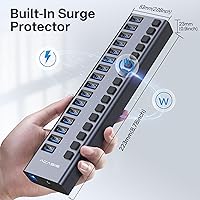
  • Dimensions: The hub measures 8.78 x 2.05 x 0.94 inches, allowing it to sit flat on a desk without occupying excessive space.
  • Weight: The unit weighs 1.79 pounds, not including the power adapter and host cable.
  • Host Connector: The hub connects to a host computer via a single USB Type-A male connector.
  • Hot-Swap Support: All 16 ports support hot-swapping, allowing devices to be connected and disconnected without powering down the hub or restarting the host system.
  • Per-Port Switches: Each of the 16 ports has a dedicated physical on/off toggle switch that cuts power to that port independently without affecting others.
  • Surge Protection: Built-in surge protection is present on the power input circuit to guard connected devices against voltage spikes.
  • OS Compatibility: The hub is compatible with Windows XP through 11, macOS 8, 9, and X, UNIX, and Linux operating systems without requiring driver installation.
  • Certifications: The product carries FCC, UL, CE, and UKCA safety and compliance certifications.
  • Lab-Tested Speeds: Internal testing by the manufacturer recorded write speeds of approximately 909MB/s and read speeds of approximately 919MB/s under controlled conditions.
  • Plug Type: All 16 downstream ports use the standard USB Type-A female receptacle format, compatible with the vast majority of USB peripherals.
  • First Available: The product was first listed for sale in March 2018, indicating over six years of continuous market availability.
  • BSR Ranking: The hub holds a Best Sellers Rank of approximately 99 in the USB Hubs category on Amazon at the time of review.

Related Reviews
SABRENT 16-Port USB 3.0 Hub HB-PU16
86%
88%
Performance & Speed
85%
Build Quality
90%
Charging Power
93%
Ease of Setup
92%
Port Availability
More
CALIONLTD USB Outdoor Power Strip with 3 Outlets and 3 USB Ports
85%
87%
Overall Performance
91%
Durability
84%
Ease of Use
92%
Waterproofing & Weather Resistance
89%
Safety Features (Surge Protection & Overload)
More
StarTech 10-Port USB 3.0 Hub ST1030USBM
85%
91%
Performance and Reliability
88%
Build Quality and Durability
77%
Installation and Setup
90%
Surge and ESD Protection
83%
Power Input and Adaptability
More
MaxLax 10-Port Aluminum USB 3.0 Hub
85%
88%
Performance
91%
Build Quality
85%
Usability
78%
Portability
92%
Connectivity
More
StarTech 3 Port PCIe USB 3.0 Card + Gigabit Ethernet
84%
94%
Installation Ease
88%
Connectivity & Performance
90%
Compatibility
78%
Power Stability
85%
Build Quality
More
KMC 3-Outlet Surge Twist Power Strip with USB-C & USB-A Ports
88%
89%
Surge Protection Performance
91%
Ease of Use
87%
Portability and Storage
88%
Build Quality and Durability
84%
Charging Speed
More
ORICO 3.5″ External Hard Drive Enclosure SATA III to USB 3.1 Type C
84%
92%
Ease of Setup
90%
Data Transfer Speed
85%
Build Quality
88%
Compatibility with OS
87%
Shock Protection
More
Vantec NST-371C31-BK NexStar Gx USB 3.1 Gen 2 Type-C 3.5″ SATA HDD/SSD Enclosure
84%
89%
Performance
94%
Ease of Setup
85%
Build Quality
92%
Compatibility with Systems
88%
Data Transfer Speed
More
Vantec NexStar JX NST-358SU3-BK USB 3.2 Gen 1 eSATA 3.5″/2.5″ SATA III HDD/SSD Enclosure
86%
92%
Performance & Data Transfer Speeds
90%
Ease of Setup
87%
Build Quality & Durability
78%
System Compatibility
85%
Thermals & Cooling
More
ikuai 3.5″ USB 3.0 Hard Drive Enclosure
80%
93%
Ease of Setup
71%
Build Quality
62%
Cable Quality & Reliability
88%
Drive Compatibility
74%
Data Transfer Speed
More

FAQ

This is one of the most important questions to ask before buying any high-port-count hub, and the honest answer is that the total available bandwidth is shared across port groups rather than being fully dedicated per port. In practice, if you are running one or two high-speed NVMe drives, you will see speeds close to the 10Gbps ceiling. But if you saturate all 16 ports with fast devices simultaneously, that bandwidth gets divided. For most workstation setups this is not a dealbreaker, but for intensive multi-drive workflows it is worth factoring in.

No driver installation is required on any of the supported operating systems. You plug in the power adapter, connect the hub to your computer via the included USB-A cable, and devices are recognized immediately. This applies to Windows XP through 11, macOS, Linux, and UNIX environments alike.

The power adapter is not optional — this hub is designed to be powered externally and will not function properly without it. Unlike bus-powered hubs that draw current from your computer, this one needs its own dedicated 12V 8A supply to deliver stable power across all 16 ports. Trying to run it without the adapter is not a supported configuration.

Each toggle switch cuts both power and data to that individual port simultaneously. This means you can effectively disconnect a device electronically without physically unplugging it, which is handy for power-cycling a misbehaving drive or disconnecting a charging device without disturbing anything else connected to the hub.

Yes, and this is actually one of the strongest use cases for the ACASIS HS082 16-Port USB 3.1 Hub. Users running compatible USB 3.1 Gen 2 NVMe enclosures consistently report real-world speeds close to 900MB/s, which is about as fast as this interface can deliver. Just make sure your enclosure also supports USB 3.1 Gen 2, otherwise it will be the bottleneck, not the hub.

The power adapter is noticeably large — larger than a typical laptop charger brick — and the attached cable is fairly stiff. It will physically fit on most power strips, but it may block an adjacent outlet depending on the strip layout. If your desk setup is already tight on outlet space, it is worth planning around this before you buy.

Yes. The hub handles both simultaneously without issue. Select ports provide fast-charge output at up to 12V 1.2A for compatible devices, while other ports handle data transfers at the same time. Keep in mind that the charging output does not support modern USB Power Delivery protocols, so PD-dependent devices will charge but at a slower rate than they would on a dedicated PD charger.

The aluminum body does get warm during sustained, high-load sessions, but the vast majority of users report it stays within a comfortable range — warm to the touch rather than hot. The aluminum housing is doing its job by passively conducting heat away from the internal components. That said, placing the hub in an enclosed shelf or stacking something on top of it is not ideal; it should have some airflow around it.

It does come up in user feedback, but it appears to affect a minority of units rather than being a widespread systematic problem. Most buyers who have owned this powered USB hub for a year or more report stable operation. The drop-offs tend to be reported after months of continuous 24/7 uptime, so if you are running a mission-critical workstation that cannot tolerate any connectivity interruptions, it is a risk worth acknowledging upfront.

No, all 16 ports are USB Type-A. There are no USB-C downstream ports on this hub. If your workflow includes USB-C peripherals — such as newer external drives, webcams, or audio interfaces that use USB-C connectors — you would need a separate adapter or a different hub that includes USB-C ports. This is one of the clearest limitations for anyone building a modern, USB-C-centric desk setup.