Overview

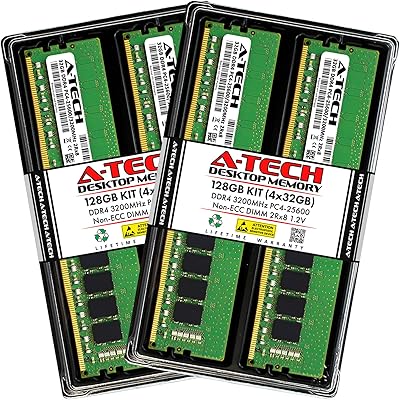
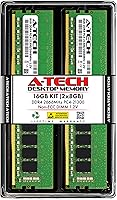
The A-Tech 16GB DDR4 2666MHz Desktop RAM is a dual-channel 2x8GB kit built for desktop users who want a straightforward, no-drama memory upgrade. A-Tech has carved out a solid reputation as a value-focused memory brand, and this kit reflects that philosophy well — reliable performance at a price that does not demand a second thought. It runs as non-ECC, unbuffered memory, which is exactly what most standard home and office desktops use. There are no overclocking profiles, no flashy heat spreaders. What you get is a plug-and-play experience that simply works, backed by one of the better warranty programs you will find at this price tier.
Features & Benefits

Running at 2666MHz, this memory kit hits the sweet spot for most mainstream desktop platforms — fast enough to keep pace with today's processors without demanding premium pricing. The 288-pin DIMM form factor means it slots into a broad range of Intel and AMD boards without adapter nonsense. Voltage sits at the JEDEC standard 1.2V, so it plays nicely with virtually any DDR4-compatible motherboard right out of the box — no BIOS adjustments needed. Depending on your board, you may receive single or dual-rank modules, which affects memory bandwidth in subtle but measurable ways. That lifetime warranty genuinely stands out and is uncommon at this price level.

Best For

This RAM upgrade makes the most sense for someone jumping from 8GB to 16GB on a budget desktop build — that jump alone transforms how a system handles browser tabs, video calls, and open applications all running simultaneously. Students pulling long sessions in productivity suites or Zoom, and remote workers juggling multiple apps, will feel a real difference day-to-day. It also suits owners of older DDR4 systems where the motherboard caps out at 2666MHz; spending more on faster memory there is genuinely wasted money. If you prioritize reliability and a solid warranty over RGB aesthetics, this kit checks exactly the right boxes.

User Feedback

The A-Tech DDR4 kit holds a 4.7-star rating across hundreds of verified reviews, with buyers most often praising how smoothly the modules installed and how stable their systems ran afterward. A-Tech's responsive support team is a recurring highlight — people genuinely appreciate having a real point of contact. That said, the most common complaints are not about the RAM itself failing; they center on compatibility mismatches with specific OEM desktops or particular motherboard configurations. A handful of users also encountered issues tied to mixed-rank setups. The takeaway is practical: verify your motherboard's qualified vendor list before ordering, and the odds of walking away satisfied are very high.

Pros

  • Stable, plug-and-play installation that works without touching the BIOS on most standard desktop boards.
  • The lifetime warranty is a genuine differentiator that most competing kits at this price tier do not offer.
  • Broad compatibility across a wide range of Intel and AMD DDR4 desktop platforms gives buyers flexibility.
  • Running at JEDEC standard 1.2V means it draws minimal power and runs cool under sustained workloads.
  • Going from 8GB to 16GB delivers a noticeable, real-world improvement in day-to-day multitasking smoothness.
  • A-Tech's customer support team is responsive and frequently praised by buyers who run into questions post-purchase.
  • Solid ratings from hundreds of verified buyers point to consistent module quality across production batches.
  • The dual-channel configuration helps squeeze better memory bandwidth from compatible motherboards compared to a single 16GB stick.

Cons

  • Module rank (single or dual) is not guaranteed, which can matter for performance on bandwidth-sensitive systems.
  • No XMP profile means you cannot push speeds beyond the rated 2666MHz even if your board supports it.
  • Some OEM desktop systems have shown compatibility issues that require careful QVL verification before buying.
  • 2666MHz is on the slower end for modern builds and will bottleneck platforms that can run faster memory.
  • The kit has a plain, utilitarian appearance with no heat spreader, which may not appeal to open-case builds.
  • Mixed-rank configurations in certain systems have caused instability for a small but notable subset of buyers.
  • 16GB total capacity may feel limiting sooner than expected for users whose needs grow toward heavier workloads.

Ratings

The scores below reflect an AI-driven analysis of verified global buyer reviews for the A-Tech 16GB DDR4 2666MHz Desktop RAM, with spam, incentivized, and bot-flagged submissions actively filtered out before scoring. The ratings are calibrated to surface both what this memory kit genuinely does well and where real users have run into frustration. You will find the results candid — this is not a marketing summary, and the numbers reflect the full picture.

Value for Money
91%
Buyers consistently point out that this RAM upgrade delivers reliable, stable performance at a price that is hard to argue with, especially given the lifetime warranty that most competitors at this tier simply do not include. For someone stretching a tight upgrade budget, getting a warrantied dual-channel kit without paying a premium is a genuine win.
A small but vocal group of buyers noted that slightly faster DDR4 kits have come down in price, narrowing the value gap. If your board supports 3200MHz and you shop around, the cost difference may not justify settling for 2666MHz.
Compatibility
74%
26%
Across the majority of standard Intel and AMD desktop builds, this memory kit slots in and works without a hitch. Users with mid-range consumer motherboards from brands like ASUS, Gigabyte, and MSI rarely report any issues, and many appreciated not needing to dig into BIOS settings at all.
OEM desktop owners — particularly those with HP, Dell, or Lenovo systems — have run into compatibility mismatches more often than custom-build users. Mixed-rank scenarios and tighter OEM memory qualification lists are the root of most one-star reviews, making pre-purchase QVL verification genuinely important rather than optional.
Ease of Installation
94%
This is where the A-Tech DDR4 kit earns some of its strongest praise. First-time upgraders repeatedly describe the installation as taking under ten minutes with no prior experience needed — just align the notch, press down, and boot up. The modules seat firmly and the system recognizes them immediately in nearly every reported case.
A handful of users with older cases or tightly packed builds mentioned clearance was tighter than expected, though this is a case issue rather than a module issue. A very small number reported needing a second seating attempt before the clips locked properly.
System Stability
88%
Once correctly installed in a compatible system, the A-Tech DDR4 kit runs rock-solid for the overwhelming majority of buyers. Users running it through extended multitasking sessions — open browsers, productivity apps, video calls — report no crashes, freezes, or unexpected reboots over months of daily use.
Stability complaints, while not common, tend to cluster around mixed-rank configurations or systems where the kit was combined with existing modules from a different batch. These are edge cases, but they are real enough that buyers should not ignore them when planning their setup.
Performance at Rated Speed
78%
22%
At 2666MHz, this RAM upgrade does exactly what it promises for everyday computing tasks. The jump from 8GB to 16GB is where most users feel the actual improvement — fewer slowdowns when switching between apps, snappier browser behavior, and more headroom for video calls running alongside other software.
Users expecting a performance leap from the speed rating itself will be underwhelmed. DDR4-2666 is a mainstream, mid-tier frequency, and on platforms that support faster speeds, this kit leaves potential bandwidth on the table. It is the right tool for the right system, not a universal upgrade.
Warranty & Support
93%
The lifetime warranty is not just a checkbox here — buyers who have actually contacted A-Tech's support team describe the experience as refreshingly human. Response times were fast, and several reviewers noted that replacement requests were handled without hassle, which builds long-term confidence in the purchase.
A few international buyers noted that warranty claims outside the US involved additional steps or longer wait times. The warranty is strong, but the full ease of the process appears to be most consistent for domestic customers.
Build Quality
82%
18%
The modules themselves feel solid and well-constructed for bare, heat-spreader-free sticks. Buyers who inspect the PCB closely note consistent, clean soldering and firm connector pins — nothing that suggests corners were cut in manufacturing to hit the price point.
Without a heat spreader, the modules look utilitarian, and buyers who care about aesthetics in an open or windowed case will find them underwhelming. There is no visual premium here — what you see is plain green or black PCB and nothing else.
Dual-Channel Performance
81%
19%
Running both sticks in matched dual-channel slots provides a tangible bandwidth improvement over a single-module setup, and most users who followed their motherboard manual for slot placement reported the system correctly detected dual-channel mode without any intervention.
Because A-Tech may ship either single-rank or dual-rank modules depending on stock, some buyers received configurations that perform differently in bandwidth-sensitive workloads. The lack of rank transparency at purchase is a minor but real frustration for buyers who care about it.
Packaging & Delivery Condition
83%
Most buyers received modules in clean, protective anti-static packaging with no physical damage. The unboxing experience is minimal and functional, which fits the no-frills nature of the product and keeps costs where they belong — in the product itself.
A small number of buyers reported receiving packages with minimal padding during shipping, leading to rattled modules on arrival. None reported actual module damage from this, but better secondary packaging would eliminate the concern entirely.
Thermal Performance
79%
21%
Even without a heat spreader, these modules run comfortably within safe temperature ranges under sustained everyday workloads. Users with decent case airflow have reported no thermal throttling or heat-related instability after extended daily use.
In cramped cases with poor airflow or systems pushing the memory hard with workstation-level tasks, the lack of any thermal management solution means the bare PCB is on its own. This is not a problem for most buyers, but it is worth noting for edge-case environments.
Overclocking Headroom
41%
59%
For buyers who simply want stable, out-of-the-box operation at the rated speed, the fixed JEDEC profile is actually a feature — there is nothing to misconfigure, and the system always boots predictably at 2666MHz without any profile juggling.
There is no XMP profile and no realistic path to pushing these modules beyond their rated speed. Enthusiasts who want any overclocking flexibility should look elsewhere entirely — this kit is fundamentally not designed for that use case, and the score reflects that hard ceiling honestly.
Platform Breadth
76%
24%
The 288-pin DDR4 DIMM standard covers a genuinely wide range of desktop platforms spanning several years of Intel and AMD hardware generations. For custom-build desktop owners, the odds of compatibility are high, and the standard voltage ensures the board's memory controller is never stressed.
Laptop users, mini-ITX builders needing SO-DIMM, and server builders needing ECC are all excluded by design. The platform breadth is solid within its intended category but drops off sharply the moment a buyer's use case steps outside standard consumer desktop territory.
Long-Term Reliability
87%
Given the product has been on the market since late 2018 and maintains a high rating across hundreds of reviews accumulated over years, the long-term track record is genuinely reassuring. Buyers who installed this RAM upgrade years ago are not returning to complain about degradation.
Long-term reliability data is harder to assess for memory products specifically, and the lifetime warranty — while confidence-inspiring — has not been stress-tested by enough time-distant claims to offer a fully complete picture. Most evidence points to solid longevity, but it remains partially theoretical.

Suitable for:

The A-Tech 16GB DDR4 2666MHz Desktop RAM is an excellent fit for everyday desktop users who are tired of their system slowing down under normal workloads. If you are running a home PC that currently has 8GB and you notice it struggling when you have two dozen browser tabs open alongside a video call and a spreadsheet, this memory upgrade is precisely the fix you need. Students who rely on their desktop for research, writing, and remote learning will find the jump to 16GB makes multitasking genuinely comfortable rather than a juggling act. It is equally well-suited to remote workers who need stable, consistent performance from a machine that runs for hours without a restart. Owners of older DDR4 platforms — particularly those with motherboards that cap at 2666MHz — get full value here because faster memory would be throttled down anyway. Anyone replacing a failed or underperforming stick and wanting a dependable, warrantied replacement without spending heavily will also find this kit hard to argue with.
Not suitable for:

The A-Tech 16GB DDR4 2666MHz Desktop RAM is not the right choice if your priority is high-performance gaming or content creation where memory bandwidth and latency make a measurable difference. Enthusiasts building a new system around a modern AMD Ryzen or Intel platform that supports DDR4-3200 or faster should invest in a higher-speed kit, since this memory runs at a mainstream ceiling and will hold back platforms that can do much more. This kit also lacks XMP or any overclocking profile, so if you were hoping to push speeds beyond the rated spec, that is simply not an option here. Workstation users handling memory-intensive tasks like large video renders, 3D modeling, or RAM-hungry virtual machines may find 16GB starts to feel constrained sooner than expected and should consider stepping up in capacity. Finally, buyers with OEM desktops from major manufacturers should verify their system's qualified vendor list carefully before purchasing, since compatibility mismatches — while not common — are the primary source of frustration with this kit.

Specifications

  • Brand: Manufactured by A-Tech Components, a memory specialist known for value-oriented, broadly compatible RAM solutions.
  • Model Number: The exact model identifier for this kit is AT8G2D4D2666NA0N12V.
  • Total Capacity: This kit provides 16GB of total memory, delivered as two 8GB modules designed to run in dual-channel mode.
  • Memory Type: Uses DDR4 SDRAM technology, the standard for desktop platforms released from 2014 onward.
  • Speed: Rated at 2666MHz (PC4-21300 / PC4-2666V), operating at the widely supported mainstream DDR4 frequency.
  • Form Factor: Standard 288-pin DIMM format, compatible with full-size desktop motherboards from both Intel and AMD platforms.
  • ECC Support: Non-ECC Unbuffered, meaning it is designed for consumer desktops and workstations, not servers requiring error correction.
  • Voltage: Operates at 1.2V, which is the JEDEC DDR4 standard voltage ensuring broad out-of-the-box motherboard compatibility.
  • Module Rank: Available as either 1Rx8 (single rank) or 2Rx8 (dual rank), depending on the specific production batch shipped.
  • Warranty: Covered by A-Tech's lifetime warranty, providing long-term protection that is uncommon at this price level.
  • Compatible Platforms: Designed for desktop PCs and workstation systems that accept 288-pin DDR4 DIMM modules.
  • Dimensions: Each module measures 5.25 x 1.23 x 0.15 inches, fitting standard full-height DIMM slots without clearance issues.
  • Weight: The complete kit weighs 1.76 ounces, typical for bare DDR4 modules without added heat spreaders.
  • Heat Spreader: No heat spreader is included; modules ship as bare PCB sticks, keeping the profile low and cost down.
  • XMP Support: No XMP or overclocking profile is present; the kit runs strictly at its JEDEC-rated 2666MHz specification.
  • Channel Support: When installed as a pair in matching slots, these modules enable dual-channel operation for improved memory bandwidth.
  • First Available: This product first became available in November 2018 and remains an active, non-discontinued product line.
  • BSR Ranking: Holds a Best Sellers Rank of #73 in the Computer Memory category on Amazon, reflecting sustained buyer demand.

Related Reviews
A-Tech 16GB (2x8GB) DDR4 2133 MHz Desktop RAM
85%
94%
Ease of Installation
87%
System Responsiveness
90%
Energy Efficiency
85%
Performance for General Use
92%
Price to Performance Ratio
More
NVTEK 8GB DDR4 2666MHz Desktop RAM
71%
83%
Value for Money
78%
Compatibility
88%
Ease of Installation
71%
Reliability & Stability
74%
Performance at Rated Speed
More
Crucial 16GB DDR4 3200MHz Desktop RAM
78%
93%
Ease of Installation
88%
Compatibility Range
79%
Real-World Performance
91%
Long-Term Reliability
74%
Value for Money
More
Gigastone 16GB Kit DDR4 2666MHz SODIMM RAM
75%
88%
Value for Money
91%
Installation Ease
74%
Compatibility
76%
Stability & Reliability
72%
Performance
More
A-Tech 16GB DDR4 2400MHz SODIMM Laptop RAM
84%
74%
Compatibility
91%
Installation Ease
83%
Performance Improvement
88%
Value for Money
82%
Build & Component Quality
More
A-Tech 32GB DDR4 2133MHz Desktop RAM
79%
88%
Value for Money
94%
Installation Ease
69%
Compatibility
86%
Stability & Reliability
61%
Memory Speed
More
A-Tech 8GB DDR4 2666MHz SODIMM Laptop RAM
81%
93%
Value for Money
91%
Installation Ease
78%
Compatibility Range
82%
Performance Impact
84%
Build & Module Quality
More
D DUOMEIQI 16GB DDR4 2666MHz SODIMM RAM
87%
88%
Installation Ease
92%
Performance Boost
90%
Compatibility
85%
Energy Efficiency
91%
System Stability
More
A-Tech 128GB DDR4 3200MHz Desktop RAM Kit
87%
92%
Performance
88%
Installation Ease
81%
Compatibility with Systems
90%
Reliability and Stability
85%
Build Quality
More
A-Tech 16GB DDR4 3200MHz SODIMM Laptop RAM
78%
83%
Compatibility
91%
Installation Ease
78%
Performance Uplift
86%
Value for Money
74%
Build Quality
More

FAQ

In most cases, yes. This memory kit uses the standard 288-pin DDR4 DIMM format and 1.2V JEDEC voltage, which are supported by the vast majority of Intel and AMD desktop boards released in the last several years. That said, the safest move before ordering is to pull up your motherboard's manual or manufacturer website and check the qualified vendor list, especially if you have an OEM system from a major brand like Dell or HP.

No, you should not need to touch the BIOS at all. These modules run at standard JEDEC 2666MHz with 1.2V, which any compatible DDR4 motherboard will recognize and apply automatically on boot. There are no XMP profiles to enable, so the setup process is genuinely straightforward — insert the sticks, power on, and your system should detect them immediately.

You can technically install just one 8GB stick, but using both together in matched slots is strongly recommended. Running them as a pair unlocks dual-channel mode, which gives your system noticeably better memory bandwidth compared to a single module operating alone. If you already have a stick installed and want to add just one of these, it can work, but true dual-channel requires matching modules in the right slots.

No. These are full-size 288-pin DIMM modules built for desktop motherboards. Laptops use a smaller SO-DIMM form factor that is physically different and will not fit a standard desktop slot, and vice versa.

ECC (Error-Correcting Code) memory detects and corrects data errors in real time, which is critical for servers handling sensitive workloads. For a home desktop or workstation running everyday tasks, non-ECC is the standard and perfectly fine — virtually all consumer motherboards only support non-ECC anyway. Unbuffered simply means there is no additional buffer chip between the memory controller and the module, which is again the norm for consumer hardware.

Mixing RAM kits is possible but can introduce instability, particularly if the modules have different ranks or timings. If you are replacing all your RAM with this kit, you are fine. If you plan to mix it with modules from another brand or speed tier, results can vary — some systems handle it without issue, others do not. For guaranteed stability, it is best to run matched pairs from the same kit.

A-Tech's lifetime warranty covers manufacturing defects in the modules themselves. If a stick fails under normal use, you can contact A-Tech's support team to initiate a replacement. Multiple buyers have noted that A-Tech's customer service is genuinely responsive and helpful, which makes the warranty more than just a marketing line. Physical damage from improper handling or static discharge would typically fall outside coverage.

It works fine for gaming at 1080p and general play, where 16GB is a comfortable and widely recommended amount. However, if you are building a high-performance gaming rig, faster memory at DDR4-3200 or beyond paired with an XMP profile can offer better frame consistency in CPU-bound scenarios. This kit is a solid practical choice, but dedicated performance gamers may want to look at faster options.

A-Tech ships either 1Rx8 (single rank) or 2Rx8 (dual rank) modules depending on the production batch available at the time of your order. For most everyday desktop use, the difference is minor. Dual-rank can offer a small bandwidth advantage in some configurations, but you cannot specify which rank you receive when ordering this kit.

Yes, absolutely. Installing desktop RAM is one of the simpler hardware tasks you can do. You open your case, align the notch on the module with the slot on the motherboard, press down firmly until the retention clips snap into place, and you are done. No tools beyond a basic screwdriver to open the case are needed. If you have never done it before, a quick video search for your specific motherboard model will walk you through the process in minutes.