Overview

The A-Tech 48GB DDR5 4800MHz SODIMM Laptop RAM occupies an interesting niche — 48GB sits between the more common 32GB and 64GB kits, making it a smart pick for users who need a meaningful capacity bump without committing to a full dual-slot upgrade. A-Tech isn't a household name like Corsair or Kingston, but they've carved out a solid reputation as a memory specialist, and their lifetime limited warranty does a lot of the trust-building work. Since launching in July 2024, this module has accumulated over 220 ratings at 4.6 stars — a strong signal for a relatively new listing. Just know upfront: this is a JEDEC-standard module, not an XMP overclock kit.
Features & Benefits

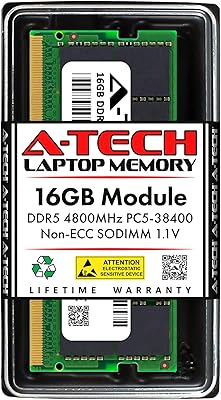
The A-Tech DDR5 stick runs at 4800MHz with CL40 latency — that's the standard DDR5 baseline, optimized for broad compatibility rather than raw benchmark chasing. In everyday use, that translates to stable performance across a wide range of DDR5 laptops, notebooks, mini PCs, and AIO systems using the 262-pin SODIMM interface. The 2Rx8 dual-rank configuration is worth noting: dual-rank modules give the memory controller more to work with, which can improve throughput in bandwidth-heavy workloads like video editing or large dataset processing. Operating at a standard 1.1V, it draws no more power than any other DDR5 stick, and the non-ECC unbuffered design aligns perfectly with consumer-grade systems.

Best For

This laptop RAM upgrade makes the most sense for people whose workflows consistently push against their current memory ceiling. Video editors juggling 4K timelines in Premiere, developers running multiple containers, or data analysts working with large local datasets — these are the folks who'll actually notice the headroom. The single-slot flexibility is also a genuine selling point: drop this 48GB module into one slot and keep the second open for a future upgrade. Mini PC and AIO owners with DDR5 SODIMM slots will find it equally well-suited. It's less ideal for casual users or anyone still on DDR4 — DDR5 compatibility is non-negotiable before purchasing.

User Feedback

Across more than 220 reviews, buyers settle at 4.6 stars — and the praise clusters around plug-and-play installation and rock-solid stability after weeks of use. A number of reviewers mention upgrading Intel NUC-style mini PCs or business ultrabooks with no BIOS fiddling required, though a handful note that certain systems needed a firmware update before the module was recognized. Comparisons to Crucial and Kingston come up occasionally, and most buyers seem satisfied that A-Tech's lifetime warranty offsets any brand hesitation. The main criticism? A small number of users hit compatibility snags with specific laptop models — a clear reminder to always verify against your system's memory specs before ordering.

Pros

  • 48GB capacity fills a real gap between 32GB and 64GB kits, giving users precise headroom without over-spending.
  • Single-module design lets you upgrade one slot now and keep the second open for a future expansion.
  • Dual-rank 2Rx8 configuration can improve bandwidth throughput compared to single-rank alternatives.
  • Runs at the standard 1.1V DDR5 voltage, putting no extra stress on laptop power delivery.
  • JEDEC-standard 4800MHz speed ensures wide compatibility across modern DDR5 SODIMM systems.
  • Lifetime limited warranty is a genuine confidence booster for a third-party memory brand.
  • Over 220 ratings at 4.6 stars reflects strong real-world buyer satisfaction since its July 2024 launch.
  • Installation is straightforward enough that most buyers report a plug-and-play experience.
  • Works across laptops, notebooks, mini PCs, and AIO systems with DDR5 SODIMM slots.
  • A-Tech's customer support team is available to assist if compatibility questions come up.

Cons

  • Brand recognition is lower than Crucial or Kingston, which may give some buyers initial pause.
  • No XMP or overclocking support means you cannot push speeds beyond the 4800MHz JEDEC baseline.
  • A small number of users have reported BIOS update requirements before the module is properly recognized.
  • System-specific compatibility is not guaranteed — verifying against your laptop's memory spec sheet is essential before buying.
  • 48GB as a single stick may leave dual-channel performance on the table if the second slot stays empty.
  • CL40 latency is on the looser end for DDR5, which matters in latency-sensitive tasks even if rarely noticeable day-to-day.
  • No ECC support rules it out for any workload requiring memory error correction.
  • As a newer product with a mid-sized review pool, long-term reliability data is still limited compared to more established modules.

Ratings

Our editorial team used AI analysis to evaluate hundreds of verified buyer reviews for the A-Tech 48GB DDR5 4800MHz SODIMM Laptop RAM, actively filtering out incentivized, duplicate, and suspicious feedback to surface what real users actually experience. The scores below reflect both the genuine strengths and the honest pain points that emerged from that process — nothing is glossed over.

System Compatibility
83%
The vast majority of buyers report successful installs across a wide range of DDR5 laptops, mini PCs, and AIO systems, with many specifically praising how straightforward the compatibility check process was. Users upgrading Intel NUC-style mini PCs and business ultrabooks frequently called out smooth recognition without any configuration headaches.
A recurring minority of reviews flag system-specific hiccups — mostly isolated BIOS recognition failures on certain laptop models. These cases are not common, but they are consistent enough to make compatibility verification an essential step before purchasing rather than an afterthought.
Installation Experience
91%
Buyers across skill levels — from first-time upgraders to seasoned IT professionals — consistently describe the installation as quick and painless. The standard SODIMM form factor means no adapters or special tools, and most users report their system booting correctly on the very first attempt.
A small subset of users encountered a required BIOS firmware update before the module was recognized, which added an extra step that caught them off guard. For buyers who are not comfortable updating firmware, this can feel more involved than the plug-and-play experience they expected.
Stability & Reliability
88%
Long-term stability is one of the most frequently praised aspects across verified reviews. Users running demanding workloads — including video rendering sessions, multi-VM developer environments, and large dataset processing — report no crashes, no memory errors, and consistent uptime over weeks of heavy use.
Because this module launched in mid-2024, the available long-term reliability data is still narrower than what you would find for more established options from brands with multi-year track records. A small number of early users did report instability on specific platform and firmware combinations.
Performance at 4800MHz
79%
21%
For everyday workloads and productivity tasks, the 4800MHz JEDEC speed delivers exactly what most buyers need — snappy multitasking, smooth app switching, and noticeably reduced slowdowns when working with large files in Lightroom or Premiere compared to older 16GB or 32GB configurations.
Enthusiast buyers expecting standout benchmark results will likely be underwhelmed. As a standard JEDEC module with CL40 latency, it does not offer XMP profiles or any overclocking headroom, which means it will trail faster-rated DDR5 kits in raw memory bandwidth tests.
Value for Money
86%
Buyers repeatedly note that 48GB as a single-stick option at this price point is genuinely hard to find from name-brand manufacturers. For users who want substantial DDR5 capacity without occupying both slots — or without paying a premium for a branded dual-kit — this laptop RAM upgrade consistently earns high marks for perceived value.
Some buyers who checked prices post-purchase noted that occasional promotional pricing from competing brands can narrow the value gap. A-Tech's lesser-known status also means a subset of buyers feel they are accepting a brand-trust trade-off even with the lifetime warranty in place.
Brand Trust & Warranty
82%
18%
The lifetime limited warranty is a meaningful commitment for a third-party memory brand, and several reviewers explicitly cited it as the deciding factor over similarly priced alternatives. The presence of an active customer support team — not just a warranty card — adds a layer of practical reassurance that buyers notice.
A-Tech does not carry the same brand equity as Crucial, Kingston, or G.Skill, and that gap in recognition genuinely affects buyer confidence before the purchase. New customers have no multi-year track record to lean on, which means the warranty has to work harder as a standalone trust signal.
Capacity Sweet Spot
89%
The 48GB capacity earns consistent praise from users who specifically needed more than 32GB but did not want to commit to a full 2x32GB kit occupying both slots. Developers, content creators, and analysts all describe it as a pragmatic choice that leaves room for future expansion without over-speccing today.
48GB is not universally recognized by all system configurators or memory compatibility tools, which can make pre-purchase research slightly more involved. Users who would prefer a conventional 32GB or 64GB configuration for price or dual-channel reasons may find this capacity unnecessarily niche.
Dual-Rank Advantage
74%
26%
The 2Rx8 dual-rank configuration gives the memory controller more parallelism to work with, and buyers running bandwidth-heavy applications like Blender or large database queries report that this 48GB SODIMM module feels noticeably responsive compared to their previous single-rank sticks.
The real-world performance benefit of dual-rank over single-rank at the same speed is subtle enough that most general users will not perceive a difference in day-to-day tasks. The advantage is more measurable in synthetic benchmarks than in typical office or light creative workloads.
Physical Build Quality
77%
23%
The module feels solid and precisely sized, fitting snugly into SODIMM slots without any play or looseness that might cause contact issues over time. Several buyers comment that the board quality looks comparable to what they have seen from name-brand modules at higher price points.
A-Tech does not publish detailed information about the DRAM chips used on this module, which makes it harder for technically inclined buyers to independently verify component quality. The absence of a heatspreader is standard for SODIMM modules but may concern buyers unfamiliar with the form factor.
Documentation & Support
71%
29%
A-Tech provides access to a customer support team that buyers can contact with compatibility questions before and after purchase, which is more hands-on than many third-party memory brands offer. Several reviewers mention getting timely responses when they reached out about system-specific concerns.
The included documentation is minimal — essentially limited to a basic installation guide — and there is no dedicated compatibility database that matches A-Tech's model numbers against specific laptop models. Buyers who need granular compatibility confirmation often have to rely on third-party tools or community forums rather than A-Tech's own resources.
DDR5 Platform Fit
85%
Running at the JEDEC DDR5 baseline of 4800MHz means this stick works cleanly with the memory controller defaults on current Intel Core Ultra and AMD Ryzen 7000-series mobile platforms, without requiring any manual timing adjustments. Buyers on those platforms report the system correctly identifies the module at boot without any intervention.
Platforms that offer XMP or EXPO memory profiles will simply ignore those features since this module does not include them. Buyers who purchased a DDR5 laptop specifically to take advantage of higher-speed memory profiles may feel the 4800MHz ceiling is a limiting factor as faster JEDEC profiles become more common.
Multitasking Headroom
92%
Users who made the jump to 48GB consistently report that their most frustrating workflows — browser sessions with dozens of tabs open alongside a video editor and a code editor — now run without the paging and slowdowns they experienced at 16GB or 32GB. The headroom feels genuinely transformative for heavy multitaskers.
Users with lighter workloads — basic web browsing, document editing, or casual media consumption — are unlikely to perceive any difference compared to a well-configured 16GB system. The benefits of 48GB are real but highly workload-dependent, which means it can feel like over-investment for users who do not regularly push their machines.

Suitable for:

The A-Tech 48GB DDR5 4800MHz SODIMM Laptop RAM is a practical upgrade for anyone whose daily workload has started to outrun their current memory. Creative professionals — think video editors processing 4K footage, photographers batch-editing in Lightroom, or 3D artists working through complex Blender renders — will appreciate having 48GB of headroom without needing to fill both SODIMM slots at once. That single-slot approach is genuinely useful for power users who want to leave a slot open for a future expansion rather than committing to a full kit today. Developers running local virtual machines or analysts crunching large datasets on a notebook will also find this a comfortable fit. Mini PC and AIO owners with DDR5 SODIMM support are well-served here too, since options at this capacity in this form factor are still relatively limited on the market.
Not suitable for:

The A-Tech 48GB DDR5 4800MHz SODIMM Laptop RAM is simply not an option if your system runs DDR4 — these are entirely different standards and physically incompatible. Buyers chasing maximum benchmark performance should also look elsewhere; this is a JEDEC-standard module running at 4800MHz with CL40 latency, not a high-speed XMP kit, so enthusiasts expecting overclocking headroom will be disappointed. If your laptop or mini PC manufacturer has strict memory qualification lists, you should verify compatibility carefully before purchasing, as a handful of systems have shown BIOS recognition issues. Server or workstation users needing ECC memory for data integrity won't find that here either — this is a consumer-grade, non-ECC unbuffered module. Finally, buyers who are only mildly memory-constrained and don't regularly push into multi-tasking, creative, or development workloads may not notice enough difference to justify the upgrade cost.
Specifications

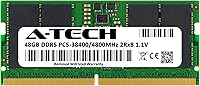
  • Capacity: This module provides 48GB of RAM in a single stick, sitting between the more common 32GB and 64GB kit options.
  • Memory Type: Uses DDR5 technology, which is the current-generation standard for modern laptops and is not backward compatible with DDR4 systems.
  • Form Factor: 262-pin SODIMM form factor designed for laptops, notebooks, mini PCs, and all-in-one desktop systems.
  • Speed: Operates at 4800MHz (PC5-38400), the baseline JEDEC DDR5 standard speed for broad system compatibility.
  • Latency: Rated at CL40, which is the standard latency timing for JEDEC DDR5 modules running at 4800MHz.
  • Rank Configuration: 2Rx8 dual-rank design, which allows the memory controller to access more data per cycle compared to single-rank modules.
  • Voltage: Runs at 1.1V, the standard operating voltage for DDR5 per the JEDEC specification, requiring no special power delivery.
  • ECC Support: Non-ECC unbuffered module intended for consumer and prosumer systems; not suitable for servers or workstations requiring error-correcting memory.
  • Compliance: Fully compliant with the JEDEC DDR5 standard, ensuring interoperability with any DDR5 SODIMM-compatible platform.
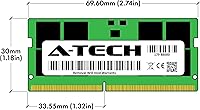
  • Dimensions: Measures 2.74 x 1.18 x 0.15 inches, matching the standard SODIMM physical size for laptop memory slots.
  • Weight: Weighs 0.493 ounces, typical of a standard SODIMM memory module.
  • Warranty: Covered by A-Tech's lifetime limited warranty, supported by a dedicated customer support team.
  • Model Number: Official model identifier is AT48G1D5S4800ND8N11V, useful for compatibility verification with system manufacturers.
  • Compatible Platforms: Designed for DDR5 SODIMM-compatible laptops, notebooks, mini PCs, and all-in-one systems; refer to your system manual to confirm slot support.
  • Release Date: First made available in July 2024, making it a relatively recent addition to the DDR5 SODIMM market.

Related Reviews

A-Tech 16GB DDR5 4800MHz SODIMM RAM
88%
91%
Performance Boost
95%
Ease of Installation
88%
Energy Efficiency
85%
Compatibility with Laptop Systems
92%
Value for Money
More
A-Tech 96GB DDR5 4800MHz SODIMM Laptop RAM
81%
78%
Compatibility
91%
Installation Ease
83%
System Stability
86%
Performance Gains
74%
Value for Money
More
Crucial 8GB DDR5 4800MHz SODIMM Laptop RAM

89%
91%
Performance Boost
88%
Installation Ease
94%
Compatibility with Intel 12th Gen & AMD Ryzen 7000
85%
Power Efficiency
90%
Multitasking Support
More
A-Tech 64GB DDR5 SODIMM Laptop RAM Kit
79%
88%
Value for Money
71%
Compatibility
91%
Installation Experience
89%
System Stability
74%
Performance at 4800MHz
More
A-Tech 32GB DDR5 4800MHz Laptop RAM Kit
87%
92%
Performance Boost
95%
Ease of Installation
89%
Energy Efficiency
84%
Compatibility
91%
Value for Money
More
A-Tech 128GB DDR5 5200MHz SODIMM Laptop RAM
88%
93%
Performance
88%
Compatibility with Laptops
91%
Ease of Installation
95%
Multitasking Performance
86%
Energy Efficiency (1.1V)
More
Samsung 32GB DDR5 4800MHz SODIMM Laptop RAM
79%
71%
Platform Compatibility
84%
Installation Ease
88%
Performance Stability
76%
Speed & Bandwidth
79%
Brand Trust & Chip Authenticity
More
A-Tech 64GB DDR5 4800MHz Desktop RAM Kit
74%
83%
Value for Money
88%
Installation Ease
74%
Compatibility
91%
System Stability
78%
Performance at Rated Speed
More
Crucial 16GB DDR5 4800MHz Laptop RAM
86%
89%
Performance Improvement
93%
Ease of Installation
88%
Multitasking Performance
91%
Compatibility with 12th Gen Intel & AMD Ryzen 7000
86%
Gaming Performance
More
A-Tech 96GB DDR5 5600MHz SODIMM Laptop RAM
84%
83%
System Compatibility
91%
Installation Experience
88%
Real-World Performance
76%
Value for Money
86%
Speed & Bandwidth
More

FAQ

It depends on whether your laptop supports DDR5 SODIMM memory. DDR5 and DDR4 are not interchangeable — the slots are physically different. Check your system manual or use an online memory configurator with your exact laptop model before ordering.

Most users report a straightforward plug-and-play experience, but a small number of systems do require a BIOS update to properly recognize newer DDR5 modules. It's worth checking your laptop manufacturer's website for the latest firmware before you install.

Yes, as long as your Intel or AMD-based laptop or mini PC has a DDR5 SODIMM slot, this module should be compatible. That said, always cross-reference with your system's supported memory specifications to avoid surprises.

Technically yes, if your second slot holds a compatible DDR5 module and your system supports mixed configurations. However, dual-channel performance is most reliable when both sticks are identical, so mixing capacities or speeds can sometimes result in the system running in single-channel mode.

48GB hits a useful middle ground — enough to handle memory-intensive workloads like video editing, large virtual machines, or heavy multitasking without going all the way to a dual-slot 64GB kit. It's especially handy if you want to use a single slot and leave the second open for a future upgrade.

A-Tech is a third-party memory specialist rather than one of the big-name brands, which can make buyers hesitant. The reassuring factors here are the lifetime limited warranty and a substantial base of real buyer reviews sitting at 4.6 stars — that kind of track record on a relatively new product is genuinely encouraging.

It should, provided your mini PC uses a DDR5 SODIMM slot. Several buyers have specifically confirmed successful installs in NUC-style mini PCs. Just verify that your specific model supports DDR5 and check the maximum supported capacity before purchasing.

No — this is a JEDEC-standard module rated at 4800MHz, and it does not support XMP or any overclocking profiles. It will run at its rated speed out of the box, which is exactly what most users need for reliable day-to-day performance.

A-Tech covers this module with a lifetime limited warranty, so if you encounter a defect, you can contact their support team for a replacement. Make sure to keep your purchase receipt as proof of purchase, as that is typically required for warranty claims.

For most laptops, installing a SODIMM module is straightforward — you open the back panel, locate the memory slot, and press the stick in at an angle until it clicks into place. No special tools beyond a small screwdriver are usually needed, and the majority of buyers describe the process as quick and hassle-free.