Overview

A-Tech 16GB DDR3 1600MHz SODIMM Laptop RAM is one of the more practical purchases you can make for an aging notebook — not because it transforms the machine, but because it genuinely extends its useful life without a hefty price tag. This memory kit targets users still running capable DDR3-era laptops from roughly 2010 to 2015 who simply need more headroom to handle modern workloads. The dual-voltage design — operating at either 1.35V or 1.5V — is a quiet but important detail, since it broadens compatibility across a wide range of systems. A-Tech has built a solid reputation for third-party memory compatibility, and that standing is backed by a lifetime warranty that gives buyers genuine peace of mind.
Features & Benefits

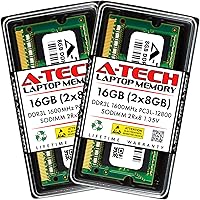
One of the smarter aspects of this SODIMM upgrade is the dual-channel configuration — two 8GB sticks rather than a single 16GB module. When both memory slots are populated, the system accesses both modules simultaneously, which improves memory bandwidth noticeably compared to running a lone stick. The 1600MHz speed hits the practical ceiling for most DDR3 platforms, so you are getting the best performance the chipset can actually use. Running at 1.35V low voltage, this kit generates less heat than standard DDR3, which matters in compact laptop chassis where thermal headroom is limited. Non-ECC unbuffered operation keeps it broadly compatible with everyday consumer hardware, and the lifetime limited warranty means you are covered long after installation day.

Best For

This DDR3 RAM kit makes the most sense for someone who owns a still-functional laptop from the DDR3 era — think machines built between 2010 and 2015 — and wants to squeeze a few more productive years out of it rather than buying new hardware. Students juggling browser tabs, documents, and video calls will feel an immediate difference. Home office workers running light productivity software benefit just as much. Mini PC and all-in-one owners with 204-pin SODIMM slots are also well served here. One important note: this is not a universal fit. Always verify your system manual or use a compatibility checker before ordering, since confirming slot support upfront can save you a frustrating return.

User Feedback

The reception from buyers of this memory kit has been consistently strong, with thousands of verified purchasers noting how straightforward installation was and how quickly their systems felt more responsive afterward. Compatibility praise spans a broad range of laptop brands, which reflects the kit's thoughtful engineering. That said, a portion of critical reviews trace back to systems that simply do not support DDR3L, or that already had filled or damaged slots — situations no RAM kit can remedy. On the service side, A-Tech's support team receives repeated mentions for being genuinely helpful when compatibility questions arose. Long-term reliability is another consistent theme, with many users still running the kit without issue after a year or more.

Pros

  • Two 8GB sticks in dual-channel mode deliver noticeably better performance than a single 16GB module.
  • Low-voltage DDR3L operation at 1.35V runs cooler and can take a small load off your laptop battery.
  • The 1600MHz speed is the practical performance ceiling for most DDR3 platforms, so nothing is left on the table.
  • Dual-voltage design means this memory kit works in both DDR3L and standard DDR3 systems, expanding compatibility.
  • A lifetime limited warranty provides real protection — not just a token 30-day window.
  • Installation is straightforward enough for first-timers, and A-Tech offers actual human support if you get stuck.
  • Compatible with a wide range of laptop brands, including many popular models from Dell, HP, Lenovo, and Asus.
  • For an older machine that still runs well, this upgrade can add years of productive life at a fraction of replacement cost.
  • Thousands of verified buyers report immediate, noticeable improvements in system responsiveness after install.
  • Long-term reliability holds up well, with many users reporting stable operation after extended daily use.

Cons

  • DDR3 is a legacy standard — this upgrade extends old hardware but cannot modernize it.
  • Not compatible with any laptop using DDR4, DDR5, or soldered memory, which covers most machines built after 2016.
  • You must verify your specific system supports DDR3L before buying; assuming compatibility can lead to a frustrating return.
  • If your laptop only has one SODIMM slot, you lose the dual-channel bandwidth advantage entirely.
  • Some older systems cap total RAM below 16GB, making the full kit capacity unusable regardless of installation.
  • No XMP or overclocking profile support — the memory runs at JEDEC standard speeds only.
  • Compatibility mismatches, while often user-error related, can be difficult to diagnose without some technical confidence.
  • The upgrade will not meaningfully improve GPU-intensive tasks, since dedicated graphics memory is unaffected.

Ratings

The scores below for the A-Tech 16GB DDR3 1600MHz SODIMM Laptop RAM were generated by our AI after analyzing thousands of verified global buyer reviews, with spam, bot activity, and incentivized feedback actively filtered out. Each category reflects the honest distribution of praise and frustration found across real purchase experiences — nothing is smoothed over or inflated. Where users consistently reported pain points, those are reflected transparently alongside the genuine strengths.
Compatibility Range
83%
The dual-voltage design — operating at both 1.35V and 1.5V — gives this memory kit a wider compatibility footprint than many competing DDR3 SODIMM options. Buyers report successful installs across a broad mix of Dell, HP, Lenovo, Asus, and Toshiba laptops from the DDR3 era, with relatively few surprises once system specs were confirmed.
A consistent thread in negative reviews involves buyers who assumed compatibility without checking their system manual first, only to find their laptop topped out at 8GB total or used a different DDR standard. The kit cannot overcome hardware-level limitations, and this creates friction for buyers who skip the verification step.
Installation Ease
91%
The physical installation process earns high marks from users of all technical skill levels. Many reviewers describe completing the upgrade in under fifteen minutes, with the standard 204-pin SODIMM slot design requiring no special tools beyond a small screwdriver to access the panel. First-timers frequently report being pleasantly surprised by how straightforward it was.
A small portion of users ran into confusion around proper module seating — when a stick is not fully clicked into the slot, the system either fails to boot or throws memory errors, which can be alarming if you have never upgraded RAM before. A few buyers also noted that accessing the RAM slots on certain ultra-slim laptop designs required more disassembly than expected.
Performance Gains
78%
22%
For laptops previously running 4GB or 8GB, the jump to 16GB in dual-channel mode produces a real and immediately noticeable difference in everyday tasks — browser-heavy workflows, office multitasking, and light media work all benefit. Users consistently describe their older machines feeling responsive and usable again rather than sluggish.
DDR3 has inherent bandwidth limitations that no kit can sidestep, so buyers expecting modern DDR4-level throughput will be disappointed. Performance gains are also more modest if the system bottleneck lies in a slow mechanical hard drive or an aging CPU, which some reviewers only realized after installation.
Value for Money
89%
Relative to the cost of replacing an entire laptop, this SODIMM upgrade represents a compelling return on investment for DDR3-era machines that are otherwise still functional. Buyers repeatedly frame it as one of the smarter low-cost hardware decisions they have made, especially for extending the life of a secondary or student laptop by two to three years.
A handful of reviewers felt the value equation shifts unfavorably if compatibility issues force a return — shipping delays and restocking friction eat into the savings. Additionally, as DDR3 becomes increasingly scarce in the broader market, pricing can fluctuate, occasionally narrowing the gap with entry-level DDR4 kits for newer platforms.
Long-term Reliability
86%
Multi-year stability is one of the most recurring themes in positive reviews for this DDR3 RAM kit. Users who installed the memory twelve to twenty-four months prior routinely return to update their review with continued praise, noting zero crashes, no memory errors in diagnostics, and consistent everyday performance throughout extended use.
A small number of buyers reported a single module failing within the first few months, though these cases appear to be outliers rather than a pattern. As with any consumer memory product, early failures do occasionally occur, and the lifetime warranty is the primary safeguard when they do.
Dual-Channel Effectiveness
74%
26%
When both slots are populated and dual-channel mode activates, users running memory-intensive workloads — particularly those with integrated graphics that share system RAM — report tangible improvements in fluidity. The matched-pair kit design ensures both modules are spec-identical, which is the best foundation for stable dual-channel operation.
The benefit is real but easy to miss if your use case is light, and some buyers who only installed one of the two sticks reported confusion when they did not see the performance jump they expected. Dual-channel gains are also less pronounced in workloads that are CPU-bound rather than memory-bandwidth-bound.
Thermal Performance
81%
19%
The DDR3L low-voltage operation at 1.35V keeps heat output modest, which matters in the tight thermal environment of a laptop chassis. Several buyers with machines that previously ran warm noted a slight reduction in fan activity after the upgrade, suggesting the memory is not adding meaningfully to the system thermal load.
The thermal advantage over standard 1.5V DDR3 is real but incremental — users should not expect dramatic temperature drops. In laptops with poor overall thermal design, the RAM upgrade alone will not resolve pre-existing heat management issues.
Customer Support
77%
23%
A-Tech's support team receives genuine praise in reviews, particularly from buyers who reached out before purchasing to verify compatibility or who encountered boot issues after installation. The accessibility of real human support is a meaningful differentiator for a hardware category where confusion is common among non-technical users.
Response times appear to vary, and a few reviewers described wait periods that felt long given the urgency of a mid-upgrade hardware question. Support quality also seems somewhat inconsistent — experiences range from very helpful to merely adequate depending on the specific representative contacted.
Warranty Confidence
88%
The limited lifetime warranty is a genuine selling point that distinguishes this kit from cheaper generic alternatives. Buyers who have had to invoke the warranty report a process that, while not instant, ultimately resulted in replacement modules without significant hassle, reinforcing trust in the brand for future purchases.
The warranty covers defects in materials and workmanship but does not protect against compatibility issues arising from user error or unsupported systems. A few buyers expressed frustration when a return was declined on grounds that the system simply did not support the kit, which is technically outside warranty scope.
Packaging & Delivery
84%
Modules arrive in protective anti-static packaging that buyers describe as appropriate and professional. Delivery times through Amazon fulfillment are consistently fast, and reviewers rarely report receiving physically damaged or improperly packaged units, which matters for sensitive electronics.
The packaging itself is minimal — no installation guide is included in the box, which can leave first-time RAM upgraders without a clear starting point if they have not done their research ahead of time. A brief printed quick-start card would address a gap that several reviewers noted.
Speed & Latency
72%
28%
At 1600MHz with CL11 latency, this kit hits the practical performance ceiling of most DDR3 laptop platforms, meaning buyers are not leaving speed on the table relative to what their chipset can actually use. For the typical DDR3-era system, this is the correct specification to target.
DDR3 at 1600MHz is objectively a legacy speed tier, and users coming from newer machines or with higher expectations will feel the ceiling quickly in bandwidth-sensitive tasks. There is no XMP profile or overclocking headroom, so the performance is fixed and cannot be manually tuned upward.
Brand Reputation
79%
21%
A-Tech occupies a well-established position in the third-party memory market, with a track record across thousands of reviews that points to consistent quality control and genuine product accountability. Buyers who have purchased A-Tech memory across multiple systems often express brand loyalty built on reliable past experience.
A-Tech does not carry the same immediate name recognition as Crucial or Kingston among less informed buyers, which occasionally creates initial hesitation. Some reviewers admitted they had concerns about buying from an unfamiliar brand before their purchase, suggesting the brand still has ground to cover in mainstream awareness.
System Breathability
76%
24%
Users who upgraded from 4GB single-stick configurations to this dual-module kit report that their operating system — particularly Windows 10 — runs with noticeably less background memory pressure. The additional headroom reduces the frequency of system slowdowns caused by memory paging to the storage drive.
The gains here are entirely dependent on what the user was running before. Buyers upgrading from an already-adequate 8GB setup in a light-use scenario may find the day-to-day difference less dramatic than they anticipated, especially on systems with SSDs that handle paging efficiently.

Suitable for:

The A-Tech 16GB DDR3 1600MHz SODIMM Laptop RAM is a practical, well-matched upgrade for anyone still running a capable DDR3-era laptop or notebook from roughly 2010 to 2015 that has become sluggish under modern workloads. Students who keep a dozen browser tabs open alongside document editors and video calls will notice a real difference — the kind that makes a machine feel usable again rather than frustrating. Home office workers running productivity suites, light photo editing, or video conferencing will similarly benefit without needing to invest in new hardware. The dual-channel kit design is especially worthwhile if your laptop has two open or replaceable SODIMM slots, since populating both delivers meaningfully better memory bandwidth than a single-stick setup. Mini PC and all-in-one owners with DDR3 platforms are also solid candidates, and anyone who gets nervous about hardware installation will appreciate that A-Tech provides accessible tech support to walk you through the process.
Not suitable for:

This SODIMM upgrade is simply not the right purchase for anyone running a modern laptop, since virtually all notebooks released after 2016 use DDR4 or DDR5 memory, making this kit physically and electronically incompatible. Buyers chasing peak gaming or content creation performance should also look elsewhere — DDR3 is a legacy standard with inherent bandwidth ceilings that no kit can overcome, regardless of brand. If your laptop only has one memory slot, or if that slot is soldered to the motherboard, this DDR3 RAM kit cannot help you either. Users who need ECC error-correcting memory for server or workstation applications will find the non-ECC design disqualifying. And if your machine is so old that it tops out at 8GB of total RAM support, installing two sticks will not unlock capacity beyond what the system specification allows — so confirming your motherboard's maximum supported RAM before buying is genuinely non-negotiable.

Specifications

  • Brand: This memory kit is manufactured by A-Tech, a dedicated third-party memory specialist known for broad system compatibility.
  • Total Capacity: The kit provides 16GB of total RAM, delivered as two individual 8GB modules.
  • Memory Type: Modules use DDR3 and DDR3L technology, supporting both standard and low-voltage DDR3 platforms.
  • Form Factor: The SODIMM 204-pin form factor is designed specifically for laptops, notebooks, mini PCs, and all-in-one systems.
  • Speed: Modules operate at 1600MHz, conforming to the PC3L-12800 and PC3-12800 standards.
  • Voltage: Default operating voltage is 1.35V (DDR3L low voltage), with backward compatibility for 1.5V DDR3 systems.
  • Latency: The kit runs at CL11 latency, which is standard and appropriate for DDR3 1600MHz consumer memory.
  • Rank Configuration: Each module is dual-rank (2Rx8), which can offer minor performance advantages in certain memory controller configurations.
  • ECC Support: These modules are Non-ECC Unbuffered, making them compatible with standard consumer-grade laptops and desktops rather than server hardware.
  • Channel Support: Installing both modules together enables dual-channel memory operation, improving overall memory bandwidth compared to a single-module setup.
  • Compatible Systems: Designed for use in laptops, notebooks, mini PCs, and all-in-one computers that support 204-pin DDR3 SODIMM modules.
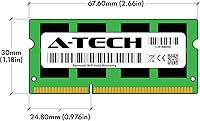
  • Module Dimensions: Each module measures 2.66 x 1.18 x 0.15 inches, a standard SODIMM footprint.
  • Module Weight: The combined kit weighs approximately 0.95 ounces, making it lightweight and easy to handle during installation.
  • Warranty: A-Tech backs this memory kit with a Limited Lifetime Warranty, covering defects in materials and workmanship for the life of the product.
  • Tech Support: A-Tech provides access to a dedicated technical support team to assist buyers before and after installation.
  • Quality Testing: Each module undergoes rigorous quality control testing at the factory to verify stability and reliable performance before shipping.
  • JEDEC Standard: The kit conforms to JEDEC DDR3L specifications, ensuring predictable behavior in compliant systems without requiring manual configuration.
  • Model Number: The official A-Tech part number for this kit is AT8G2D3S1600ND8N135V.

Related Reviews

NEMIX RAM 16GB DDR3 1600MHz SODIMM
86%
88%
Performance Boost
91%
Ease of Installation
85%
Compatibility
90%
Energy Efficiency
84%
Build Quality
More
A-Tech 16GB DDR4 3200MHz SODIMM Laptop RAM
78%
83%
Compatibility
91%
Installation Ease
78%
Performance Uplift
86%
Value for Money
74%
Build Quality
More
A-Tech 16GB DDR3 1600MHz Desktop RAM
79%
93%
Value for Money
88%
Compatibility
91%
Installation Ease
86%
System Stability
82%
Performance Uplift
More
A-Tech 16GB DDR3 1600MHz ECC RDIMM Server RAM Kit
86%
90%
Performance
88%
Installation Ease
92%
Reliability
75%
Compatibility
94%
Data Integrity (ECC)
More
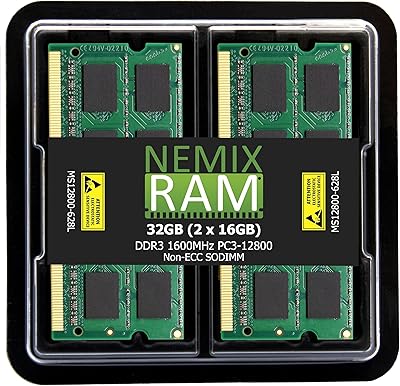
NEMIX RAM 32GB (2x16GB) DDR3 1600MHz SODIMM Laptop Memory Kit
85%
88%
Performance Improvement
92%
Ease of Installation
85%
Compatibility with Laptops
90%
Energy Efficiency
91%
Value for Money
More
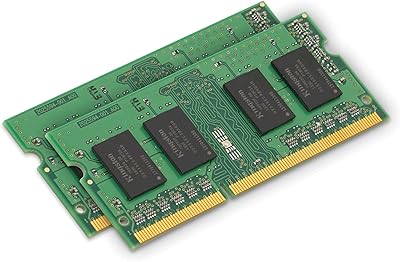
Kingston 16GB Kit (2 x 8GB) DDR3 1600MHz SODIMM Laptop Memory
88%
88%
Performance Boost
91%
Ease of Installation
85%
Compatibility with Laptops
92%
Energy Efficiency
80%
Build Quality
More
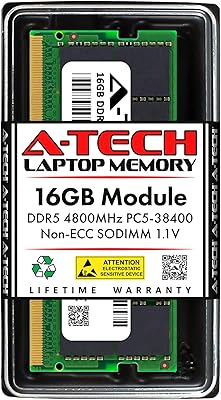
A-Tech 16GB DDR5 4800MHz SODIMM RAM
88%
91%
Performance Boost
95%
Ease of Installation
88%
Energy Efficiency
85%
Compatibility with Laptop Systems
92%
Value for Money
More
A-Tech 8GB DDR4 2666MHz SODIMM Laptop RAM
85%
88%
Performance Improvement
90%
Ease of Installation
85%
Energy Efficiency
81%
Compatibility with Laptops
87%
Stability and Reliability
More
A-Tech 128GB DDR5 5200MHz SODIMM Laptop RAM
88%
93%
Performance
88%
Compatibility with Laptops
91%
Ease of Installation
95%
Multitasking Performance
86%
Energy Efficiency (1.1V)
More
A-Tech 32GB (4x8GB) DDR3 1600MHz Desktop RAM
88%
94%
Installation Ease
89%
System Performance
92%
Value for Money
83%
Compatibility
91%
Stability and Reliability
More
A-Tech 16GB DDR4 2400MHz SODIMM Laptop RAM
84%
74%
Compatibility
91%
Installation Ease
83%
Performance Improvement
88%
Value for Money
82%
Build & Component Quality
More

FAQ

The most reliable way is to check your laptop's user manual or the manufacturer's support page for the exact memory type and maximum capacity it supports. You can also use A-Tech's own compatibility tool on their website, or look up your model on Crucial's Advisor tool as a cross-reference. The key things to confirm are that your system takes DDR3 SODIMM modules and has at least one open or replaceable slot.

If your system currently has 4GB or 8GB of RAM and regularly feels sluggish — especially when multitasking, running a browser with many tabs, or using office applications — then yes, the improvement is usually noticeable and immediate. RAM upgrades help most when your existing memory is the bottleneck. If your laptop is slow due to a failing hard drive or an underpowered processor, adding RAM alone will not fix those issues.

You can install just one 8GB module if your laptop only has one available slot, and it will work fine. However, to get the full dual-channel benefit, both slots need to be populated — one module in each. Dual-channel mode lets the memory controller access both sticks simultaneously, which improves bandwidth and can make a meaningful difference in overall responsiveness.

DDR3L is simply a lower-voltage version of DDR3, designed to run at 1.35V instead of the standard 1.5V. The A-Tech 16GB DDR3 1600MHz SODIMM Laptop RAM supports both voltages, so it will work in systems that expect standard DDR3 as well as those specifically designed for the lower-voltage DDR3L standard. In practice, the low-voltage operation produces a bit less heat, which is helpful inside a compact laptop chassis.

That depends on your existing RAM. If your current stick is a DDR3 SODIMM running at 1600MHz, adding a compatible 8GB stick from this kit in the second slot should work, but mixing modules from different manufacturers can sometimes cause instability. For best results, replacing both sticks with a matched pair — which is what this kit provides — is the more reliable approach.

Certain older MacBook Pro and Mac mini models from 2010 to 2015 used user-upgradeable DDR3 SODIMM RAM, and this memory kit has been used successfully in many of those machines. However, Apple's specific memory requirements vary by model year, so you should verify your exact Mac model's compatibility before purchasing.

A-Tech offers a Limited Lifetime Warranty and a tech support team that can help diagnose compatibility issues before you initiate a return. Many reported problems turn out to be seating issues — the module not being fully clicked into the slot — rather than actual defects. If the kit is genuinely incompatible with your system, standard return options through Amazon also apply.

If your laptop is currently running with 4GB to 8GB of RAM, upgrading can reduce stuttering in less demanding games and improve overall system fluidity. That said, DDR3 memory has inherent bandwidth limitations, and the performance ceiling of your CPU and graphics hardware will still be the dominant factor. For serious gaming, this upgrade helps at the margins but is not a transformative fix.

For most laptops, RAM installation involves removing a bottom panel with a small Phillips screwdriver, releasing the existing module, and pressing the new one into place at an angle until it clicks flat. It typically takes under ten minutes. A-Tech also has a support team available to guide you through the process if you are uncertain, which makes this a reasonable DIY project even for first-timers.

The main risk is static discharge, which you can virtually eliminate by working on a non-carpeted surface and touching a grounded metal object before handling the modules. Beyond that, the installation is low-risk as long as you seat the modules fully and do not force them in the wrong direction — they are keyed to only fit one way. Just make sure your laptop is powered off and unplugged before you start.