Overview

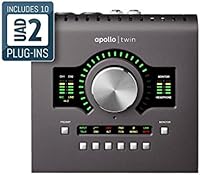
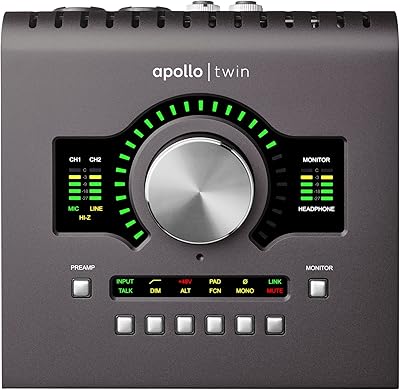
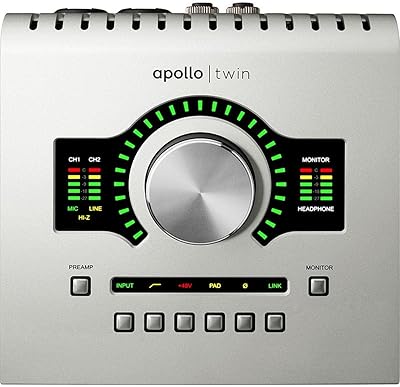
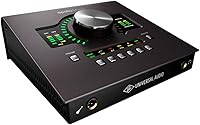
The Universal Audio Apollo Twin MKII Quad Interface sits at the serious end of the desktop recording market — built for producers and engineers who want professional-grade conversion without filling a rack. Universal Audio has spent decades supplying hardware to major recording studios, and that pedigree shows up here. What separates this unit from most competitors isn't just the converters; it's the onboard Quad-core DSP that lets you run studio-grade plug-ins in real time without taxing your CPU. The 2-in/6-out configuration keeps things compact, and the included Analog Classics bundle gives you a genuinely useful starting point — though it's only a taste of the broader UAD library.
Features & Benefits

At 24-bit/192kHz resolution, recordings through this Thunderbolt interface capture more detail than most home studios will ever need — but the practical result is clean, open-sounding audio that holds up across the mix. The bigger story is the sub-2ms latency from the DSP engine, which means you can genuinely track through an 1176 or LA-2A emulation while singing or playing without the uncomfortable delay that kills focus. The two front-end preamps are clean and punchy, the Hi-Z input handles guitars directly, and the optical expansion port lets you add up to eight more channels via an external preamp. Console 2.0 software ties everything together neatly inside your DAW.

Best For

The Apollo Twin MKII Quad was built for a specific type of buyer: the serious home studio producer or engineer who wants real analog character without maintaining a rack of hardware. If you're tracking vocals, acoustic instruments, or electric guitar direct, the two preamps and Hi-Z input cover most solo and small-ensemble sessions comfortably. This UA desktop interface also rewards users who are committed to — or at least curious about — the UAD plug-in ecosystem, since the long-term DSP value compounds as your library grows. One firm requirement though: your machine needs a Thunderbolt port. There is no USB fallback, so verify compatibility before purchasing.

User Feedback

With a 4.4-star average across nearly 300 ratings, buyers broadly agree that the preamp clarity and build justify the investment — several note a tangible difference in low-end depth and top-end air compared to their previous mid-range interfaces. The most consistent criticism isn't about audio at all: it's about cost. The hardware is only part of the spend, and expanding beyond the starter bundle means buying into UAD's plug-in store, which catches some buyers off guard. Windows users occasionally flag a steeper initial setup compared to Mac. On latency, however, real-time tracking performance draws near-universal praise, with most reporting no noticeable delay even on demanding sessions.

Pros

  • Preamp quality is noticeably cleaner and more open-sounding than most interfaces in this class.
  • Onboard Quad-core DSP lets you track through classic compressors and EQs with practically no delay.
  • The build feels solid and professional — this is not a plastic-shell, budget-tier device.
  • Optical expansion port gives you room to grow without replacing the interface entirely.
  • Console 2.0 software integrates cleanly into major DAWs and makes session setup fast.
  • Works on both Mac and Windows, covering most studio setups without compatibility headaches.
  • The included plug-in bundle gives you immediately useful vintage emulations from day one.
  • Compact desktop footprint keeps your workspace uncluttered despite the professional feature set.
  • Front-panel Hi-Z input means you can plug a guitar straight in without a separate DI box.
  • A 4.4-star average across hundreds of real buyers reflects consistent satisfaction with core performance.

Cons

  • Thunderbolt-only connectivity locks out anyone without a compatible port, especially on older Windows machines.
  • The UAD plug-in store is a recurring cost that can add up quickly once you move past the starter bundle.
  • Windows driver setup has been a friction point for some users, particularly on first install.
  • Only two mic preamp inputs limits simultaneous recording for bands or multi-instrument sessions.
  • The ecosystem lock-in means your DSP investment only works with this hardware — UAD plug-ins cannot run standalone.
  • Buyers who rarely use plug-ins during tracking will not get full value from the onboard DSP.
  • No USB connectivity means this unit is not easily portable across different studio setups or borrowed machines.
  • The starting plug-in bundle may feel thin once you hear what the broader UAD library can do.
  • Higher upfront cost compared to competitors that offer similar I/O counts without DSP processing.

Ratings

The scores below were generated by AI after analyzing verified buyer reviews worldwide for the Universal Audio Apollo Twin MKII Quad Interface, with spam, bot-submitted, and incentivized feedback actively filtered out before scoring. Each category reflects the full range of real user experiences — not just the highlights — so both genuine strengths and recurring frustrations are transparently represented. Whether you're on the fence about the ecosystem investment or simply want to know how it performs on a daily recording session, these ratings give you an honest, ground-level picture.

Audio Conversion Quality
93%
Buyers who upgraded from mid-range interfaces consistently describe a clear, immediate improvement in the openness and depth of their recordings. Vocals in particular come through with more air and low-end definition — the kind of difference that shows up clearly on headphones during mixing sessions.
A small number of users with highly trained ears and reference-grade monitoring setups feel the improvement over competing premium converters is incremental rather than transformative at this price tier. For most home studio users, however, this is not a practical concern.
DSP Processing Performance
91%
The Quad-core UAD-2 engine handles real-time plug-in processing reliably, and users report being able to run multiple instances of demanding emulations simultaneously without noticeable CPU strain on their host machine. Tracking a vocal through an 1176 with genuine near-zero latency is the feature that earns the most repeat praise.
Heavier UAD sessions with many simultaneous plug-in instances can approach DSP limits, particularly for producers working on dense multi-track projects. At that point, you either bounce tracks or invest in an additional UAD device to expand headroom.
Preamp Quality
88%
The two built-in preamps are widely praised for their clean, transparent gain structure — they stay quiet even when pushed, which makes them well-suited for both condenser microphones on vocals and dynamic mics on louder sources like guitar cabinets. Multiple users note that they stopped reaching for external preamps after switching to this unit.
With only two preamp inputs, anyone recording a full band setup or even a drums-and-vocal overdub simultaneously will hit the ceiling quickly. The preamps are excellent for what they are, but the channel count is a real constraint for session work beyond solo or duo recording.
Latency During Tracking
89%
Real-world tracking sessions confirm the sub-2ms claim holds up in practice — singers and guitarists monitoring through UAD compressor and EQ emulations report no perception of delay, which is the fundamental test. This is one of the most consistently praised aspects across user feedback.
The low-latency advantage is specifically tied to UAD plug-ins running on the DSP engine; native plug-ins running through the DAW are subject to standard buffer size latency like any other interface. A few users who misunderstood this distinction initially felt let down before adjusting their workflow.
Build & Hardware Quality
86%
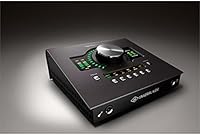
The metal chassis and firm, tactile controls give the Apollo Twin MKII Quad a professional feel that stands apart from the plastic-heavy competition. Long-term owners regularly note that their units have held up without hardware degradation through years of daily studio use.
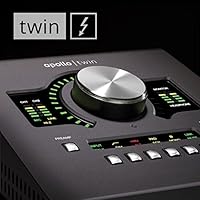
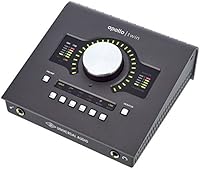
The large monitor volume knob, while satisfying to turn, can feel slightly exposed on a busy desktop and a few users report accidental bumping during sessions. It is a minor ergonomic observation rather than a durability flaw, but worth noting for tightly packed workstations.
Value for Money
71%
29%
Buyers who fully commit to the UAD ecosystem over time consistently report feeling that the hardware investment paid off, particularly as their plug-in library grows through sales and bundles. For those users, the DSP hardware becomes more valuable the longer they own it.
The perceived value divides sharply between users who understood the ecosystem model upfront and those who did not. The hardware alone is a significant outlay, and discovering that meaningful plug-in expansion requires additional spending catches a vocal minority of buyers off guard.
Software & DAW Integration
83%
Console 2.0 is described as intuitive by most experienced users, with channel strip presets and a drag-and-drop workflow that integrates naturally into sessions without demanding a steep learning curve. Compatibility across VST, AAX, and RTAS formats means it slots into virtually any professional DAW environment without friction.
Occasional reports of Console needing a restart or causing minor DAW hiccups on Windows surface in user feedback, and the software's update cadence means compatibility issues can emerge temporarily after major operating system updates. These are not widespread failures, but they do appear with some regularity.
Setup & First-Use Experience
74%
26%
Mac users broadly describe the initial setup as straightforward — plug in the Thunderbolt cable, install the UAD software, and the unit is recognized cleanly. For the majority of buyers on Apple hardware, getting up and running takes under an hour.
Windows users tell a different story often enough to be a pattern: Thunderbolt security settings, driver conflicts, and software registration steps have caused frustrating multi-hour setups for a meaningful subset of PC users. Universal Audio's support documentation helps, but the out-of-box experience on Windows is inconsistent.
Included Plug-in Bundle
69%
31%
The Analog Classics bundle delivers genuinely useful, fully functional tools — the LA-2A, 1176LN, and Pultec emulations are not watered-down versions, and a working producer can achieve polished results with just these plug-ins on vocals and mix bus processing.
Relative to the hardware investment, the bundle feels modest to many buyers who expected a more comprehensive starting library. It covers the classics but leaves obvious gaps, and the realization that filling those gaps means purchasing additional UAD titles can feel like a secondary price tag arrives sooner than expected.
Connectivity & Compatibility
66%
34%
For buyers with a Thunderbolt-equipped machine, the connection is fast, reliable, and delivers consistent low-latency performance without the bandwidth compromises associated with USB audio. Users on modern Macs with Thunderbolt 3 or 4 ports report zero connectivity issues over extended periods.
The Thunderbolt-only requirement is the single most common dealbreaker cited by prospective buyers. Anyone on a Windows laptop without a confirmed Thunderbolt port — not just USB-C — cannot use this interface at all, and there is no adapter workaround that resolves this limitation.
Channel Count & Expandability
77%
23%
The optical ADAT input is a smart inclusion that lets users expand well beyond the two built-in preamps by connecting an eight-channel external preamp, effectively turning this compact desktop unit into a capable multi-channel recording rig when needed.
Without that external expansion, two simultaneous analog inputs is a tight ceiling for producers who work with live bands or multi-microphone setups. Users coming from four- or eight-input interfaces may find the base I/O count a step backward in terms of session flexibility.
Headphone Monitoring
81%
19%
The headphone output is praised for delivering clean, detailed playback that accurately represents the mix — a practical necessity during late-night sessions when monitor speakers are off. Volume control is smooth and the output level is strong enough to drive most professional headphones without distortion.
There is only a single headphone output, which limits simultaneous monitoring for two performers — a notable gap for vocalist-producer setups where both people want to hear the same cue mix independently. A second output is available only by routing through the monitor outputs with an external splitter.
Desktop Footprint & Design
84%
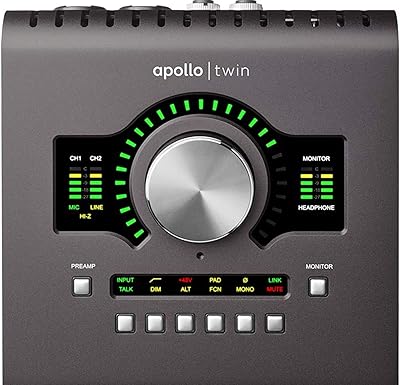
The compact 6 x 8 x 8 inch footprint is consistently appreciated by users working on modest desk setups. The clean industrial design and solid metal surface hold up aesthetically in both home and professional studio environments without looking out of place.
At 3.74 pounds and designed primarily for desktop placement, portability is limited compared to bus-powered USB interfaces. The Thunderbolt dependency also means you need a specific cable and port configuration wherever you set it up, reducing flexibility for mobile recording situations.
Long-Term Ecosystem Value
78%
22%
Producers who have owned the Apollo Twin MKII Quad for two or more years tend to rate their satisfaction higher than newer buyers — the UAD library grows with you, regular sales reduce ongoing costs, and the DSP hardware continues to run newer plug-ins without becoming obsolete quickly.
The ecosystem lock-in is real: UAD plug-ins only run on UAD hardware, which means your investment in the library has no portability if you switch platforms later. For buyers who prioritize flexibility or plan to change interfaces within a few years, this dependency carries meaningful long-term risk.

Suitable for:

The Universal Audio Apollo Twin MKII Quad Interface is built for producers, engineers, and serious musicians who want professional studio-quality recording at their desk without a room full of outboard gear. If you regularly track vocals, acoustic instruments, or guitar direct and want to monitor through high-quality analog emulations in real time, this unit genuinely delivers on that promise. It fits naturally into home studios running Logic, Pro Tools, Ableton, or any major DAW, and the Thunderbolt connection keeps latency low enough that live tracking through plug-ins feels responsive rather than frustrating. The two-channel input setup is well-suited to solo artists and small-ensemble sessions, and the optical expansion port gives you a clear growth path when your needs outgrow the built-in preamps. Buyers who plan to invest in the UAD plug-in library over time will find the onboard DSP pays dividends the longer they stay in the ecosystem.
Not suitable for:

If your computer lacks a Thunderbolt port, the Universal Audio Apollo Twin MKII Quad Interface is simply not an option — there is no USB or USB-C alternative in this product line, and that is a hard stop for many Windows laptop users. Buyers expecting a complete plug-in library out of the box will likely be disappointed: the included Analog Classics bundle is a solid introduction but covers only a small fraction of what UAD offers, and expanding that library costs extra. Podcasters, streamers, or anyone who only needs a single-channel input for voice recording will find this unit significantly overbuilt and overpriced for their use case. Musicians on a tight overall budget should also think carefully, since the hardware cost is just the entry point — getting genuine value from the DSP engine often means ongoing spending in UAD's store. If you want a no-subscription, plug-and-play interface that just works without ecosystem commitment, there are simpler, more affordable options that will serve you better.
Specifications

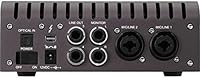
  • Interface Type: Desktop Thunderbolt audio interface designed for Mac and Windows computers with a Thunderbolt port.
  • I/O Configuration: 2-in / 6-out configuration with two analog inputs and six analog and digital outputs.
  • Mic Preamps: Two premium mic/line preamp inputs with digitally controlled gain for clean, consistent signal handling.
  • Instrument Input: Front-panel Hi-Z instrument input accepts guitar or bass directly without requiring a separate DI box.
  • Monitor Outputs: Two digitally controlled analog monitor outputs for connecting studio reference speakers.
  • Headphone Output: Dedicated front-panel headphone output with independent volume control for monitoring during sessions.
  • Digital Expansion: 8-channel optical (ADAT/SMUX) input allows connection of an external preamp or digital mixer for expanded channel count.
  • Audio Resolution: Supports recording and playback at up to 24-bit / 192kHz for high-fidelity audio conversion.
  • DSP Engine: Quad-core UAD-2 SHARC processors handle real-time UAD plug-in processing without loading the host CPU.
  • Latency: Real-time UAD plug-in processing operates at sub-2ms latency, enabling live monitoring through plug-ins without disruptive delay.
  • Connectivity: Thunderbolt connection compatible with both Mac and Windows; no USB connectivity is available on this model.
  • Plug-in Formats: UAD Powered Plug-Ins run in VST, RTAS, and AAX 64 formats, covering all major DAW environments.
  • Included Software: Ships with Console 2.0 software and the Analog Classics UAD bundle, including legacy versions of the LA-2A, 1176LN, and Pultec EQP-1A.
  • Dimensions: Unit measures 6 x 8 x 8 inches, designed to sit compactly on a desktop without occupying significant workspace.
  • Weight: Weighs 3.74 pounds, reflecting a solid, premium build rather than a lightweight plastic chassis.
  • Compatibility: Works with all major DAWs including Pro Tools, Logic Pro, Ableton Live, Cubase, and Reaper on supported operating systems.
  • Operating Systems: Compatible with macOS and Windows; Mac users generally report a smoother initial setup experience than Windows users.
  • User Rating: Holds a 4.4 out of 5 star average based on 283 ratings on Amazon, reflecting consistent buyer satisfaction.

Related Reviews

Universal Audio Apollo 8 QUAD Audio Interface
79%
93%
Preamp Quality
91%
DSP Performance
89%
Audio Conversion
92%
Build Quality
74%
Software & Console 2.0
More
Universal Audio Apollo Twin MkII Solo Interface
78%
93%
Preamp Quality
71%
DSP Performance
91%
Build Quality
89%
Audio Conversion
78%
Software Experience
More
Universal Audio Apollo Twin MkII Heritage Edition
86%
93%
Audio Performance
94%
Build Quality
88%
UAD Plug-in Bundle
90%
Latency & Tracking
72%
Software Compatibility
More
Universal Audio Apollo Twin X QUAD Interface
81%
93%
Audio Conversion Quality
88%
DSP Performance
91%
Preamp Quality
74%
Value for Money
86%
Build Quality
More
Universal Audio Apollo X16 Audio Interface
82%
94%
Conversion Quality
91%
UAD DSP Performance
89%
Build & Hardware Quality
92%
Low-Latency Tracking
88%
I/O Flexibility
More
Universal Audio Apollo Twin USB Heritage Interface
79%
91%
Audio Conversion Quality
86%
UAD DSP Performance
88%
Preamp Quality
71%
Windows Compatibility
74%
Value for Money
More
Universal Audio Apollo Twin X DUO Interface
79%
93%
Sound Quality
91%
Preamp Quality
74%
DSP Performance
81%
Value for Money
57%
Platform Compatibility
More
Universal Audio Arrow Thunderbolt 3 Audio Interface
77%
93%
Audio Conversion Quality
91%
Unison Preamp Performance
88%
Real-Time UAD Processing
58%
Thunderbolt 3 Connectivity
61%
Windows Compatibility
More
Audient iD14 MKII
Audient iD14 MKII
87%
94%
Preamplifier Transparency
92%
Build Quality and Weight
89%
Headphone Output Versatility
91%
Digital Expandability
86%
Instrument DI Character
More
Universal Audio Apollo x8 Heritage Edition Interface
79%
93%
Conversion Quality
91%
DSP Performance
89%
Preamp Emulation
82%
Heritage Plug-in Bundle
71%
Ecosystem & Software Integration
More

FAQ

It works with both Mac and Windows, but you do need a Thunderbolt port on your PC. Windows setup can be a bit more involved than on Mac — a handful of users report needing to update drivers and ensure Thunderbolt security settings are configured correctly before the unit is recognized — so budget some time for initial setup if you're on Windows.

The Universal Audio Apollo Twin MKII Quad Interface ships with the Analog Classics bundle, which includes legacy versions of the LA-2A compressor, 1176LN limiter, Pultec EQP-1A equalizer, and a handful of others. They're genuinely useful tools — not demo versions — and experienced engineers can do a lot with just those. That said, they represent a small slice of the full UAD library, so if you're expecting a comprehensive plug-in suite out of the box, you'll want to temper that expectation.
Only if your USB-C port supports the Thunderbolt protocol — not all USB-C ports do. A standard USB-C port will not work, even with an adapter. Before buying, check your computer's specifications to confirm it has a Thunderbolt 2 or Thunderbolt 3 port, not just USB-C.

The interface has two built-in mic/line preamp inputs, so you can record two microphones simultaneously out of the box. If you need more channels, you can connect an external preamp with ADAT output to the optical input and expand up to eight additional digital channels. For solo and duo recording, the two built-in preamps are plenty.

It depends entirely on your workflow. If you regularly track vocals or instruments and want to hear yourself through high-quality compression or EQ while recording — not just a dry signal — the near-zero latency DSP processing is a real practical advantage. If you mostly record and mix entirely in the box without caring about real-time monitoring through plug-ins, you'll be paying a premium for a feature you'll rarely use.

Both. You can run UAD Powered Plug-Ins as standard inserts inside Pro Tools, Logic, Ableton, Cubase, and other major DAWs using VST, AAX, or RTAS formats. The Console 2.0 application handles real-time monitoring during tracking. The two workflows complement each other rather than being mutually exclusive.

Not necessarily — the included bundle is functional on its own. But realistically, the more time you spend with the UA desktop interface, the more you'll find yourself eyeing other UAD titles. Universal Audio runs regular sales and bundle offers, so expanding your library doesn't have to happen all at once. Just go in knowing that the hardware is an entry point to an ecosystem, not a one-time purchase.

Yes. Through Console 2.0, you can create a custom headphone mix that blends your DAW playback with your live input signal. This is especially useful when overdubbing, since you can dial in how much of your own voice or instrument you hear relative to the backing track, all with near-zero latency.

The chassis is metal with a solid, dense feel — noticeably more substantial than most interfaces at lower price points. The knobs and connectors feel well-made rather than loose or flimsy. Several longtime owners report using their units daily for years without hardware issues, which aligns with Universal Audio's reputation for building gear that lasts.

Not simultaneously — the Apollo Twin MKII Quad connects to one computer at a time via Thunderbolt. Switching between two machines is physically possible by swapping the cable, but there is no built-in switching mechanism. If you need to move between a desktop and laptop regularly, just be sure both machines have Thunderbolt ports and the UAD software installed on each.

Where to Buy