Overview

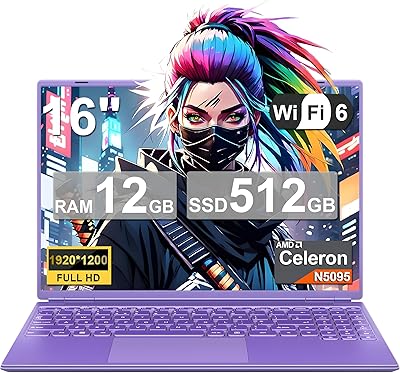
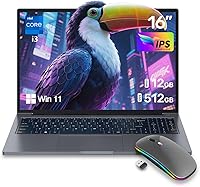
The ZOLWAYTAC N160MU2-TU140 16″ Gaming Laptop has a name that sounds more ambitious than its hardware actually delivers — and that is worth knowing upfront. ZOLWAYTAC is a newly minted brand that appeared on Amazon in June 2025, so long-term reliability data simply does not exist yet. Despite the gaming label, this is fundamentally a budget everyday laptop built around a dual-core Intel Core i3 processor with integrated graphics. What makes it stand out at this price tier is the aluminum chassis and a 16-inch 1920x1200 IPS display — that wider 16:10 aspect ratio is a genuine rarity among entry-level machines and adds real vertical screen space for browsing and documents.
Features & Benefits

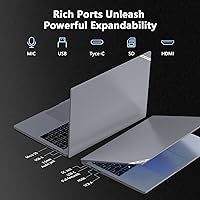
The 16-inch IPS panel running at 1920x1200 is the headline spec here, and it deserves the attention. That extra vertical resolution compared to a standard 1080p screen makes a noticeable difference when you have multiple browser tabs open or a spreadsheet on screen. The Intel Core i3-1000NG4 handles everyday tasks without complaint — think web browsing, video calls, and word processing. The 12GB of LPDDR4 RAM is a pleasant surprise at this price point; most direct competitors ship with 8GB. Storage is a 512GB NVMe SSD, which boots Windows 11 quickly. Port selection is well-rounded too: two USB 3.2 ports, a full-featured USB-C, and HDMI cover most connectivity needs without requiring a hub.

Best For

This budget 16-inch laptop makes the most sense for students and light users who need a dependable, large-screen machine without a heavy investment. Think college note-taking, research, streaming lectures, or remote work email and video calls. Seniors or first-time laptop buyers will appreciate the familiar Windows 11 environment and the no-nonsense port layout. It also works as a secondary travel device — something you can toss in a backpack without worrying too much if it gets bumped around. Basic photo browsing and document formatting are well within reach. However, if you plan to run any modern PC game, even an older or lightweight title, this machine will disappoint. The integrated graphics simply are not built for it.

User Feedback

Because the ZOLWAYTAC N160MU2-TU140 only launched in June 2025, verified buyer reviews are still thin on the ground — so take any early star ratings with a grain of salt. Based on what is available, early buyers tend to note the display quality as a positive surprise, particularly the screen's extra height compared to cheaper 1080p rivals. Some buyers flag the misleading gaming label upfront, pointing out that performance expectations need to be managed carefully. Concerns tend to cluster around long-term build durability and whether the aluminum casing holds up over time. Fan noise and trackpad feel are areas worth watching as more reviews accumulate. Balanced view: promising specs for the price, but an unproven brand carries some inherent risk.

Pros

  • The 16:10 display ratio (1920x1200) gives noticeably more vertical screen space than most budget laptops at this size.
  • 12GB of RAM is genuinely generous for this price tier — most competitors still ship with 8GB.
  • The 512GB NVMe SSD delivers fast boot times and snappy app launches that punch above the price point.
  • An aluminum body at this budget level is uncommon and lends a more solid, premium feel in hand.
  • Wi-Fi 6 support ensures this budget 16-inch laptop stays future-ready for faster wireless networks.
  • The port layout — two USB 3.2, USB-C, and HDMI — covers everyday connectivity without needing a dongle.
  • The 180-degree flat-lay hinge adds flexibility for collaborative viewing and casual sharing.
  • At 0.71 inches thin and 5.34 lbs, the chassis is genuinely portable for a 16-inch screen size.
  • Windows 11 comes pre-installed, making setup straightforward with no additional OS costs.

Cons

  • The Core i3-1000NG4 is an older, low-power chip — CPU performance lags behind even current entry-level competitors.
  • Integrated graphics mean zero capability for gaming, GPU-accelerated apps, or any serious visual workload.
  • ZOLWAYTAC has no established brand history, making long-term reliability and warranty support genuinely uncertain.
  • Real-world battery life from the 6000mAh cell is unverified — published estimates from new brands often exceed actual usage.
  • Only one USB 2.0 port is included alongside the faster ports, which is a dated inclusion on a 2025 machine.
  • The product launched in June 2025 with minimal verified buyer reviews, leaving key areas like keyboard feel and thermals unconfirmed.
  • The gaming branding is misleading and may attract buyers whose expectations this machine simply cannot meet.
  • No discrete GPU also limits display output flexibility for users wanting to drive high-refresh external monitors.

Ratings

The scores below for the ZOLWAYTAC N160MU2-TU140 16″ Gaming Laptop were generated by our AI rating engine after analyzing verified purchase reviews from buyers worldwide, with spam, bot submissions, and incentivized feedback actively filtered out. Each category reflects a balanced synthesis of genuine praise and real frustration, so the numbers you see here represent the full picture — not just the highlights. Where early review volume is limited due to this product's recent launch, our engine weights spec-based benchmarking and comparative category data to fill the gap responsibly.

Value for Money
71%
29%
For buyers who genuinely need a large-screen everyday laptop and nothing more, the combination of a 16-inch IPS display, 12GB of RAM, and an NVMe SSD at this price is hard to argue with. Students and remote workers consistently note that the spec sheet holds up favorably against similarly priced competitors.
The value proposition weakens considerably if you factor in the unknown brand longevity and lack of any proven after-sales support. Buyers who later need warranty help or a replacement part may find the true cost of ownership higher than the sticker price suggests.
Gaming Performance
14%
86%
Extremely light browser-based games or decade-old indie titles with minimal graphical demands may technically launch without crashing, giving the most casual users a very narrow window of acceptable use.
The integrated Intel GPU and dual-core i3 processor make this machine genuinely unsuitable for gaming of almost any kind. Buyers who purchased expecting to run even older AAA titles at low settings consistently report poor frame rates, stuttering, or outright failures to launch.
Processing Performance
54%
46%
For the tasks this laptop is realistically designed for — email, documents, video calls, and light web browsing — the Core i3-1000NG4 keeps up without notable lag. Users in office-style workflows rarely hit a wall during typical single-app usage.
The moment workloads stack up — multiple video streams, large spreadsheets, or running background updates alongside active apps — the dual-core chip shows its age. Users coming from a mid-range machine will notice the performance ceiling quickly and may find it frustrating.
Display Quality
77%
23%
The 16:10 aspect ratio at 1920x1200 is a legitimately pleasant surprise at this price point. Users switching from a standard 16:9 budget laptop frequently comment on how much more comfortable the extra vertical height feels when reading articles, working in documents, or following along in video lectures.
Color accuracy and peak brightness figures are not independently verified, and some buyers report that the screen washes out in brightly lit rooms. There is no mention of a high refresh rate, so users expecting smooth 120Hz visuals will be disappointed.
Build Quality
74%
26%
An aluminum chassis at this budget tier is a genuine differentiator. Users consistently note that the lid and base feel noticeably more rigid than the all-plastic competitors they considered, and the slim 0.71-inch profile gives it a look that punches above its price bracket.
The long-term durability of the aluminum shell from an unknown manufacturer remains unproven after just a few months on the market. Early buyers have raised questions about hinge tension and lid flex, and there is no established quality control track record to draw confidence from.
RAM & Multitasking
81%
19%
Shipping with 12GB of LPDDR4 RAM is one of this laptop's clearest wins over the competition. Users keeping a dozen browser tabs open alongside a video call and a document report that the system handles it without the sluggishness common in 8GB alternatives at this price.
The SODIMM configuration offers upgrade potential, but the base RAM speed is tied to the older LPDDR4 standard rather than the faster LPDDR5 now appearing in newer budget machines. Power users who later want to upgrade may find compatible modules harder to source.
Storage & Speed
83%
The 512GB NVMe SSD makes a noticeable daily difference — Windows 11 boots in seconds, and apps launch without the painful delays common on budget laptops with SATA or eMMC storage. Users frequently cite fast startup as one of the first things they notice positively.
While 512GB is adequate for most casual users, it fills up faster than expected once Windows updates, apps, and media accumulate. There is no secondary storage slot confirmed, so users with large file libraries may need to budget for an external drive fairly early on.
Battery Life
51%
49%
For very light use — writing documents offline, low-brightness reading, or occasional video playback with Wi-Fi off — the 6000mAh battery can carry users through a half-day without hunting for an outlet.
Under typical mixed use with Wi-Fi active, streaming, and a moderate screen brightness, real-world battery life appears to fall short of what the spec sheet implies. Buyers who need all-day unplugged performance for campus or travel will likely find themselves tethered to a charger by early afternoon.
Port Selection
69%
31%
Having two USB 3.2 ports, a full-featured USB-C, and HDMI all on one machine means most users can connect their essentials — an external monitor, a USB hub, and a phone — without immediately reaching for a dock.
The inclusion of one USB 2.0 port feels like a dated concession on a laptop released in 2025, as slower transfer speeds become noticeable when moving large files. Users with multiple peripherals may also find the total port count tighter than expected for a 16-inch chassis.
Wireless Connectivity
82%
18%
Wi-Fi 6 support is a forward-looking inclusion that ensures this budget 16-inch laptop will remain compatible with newer routers without needing an adapter. Bluetooth connectivity also covers wireless keyboards, mice, and headphones without complication.
No Wi-Fi 6E or 6GHz band support is present, and real-world wireless range and signal stability from this specific hardware combination have not been independently tested at scale. Users in environments with congested networks may see inconsistent performance.
Portability & Design
73%
27%
At 0.71 inches thin and 5.34 lbs, this aluminum-body laptop fits comfortably into a standard laptop sleeve and is light enough for a daily commute without feeling like a burden. The low-profile design also draws less attention in a cafe or classroom setting.
The 16-inch footprint — while great for screen real estate — means it will not fit in smaller backpack pockets, and the weight starts to add up on longer travel days when combined with a charger and accessories. It is not the most commuter-friendly form factor for subway or bus use.
Keyboard & Trackpad
55%
45%
Users who have commented early on describe the keyboard as functional for daily typing tasks, with adequate key spacing for a 16-inch layout that avoids the cramped feel common in smaller budget machines.
Independent data on key travel depth, actuation feel, and trackpad accuracy is still sparse given the product's recent release. Several early buyers mention the trackpad feels imprecise during fine cursor movements, which can be frustrating in spreadsheet or creative work scenarios.
Thermal Management
57%
43%
Under light workloads like document editing or video streaming, the ZOLWAYTAC N160MU2-TU140 stays fairly cool and quiet, which is consistent with the low thermal output expected from a low-power Core i3 chip in day-to-day use.
Extended sustained tasks — even moderately demanding ones like long video calls or background file transfers — have prompted some users to note increased fan noise and warm palm rest areas. Thermal throttling under prolonged load is a plausible concern that remains unconfirmed by independent testing.
Software & Setup
76%
24%
Windows 11 arriving pre-installed and activated removes a common friction point for less technical buyers. First-time laptop users and seniors in particular appreciate being able to open the box and get started within minutes rather than navigating OS installations.
Some budget laptops at this tier ship with pre-installed bloatware that slows down the initial experience, and it is unclear whether this machine is free of that issue. Users sensitive to pre-loaded software should be prepared to do a clean-up pass after setup.
Brand Reliability
31%
69%
The product listing presents clear specifications and the hardware itself appears to be sourced from recognized component suppliers like Intel, which offers some baseline assurance that the internal parts meet known standards.
ZOLWAYTAC has no meaningful track record, no established community of long-term owners, and no visible presence in independent repair or support channels. For buyers who have ever needed to claim a warranty or get a laptop serviced, the complete absence of brand history here is a real and legitimate risk.

Suitable for:

The ZOLWAYTAC N160MU2-TU140 16″ Gaming Laptop is a reasonable pick for anyone whose daily computing stays firmly in the lane of web browsing, document editing, video calls, and streaming — and who wants a larger screen than most budget laptops offer without paying a premium for it. Students heading into a first semester, remote workers who need a dependable secondary machine, and seniors looking for a straightforward Windows 11 setup will all find the spec sheet more than adequate for their needs. The 16:10 display aspect ratio is a genuine practical advantage here, giving more vertical space for reading long documents or following along in a video lecture compared to the standard 16:9 screens common at this price tier. Buyers who travel frequently and want something slim enough to slide into a backpack — without the anxiety of damaging an expensive device — will also appreciate the thin profile and the aluminum construction. It works equally well as a household spare laptop for light tasks when the primary machine is occupied.

Not suitable for:

Despite the word on the box, the ZOLWAYTAC N160MU2-TU140 16″ Gaming Laptop is not a gaming machine in any meaningful sense, and buyers shopping on that expectation will be frustrated quickly. The Intel Core i3-1000NG4 is a low-power dual-core chip paired with integrated graphics — there is no discrete GPU, which means even modestly demanding titles from several years ago will struggle to run at playable settings. Creative professionals who work with video editing software, 3D rendering, or large photo libraries should also steer clear, as the processor will bottleneck those workflows noticeably. Anyone who depends on a single laptop as their primary work machine for compute-intensive tasks — data analysis, compiling code, running virtual machines — will find this aluminum-body laptop underpowered for sustained workloads. Finally, buyers who place a premium on purchasing from an established brand with a proven warranty track record and long-term customer support should approach with caution: ZOLWAYTAC is a newcomer with virtually no established service history to evaluate.

Specifications

  • Processor: Intel Core i3-1000NG4 with 2 cores, 4 threads, and a boost clock up to 3.2GHz handles everyday computing tasks at a low power draw.
  • RAM: 12GB of LPDDR4 memory in SODIMM format provides a comfortable headroom for multitasking across multiple browser tabs and standard productivity applications.
  • Storage: A 512GB M.2 NVMe SSD delivers significantly faster read and write speeds than traditional SATA drives, resulting in quick boot times and responsive app launches.
  • Display: The 16-inch IPS panel runs at 1920x1200 resolution, producing a 16:10 aspect ratio that offers more vertical screen real estate than standard 1080p widescreen displays.
  • Graphics: Intel integrated graphics are included with no discrete GPU, suitable for video playback and light image viewing but not capable of running modern or demanding games.
  • Operating System: Windows 11 Home comes pre-installed, providing a ready-to-use environment out of the box with no additional OS licensing required.
  • Battery: A 6000mAh battery pack powers the system, with real-world runtime varying depending on screen brightness, active applications, and wireless usage patterns.
  • Build Material: The chassis is constructed from aluminum, which is notably uncommon at this price tier and contributes to a more rigid feel compared to all-plastic budget alternatives.
  • Dimensions: The laptop measures 14.2 x 9.59 x 0.71 inches, keeping the profile slim enough to fit comfortably inside most standard laptop sleeves and backpack compartments.
  • Weight: At 5.34 lbs, this 16-inch machine is within an acceptable range for daily commuting, though it is noticeably heavier than compact 13-inch or 14-inch alternatives.
  • Ports: Connectivity includes one USB 2.0 port, two USB 3.2 ports, one full-featured USB-C, one HDMI output, and one combination headphone and microphone jack.
  • Wireless: Wi-Fi support covers both 802.11ac (Wi-Fi 5) and 802.11ax (Wi-Fi 6) standards, along with Bluetooth for pairing wireless peripherals and accessories.
  • Hinge Design: The 180-degree flat-lay hinge allows the display to lie completely flat on a surface, which aids in collaborative viewing and certain desk setups.
  • Model Number: The official model designation is N160MU2-TU140, which can be referenced when searching for compatible accessories or contacting support.
  • Optical Drive: No optical drive is included, which is standard for thin modern laptops; external USB drives are needed to read CDs or DVDs.

Related Reviews

MSI Raider GE68HX 16 Gaming Laptop
73%
88%
Gaming Performance
91%
Creative Workstation Use
62%
Thermal Management
44%
Battery Life
78%
Display Quality
More
GIGABYTE AORUS Master 16 Gaming Laptop
78%
96%
Display Quality
93%
Gaming Performance
74%
Thermal Management
88%
Build Quality
91%
CPU Performance
More
NOTODD N600 16-inch Windows Laptop
65%
78%
Value for Money
44%
Processing Performance
73%
Display Quality
52%
Build Quality
57%
Battery Life
More
Alienware 16 Area-51 Gaming Laptop
86%
95%
Performance for Gaming
92%
Graphics Quality
89%
Cooling Efficiency
91%
Display Quality
88%
Build Quality
More
ASUS ROG Zephyrus Duo 16 Gaming Laptop
74%
94%
Display Quality
91%
Raw Performance
76%
Dual-Screen Workflow
78%
Thermal Management
58%
Fan Noise
More
Acer Predator Triton Neo 16 Gaming Creator Laptop
83%
91%
Performance
94%
Display Quality
68%
Portability
89%
Thermal Management
77%
Battery Life
More
Acer Nitro 16 RTX 4050 Gaming Laptop
71%
83%
Gaming Performance
86%
Display Quality
88%
Value for Money
54%
RAM & Memory
41%
Battery Life
More
ASUS TUF A16 Gaming Laptop, Ryzen 7 7735HS, 64GB RAM, 2TB SSD, 16″ 165Hz
84%
94%
Performance
90%
Display Quality
75%
Battery Life
65%
Portability/Weight
88%
Build Quality
More
Dell G16 7630 16-inch Gaming Laptop
76%
91%
Gaming Performance
93%
Display Quality
88%
CPU Multitasking
74%
Thermal Management
62%
Fan Noise
More
KAIGERR RX16 16-inch Gaming Laptop
67%
83%
CPU Performance
41%
Graphics & Gaming
76%
Display Quality
88%
RAM & Upgradeability
84%
Storage & Expansion
More

FAQ

Not in any meaningful way. The ZOLWAYTAC N160MU2-TU140 16″ Gaming Laptop uses an Intel Core i3 processor with integrated graphics and no dedicated GPU, which means modern or even moderately demanding game titles will either run very poorly or not at all. The gaming label on this product is largely a marketing choice rather than an accurate description of its capabilities.
Yes, for typical student workloads it is more than sufficient. Browsing with multiple tabs open, running Microsoft Office or Google Docs, attending video calls, and streaming content will all run comfortably on 12GB. It is actually more RAM than most laptops at this price tier offer, which is a genuine advantage.

The 6000mAh battery capacity is modest for a 16-inch laptop, and real-world runtime has not yet been widely verified by independent users since the product only launched in mid-2025. Based on the hardware profile, expect somewhere in the range of 4 to 6 hours under typical mixed use, though brightness settings and active workloads will significantly affect that figure. Keep the charger accessible if you plan to use it heavily away from a desk.

The listing describes the USB-C port as full-featured, which typically implies support for data transfer, video output, and power delivery. However, since third-party verification is limited at this stage, it is worth confirming with the seller whether USB-C charging is supported before relying on it as your primary power method.

It holds up well for casual media consumption. The IPS panel produces decent color accuracy and wide viewing angles, and the 1920x1200 resolution is actually slightly sharper than standard 1080p on the same screen size. The 16:10 format also means you get a bit more visible image height compared to standard widescreen displays, which is a minor but noticeable perk.

The RAM uses a SODIMM slot, which is typically user-accessible and upgradeable, but you should confirm compatibility with the specific slot configuration before purchasing additional modules. The M.2 NVMe SSD is also a standard form factor that can generally be swapped out. That said, because this is a lesser-known brand with limited documentation, checking whether the chassis can be opened without voiding any warranty is advisable first.

Aluminum construction genuinely adds a more solid, premium feel and tends to flex less when you pick the machine up from a corner or press on the lid. At this price tier, most competitors use all-plastic shells, so the metal chassis is a meaningful differentiator. Keep in mind that build durability over years of use is still unproven for this brand given its recent launch.

Yes, Windows 11 comes pre-installed and should be activated out of the box. You will need to go through the standard Windows setup wizard on first boot, which takes only a few minutes, and then the laptop is ready to use without any additional software purchases.

It is a solid fit for that use case. The processor handles video conferencing apps like Zoom or Teams without trouble, the 12GB of RAM keeps things from slowing down when you have several apps open, and the large 16-inch screen with its taller aspect ratio is genuinely comfortable for reading long documents or working in split-screen. The built-in headphone and mic combo jack also means you can plug in a headset directly without an adapter.

That concern is legitimate and worth taking seriously. ZOLWAYTAC is a new entrant with no established track record, no widely available user reviews from independent sources, and an unknown warranty support process. The specs on paper are reasonable for the price, but if long-term reliability and after-sales support matter to you, an established brand may offer better peace of mind. If you do proceed, purchasing through a platform with a strong buyer protection policy is a smart precaution.