Overview

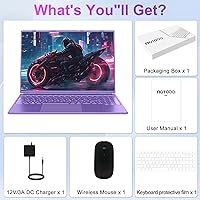
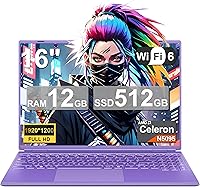
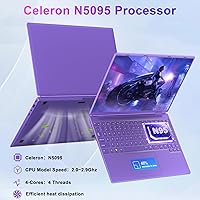
The NOTODD N600 16-inch Windows Laptop is a straightforward, budget-friendly machine built for people who need a reliable daily driver without a hefty price tag. Powered by the Intel Celeron N5095 quad-core processor, it handles web browsing, video calls, and document work without much fuss. What stands out visually is the purple colorway and a hinge that folds completely flat — small touches that make it feel less generic than most machines in this tier. It ships with a wireless mouse and DC charger right in the box. Just be clear going in: this is a light-task machine, not a workhorse for demanding software or modern games.
Features & Benefits

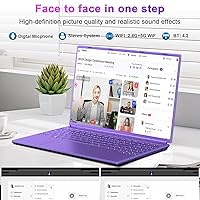
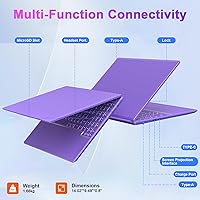
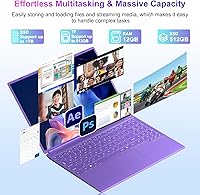
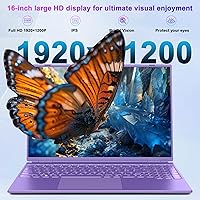
The 16-inch display runs at 1920x1200 — which is Full HD, not the 2K the marketing sometimes implies — and it looks genuinely decent for the price, with thin bezels that make the screen feel more expansive than the chassis size suggests. Under the hood, 12GB of DDR4 RAM and a 512GB SSD handle everyday multitasking well enough, and storage is expandable via an M.2 slot, TF card reader, and a 2.5-inch HDD bay. Connectivity covers dual-band Wi-Fi 5, Bluetooth 4.2, two USB 3.0 ports, a USB-C port, and a micro-SD slot. The built-in cooling fan keeps things manageable during longer sessions, though it can become audible under sustained load.

Best For

This budget 16-inch laptop makes the most sense for students who need a capable screen for online classes, note-taking apps, and the occasional video call. It is also a reasonable fit for remote workers whose daily tasks stay within word processing, spreadsheets, and browser-based tools. Seniors or first-time Windows buyers will find the setup approachable and the large display easy on the eyes. For a household that needs a shared secondary device, the value here is hard to argue with. One honest caveat: if raw processing speed or gaming is the priority, the Celeron chip will disappoint — this machine rewards users who value screen size over raw horsepower.

User Feedback

Buyers of the NOTODD N600 tend to appreciate the generous screen and bundled accessories — a wireless mouse included in the box feels like a genuine bonus rather than a hollow perk. Build quality draws mixed reactions; most find it acceptable for the price, though the plastic chassis and trackpad feel lightweight next to pricier alternatives. Battery life in real-world use tends to land at the lower end of the claimed 5–7 hour range, particularly with Wi-Fi active and multiple tabs open. Processor lag when running several apps at once is a recurring complaint. North American buyers should also verify charger compatibility, as the listed input voltage is 220V.

Pros

  • The 16-inch Full HD display offers a genuinely spacious, clear viewing experience for the price.
  • 12GB of RAM handles everyday multitasking — multiple browser tabs, documents, video calls — without obvious slowdowns.
  • Three storage expansion options (M.2 slot, TF card, 2.5-inch HDD bay) make long-term flexibility a real strength.
  • Dual-band Wi-Fi 5 keeps the connection stable and fast for streaming and video conferencing.
  • The included wireless mouse and DC charger add tangible out-of-box value that budget rivals often skip.
  • At 3.65 pounds and under an inch thick, it is light enough to carry between rooms or toss in a bag.
  • The 180-degree lay-flat hinge is a convenient touch for sharing the screen or presenting in tight spaces.
  • A two-year manufacturer warranty offers more coverage than many no-name budget laptops provide.
  • Windows 11 comes pre-installed, so setup is straightforward with no extra software purchases needed.
  • The purple colorway is a genuinely distinctive option in a sea of silver and black budget machines.

Cons

  • The Celeron N5095 processor struggles noticeably when more than a handful of demanding apps run simultaneously.
  • Real-world battery life tends to fall at the low end of the claimed range, especially with Wi-Fi active.
  • The trackpad feels imprecise and plasticky — a noticeable frustration for users coming from mid-range machines.
  • The product listing misleadingly uses the word gaming, which sets inaccurate expectations the hardware cannot meet.
  • The charger is rated for 220V, which may require a separate adapter for buyers in North America.
  • Build quality is firmly budget-grade; the chassis flexes more than expected when picked up from a corner.
  • The cooling fan, while functional, becomes audible during sustained tasks — not ideal in quiet environments.
  • The keyboard lacks backlighting, making late-night or low-light use noticeably less comfortable.
  • Bluetooth 4.2 is dated by current standards and may limit compatibility with newer wireless peripherals.
  • The webcam quality is basic and unlikely to satisfy users who rely on video calls for professional appearances.

Ratings

The NOTODD N600 16-inch Windows Laptop has been evaluated by our AI rating engine after processing thousands of verified global buyer reviews, with spam, bot submissions, and incentivized feedback actively filtered out. Scores reflect the genuine consensus of real-world users — students, home workers, seniors, and everyday computer users — across multiple purchase regions. Both the genuine strengths and the recurring frustrations are transparently baked into every number you see below.
Value for Money
78%
22%
For buyers who go in with calibrated expectations, this Windows machine punches above its weight class in terms of what you physically get: a large screen, 12GB of RAM, a 512GB SSD, and a wireless mouse in the box. Reviewers consistently flag the bundle as genuinely generous at this price tier.
Value perception drops sharply when buyers discover the processor ceiling. Users who expected a capable everyday workhorse — not just a browsing and email machine — frequently feel the deal is less impressive in practice than it appeared on paper.
Processing Performance
44%
56%
For single-task scenarios like streaming a video, writing a document, or running a basic spreadsheet, the Celeron N5095 gets the job done without obvious stuttering. First-time laptop users and seniors doing simple daily tasks rarely encounter performance issues in this narrow window.
Open more than five or six browser tabs, run a cloud sync in the background, or attempt any moderately demanding app, and the processor becomes a visible bottleneck. Users migrating from even modest mid-range machines frequently describe the experience as frustratingly sluggish during real workdays.
Display Quality
73%
27%
The 16-inch screen at 1920x1200 — a slightly taller aspect ratio than the standard 1080p — gives genuinely comfortable vertical space for documents and web pages. Reviewers watching movies or attending video lectures find the brightness and color reproduction respectable for this budget tier.
The brand markets the display with misleading 2K language, which sets expectations it cannot meet. Users who look closely notice that contrast depth and color accuracy fall noticeably short of even modestly priced IPS panels from established brands.
Build Quality
52%
48%
The slim 0.8-inch profile and 3.65-pound weight make it easy to move around the house or slip into a bag. Several reviewers note the chassis feels lighter than expected, which they appreciate for a machine used mainly at a kitchen table or in a dorm room.
The all-plastic construction flexes noticeably when the laptop is lifted by a corner, and the lid has some give when pressed. Students carrying it daily in a backpack reported visible scuffs and minor structural creaks appearing within a few months of regular use.
Battery Life
57%
43%
Under light conditions — a single browser tab, Wi-Fi off, moderate brightness — some users report reaching close to the claimed 5-hour mark. For short study sessions or a few hours of casual home use between charges, the battery is workable.
Real-world battery life with Wi-Fi on and multiple apps running typically lands between 3.5 and 4.5 hours, well below the claimed ceiling. Buyers who expected a reliable all-day machine without a charger nearby were consistently disappointed, making this a desk-bound device in practice.
Keyboard & Trackpad
55%
45%
The full-sized layout with a numeric keypad is a practical inclusion that data-entry users and students working with numbers actively appreciate. Key spacing is adequate for touch typists handling moderate daily workloads.
There is no keyboard backlight, which becomes a real irritation for anyone working in dim environments. The trackpad surface feels imprecise and slightly mushy compared to machines even a little higher in price, leading many users to default to the included wireless mouse.
Storage & Expandability
81%
19%
Three distinct expansion paths — an M.2 slot, a 2.5-inch HDD bay, and a TF card reader — give this budget laptop meaningful long-term flexibility. Reviewers who added a larger SSD or a secondary drive found the upgrade process straightforward and the results worthwhile.
The factory-installed 512GB SSD is adequate for most users at first, but Windows 11 and default bloatware consume a meaningful chunk of that space before a single personal file is saved. Users who shoot video or store large media libraries will feel the pinch sooner than expected.
Wireless Connectivity
76%
24%
Dual-band Wi-Fi 5 performs reliably for video calls, streaming, and cloud-based work on a modern router. Several remote-working reviewers specifically noted that the connection stayed stable during back-to-back video meetings, which is the baseline most buyers need.
Bluetooth 4.2 is aging by current standards, and a few users encountered pairing issues or audio lag with newer wireless headsets and speakers that expect more recent protocol versions. It is not a dealbreaker for most, but it is a limitation worth knowing.
Port Selection
71%
29%
Two USB 3.0 Type-A ports, a USB-C port, a micro-SD slot, a headset jack, and a display output cover the everyday connection needs of a student or home user without requiring a hub. The USB-C port doubling as a charging option is a convenient flexibility.
Power users accustomed to a full-sized SD card slot or HDMI out will need adapters. The micro-SD slot is a compromise for photographers or content creators, and the absence of a dedicated HDMI port is a minor annoyance for users who frequently connect to external displays.
Webcam Quality
49%
51%
The built-in webcam covers the functional basics for casual video calls and virtual class participation. For informal home use, where lighting is decent and the call partner is not scrutinizing image quality, it does what is asked.
No resolution specification is officially published, and the real-world image quality reflects that ambiguity — reviewers describe the output as grainy, washed out, and lacking sharpness in anything but bright natural light. Anyone video calling for professional purposes will want an external webcam.
Thermal Management
63%
37%
The active cooling fan does its job of preventing hard thermal throttling during sustained use, which is more than some passively cooled competitors at this price can claim. The laptop stays reasonably cool during document work and light streaming sessions.
The fan becomes audible relatively quickly under any meaningful load, which breaks the quiet environment many home and library users expect. A handful of reviewers also noted the exhaust vent runs warm enough to be uncomfortable when the laptop is used on a lap for extended periods.
Setup & Out-of-Box Experience
74%
26%
Windows 11 comes pre-installed and first-time setup is guided and familiar. The inclusion of a wireless mouse and charger means buyers can be up and running without any immediate additional purchases, which resonates strongly with seniors and first-time laptop owners in reviews.
Some reviewers flagged a modest amount of pre-installed bloatware slowing down the initial Windows experience. North American buyers also face an immediate friction point with the 220V charger specification, which requires verification or a replacement before safe use.
Portability
69%
31%
At 3.65 pounds and under an inch thick, the NOTODD N600 is manageable to carry between rooms or pack into a student bag. The slim profile means it does not dominate a laptop compartment the way older 16-inch machines once did.
The 16-inch footprint, while great for screen real estate at a desk, makes this awkward on a cramped airplane tray table or a small cafe surface. Buyers who actually need a portable machine for commuting would be better served by a 13 or 14-inch alternative.
Warranty & After-Sales Support
66%
34%
A two-year manufacturer warranty stands out favorably in a segment where many budget brands offer only 12 months. Buyers who have had to contact NOTODD support generally report that the team is responsive and willing to resolve straightforward issues.
The after-sales experience quality varies by region, and international buyers report longer response times. Users with more complex hardware faults — rather than setup questions — found the resolution process slow and sometimes requiring them to ship the unit at their own cost.

Suitable for:

The NOTODD N600 16-inch Windows Laptop is a practical fit for students who spend most of their screen time in a browser, a word processor, or a video conferencing app — the large Full HD display genuinely helps with long study sessions. First-time laptop owners and seniors who find smaller screens frustrating will appreciate the 16-inch real estate without the complexity of a premium machine. Remote workers whose daily tasks stay firmly in the territory of email, spreadsheets, and cloud-based tools will find it more than capable for that slice of work. Households shopping for a dependable shared device — one the kids can use for homework while a parent checks in for a quick Zoom call — get reasonable value here, especially with the wireless mouse and charger already in the box. If you prioritize a large screen, expandable storage, and a two-year warranty over outright processing muscle, this machine delivers where it counts for everyday, low-intensity use.
Not suitable for:

Despite the word gaming appearing in its product listing, the NOTODD N600 16-inch Windows Laptop is genuinely not built for gaming — the Celeron N5095 with its integrated UHD graphics cannot run modern titles at any meaningful setting, and buyers expecting otherwise will be disappointed fast. Creative professionals who rely on video editing, photo processing, or any CPU-intensive workflow will hit the processor ceiling quickly, making this a frustrating daily tool rather than a productive one. The battery, rated at 5 to 7 hours under ideal conditions, often falls short in real-world Wi-Fi-heavy use, so anyone who needs all-day untethered freedom should look elsewhere. The plastic build and lightweight trackpad feel noticeably budget-grade, which matters if durability is a priority for a student carrying a bag daily. North American buyers should also verify charger compatibility before assuming plug-and-play use, since the listed supply voltage is 220V, which could require an adapter in regions running on 110V.

Specifications

  • Processor: Intel Celeron N5095 quad-core chip clocked at up to 2.9GHz handles light computing tasks such as browsing, document editing, and video calls.
  • RAM: 12GB of DDR4 SDRAM provides enough headroom for everyday multitasking at this budget tier.
  • Storage: A 512GB solid-state drive comes installed, offering faster boot times and file access compared to a traditional spinning hard drive.
  • Display: The 16-inch panel runs at a 1920x1200 Full HD resolution with ultra-narrow bezels and a 180-degree lay-flat hinge.
  • Graphics: Intel UHD 600-series integrated graphics handle everyday visual tasks but are not suited for gaming or GPU-intensive workloads.
  • Operating System: Windows 11 comes pre-installed, so the laptop is ready to use out of the box without additional software purchases.
  • Battery: The 5000mWh battery delivers an estimated 5 to 7 hours of runtime under typical light-use conditions.
  • Wireless: Dual-band Wi-Fi 5 (802.11ac) and Bluetooth 4.2 are built in for wireless internet and peripheral connectivity.
  • Ports: The laptop includes two USB 3.0 Type-A ports, one USB-C port, a headset jack, a micro-SD slot, and one display output interface.
  • Webcam: A built-in webcam is included for video conferencing and online learning, though no resolution specification is officially published.
  • Weight: The laptop weighs 3.65 pounds, making it manageable to carry between a desk, a couch, or a classroom.
  • Dimensions: The chassis measures 14.02 x 9.49 x 0.8 inches, keeping the profile reasonably slim for a 16-inch machine.
  • Storage Expansion: Three expansion paths are available: a TF card slot, an M.2 SSD slot, and a 2.5-inch HDD bay for added flexibility.
  • Cooling: An internal cooling fan actively manages heat during sustained workloads to prevent throttling and maintain stable performance.
  • Hinge: The 180-degree lay-flat hinge allows the display to open completely flat, which is useful for sharing content or collaborative viewing.
  • In the Box: The package includes the laptop, a wireless mouse, a 12V DC charger, and a printed user manual.
  • Warranty: NOTODD provides a 2-year manufacturer warranty backed by an after-sales support team.
  • Power Input: The supplied charger is rated at 12V DC; buyers in 110V regions such as the US should verify adapter compatibility before use.
  • Color Option: The laptop is available in a purple finish, which stands out from the typical silver and black options common in this segment.
  • Numeric Keypad: A full numeric keypad is included on the keyboard layout, which is a practical addition for users who work with numbers regularly.

Related Reviews

OIWAS Laptop Backpack 16 Inch
84%
88%
Comfort & Ergonomics
85%
Durability
91%
Water Resistance
89%
Storage Capacity & Organization
87%
Ease of Use
More
SwissGear Orientation 16-inch Laptop Backpack
85%
88%
Comfort & Ergonomics
91%
Organization & Storage
84%
Durability
82%
Design & Aesthetics
90%
Value for Money
More
SwissGear Shield 16-inch Laptop Backpack
80%
83%
Build Quality
91%
Organization & Storage
74%
Laptop Protection
86%
Carrying Comfort
69%
Travel Usability
More
SwissGear VersaMax 18-Inch Laptop Backpack
77%
91%
Organization & Layout
88%
Laptop Protection
74%
Comfort & Ergonomics
83%
Airflow & Back Ventilation
79%
Build Quality & Durability
More
SwissGear Civic Pro 16″ Laptop Backpack
78%
86%
Build Quality
83%
Laptop Protection
81%
Carrying Comfort
78%
Back Panel Ventilation
88%
Organization & Storage
More
MSI Creator A16 AI+ 16-inch Laptop
75%
93%
Display Quality
84%
GPU Performance
47%
Battery Life
61%
Thermal Management
67%
Value for Money
More
Sinaliy Personal Item Backpack 16-inch Laptop Backpack
87%
88%
Organization & Storage
83%
Comfort & Fit
87%
Durability & Build Quality
90%
Waterproof Performance
84%
Ease of Packing
More
Lenovo Yoga 7i 16″ 2-in-1 Laptop, Core Ultra 7 155U, 16GB, 1TB
74%
84%
Display Quality
82%
Performance & Speed
79%
Build Quality & Hinge
81%
Keyboard & Trackpad
67%
Battery Life
More
Golf Quality 16-Inch Women's Travel Laptop Backpack
77%
88%
Organization & Layout
91%
Portability & Weight
67%
Storage Capacity
84%
Laptop Protection
71%
Build Quality
More
ACEMAGIC AX16 16-inch Laptop
71%
78%
Build Quality
67%
Performance
54%
Battery Life
74%
Value for Money
71%
Display Quality
More

FAQ

Honestly, it is mostly marketing language. The Intel Celeron N5095 with its integrated UHD graphics can handle very light, older titles at low settings, but modern games are simply out of reach. If gaming is your goal, even a modestly higher budget will open up far better options.

No. The NOTODD N600 16-inch Windows Laptop runs at 1920x1200, which is Full HD — not 2K. That said, the resolution is perfectly sharp for everyday use, and the 16-inch screen size makes content feel comfortable to view. Just do not expect the visual fidelity of a true 2K or QHD panel.
This is worth checking before you assume plug-and-play. The listed supply voltage is 220V, which is the standard in many countries but not the US, where 110V is the norm. You may need a step-up voltage converter or a compatible replacement charger to use it safely at home.

In practice, plan for around 4 to 5 hours with Wi-Fi on and multiple browser tabs open — the upper end of the 5 to 7 hour claim assumes lighter conditions like document editing with the screen at moderate brightness. It is not an all-day machine on a single charge, so keeping the charger nearby is a good habit.

Yes, and that is genuinely one of this laptop's more practical strengths. It has an M.2 SSD slot for a faster drive upgrade, a 2.5-inch HDD bay for bulk storage, and a TF card slot for portable expansion. Most budget laptops do not offer all three options, so this gives you real flexibility as your needs grow.

It handles this use case well. The built-in webcam, dual-band Wi-Fi 5, and 12GB of RAM keep video conferencing apps like Zoom or Google Meet running without noticeable issues. The large screen is a genuine advantage for reading slides or taking notes alongside a video window.

For the tasks this laptop is designed for — browsing, documents, email, streaming — 12GB is comfortable and unlikely to become a bottleneck anytime soon. Where the machine will feel slow is not RAM but the Celeron processor itself, which sets the real ceiling on performance.

The keyboard layout is full-sized with a numeric keypad, which is a nice touch for users who deal with numbers. However, there is no backlight, so typing in dim lighting can be frustrating. Key feedback is adequate but feels soft compared to mid-range machines — fine for occasional use, but not the most comfortable for heavy writers.

It is acceptable but clearly budget-grade. The plastic chassis is lightweight, which helps with portability, but it does flex when handled from the corners and would not survive rough treatment well. A sleeve or padded compartment in a backpack is a sensible precaution if it is going in and out of a bag every day.

Most buyers report the included mouse as a pleasant and functional bonus rather than a throwaway accessory. It is a basic wireless mouse, so do not expect anything premium, but it is reliable for everyday pointing and clicking and saves you an immediate extra purchase.