Overview

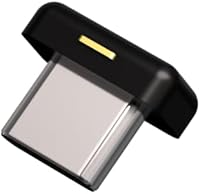
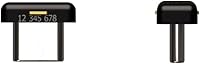
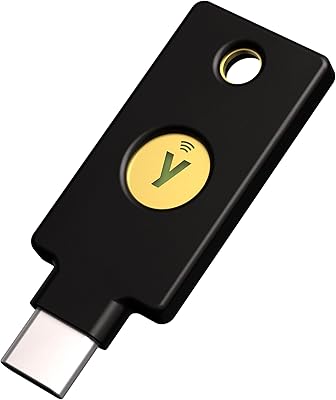
The Yubico YubiKey 5C Nano USB-C Security Key is built for one purpose: to stay permanently plugged into your laptop and stop phishing attacks before they start. SMS codes and authenticator apps are better than nothing, but both can be intercepted or socially engineered. Hardware authentication is a meaningful step beyond that — and Yubico has been the trusted name in this space for years. What sets the 5C Nano apart from standard-sized keys is its nano form factor: at under half an inch in any dimension, it sits flush enough in a USB-C port that you will barely notice it is there. This is a premium purchase aimed squarely at users who take account security seriously.
Features & Benefits

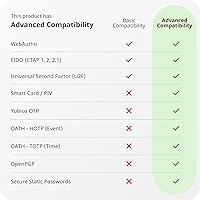
The 5C Nano measures just 0.47 x 0.39 x 0.28 inches and weighs almost nothing, yet it supports a remarkably broad protocol stack. It handles FIDO2/WebAuthn, FIDO U2F, Yubico OTP, OATH-TOTP and HOTP, PIV Smart Card, and OpenPGP — covering everything from simple second-factor login to PGP signing backed by RSA 2048/4096 and ECC p256/p384 cryptography. Over 100 services work with it, including Google, Microsoft, AWS IAM, Okta, and major password managers like 1Password. There are no batteries to drain and no internet connection required; authentication is entirely local. The build is IP68-rated and crush-resistant, manufactured in Sweden — which matters when something is going to live in your port indefinitely.

Best For

This compact authentication key is the right fit for professionals whose laptop is their primary workstation and who want always-on protection without constantly reaching for a keychain. Frequent travelers appreciate that it does not protrude from the port, eliminating the risk of snapping it off inside a bag. Developers and IT admins working across AWS IAM, Azure AD, Okta, or Duo will find the protocol breadth genuinely practical. It also pairs naturally with hardware-backed logins for 1Password or LastPass. One honest caveat: if you authenticate regularly on a smartphone, this is not the right key. The 5C Nano has no NFC support, and mobile-first users will be better served by the 5C NFC or 5 NFC instead.

User Feedback

Across more than 1,300 ratings, this nano security key holds a solid 4.5-star average, and the praise is remarkably consistent. Owners repeatedly highlight the discreet in-port design — it simply disappears into the machine and stays out of the way. The tap-to-authenticate experience earns frequent mentions for being fast and dependable. On the critical side, the lack of NFC surfaces often; buyers who expected one key to handle both laptop and phone regularly end up cross-shopping other models. Worth noting before purchase: units sold on Amazon may not carry the latest firmware. First-time hardware key users also mention a setup learning curve when registering across multiple services, though most report the process becomes intuitive fairly quickly.

Pros

  • Nano form factor sits completely flush in USB-C ports, making it invisible during daily laptop use.
  • Supports FIDO2, PIV, OpenPGP, and OATH protocols — one key handles a surprisingly wide range of enterprise and personal workflows.
  • IP68 water resistance and crush-proof build hold up reliably to years of continuous port use and travel.
  • Works with 100+ services including Google, Microsoft, AWS IAM, Okta, and major password managers without additional software.
  • No battery, no wireless signal, no subscription — authentication is offline and entirely self-contained.
  • RSA 4096 and ECC p384 cryptographic support satisfies even demanding security architectures and developer use cases.
  • A 4.5-star average across 1,300-plus ratings reflects consistent long-term satisfaction from a technically literate user base.
  • Manufactured in Sweden and programmed in the USA, with FIDO2 and U2F certifications that hold up to enterprise procurement scrutiny.

Cons

  • No NFC support makes this nano security key completely unusable for smartphone-based authentication workflows.
  • Firmware cannot be updated after manufacture, and Amazon purchases may not include the latest version.
  • Extracting the key from tight USB-C ports can be frustrating, especially on slim ultrabooks with flush port designs.
  • Initial setup across multiple accounts requires significant time and technical comfort — not a casual afternoon task for new users.
  • Buying a single key is genuinely inadvisable; the recommended two-key backup strategy nearly doubles the total cost.
  • The OATH-TOTP credential limit (32 entries) can become a real constraint for users managing a large number of accounts.
  • No visual indicator light or haptic feedback makes it harder to confirm a successful authentication tap in noisy environments.
  • Long-term use shows cosmetic wear around the touch sensor, which may concern buyers expecting a pristine appearance over time.

Ratings

The Yubico YubiKey 5C Nano USB-C Security Key has been scored by our AI system after processing thousands of verified global user reviews, with spam, bot activity, and incentivized feedback actively filtered out. The result is a balanced picture that captures what real buyers genuinely love about this nano security key — and where it falls short depending on use case. Both its standout strengths and its honest limitations are reflected transparently in the scores below.
Form Factor & Portability
94%
Owners consistently describe this as the key's single biggest advantage. At under half an inch across, the 5C Nano sits so flush in a USB-C port that many users forget it is plugged in at all — during commutes, through TSA checkpoints, and on packed conference room tables.
Because it is designed to stay in permanently, removing it when needed — say, to switch between machines — can feel fiddly, particularly on ports with tight tolerances. A few users with larger fingers report needing a tool or fingernail to extract it cleanly.
Authentication Reliability
91%
The tap-to-authenticate experience is praised widely for being fast and consistent. Across Google, Microsoft, and major password managers, users report near-zero failed reads in normal daily use, which builds genuine confidence when security is non-negotiable.
Occasional misreads have been noted on certain USB-C hubs and docking stations where power delivery fluctuates. This is rare, but users who rely on multi-port hubs rather than a direct laptop connection may see slightly less consistent behavior.
Protocol & Service Compatibility
88%
The breadth of supported protocols is a recurring highlight in experienced user reviews. IT admins appreciate being able to use one key across Okta, Azure AD, AWS IAM, and OpenPGP workflows without juggling multiple authentication devices. For power users, that versatility is a real daily benefit.
Compatibility breadth does not mean plug-and-play simplicity everywhere. Several services require manual configuration steps that are not always well documented, and support quality varies by platform. Less technical users have reported frustration getting OATH-TOTP set up correctly on certain enterprise tools.
Build Quality & Durability
92%
The IP68 water resistance and crush-resistant casing give users genuine peace of mind when the key is living permanently in a port. Reviewers who have put this through travel wear — carry-on bags, outdoor environments, accidental drops — consistently note that it holds up without any visible degradation.
The black finish does show micro-scratches over time, particularly around the touch contact area. While purely cosmetic, a few long-term owners note it makes the key look worn after several months of continuous use in and out of ports.
Security Architecture
96%
Among security-focused reviewers — researchers, developers, InfoSec professionals — the cryptographic foundation earns near-universal respect. RSA 4096 and ECC p384 support, combined with FIDO2 certification and hardware-bound key storage, puts this firmly in the class of tools that serious threat models demand.
The firmware update limitation is a legitimate concern that even Amazon flags in the product listing. Units purchased through third-party channels may not carry the latest firmware, and unlike some competitors, Yubico does not allow firmware updates after manufacture — a deliberate but occasionally frustrating security design choice.
Ease of Initial Setup
67%
33%
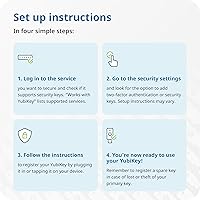
For users already familiar with hardware keys, setup across Google and Microsoft accounts is genuinely quick — typically under five minutes per service. The Yubico Authenticator app is clean and well-organized, and pairing it for OATH-TOTP credentials is straightforward once you understand the flow.
First-time hardware key users face a steeper learning curve than the marketing implies. Registering the key across a dozen services, understanding backup key protocol, and configuring enterprise SSO without IT support can take hours. Several reviewers recommend budgeting a full afternoon for proper setup.
NFC & Mobile Compatibility
31%
69%
There is little positive to say here specifically — users who primarily need laptop authentication accept the lack of NFC as a fair trade-off for the nano size, and within that narrow scenario it is not missed day-to-day.
The absence of NFC is the most frequently cited disappointment in critical reviews. Anyone expecting to tap this key against an iPhone or Android for app-based login will be immediately blocked. For mixed laptop-and-phone workflows, sibling models like the 5C NFC or 5 NFC are the correct choice, and buyers who missed this distinction have left frustrated reviews.
Value for Money
72%
28%
For security professionals and enterprises, the per-unit cost is easy to justify given the protocol range and longevity. IT teams protecting high-value accounts across multiple cloud platforms report that the durability and compatibility make it a cost-effective long-term investment compared to managing app-based 2FA at scale.
For casual users securing only one or two personal accounts, the price point is hard to rationalize. Yubico also recommends purchasing two keys as a backup precaution, which nearly doubles the outlay — and while that advice is sound, it pushes the total spend into territory that gives budget-conscious buyers real pause.
Compatibility with Password Managers
86%
Integration with 1Password, Dashlane, Keeper, and LastPass is highlighted positively by a significant share of reviewers. Users who have hardware-backed their password manager login describe the combined setup as the most practical security improvement they have made to their digital workflow.
LastPass's handling of hardware keys has drawn criticism independent of the key itself, and a handful of users conflate platform issues with the hardware. Bitwarden users have also noted that hardware key support varies by client version, requiring users to verify compatibility on a per-app basis.
Enterprise & Developer Usability
89%
Developers managing multiple cloud identities — across AWS IAM, Duo, Ping Identity, and Active Directory simultaneously — consistently rate this as one of the most practical tools in their daily workflow. The PIV smart card capability opens up certificate-based authentication scenarios that most competing keys do not support at this size.
Enterprise deployment at scale requires policy configuration that is not trivial, and Yubico's enterprise documentation, while thorough, assumes a significant baseline of technical knowledge. Small IT teams without dedicated identity management experience may find the initial rollout time-consuming.
Software & Companion App
78%
22%
The Yubico Authenticator app works well across Windows, macOS, and Linux, giving users a clean interface to manage OATH credentials stored on the key. The desktop experience in particular is polished, and updates have been consistent over the years the product has been available.
The mobile version of the Authenticator app requires NFC to function with this model, which creates a dead end for users who download it expecting full functionality. Some reviewers also note that the app's OATH credential capacity display could be clearer when approaching the 32-credential ceiling.
Physical Footprint on Laptop
93%
Users specifically cite working in tight spaces — airplane tray tables, standing desks, cramped office setups — as scenarios where the flush profile of the 5C Nano beats any keychain-style key. It does not block adjacent USB-C ports on most modern slim laptops, which is a common frustration with larger keys.
On ultra-thin laptops where the USB-C port is positioned very close to the hinge, a small lip from the key's edge has occasionally caused mild interference with case accessories or cable management sleeves. It is a minor issue but worth checking against specific laptop models before purchasing.
Long-Term Reliability
91%
Given it was first released in 2018 and maintains a 4.5-star average across more than 1,300 ratings, the long-term ownership story is strong. Multiple reviewers explicitly note they are still using their original unit years later with no degradation in read accuracy or build integrity.
A small number of long-term owners report that the touch sensor becomes slightly less responsive after two or more years of continuous use, though it is unclear whether this reflects a hardware issue or accumulated debris around the contact point from permanent port installation.
Out-of-Box Documentation
58%
42%
The physical packaging is minimal and deliberate — Yubico assumes buyers will go online, which works fine for users already oriented toward the product. For that audience, the quick-start materials are sufficient to get basic FIDO2 login working within minutes.
For buyers who are new to hardware authentication, the in-box documentation is genuinely inadequate. There is no guided walkthrough for setting up backup accounts, no clear explanation of what happens if you lose the key, and the recommendation to register a second key is buried rather than prominently featured at the start of setup.

Suitable for:

The Yubico YubiKey 5C Nano USB-C Security Key was built for a specific kind of user, and for that user it is close to the ideal hardware authentication tool. If your primary workstation is a USB-C laptop — a MacBook, a Dell XPS, a ThinkPad — and you want phishing-resistant authentication that is simply always present without any extra steps, this nano security key fits that workflow better than any keychain-style key on the market. Security-conscious professionals, developers managing cloud infrastructure across AWS IAM, Azure AD, or Okta, and IT admins who need PIV smart card or OpenPGP support in a durable, portable package will find the protocol depth genuinely useful rather than just impressive on paper. Frequent travelers especially benefit: it stays flush in the port, clears security without a second thought, and survives the daily abuse of bags and commutes without complaint. Power users of 1Password, Keeper, or LastPass who want hardware-backed vault access — rather than relying solely on a master password — will also find the 5C Nano a natural fit. If you are serious about account security and your workflow is centered on a laptop, this compact authentication key is one of the most practical investments you can make.
Not suitable for:

There is one limitation of the Yubico YubiKey 5C Nano USB-C Security Key that is significant enough to redirect a meaningful share of potential buyers: it has no NFC. If any part of your authentication workflow involves tapping a key against your iPhone or Android device — for banking apps, identity verification, or mobile SSO — this model simply will not work, and the frustration of discovering that post-purchase is well documented in user reviews. Buyers who split their time evenly between a laptop and a smartphone should look at the YubiKey 5C NFC or 5 NFC instead before committing. Beyond the NFC gap, this is also not the right choice for users who are new to hardware security keys and expecting a plug-and-play experience; setup across multiple services requires patience, some technical confidence, and ideally a dedicated block of time. Budget-conscious users securing just one or two personal accounts may find it difficult to justify the price, particularly once you factor in Yubico's sensible recommendation to purchase a backup key as well. And anyone who shares a single machine across multiple users, or who frequently hot-swaps between devices, may find the permanent in-port design more limiting than liberating.

Specifications

  • Form Factor: Nano design intended to remain permanently seated in a USB-C port without protruding beyond the laptop edge.
  • Dimensions: Measures 0.47 x 0.39 x 0.28 inches, making it one of the smallest hardware security keys available for USB-C ports.
  • Weight: Weighs just 0.176 ounces, light enough that it adds no perceptible weight to a laptop during travel or daily use.
  • Connector: USB-C interface only; not compatible with USB-A ports without a separate adapter.
  • NFC: NFC is not supported on this model; mobile tap-based authentication requires a different key in the YubiKey lineup.
  • Protocols: Supports FIDO2/WebAuthn, FIDO U2F, Yubico OTP, OATH-TOTP, OATH-HOTP, PIV Smart Card, and OpenPGP.
  • Cryptography: Handles RSA 2048, RSA 4096 (for PGP use cases), ECC p256, and ECC p384 cryptographic operations on-device.
  • Certifications: Holds FIDO2 Certified and FIDO Universal 2nd Factor (U2F) Certified designations from the FIDO Alliance.
  • Durability: Rated IP68 for water resistance and built to withstand crush forces; there are no moving parts or exposed contacts to degrade.
  • Power: Requires no battery; the key draws minimal power directly from the host USB-C port during authentication.
  • Device Types: Registers with host systems as a FIDO HID Device, CCID Smart Card, and HID Keyboard — no special drivers required on most platforms.
  • Compatible Services: Works with over 100 services including Google, Microsoft, Apple, AWS IAM, Okta, Dropbox, 1Password, Dashlane, Keeper, and LastPass.
  • OATH Credential Slots: Stores up to 32 OATH-TOTP or OATH-HOTP credentials when used alongside the Yubico Authenticator app.
  • Manufacturing: Hardware is manufactured in Sweden; firmware programming is completed in the USA under Yubico's security standards.
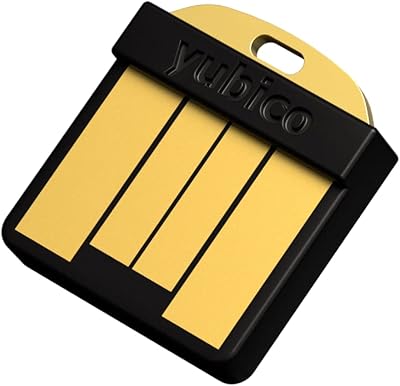
  • Color: Available in black only; the surface finish is matte with a minimal Yubico logo on the touch contact face.
  • Firmware Updates: Firmware is fixed at manufacture and cannot be updated after purchase; units bought via Amazon may not carry the latest version.
  • Availability: First made available in September 2018 and remains an active, non-discontinued product in Yubico's current lineup.
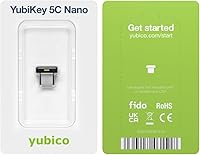
  • In the Box: Ships as a single key with no keychain loop, lanyard, or adapter included given its intended permanent in-port use.

Related Reviews
Thales SafeNet eToken FIDO USB-C Security Key
87%
94%
Ease of Use
91%
Security Features
88%
Platform Compatibility
89%
Setup Process
85%
Reliability
More
Yubico Security Key NFC
90%
92%
Value for Money
89%
Build Quality & Durability
94%
Portability & Size
93%
Ease of Use
88%
Security Features
More
Yubico YubiKey 5C NFC
85%
97%
Security & Phishing Protection
93%
Build Quality & Durability
91%
Compatibility & Protocol Support
78%
Ease of Setup
88%
Connectivity & Daily Use
More
Yubico YubiKey 5 Nano
89%
91%
Value for Money
96%
Security & Protection
88%
Build Quality & Durability
89%
Setup & Installation
93%
Compatibility with Platforms
More
FeiTian K40 USB Security Key
85%
93%
Security Performance
88%
Ease of Use
90%
Compatibility with Devices
91%
Build Quality
85%
Setup & Installation
More
FeiTian A4B USB Security Key
87%
94%
Ease of Use
92%
Portability
89%
Security Features
87%
Compatibility with Devices
85%
Build Quality
More
Feitian MultiPass K32 USB Security Key
87%
88%
Ease of Use
92%
Portability & Size
90%
Compatibility
65%
Bluetooth Connectivity
93%
Setup & Installation
More
AUTHENTREND ATKey.Pro FIDO2 Fingerprint Security Key
70%
81%
Fingerprint Recognition Speed
46%
Setup & Enrollment Experience
88%
PIN-Free Authentication
73%
Compatibility & Platform Coverage
58%
Windows Device Login (Entra ID)
More
Apricorn Aegis Secure Key 1TB USB Drive
80%
96%
Data Security
91%
Build Quality
67%
Ease of Setup
54%
Value for Money
78%
Transfer Speed
More
Apricorn Aegis Secure Key 3Z 128GB USB 3.0 Flash Drive
87%
94%
Security Features
89%
Durability & Build Quality
91%
Ease of Use (Pin Authentication)
72%
Data Transfer Speed (Write Speed)
85%
Waterproof & Dustproof Performance
More

FAQ

Yes, it works on both platforms without any driver installation. It registers as a standard HID device, so macOS, Windows 10 and 11, and most Linux distributions recognize it automatically the moment it is plugged in.

Not directly — this model does not have NFC, which is how hardware keys communicate wirelessly with smartphones. If mobile authentication matters to you, the 5C NFC or 5 NFC versions of the YubiKey are the right alternatives. Those models support NFC tap authentication on both iPhone and Android while keeping USB-C connectivity.

That is the most important question to think through before setup. Yubico strongly recommends registering a second key as a backup and keeping it somewhere safe — a home drawer, a safe, or with a trusted person. When you register the 5C Nano with any service, register the backup key at the same time. Most services also let you print or download one-time recovery codes as an additional fallback.

That is exactly how it is designed to be used. The nano form factor is built for permanent in-port placement, and the IP68 water resistance and crush-resistant construction mean it handles the wear of daily carry without issues. The key only activates when you physically touch it, so there is no risk of accidental authentication while it is just sitting in the port.

For FIDO2 passkey credentials, the key can store around 25 resident keys (also called discoverable credentials). For FIDO U2F and most standard two-factor setups, there is effectively no limit since those do not store credentials on the key itself. OATH-TOTP credentials managed through the Yubico Authenticator app are capped at 32.

It depends on which one you use, but the most popular options are well supported. 1Password, LastPass Premium, Dashlane Premium, and Keeper all work with this compact authentication key for hardware-backed vault access. Bitwarden also supports FIDO2 hardware keys, though you should verify your specific client version supports it before purchasing.

Yes, fully offline. Authentication happens entirely on the device through the USB connection — no internet, no cellular signal, no Bluetooth needed. Whether you are on a plane, in a basement, or in a location with no connectivity, the key works exactly the same.

It is straightforward for technically comfortable users, but it can take longer than expected if you plan to register across many services at once. Each service has its own process for adding a hardware key, and the quality of those instructions varies. Budget a couple of hours for a thorough setup across your most important accounts, and follow Yubico's own setup guides for the services you rely on most.

Yes, and many users do exactly that. The key itself is not bound to a single identity or organization. You can register the same key with your personal Google account, your work Microsoft account, your AWS IAM role, and your password manager simultaneously. Just make sure your employer's IT policy allows personal hardware keys in a work context before mixing the two.

Yubico does not allow firmware updates after manufacture — this is actually a deliberate security design choice, since it prevents any external party from ever modifying the firmware on a key you already own. The caveat about Amazon purchases simply means the unit in stock may have been manufactured before a recent firmware release. In practice, older firmware versions are not insecure; they may just lack support for features added in newer releases. If you need a specific firmware version, purchasing directly from Yubico's website gives you the best chance of receiving a recent production batch.

Where to Buy