Overview

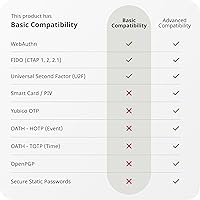
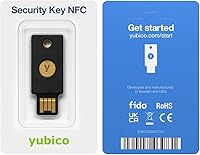
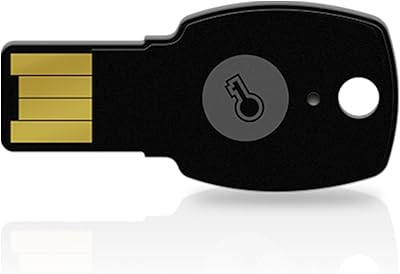
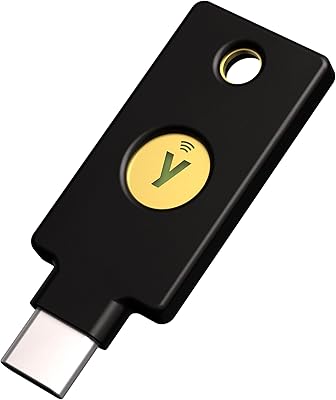
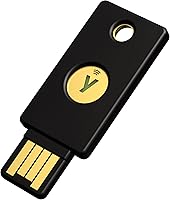
The Yubico Security Key NFC USB Security Key is Yubico's entry-level hardware authenticator, built for people who want real account protection without having to become a security expert. Most people rely on SMS codes or authenticator apps for two-factor login — both of which can be intercepted or phished. This key takes a different approach: you physically plug it in via USB-A or tap it near your phone over NFC, and that physical action is what proves it's really you. It supports FIDO2 and U2F standards, the protocols behind modern passkeys. One thing to know upfront: it does not support one-time passwords. That's a deliberate tradeoff for simplicity, and at this price, it makes hardware security genuinely accessible.
Features & Benefits

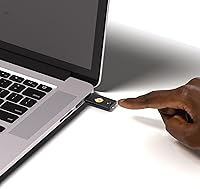
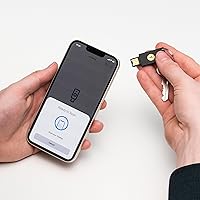
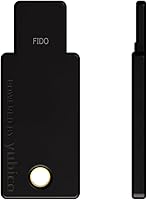
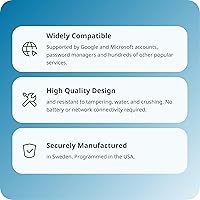
Connectivity is where this security key covers a lot of ground. Plug it into any USB-A port on a Windows, Mac, ChromeOS, or Linux machine, or hold it near an NFC-enabled phone to authenticate in seconds — no app open, no code to type. It works with over 1,000 services, from Google and Microsoft accounts to 1Password, Dropbox, and even crypto platforms. The key runs on FIDO2/WebAuthn and FIDO U2F, making it compatible with the current generation of passkey-based logins. Physically, it's IP68-rated — fully waterproof and crush-resistant — and light enough to live on a keychain without you noticing it. No charging, no syncing, no subscriptions. Just a small piece of hardware that does exactly what it promises.

Best For

This hardware authenticator suits people who want meaningful account protection but don't need the full feature set of a premium key. If you're securing a Gmail account, a password manager like 1Password, or a crypto exchange login, it covers you completely. It's a strong pick for USB-A users who haven't moved to USB-C-only devices yet, and anyone with an NFC-capable smartphone will find mobile authentication quick and painless. It also makes sense to buy two — one for daily carry and one stored safely as a backup key. What it's not ideal for: power users who need OTP support or a USB-C connector, who should look at the YubiKey 5 Series instead.

User Feedback

With a 4.4-star rating across more than 3,000 reviews, the Yubico NFC key earns consistent praise for ease of setup and reliable NFC performance on both Android and iOS. Most buyers mention that getting it working with Google or Microsoft accounts took only a few minutes, and the compact keychain-friendly build is frequently called out as a practical bonus. That said, two complaints come up regularly. Buyers who assumed this key worked identically to the YubiKey 5 were caught off guard by the lack of OTP support. Others with USB-C-only laptops find the connector limiting. Buyers who go in knowing what it does — and doesn't — consistently feel the protection-to-price ratio holds up well.

Pros

  • Works instantly on plug-in or NFC tap — no app to open, no code to type.
  • Compatible with over 1,000 services, covering most accounts people actually care about.
  • IP68 water and crush resistance means it holds up on a keychain through real daily use.
  • FIDO2 and U2F support future-proofs logins as more services adopt passkey standards.
  • No batteries or charging required — ever.
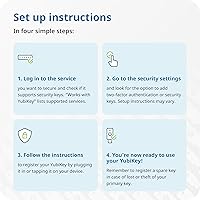
  • Setup with Google, Microsoft, and major password managers takes just a few minutes.
  • Lightweight at 0.353 oz, so it barely registers on your keyring.
  • Made in Sweden and USA under high-security manufacturing standards, not generic overseas production.
  • Affordable enough to buy a second one as a backup without hesitation.

Cons

  • No one-time password support — a real gap for users on OTP-dependent services.
  • USB-A only; owners of USB-C-only laptops or tablets need an adapter or a different model.
  • No visual indicator or screen — you cannot confirm account-specific actions on the key itself.
  • If you lose it and have not registered a backup key, account recovery can be a lengthy ordeal.
  • NFC performance on some Android devices with thick cases can be inconsistent.
  • Not suitable for enterprise use cases requiring smart card or PIV authentication.
  • The lack of OTP support is not clearly communicated at the point of purchase, leading to preventable buyer confusion.
  • No USB-C variant exists in this exact product line — requiring buyers to shop a separate model entirely.

Ratings

The Yubico Security Key NFC USB Security Key was evaluated by our AI system after processing thousands of verified global buyer reviews, with spam, bot-submitted, and incentivized feedback actively filtered out. Scores reflect the honest consensus across real-world use cases — from daily commuters securing Gmail on their phones to IT-adjacent users locking down crypto wallets. Both the genuine strengths and the recurring frustrations are transparently reflected in every category below.
Ease of Setup
91%
Most buyers report getting up and running with Google or Microsoft accounts in under five minutes, with no technical background required. The plug-and-tap experience is consistently described as intuitive — browsers and operating systems handle the heavy lifting without any driver installation.
A small subset of users found the initial registration flow confusing when a service's security settings are buried in account menus. First-time hardware key users occasionally needed to consult a setup guide before the process clicked.
Phishing Protection
96%
This is where the hardware authenticator genuinely outperforms SMS codes and authenticator apps — the physical requirement to tap or plug in makes remote phishing attacks essentially impossible. Users who switched after experiencing account compromise attempts report feeling noticeably more confident about high-value accounts like email and crypto exchanges.
The protection only applies to services that support FIDO2 or U2F — if a platform still relies on SMS fallback, that weaker channel remains a vulnerability outside the key's control. A small number of users were frustrated to discover some niche services they use haven't adopted FIDO standards yet.
NFC Performance
83%
On most modern Android and iOS devices, the NFC tap authentication is fast and consistent — buyers regularly describe it as quicker than typing a code. It works well across a range of flagship phones, and the tap point on the key is easy to locate after a few uses.
Users with thicker phone cases report occasional read failures, requiring them to remove their case or reposition the key. A minority of buyers on older Android devices found NFC authentication unreliable enough that they defaulted to USB as their primary method.
Build Quality
88%
The housing feels solid and well-finished for a keychain accessory — not flimsy or plasticky. Buyers who have carried it on a key ring for a year or more note it shows minimal wear, and its IP68 rating has been tested inadvertently by users who put it through a full laundry cycle with no ill effects.
Some users feel the black finish scratches slightly with regular keychain contact, though this is cosmetic rather than functional. A few buyers noted the keychain hole feels marginally tighter than competing devices, making ring attachment slightly fiddly the first time.
Service Compatibility
87%
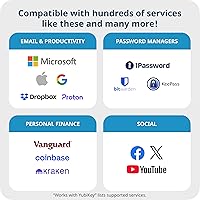
Coverage across major platforms is genuinely broad — Google, Microsoft, Apple ID, Dropbox, 1Password, LastPass, Facebook, and a wide range of crypto platforms all work reliably. For most users securing their everyday accounts, this security key covers everything they need without any gaps.
Compatibility drops off noticeably with legacy enterprise systems, government portals, and smaller niche platforms that haven't adopted FIDO standards. Users trying to secure certain banking or healthcare portals sometimes found those services don't support hardware keys at all yet.
OTP & Protocol Coverage
47%
53%
For users whose services rely entirely on FIDO2 and U2F — which covers the vast majority of popular consumer platforms — the protocol support is well-matched to everyday needs. Buyers who understood this limitation upfront had no issues.
The absence of one-time password support is the single most cited source of buyer disappointment, particularly among users upgrading from a YubiKey 5 or those who assumed all Yubico keys behave identically. If any of your accounts require TOTP codes through an authenticator app, this hardware authenticator cannot replace that workflow.
USB-A Connector
61%
39%
For users on Windows laptops, older MacBooks, Chromebooks, and desktop computers, the USB-A connector works without adapters and fits the vast majority of ports they already use daily. It is the right fit for a large segment of the market.
Owners of newer MacBook Pro or MacBook Air models, iPad Pro users, or anyone who has gone fully USB-C will find the connector incompatible without a dongle. This limitation generates consistent frustration in reviews from buyers who did not check connector type before purchasing.
Value for Money
89%
At its price tier, the Yubico NFC key is widely regarded as offering strong protection-to-cost ratio — buyers frequently note that the peace of mind on high-value accounts feels disproportionately affordable. Many consider purchasing a second key as a backup a no-brainer given the price.
Buyers who later discovered they needed OTP support felt the value proposition broke down once they realized they also had to purchase a more capable key. A small number of users felt the feature set was too narrow to justify even the modest spend compared to free authenticator apps.
Portability & Size
93%
At 0.353 oz and slim enough to forget it is on your keyring, this security key is consistently praised for being genuinely pocketable. Buyers who carry it daily alongside house keys report it adds no meaningful bulk or weight to their everyday carry.
The slim profile means it is easy to misplace if separated from a key ring — several users mention losing one because it slipped out of a bag pocket. There is no color variety, so distinguishing it from a spare key on a ring with multiple items takes a moment.
Cross-Platform Support
86%
Support spans Windows, macOS, ChromeOS, Linux, Android, and iOS without any platform-specific setup differences, which buyers in mixed-device households appreciate. Switching between a Windows work laptop and a personal MacBook requires no reconfiguration.
Linux users occasionally report that specific distributions require manual browser configuration to recognize the key properly. ChromeOS NFC support is limited, pushing those users to rely on USB exclusively.
Account Backup & Recovery
58%
42%
When users follow the recommended two-key setup and register both keys across their accounts from the start, the backup experience works as intended and prevents lockouts reliably.
Users who purchased only a single key and lost it describe a stressful and sometimes multi-day account recovery process across services with strict hardware key policies. The lack of any cloud-based credential backup is a genuine risk for less prepared buyers, and it is not prominently flagged at purchase.
Durability Over Time
91%
Long-term owners who have used this hardware authenticator for two or more years consistently report it still functions exactly as it did on day one. The lack of moving parts and battery means there is simply less to degrade over time.
A small number of users report the USB-A connector becoming slightly loose after extensive daily insertion and removal cycles over several years, though this appears to be an edge case rather than a common failure mode.
Documentation & Support
74%
26%
Yubico's online support documentation is thorough, and most common setup scenarios for major platforms are covered with step-by-step guides. Buyers comfortable searching online generally find answers without needing to contact support directly.
The physical packaging includes minimal setup guidance, which leaves less tech-savvy buyers uncertain about where to start. Customer support response times receive mixed feedback, with some users noting slow resolution for account recovery edge cases.

Suitable for:

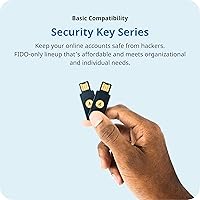
The Yubico Security Key NFC USB Security Key is a strong fit for everyday users who want to stop worrying about phishing attacks on their most important accounts without having to learn a lot of technical jargon. If you're someone who logs into Gmail, a password manager like 1Password or Dashlane, a crypto exchange, or a work tool like Microsoft 365 or Okta, this key adds a layer of protection that SMS codes and authenticator apps simply cannot match. It works especially well for people using USB-A laptops — think older MacBooks, most Windows machines, or Chromebooks — and anyone with an NFC-capable smartphone who wants a fast, tap-to-login experience on the go. Buying two at once is a genuinely smart move: one for daily use, one stored as a backup so you're never locked out if the first one goes missing.
Not suitable for:

The Yubico Security Key NFC USB Security Key is not the right tool for users who need one-time password support — it simply does not offer it, and that surprises buyers who assume all Yubico keys work the same way. If you rely on OTP-based logins, or use services that require TOTP codes generated through an authenticator app, you'll need to step up to the YubiKey 5 Series instead. People who have already moved to USB-C-only devices, such as newer MacBook Pro or MacBook Air models, will find the USB-A connector frustrating — there is no USB-C version in this specific key; the Security Key C NFC is the equivalent for USB-C ports. Advanced users managing enterprise environments, legacy authentication systems, or smart card logins will also find this hardware authenticator too limited for their needs.
Specifications

  • Connector: Connects to computers and laptops via a standard USB-A port.
  • Wireless: Supports NFC for tap-to-authenticate on compatible Android and iOS devices.
  • Protocols: Implements FIDO2/WebAuthn and FIDO U2F; one-time password protocols are not supported.
  • Cryptographic Spec: Uses ECC p256 elliptic curve cryptography for secure credential storage and authentication.
  • Dimensions: Measures 3.35 x 2.17 x 0.04 inches, sized to sit flat on a standard keychain.
  • Weight: Weighs 0.353 oz, light enough to carry daily without noticing it.
  • Water Resistance: Rated IP68, meaning it is fully waterproof and protected against dust ingress under normal conditions.
  • Durability: Built from crush-resistant materials with no moving parts, designed to withstand everyday physical wear.
  • Power: Requires no batteries or charging; draws power directly from the host USB port when connected.
  • Compatibility: Works across Windows, macOS, ChromeOS, Linux, iOS, and Android platforms.
  • Service Support: Compatible with over 1,000 apps and services including Google, Microsoft, Apple, Dropbox, and major password managers.
  • Form Factor: Keychain form factor with a built-in hole for attaching to a key ring or lanyard.
  • Certifications: Certified under FIDO2, FIDO U2F, and IP68 standards.
  • Manufacturing: Designed and manufactured across Sweden and the USA under strict security production standards.
  • Account Capacity: Supports registration across up to 100 accounts and services simultaneously.
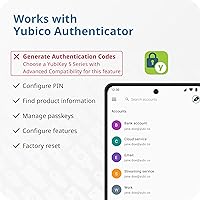
  • Software Required: No software is required for daily authentication; the Yubico Authenticator app is optional for PIN and passkey management only.
  • USB Standard: Operates over USB 2.0 for broad compatibility with older and newer host devices alike.

Related Reviews

FeiTian A4B USB Security Key
87%
94%
Ease of Use
92%
Portability
89%
Security Features
87%
Compatibility with Devices
85%
Build Quality
More
FEITIAN ePass K40 USB Security Key
82%
88%
Authentication Reliability
83%
NFC Performance
74%
Setup & Ease of Use
61%
Build Quality
86%
Compatibility Range
More
Feitian MultiPass K32 USB Security Key
77%
88%
Value for Money
91%
Multi-Interface Connectivity
84%
Ease of Setup
86%
NFC Performance
61%
Bluetooth Reliability
More
AUTHENTREND ATKey.Pro FIDO2 Fingerprint Security Key
70%
81%
Fingerprint Recognition Speed
46%
Setup & Enrollment Experience
88%
PIN-Free Authentication
73%
Compatibility & Platform Coverage
58%
Windows Device Login (Entra ID)
More
Thales SafeNet eToken FIDO USB-C Security Key
87%
94%
Ease of Use
91%
Security Features
88%
Platform Compatibility
89%
Setup Process
85%
Reliability
More
Apricorn Aegis Secure Key 1TB USB Drive
80%
96%
Data Security
91%
Build Quality
67%
Ease of Setup
54%
Value for Money
78%
Transfer Speed
More
Apricorn Aegis Secure Key 3Z 128GB USB 3.0 Flash Drive
87%
94%
Security Features
89%
Durability & Build Quality
91%
Ease of Use (Pin Authentication)
72%
Data Transfer Speed (Write Speed)
85%
Waterproof & Dustproof Performance
More
Apricorn Aegis Secure Key 3NX 16GB Drive
80%
97%
Data Security
91%
Build Quality
83%
Ease of Setup
48%
Value for Money
78%
Authentication Experience
More
Yubico YubiKey 5C NFC
85%
97%
Security & Phishing Protection
93%
Build Quality & Durability
91%
Compatibility & Protocol Support
78%
Ease of Setup
88%
Connectivity & Daily Use
More
Cryptnox FIDO2 NFC Security Key
76%
93%
Portability & Form Factor
86%
NFC Authentication Speed
81%
Platform & Service Compatibility
94%
Security Credentials
67%
Setup & Registration Experience
More

FAQ

Yes, it does. The Yubico NFC key uses NFC to authenticate on iPhones running iOS 13.3 or later. You just hold the key near the top of your phone when prompted, and it completes the login. No app needs to be open.

Absolutely. Google was one of the first major platforms to support FIDO2 hardware keys, and this security key works with it reliably. You register the key once inside your Google account security settings, and from that point on you tap or plug in to verify your identity at login.

No, it does not. This is one of the most important things to understand before buying. The Yubico Security Key NFC USB Security Key supports only FIDO2 and U2F protocols, which cover passkeys and hardware-based two-factor login. If you need OTP generation — the kind of six-digit codes used by some legacy systems — you will need to step up to the YubiKey 5 Series instead.
Potentially yes, which is exactly why Yubico recommends buying two keys and registering both on your accounts from the start. Keep one as your daily key and store the second somewhere safe as a backup. If you lose the primary, you can use the backup to access your accounts and register a replacement.

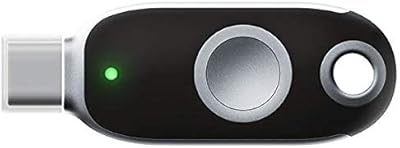
Not directly — this key uses a USB-A connector only. You can use a USB-A to USB-C adapter as a workaround, but if USB-C is your standard, Yubico's Security Key C NFC is the purpose-built version for you and is worth looking at instead.

You can register the key on up to 100 services. In practice, for most people that is far more than enough to cover email, social media, password managers, banking, and any work tools.

It holds up well. The hardware authenticator carries an IP68 rating, which means it can handle submersion in water and is resistant to dust. The crush-resistant build also means a drop onto a hard floor or getting sat on in a bag is unlikely to cause damage.

No drivers are needed. For day-to-day login, you just plug it in or tap, and the operating system and browser handle the rest. The optional Yubico Authenticator app is available if you want to manage your PIN or view registered passkeys, but it is not required for normal use.

Yes. ChromeOS has native support for FIDO2 security keys, and the Yubico NFC key works via the USB-A port on any Chromebook that has one. NFC is not typically active on Chromebooks, so USB is the way to go there.

It is genuinely practical advice, not just an upsell. Hardware security keys do not have a cloud backup — if you lose your only key and have not set up account recovery options ahead of time, regaining access to locked accounts can take days and involve a lot of identity verification hoops. Registering a second key as a backup when you set up the first one takes about five minutes and saves you from that headache.

Where to Buy